MSI's ALL-IN-ONE Woodcutter
Coh3n
2010-04-20 23:50:51
[INDENT]
Powerchopper- Just like any Powerchopper, this script will chop and drop any tree and their respective logs. By default, it will chop all MSI's supported trees that are found in the main screen, so it is best to specify which you want to chop.
- It is important to note that it's a Powerchopper (there's no walking involved), and therefore, you can chop at any location around Runescape.
- Supported Trees:
- Dead (old and new)
- Normal (old and new)
- Oak (old and new)
- Willow (old and new)
- Maple (old and new)
- Yew (old and new)
- Magic (old)
Banking Locations- Request a new location here.
Special Notes- All hatchets are supported, except Infernal Adze and Sacred Clay.
- Can be setup to chop as many tree types as you wish.
- It will work better if your player isn't wearing anything (except a hatchet).
Updates- All recent MSI updates and announcements can be found here.
Cheers,
The MSI Team[/INDENT]
DOWNLOAD
________________________________
.
Coh3n
2010-07-07 17:01:10
Updated. Added Varrock east oaks. :)
Becks
2010-07-08 16:03:49
This is awesome looks incredibly promising. Good job guys.
Coh3n
2010-07-09 01:55:53
Added GE Yews and Draynor Willows.
BobboHobbo
2010-07-09 08:10:33
I love how you make every thread of yours no nicely laid out :).
Coh3n
2010-07-09 08:17:43
From: BobboHobbo
I love how you make every thread of yours no nicely laid out :).
Lol, I'm pretty much an organization freak. :p
From: Coh3n
Lol, I'm pretty much an organization freak. :p
Love you too! Coming home soon!
Coh3n
2010-07-10 18:43:24
Added Rimmington yews, thanks BobboHobbo for the script. :)
BobboHobbo
2010-07-11 06:23:25
From: Coh3n
Added Rimmington yews, thanks BobboHobbo for the script. :)
Rhimmy needs a bit of work. When theres no trees, it hovers over the normal tree continusoly which could look really botty to Jagex. and it also needs a relocator thing to because if it goes to the bottom tree it wont find the top ones.
Sir R. M8gic1an
2010-07-11 07:07:21
We should use an oldschool technique. SkipTBoxArray.
It hasn't properly been used since WizzyPluggin & TPA Splitting, but it has a lot of potential.
I'm looking at how to implement it, and it might take some moving around to fit, but I'll have it figured in a minute.
Currently, the problem is that the color finding function does not check the uptext. There'll be some wrapping, it seems to me.
~RM
BobboHobbo
2010-07-11 08:12:52
@Rasta. alright sweet man.
also
09:33:53 PM: Sor: Detail: MSI_FindObjectsTPA: Own character!
09:33:53 PM: Sr: Detail: MSI_FindObjectsTPA: Not enough points!
09:33:53 PM: Sror: Detail: MSI_FindObjectsTPA: Not enough points!
09:33:53 PM: Srrior: Detail: MSI_FindObjectsTPA: Not enough points!
09:33:53 PM: Srior: Detail: MSI_FindObjectsTPA: Not enough points!
09:33:53 PM: Sor: Detail: MSI_FindObjectsTPA: Not enough points!
09:33:53 PM: rr: Detail: MSI_FindObjectsTPA: Not enough points!
09:33:53 PM: r: Detail: MSI_FindObjects: 20 objects found!
09:33:57 PM: : Entering Func: MSI_OpenBank: Successfuly opened bank: Falador east bank
09:34:15 PM: : Player Action: MSI_MainLoop: Failed to bank materials
banking fails at Falador some how, i didnt see it but it was right infront of bank booth with a full invent of yews :l.
Sir R. M8gic1an
2010-07-11 08:31:14
Didn't do the actual text finding part, but implemented the not boxes.
Renamed 'Box' -> 'SelfBox'
Procedure CopyTBox(Origin, var BoxTo: TBox);
begin
  BoxTo := IntToBox(Origin.X1, Origin.Y1, Origin.X2, Origin.Y2);
end;

{******************************************************************************}
{ Function MSI_FindObjectsTPA( ... ): Boolean;                                 }
{ By: marpis                                                                   }
{ Date: 25 June 2010                                                           }
{ Description: Finds objects in mainscreen, saves co-ords in TPA               }
{******************************************************************************}
Function MSI_FindObjectsTPA(Var Objs: TPointArray; ObjInfo: TMSObject; SearchBox: TBox; CheckText: Boolean): Boolean;
Var
  TPA, TempTPA: TPointArray;
  ATPA: T2DPointArray;
  I, II, CTS, TMP, H: Integer;
  SelfBox: TBox;
  Boxes, NotBoxes: TBoxArray;
  Animating2: TBooleanArray;
  BadPoint: Boolean;
Begin
  If (Not LoggedIn) Then Exit;

  CTS := GetColorToleranceSpeed;
  ColorToleranceSpeed(2);
  SetColorSpeed2Modifiers(ObjInfo.Hue, ObjInfo.Sat);
  SelfBox := IntToBox(228, 150, 275, 200);

  H := High(ObjInfo.Colors);
  SetLength(ATPA, H + 1);

  For I := 0 To H Do
    FindColorsSpiralTolerance(MSCX, MSCY, ATPA[I], ObjInfo.Colors[I], SearchBox.X1, SearchBox.Y1, SearchBox.X2, SearchBox.Y2, ObjInfo.Tol);

  ColorToleranceSpeed(CTS);
  SetColorSpeed2Modifiers(0.2, 0.2);

  { Check if some of the colors was not on MS. }
  If ObjInfo.FindAllColors Then
    For I := 0 To H Do
      If (Length(ATPA) < 1) Then
      Begin
        MSI_Debug('MSI_FindObjectsTPA', 'All colors weren''t found!', DEBUG_SMALL_DETAILS);
        Objs := [];
        Exit;
      End;

  { Check if we have enough pixels on MS. }
  TPA := MergeATPA(ATPA);
  //DrawDots(TPA, 1000);

  If (Length(TPA) < ObjInfo.Accuracy) Then
  Begin
    MSI_Debug('MSI_FindObjectsTPA', 'No colors found!', DEBUG_SMALL_DETAILS);
    Objs := [];
    Exit;
  End;

  ATPA := TPAtoATPAEx(TPA, ObjInfo.W, ObjInfo.H);
  SortATPAFrom(ATPA, Point(MSCX, MSCY));
  H := High(ATPA);
  SetLength(TPA, H + 1);

  For I := 0 To H Do
    TPA[I] := MiddleTPA(ATPA[I]);

  H := High(TPA);
  SetLength(Boxes, H + 1);

  For I := 0 To H Do
  Begin
    Boxes[I].X1 := TPA[I].X - (ObjInfo.W / 2);
    Boxes[I].Y1 := TPA[I].Y - (ObjInfo.H / 2);
    Boxes[I].X2 := TPA[I].X + (ObjInfo.W / 2);
    Boxes[I].Y2 := TPA[I].Y + (ObjInfo.H / 2);
  End;

  If ObjInfo.Anim Then
    Animating2 := AnimatingMulti(Boxes, 100, 1);

  For I := 0 To High(TPA) Do
  Begin
    BadPoint := False;
    //DrawBox(Boxes[I], 200);

    {Bad Boxes}
    if not BadPoint then
    if Length(NotBoxes) > 0 then
    begin
      TMP := High(NotBoxes);

      for II := 0 to TMP do
        if PointInBox(TPA[i], NotBoxes[II])) then
        begin
          MSI_Debug('MSI_FindObjectsTPA', 'Point in bad Box', DEBUG_SMALL_DETAILS);
          BadPoint := True;
          break;
        end;
    end;

    { Animation }
    If (Not BadPoint) Then
    If ObjInfo.Anim Then
      If (Not Animating2[I]) Then
      Begin
        MSI_Debug('MSI_FindObjectsTPA', 'Not animating!', DEBUG_SMALL_DETAILS);
        BadPoint := True;
      End;

    { Exclude own character }
    If (Not BadPoint) Then
    If ObjInfo.ExcludeSelf Then
      If PointInBox(TPA[I], SelfBox) Then
      Begin
        MSI_Debug('MSI_FindObjectsTPA', 'Own character!', DEBUG_SMALL_DETAILS);
        BadPoint := True;
      End;

    { Invalid point }
    If (Not BadPoint) Then
    If ((TPA[I].X + TPA[I].Y) < 1) Then
    Begin
      MSI_Debug('MSI_FindObjectsTPA', 'Invalid point!', DEBUG_SMALL_DETAILS);
      BadPoint := True;
    End;

    { Accuracy }
    If (Not BadPoint) Then
    If (Length(ATPA[I]) < ObjInfo.Accuracy) Then
    Begin
      MSI_Debug('MSI_FindObjectsTPA', 'Not enough points!', DEBUG_SMALL_DETAILS);
      BadPoint := True;
    End;

    { Bad colors }
    If (Not BadPoint) Then
    For II := 0 To High(ObjInfo.BadColors) Do
    Begin
      MSI_Debug('MSI_FindObjectsTPA', 'Looking for bad color: '+IntToStr(ObjInfo.BadColors[II]), DEBUG_SMALL_DETAILS);
      If FindColorSpiralTolerance(TMP, TMP, ObjInfo.BadColors[II], TPA[I].X - (ObjInfo.W / 2), TPA[I].Y - (ObjInfo.H / 2), TPA[I].X + (ObjInfo.W / 2), TPA[I].Y + (ObjInfo.H / 2), ObjInfo.BadColorTolerance) Then
      Begin
        MSI_Debug('MSI_FindObjectsTPA', 'Bad color found!', DEBUG_SMALL_DETAILS);
        BadPoint := True;
        Break;
      End;
    End;

    { FindAllColors }
    If (Not BadPoint) Then
      If ObjInfo.FindAllColors Then
      For II := 0 To H Do
      Begin
        TempTPA := MSI_ReturnPointsInBox(ATPA[II], IntToBox(TPA[I].X - (ObjInfo.W / 2), TPA[I].Y - (ObjInfo.H / 2), TPA[I].X + (ObjInfo.W / 2), TPA[I].Y + (ObjInfo.H / 2)));
        If (Length(TempTPA) < 1) Then
        Begin
          MSI_Debug('MSI_FindObjectsTPA', 'All colors weren''t found!', DEBUG_SMALL_DETAILS);
          BadPoint := True;
          Break;
        End;
      End;

    { Text Checking }
    if not BadPoint then
    if CheckText then
    begin

    end;

    { Valid point! }
    If (Not BadPoint) Then
    Begin
      SetLength(Objs, Length(Objs) + 1);
      Objs[High(Objs)] := TPA[I];

    { Avoid it Next time}
    End Else Begin
      TMP := High(NotBoxes);
      SetLength(NotBoxes, TMP + 1);
      CopyBox( Boxes[I], NotBoxes[TMP]);
    End;
  End;

  Result := (Length(Objs) > 0);
End;
  Boxes, NotBoxes: TBoxArray;

    {Bad Boxes}
    if not BadPoint then
    if Length(NotBoxes) > 0 then
    begin
      TMP := High(NotBoxes);

      for II := 0 to TMP do
        if PointInBox(TPA[i], NotBoxes[II])) then
        begin
          MSI_Debug('MSI_FindObjectsTPA', 'Point in bad Box', DEBUG_SMALL_DETAILS);
          BadPoint := True;
          break;
        end;
    end;

    { Text Checking }
    if not BadPoint then
    if CheckText then
    begin

    end;

    { Valid point! }
    If (Not BadPoint) Then
    Begin
      SetLength(Objs, Length(Objs) + 1);
      Objs[High(Objs)] := TPA[I];

    { Avoid it Next time}
    End Else Begin
      TMP := High(NotBoxes);
      SetLength(NotBoxes, TMP + 1);
      CopyBox( Boxes[I], NotBoxes[TMP]);
    End;
Notice: I had to add CheckText to the params.
and here is CopyBox:
Procedure CopyTBox(Origin, var BoxTo: TBox);
begin
  BoxTo := IntToBox(Origin.X1, Origin.Y1, Origin.X2, Origin.Y2);
end;
~RM
3Garrett3
2010-07-11 10:13:06
From: BobboHobbo
banking fails at Falador some how, i didnt see it but it was right infront of bank booth with a full invent of yews :l.
It doesn't find the booth? I must have messed up the object thing. I spent like 30 minutes getting colours for it though.
BobboHobbo
2010-07-11 10:26:14
From: 3Garrett3
It doesn't find the booth? I must have messed up the object thing. I spent like 30 minutes getting colours for it though.
Nahh its finding the booth ive noticed very well accutally, it just sometimes doesnt deposit and sometimes does but says it doesnt :L? ever since cohens update ;D.
Coh3n
2010-07-11 10:32:15
From: BobboHobbo
Nahh its finding the booth ive noticed very well accutally, it just sometimes doesnt deposit and sometimes does but says it doesnt :L? ever since cohens update ;D.
Yeah that was my bad. It should be fixed now. Also, if the last walking point is changed to a point in the middle of the three trees, it should be fine. Currently, the point is where the bottom two trees are.
BobboHobbo
2010-07-11 10:35:22
From: Coh3n
Yeah that was my bad. It should be fixed now. Also, if the last walking point is changed to a point in the middle of the three trees, it should be fine. Currently, the point is where the bottom two trees are.
Ah k.. And yeah haha i didnt relize that when i made the point.
Coh3n
2010-07-11 10:38:40
From: BobboHobbo
Rhimmy needs a bit of work. When theres no trees, it hovers over the normal tree continusoly which could look really botty to Jagex. and it also needs a relocator thing to because if it goes to the bottom tree it wont find the top ones.
I think there's been 1000 discussions on this and everytime it comes down to the conclusion that Jagex doesn't record mouse movements. Also, since the trees are basically the same colours, it's very hard for this not to happen.
From: BobboHobbo
Ah k.. And yeah haha i didnt relize that when i made the point.
No problem. :p
@RM: Is that suppose to just mark a box as bad and therefore not hover it? Cause I don't really see how that would be possible…
E: We could also have the script change the camera angle depending on the script as at a certain angle, all the trees in Rimmington are visible.
BobboHobbo
2010-07-11 11:00:57
From: Coh3n
I think there's been 1000 discussions on this and everytime it comes down to the conclusion that Jagex doesn't record mouse movements. Also, since the trees are basically the same colours, it's very hard for this not to happen.
No problem. :p
@RM: Is that suppose to just mark a box as bad and therefore not hover it? Cause I don't really see how that would be possible…
E: We could also have the script change the camera angle depending on the script as at a certain angle, all the trees in Rimmington are visible.
Oh really? should do that, didnt even think of it :). Oh but it does mess with the tree finder but. especially with willows :).
Coh3n
2010-07-11 11:06:03
From: BobboHobbo
Oh but it does mess with the tree finder but. especially with willows :).
Shouldn't affect it at all. What do you think would happen? The only thing it would affect is colour walking, and the compass angle is set to North before walking anyway. I think maybe a "CompassAng" attribute could be added to TScript. Then at the beginning of MSI_AutoObjects, just have it set the angle depending on the script.
Hamish
2010-07-11 11:14:50
Maybe add in the 4 willows next to that port town next to draynor. I forget what it's called. It's quite close to draynor bank and has 4 willows that aren't used as much.
Coh3n
2010-07-11 11:20:02
From: Hamish
Maybe add in the 4 willows next to that port town next to draynor. I forget what it's called. It's quite close to draynor bank and has 4 willows that aren't used as much.
Yeah, the script record has already been made (in the AIO Woodcutter thread in this section), it just needs to be added.
E: Added CompassAng to the TScript record.
Sir R. M8gic1an
2010-07-11 12:31:24
Ok… me included, we made this thread drift quite a bit.
Lets get back on topic and make a new thread for whatever is necessary :)
~RM
marpis
2010-07-12 05:29:03
Great job! :) Now MSI is actually useful!
Coh3n
2010-07-17 17:30:31
Added Port Sarim willows.
Sir R. M8gic1an
2010-07-17 22:19:53
Lovin ya Coh3n!
~RM
Coh3n
2010-07-18 20:35:48
Updated Port Sarim willows. :)
Coh3n
2010-07-21 21:21:30
Added the script constants to each one to avoid any confusion.
Coh3n
2010-07-24 15:25:12
Added Port Sarim Yews. Thanks Shut. :)
darkfire23
2010-08-11 22:02:15
Hey guys, im new to MSI, but i've been tryin to figure it out the past few days. It's looking great and has a ton of potential. Been testing the Port Sarim yews and willows. it chops and drops when powerskilling, but it won't go to the dropbox when inventory is full. Is banking down due to the fact tht reflection and srl are still not updated? or is there a problem in my coding tht it won't find the path?
i luffs yeww
2010-08-11 22:13:52
SRL and reflection work fine (except ground items).
From: darkfire23
Hey guys, im new to MSI, but i've been tryin to figure it out the past few days. It's looking great and has a ton of potential. Been testing the Port Sarim yews and willows. it chops and drops when powerskilling, but it won't go to the dropbox when inventory is full. Is banking down due to the fact tht reflection and srl are still not updated? or is there a problem in my coding tht it won't find the path?
Be sure to update Reflection through SVN.
marpis
2010-08-12 04:48:12
From: darkfire23
Hey guys, im new to MSI, but i've been tryin to figure it out the past few days. It's looking great and has a ton of potential. Been testing the Port Sarim yews and willows. it chops and drops when powerskilling, but it won't go to the dropbox when inventory is full. Is banking down due to the fact tht reflection and srl are still not updated? or is there a problem in my coding tht it won't find the path?
Remember to set your location correctly in the setup:
  with MSI_Players[0] do
  begin
    Name     := '';       // Username
    Pass     := '';       // Password
    Nick     := '';       // Nickname (3-4 lowercase letters from username)
    Pin      := '';       // Bank pin; leave as '' if player doesn't have one
    Active   := True;     // Use this player?
    Member   := False;    // Is this player a member?
    Location := LOC_PS_DBOX;        // See instructions at the top
    Scripts  := [SCRIPT_PS_WILLOWS];       // See instructions at the top
    Objects  := [[]];     // See instructions at the top
    Loads[0] := 99;        // Amount of loads before breaking/switching players
    Loads[1] := 999;        // Total loads for the player to do
  end;
darkfire23
2010-08-13 02:28:25
From: marpis
Remember to set your location correctly in the setup:
  with MSI_Players[0] do
  begin
    Name     := '';       // Username
    Pass     := '';       // Password
    Nick     := '';       // Nickname (3-4 lowercase letters from username)
    Pin      := '';       // Bank pin; leave as '' if player doesn't have one
    Active   := True;     // Use this player?
    Member   := False;    // Is this player a member?
    Location := LOC_PS_DBOX;        // See instructions at the top
    Scripts  := [SCRIPT_PS_WILLOWS];       // See instructions at the top
    Objects  := [[]];     // See instructions at the top
    Loads[0] := 99;        // Amount of loads before breaking/switching players
    Loads[1] := 999;        // Total loads for the player to do
  end;
Its all set up right.. ill give it another go tonight and report backk.
Coh3n
2010-08-13 09:59:35
From: darkfire23
Its all set up right.. ill give it another go tonight and report backk.
Please post the error in the debug box if you can. :)
When can we expect another update?
(It just seems like Jagex is updating quite frequently, though I'll still be testing :D )
Coh3n
2010-08-28 23:10:35
From: goldrush655
When can we expect another update?
(It just seems like Jagex is updating quite frequently, though I'll still be testing :D )
Well until someone reports that a certain location is broken, we can only assume that they're all working fine. Also, more locations will be added as they are needed. If you know a good location and you would like it added, post it. :)
Oh well then, seems like I need to do some reading on MSI, I should have a progress report up by the end of the week.
WriteFileString: Invalid Internal Handle of File: 1
[0:00:36]: [ Rock ] ---- MSI_BestTool
[0:00:37]: [ Rock ] ------ CurrentSkill level: 72
[0:00:37]: [ Rock ] ---- MSI_BestTool: Rune Hatchet
[0:00:37]: [ Rock ] ---- MSI_FindTool - GameTab:26
[0:00:38]: [ Rock ] ------ Found DTM: Rune Hatchet
[0:00:38]: [ Rock ] ---- MSI_FindTool: True
Error: Out of Global Vars range at line 61
The following DTMs were not freed: [SRL - Lamp bitmap, 1, 2, 3, 4, 5, 6, 7, 8, 9, 10, 11, 12, 13, 14, 15, 16, 17, 18, 19, 20, 21, 22, 23, 24, 25, 26, 27, 28, 29, 30, 31, 32, 33, 34, 35, 36, 37, 38, 39, 40, 41, 42, 43, 44, 45, 46, 47]
The following bitmaps were not freed: [SRL - Mod bitmap, SRL - Admin bitmap]
File[C:\Users\Name\A runescape\Simba\Includes\SRL\Logs\SRL Log 30-08-10 0.txt] has not been freed in the script, freeing it now.
How do I "free" those DTM's?
From: goldrush655
Oh well then, seems like I need to do some reading on MSI, I should have a progress report up by the end of the week.
WriteFileString: Invalid Internal Handle of File: 1
[0:00:36]: [ Rock ] ---- MSI_BestTool
[0:00:37]: [ Rock ] ------ CurrentSkill level: 72
[0:00:37]: [ Rock ] ---- MSI_BestTool: Rune Hatchet
[0:00:37]: [ Rock ] ---- MSI_FindTool - GameTab:26
[0:00:38]: [ Rock ] ------ Found DTM: Rune Hatchet
[0:00:38]: [ Rock ] ---- MSI_FindTool: True
Error: Out of Global Vars range at line 61
The following DTMs were not freed: [SRL - Lamp bitmap, 1, 2, 3, 4, 5, 6, 7, 8, 9, 10, 11, 12, 13, 14, 15, 16, 17, 18, 19, 20, 21, 22, 23, 24, 25, 26, 27, 28, 29, 30, 31, 32, 33, 34, 35, 36, 37, 38, 39, 40, 41, 42, 43, 44, 45, 46, 47]
The following bitmaps were not freed: [SRL - Mod bitmap, SRL - Admin bitmap]
File[C:\Users\Name\A runescape\Simba\Includes\SRL\Logs\SRL Log 30-08-10 0.txt] has not been freed in the script, freeing it now.
How do I "free" those DTM's?
The problem is actually this line: "Error: Out of Global Vars range at line 61".
Though, I'm not quite sure why you would be getting that and no one else has?
Try restarting everything and doing it again.
I just got off work and I've got a couple thing's to do, but if no one has helped you yet then I will look into it more when I come back. (1-2 hrs).
Coh3n
2010-08-30 15:01:33
I'm starting to get a little frustrated with all the errors that are mysteriously popping up (out of global vars range, opcode, etc.). I don't understand… A couple weeks ago everything was working fine and nothing major has been changed since then (I don't think). I wish I had more time.
Could someone try reverting back to the revision before Garrett's big commit for Fishing.simba. He may have accidentally changed something that threw things out of whack.
From: Coh3n
I'm starting to get a little frustrated with all the errors that are mysteriously popping up (out of global vars range, opcode, etc.). I don't understand… A couple weeks ago everything was working fine and nothing major has been changed since then (I don't think). I wish I had more time.
Could someone try reverting back to the revision before Garrett's big commit for Fishing.simba. He may have accidentally changed something that threw things out of whack.
I figured it out, I hadn't properly installed my MSI extensions, BUT! as you know I am having problems getting the remote to install :(
Coh3n
2010-08-30 20:23:02
Updated the first post with all the script's default objects so we can shorted the RunMe.simba script header.
I've also fixed all the bugs people were having. I'll commit the fixes within an hour. I'll also make an announcement.
E: Also added locations.
Punkgi
2010-08-31 12:13:32
The Grand Exchange Yew cutter and banker isn't working properly. It won't bank. It also doesn't use the east tree at all, it just sits between the middle and west tree.
Coh3n
2010-08-31 12:22:28
From: Punkgi
The Grand Exchange Yew cutter and banker isn't working properly. It won't bank. It also doesn't use the east tree at all, it just sits between the middle and west tree.
More information than "It won't bank" would be helpful. Debug perhaps? Does it not walk to the bank, does it not open the bank? Does it not deposit the logs? And yeah, until we can get the relocator done, or both trees can be seen at once, then it will only do one tree. Sorry for the inconvenience.
And please post any problems you're having on the
Script didn't run thread. Thanks.
Punkgi
2010-08-31 12:33:41
Since you have asked the questions, I will answer them here, but post the other problems in the other thread.
When it gets a full invitory it just stays there, I believe once it has clicked on the tree symbol, but it just sits there till it logs out after that. It has no problem going from the GE to the trees, and cutting.
How do I debug? If it helps.
Coh3n
2010-08-31 12:35:06
From: Punkgi
Since you have asked the questions, I will answer them here, but post the other problems in the other thread.
When it gets a full invitory it just stays there, I believe once it has clicked on the tree symbol, but it just sits there till it logs out after that. It has no problem going from the GE to the trees, and cutting.
How do I debug? If it helps.
What text comes up in the debug box? It just seems that the path from the trees to the bank isn't working for some reason.
Punkgi
2010-08-31 12:45:17
From: Coh3n
What text comes up in the debug box? It just seems that the path from the trees to the bank isn't working for some reason.
Yeah, I disabled the SMART, then walked to the GE, Enabled it, and it picked up the banker, banked and walked back and is cutting again.
[0:17:40]: [ Ove ] ---- Not enough points!
[0:17:40]: [ Ove ] ---- Not enough points!
[0:17:40]: [ Ove ] ---- Not enough points!
[0:17:40]: [ Ove ] -- MSI_FindObjectsTPA: False
[0:17:44]: [ Ove ] -- MSI_FindObjectsIn
[0:17:44]: [ Ove ] ---- MSI_FindObjectsTPA
[0:17:44]: [ Ove ] ------ Not enough points!
[0:17:44]: [ Ove ] ------ Not enough points!
[0:17:44]: [ Ove ] ------ Not enough points!
[0:17:44]: [ Ove ] ------ Not enough points!
[0:17:44]: [ Ove ] ---- MSI_FindObjectsTPA: True
[0:17:44]: [ Ove ] ---- 2 objects found!
[0:17:46]: [ Ove ] ---- MSI_FindObjectsTPA
[0:17:46]: [ Ove ] ------ Not enough points!
[0:17:46]: [ Ove ] ---- MSI_FindObjectsTPA: True
[0:17:46]: [ Ove ] -- MSI_FindObjectsIn: True
[0:17:49]: [ Ove ] -- MSI_FindObjectsTPA
[0:17:49]: [ Ove ] ---- Not enough points!
[0:17:49]: [ Ove ] -- MSI_FindObjectsTPA: True
[0:17:52]: [ Ove ] -- MSI_FindObjectsIn
[0:17:52]: [ Ove ] ---- MSI_FindObjectsTPA
[0:17:52]: [ Ove ] ------ Not enough points!
[0:17:53]: [ Ove ] ------ Not enough points!
[0:17:53]: [ Ove ] ------ Not enough points!
[0:17:53]: [ Ove ] ---- MSI_FindObjectsTPA: True
[0:17:53]: [ Ove ] ---- 3 objects found!
[0:17:55]: [ Ove ] ---- MSI_FindObjectsTPA
[0:17:55]: [ Ove ] ------ Not enough points!
[0:17:55]: [ Ove ] ---- MSI_FindObjectsTPA: True
[0:17:55]: [ Ove ] -- MSI_FindObjectsIn: True
[0:17:57]: [ Ove ] -- MSI_FindObjectsTPA
[0:17:57]: [ Ove ] -- MSI_FindObjectsTPA: True
[0:18:06]: [ Ove ] -- MSI_FindObjectsIn
[0:18:06]: [ Ove ] ---- MSI_FindObjectsTPA
[0:18:06]: [ Ove ] ---- MSI_FindObjectsTPA: No colors found!
[0:18:06]: [ Ove ] -- MSI_FindObjectsIn: False
[0:18:09]: [ Ove ] -- MSI_FindObjectsIn
[0:18:09]: [ Ove ] ---- MSI_FindObjectsTPA
[0:18:09]: [ Ove ] ---- MSI_FindObjectsTPA: No colors found!
[0:18:09]: [ Ove ] -- MSI_FindObjectsIn: False
[0:18:12]: [ Ove ] -- MSI_FindObjectsIn
[0:18:12]: [ Ove ] ---- MSI_FindObjectsTPA
[0:18:12]: [ Ove ] ---- MSI_FindObjectsTPA: No colors found!
[0:18:12]: [ Ove ] -- MSI_FindObjectsIn: False
[0:18:16]: [ Ove ] -- MSI_FindObjectsIn
[0:18:16]: [ Ove ] ---- MSI_FindObjectsTPA
[0:18:16]: [ Ove ] ---- MSI_FindObjectsTPA: No colors found!
[0:18:16]: [ Ove ] -- MSI_FindObjectsIn: False
[0:18:19]: [ Ove ] -- MSI_FindObjectsIn
[0:18:19]: [ Ove ] ---- MSI_FindObjectsTPA
[0:18:20]: [ Ove ] ---- MSI_FindObjectsTPA: No colors found!
[0:18:20]: [ Ove ] -- MSI_FindObjectsIn: False
[0:18:22]: [ Ove ] -- MSI_FindObjectsIn
[0:18:22]: [ Ove ] ---- MSI_FindObjectsTPA
[0:18:23]: [ Ove ] ---- MSI_FindObjectsTPA: No colors found!
[0:18:23]: [ Ove ] -- MSI_FindObjectsIn: False
[0:18:25]: [ Ove ] -- MSI_FindObjectsIn
[0:18:25]: [ Ove ] ---- MSI_FindObjectsTPA
[0:18:25]: [ Ove ] ---- MSI_FindObjectsTPA: No colors found!
[0:18:25]: [ Ove ] -- MSI_FindObjectsIn: False
[0:18:29]: [ Ove ] -- MSI_FindObjectsIn
[0:18:29]: [ Ove ] ---- MSI_FindObjectsTPA
[0:18:29]: [ Ove ] ---- MSI_FindObjectsTPA: No colors found!
[0:18:29]: [ Ove ] -- MSI_FindObjectsIn: False
This is all I get out of my debug. The whole time it is cutting and doing nothing.
Coh3n
2010-08-31 12:46:37
Weird. It didn't say anything about tiles on the minimap?
Punkgi
2010-08-31 12:49:08
From: Coh3n
Weird. It didn't say anything about tiles on the minimap?
Yeah, when I 1st started the script, when it was still in the GE setting everything up.
[0:16:44]:
[0:16:44]: [ Ove ]  MSI_Walk
[0:16:45]: [ Ove ] -- Player's Location = Grand Exchange bank
[0:16:45]: [ Ove ] -- MSI_PerfomWalk
[0:16:45]: [ Ove ] ---- MSI_ReflectionWalk
[0:16:45]: [ Ove ] -------- Tile(3207, 3502) is not on the minimap
[0:16:45]: [ Ove ] -------- Tile(3195, 3496) is not on the minimap
[0:16:45]: [ Ove ] -------- Tile(3187, 3488) is not on the minimap
[0:16:45]: [ Ove ] -------- Tile(3176, 3490) is on the minimap
[0:16:47]: [ Ove ] -------- MSI_AntiBan
[0:16:48]: [ Ove ] -------- Tile(3207, 3502) is not on the minimap
[0:16:48]: [ Ove ] -------- Tile(3195, 3496) is not on the minimap
[0:16:48]: [ Ove ] -------- Tile(3187, 3488) is on the minimap
[0:16:50]: [ Ove ] -------- MSI_AntiBan
[0:16:52]: [ Ove ] -------- MSI_AntiBan
[0:16:52]: [ Ove ] -------- Tile(3207, 3502) is not on the minimap
[0:16:52]: [ Ove ] -------- Tile(3195, 3496) is on the minimap
[0:16:53]: [ Ove ] -------- MSI_AntiBan
[0:16:54]: [ Ove ] -------- MSI_AntiBan
[0:16:55]: [ Ove ] -------- MSI_AntiBan
[0:16:59]: [ Ove ] -------- Tile(3207, 3502) is on the minimap
[0:17:01]: [ Ove ] -------- MSI_AntiBan
[0:17:03]: [ Ove ] -------- MSI_AntiBan
[0:17:06]: [ Ove ] ------ Player's Location = Grand Exchange yews
[0:17:06]: [ Ove ] ---- MSI_ReflectionWalk: True
[0:17:06]: [ Ove ] -- MSI_PerformWalk: True
[0:17:06]: [ Ove ]  MSI_Walk: True
[0:17:06]: [ Ove ]  MSI_AutoObjects
[0:17:06]: [ Ove ] -- MSI_FindObjectsIn
[0:17:06]: [ Ove ] ---- MSI_FindObjectsTPA
[0:17:06]: [ Ove ] ------ Not enough points!
[0:17:06]: [ Ove ] ------ Not enough points!
[0:17:06]: [ Ove ] ------ Not enough points!
[0:17:06]: [ Ove ] ------ Not enough points!
[0:17:06]: [ Ove ] ------ Not enough points!
[0:17:06]: [ Ove ] ---- MSI_FindObjectsTPA: True
[0:17:06]: [ Ove ] ---- 6 objects found!
but still, it walks fine to the trees.
Coh3n
2010-08-31 13:36:40
Oh, did it just logout because the tree didn't spawn in time? Or was there actually a full inventory?
Punkgi
2010-08-31 13:41:13
From: Coh3n
Oh, did it just logout because the tree didn't spawn in time? Or was there actually a full inventory?
No, I had a full inventory. If it would walk back from trees, the script would be flawless from what I see. I don't know what it uses to walk back from the trees in the script. I can only find things that tell it to walk to the tree. haha, but I'm sure it's there.
Coh3n
2010-08-31 13:53:24
From: Punkgi
No, I had a full inventory. If it would walk back from trees, the script would be flawless from what I see. I don't know what it uses to walk back from the trees in the script. I can only find things that tell it to walk to the tree. haha, but I'm sure it's there.
I'm not sure why it wouldn't work, honestly. All the scripts use the same mainloop, the only differences are the attributes. In this case, the only difference would be the path. The same path is used to go to and from the bank (except it's reversed), so I don't see why one would work and not the other. When you had a full inventory, you're sure you didn't have anything like this in your debug?
[0:16:45]: [ Ove ] ---- MSI_ReflectionWalk
[0:16:45]: [ Ove ] -------- Tile(3207, 3502) is not on the minimap
[0:16:45]: [ Ove ] -------- Tile(3195, 3496) is not on the minimap
[0:16:45]: [ Ove ] -------- Tile(3187, 3488) is not on the minimap
[0:16:45]: [ Ove ] -------- Tile(3176, 3490) is on the minimap
[0:16:47]: [ Ove ] -------- MSI_AntiBan
[0:16:48]: [ Ove ] -------- Tile(3207, 3502) is not on the minimap
[0:16:48]: [ Ove ] -------- Tile(3195, 3496) is not on the minimap
[0:16:48]: [ Ove ] -------- Tile(3187, 3488) is on the minimap
[0:16:50]: [ Ove ] -------- MSI_AntiBan
[0:16:52]: [ Ove ] -------- MSI_AntiBan
[0:16:52]: [ Ove ] -------- Tile(3207, 3502) is not on the minimap
[0:16:52]: [ Ove ] -------- Tile(3195, 3496) is on the minimap
[0:16:53]: [ Ove ] -------- MSI_AntiBan
[0:16:54]: [ Ove ] -------- MSI_AntiBan
[0:16:55]: [ Ove ] -------- MSI_AntiBan
[0:16:59]: [ Ove ] -------- Tile(3207, 3502) is on the minimap
Could you start your player in the GE with a full inventory of logs, then run the script? That way it should walk there fine and since it already has a full inventory, it should walk back. Hopefully we can see the error easier this way.
Punkgi
2010-08-31 14:59:09
From: Coh3n
Could you start your player in the GE with a full inventory of logs, then run the script? That way it should walk there fine and since it already has a full inventory, it should walk back. Hopefully we can see the error easier this way.
Yeah hold on,
[0:00:12]: {----------------------------------------------------------------}
[0:00:12]: {                    MSI Phoenix Player Report                   }
[0:00:12]: {------------------------- Revision 241 -------------------------}
[0:00:12]: {     Time Running: 12 Seconds                                   }
[0:00:12]: {----------------------------------------------------------------}
[0:00:12]: {                                                                }
[0:00:12]: {     Player 0: ***********                                   }
[0:00:12]: {     Location: Grand Exchange yews                              }
[0:00:12]: {     Time: 00s                                                  }
[0:00:12]: {     Total Loads: 0                                             }
[0:00:12]: {     Active: True                                               }
[0:00:12]: {                                                                }
[0:00:12]: {     Script: Grand Exchange Yews                                }
[0:00:12]: {       Time:  00s                                               }
[0:00:12]: {       Skill: Woodcutting                                       }
[0:00:12]: {       Loads: 0                                                 }
[0:00:12]: {       Exp:   0                                                 }
[0:00:12]: {       Level: Not yet defined                                   }
[0:00:12]: {         Item:   Yew logs                                       }
[0:00:12]: {         Amount: 0                                              }
[0:00:12]: {                                                                }
[0:00:12]: {----------------------------------------------------------------}
[0:00:12]: {----------------------------------------------------------------}
[0:00:12]: [ Ove ]  MSI_SetupPlayer
[0:00:13]: STATS: "ERROR(1): Wrong username or password!"
[0:00:19]: [ Ove ] -- MSI_BestTool
[0:00:20]: [ Ove ] ---- CurrentSkill level: 89
[0:00:20]: [ Ove ] -- MSI_BestTool: Rune Hatchet
[0:00:20]: [ Ove ] -- MSI_FindTool - GameTab:26
[0:00:21]: [ Ove ] ---- Failed to find tool: Rune Hatchet
[0:00:21]: [ Ove ] -- MSI_FindTool: False
[0:00:21]: [ Ove ] -- MSI_FindTool - GameTab:26
[0:00:21]: [ Ove ] ---- Failed to find tool: Adamant Hatchet
[0:00:21]: [ Ove ] -- MSI_FindTool: False
[0:00:21]: [ Ove ] -- MSI_FindTool - GameTab:26
[0:00:21]: [ Ove ] ---- Failed to find tool: Mithril Hatchet
[0:00:22]: [ Ove ] -- MSI_FindTool: False
[0:00:22]: [ Ove ] -- MSI_FindTool - GameTab:26
[0:00:22]: [ Ove ] ---- Failed to find tool: Steel Hatchet
[0:00:22]: [ Ove ] -- MSI_FindTool: False
[0:00:22]: [ Ove ] -- MSI_FindTool - GameTab:26
[0:00:22]: [ Ove ] ---- Failed to find tool: Iron Hatchet
[0:00:22]: [ Ove ] -- MSI_FindTool: False
[0:00:22]: [ Ove ] -- MSI_FindTool - GameTab:26
[0:00:22]: [ Ove ] ---- Failed to find tool: Bronze Hatchet
[0:00:22]: [ Ove ] -- MSI_FindTool: False
[0:00:22]: [ Ove ] -- MSI_FindTool - GameTab:25
[0:00:23]: [ Ove ] ---- Found DTM: Rune Hatchet
[0:00:23]: [ Ove ] -- MSI_FindTool: True
[0:00:23]: [ Ove ]
[0:00:23]: [ Ove ]  MSI_Walk
[0:00:23]: [ Ove ] -- Player's Location = Grand Exchange yews
[0:00:23]: [ Ove ]  MSI_Walk: True
[0:00:23]: [ Ove ]  MSI_AutoObjects
[0:00:23]: [ Ove ]  MSI_AutoObjects: True
[0:00:23]: [ Ove ]  MSI_Walk
[0:00:23]: [ Ove ] -- Player's Location = Grand Exchange yews
[0:00:23]: [ Ove ] -- MSI_PerfomWalk
[0:00:23]: [ Ove ] ---- MSI_ReflectionWalk
[0:00:23]: [ Ove ] -------- Tile(3207, 3502) is on the minimap
[0:00:24]: [ Ove ] ------ Player's Location = Grand Exchange bank
[0:00:24]: [ Ove ] ---- MSI_ReflectionWalk: True
[0:00:24]: [ Ove ] -- MSI_PerformWalk: True
[0:00:24]: [ Ove ]  MSI_Walk: True
[0:00:24]: [ Ove ]  MSI_BankMaterials
[0:00:25]: [ Ove ] ---- MSI_CountItems: Found 27 of item Yew logs
[0:00:25]: [ Ove ] -- MSI_OpenBank
[0:00:25]: [ Ove ] ---- MSI_FindObjectsIn
[0:00:25]: [ Ove ] ------ MSI_FindObjectsTPA
[0:00:25]: [ Ove ] -------- Not enough points!
[0:00:25]: [ Ove ] -------- Not enough points!
[0:00:25]: [ Ove ] ------ MSI_FindObjectsTPA: True
[0:00:25]: [ Ove ] ------ 3 objects found!
[0:00:25]: [ Ove ] ------ Uptext didn't match!
[0:00:25]: [ Ove ] ------ 3 objects found!
[0:00:26]: [ Ove ] ------ Uptext didn't match!
[0:00:26]: [ Ove ] ------ 3 objects found!
[0:00:26]: [ Ove ] ------ Uptext didn't match!
[0:00:26]: [ Ove ] ---- MSI_FindObjectsIn: False
[0:00:27]: [ Ove ] ---- MSI_FindObjectsIn
[0:00:27]: [ Ove ] ------ MSI_FindObjectsTPA
[0:00:28]: [ Ove ] -------- Not enough points!
[0:00:28]: [ Ove ] -------- Not enough points!
[0:00:28]: [ Ove ] ------ MSI_FindObjectsTPA: True
[0:00:28]: [ Ove ] ------ 3 objects found!
[0:00:28]: [ Ove ] ------ Uptext didn't match!
[0:00:28]: [ Ove ] ------ 3 objects found!
[0:00:28]: [ Ove ] ------ Uptext didn't match!
[0:00:28]: [ Ove ] ------ 3 objects found!
[0:00:29]: [ Ove ] ------ Uptext didn't match!
[0:00:29]: [ Ove ] ---- MSI_FindObjectsIn: False
[0:00:31]: [ Ove ] ---- MSI_FindObjectsIn
[0:00:31]: [ Ove ] ------ MSI_FindObjectsTPA
[0:00:31]: [ Ove ] -------- Not enough points!
[0:00:31]: [ Ove ] ------ MSI_FindObjectsTPA: True
[0:00:31]: [ Ove ] ------ 3 objects found!
What you said didn't work, so what I did was just flip it around. In the script instead of starting at the GE bank, I started at the GE yews. No different. I'm going to try to start the script in the bank now.
You can see at :23 that it clicks on the tree to move (it found the tile), and then it thinks it is at the GE. Little does it know, it is still at the yew trees.
EDIT: Testing out the 'LOC_PS_WILLOW' currently, and it has ran for a while now. It got stuck on the drill sargent, but other than that, it's good.
Current Proggie:
0:28:45]: {—————————————————————-}
[0:28:45]: { MSI Phoenix Player Report }
[0:28:45]: {————————- Revision 241 ————————-}
[0:28:45]: { Time Running: 28 Minutes and 45 Seconds }
[0:28:45]: {—————————————————————-}
[0:28:45]: { }
[0:28:45]: { Player 0: Pumpkin MAN!!!! }
[0:28:45]: { Location: Port Sarim deposit box }
[0:28:45]: { Time: 28m 29s }
[0:28:45]: { Total Loads: 10 }
[0:28:45]: { Active: True }
[0:28:45]: { }
[0:28:45]: { Script: Port Sarim Willows }
[0:28:45]: { Time: 28m 29s }
[0:28:45]: { Skill: Woodcutting }
[0:28:45]: { Loads: 10 }
[0:28:45]: { Exp: 18,220 }
[0:28:45]: { Level: 89 }
[0:28:45]: { Item: Willow logs }
[0:28:45]: { Amount: 270 }
[0:28:45]: { }
[0:28:45]: {—————————————————————-}
[0:28:45]: {—————————————————————-}
Coh3n
2010-08-31 19:24:05
Ah okay. Then I think it's just the path that is messed up. I will remake it soon and edit this post. Also, there's report tags so you get the right spacing. :)
Instead of
it's
(without the space).
E: Also, progress reports should be posted on
The Progress Report Thread!E2: Path is fixed in revision 243. Tested it myself. :)
TomTuff
2010-09-01 17:46:11
i'm doing oaks @ veb, after it fills up a load it sometimes is on the wrong tab (i.e. it's on quests instead of the inventory screen) and it doesn't switch back, so i have to manually click to the inventory tab to get it to recognize that it has a full inventory, so it should walk to the bankk. this has been happening to about 80% of my loads.
Aristos
2010-09-01 22:35:24
Sorry for the noobie question, but where can i find MSI scripts? are these scripts available for junior members?
3Garrett3
2010-09-01 22:45:33
From: Aristos
Sorry for the noobie question, but where can i find MSI scripts? are these scripts available for junior members?
http://villavu.com/forum/showthread.php?t=56131 :)
Coh3n
2010-09-02 13:46:37
From: TomTuff
i'm doing oaks @ veb, after it fills up a load it sometimes is on the wrong tab (i.e. it's on quests instead of the inventory screen) and it doesn't switch back, so i have to manually click to the inventory tab to get it to recognize that it has a full inventory, so it should walk to the bankk. this has been happening to about 80% of my loads.
I fixed that in antiban, but I didn't realize there was an extra tab clicking in MSI_WaiWhileChopping. Try now. :)
From: Aristos
Sorry for the noobie question, but where can i find MSI scripts? are these scripts available for junior members?
There's a link for setup instructions on the first line of this thread. Be sure to read the whole thread next time before you post. :)
traveler
2010-09-03 11:40:42
I found another small bug in the woodcutting script. after depositing the normal logs that im cutting, it does not ever click the x to close the bank. Then it just kinda sits there until it times out and then logs back into and starts cutting trees again. I would have tried to fix this myself, but its been so long since ive tried to script anything.
Coh3n
2010-09-03 13:54:20
From: traveler
I found another small bug in the woodcutting script. after depositing the normal logs that im cutting, it does not ever click the x to close the bank. Then it just kinda sits there until it times out and then logs back into and starts cutting trees again. I would have tried to fix this myself, but its been so long since ive tried to script anything.
It shouldn't have to close the bank. It will sometimes close it, sometimes not, it should work either way, unless for some reason you can't click on the minimap anymore while a window is open.
Do you have what was in the debug box?
traveler
2010-09-03 17:56:47
i posted it in the bugs section, since i got the same problem on the mining script.
Punkgi
2010-09-04 12:36:18
I updated my MSI file, and it is walking back from the yews right now. Thanks for the fix!
Coh3n
2010-09-05 19:32:56
From: Punkgi
I updated my MSI file, and it is walking back from the yews right now. Thanks for the fix!
Glad it's working. :) I've also updated the first post with a link to where further bugs should be posted.
wondersueak
2010-09-10 00:04:45
Does this support ivy, magic trees, dragon hatchets, and inferno adze? (not sure if I spelled that right)
Coh3n
2010-09-10 00:06:02
From: wondersueak
Does this support ivy, magic trees, dragon hatchets, and inferno adze? (not sure if I spelled that right)
It doesn't currently support anything that's member's only, sorry.
wondersueak
2010-09-10 00:40:44
It's no problem. May I add it to the bugs, proggies, and suggestion forums? That is, if any MSI member is capable of adding something that is for members.
Coh3n
2010-09-10 02:03:30
From: wondersueak
It's no problem. May I add it to the bugs, proggies, and suggestion forums? That is, if any MSI member is capable of adding something that is for members.
Sure, just put a suggestion tag before it (you can choose when you create the thread title). Just say the script you want, and someone may make the record. ;)
wondersueak
2010-09-10 02:10:25
M'kay. Thanks! I just need it for the woodcutting part of the MSI. If that person feels like adding all the member ones to all the other MSI scripts then they can feel free to do so.
Added Seers Village mage cutter :)
Just an Idea to put it out there. There is a second set of magic Trees just north of the ones your already including. Putting in a Reflection Walking Line from bank to the other set of trees. Using Case of and a random when leaving the bank to go to either. Set Loc when you get there. If it can't find tree's at one Location you could have it move to the second location. Then set loc again for walking to bank and all. As a failsafe you could have it only switch locations 4 times without chopping anything.
Thought I'd put this idea out there for you all.
~BraK
From: BraK
Just an Idea to put it out there. There is a second set of magic Trees just north of the ones your already including. Putting in a Reflection Walking Line from bank to the other set of trees. Using Case of and a random when leaving the bank to go to either. Set Loc when you get there. If it can't find tree's at one Location you could have it move to the second location. Then set loc again for walking to bank and all. As a failsafe you could have it only switch locations 4 times without chopping anything.
Thought I'd put this idea out there for you all.
~BraK
Already plan including this. However, the method you suggested would take quite a bit of altering the way MSI works to accomplish.
From my understanding, Coh3n is nearly finished with the Relocation system, and once that is done I will be able to add those tree's to the same script and it will switch between when necessary :)
Coh3n
2010-09-22 13:26:01
From: NCDS
From my understanding, Coh3n is nearly finished with the Relocation system, and once that is done I will be able to add those tree's to the same script and it will switch between when necessary :)
It's done and working for all skills. Points just need to be added to the location records where necessary.
TomTuff
2010-09-30 00:33:36
as per request by Coh3n:
trees:

oaks:

Coh3n
2010-09-30 00:49:37
From: TomTuff
as per request by Coh3n:
trees:
oaks:
Thanks, added both. :)
realrocker00
2010-10-05 22:29:29
this is one sexy bot. it runs so smooth! I'm never going back to any other woodcutting bot! haha thanks MSI team! :)
Coh3n
2010-10-05 23:08:00
From: realrocker00
this is one sexy bot. it runs so smooth! I'm never going back to any other woodcutting bot! haha thanks MSI team! :)
Edited you post, watch you language. ;)
And thank-you. :)
realrocker00
2010-10-06 16:46:24
just a suggestion, add seers yews? thats my favorite woodcutting spot :D
From: realrocker00
just a suggestion, add seers yews? thats my favorite woodcutting spot :D
I was thinking about this earlier actually, and will probably add it tomorrow.
BlueWorld
2010-10-10 06:16:25
where would be best place to chop yews?
marpis
2010-10-10 06:30:52
From: BlueWorld
where would be best place to chop yews?
Probably Rimmington.
I'm not sure if I'm doing it wrong, but when using the Port Sarim Yews script it can't find the deposit box. I have things set up as:
with MSI_Players[0] do
begin
Name := '******'; // Username
Pass := '******'; // Password
Nick := '**'; // Nickname (3-4 lowercase letters from username)
Pin := '****'; // Bank pin; leave as '' if player doesn't have one
Active := True; // Use this player?
Member := False; // Is this player a member?
Location := LOC_PS_DBOX; // See instructions at the top
Scripts := [SCRIPT_PS_YEWS]; // See instructions at the top
Objects := [[TREE_YEW]]; // See instructions at the top
Priority := [[TREE_YEW]]; // See instructions at the top
DontDrop := [TREE_YEW]; // See instructions at the top
Loads[0] := 3; // Amount of loads before breaking/switching players
Loads[1] := 24; // Total loads for the player to do
end;
It can start from the deposit box and find the yew tree, chop a full invent (well sometimes chops 2~3 regular trees) but it is unable to find it's way back to the deposit box. It usually stops in front of the bar.
Also, when banking the logs in the depositing box for the Port Sarim Willows script, is there an option to make it empty my inventory in one click instead of clicking the logs 1 by 1?
Coh3n
2010-10-15 18:30:13
From: iRun
It can start from the deposit box and find the yew tree, chop a full invent (well sometimes chops 2~3 regular trees) but it is unable to find it's way back to the deposit box. It usually stops in front of the bar.
Sounds like the path needs to be redone.
From: iRun
Also, when banking the logs in the depositing box for the Port Sarim Willows script, is there an option to make it empty my inventory in one click instead of clicking the logs 1 by 1?
This was mentioned in another thread, it's not supposed to do that. Hopefully it will be fixed soon.
Inferknow
2010-10-16 00:35:35
From: iRun
Also, when banking the logs in the depositing box for the Port Sarim Willows script, is there an option to make it empty my inventory in one click instead of clicking the logs 1 by 1?
I think this is an extremely easy fix. I just went into Banking.scar and changed line 172 from
if (GetAmount(x, y) > 1) then
to
if (GetAmount(x, y) > 0) then
And now it deposits all for me. This should fix the same banking issue with iron ore from Rimmington too.
Coh3n
2010-10-16 01:53:42
From: Inferknow
I think this is an extremely easy fix. I just went into Banking.scar and changed line 172 from
if (GetAmount(x, y) > 1) then
to
if (GetAmount(x, y) > 0) then
And now it deposits all for me. This should fix the same banking issue with iron ore from Rimmington too.
It shouldn't even get to that part. That is there to deposit miscellaneous items such as gems or randoms rewards. The only reason I can think of why this would happen is if the DTMs are outdated.
I have a little time, I'll check it now.
E: Fixed in the latest version.
Coh3n
2010-10-18 08:39:56
If someone wouldn't mind, we need pictures for the first post for Seers Yews and Seers Maples. :)
Overtime
2010-10-18 10:22:51
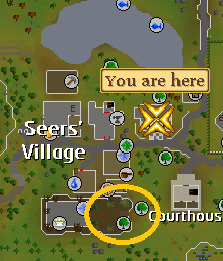
I had it ready, was jut waiting for you :P
From: Squancy
I had it ready, was jut waiting for you :P
Thanks, added to first post.
Also added and committed Edgeville yews.
Coh3n
2010-10-19 01:25:56
From: NCDS
Thanks, added to first post.
Also added and committed Edgeville yews.
That was a picture of the Yews, not Maples. :p Maples are just north of the bank, which we still need a picture for.
From: Coh3n
That was a picture of the Yews, not Maples. :p Maples are just north of the bank, which we still need a picture for.
No one saw anything :whistling:
renafox
2010-10-21 06:40:52
possible to do a small edit of rm yews?

or maybe

From: renafox
possible to do a small edit of rm yews?
Is it any faster to bank there? it still looks pretty far.
From: renafox
or maybe
This will be done, the Relocation system just needs to be altered to handle Relocation points that are multiple clicks away. I can probably get on that a bit today.
Overtime
2010-10-21 09:44:38
From: NCDS
Is it any faster to bank there? it still looks pretty far
This will be done, the Relocation system just needs to be altered to handle Relocation points that are multiple clicks away. I can probably get on that a bit today.
I guess there are more yews around there, which I guess can make it faster instead of cutting at one yew.
Yea I would have have done the draynor yews, but I didn't know how to add multiple clicks to the relocating function.
From: Squancy
I guess there are more yews around there, which I guess can make it faster instead of cutting at one yew.
Alright, maybe I'll add that then as a separate location, unless the other Yew tree is close to those ones? In which case it could just be added as a RelocPoint.
From: Squancy
Yea I would have have done the draynor yews, but I didn't know how to add multiple clicks to the relocating function.
I think it should work fine if the Relocation Points array is made to a T2DArray and another loop is added to MSI_Relocate. I'll have to look at it more though in a little bit.
Overtime
2010-10-21 18:15:38
I really dont know tbh. I havent logged on to check out the yews in that area.
Going to see the midnight showing for Paranomal Activity 2. :D
I really need to start learning to script D:
WTB MSN Turtorials D:
mormonman
2010-10-21 18:25:04
From: Squancy
I really dont know tbh. I havent logged on to check out the yews in that area.
Going to see the midnight showing for Paranomal Activity 2. :D
I really need to start learning to script D:
WTB MSN Turtorials D:
Best way to learn is read the tutorials on here and trial/error.
Coh3n
2010-10-22 00:15:16
From: renafox
possible to do a small edit of rm yews?
That is much shorter and I've actually meant to do that for some time. If it's not done I'll do it when I get home next week. As for your other one - what NCDS said.
Maybe we can do a 2D array for multiple points. So we can have different relocation paths. Most paths will contain only one point, but for ones such as Draynor yews, it would have 2 or 3.
From: Coh3n
That is much shorter and I've actually meant to do that for some time. If it's not done I'll do it when I get home next week. As for your other one - what NCDS said.
Maybe we can do a 2D array for multiple points. So we can have different relocation paths. Most paths will contain only one point, but for ones such as Draynor yews, it would have 2 or 3.
That's what I was thinking too. I thought about using MSI_ReflectionWalk for the ones with multiple clicks (could actually be used in both cases) but since MSI_Relocate handles the click using a passed TPoint, MSI_ReflectionWalk wouldn't work with the current MSI_Relocate. So I guess that leaves us just adding a loop in the relocate function?
Hopefully you will be on tonight? as I will have some time to myself then as well and can most likely bang out some stuff.
Coh3n
2010-10-22 13:21:15
From: NCDS
That's what I was thinking too. I thought about using MSI_ReflectionWalk for the ones with multiple clicks (could actually be used in both cases) but since MSI_Relocate handles the click using a passed TPoint, MSI_ReflectionWalk wouldn't work with the current MSI_Relocate. So I guess that leaves us just adding a loop in the relocate function?
Yeah, another loop looks like it would be the best way to go. We just have to make sure it knows which path to use.
From: NCDS
Hopefully you will be on tonight? as I will have some time to myself then as well and can most likely bang out some stuff.
No, I won't be, sorry. I have a game tonight.
Big Tom
2010-10-26 17:53:12
Im running the Port Sarim yew cutter with my lower level account, If im not wielding the hatchet is it suppose to detect this or am i suppose to set this in the script? Otherwise it banks my hatchet… Sorry if this is the wrong thread for this question.
From: Big Tom
Im running the Port Sarim yew cutter with my lower level account, If im not wielding the hatchet is it suppose to detect this or am i suppose to set this in the script? Otherwise it banks my hatchet… Sorry if this is the wrong thread for this question.
It should detect it. What kind of Hatchet are you using?
Coh3n
2010-10-26 18:11:17
From: Big Tom
Im running the Port Sarim yew cutter with my lower level account, If im not wielding the hatchet is it suppose to detect this or am i suppose to set this in the script? Otherwise it banks my hatchet… Sorry if this is the wrong thread for this question.
Could you post the debug please? We can see if it detected the hatchet as an exception or not. Also, did it Right click the logs and choose Deposit-All, or did it just use the deposit all button?
Big Tom
2010-10-27 08:42:50
From: Coh3n
Could you post the debug please? We can see if it detected the hatchet as an exception or not. Also, did it Right click the logs and choose Deposit-All, or did it just use the deposit all button?
It did not right click it just hits deposit, but il try to post the debug when I get home from school.
Coh3n
2010-10-27 15:18:48
From: Big Tom
It did not right click it just hits deposit, but il try to post the debug when I get home from school.
I thought I had fixed all the Deposit Box bugs. Guess not. :p
Hopefully you can get the debug and I can take a look tonight. :)
Big Tom
2010-10-27 18:49:37
From: Coh3n
Could you post the debug please? We can see if it detected the hatchet as an exception or not. Also, did it Right click the logs and choose Deposit-All, or did it just use the deposit all button?
Im still pretty new to all of this so im not completely sure how I post the debug?
Overtime
2010-10-27 18:58:57
go into your msi folder and go to MSI logs, and try to find the one you used for that day and use
tags when you post it
Big Tom
2010-10-27 19:18:04
I hope this is what your looking for?
[ Gro ] -- Created Debug file
[ Gro ] -- Gathering report info, please wait...
[ Gro ] -- MSI_SetupPlayer
[ Gro ] ---- Player is not logged in
[ Gro ] ------ Scanning for randoms...
[ Gro ] ---- MSI_SetSkillLevels
[ Gro ] ------ Woodcutting Level: 65
[ Gro ] ---- MSI_SetSkillLevels: Exit
[ Gro ] ---- Best tool for Woodcutting is Dragon Hatchet
[ Gro ] ---- MSI_FindTool - Gametab: 26
[ Gro ] ------ Failed to find tool: Dragon Hatchet
[ Gro ] ---- MSI_FindTool: False
[ Gro ] ---- MSI_FindTool - Gametab: 26
[ Gro ] ------ Failed to find tool: Rune Hatchet
[ Gro ] ---- MSI_FindTool: False
[ Gro ] ---- MSI_FindTool - Gametab: 26
[ Gro ] ------ Failed to find tool: Adamant Hatchet
[ Gro ] ---- MSI_FindTool: False
[ Gro ] ---- MSI_FindTool - Gametab: 26
[ Gro ] ------ Failed to find tool: Mithril Hatchet
[ Gro ] ---- MSI_FindTool: False
[ Gro ] ---- MSI_FindTool - Gametab: 26
[ Gro ] ------ Found DTM: Steel Hatchet
[ Gro ] ---- MSI_FindTool: True
[ Gro ] -- MSI_SetupPlayer: True
[ Gro ]  MSI_SetupPlayer: True
[ Gro ]  MSI_Walk
[ Gro ] ---- MSI_WaitWhileResting
[ Gro ] -- Player's Location = Port Sarim yews
[ Gro ]  MSI_Walk: True
[ Gro ]  MSI_AutoObjects
[ Gro ] -- MSI_FindObjectsIn
[ Gro ] ------ MSI_FindObjectsTPA: Not enough points!
[ Gro ] ------ MSI_FindObjectsTPA: Not enough points!
[ Gro ] ---- 32 objects found!
[ Gro ] ---- Uptext didn't match!
[ Gro ] ---- 32 objects found!
[ Gro ] ---- Track Object
[ Gro ] ------ ~ Track Record
[ Gro ] ------ ~ ~ TrackObject
[ Gro ] ------ ~ ~ Searches: 1
[ Gro ] ------ ~ ~ Successes: 1
[ Gro ] ------ ~ ~ Success %: 100
[ Gro ] ---- TrackObject: True
[ Gro ] -- MSI_FindObjectsIn: True
[ Gro ] -- MSI_WaitWhileChopping
[ Gro ] ---- Entering loop
[ Gro ] ------ Looking for tree
[ Gro ] -------- Scanning for randoms...
[ Gro ] ------ Looking for bird's nests
[ Gro ] ------ Checking inventory count
[ Gro ] -------- MSI_AntiBan
[ Gro ] ------ Looking for tree
[ Gro ] -------- Scanning for randoms...
[ Gro ] ------ Looking for bird's nests
[ Gro ] ------ Checking inventory count
[ Gro ] ------ Looking for tree
[ Gro ] -------- Scanning for randoms...
[ Gro ] ------ Looking for bird's nests
[ Gro ] ------ Checking inventory count
[ Gro ] ------ Looking for tree
[ Gro ] -------- Scanning for randoms...
[ Gro ] ------ Looking for bird's nests
[ Gro ] ------ Checking inventory count
[ Gro ] ------ Looking for tree
[ Gro ] -------- Scanning for randoms...
[ Gro ] ------ Looking for bird's nests
[ Gro ] ------ Checking inventory count
[ Gro ] ------ Looking for tree
[ Gro ] -------- Scanning for randoms...
[ Gro ] ------ Looking for bird's nests
[ Gro ] ------ Checking inventory count
[ Gro ] ------ Looking for tree
[ Gro ] -------- Scanning for randoms...
[ Gro ] ------ Looking for bird's nests
[ Gro ] ------ Checking inventory count
[ Gro ] ------ Looking for tree
[ Gro ] -------- Scanning for randoms...
[ Gro ] ------ Looking for bird's nests
[ Gro ] ------ Checking inventory count
[ Gro ] ------ Looking for tree
[ Gro ] -------- Scanning for randoms...
[ Gro ] ------ Looking for bird's nests
[ Gro ] ------ Checking inventory count
[ Gro ] ------ Looking for tree
[ Gro ] -------- Scanning for randoms...
[ Gro ] ------ Looking for bird's nests
[ Gro ] ------ Checking inventory count
[ Gro ] -------- MSI_AntiBan
[ Gro ] ------ Looking for tree
[ Gro ] -------- Scanning for randoms...
[ Gro ] ------ Looking for bird's nests
[ Gro ] ------ Checking inventory count
[ Gro ] ------ Looking for tree
[ Gro ] -------- Scanning for randoms...
[ Gro ] ------ Looking for bird's nests
[ Gro ] ------ Checking inventory count
[ Gro ] ------ Looking for tree
[ Gro ] -------- Scanning for randoms...
[ Gro ] ------ Looking for bird's nests
[ Gro ] ------ Checking inventory count
[ Gro ] ------ Looking for tree
[ Gro ] -------- Scanning for randoms...
[ Gro ] ------ Looking for bird's nests
[ Gro ] ------ Checking inventory count
[ Gro ] ------ Looking for tree
[ Gro ] -------- Scanning for randoms...
[ Gro ] ------ Looking for bird's nests
[ Gro ] ------ Checking inventory count
[ Gro ] ------ Looking for tree
[ Gro ] -------- Scanning for randoms...
[ Gro ] ------ Looking for bird's nests
[ Gro ] ------ Checking inventory count
[ Gro ] ------ Looking for tree
[ Gro ] -------- Scanning for randoms...
[ Gro ] ------ Looking for bird's nests
[ Gro ] ------ Checking inventory count
[ Gro ] ------ Looking for tree
[ Gro ] -------- Scanning for randoms...
[ Gro ] ------ Looking for bird's nests
[ Gro ] ------ Checking inventory count
[ Gro ] ------ Looking for tree
[ Gro ] -------- Scanning for randoms...
[ Gro ] ------ Looking for bird's nests
[ Gro ] ------ Checking inventory count
[ Gro ] ---- Out of loop
[ Gro ] -- MSI_WaitWhileChopping: Exit
[ Gro ] -- MSI_FindObjectsIn
[ Gro ] ---- 33 objects found!
[ Gro ] ---- Uptext didn't match!
[ Gro ] ---- 33 objects found!
[ Gro ] ---- Track Object
[ Gro ] ------ ~ Track Record
[ Gro ] ------ ~ ~ TrackObject
[ Gro ] ------ ~ ~ Searches: 2
[ Gro ] ------ ~ ~ Successes: 2
[ Gro ] ------ ~ ~ Success %: 100
[ Gro ] ---- TrackObject: True
[ Gro ] -- MSI_FindObjectsIn: True
[ Gro ] -- MSI_WaitWhileChopping
[ Gro ] ---- Entering loop
[ Gro ] ------ Looking for tree
[ Gro ] -------- Scanning for randoms...
[ Gro ] ------ Looking for bird's nests
[ Gro ] ------ Checking inventory count
[ Gro ] ------ Looking for tree
[ Gro ] -------- Scanning for randoms...
[ Gro ] ------ Looking for bird's nests
[ Gro ] ------ Checking inventory count
[ Gro ] ------ Looking for tree
[ Gro ] -------- Scanning for randoms...
[ Gro ] ------ Looking for bird's nests
[ Gro ] ------ Checking inventory count
[ Gro ] -------- MSI_AntiBan
[ Gro ] ------ Looking for tree
[ Gro ] -------- Scanning for randoms...
[ Gro ] ------ Looking for bird's nests
[ Gro ] ------ Checking inventory count
[ Gro ] ------ Looking for tree
[ Gro ] -------- Scanning for randoms...
[ Gro ] ------ Looking for bird's nests
[ Gro ] ------ Checking inventory count
[ Gro ] ------ Looking for tree
[ Gro ] -------- Scanning for randoms...
[ Gro ] ------ Looking for bird's nests
[ Gro ] ------ Checking inventory count
[ Gro ] ------ Looking for tree
[ Gro ] -------- Scanning for randoms...
[ Gro ] ------ Looking for bird's nests
[ Gro ] ------ Checking inventory count
[ Gro ] ------ Looking for tree
[ Gro ] -------- Scanning for randoms...
[ Gro ] ------ Looking for bird's nests
[ Gro ] ------ Checking inventory count
[ Gro ] ------ Looking for tree
[ Gro ] -------- Scanning for randoms...
[ Gro ] ------ Looking for bird's nests
[ Gro ] ------ Checking inventory count
[ Gro ] ------ Looking for tree
[ Gro ] -------- Scanning for randoms...
[ Gro ] ------ Looking for bird's nests
[ Gro ] ------ Checking inventory count
[ Gro ] -------- MSI_AntiBan
[ Gro ] ------ Looking for tree
[ Gro ] -------- Scanning for randoms...
[ Gro ] ------ Looking for bird's nests
[ Gro ] ------ Checking inventory count
[ Gro ] ------ Looking for tree
[ Gro ] -------- Scanning for randoms...
[ Gro ] ------ Looking for bird's nests
[ Gro ] ------ Checking inventory count
[ Gro ] -------- New count > old count
[ Gro ] ------ Looking for tree
[ Gro ] -------- Scanning for randoms...
[ Gro ] ------ Looking for bird's nests
[ Gro ] ------ Checking inventory count
[ Gro ] ------ Looking for tree
[ Gro ] -------- Scanning for randoms...
[ Gro ] ------ Looking for bird's nests
[ Gro ] ------ Checking inventory count
[ Gro ] ------ Looking for tree
[ Gro ] -------- Scanning for randoms...
[ Gro ] ------ Looking for bird's nests
[ Gro ] ------ Checking inventory count
[ Gro ] ------ Looking for tree
[ Gro ] -------- Scanning for randoms...
[ Gro ] ------ Looking for bird's nests
[ Gro ] ------ Checking inventory count
[ Gro ] ------ Looking for tree
[ Gro ] -------- Scanning for randoms...
[ Gro ] ------ Looking for bird's nests
[ Gro ] ------ Checking inventory count
[ Gro ] ------ Looking for tree
[ Gro ] -------- Scanning for randoms...
[ Gro ] ------ Looking for bird's nests
[ Gro ] ------ Checking inventory count
[ Gro ] ------ Looking for tree
[ Gro ] -------- Scanning for randoms...
[ Gro ] ------ Looking for bird's nests
[ Gro ] ------ Checking inventory count
[ Gro ] ------ Looking for tree
[ Gro ] -------- Scanning for randoms...
[ Gro ] ------ Looking for bird's nests
[ Gro ] ------ Checking inventory count
[ Gro ] ------ Looking for tree
[ Gro ] -------- Scanning for randoms...
[ Gro ] ------ Looking for bird's nests
[ Gro ] ------ Checking inventory count
[ Gro ] -------- New count > old count
[ Gro ] ------ Looking for tree
[ Gro ] -------- Scanning for randoms...
[ Gro ] ------ Looking for bird's nests
[ Gro ] ------ Checking inventory count
[ Gro ] -------- New count > old count
[ Gro ] ------ Looking for tree
[ Gro ] -------- Scanning for randoms...
[ Gro ] ------ Looking for bird's nests
[ Gro ] ------ Checking inventory count
[ Gro ] ------ Looking for tree
[ Gro ] -------- Scanning for randoms...
[ Gro ] ------ Looking for bird's nests
[ Gro ] ------ Checking inventory count
[ Gro ] ------ Looking for tree
[ Gro ] -------- Scanning for randoms...
[ Gro ] ------ Looking for bird's nests
[ Gro ] ------ Checking inventory count
[ Gro ] ------ Looking for tree
[ Gro ] -------- Scanning for randoms...
[ Gro ] ------ Looking for bird's nests
[ Gro ] ------ Checking inventory count
[ Gro ] ------ Looking for tree
[ Gro ] -------- Scanning for randoms...
[ Gro ] ------ Looking for bird's nests
[ Gro ] ------ Checking inventory count
[ Gro ] ------ Looking for tree
[ Gro ] -------- Scanning for randoms...
[ Gro ] ------ Looking for bird's nests
[ Gro ] ------ Checking inventory count
[ Gro ] ------ Looking for tree
[ Gro ] -------- Scanning for randoms...
[ Gro ] ------ Looking for bird's nests
[ Gro ] ------ Checking inventory count
[ Gro ] -------- New count > old count
[ Gro ] ------ Looking for tree
[ Gro ] -------- Scanning for randoms...
[ Gro ] ------ Looking for bird's nests
[ Gro ] ------ Checking inventory count
[ Gro ] ------ Looking for tree
[ Gro ] -------- Scanning for randoms...
[ Gro ] ------ Looking for bird's nests
[ Gro ] ------ Checking inventory count
[ Gro ] ------ Looking for tree
[ Gro ] -------- Scanning for randoms...
[ Gro ] ------ Looking for bird's nests
[ Gro ] ------ Checking inventory count
[ Gro ] ------ Looking for tree
[ Gro ] -------- Scanning for randoms...
[ Gro ] ------ Looking for bird's nests
[ Gro ] ------ Checking inventory count
[ Gro ] ------ Looking for tree
[ Gro ] -------- Scanning for randoms...
[ Gro ] ------ Looking for bird's nests
[ Gro ] ------ Checking inventory count
[ Gro ] -------- MSI_AntiBan
[ Gro ] ------ Looking for tree
[ Gro ] -------- Scanning for randoms...
[ Gro ] ------ Looking for bird's nests
[ Gro ] ------ Checking inventory count
[ Gro ] ------ Looking for tree
[ Gro ] -------- Scanning for randoms...
[ Gro ] ------ Looking for bird's nests
[ Gro ] ------ Checking inventory count
[ Gro ] ------ Looking for tree
[ Gro ] -------- Scanning for randoms...
[ Gro ] ------ Looking for bird's nests
[ Gro ] ------ Checking inventory count
[ Gro ] ------ Looking for tree
[ Gro ] -------- Scanning for randoms...
[ Gro ] ------ Looking for bird's nests
[ Gro ] ------ Checking inventory count
[ Gro ] ------ Looking for tree
[ Gro ] -------- Scanning for randoms...
[ Gro ] ------ Looking for bird's nests
[ Gro ] ------ Checking inventory count
[ Gro ] ------ Looking for tree
[ Gro ] -------- Scanning for randoms...
[ Gro ] ------ Looking for bird's nests
[ Gro ] ------ Checking inventory count
[ Gro ] ------ Looking for tree
[ Gro ] -------- Scanning for randoms...
[ Gro ] ------ Looking for bird's nests
[ Gro ] ------ Checking inventory count
[ Gro ] ------ Looking for tree
[ Gro ] -------- Scanning for randoms...
[ Gro ] ------ Looking for bird's nests
[ Gro ] ------ Checking inventory count
[ Gro ] ------ Looking for tree
[ Gro ] -------- Scanning for randoms...
[ Gro ] ------ Looking for bird's nests
[ Gro ] ------ Checking inventory count
[ Gro ] ------ Looking for tree
[ Gro ] -------- Scanning for randoms...
[ Gro ] ------ Looking for bird's nests
[ Gro ] ------ Checking inventory count
[ Gro ] ------ Looking for tree
[ Gro ] -------- Scanning for randoms...
[ Gro ] ------ Looking for bird's nests
[ Gro ] ------ Checking inventory count
[ Gro ] ------ Looking for tree
[ Gro ] -------- Scanning for randoms...
[ Gro ] ------ Looking for bird's nests
[ Gro ] ------ Checking inventory count
[ Gro ] ------ Looking for tree
[ Gro ] -------- Scanning for randoms...
[ Gro ] ------ Looking for bird's nests
[ Gro ] ------ Checking inventory count
[ Gro ] -------- New count > old count
[ Gro ] ------ Looking for tree
[ Gro ] -------- Scanning for randoms...
[ Gro ] ------ Looking for bird's nests
[ Gro ] ------ Checking inventory count
[ Gro ] ------ Looking for tree
[ Gro ] -------- Scanning for randoms...
[ Gro ] ------ Looking for bird's nests
[ Gro ] ------ Checking inventory count
[ Gro ] ------ Looking for tree
[ Gro ] -------- Scanning for randoms...
[ Gro ] ------ Looking for bird's nests
[ Gro ] ------ Checking inventory count
[ Gro ] ------ Looking for tree
[ Gro ] -------- Scanning for randoms...
[ Gro ] ------ Looking for bird's nests
[ Gro ] ------ Checking inventory count
[ Gro ] ------ Looking for tree
[ Gro ] -------- Scanning for randoms...
[ Gro ] ------ Looking for bird's nests
[ Gro ] ------ Checking inventory count
[ Gro ] -------- New count > old count
[ Gro ] ------ Looking for tree
[ Gro ] -------- Scanning for randoms...
[ Gro ] ------ Looking for bird's nests
[ Gro ] ------ Checking inventory count
[ Gro ] -------- MSI_AntiBan
[ Gro ] ------ Looking for tree
[ Gro ] -------- Scanning for randoms...
[ Gro ] ------ Looking for bird's nests
[ Gro ] ------ Checking inventory count
[ Gro ] -------- New count > old count
[ Gro ] ------ Looking for tree
[ Gro ] -------- Scanning for randoms...
[ Gro ] ------ Looking for bird's nests
[ Gro ] ------ Checking inventory count
[ Gro ] ------ Looking for tree
[ Gro ] -------- Scanning for randoms...
[ Gro ] ------ Looking for bird's nests
[ Gro ] ------ Checking inventory count
[ Gro ] ------ Looking for tree
[ Gro ] -------- Scanning for randoms...
[ Gro ] ------ Looking for bird's nests
[ Gro ] ------ Checking inventory count
[ Gro ] -------- New count > old count
[ Gro ] ------ Looking for tree
[ Gro ] -------- Scanning for randoms...
[ Gro ] ------ Looking for bird's nests
[ Gro ] ------ Checking inventory count
[ Gro ] ------ Looking for tree
[ Gro ] -------- Scanning for randoms...
[ Gro ] ------ Looking for bird's nests
[ Gro ] ------ Checking inventory count
[ Gro ] ------ Looking for tree
[ Gro ] -------- Scanning for randoms...
[ Gro ] ------ Looking for bird's nests
[ Gro ] ------ Checking inventory count
[ Gro ] ------ Looking for tree
[ Gro ] -------- Scanning for randoms...
[ Gro ] ------ Looking for bird's nests
[ Gro ] ------ Checking inventory count
[ Gro ] ------ Looking for tree
[ Gro ] -------- Scanning for randoms...
[ Gro ] ------ Looking for bird's nests
[ Gro ] ------ Checking inventory count
[ Gro ] ------ Looking for tree
[ Gro ] -------- Scanning for randoms...
[ Gro ] ------ Looking for bird's nests
[ Gro ] ------ Checking inventory count
[ Gro ] ------ Looking for tree
[ Gro ] -------- Scanning for randoms...
[ Gro ] ------ Looking for bird's nests
[ Gro ] ------ Checking inventory count
[ Gro ] -------- MSI_AntiBan
[ Gro ] ------ Looking for tree
[ Gro ] -------- Scanning for randoms...
[ Gro ] ------ Looking for bird's nests
[ Gro ] ------ Checking inventory count
[ Gro ] ------ Looking for tree
[ Gro ] -------- Scanning for randoms...
[ Gro ] ------ Looking for bird's nests
[ Gro ] ------ Checking inventory count
[ Gro ] ------ Looking for tree
[ Gro ] -------- Scanning for randoms...
[ Gro ] ------ Looking for bird's nests
[ Gro ] ------ Checking inventory count
[ Gro ] ------ Looking for tree
[ Gro ] -------- Scanning for randoms...
[ Gro ] ------ Looking for bird's nests
[ Gro ] ------ Checking inventory count
[ Gro ] -------- New count > old count
[ Gro ] ------ Looking for tree
[ Gro ] -------- Scanning for randoms...
[ Gro ] ------ Looking for bird's nests
[ Gro ] ------ Checking inventory count
[ Gro ] ------ Looking for tree
[ Gro ] -------- Scanning for randoms...
[ Gro ] ------ Looking for bird's nests
[ Gro ] ------ Checking inventory count
[ Gro ] ------ Looking for tree
[ Gro ] -------- Scanning for randoms...
[ Gro ] ------ Looking for bird's nests
[ Gro ] ------ Checking inventory count
[ Gro ] -------- New count > old count
[ Gro ] ------ Preventing logout
[ Gro ] -------- Clicking game tab: 29
[ Gro ] ------ Looking for tree
[ Gro ] -------- Scanning for randoms...
[ Gro ] ------ Looking for bird's nests
[ Gro ] ------ Checking inventory count
[ Gro ] -------- New count > old count
[ Gro ] ------ Preventing logout
[ Gro ] -------- Clicking game tab: 26
[ Gro ] ------ Looking for tree
[ Gro ] -------- Scanning for randoms...
[ Gro ] ------ Looking for bird's nests
[ Gro ] ------ Checking inventory count
[ Gro ] ------ Preventing logout
[ Gro ] -------- Clicking game tab: 33
[ Gro ] ------ Looking for tree
[ Gro ] -------- Scanning for randoms...
[ Gro ] ------ Looking for bird's nests
[ Gro ] ------ Checking inventory count
[ Gro ] ------ Preventing logout
[ Gro ] -------- Clicking game tab: 31
[ Gro ] ------ Looking for tree
[ Gro ] -------- Scanning for randoms...
[ Gro ] ------ Looking for bird's nests
[ Gro ] ------ Checking inventory count
[ Gro ] ------ Preventing logout
[ Gro ] -------- Clicking game tab: 28
[ Gro ] ------ Looking for tree
[ Gro ] -------- Scanning for randoms...
[ Gro ] ------ Looking for bird's nests
[ Gro ] ------ Checking inventory count
[ Gro ] ------ Preventing logout
[ Gro ] -------- Clicking game tab: 23
[ Gro ] ------ Looking for tree
[ Gro ] -------- Scanning for randoms...
[ Gro ] ------ Looking for bird's nests
[ Gro ] ------ Checking inventory count
[ Gro ] ------ Preventing logout
[ Gro ] -------- Clicking game tab: 29
[ Gro ] ------ Looking for tree
[ Gro ] -------- Scanning for randoms...
[ Gro ] ------ Looking for bird's nests
[ Gro ] ------ Checking inventory count
[ Gro ] ------ Preventing logout
[ Gro ] -------- Clicking game tab: 24
[ Gro ] ------ Looking for tree
[ Gro ] -------- Scanning for randoms...
[ Gro ] ------ Looking for bird's nests
[ Gro ] ------ Checking inventory count
[ Gro ] ------ Preventing logout
[ Gro ] -------- Clicking game tab: 29
[ Gro ] ------ Looking for tree
[ Gro ] -------- Scanning for randoms...
[ Gro ] ------ Looking for bird's nests
[ Gro ] ------ Checking inventory count
[ Gro ] ------ Preventing logout
[ Gro ] -------- Clicking game tab: 34
[ Gro ] ------ Looking for tree
[ Gro ] -------- Scanning for randoms...
[ Gro ] ------ Looking for bird's nests
[ Gro ] ------ Checking inventory count
[ Gro ] ------ Preventing logout
[ Gro ] -------- Clicking game tab: 31
[ Gro ] ------ Looking for tree
[ Gro ] -------- Scanning for randoms...
[ Gro ] ------ Looking for bird's nests
[ Gro ] ------ Checking inventory count
[ Gro ] ------ Preventing logout
[ Gro ] -------- Clicking game tab: 29
[ Gro ] ------ Looking for tree
[ Gro ] -------- Scanning for randoms...
[ Gro ] ------ Looking for bird's nests
[ Gro ] ------ Checking inventory count
[ Gro ] -------- New count > old count
[ Gro ] ------ Preventing logout
[ Gro ] -------- Clicking game tab: 32
[ Gro ] ------ Looking for tree
[ Gro ] -------- Scanning for randoms...
[ Gro ] ------ Looking for bird's nests
[ Gro ] ------ Checking inventory count
[ Gro ] ------ Preventing logout
[ Gro ] -------- Clicking game tab: 23
[ Gro ] ------ Looking for tree
[ Gro ] -------- Scanning for randoms...
[ Gro ] ------ Looking for bird's nests
[ Gro ] ------ Checking inventory count
[ Gro ] ------ Preventing logout
[ Gro ] -------- Clicking game tab: 32
[ Gro ] ------ Looking for tree
[ Gro ] -------- Scanning for randoms...
[ Gro ] ------ Looking for bird's nests
[ Gro ] ------ Checking inventory count
[ Gro ] ------ Preventing logout
[ Gro ] -------- Clicking game tab: 33
[ Gro ] ------ Looking for tree
[ Gro ] -------- Scanning for randoms...
[ Gro ] ------ Looking for bird's nests
[ Gro ] ------ Checking inventory count
[ Gro ] -------- New count > old count
[ Gro ] ------ Preventing logout
[ Gro ] -------- Clicking game tab: 30
[ Gro ] ------ Looking for tree
[ Gro ] -------- Scanning for randoms...
[ Gro ] ------ Looking for bird's nests
[ Gro ] ------ Checking inventory count
[ Gro ] -------- New count > old count
[ Gro ] ------ Preventing logout
[ Gro ] -------- Clicking game tab: 33
[ Gro ] ------ Looking for tree
[ Gro ] -------- Scanning for randoms...
[ Gro ] ------ Looking for bird's nests
[ Gro ] ------ Checking inventory count
[ Gro ] ------ Preventing logout
[ Gro ] -------- Clicking game tab: 34
[ Gro ] ------ Looking for tree
[ Gro ] -------- Scanning for randoms...
[ Gro ] ------ Looking for bird's nests
[ Gro ] ------ Checking inventory count
[ Gro ] ------ Preventing logout
[ Gro ] -------- Clicking game tab: 32
[ Gro ] ------ Looking for tree
[ Gro ] -------- Scanning for randoms...
[ Gro ] ------ Looking for bird's nests
[ Gro ] ------ Checking inventory count
[ Gro ] ------ Preventing logout
[ Gro ] -------- Clicking game tab: 31
[ Gro ] ------ Looking for tree
[ Gro ] -------- Scanning for randoms...
[ Gro ] ------ Looking for bird's nests
[ Gro ] ------ Checking inventory count
[ Gro ] -------- New count > old count
[ Gro ] ------ Preventing logout
[ Gro ] -------- Clicking game tab: 35
[ Gro ] -------- MSI_AntiBan
[ Gro ] ------ Looking for tree
[ Gro ] -------- Scanning for randoms...
[ Gro ] ------ Looking for bird's nests
[ Gro ] ------ Checking inventory count
[ Gro ] ------ Preventing logout
[ Gro ] -------- Clicking game tab: 30
[ Gro ] ------ Looking for tree
[ Gro ] -------- Scanning for randoms...
[ Gro ] ------ Looking for bird's nests
[ Gro ] ------ Checking inventory count
[ Gro ] ------ Preventing logout
[ Gro ] -------- Clicking game tab: 24
[ Gro ] ------ Looking for tree
[ Gro ] -------- Scanning for randoms...
[ Gro ] ------ Looking for bird's nests
[ Gro ] ------ Checking inventory count
[ Gro ] ------ Preventing logout
[ Gro ] -------- Clicking game tab: 31
[ Gro ] ------ Looking for tree
[ Gro ] -------- Scanning for randoms...
[ Gro ] ------ Looking for bird's nests
[ Gro ] ------ Checking inventory count
[ Gro ] ------ Preventing logout
[ Gro ] -------- Clicking game tab: 35
[ Gro ] ------ Looking for tree
[ Gro ] -------- Scanning for randoms...
[ Gro ] ------ Looking for bird's nests
[ Gro ] ------ Checking inventory count
[ Gro ] ------ Preventing logout
[ Gro ] -------- Clicking game tab: 24
[ Gro ] ------ Looking for tree
[ Gro ] -------- Scanning for randoms...
[ Gro ] ------ Looking for bird's nests
[ Gro ] ------ Checking inventory count
[ Gro ] ------ Preventing logout
[ Gro ] -------- Clicking game tab: 35
[ Gro ] ------ Looking for tree
[ Gro ] -------- Scanning for randoms...
[ Gro ] ------ Looking for bird's nests
[ Gro ] ------ Checking inventory count
[ Gro ] ------ Preventing logout
[ Gro ] -------- Clicking game tab: 21
[ Gro ] -------- MSI_AntiBan
[ Gro ] ------ Looking for tree
[ Gro ] -------- Scanning for randoms...
[ Gro ] ------ Looking for bird's nests
[ Gro ] ------ Checking inventory count
[ Gro ] ------ Preventing logout
[ Gro ] -------- Clicking game tab: 30
[ Gro ] ------ Looking for tree
[ Gro ] -------- Scanning for randoms...
[ Gro ] ------ Looking for bird's nests
[ Gro ] ------ Checking inventory count
[ Gro ] ------ Preventing logout
[ Gro ] -------- Clicking game tab: 26
[ Gro ] ------ Looking for tree
[ Gro ] -------- Scanning for randoms...
[ Gro ] ------ Looking for bird's nests
[ Gro ] ------ Checking inventory count
[ Gro ] -------- New count > old count
[ Gro ] ------ Preventing logout
[ Gro ] -------- Clicking game tab: 22
[ Gro ] ------ Looking for tree
[ Gro ] -------- Scanning for randoms...
[ Gro ] ------ Looking for bird's nests
[ Gro ] ------ Checking inventory count
[ Gro ] ------ Preventing logout
[ Gro ] -------- Clicking game tab: 22
[ Gro ] ------ Looking for tree
[ Gro ] -------- Scanning for randoms...
[ Gro ] ------ Looking for bird's nests
[ Gro ] ------ Checking inventory count
[ Gro ] ------ Preventing logout
[ Gro ] -------- Clicking game tab: 33
[ Gro ] -------- MSI_AntiBan
[ Gro ] ------ Looking for tree
[ Gro ] -------- Scanning for randoms...
[ Gro ] ------ Looking for bird's nests
[ Gro ] ------ Checking inventory count
[ Gro ] ------ Preventing logout
[ Gro ] -------- Clicking game tab: 23
[ Gro ] ------ Looking for tree
[ Gro ] -------- Scanning for randoms...
[ Gro ] ------ Looking for bird's nests
[ Gro ] ------ Checking inventory count
[ Gro ] ------ Preventing logout
[ Gro ] -------- Clicking game tab: 23
[ Gro ] ------ Looking for tree
[ Gro ] -------- Scanning for randoms...
[ Gro ] ------ Looking for bird's nests
[ Gro ] ------ Checking inventory count
[ Gro ] ------ Preventing logout
[ Gro ] -------- Clicking game tab: 27
[ Gro ] ------ Looking for tree
[ Gro ] -------- Scanning for randoms...
[ Gro ] ------ Looking for bird's nests
[ Gro ] ------ Checking inventory count
[ Gro ] ------ Preventing logout
[ Gro ] -------- Clicking game tab: 26
[ Gro ] ------ Looking for tree
[ Gro ] -------- Scanning for randoms...
[ Gro ] ------ Looking for bird's nests
[ Gro ] ------ Checking inventory count
[ Gro ] -------- New count > old count
[ Gro ] ------ Preventing logout
[ Gro ] -------- Clicking game tab: 27
[ Gro ] ------ Looking for tree
[ Gro ] -------- Scanning for randoms...
[ Gro ] ------ Looking for bird's nests
[ Gro ] ------ Checking inventory count
[ Gro ] ------ Preventing logout
[ Gro ] -------- Clicking game tab: 28
[ Gro ] ------ Looking for tree
[ Gro ] -------- Scanning for randoms...
[ Gro ] ------ Looking for bird's nests
[ Gro ] ------ Checking inventory count
[ Gro ] ------ Preventing logout
[ Gro ] -------- Clicking game tab: 22
[ Gro ] -------- MSI_AntiBan
[ Gro ] ------ Looking for tree
[ Gro ] -------- Scanning for randoms...
[ Gro ] ------ Looking for bird's nests
[ Gro ] ------ Checking inventory count
[ Gro ] ------ Preventing logout
[ Gro ] -------- Clicking game tab: 28
[ Gro ] ------ Looking for tree
[ Gro ] -------- Scanning for randoms...
[ Gro ] ------ Looking for bird's nests
[ Gro ] ------ Checking inventory count
[ Gro ] ------ Preventing logout
[ Gro ] -------- Clicking game tab: 24
[ Gro ] ------ Looking for tree
[ Gro ] -------- Scanning for randoms...
[ Gro ] ------ Looking for bird's nests
[ Gro ] ------ Checking inventory count
[ Gro ] ------ Preventing logout
[ Gro ] -------- Clicking game tab: 33
[ Gro ] ------ Looking for tree
[ Gro ] -------- Scanning for randoms...
[ Gro ] ------ Looking for bird's nests
[ Gro ] ------ Checking inventory count
[ Gro ] ------ Preventing logout
[ Gro ] -------- Clicking game tab: 22
[ Gro ] ------ Looking for tree
[ Gro ] -------- Scanning for randoms...
[ Gro ] ------ Looking for bird's nests
[ Gro ] ------ Checking inventory count
[ Gro ] ------ Preventing logout
[ Gro ] -------- Clicking game tab: 27
[ Gro ] ------ Looking for tree
[ Gro ] -------- Scanning for randoms...
[ Gro ] ------ Looking for bird's nests
[ Gro ] ------ Checking inventory count
[ Gro ] ------ Preventing logout
[ Gro ] -------- Clicking game tab: 27
[ Gro ] ------ Looking for tree
[ Gro ] -------- Scanning for randoms...
[ Gro ] ------ Looking for bird's nests
[ Gro ] ------ Checking inventory count
[ Gro ] -------- New count > old count
[ Gro ] ------ Preventing logout
[ Gro ] -------- Clicking game tab: 21
[ Gro ] -------- MSI_AntiBan
[ Gro ] ------ Looking for tree
[ Gro ] -------- Scanning for randoms...
[ Gro ] ------ Looking for bird's nests
[ Gro ] ------ Checking inventory count
[ Gro ] ------ Preventing logout
[ Gro ] -------- Clicking game tab: 26
[ Gro ] ------ Looking for tree
[ Gro ] -------- Scanning for randoms...
[ Gro ] ------ Looking for bird's nests
[ Gro ] ------ Checking inventory count
[ Gro ] -------- New count > old count
[ Gro ] ------ Preventing logout
[ Gro ] -------- Clicking game tab: 24
[ Gro ] ------ Looking for tree
[ Gro ] -------- Scanning for randoms...
[ Gro ] ------ Looking for bird's nests
[ Gro ] ------ Checking inventory count
[ Gro ] -------- New count > old count
[ Gro ] ------ Preventing logout
[ Gro ] -------- Clicking game tab: 23
[ Gro ] ------ Looking for tree
[ Gro ] -------- Scanning for randoms...
[ Gro ] ------ Looking for bird's nests
[ Gro ] ------ Checking inventory count
[ Gro ] ------ Preventing logout
[ Gro ] -------- Clicking game tab: 27
[ Gro ] ------ Looking for tree
[ Gro ] -------- Scanning for randoms...
[ Gro ] ------ Looking for bird's nests
[ Gro ] ------ Checking inventory count
[ Gro ] ------ Preventing logout
[ Gro ] -------- Clicking game tab: 26
[ Gro ] ------ Looking for tree
[ Gro ] -------- Scanning for randoms...
[ Gro ] ------ Looking for bird's nests
[ Gro ] ------ Checking inventory count
[ Gro ] ------ Preventing logout
[ Gro ] -------- Clicking game tab: 32
[ Gro ] ------ Looking for tree
[ Gro ] -------- Scanning for randoms...
[ Gro ] ------ Looking for bird's nests
[ Gro ] ------ Checking inventory count
[ Gro ] ------ Preventing logout
[ Gro ] -------- Clicking game tab: 21
[ Gro ] ------ Looking for tree
[ Gro ] -------- Scanning for randoms...
[ Gro ] ------ Looking for bird's nests
[ Gro ] ------ Checking inventory count
[ Gro ] ------ Preventing logout
[ Gro ] -------- Clicking game tab: 33
[ Gro ] ------ Looking for tree
[ Gro ] -------- Scanning for randoms...
[ Gro ] ------ Looking for bird's nests
[ Gro ] ------ Checking inventory count
[ Gro ] ------ Preventing logout
[ Gro ] -------- Clicking game tab: 33
[ Gro ] ------ Looking for tree
[ Gro ] -------- Scanning for randoms...
[ Gro ] ------ Looking for bird's nests
[ Gro ] ------ Checking inventory count
[ Gro ] ------ Preventing logout
[ Gro ] -------- Clicking game tab: 31
[ Gro ] ------ Looking for tree
[ Gro ] -------- Scanning for randoms...
[ Gro ] ------ Looking for bird's nests
[ Gro ] ------ Checking inventory count
[ Gro ] ------ Preventing logout
[ Gro ] -------- Clicking game tab: 32
[ Gro ] ------ Looking for tree
[ Gro ] -------- Scanning for randoms...
[ Gro ] ------ Looking for bird's nests
[ Gro ] ------ Checking inventory count
[ Gro ] -------- New count > old count
[ Gro ] ------ Preventing logout
[ Gro ] -------- Clicking game tab: 28
[ Gro ] ------ Looking for tree
[ Gro ] -------- Scanning for randoms...
[ Gro ] ------ Looking for bird's nests
[ Gro ] ------ Checking inventory count
[ Gro ] ------ Preventing logout
[ Gro ] -------- Clicking game tab: 21
[ Gro ] ------ Looking for tree
[ Gro ] -------- Scanning for randoms...
[ Gro ] ------ Looking for bird's nests
[ Gro ] ------ Checking inventory count
[ Gro ] ------ Preventing logout
[ Gro ] -------- Clicking game tab: 23
[ Gro ] ------ Looking for tree
[ Gro ] -------- Scanning for randoms...
[ Gro ] ------ Looking for bird's nests
[ Gro ] ------ Checking inventory count
[ Gro ] ------ Preventing logout
[ Gro ] -------- Clicking game tab: 28
[ Gro ] ------ Looking for tree
[ Gro ] -------- Scanning for randoms...
[ Gro ] ------ Looking for bird's nests
[ Gro ] ------ Checking inventory count
[ Gro ] ------ Preventing logout
[ Gro ] -------- Clicking game tab: 31
[ Gro ] ------ Looking for tree
[ Gro ] -------- Scanning for randoms...
[ Gro ] ------ Looking for bird's nests
[ Gro ] ------ Checking inventory count
[ Gro ] -------- New count > old count
[ Gro ] ------ Preventing logout
[ Gro ] -------- Clicking game tab: 31
[ Gro ] ------ Looking for tree
[ Gro ] -------- Scanning for randoms...
[ Gro ] ------ Looking for bird's nests
[ Gro ] ------ Checking inventory count
[ Gro ] ------ Preventing logout
[ Gro ] -------- Clicking game tab: 34
[ Gro ] ------ Looking for tree
[ Gro ] -------- Scanning for randoms...
[ Gro ] ------ Looking for bird's nests
[ Gro ] ------ Checking inventory count
[ Gro ] ------ Preventing logout
[ Gro ] -------- Clicking game tab: 35
[ Gro ] ------ Looking for tree
[ Gro ] -------- Scanning for randoms...
[ Gro ] ------ Looking for bird's nests
[ Gro ] ------ Checking inventory count
[ Gro ] ------ Preventing logout
[ Gro ] -------- Clicking game tab: 28
[ Gro ] ------ Looking for tree
[ Gro ] -------- Scanning for randoms...
[ Gro ] ------ Looking for bird's nests
[ Gro ] ------ Checking inventory count
[ Gro ] ------ Preventing logout
[ Gro ] -------- Clicking game tab: 34
[ Gro ] ------ Looking for tree
[ Gro ] -------- Scanning for randoms...
[ Gro ] ------ Looking for bird's nests
[ Gro ] ------ Checking inventory count
[ Gro ] ------ Preventing logout
[ Gro ] -------- Clicking game tab: 23
[ Gro ] ------ Looking for tree
[ Gro ] -------- Scanning for randoms...
[ Gro ] ------ Looking for bird's nests
[ Gro ] ------ Checking inventory count
[ Gro ] ------ Preventing logout
[ Gro ] -------- Clicking game tab: 28
[ Gro ] ------ Looking for tree
[ Gro ] -------- Scanning for randoms...
[ Gro ] ------ Looking for bird's nests
[ Gro ] ------ Checking inventory count
[ Gro ] ------ Preventing logout
[ Gro ] -------- Clicking game tab: 32
[ Gro ] ------ Looking for tree
[ Gro ] -------- Scanning for randoms...
[ Gro ] ------ Looking for bird's nests
[ Gro ] ------ Checking inventory count
[ Gro ] ------ Preventing logout
[ Gro ] -------- Clicking game tab: 32
[ Gro ] ------ Looking for tree
[ Gro ] -------- Scanning for randoms...
[ Gro ] ------ Looking for bird's nests
[ Gro ] ------ Checking inventory count
[ Gro ] ------ Preventing logout
[ Gro ] -------- Clicking game tab: 33
[ Gro ] ------ Looking for tree
[ Gro ] -------- Scanning for randoms...
[ Gro ] ------ Looking for bird's nests
[ Gro ] ------ Checking inventory count
[ Gro ] -------- New count > old count
[ Gro ] ------ Preventing logout
[ Gro ] -------- Clicking game tab: 31
[ Gro ] ------ Looking for tree
[ Gro ] -------- Scanning for randoms...
[ Gro ] ------ Looking for bird's nests
[ Gro ] ------ Checking inventory count
[ Gro ] -------- New count > old count
[ Gro ] ------ Preventing logout
[ Gro ] -------- Clicking game tab: 32
[ Gro ] ------ Looking for tree
[ Gro ] -------- Scanning for randoms...
[ Gro ] ------ Looking for bird's nests
[ Gro ] ------ Checking inventory count
[ Gro ] ------ Preventing logout
[ Gro ] -------- Clicking game tab: 23
[ Gro ] ------ Looking for tree
[ Gro ] -------- Scanning for randoms...
[ Gro ] ------ Looking for bird's nests
[ Gro ] ------ Checking inventory count
[ Gro ] ------ Preventing logout
[ Gro ] -------- Clicking game tab: 33
[ Gro ] ------ Looking for tree
[ Gro ] -------- Scanning for randoms...
[ Gro ] ------ Looking for bird's nests
[ Gro ] ------ Checking inventory count
[ Gro ] ------ Preventing logout
[ Gro ] -------- Clicking game tab: 27
[ Gro ] ------ Looking for tree
[ Gro ] -------- Scanning for randoms...
[ Gro ] ------ Looking for bird's nests
[ Gro ] ------ Checking inventory count
[ Gro ] ------ Preventing logout
[ Gro ] -------- Clicking game tab: 23
[ Gro ] -------- MSI_AntiBan
[ Gro ] ------ Looking for tree
[ Gro ] -------- Scanning for randoms...
[ Gro ] ------ Looking for bird's nests
[ Gro ] ------ Checking inventory count
[ Gro ] -------- New count > old count
[ Gro ] ------ Preventing logout
[ Gro ] -------- Clicking game tab: 21
[ Gro ] ------ Looking for tree
[ Gro ] -------- Scanning for randoms...
[ Gro ] ------ Looking for bird's nests
[ Gro ] ------ Checking inventory count
[ Gro ] ------ Preventing logout
[ Gro ] -------- Clicking game tab: 29
[ Gro ] ------ Looking for tree
[ Gro ] -------- Scanning for randoms...
[ Gro ] ------ Looking for bird's nests
[ Gro ] ------ Checking inventory count
[ Gro ] ------ Preventing logout
[ Gro ] -------- Clicking game tab: 24
[ Gro ] ------ Looking for tree
[ Gro ] -------- Scanning for randoms...
[ Gro ] ------ Looking for bird's nests
[ Gro ] ------ Checking inventory count
[ Gro ] ------ Preventing logout
[ Gro ] -------- Clicking game tab: 22
[ Gro ] ---- Out of loop
[ Gro ] -- MSI_WaitWhileChopping: Exit
[ Gro ]  MSI_AutoObjects: True
[ Gro ]  MSI_Walk
[ Gro ] ---- MSI_WaitWhileResting
[ Gro ] -- Player's Location = Port Sarim yews
[ Gro ] -- MSI_PerfomWalk
[ Gro ] ---- MSI_ReflectionWalk
[ Gro ] ------ Tile(3046, 3235) is not on the minimap
[ Gro ] ------ Tile(3042, 3245) is not on the minimap
[ Gro ] ------ Tile(3041, 3254) is not on the minimap
[ Gro ] ------ Tile(3041, 3263) is on the minimap
[ Gro ] -------- Scanning for randoms...
[ Gro ] -------- Scanning for randoms...
[ Gro ] ------ Tile(3046, 3235) is not on the minimap
[ Gro ] ------ Tile(3042, 3245) is not on the minimap
[ Gro ] ------ Tile(3041, 3254) is on the minimap
[ Gro ] -------- Scanning for randoms...
[ Gro ] -------- Scanning for randoms...
[ Gro ] ------ Tile(3046, 3235) is not on the minimap
[ Gro ] ------ Tile(3042, 3245) is on the minimap
[ Gro ] -------- Scanning for randoms...
[ Gro ] ------ Tile(3046, 3235) is on the minimap
[ Gro ] -------- Scanning for randoms...
[ Gro ] -------- Scanning for randoms...
[ Gro ] ------ Player's Location = Port Sarim deposit box
[ Gro ] ---- MSI_ReflectionWalk: True
[ Gro ] -- MSI_PerformWalk: True
[ Gro ]  MSI_Walk: True
[ Gro ]  MSI_BankMaterials
[ Gro ] ---- There are 0 exceptions
[ Gro ] -- MSI_FindItemSlots: Found 0 Yew logs in inventory slot(s) []
[ Gro ] ---- MSI_CountItems: Found 0 of item Yew logs(0 XP)
[ Gro ] -- MSI_OpenBank
[ Gro ] ---- MSI_FindObjectsIn
[ Gro ] -------- MSI_FindObjectsTPA: Not enough points!
[ Gro ] ------ 1 objects found!
[ Gro ] ------ Track Object
[ Gro ] ---------- MSI_FindObjectsTPA: No colors found!
[ Gro ] ---------- MSI_FindObjectsTPA: Not enough points!
[ Gro ] ---------- MSI_FindObjectsTPA: Not enough points!
[ Gro ] ---------- MSI_FindObjectsTPA: Not enough points!
[ Gro ] -------- ~ Track Record
[ Gro ] -------- ~ ~ TrackObject
[ Gro ] -------- ~ ~ Searches: 3
[ Gro ] -------- ~ ~ Successes: 3
[ Gro ] -------- ~ ~ Success %: 100
[ Gro ] ------ TrackObject: True
[ Gro ] ---- MSI_FindObjectsIn: True
[ Gro ] -- MSI_OpenBank: True(Port Sarim deposit box)
[ Gro ] -- MSI_Deposit
[ Gro ] ------ There are 0 exceptions
[ Gro ] -- MSI_Deposit: True
[ Gro ] ---- There are 0 exceptions
[ Gro ]  MSI_BankMaterials: True
[ Gro ]  MSI_SetSkillLevels
[ Gro ] -- Woodcutting level hasn't changed
[ Gro ]  MSI_SetSkillLevels: Exit
[ Gro ] -- There are 0 exceptions
[ Gro ]  MSI_Walk
[ Gro ] ---- MSI_WaitWhileResting
[ Gro ] -- Player's Location = Port Sarim deposit box
[ Gro ] -- MSI_PerfomWalk
[ Gro ] ---- MSI_ReflectionWalk
[ Gro ] ------ Tile(3053, 3270) is not on the minimap
[ Gro ] ------ Tile(3044, 3269) is not on the minimap
[ Gro ] ------ Tile(3041, 3263) is not on the minimap
[ Gro ] ------ Tile(3041, 3254) is not on the minimap
[ Gro ] ------ Tile(3042, 3245) is on the minimap
[ Gro ] -------- Scanning for randoms...
[ Gro ] -------- Scanning for randoms...
[ Gro ] ------ Tile(3053, 3270) is not on the minimap
[ Gro ] ------ Tile(3044, 3269) is not on the minimap
[ Gro ] ------ Tile(3041, 3263) is not on the minimap
[ Gro ] ------ Tile(3041, 3254) is on the minimap
[ Gro ] -------- Scanning for randoms...
[ Gro ] ------ Tile(3053, 3270) is not on the minimap
[ Gro ] ------ Tile(3044, 3269) is not on the minimap
[ Gro ] ------ Tile(3041, 3263) is on the minimap
[ Gro ] -------- Scanning for randoms...
[ Gro ] ------ Tile(3053, 3270) is on the minimap
[ Gro ] -------- Scanning for randoms...
[ Gro ] -------- Scanning for randoms...
[ Gro ] -------- Scanning for randoms...
[ Gro ] ------ Player's Location = Port Sarim yews
[ Gro ] ---- MSI_ReflectionWalk: True
[ Gro ] -- MSI_PerformWalk: True
[ Gro ]  MSI_Walk: True
[ Gro ]  MSI_AutoObjects
[ Gro ] -- MSI_FindObjectsIn
[ Gro ] ------ MSI_FindObjectsTPA: Not enough points!
[ Gro ] ------ MSI_FindObjectsTPA: Not enough points!
[ Gro ] ---- 29 objects found!
[ Gro ] ---- Track Object
[ Gro ] ------ ~ Track Record
[ Gro ] ------ ~ ~ TrackObject
[ Gro ] ------ ~ ~ Searches: 4
[ Gro ] ------ ~ ~ Successes: 4
[ Gro ] ------ ~ ~ Success %: 100
[ Gro ] ---- TrackObject: True
[ Gro ] -- MSI_FindObjectsIn: True
[ Gro ] -- MSI_WaitWhileChopping
[ Gro ] ---- Entering loop
[ Gro ] ------ Looking for tree
[ Gro ] -------- Scanning for randoms...
[ Gro ] ------ Looking for bird's nests
[ Gro ] ------ Checking inventory count
[ Gro ] ------ Looking for tree
[ Gro ] -------- Scanning for randoms...
[ Gro ] ------ Looking for bird's nests
[ Gro ] ------ Checking inventory count
[ Gro ] -------- MSI_AntiBan
[ Gro ] ------ Looking for tree
[ Gro ] -------- Scanning for randoms...
[ Gro ] ------ Looking for bird's nests
[ Gro ] ------ Checking inventory count
[ Gro ] ------ Looking for tree
[ Gro ] -------- Scanning for randoms...
[ Gro ] ------ Looking for bird's nests
[ Gro ] ------ Checking inventory count
[ Gro ] ------ Looking for tree
[ Gro ] -------- Scanning for randoms...
[ Gro ] ------ Looking for bird's nests
[ Gro ] ------ Checking inventory count
[ Gro ] ------ Looking for tree
[ Gro ] -------- Scanning for randoms...
[ Gro ] ------ Looking for bird's nests
[ Gro ] ------ Checking inventory count
[ Gro ] ------ Looking for tree
[ Gro ] -------- Scanning for randoms...
[ Gro ] ------ Looking for bird's nests
[ Gro ] ------ Checking inventory count
[ Gro ] ------ Looking for tree
[ Gro ] -------- Scanning for randoms...
[ Gro ] ------ Looking for bird's nests
[ Gro ] ------ Checking inventory count
[ Gro ] -------- MSI_AntiBan
[ Gro ] ------ Looking for tree
[ Gro ] -------- Scanning for randoms...
[ Gro ] ------ Looking for bird's nests
[ Gro ] ------ Checking inventory count
[ Gro ] ------ Looking for tree
[ Gro ] -------- Scanning for randoms...
[ Gro ] ------ Looking for bird's nests
[ Gro ] ------ Checking inventory count
[ Gro ] ------ Looking for tree
[ Gro ] -------- Scanning for randoms...
[ Gro ] ------ Looking for bird's nests
[ Gro ] ------ Checking inventory count
[ Gro ] ------ Looking for tree
[ Gro ] -------- Scanning for randoms...
[ Gro ] ------ Looking for bird's nests
[ Gro ] ------ Checking inventory count
[ Gro ] ------ Looking for tree
[ Gro ] -------- Scanning for randoms...
[ Gro ] ------ Looking for bird's nests
[ Gro ] ------ Checking inventory count
[ Gro ] ------ Looking for tree
[ Gro ] -------- Scanning for randoms...
[ Gro ] ------ Looking for bird's nests
[ Gro ] ------ Checking inventory count
[ Gro ] ------ Looking for tree
[ Gro ] -------- Scanning for randoms...
[ Gro ] ------ Looking for bird's nests
[ Gro ] ------ Checking inventory count
[ Gro ] ------ Looking for tree
[ Gro ] -------- Scanning for randoms...
[ Gro ] ------ Looking for bird's nests
[ Gro ] ------ Checking inventory count
[ Gro ] ------ Looking for tree
[ Gro ] -------- Scanning for randoms...
[ Gro ] ------ Looking for bird's nests
[ Gro ] ------ Checking inventory count
[ Gro ] ------ Looking for tree
[ Gro ] -------- Scanning for randoms...
[ Gro ] ------ Looking for bird's nests
[ Gro ] ------ Checking inventory count
[ Gro ] ---- Out of loop
[ Gro ] -- MSI_WaitWhileChopping: Exit
[ Gro ] -- MSI_FindObjectsIn
[ Gro ] ------ MSI_FindObjectsTPA: Not enough points!
[ Gro ] ---- 26 objects found!
[ Gro ] ---- Track Object
[ Gro ] ------ ~ Track Record
[ Gro ] ------ ~ ~ TrackObject
[ Gro ] ------ ~ ~ Searches: 5
[ Gro ] ------ ~ ~ Successes: 5
[ Gro ] ------ ~ ~ Success %: 100
[ Gro ] ---- TrackObject: True
[ Gro ] -- MSI_FindObjectsIn: True
[ Gro ] -- MSI_WaitWhileChopping
[ Gro ] ---- Entering loop
[ Gro ] ------ Looking for tree
[ Gro ] -------- Scanning for randoms...
[ Gro ] ------ Looking for bird's nests
[ Gro ] ------ Checking inventory count
[ Gro ] ------ Looking for tree
[ Gro ] -------- Scanning for randoms...
[ Gro ] ------ Looking for bird's nests
[ Gro ] ------ Checking inventory count
[ Gro ] ------ Looking for tree
[ Gro ] -------- Scanning for randoms...
[ Gro ] ------ Looking for bird's nests
[ Gro ] ------ Checking inventory count
[ Gro ] ------ Looking for tree
[ Gro ] -------- Scanning for randoms...
[ Gro ] ------ Looking for bird's nests
[ Gro ] ------ Checking inventory count
[ Gro ] ------ Looking for tree
[ Gro ] -------- Scanning for randoms...
[ Gro ] ------ Looking for bird's nests
[ Gro ] ------ Checking inventory count
[ Gro ] ------ Looking for tree
[ Gro ] -------- Scanning for randoms...
[ Gro ] ------ Looking for bird's nests
[ Gro ] ------ Checking inventory count
[ Gro ] -------- MSI_AntiBan
[ Gro ] ------ Looking for tree
[ Gro ] -------- Scanning for randoms...
[ Gro ] ------ Looking for bird's nests
[ Gro ] ------ Checking inventory count
[ Gro ] ------ Looking for tree
[ Gro ] -------- Scanning for randoms...
[ Gro ] ------ Looking for bird's nests
[ Gro ] ------ Checking inventory count
[ Gro ] ------ Looking for tree
[ Gro ] -------- Scanning for randoms...
[ Gro ] ------ Looking for bird's nests
[ Gro ] ------ Checking inventory count
[ Gro ] ------ Looking for tree
[ Gro ] -------- Scanning for randoms...
[ Gro ] ------ Looking for bird's nests
[ Gro ] ------ Checking inventory count
[ Gro ] ------ Looking for tree
[ Gro ] -------- Scanning for randoms...
[ Gro ] ------ Looking for bird's nests
[ Gro ] ------ Checking inventory count
[ Gro ] ------ Looking for tree
[ Gro ] -------- Scanning for randoms...
[ Gro ] ------ Looking for bird's nests
[ Gro ] ------ Checking inventory count
[ Gro ] ------ Looking for tree
[ Gro ] -------- Scanning for randoms...
[ Gro ] ------ Looking for bird's nests
[ Gro ] ------ Checking inventory count
[ Gro ] ------ Looking for tree
[ Gro ] -------- Scanning for randoms...
[ Gro ] ------ Looking for bird's nests
[ Gro ] ------ Checking inventory count
[ Gro ] ------ Looking for tree
[ Gro ] -------- Scanning for randoms...
[ Gro ] ------ Looking for bird's nests
[ Gro ] ------ Checking inventory count
[ Gro ] ------ Looking for tree
[ Gro ] -------- Scanning for randoms...
[ Gro ] ------ Looking for bird's nests
[ Gro ] ------ Checking inventory count
[ Gro ] -------- MSI_AntiBan
[ Gro ] ------ Looking for tree
[ Gro ] -------- Scanning for randoms...
[ Gro ] ------ Looking for bird's nests
[ Gro ] ------ Checking inventory count
[ Gro ] ------ Looking for tree
[ Gro ] -------- Scanning for randoms...
[ Gro ] ------ Looking for bird's nests
[ Gro ] ------ Checking inventory count
[ Gro ] ---- Out of loop
[ Gro ] -- MSI_WaitWhileChopping: Exit
[ Gro ] -- MSI_FindObjectsIn
[ Gro ] ------ MSI_FindObjectsTPA: Not enough points!
[ Gro ] ---- 26 objects found!
[ Gro ] ---- Track Object
[ Gro ] ------ ~ Track Record
[ Gro ] ------ ~ ~ TrackObject
[ Gro ] ------ ~ ~ Searches: 6
[ Gro ] ------ ~ ~ Successes: 6
[ Gro ] ------ ~ ~ Success %: 100
[ Gro ] ---- TrackObject: True
[ Gro ] -- MSI_FindObjectsIn: True
[ Gro ] -- MSI_WaitWhileChopping
[ Gro ] ---- Entering loop
[ Gro ] ------ Looking for tree
[ Gro ] -------- Scanning for randoms...
[ Gro ] ------ Looking for bird's nests
[ Gro ] ------ Checking inventory count
[ Gro ] ------ Looking for tree
[ Gro ] -------- Scanning for randoms...
[ Gro ] ------ Looking for bird's nests
[ Gro ] ------ Checking inventory count
[ Gro ] ------ Looking for tree
[ Gro ] -------- Scanning for randoms...
[ Gro ] ------ Looking for bird's nests
[ Gro ] ------ Checking inventory count
[ Gro ] ------ Looking for tree
[ Gro ] -------- Scanning for randoms...
[ Gro ] ------ Looking for bird's nests
[ Gro ] ------ Checking inventory count
[ Gro ] ------ Looking for tree
[ Gro ] -------- Scanning for randoms...
[ Gro ] ------ Looking for bird's nests
[ Gro ] ------ Checking inventory count
[ Gro ] ------ Looking for tree
[ Gro ] -------- Scanning for randoms...
[ Gro ] ------ Looking for bird's nests
[ Gro ] ------ Checking inventory count
[ Gro ] ------ Looking for tree
[ Gro ] -------- Scanning for randoms...
[ Gro ] ------ Looking for bird's nests
[ Gro ] ------ Checking inventory count
[ Gro ] ------ Looking for tree
[ Gro ] -------- Scanning for randoms...
[ Gro ] ------ Looking for bird's nests
[ Gro ] ------ Checking inventory count
[ Gro ] ------ Looking for tree
[ Gro ] -------- Scanning for randoms...
[ Gro ] ------ Looking for bird's nests
[ Gro ] ------ Checking inventory count
[ Gro ] ------ Looking for tree
[ Gro ] -------- Scanning for randoms...
[ Gro ] ------ Looking for bird's nests
[ Gro ] ------ Checking inventory count
[ Gro ] ------ Looking for tree
[ Gro ] -------- Scanning for randoms...
[ Gro ] ------ Looking for bird's nests
[ Gro ] ------ Checking inventory count
[ Gro ] ------ Looking for tree
[ Gro ] -------- Scanning for randoms...
[ Gro ] ------ Looking for bird's nests
[ Gro ] ------ Checking inventory count
[ Gro ] ------ Looking for tree
[ Gro ] -------- Scanning for randoms...
[ Gro ] ------ Looking for bird's nests
[ Gro ] ------ Checking inventory count
[ Gro ] ------ Looking for tree
[ Gro ] -------- Scanning for randoms...
[ Gro ] ------ Looking for bird's nests
[ Gro ] ------ Checking inventory count
[ Gro ] ------ Looking for tree
[ Gro ] -------- Scanning for randoms...
[ Gro ] ------ Looking for bird's nests
[ Gro ] ------ Checking inventory count
[ Gro ] ------ Looking for tree
[ Gro ] -------- Scanning for randoms...
[ Gro ] ------ Looking for bird's nests
[ Gro ] ------ Checking inventory count
[ Gro ] ------ Looking for tree
[ Gro ] -------- Scanning for randoms...
[ Gro ] ------ Looking for bird's nests
[ Gro ] ------ Checking inventory count
[ Gro ] ------ Looking for tree
[ Gro ] -------- Scanning for randoms...
[ Gro ] ------ Looking for bird's nests
[ Gro ] ------ Checking inventory count
[ Gro ] ------ Looking for tree
[ Gro ] -------- Scanning for randoms...
[ Gro ] ------ Looking for bird's nests
[ Gro ] ------ Checking inventory count
[ Gro ] ---- Out of loop
[ Gro ] -- MSI_WaitWhileChopping: Exit
[ Gro ] -- MSI_FindObjectsIn
[ Gro ] ------ MSI_FindObjectsTPA: Not enough points!
[ Gro ] ---- 28 objects found!
[ Gro ] ---- Track Object
[ Gro ] ------ ~ Track Record
[ Gro ] ------ ~ ~ TrackObject
[ Gro ] ------ ~ ~ Searches: 7
[ Gro ] ------ ~ ~ Successes: 7
[ Gro ] ------ ~ ~ Success %: 100
[ Gro ] ---- TrackObject: True
[ Gro ] -- MSI_FindObjectsIn: True
[ Gro ] -- MSI_WaitWhileChopping
[ Gro ] ---- Entering loop
[ Gro ] ------ Looking for tree
[ Gro ] -------- Scanning for randoms...
[ Gro ] ------ Looking for bird's nests
[ Gro ] ------ Checking inventory count
[ Gro ] ------ Looking for tree
[ Gro ] -------- Scanning for randoms...
[ Gro ] ------ Looking for bird's nests
[ Gro ] ------ Checking inventory count
[ Gro ] ------ Looking for tree
[ Gro ] -------- Scanning for randoms...
[ Gro ] ------ Looking for bird's nests
[ Gro ] ------ Checking inventory count
[ Gro ] ------ Looking for tree
[ Gro ] -------- Scanning for randoms...
[ Gro ] ------ Looking for bird's nests
[ Gro ] ------ Checking inventory count
[ Gro ] ------ Looking for tree
[ Gro ] -------- Scanning for randoms...
[ Gro ] ------ Looking for bird's nests
[ Gro ] ------ Checking inventory count
[ Gro ] ------ Looking for tree
[ Gro ] -------- Scanning for randoms...
[ Gro ] ------ Looking for bird's nests
[ Gro ] ------ Checking inventory count
[ Gro ] ------ Looking for tree
[ Gro ] -------- Scanning for randoms...
[ Gro ] ------ Looking for bird's nests
[ Gro ] ------ Checking inventory count
[ Gro ] ------ Looking for tree
[ Gro ] -------- Scanning for randoms...
[ Gro ] ------ Looking for bird's nests
[ Gro ] ------ Checking inventory count
[ Gro ] ------ Looking for tree
[ Gro ] -------- Scanning for randoms...
[ Gro ] ------ Looking for bird's nests
[ Gro ] ------ Checking inventory count
[ Gro ] -------- MSI_AntiBan
[ Gro ] ------ Looking for tree
[ Gro ] -------- Scanning for randoms...
[ Gro ] ------ Looking for bird's nests
[ Gro ] ------ Checking inventory count
[ Gro ] ------ Looking for tree
[ Gro ] -------- Scanning for randoms...
[ Gro ] ------ Looking for bird's nests
[ Gro ] ------ Checking inventory count
[ Gro ] ------ Looking for tree
[ Gro ] -------- Scanning for randoms...
[ Gro ] ------ Looking for bird's nests
[ Gro ] ------ Checking inventory count
[ Gro ] ------ Looking for tree
[ Gro ] -------- Scanning for randoms...
[ Gro ] ------ Looking for bird's nests
[ Gro ] ------ Checking inventory count
[ Gro ] ------ Looking for tree
[ Gro ] -------- Scanning for randoms...
[ Gro ] ------ Looking for bird's nests
[ Gro ] ------ Checking inventory count
[ Gro ] ------ Looking for tree
[ Gro ] -------- Scanning for randoms...
[ Gro ] ------ Looking for bird's nests
[ Gro ] ------ Checking inventory count
[ Gro ] ------ Looking for tree
[ Gro ] -------- Scanning for randoms...
[ Gro ] ------ Looking for bird's nests
[ Gro ] ------ Checking inventory count
[ Gro ] ------ Looking for tree
[ Gro ] -------- Scanning for randoms...
[ Gro ] ------ Looking for bird's nests
[ Gro ] ------ Checking inventory count
[ Gro ] ------ Looking for tree
[ Gro ] -------- Scanning for randoms...
[ Gro ] ------ Looking for bird's nests
[ Gro ] ------ Checking inventory count
[ Gro ] ---- Out of loop
[ Gro ] -- MSI_WaitWhileChopping: Exit
[ Gro ] -- MSI_FindObjectsIn
[ Gro ] ---- 28 objects found!
[ Gro ] ---- Track Object
[ Gro ] ------ ~ Track Record
[ Gro ] ------ ~ ~ TrackObject
[ Gro ] ------ ~ ~ Searches: 8
[ Gro ] ------ ~ ~ Successes: 8
[ Gro ] ------ ~ ~ Success %: 100
[ Gro ] ---- TrackObject: True
[ Gro ] -- MSI_FindObjectsIn: True
[ Gro ] -- MSI_WaitWhileChopping
[ Gro ] ---- Entering loop
[ Gro ] ------ Looking for tree
[ Gro ] -------- Scanning for randoms...
[ Gro ] ------ Looking for bird's nests
[ Gro ] ------ Checking inventory count
[ Gro ] ------ Looking for tree
[ Gro ] -------- Scanning for randoms...
[ Gro ] ------ Looking for bird's nests
[ Gro ] ------ Checking inventory count
[ Gro ] ------ Looking for tree
[ Gro ] -------- Scanning for randoms...
[ Gro ] ------ Looking for bird's nests
[ Gro ] ------ Checking inventory count
[ Gro ] ------ Looking for tree
[ Gro ] -------- Scanning for randoms...
[ Gro ] ------ Looking for bird's nests
[ Gro ] ------ Checking inventory count
[ Gro ] ------ Looking for tree
[ Gro ] -------- Scanning for randoms...
[ Gro ] ------ Looking for bird's nests
[ Gro ] ------ Checking inventory count
[ Gro ] -------- MSI_AntiBan
[ Gro ] ------ Looking for tree
[ Gro ] -------- Scanning for randoms...
[ Gro ] ------ Looking for bird's nests
[ Gro ] ------ Checking inventory count
[ Gro ] ------ Looking for tree
[ Gro ] -------- Scanning for randoms...
[ Gro ] ------ Looking for bird's nests
[ Gro ] ------ Checking inventory count
[ Gro ] ------ Looking for tree
[ Gro ] -------- Scanning for randoms...
[ Gro ] ------ Looking for bird's nests
[ Gro ] ------ Checking inventory count
[ Gro ] ------ Looking for tree
[ Gro ] -------- Scanning for randoms...
[ Gro ] ------ Looking for bird's nests
[ Gro ] ------ Checking inventory count
[ Gro ] ------ Looking for tree
[ Gro ] -------- Scanning for randoms...
[ Gro ] ------ Looking for bird's nests
[ Gro ] ------ Checking inventory count
[ Gro ] ------ Looking for tree
[ Gro ] -------- Scanning for randoms...
[ Gro ] ------ Looking for bird's nests
[ Gro ] ------ Checking inventory count
[ Gro ] -------- MSI_AntiBan
[ Gro ] ------ Looking for tree
[ Gro ] -------- Scanning for randoms...
[ Gro ] ------ Looking for bird's nests
[ Gro ] ------ Checking inventory count
[ Gro ] ------ Looking for tree
[ Gro ] -------- Scanning for randoms...
[ Gro ] ------ Looking for bird's nests
[ Gro ] ------ Checking inventory count
[ Gro ] ------ Looking for tree
[ Gro ] -------- Scanning for randoms...
[ Gro ] ------ Looking for bird's nests
[ Gro ] ------ Checking inventory count
[ Gro ] ------ Looking for tree
[ Gro ] -------- Scanning for randoms...
[ Gro ] ------ Looking for bird's nests
[ Gro ] ------ Checking inventory count
[ Gro ] ------ Looking for tree
[ Gro ] -------- Scanning for randoms...
[ Gro ] ------ Looking for bird's nests
[ Gro ] ------ Checking inventory count
[ Gro ] ------ Looking for tree
[ Gro ] -------- Scanning for randoms...
[ Gro ] ------ Looking for bird's nests
[ Gro ] ------ Checking inventory count
[ Gro ] ------ Looking for tree
[ Gro ] -------- Scanning for randoms...
[ Gro ] ------ Looking for bird's nests
[ Gro ] ------ Checking inventory count
[ Gro ] ------ Looking for tree
[ Gro ] -------- Scanning for randoms...
[ Gro ] ------ Looking for bird's nests
[ Gro ] ------ Checking inventory count
[ Gro ] ---- Out of loop
[ Gro ] -- MSI_WaitWhileChopping: Exit
[ Gro ] -- MSI_FindObjectsIn
[ Gro ] ------ MSI_FindObjectsTPA: Not enough points!
[ Gro ] ---- 27 objects found!
[ Gro ] ---- Track Object
[ Gro ] ------ ~ Track Record
[ Gro ] ------ ~ ~ TrackObject
[ Gro ] ------ ~ ~ Searches: 9
[ Gro ] ------ ~ ~ Successes: 9
[ Gro ] ------ ~ ~ Success %: 100
[ Gro ] ---- TrackObject: True
[ Gro ] -- MSI_FindObjectsIn: True
[ Gro ] -- MSI_WaitWhileChopping
[ Gro ] ---- Entering loop
[ Gro ] ------ Looking for tree
[ Gro ] -------- Scanning for randoms...
[ Gro ] ------ Looking for bird's nests
[ Gro ] ------ Checking inventory count
[ Gro ] ------ Looking for tree
[ Gro ] -------- Scanning for randoms...
[ Gro ] ------ Looking for bird's nests
[ Gro ] ------ Checking inventory count
[ Gro ] ------ Looking for tree
[ Gro ] -------- Scanning for randoms...
[ Gro ] ------ Looking for bird's nests
[ Gro ] ------ Checking inventory count
[ Gro ] ------ Looking for tree
[ Gro ] -------- Scanning for randoms...
[ Gro ] ------ Looking for bird's nests
[ Gro ] ------ Checking inventory count
[ Gro ] ------ Looking for tree
[ Gro ] -------- Scanning for randoms...
[ Gro ] ------ Looking for bird's nests
[ Gro ] ------ Checking inventory count
[ Gro ] ------ Looking for tree
[ Gro ] -------- Scanning for randoms...
[ Gro ] ------ Looking for bird's nests
[ Gro ] ------ Checking inventory count
[ Gro ] ------ Looking for tree
[ Gro ] -------- Scanning for randoms...
[ Gro ] ------ Looking for bird's nests
[ Gro ] ------ Checking inventory count
[ Gro ] ------ Looking for tree
[ Gro ] -------- Scanning for randoms...
[ Gro ] ------ Looking for bird's nests
[ Gro ] ------ Checking inventory count
[ Gro ] ------ Looking for tree
[ Gro ] -------- Scanning for randoms...
[ Gro ] ------ Looking for bird's nests
[ Gro ] ------ Checking inventory count
[ Gro ] -------- MSI_AntiBan
[ Gro ] ------ Looking for tree
[ Gro ] -------- Scanning for randoms...
[ Gro ] ------ Looking for bird's nests
[ Gro ] ------ Checking inventory count
[ Gro ] ------ Looking for tree
[ Gro ] -------- Scanning for randoms...
[ Gro ] ------ Looking for bird's nests
[ Gro ] ------ Checking inventory count
[ Gro ] ------ Looking for tree
[ Gro ] -------- Scanning for randoms...
[ Gro ] ------ Looking for bird's nests
[ Gro ] ------ Checking inventory count
[ Gro ] ------ Looking for tree
[ Gro ] -------- Scanning for randoms...
[ Gro ] ------ Looking for bird's nests
[ Gro ] ------ Checking inventory count
[ Gro ] ------ Looking for tree
[ Gro ] -------- Scanning for randoms...
[ Gro ] ------ Looking for bird's nests
[ Gro ] ------ Checking inventory count
[ Gro ] ------ Looking for tree
[ Gro ] -------- Scanning for randoms...
[ Gro ] ------ Looking for bird's nests
[ Gro ] ------ Checking inventory count
[ Gro ] ------ Looking for tree
[ Gro ] -------- Scanning for randoms...
[ Gro ] ------ Looking for bird's nests
[ Gro ] ------ Checking inventory count
[ Gro ] ------ Looking for tree
[ Gro ] -------- Scanning for randoms...
[ Gro ] ------ Looking for bird's nests
[ Gro ] ------ Checking inventory count
[ Gro ] ------ Looking for tree
[ Gro ] -------- Scanning for randoms...
[ Gro ] ------ Looking for bird's nests
[ Gro ] ------ Checking inventory count
[ Gro ] ------ Looking for tree
[ Gro ] -------- Scanning for randoms...
[ Gro ] ------ Looking for bird's nests
[ Gro ] ------ Checking inventory count
[ Gro ] ------ Looking for tree
[ Gro ] -------- Scanning for randoms...
[ Gro ] ------ Looking for bird's nests
[ Gro ] ------ Checking inventory count
[ Gro ] ---- Out of loop
[ Gro ] -- MSI_WaitWhileChopping: Exit
[ Gro ] -- MSI_FindObjectsIn
[ Gro ] ------ MSI_FindObjectsTPA: Not enough points!
[ Gro ] ------ MSI_FindObjectsTPA: Not enough points!
[ Gro ] ---- 27 objects found!
[ Gro ] ---- Track Object
[ Gro ] -------- MSI_FindObjectsTPA: Not enough points!
[ Gro ] ------ ~ Track Record
[ Gro ] ------ ~ ~ TrackObject
[ Gro ] ------ ~ ~ Searches: 10
[ Gro ] ------ ~ ~ Successes: 10
[ Gro ] ------ ~ ~ Success %: 100
[ Gro ] ---- TrackObject: True
[ Gro ] -- MSI_FindObjectsIn: True
[ Gro ] -- MSI_WaitWhileChopping
[ Gro ] ---- Entering loop
[ Gro ] ------ Looking for tree
[ Gro ] -------- Scanning for randoms...
[ Gro ] ------ Looking for bird's nests
[ Gro ] ------ Checking inventory count
[ Gro ] -------- MSI_AntiBan
[ Gro ] ------ Looking for tree
[ Gro ] -------- Scanning for randoms...
[ Gro ] ------ Looking for bird's nests
[ Gro ] ------ Checking inventory count
[ Gro ] ------ Looking for tree
[ Gro ] -------- Scanning for randoms...
[ Gro ] ------ Looking for bird's nests
[ Gro ] ------ Checking inventory count
[ Gro ] ------ Looking for tree
[ Gro ] -------- Scanning for randoms...
[ Gro ] ------ Looking for bird's nests
[ Gro ] ------ Checking inventory count
[ Gro ] ------ Looking for tree
[ Gro ] -------- Scanning for randoms...
[ Gro ] ------ Looking for bird's nests
[ Gro ] ------ Checking inventory count
[ Gro ] ------ Looking for tree
[ Gro ] -------- Scanning for randoms...
[ Gro ] ------ Looking for bird's nests
[ Gro ] ------ Checking inventory count
[ Gro ] ------ Looking for tree
[ Gro ] -------- Scanning for randoms...
[ Gro ] ------ Looking for bird's nests
[ Gro ] ------ Checking inventory count
[ Gro ] ------ Looking for tree
[ Gro ] -------- Scanning for randoms...
[ Gro ] ------ Looking for bird's nests
[ Gro ] ------ Checking inventory count
[ Gro ] -------- MSI_AntiBan
[ Gro ] ------ Looking for tree
[ Gro ] -------- Scanning for randoms...
[ Gro ] ------ Looking for bird's nests
[ Gro ] ------ Checking inventory count
[ Gro ] ------ Looking for tree
[ Gro ] -------- Scanning for randoms...
[ Gro ] ------ Looking for bird's nests
[ Gro ] ------ Checking inventory count
[ Gro ] ------ Looking for tree
[ Gro ] -------- Scanning for randoms...
[ Gro ] ------ Looking for bird's nests
[ Gro ] ------ Checking inventory count
[ Gro ] ------ Looking for tree
[ Gro ] -------- Scanning for randoms...
[ Gro ] ------ Looking for bird's nests
[ Gro ] ------ Checking inventory count
[ Gro ] ------ Looking for tree
[ Gro ] -------- Scanning for randoms...
[ Gro ] ------ Looking for bird's nests
[ Gro ] ------ Checking inventory count
[ Gro ] ------ Looking for tree
[ Gro ] -------- Scanning for randoms...
[ Gro ] ------ Looking for bird's nests
[ Gro ] ------ Checking inventory count
[ Gro ] ------ Looking for tree
[ Gro ] -------- Scanning for randoms...
[ Gro ] ------ Looking for bird's nests
[ Gro ] ------ Checking inventory count
[ Gro ] ---- Out of loop
[ Gro ] -- MSI_WaitWhileChopping: Exit
[ Gro ] -- MSI_FindObjectsIn
[ Gro ] ------ MSI_FindObjectsTPA: Not enough points!
[ Gro ] ------ MSI_FindObjectsTPA: Not enough points!
[ Gro ] ------ MSI_FindObjectsTPA: Not enough points!
[ Gro ] ---- 25 objects found!
[ Gro ] ---- Track Object
[ Gro ] ------ ~ Track Record
[ Gro ] ------ ~ ~ TrackObject
[ Gro ] ------ ~ ~ Searches: 11
[ Gro ] ------ ~ ~ Successes: 11
[ Gro ] ------ ~ ~ Success %: 100
[ Gro ] ---- TrackObject: True
[ Gro ] -- MSI_FindObjectsIn: True
[ Gro ] -- MSI_WaitWhileChopping
[ Gro ] ---- Entering loop
[ Gro ] ------ Looking for tree
[ Gro ] -------- Scanning for randoms...
[ Gro ] ------ Looking for bird's nests
[ Gro ] ------ Checking inventory count
[ Gro ] ------ Looking for tree
[ Gro ] -------- Scanning for randoms...
[ Gro ] ------ Looking for bird's nests
[ Gro ] ------ Checking inventory count
[ Gro ] ------ Looking for tree
[ Gro ] -------- Scanning for randoms...
[ Gro ] ------ Looking for bird's nests
[ Gro ] ------ Checking inventory count
[ Gro ] -------- MSI_AntiBan
[ Gro ] ------ Looking for tree
[ Gro ] -------- Scanning for randoms...
[ Gro ] ------ Looking for bird's nests
[ Gro ] ------ Checking inventory count
[ Gro ] ------ Looking for tree
[ Gro ] -------- Scanning for randoms...
[ Gro ] ------ Looking for bird's nests
[ Gro ] ------ Checking inventory count
[ Gro ] ------ Looking for tree
[ Gro ] -------- Scanning for randoms...
[ Gro ] ------ Looking for bird's nests
[ Gro ] ------ Checking inventory count
[ Gro ] ------ Looking for tree
[ Gro ] -------- Scanning for randoms...
[ Gro ] ------ Looking for bird's nests
[ Gro ] ------ Checking inventory count
[ Gro ] ------ Looking for tree
[ Gro ] -------- Scanning for randoms...
[ Gro ] ------ Looking for bird's nests
[ Gro ] ------ Checking inventory count
[ Gro ] ------ Looking for tree
[ Gro ] -------- Scanning for randoms...
[ Gro ] ------ Looking for bird's nests
[ Gro ] ------ Checking inventory count
[ Gro ] ------ Looking for tree
[ Gro ] -------- Scanning for randoms...
[ Gro ] ------ Looking for bird's nests
[ Gro ] ------ Checking inventory count
[ Gro ] ------ Looking for tree
[ Gro ] -------- Scanning for randoms...
[ Gro ] ------ Looking for bird's nests
[ Gro ] ------ Checking inventory count
[ Gro ] ------ Looking for tree
[ Gro ] -------- Scanning for randoms...
[ Gro ] ------ Looking for bird's nests
[ Gro ] ------ Checking inventory count
[ Gro ] ------ Looking for tree
[ Gro ] -------- Scanning for randoms...
[ Gro ] ------ Looking for bird's nests
[ Gro ] ------ Checking inventory count
[ Gro ] ------ Looking for tree
[ Gro ] -------- Scanning for randoms...
[ Gro ] ------ Looking for bird's nests
[ Gro ] ------ Checking inventory count
[ Gro ] ------ Looking for tree
[ Gro ] -------- Scanning for randoms...
[ Gro ] ------ Looking for bird's nests
[ Gro ] ------ Checking inventory count
[ Gro ] -------- MSI_AntiBan
[ Gro ] ------ Looking for tree
[ Gro ] -------- Scanning for randoms...
[ Gro ] ------ Looking for bird's nests
[ Gro ] ------ Checking inventory count
[ Gro ] ---- Out of loop
[ Gro ] -- MSI_WaitWhileChopping: Exit
[ Gro ] -- MSI_FindObjectsIn
[ Gro ] ------ MSI_FindObjectsTPA: Not enough points!
[ Gro ] ---- 25 objects found!
[ Gro ] ---- Track Object
[ Gro ] ------ ~ Track Record
[ Gro ] ------ ~ ~ TrackObject
[ Gro ] ------ ~ ~ Searches: 12
[ Gro ] ------ ~ ~ Successes: 12
[ Gro ] ------ ~ ~ Success %: 100
[ Gro ] ---- TrackObject: True
[ Gro ] -- MSI_FindObjectsIn: True
[ Gro ] -- MSI_WaitWhileChopping
[ Gro ] ---- Entering loop
[ Gro ] ------ Looking for tree
[ Gro ] -------- Scanning for randoms...
[ Gro ] ------ Looking for bird's nests
[ Gro ] ------ Checking inventory count
[ Gro ] ------ Looking for tree
[ Gro ] -------- Scanning for randoms...
[ Gro ] ------ Looking for bird's nests
[ Gro ] ------ Checking inventory count
[ Gro ] ------ Looking for tree
[ Gro ] -------- Scanning for randoms...
[ Gro ] ------ Looking for bird's nests
[ Gro ] ------ Checking inventory count
[ Gro ] ------ Looking for tree
[ Gro ] -------- Scanning for randoms...
[ Gro ] ------ Looking for bird's nests
[ Gro ] ------ Checking inventory count
[ Gro ] ------ Looking for tree
[ Gro ] -------- Scanning for randoms...
[ Gro ] ------ Looking for bird's nests
[ Gro ] ------ Checking inventory count
[ Gro ] ------ Looking for tree
[ Gro ] -------- Scanning for randoms...
[ Gro ] ------ Looking for bird's nests
[ Gro ] ------ Checking inventory count
[ Gro ] ------ Looking for tree
[ Gro ] -------- Scanning for randoms...
[ Gro ] ------ Looking for bird's nests
[ Gro ] ------ Checking inventory count
[ Gro ] ------ Looking for tree
[ Gro ] -------- Scanning for randoms...
[ Gro ] ------ Looking for bird's nests
[ Gro ] ------ Checking inventory count
[ Gro ] ------ Looking for tree
[ Gro ] -------- Scanning for randoms...
[ Gro ] ------ Looking for bird's nests
[ Gro ] ------ Checking inventory count
[ Gro ] ------ Looking for tree
[ Gro ] -------- Scanning for randoms...
[ Gro ] ------ Looking for bird's nests
[ Gro ] ------ Checking inventory count
[ Gro ] ------ Looking for tree
[ Gro ] -------- Scanning for randoms...
[ Gro ] ------ Looking for bird's nests
[ Gro ] ------ Checking inventory count
[ Gro ] ------ Looking for tree
[ Gro ] -------- Scanning for randoms...
[ Gro ] ------ Looking for bird's nests
[ Gro ] ------ Checking inventory count
[ Gro ] ------ Looking for tree
[ Gro ] -------- Scanning for randoms...
[ Gro ] ------ Looking for bird's nests
[ Gro ] ------ Checking inventory count
[ Gro ] ------ Looking for tree
[ Gro ] -------- Scanning for randoms...
[ Gro ] ------ Looking for bird's nests
[ Gro ] ------ Checking inventory count
[ Gro ] -------- MSI_AntiBan
[ Gro ] ------ Looking for tree
[ Gro ] -------- Scanning for randoms...
[ Gro ] ------ Looking for bird's nests
[ Gro ] ------ Checking inventory count
[ Gro ] ------ Looking for tree
[ Gro ] -------- Scanning for randoms...
[ Gro ] ------ Looking for bird's nests
[ Gro ] ------ Checking inventory count
[ Gro ] ------ Looking for tree
[ Gro ] -------- Scanning for randoms...
[ Gro ] ------ Looking for bird's nests
[ Gro ] ------ Checking inventory count
[ Gro ] ------ Looking for tree
[ Gro ] -------- Scanning for randoms...
[ Gro ] ------ Looking for bird's nests
[ Gro ] ------ Checking inventory count
[ Gro ] ------ Looking for tree
[ Gro ] -------- Scanning for randoms...
[ Gro ] ------ Looking for bird's nests
[ Gro ] ------ Checking inventory count
[ Gro ] ------ Looking for tree
[ Gro ] -------- Scanning for randoms...
[ Gro ] ------ Looking for bird's nests
[ Gro ] ------ Checking inventory count
[ Gro ] ---- Out of loop
[ Gro ] -- MSI_WaitWhileChopping: Exit
[ Gro ] -- MSI_FindObjectsIn
[ Gro ] ------ MSI_FindObjectsTPA: Not enough points!
[ Gro ] ------ MSI_FindObjectsTPA: Not enough points!
[ Gro ] ------ MSI_FindObjectsTPA: Not enough points!
[ Gro ] ---- 26 objects found!
[ Gro ] ---- Track Object
[ Gro ] ------ ~ Track Record
[ Gro ] ------ ~ ~ TrackObject
[ Gro ] ------ ~ ~ Searches: 13
[ Gro ] ------ ~ ~ Successes: 13
[ Gro ] ------ ~ ~ Success %: 100
[ Gro ] ---- TrackObject: True
[ Gro ] -- MSI_FindObjectsIn: True
[ Gro ] -- MSI_WaitWhileChopping
[ Gro ] ---- Entering loop
[ Gro ] ------ Looking for tree
[ Gro ] -------- Scanning for randoms...
[ Gro ] ------ Looking for bird's nests
[ Gro ] ------ Checking inventory count
[ Gro ] ------ Looking for tree
[ Gro ] -------- Scanning for randoms...
[ Gro ] ------ Looking for bird's nests
[ Gro ] ------ Checking inventory count
[ Gro ] ------ Looking for tree
[ Gro ] -------- Scanning for randoms...
[ Gro ] ------ Looking for bird's nests
[ Gro ] ------ Checking inventory count
[ Gro ] ------ Looking for tree
[ Gro ] -------- Scanning for randoms...
[ Gro ] ------ Looking for bird's nests
[ Gro ] ------ Checking inventory count
[ Gro ] ------ Looking for tree
[ Gro ] -------- Scanning for randoms...
[ Gro ] ------ Looking for bird's nests
[ Gro ] ------ Checking inventory count
[ Gro ] ------ Looking for tree
[ Gro ] -------- Scanning for randoms...
[ Gro ] ------ Looking for bird's nests
[ Gro ] ------ Checking inventory count
[ Gro ] ------ Looking for tree
[ Gro ] -------- Scanning for randoms...
[ Gro ] ------ Looking for bird's nests
[ Gro ] ------ Checking inventory count
[ Gro ] ------ Looking for tree
[ Gro ] -------- Scanning for randoms...
[ Gro ] ------ Looking for bird's nests
[ Gro ] ------ Checking inventory count
[ Gro ] -------- MSI_AntiBan
[ Gro ] ------ Looking for tree
[ Gro ] -------- Scanning for randoms...
[ Gro ] ------ Looking for bird's nests
[ Gro ] ------ Checking inventory count
[ Gro ] ------ Looking for tree
[ Gro ] -------- Scanning for randoms...
[ Gro ] ------ Looking for bird's nests
[ Gro ] ------ Checking inventory count
[ Gro ] ------ Looking for tree
[ Gro ] -------- Scanning for randoms...
[ Gro ] ------ Looking for bird's nests
[ Gro ] ------ Checking inventory count
[ Gro ] ------ Looking for tree
[ Gro ] -------- Scanning for randoms...
[ Gro ] ------ Looking for bird's nests
[ Gro ] ------ Checking inventory count
[ Gro ] ------ Looking for tree
[ Gro ] -------- Scanning for randoms...
[ Gro ] ------ Looking for bird's nests
[ Gro ] ------ Checking inventory count
[ Gro ] ------ Looking for tree
[ Gro ] -------- Scanning for randoms...
[ Gro ] ------ Looking for bird's nests
[ Gro ] ------ Checking inventory count
[ Gro ] ------ Looking for tree
[ Gro ] -------- Scanning for randoms...
[ Gro ] ------ MSI_SetSkillLevels
[ Gro ] -------- Woodcutting level hasn't changed
[ Gro ] ------ MSI_SetSkillLevels: Exit
Could you post just the part that failed please?
Big Tom
2010-10-27 20:24:36
From: NCDS
Could you post just the part that failed please?
It doesnt really fail it will just keep clicking the tree with no axe I ran it for around 10 minutes after to see if it would, should I go longer?
Were you using Steel hatchet as the Debug says?
Overtime
2010-10-27 20:52:55
yea what wood cutting axe did you have?
was it in inventory or wielded.
If the axe wasnt wielded did you have a weapon wielded like a iron sword/skimmy?
Big Tom
2010-10-27 21:19:44
From: NCDS
Were you using Steel hatchet as the Debug says?
Rune Hatchet, I was not wielding it and I had a maple shortbow epuipped.
Overtime
2010-10-27 21:40:29
oh thats why then. Just take the bow off and it will work.
Big Tom
2010-10-27 22:04:37
Alright sorry for the trouble I had no idea that had anything to do with it. Il test tomorrow again just to make sure.
Overtime
2010-10-27 22:06:54
Its not your fault, its just the DTM's need to be updated. Once they are you can put whatever weapon on your character.
Till then just done have a weapon equiped and keep checking for an update for a fix on that ;)
Big Tom
2010-10-27 22:14:28
From: Squancy
Its not your fault, its just the DTM's need to be updated. Once they are you can put whatever weapon on your character.
Till then just done have a weapon equiped and keep checking for an update for a fix on that ;)
Ok, Thanks for the help anyway Im still learning.
Coh3n
2010-10-28 00:41:32
How in the hell does it think a longbow is a steel hatchet? The shape isn't even close…
The colors aren't even that close…
renafox
2010-11-02 09:25:42
From: Coh3n
That is much shorter and I've actually meant to do that for some time. If it's not done I'll do it when I get home next week. As for your other one - what NCDS said.
Maybe we can do a 2D array for multiple points. So we can have different relocation paths. Most paths will contain only one point, but for ones such as Draynor yews, it would have 2 or 3.
ive taken a look at the scripts.simba
maybe you could tell me how to get the coordinates of the reflections i might help out to make more scripts.
like this :[PHP]Reflection := [
Point(3187, 3437), Point(3183, 3429),
Point(3174, 3427), Point(3171, 3418),
Point(3173, 3408), Point(3170, 3397),
Point(3173, 3387), Point(3174, 3377),
Point(3171, 3367), Point(3176, 3361),
Point(3181, 3367)
]; [/PHP]
i do coding on other games before shouldnt be a problem
Coh3n
2010-11-02 13:57:44
From: renafox
ive taken a look at the scripts.simba
maybe you could tell me how to get the coordinates of the reflections i might help out to make more scripts.
like this :[PHP]Reflection := [
Point(3187, 3437), Point(3183, 3429),
Point(3174, 3427), Point(3171, 3418),
Point(3173, 3408), Point(3170, 3397),
Point(3173, 3387), Point(3174, 3377),
Point(3171, 3367), Point(3176, 3361),
Point(3181, 3367)
]; [/PHP]
i do coding on other games before shouldnt be a problem
Take a look at the How to make a TScript record section of
this tutorial. :) Also, sorry, I completely forgot about this. :o
Coh3n
2010-11-07 19:02:08
Rimmington Yews now banks at the Port Sarim Deposit box as it is much shorter. :)
Big Tom
2010-11-12 20:11:52
[ Uxx ] -- Created Debug file
[ Uxx ] -- Gathering report info, please wait...
[ Uxx ] -- MSI_SetupPlayer
[ Uxx ] ---- Player is not logged in
[ Uxx ] ------ Scanning for randoms...
[ Uxx ] ---- MSI_SetSkillLevels
[ Uxx ] ------ Woodcutting Level: 88
[ Uxx ] ---- MSI_SetSkillLevels: Exit
[ Uxx ] ---- MSI_SetupWoodcutting
[ Uxx ] ------ Best tool for Woodcutting is Dragon Hatchet
[ Uxx ] ------ MSI_FindTool - Gametab: 26
[ Uxx ] -------- Failed to find tool: Dragon Hatchet
[ Uxx ] ------ MSI_FindTool: False
[ Uxx ] ------ MSI_FindTool - Gametab: 26
[ Uxx ] -------- Found DTM: Rune Hatchet
[ Uxx ] ------ MSI_FindTool: True
[ Uxx ] ---- MSI_SetupWoodcutting: True
[ Uxx ] -- MSI_SetupPlayer: True
[ Uxx ] ---- There are 0 exceptions
[ Uxx ] -- MSI_Walk
[ Uxx ] ------ MSI_WaitWhileResting
[ Uxx ] ---- Player's Location = Port Sarim deposit box
[ Uxx ] -- MSI_Walk: False
[ Uxx ] -- MSI_UnsetPlayer
[ Uxx ] ---- Failed to walk to location
[ Uxx ] ---- MSI_SetSkillLevels
[ Uxx ] ------ Woodcutting level hasn't changed
[ Uxx ] ---- MSI_SetSkillLevels: Exit
Running the Remmington yew cutter and it logs in recognizes where it is but fails to walk to the trees. Ive tried starting at the trees and the dbox with no luck.
Coh3n
2010-11-14 16:13:17
From: Big Tom
Running the Remmington yew cutter and it logs in recognizes where it is but fails to walk to the trees. Ive tried starting at the trees and the dbox with no luck.
Sorry for the prolonged reply. I've made a few adjustments and it's working for me when starting at both locations. After you update, it should work nicely. :)
Big Tom
2010-11-14 17:33:37
From: Coh3n
Sorry for the prolonged reply. I've made a few adjustments and it's working for me when starting at both locations. After you update, it should work nicely. :)
[ Uxx ] -- Created Debug file
[ Uxx ] -- Gathering report info, please wait...
[ Uxx ] -- MSI_SetupPlayer
[ Uxx ] ---- Player is not logged in
[ Uxx ] ------ Scanning for randoms...
[ Uxx ] ---- MSI_SetSkillLevels
[ Uxx ] ------ Woodcutting Level: 88
[ Uxx ] ---- MSI_SetSkillLevels: Exit
[ Uxx ] ---- MSI_SetupWoodcutting
[ Uxx ] ------ Best tool for Woodcutting is Dragon Hatchet
[ Uxx ] ------ MSI_FindTool - Gametab: 26
[ Uxx ] -------- Failed to find tool: Dragon Hatchet
[ Uxx ] ------ MSI_FindTool: False
[ Uxx ] ------ MSI_FindTool - Gametab: 26
[ Uxx ] -------- Found DTM: Rune Hatchet
[ Uxx ] ------ MSI_FindTool: True
[ Uxx ] ---- MSI_SetupWoodcutting: True
[ Uxx ] -- MSI_SetupPlayer: True
[ Uxx ] -- MSI_Walk
[ Uxx ] ------ MSI_WaitWhileResting
[ Uxx ] ---- Player's Location = Rimmington yews
[ Uxx ] ------ Distace from player to location: 9
[ Uxx ] ------ Distace from player to location: 24
[ Uxx ] -- MSI_Walk: False
[ Uxx ] -- MSI_UnsetPlayer
[ Uxx ] ---- Failed to walk to location
[ Uxx ] ---- MSI_SetSkillLevels
[ Uxx ] ------ Woodcutting level hasn't changed
[ Uxx ] ---- MSI_SetSkillLevels: Exit
When you say update im assuming you mean update the (runme) file, I updated that and Im still getting the same error as you can see. Im probably the one making the mistake this time, I just cant find it.
Coh3n
2010-11-14 17:34:55
From: Big Tom
When you say update im assuming you mean update the (runme) file, I updated that and Im still getting the same error as you can see. Im probably the one making the mistake this time, I just cant find it.
Did you right click your MSI folder and choose SVN Update?
Big Tom
2010-11-14 18:42:38
From: Coh3n
Did you right click your MSI folder and choose SVN Update?
Yes and it updated a bunch of stuff too. If I try to do it again it just says (skipped C:\Simba\Includes\MSI\RunMe.simba)
and finishes.
Coh3n
2010-11-14 18:53:39
From: Big Tom
Yes and it updated a bunch of stuff too. If I try to do it again it just says (skipped C:\Simba\Includes\MSI\RunMe.simba)
and finishes.
I didn't update anything in RunMe.simba, so that shouldn't matter.
Can you post your DeclarePlayers procedure? You may be setting something up wrong?
Big Tom
2010-11-14 19:02:05
  with MSI_Players[0] do
  begin

    Name       := '********';      // Username
    Pass       := '*******';      // Password
    Nick       := '***';      // Nickname (3-4 lowercase letters from username)
    Pin        := '';      // Bank pin; leave as '' if player doesn't have one
    Active     := True;    // Use this player?
    Member     := True;   // Is this player a member?
    Location   := LOC_RM_YEWS;        // See instructions at the top
    BreakLoads := 20;        // Amount of loads before breaking/switching players
    TotalLoads := 500;        // Total loads for the player to do; leave 0 if using TotalTime or to go forever
    TotalTime  := 500;        // How long for the player to run? (in minutes); leave 0 if using TotalLoads or go forever

    with Scripts[0] do
    begin
      Name     := SCRIPT_RM_YEWS;   // The script constant
      Trees    := [TREE_YEW]; // Trees to cut
      Priority := [];
      DontDrop := []; // For powerchopping only
    end;
  end;
I was thinking the same thing but it recognizes the script in the debug.
Coh3n
2010-11-14 20:06:11
Hm, I'm not sure. Are you sure you updated properly? I tested from both locations so I'm not sure why it wouldn't work for you.
Big Tom
2010-11-14 22:02:30
From: Coh3n
Hm, I'm not sure. Are you sure you updated properly? I tested from both locations so I'm not sure why it wouldn't work for you.
As I read this I tried to update again and it updated the files, I didnt do anything different than any other time. Im not the expert but maybe there was just a delay to recognize that it could be updated.Thanks for the help, running great now. :)
Coh3n
2010-11-15 00:51:27
From: Big Tom
As I read this I tried to update again and it updated the files, I didnt do anything different than any other time. Im not the expert but maybe there was just a delay to recognize that it could be updated.Thanks for the help, running great now. :)
Glad it's working. :)
jumbosped
2010-11-23 03:40:33
hey question this script is crazy congrats on makin it guys but whenever i start in a bank and set my location to LOC_DB_BANK or any city it looks around the bank for trees and then if it does somehow find them it will just drop all of the logs instead of banking them
From: jumbosped
hey question this script is crazy congrats on makin it guys but whenever i start in a bank and set my location to LOC_DB_BANK or any city it looks around the bank for trees and then if it does somehow find them it will just drop all of the logs instead of banking them
Post your DeclarePlayers?
It sounds like you are set up to powerchop
P3rs0nal1ty
2010-12-09 18:15:32
for some reason, when im doing VE oaks, it will go to the bank, after about 10 mins of running and getting full loads, and it will stop after depositing only some of the oaks. it leaves 10, give or take, in my inventory, then logs out… >_>
Coh3n
2010-12-10 00:46:16
No offense to anyone that posts bug reports, but does no one understand that simply telling us what went wrong doesn't really help us? We need debug text, screenshots, etc.
MSI is huge, we need specific information in order to figure out what the problem is.
P3rs0nal1ty
2010-12-12 18:43:51
after using VE oaks for awhile, and other bots, i've noticed a slight problem. for some reason it doesnt solve randoms. is it supposed to? because when it gets a random it doesnt do anything, and just logs out. nothing in debug box, just logs itself out and stops the script. i've also noticed, that while cutting the VE oaks, that the cursor will most often be flying around on the normal trees. which would look awfully botty to jagex.
Gu3st...
2010-12-12 18:46:17
From: donkey60000
after using VE oaks for awhile, and other bots, i've noticed a slight problem. for some reason it doesnt solve randoms. is it supposed to? because when it gets a random it doesnt do anything, and just logs out. nothing in debug box, just logs itself out and stops the script. i've also noticed, that while cutting the VE oaks, that the cursor will most often be flying around on the normal trees. which would look awfully botty to jagex.
Solving randoms has nothing to do with MSI. This is a SRL or a reflection problem
P3rs0nal1ty
2010-12-12 18:51:20
From: Zyt3x
Solving randoms has nothing to do with MSI. This is a SRL or a reflection problem
both my SRL, and my Reflection are up to date.
Gu3st...
2010-12-12 18:53:02
From: donkey60000
both my SRL, and my Reflection are up to date.
Both SRL and reflection has some problems solving all the randoms (Some aren't solved yet/made code for yet)
P3rs0nal1ty
2010-12-12 18:59:12
From: Zyt3x
Both SRL and reflection has some problems solving all the randoms (Some aren't solved yet/made code for yet)
oh, well, that explains it (: guess i'm just gonna have to wait it out. on the other hand, does the SRL community develop reflection? or is it a third party developer?
Gu3st...
2010-12-12 19:00:18
From: donkey60000
oh, well, that explains it (: guess i'm just gonna have to wait it out. on the other hand, does the SRL community develop reflection? or is it a third party developer?
It's the SRL community that's developing it :)
http://villavu.com/forum/forumdisplay.php?f=205
bmx pk
2011-01-04 19:27:12
Hello kinda new to msi but i love it, its awesome! ive been using seer magics and seer yews. The magics will work for about 3-5 loads then just stops nothin in debug box. The yews is wierd might need to be fixed not sure but when it banks its flawless so far when it goes back to the Yew trees seems to go to far north or needs to go more west i ahve to move it more west or south for it to get color of trees its giving me this:
[1:02:53]: [ ] ——– Already near tile
[1:02:53]: [ ] ———- Distance from player to location: 6
[1:02:53]: [ ] ———- Distance from player t[1:02:54]: [ ] ———- Distance from player to location: 29
[1:02:55]: [ ] ——– Already near tile
[1:02:55]: [ ] ———- Distance from player to location: 6
[1:02:55]: [ ] ———- Distance from player to location: 29
From: bmx pk
Hello kinda new to msi but i love it, its awesome! ive been using seer magics and seer yews. The magics will work for about 3-5 loads then just stops nothin in debug box. The yews is wierd might need to be fixed not sure but when it banks its flawless so far when it goes back to the Yew trees seems to go to far north or needs to go more west i ahve to move it more west or south for it to get color of trees its giving me this:
[1:02:53]: [ ] ——– Already near tile
[1:02:53]: [ ] ———- Distance from player to location: 6
[1:02:53]: [ ] ———- Distance from player t[1:02:54]: [ ] ———- Distance from player to location: 29
[1:02:55]: [ ] ——– Already near tile
[1:02:55]: [ ] ———- Distance from player to location: 6
[1:02:55]: [ ] ———- Distance from player to location: 29
It was saying that when you weren't moving?
bmx pk
2011-01-04 19:59:08
ya i was at tree area seer yews and north of the far east tree and it wouldnt find a color and would have to manually move my guy also got this one was not moving just saything these over and over and over
[0:04:00]: [ ] ———- Distance from player to location: 16
[0:04:00]: [ ] ———- Distance from player to location: 35
[0:04:00]: [ ] ——– Already near tile
but after i move my guy and it gets the color its flawless from moving to other trees and banking minus not being able to put in my bank pin
From: bmx pk
ya i was at tree area seer yews and north of the far east tree and it wouldnt find a color and would have to manually move my guy also got this one was not moving just saything these over and over and over
[0:04:00]: [ ] ———- Distance from player to location: 16
[0:04:00]: [ ] ———- Distance from player to location: 35
[0:04:00]: [ ] ——– Already near tile
but after i move my guy and it gets the color its flawless from moving to other trees and banking minus not being able to put in my bank pin
The distance for the location just needs to be adjusted I believe. I don't see why the distance is changing though if your not moving.
I'll have a look and let you know what's up. :)
bmx pk
2011-01-04 20:24:04
ok sounds good it puts me in 2 diff spots ill bank and 1 spot then bank and other spot lol so i dunno thanx thou
From: bmx pk
ok sounds good it puts me in 2 diff spots ill bank and 1 spot then bank and other spot lol so i dunno thanx thou
Ohh, if that spot has relocation points that's probably why.
Anyways, I'm going to have a look now.
Edit: Hmm, The RelocateDistance for seers yews is only set to 5 already, meaning it should have continued to walk until it got within 5 tiles. I don't have a members account to really test anything out, but if you'd like you can mess with it. All the Reloaction stuff you would be looking for for this is in Locations.Simba.
I'll probably get members again soon, but I can't do too much with this until then unfortunately.
bmx pk
2011-01-04 21:18:55
k thanx i tried to mess with it a little i dont know what im doin lol its wierd im not even that far away from the trees probly like 4-5 squares away it just wont find the color unless i move my guys manually then let computer do then it will find colors its wierd thanx thou
Coh3n
2011-01-12 15:37:57
Sorry I don't have a clue of what your problem is; your descriptions are quite vague. :p If you have any screenshots that would be helpful.
Does it move between trees fine (i.e. when all the trees on the screen are cut down, does it walk to a place where it can see the other trees)?
Also, about the Magics, a better description and some screenshots would be helpful.
E: Rewrote the thread. It's more organized now. I'll be adding whether each script has color walking or not later today.
Oh and if someone can make a picture of Seers Village Maples that would be great. :)
boobooo42
2011-02-01 11:29:24
Powerchopper needs teaks :)
Coh3n
2011-02-01 15:04:47
From: boobooo42
Powerchopper needs teaks :)
Make the object and item records, and I'll be happy to add them.
http://villavu.com/forum/showthread.php?t=57726
Guys I found an error. im running draynor willows My bank was full 78/78 and i logged in with an inv full of willows. It couldnt bank my stuff and it didnt logme out or anything so yeah. Glad to be of any service
What is a bird's nest? Also, if its intended to drop the logs then it isnt. For me its constantly examining them. Drop is second option not third i believe for willows
From: yago
Guys I found an error. im running draynor willows My bank was full 78/78 and i logged in with an inv full of willows. It couldnt bank my stuff and it didnt logme out or anything so yeah. Glad to be of any service
In my opinion that's something the user should take care of, but we can add something to handle the message and log out I guess.
From: yago
What is a bird's nest?
Members only ;)
From: yago
Also, if its intended to drop the logs then it isnt. For me its constantly examining them. Drop is second option not third i believe for willows
It examines them as a form of AntiBan to seem more human like. It will only drop them if you set it to.
Oh, okay that explains a lot. Thank-you. MSI is some goods stuff.
noidea
2011-02-15 16:19:32
Ok, im sitting at varrock east bank. I start the normal tree cutter and it says the best hatchet I have on me is the iron one (true), and then it opens the bank, banks the axe (which was in my inventory), then runs to the trees and tries to cut them. It clicks the tree without any hatchet, waits a couple of seconds and trys again. I just restarted the script and checked the form settings, so its not anything Im doing.
Ideas?
Edit: I tried it starting at trees, it banked the hatchet. The hatchet was in my inv.
Edit: That was with an iron hatchet. I have 1 atk, so I can wield it. I was not trying to wield it. I just tried with a steel hatchet and it worked fine because I couldnt wield it.
You need to make a fail safe for this.
Edit: I tried to get debug, but it clears the debug after depositing.. Maybe you guys should stop it from clearing the debug so often.
Edit:
[ Ank ] -- MSI_SetSkillLevels
[ Ank ] ---- Woodcutting Level: 1
[ Ank ] -- MSI_SetSkillLevels: Finished
{----------------------------------------------------------------}
{                    MSI Phoenix Short Report                    }
{------------------------- Revision 000 -------------------------}
{     Time Running: 6 Seconds                                    }
{----------------------------------------------------------------}
{                                                                }
{        Totals:                                                 }
{         - Players:         1                                   }
{         - Player Time:     00s                                 }
[Reflection] Randoms var set!
{         - Randoms Solved:  0                                   }
{         - Randoms Failed:  0                                   }
{                                                                }
{----------------------------------------------------------------}
{----------------------------------------------------------------}

{----------------------------------------------------------------}
{                    MSI Phoenix Player Report                   }
{------------------------- Revision 000 -------------------------}
{     Time Running: 6 Seconds                                    }
{----------------------------------------------------------------}
{                                                                }
{     Player 0:                                        }
{     Location: Varrock east bank                                }
{     Time:     00s                                              }
{     Active:   True                                             }
{                                                                }
{     Script: Varrock East Trees                                 }
{       Time:  00s                                               }
{       Skill: Woodcutting                                       }
{       Exp:   0                                                 }
{       Level: 1                                                }
{       Loads: 0                                                 }
{         Item:   Normal logs                                    }
{         Amount: 0                                              }
{                                                                }
{----------------------------------------------------------------}
{----------------------------------------------------------------}
[0:00:07]: [ Ank ] -- Cleared file: C:\Simba\Includes\MSI\Remote.txt
[0:00:07]: [ Ank ] -- MSI_SetupPlayer
[0:00:07]: [ Ank ] ------ Current GameTab: 23
[0:00:07]: [ Ank ] ------ Scanning for randoms...
[0:00:09]: [ Ank ] ---- MSI_SetSkillLevels
[0:00:23]: [ Ank ] ------ Woodcutting level hasn't changed
[0:00:23]: [ Ank ] ---- MSI_SetSkillLevels: Finished
[0:00:23]: [ Ank ] ---- MSI_SetupWoodcutting
[0:00:23]: [ Ank ] ------ Best tool for Woodcutting is Iron Hatchet
[0:00:23]: [ Ank ] ------ MSI_FindTool
[0:00:23]: [ Ank ] -------- Searching Equipment Tab
[0:00:23]: [ Ank ] -------- Found DTM of Iron Hatchet
[0:00:23]: [ Ank ] ------ MSI_FindTool: True
[0:00:23]: [ Ank ] ---- MSI_SetupWoodcutting: True
[0:00:23]: [ Ank ] -- MSI_SetupPlayer: True
[0:00:23]: [ Ank ] ---- Distance from player to location: 6
[0:00:23]: [ Ank ] ---- Player is at Varrock east bank
[0:00:23]: [ Ank ] ---- Distance from player to location: 6
[0:00:23]: [ Ank ] ---- Player is at Varrock east bank
[0:00:24]: [ Ank ] -- MSI_BankMaterials
[0:00:24]: [ Ank ] ---- MSI_CountItems: Found 0 of Normal logs (0 XP)
[0:00:24]: [ Ank ] ---- MSI_OpenBank
[0:00:24]: [ Ank ] -------- Scanning for randoms...
[0:00:25]: [ Ank ] ------ MSI_FindObjectsIn [30]
[0:00:25]: [ Ank ] ---------- Not enough points: 31
[0:00:25]: [ Ank ] ---------- Not enough points: 26
[0:00:25]: [ Ank ] ---------- Not enough points: 12
[0:00:25]: [ Ank ] ---------- Not enough points: 13
[0:00:25]: [ Ank ] ---------- Not enough points: 10
[0:00:25]: [ Ank ] ---------- Not enough points: 5
[0:00:25]: [ Ank ] ---------- Not enough points: 6
[0:00:25]: [ Ank ] ---------- Not enough points: 18
[0:00:25]: [ Ank ] ---------- Not enough points: 27
[0:00:25]: [ Ank ] ---------- Not enough points: 20
[0:00:25]: [ Ank ] ---------- Not enough points: 41
[0:00:25]: [ Ank ] ---------- Not enough points: 44
[0:00:25]: [ Ank ] ---------- Not enough points: 9
[0:00:25]: [ Ank ] ---------- Not enough points: 25
[0:00:25]: [ Ank ] ---------- Not enough points: 47
[0:00:25]: [ Ank ] ---------- Not enough points: 23
[0:00:25]: [ Ank ] ---------- Not enough points: 22
[0:00:25]: [ Ank ] ---------- Not enough points: 10
[0:00:25]: [ Ank ] ---------- Not enough points: 23
[0:00:25]: [ Ank ] -------- 15 objects found!
[0:00:25]: [ Ank ] -------- Uptext found!
[0:00:26]: [ Ank ] ------ MSI_FindObjectsIn: True
[0:00:26]: [ Ank ] ---- MSI_OpenBank: True(Varrock east bank)
[0:00:26]: [ Ank ] ---- MSI_Deposit
[0:00:27]: [ Ank ] ------ Deposited all items in the inventory
[0:00:27]: [ Ank ] ---- MSI_Deposit: True
After that it clears the debug.
Coh3n
2011-02-15 17:11:48
The debug is cleared to prevent lag. All the debug is saved to MSI/Debug Logs.
noidea
2011-02-15 17:34:00
From: Coh3n
The debug is cleared to prevent lag. All the debug is saved to MSI/Debug Logs.
Baww sorry I forgot :duh:
Also, it takes forever for msi to click to continue when cutting trees. My character was sitting there not chopping for >20 seconds until it Clicktoconiued.
Edit: I found a banking error. It ended up on the end booth and tried to bank from there. It caitn open the bank there so it failed. heres a screen shot. The bank just wont pop up from that position.
http://i.imgur.com/KlDym.jpg
Coh3n
2011-02-15 19:06:34
From: noidea
Also, it takes forever for msi to click to continue when cutting trees. My character was sitting there not chopping for >20 seconds until it Clicktoconiued.
You mean clicking the next tree? I'll argue that as the max time to wait for a normal tree is 10 seconds. :unsure:
From: noidea
Edit: I found a banking error. It ended up on the end booth and tried to bank from there. It caitn open the bank there so it failed. heres a screen shot. The bank just wont pop up from that position.
http://i.imgur.com/KlDym.jpg
That makes absolutely no sense. It shouldn't matter where you are on the main screen. Can you try doing it with SMART debugging enabled so we can see exactly what's going on?
Debug info would greatly help both of these things..
noidea
2011-02-16 16:51:22
The above was worked out on the IRC if any one was wondering.
I've been noticing things while cutting Willows in Port Sarim. Some times with the 2 willows on the right, it'll be cutting them and the smart debug will catch onto the corner of the other tree. When the tree Im cutting disappears, it thinks its still cutting because of the corner of the box touching a bit of the other tree. Sceeny - edit, couldnt get a screeny atm.
Edit: I got the screenies.
First the guy is cutting the upper willow tree and smart debug says this
http://i.imgur.com/zt7pk.jpgThen that tree falls and it starts detecting that its cutting the lower tree because of that corner of the box, while its not actually cutting.
http://i.imgur.com/IvRVQ.jpgAlso, when depositing in the Port Sarim deposit box, it opens it ok, then deposits, but then it clicks the inv game tab while the deposit screen is still up. The debug says gametab(30). After clicking the inv game tab (the empty block since the deposit screen is up), it clicks the minimap without closing the deposit screen.
Coh3n
2011-02-17 03:22:02
From: noidea
I've been noticing things while cutting Willows in Port Sarim. Some times with the 2 willows on the right, it'll be cutting them and the smart debug will catch onto the corner of the other tree. When the tree Im cutting disappears, it thinks its still cutting because of the corner of the box touching a bit of the other tree. Sceeny - edit, couldnt get a screeny atm.
That's hard to handle since the trees are so close to each other, and that's what the timing out failsafe is for. Does it happen often?
After looking at your screenshots, I have an idea to prevent this. You'll have to give me a day or two as I have a few projects on the go. :)
From: noidea
Also, when depositing in the Port Sarim deposit box, it opens it ok, then deposits, but then it clicks the inv game tab while the deposit screen is still up. The debug says gametab(30). After clicking the inv game tab (the empty block since the deposit screen is up), it clicks the minimap without closing the deposit screen.
Like I said on IRC, I'll add a check for the next version. :)
Coh3n
2011-03-06 14:25:43
Added Draynor Yews, thanks IPwns. We need an image for the first post if anyone is up for it.
From: Coh3n
Added Draynor Yews, thanks IPwns. We need an image for the first post if anyone is up for it.
What yew does it chop at, or does it cover all?
Coh3n
2011-03-06 14:43:23
From: NCDS
What yew does it chop at, or does it cover all?
All 3. :)
From: Coh3n
All 3. :)
Should have made it members only, honestly. :redface: Pretty sure that's the only place not super abused already.
Coh3n
2011-03-06 14:48:29
From: NCDS
Should have made it members only, honestly. :redface: Pretty sure that's the only place not super abused already.
Too late now, but I was going to add Fally Yews later. Could make that only for members. I'm sure it's not "super" abused.
From: Coh3n
Too late now, but I was going to add Fally Yews later. Could make that only for members. I'm sure it's not "super" abused.
Yeah, scratch that anyways, it's quite a bit busier than I had thought.
YoHoJo
2011-03-06 14:58:05
From: YoHoJo
 http://i.imgur.com/Tiqik.png
Added to first post, thanks. :)
vashanddou
2011-03-31 18:29:09
Keeps trying to bank when powerchopping…
Flaw with PowerChopper:
[0:03:06]: [ ] —— MSI_WaitWhileResting
[0:03:06]: [ ] —- Player's Location = Powerskilling
[0:03:06]: [ ] —- MSI_AtLocation
[0:03:06]: [ ] —— We are powerskilling, we have no specific location
[0:03:06]: [ ] —- MSI_AtLocation: True
[0:03:06]: [ ] – MSI_Walk: True
[0:03:06]: [ ] – MSI_BankMaterials
[0:03:06]: [ ] —- stats_IncVariable('Willow Logs Chopped', 1);
[0:03:06]: [ ] —- MSI_CountItems: Found 1 of Willow logs (68 XP)
Error: Out of Proc Range at line 286
Line 286:
Result := MSI_Scripts[scriptConst].BankObjects();
Coh3n
2011-03-31 18:30:43
Can you post more of the debug please?
E: Just tested myself, and everything was fine, so I'm not sure what happened with yours, but debug info would help.
Coh3n
2011-04-18 00:36:44
Added Rimmington Willows.
blackfire553
2011-06-07 00:12:32
For the Draynor Normals there is a low chance that it slowly works its way north when it runs out of trees by chopping down the ones available on the screen in a line, but as your woodcutting level gets higher it is more and more frequent. I will try to work on adding support for running back to the default area when it wanders north.
Coh3n
2011-06-07 08:04:51
From: blackfire553
For the Draynor Normals there is a low chance that it slowly works its way north when it runs out of trees by chopping down the ones available on the screen in a line, but as your woodcutting level gets higher it is more and more frequent. I will try to work on adding support for running back to the default area when it wanders north.
Should just be able to add a check to see if the player is a certain distance from the location's tiles. If normal trees aren't found on the MS though, it will walk back to the original location.
DSX87
2011-06-11 21:26:07
I've gotten this issue several times with not only the woodcutting script, but the fishing and mining as well.
Setting up MSI took 672 ms.
Exception: "" is not a valid boolean.
Error: Out Of Range at line 2624
The following DTMs were not freed: [Bronze Pickaxe, Iron Pickaxe, Steel Pickaxe, Mithril Pickaxe, Adamant Pickaxe, Rune Pickaxe, Dragon Pickaxe, Bronze Hatchet, Iron Hatchet, Steel Hatchet, Mithril Hatchet, Adamant Hatchet, Rune Hatchet, Dragon Hatchet, Normal Logs, Oak Logs, Willow Logs, Maple Logs, Yew Logs, Magic Logs, Clay Ore, Copper Ore, Tin Ore, Iron Ore, Silver Ore, Coal Ore, Gold Ore, Mithril Ore, Adamantite Ore, Runite Ore, Small Fishing Net, Crayfish Cage, Fishing Rod, Fishing Bait, Fly Fishing Rod, Harpoon, Lobster Pot, Raw Shrimps, Raw Crayfish, Raw Sardines, Raw Anchovies, Raw Herring, Raw Trout, Raw Pike, Raw Salmon, Raw Tuna, Raw Lobster, Raw Swordfish, Cooked Shrimps, Cooked Crayfish, Cooked Sardines, Cooked Anchovies, Cooked Herring, Cooked Trout, Cooked Pike, Cooked Salmon, Cooked Tuna, Cooked Lobster, Cooked Swordfish, Uncut Sapphire, Uncut Emerald, Uncut Ruby, Uncut Diamond, Bird'S Nest, Feather, Staff Of Air, Staff Of Water, Staff Of Earth, Staff Of Fire, Air Rune, Body Rune, Mind Rune, Earth Rune, Fire Rune, Water Rune, Chaos Rune, Law Rune, Cosmic Rune, Death Rune, Nature Rune, Soft Clay, Vial, Vial Of Water, Jug, Jug Of Water, Bowl, Bowl Of Water, Bucket, Bucket Of Water, Bronze Bar, Iron Bar, Silver Bar, Steel Bar, Gold Bar, Mithril Bar, Adamant Bar, Rune Bar]
The following bitmaps were not freed: [0, 1, 2, 3, 4, 5, 6, 7, 8, 9, 10, 11, 12, 13, 14, 15, 16, 17, 18, 19, 20, 21, 22, 23, 24]
How would I go about fixing this as it happens fairly often and the only solution I've found is to reinstall Simba.
I would recommend reinstalling MSI as well.
What file pops up when you get the error?
DSX87
2011-06-12 00:14:57
From: NCDS
I would recommend reinstalling MSI as well.
What file pops up when you get the error?
Nothing pops up. I just load the MSI woodcutting script, click on MSI, then run, and that's the error I receive.
I may have found a bug in the Script,

That shows up sometimes and sometimes it shows up with the trees correctly identified.
Coh3n
2011-06-13 19:28:37
From: DSX87
Nothing pops up. I just load the MSI woodcutting script, click on MSI, then run, and that's the error I receive.
What do you mean? What script do you load? You should be able to go to the MSI menu and click Run and that's it.
From: Zino
I may have found a bug in the Script,
That shows up sometimes and sometimes it shows up with the trees correctly identified.
Yikes, that's not right! I've been working on rewriting Objects.simba and it's basically done, I'm just testing. It'll be much more accurate so that should be fixed. I'll test that location just to be sure. Thanks for reporting .:)
E: The Draynor Willows issue should be fixed in the newest version. :)
Mike408
2011-08-10 06:50:41
So is GE Yews broken now because of the update?
From: Mike408
So is GE Yews broken now because of the update?
Probaly yes. I will be start checking out MSI aswell whenever I get time. :)
~Home
Coh3n
2011-08-10 08:55:16
From: Mike408
So is GE Yews broken now because of the update?
Yes, it is. See
this thread for more details.
Coh3n
2011-08-15 02:01:14
Added Seers Village Oaks. We need images for Seers Village Oaks and Maples if someone wouldn't mind quickly getting those. :)
I also removed the description for each script as it isn't needed with the pictures.

Seers Maple's

Seer's Oak's
Someone will probably post better pics later. As I can't get to a lot of sites at work. :)
~BraK
Coh3n
2011-08-15 02:33:36
Good enough for me, thanks BraK. :)
Mike408
2011-08-15 04:44:47
Is there a way that the mouse can stop hovering over random plants at certain yew spots such as edge ville and seers yews? There is a plant setup to be the same color as yews at these spots that can be used to possibly detect reoccurring mouse hover, to see who is using a bot.
plant seen on the left
http://images3.wikia.nocookie.net/__cb20110709104527/runescape/images/archive/4/4e/20110709104809!Edgeville_castle_yew_tree_riddle_treasure_trail.pngIs there any way we can have the script recognize the plant and avoid hovering over it while searching for trees?
Coh3n
2011-08-15 10:25:45
From: Mike408
Is there a way that the mouse can stop hovering over random plants at certain yew spots such as edge ville and seers yews? There is a plant setup to be the same color as yews at these spots that can be used to possibly detect reoccurring mouse hover, to see who is using a bot.
plant seen on the left
http://images3.wikia.nocookie.net/__cb20110709104527/runescape/images/archive/4/4e/20110709104809!Edgeville_castle_yew_tree_riddle_treasure_trail.png
Is there any way we can have the script recognize the plant and avoid hovering over it while searching for trees?
It should only hover the plant once before waiting for the tree to spawn; 2-3 times maximum. There's really no way to avoid this without using 100% reflection. That being said, this shouldn't even happen anymore with the new trees as the plant color and yew colors don't match.
Also added Seers Village Trees to the first post. If someone could make the image for that script that would be great. The trees that are cut are a little south of the Seers yew trees.
From: Mike408
Is there a way that the mouse can stop hovering over random plants at certain yew spots such as edge ville and seers yews? There is a plant setup to be the same color as yews at these spots that can be used to possibly detect reoccurring mouse hover, to see who is using a bot.
plant seen on the left
http://images3.wikia.nocookie.net/__cb20110709104527/runescape/images/archive/4/4e/20110709104809!Edgeville_castle_yew_tree_riddle_treasure_trail.png
Is there any way we can have the script recognize the plant and avoid hovering over it while searching for trees?
From: Coh3n
It should only hover the plant once before waiting for the tree to spawn; 2-3 times maximum. There's really no way to avoid this without using 100% reflection. That being said, this shouldn't even happen anymore with the new trees as the plant color and yew colors don't match.
Once we get TsubLocs implemented we will be able to add more custom settings for each script so simple sorting techniques will take care of a lot of this.
Mike408
2011-08-22 04:33:08
Has GE Yews been fixed yet? Last time I ran it, it would click the far edge of the new trees (the base of the tree needs to be clicked, there is no uptext on the outer leaves)
Coh3n
2011-08-22 10:13:41
From: Mike408
Has GE Yews been fixed yet? Last time I ran it, it would click the far edge of the new trees (the base of the tree needs to be clicked, there is no uptext on the outer leaves)
No, it hasn't yet. If everything goes as planned it will be this week. Thanks for the patients.
ry0240
2011-09-13 00:05:53
Does the seers Maple trees work decent? or does that need some upgrading to?
From: ry0240
Does the seers Maple trees work decent? or does that need some upgrading to?
The final changes are currently being heavily tested by Coh3n and myself and will hopefully be pushed to the main repo within a day or two.
If you're interested, you can find the most recent updates for seers maples at my personal git branch located here:
https://github.com/NCDS/MSI/tree/TBox_locationsWe appreciate your patience.
Coh3n
2011-09-13 01:20:37
From: ry0240
Does the seers Maple trees work decent? or does that need some upgrading to?
As far as I know, P2P areas still have the old trees, so Seers Maples should work just fine.
From: Coh3n
As far as I know, P2P areas still have the old trees, so Seers Maples should work just fine.
It does. The TLoc stuff just wasn't setup for it before my last update (pretty sure anyways).
Coh3n
2011-09-13 02:01:30
From: NCDS
It does. The TLoc stuff just wasn't setup for it before my last update (pretty sure anyways).
I mean with the master branch, not TBox_locations.
From: Coh3n
I mean with the master branch, not TBox_locations.
Ah yes, you're right then. :redface:
Coh3n
2011-09-15 00:49:34
I've updated the first post and moved it to the Public Scripts section.
m5u4r3p2h1y
2011-10-09 13:36:27
hmmm none of the woodcutting scripts in MSI seem to work for me. I've been trying to use willow cutter at port sarim but neither the port sarim one works nor the power cutter. it will click southwest most tree once, but then just keeps putting the green boxes around pieces of the stone fence and stops clicking trees… any ideas?
From: m5u4r3p2h1y
hmmm none of the woodcutting scripts in MSI seem to work for me. I've been trying to use willow cutter at port sarim but neither the port sarim one works nor the power cutter. it will click southwest most tree once, but then just keeps putting the green boxes around pieces of the stone fence and stops clicking trees… any ideas?
How long do you let it go before stopping the script? It should recover from that without any problems. That's just showing that it's searching for more trees to cut before relocating. However, if it already cut a tree, it should relocate automatically when it's gone.
Can you post the debug of when this happens?
bambino
2011-10-26 11:41:44
i can't find the download link anywherE?
Crazydictator
2011-10-26 12:12:17
It's not working so relax lol.
Smidqe
2011-10-26 12:45:44
From: bambino
i can't find the download link anywherE?
These instructions will help you to set up MSI.
http://villavu.com/forum/showthread.php?t=57723
Coh3n
2011-10-26 18:17:21
From: bambino
i can't find the download link anywherE?
There's a link on the first post…
From: Crazydictator
It's not working so relax lol.
As far as I know, it's working fine.
Heavenzeyez1
2011-10-26 19:26:01
I have problem finding trees/yews/willows since the new layout came out(been months already), it will just hover over the leaves but never finds the spot to click on a tree. :(
~Eerik.
Jakkle
2011-10-26 19:32:50
G.E Oaks working fine :) and just installed sps for the first time, seems to be working fine to me to.
From: Heavenzeyez1
I have problem finding trees/yews/willows since the new layout came out(been months already), it will just hover over the leaves but never finds the spot to click on a tree. :(
~Eerik.
What locations are you using? This has been fixed for a while at all locations I thought.
Coh3n
2011-10-26 21:18:18
Heaven, unless your MSI is incredibly outdated it should only hover the trunk colours. Are you Powerchopping? I'm not sure if it changes the camera angle while powerskilling.
From: Coh3n
Heaven, unless your MSI is incredibly outdated it should only hover the trunk colours. Are you Powerchopping? I'm not sure if it changes the camera angle while powerskilling.
I don't believe it does right now. I was thinking of putting together an algorithm to move the camera respectively to points found, or points clicked. I haven't gotten too far with that yet with exams and such though..
Coh3n
2011-10-26 22:55:32
From: NCDS
I don't believe it does right now. I was thinking of putting together an algorithm to move the camera respectively to points found, or points clicked. I haven't gotten too far with that yet with exams and such though..
That may not be necessary. We could just have the angle set all the way down when looking for the new trees. Seems a lot simpler that way.
From: Coh3n
That may not be necessary. We could just have the angle set all the way down when looking for the new trees. Seems a lot simpler that way.
You never want to do anything fun. :p
You are most likely right though, that seems like it would work fine.
kingarabian
2011-10-27 00:03:12
Running it on 4 accounts right now, doing great-despite the logs changing size! However I have no idea why the miner messes up with depositing ore once they change size.
YoHoJo
2011-10-27 00:16:16
Q: Does MSI properly handle the small sized items right now?
From: YoHoJo
Q: Does MSI properly handle the small sized items right now?
We haven't made any changes yet. Most scripts that don't need to withdraw should work though. We're discussing ways to accommodate for it though.
YoHoJo
2011-10-27 00:20:18
What about depositing/dropping inventory items?
From: YoHoJo
What about depositing/dropping inventory items?
Depositing has worked fine in my experience so far. I haven't had an instance where I needed to drop something yet though.
Coh3n
2011-10-27 02:30:08
From: NCDS
You never want to do anything fun. :p
You are most likely right though, that seems like it would work fine.
You can do whatever you want. I was just offering my opinion. ;)
From: YoHoJo
Q: Does MSI properly handle the small sized items right now?
Properly? No. If
all the inventory items are small, they'll still get deposited, but they'll be clicked separately as they're not recognized as a valid item, but a miscellaneous or junk item.
If you're mining iron and you have 18 normal sized ores, and 9 small ones, they will all be deposited just fine; however, the progress report will only count 18 rather than 27 (assuming the normal item DTM doesn't work for the small item).
Basically, woodcutting, fishing, mining, and magic will
work. There may be some odd behaviour due to the smaller items, but they'll still work. Money making and cooking won't work until there's support for smaller items. Runecrafting won't work because of the small items, as well as SPS doesn't yet have support for the RCing alters.
Heavenzeyez1
2011-10-27 03:32:23
Last time I checked was Draynor normal trees a week ago maybe with banking.
I think I will give it another try! :)
Thanks all,
~Eerik.
Coh3n
2011-10-27 03:42:47
Eerik, if you find any locations not working properly, please post them in
here.
Phran6
2011-10-27 16:33:43
Is it normal that the scrip allway depose my rune hatchet in bank when i don't wield it because i dont have 40 attack ?
i have to wield an iron hatchet :(
E: Fixed it by using exeption in the form :)
Coh3n
2011-10-27 17:27:28
From: FrancisHelie
Is it normal that the scrip allway depose my rune hatchet in bank when i don't wield it because i dont have 40 attack ?
i have to wield an iron hatchet :(
E: Fixed it by using exeption in the form :)
Was gonna say that. Is it because the hatchet is small in your inventory? If it's big, then somethings wrong.
Phran6
2011-10-27 17:28:25
it was small
putonajonny
2011-10-27 19:23:01
Any chance of adding IVY? You could specify what direction to look in and let it go
Coh3n
2011-10-27 19:53:00
From: putonajonny
Any chance of adding IVY? You could specify what direction to look in and let it go
It's on our to-do list. ;)
We're working to get everything updated since Tuesday's update, but after that we're free to expand the existing skills.
Crazydictator
2011-10-27 20:06:41
From: Coh3n
There's a link on the first post…
As far as I know, it's working fine.
I've tried running it, it often just hovers above the inventory and moves every few seconds.
kRATOS Kill9
2011-10-27 21:08:19
How do I add it? sorry im a noob
Coh3n
2011-10-27 21:28:52
From: Crazydictator
I've tried running it, it often just hovers above the inventory and moves every few seconds.
Certain locations may be buggy. If you experience this, please post
here. I've tested a few different locations and they're working fine.
From: kRATOS Kill9
How do I add it? sorry im a noob
Add what?
kRATOS Kill9
2011-10-27 21:41:22
idk. I don't even know how to use these bots
Coh3n
2011-10-27 21:45:31
From: kRATOS Kill9
idk. I don't even know how to use these bots
Have you followed
this guide?
kRATOS Kill9
2011-10-27 21:50:20
yea i now i installed everything and im looking for scripts and I found a woodcutting script and put it in the scripts folder. I opened it put in the info and launched it. The game opens and just sits there. I login trying to jumpstart it but nothing.
Coh3n
2011-10-27 21:52:05
From: kRATOS Kill9
yea i now i installed everything and im looking for scripts and I found a woodcutting script and put it in the scripts folder. I opened it put in the info and launched it. The game opens and just sits there. I login trying to jumpstart it but nothing.
It's probably a Reflection script. As far as I know, MSI is the only working woodcutting script right now.
kRATOS Kill9
2011-10-27 21:55:47
that's another problem, I don't understand how to install MSI scripts
IT's confusing to understand the guide
kingarabian
2011-10-27 21:57:53
From: kRATOS Kill9
that's another problem, I don't understand how to install MSI scripts
IT's confusing to understand the guide
It's pre installed. You select each script through the form.
Coh3n
2011-10-27 21:57:53
From: kRATOS Kill9
that's another problem, I don't understand how to install MSI scripts
IT's confusing to understand the guide
Try
this one. It was just written and may be easier for you to understand.
kRATOS Kill9
2011-10-27 22:05:04
what if I know nothing about scripting?
From: kRATOS Kill9
what if I know nothing about scripting?
go to Simba/Includes/MSI and open RunMe.simba. Then pres the play button at the top. Fil out the form that pops up and press run. Presto!
kingarabian
2011-10-27 22:24:38
From: kRATOS Kill9
what if I know nothing about scripting?
kRATOS Kill9, Coh3n has a detailed guide on setting up the script. Its in MSI tutorials in the MSI Phoenix section.
Coh3n
2011-10-28 01:52:09
From: kRATOS Kill9
what if I know nothing about scripting?
If you installed properly all you have to do is go to the MSI menu and choose Run. The form will pop up and it's pretty straight forward from there.
kRATOS Kill9
2011-10-28 07:26:52
So how do use a woodcutting bot? Like I still have no clue as what to do. I finally got the form to pop up and I filled out my players information, I filled out the script properties and clicked run, the game loads but now what?
From: kRATOS Kill9
So how do use a woodcutting bot? Like I still have no clue as what to do. I finally got the form to pop up and I filled out my players information, I filled out the script properties and clicked run, the game loads but now what?
Let it run. It should do everything for you. You may want to make sure the character has an axe already as withdrawing it would be buggy right now, but everything else should be fine.
kRATOS Kill9
2011-10-28 14:37:10
thanks NCDS sorry im new to botting. I feel so retarded
Coh3n
2011-10-28 15:20:42
From: kRATOS Kill9
thanks NCDS sorry im new to botting. I feel so retarded
Don't worry. That's what we're here for. Everything working alright?
JereHakala
2011-10-29 16:50:46
This keeps teleporting me to lumbridge, then just stands there for a while and shuts the script down, hmm.. I have everything updated & correct color settings, and I got one other MSI script to work (for a while.)
http://pastebin.com/HbpME7TS
kingarabian
2011-10-29 17:00:35
From: JereHakala
This keeps teleporting me to lumbridge, then just stands there for a while and shuts the script down, hmm.. I have everything updated & correct color settings, and I got one other MSI script to work (for a while.)
http://pastebin.com/HbpME7TS
Yes, we are aware of this problem. The problem is in the SPS plugin and not the script it's self. We currently are trying to fix this problem so in the mean time keep closing and opening up Simba until it runs normally. Running it as an administrator helps as well.
JereHakala
2011-10-29 17:07:28
From: kingarabian
Yes, we are aware of this problem. The problem is in the SPS plugin and not the script it's self. We currently are trying to fix this problem so in the mean time keep closing and opening up Simba until it runs normally. Running it as an administrator helps as well.
Now it started to cut the yews when I didn't set any settings to the gui :huh:
So if I just press start it cuts correctly, if I select account on the last GUI menu (5th) it teleports to lumb.
Although it seems to log out after the tree goes away, meh.
Coh3n
2011-10-31 00:54:13
Make sure settings are set correctly. Lowest detail and highest brightness. A lot of people seem to be having issues with Woodcutting so I'll have to test that out and see what's up.
JereHakala
2011-10-31 17:34:09
After updating SPS & Msi everything seems to work, walking, woodcutting but it seems to stop after yews are down in G.E, and in edge it didn't seem to turn to the other yew.
Coh3n
2011-10-31 18:07:16
From: JereHakala
After updating SPS & Msi everything seems to work, walking, woodcutting but it seems to stop after yews are down in G.E, and in edge it didn't seem to turn to the other yew.
Can you post the debug? It's automatically saved in Simba/Includes/MSI/Debug Logs.
kRATOS Kill9
2011-11-01 07:19:50
Hey i got a problem when i open simba and try running msi it gives me the following error
[Error] C:\Simba\Includes\SRL/SRL/misc/smart.scar(29:5): Unknown identifier 'SmartHoldMousePlus' at line 28
Compiling failed.
It's been working all week but now something's wrong?
Silent
2011-11-01 14:52:54
From: kRATOS Kill9
Hey i got a problem when i open simba and try running msi it gives me the following error
[Error] C:\Simba\Includes\SRL/SRL/misc/smart.scar(29:5): Unknown identifier 'SmartHoldMousePlus' at line 28
Compiling failed.
It's been working all week but now something's wrong?
There was a bad update sent out to SMART, update again and you should be set.
kRATOS Kill9
2011-11-01 16:58:05
How do I update SMART?
Heavenzeyez1
2011-11-01 17:05:57
From: kRATOS Kill9
How do I update SMART?
Run Simba and update SRL! ;)
~Eerik.
biohazard222
2011-11-01 17:09:54
i have the same problem, i have updated srl but didnt work, my version is 802
From: biohazard222
i have the same problem, i have updated srl but didnt work, my version is 802
It often takes around an hour before the update can go through… Try again shortly.
kRATOS Kill9
2011-11-01 18:28:55
What does this mean, its from the debug:
The following DTMs were not freed: [Bronze Pickaxe, Iron Pickaxe, Steel Pickaxe, Mithril Pickaxe, Adamant Pickaxe, Rune Pickaxe, Dragon Pickaxe, Bronze Hatchet, Iron Hatchet, Steel Hatchet, Mithril Hatchet, Adamant Hatchet, Rune Hatchet, Dragon Hatchet, Normal Logs, Oak Logs, Willow Logs, Maple Logs, Yew Logs, Magic Logs, Clay Ore, Copper Ore, Tin Ore, Iron Ore, Silver Ore, Coal Ore, Gold Ore, Mithril Ore, Adamantite Ore, Runite Ore, Small Fishing Net, Crayfish Cage, Fishing Rod, Fishing Bait, Fly Fishing Rod, Harpoon, Barb-Tail Harpoon, Lobster Pot, Raw Shrimps, Raw Crayfish, Raw Sardines, Raw Anchovies, Raw Herring, Raw Trout, Raw Pike, Raw Salmon, Raw Tuna, Raw Lobster, Raw Swordfish, Raw Monkfish, Raw Shark, Cooked Shrimps, Cooked Crayfish, Cooked Sardines, Cooked Anchovies, Cooked Herring, Cooked Trout, Cooked Pike, Cooked Salmon, Cooked Tuna, Cooked Lobster, Cooked Swordfish, Cooked Monkfish, Cooked Shark, Uncut Sapphire, Uncut Emerald, Uncut Ruby, Uncut Diamond, Bird'S Nest, Feather, Staff Of Air, Staff Of Water, Staff Of Earth, Staff Of Fire, Air Rune, Body Rune, Mind Rune, Earth Rune, Fire Rune, Water Rune, Chaos Rune, Law Rune, Cosmic Rune, Death Rune, Nature Rune, Rune Essence, Pure Essence, Soft Clay, Vial, Vial Of Water, Jug, Jug Of Water, Bowl, Bowl Of Water, Bucket, Bucket Of Water, Air Tiara, Body Tiara, Mind Tiara, Earth Tiara, Fire Tiara, Water Tiara]
Coh3n
2011-11-01 18:32:43
Nothing, but my guess is there was an error message before that? Do you get that when you try to run MSI?
Gu3st...
2011-11-01 19:03:19
Well, it does mean something. :p Of course you know this Coh3n but I'm sorta just adding to your post
When MSI stops correctly (in other words: no error), all that text doesn't show up.
kRATOS Kill9
2011-11-01 21:14:44
@Coh3n I'm not really sure. Sometimes it will show up and other times it won't
I'll check right now to see what causes it
well I just ran MSI and it isn't working. I get this:
Running MSI…
ERROR in TMThread.LoadFile
Exception in Script: Unable to find file 'C:\Simba\Includes\SRL/SRL/core/text.scar' used from 'C:\Simba\Includes\srl/srl.scar'
@Zyt3x you have a point, I was trying to figure out what was wrong, and got so frustrated that I started exiting out of every window and bam! that came up.
@coh3n no there was no error before it happened
Coh3n
2011-11-02 02:17:36
Try not to double and triple post. That's what the edit button is for. ;) If you want to bump a thread you can delete your original post and post a new one.
The DTMs thing is probably because Java didn't close properly when you tried to close Simba. As for the other error, try overriding your SRL update so it will redownload the files.
Versus The World
2011-11-05 01:54:58
Will there be support for Ivy in the future?
Coh3n
2011-11-05 02:50:40
From: Versus The World
Will there be support for Ivy in the future?
It's planned yes. Probably would already have it, but we're still making some changes from the bot buster update.
Alecks
2011-11-06 21:59:55
Magics appear to be broken; errors up during walk to the trees, never gets there.
Edgeville yews is a bit buggy
kingarabian
2011-11-06 23:48:27
Still idle'ing a lot at Draynor Yews.
mormonman
2011-11-06 23:54:38
From: kingarabian
Still idle'ing a lot at Draynor Yews.
That has to do with the animation pixel shift bug I mentioned.
kingarabian
2011-11-07 00:01:50
From: mormonman
That has to do with the animation pixel shift bug I mentioned.
Ah! Do you know why it's bugging up?
mormonman
2011-11-07 00:10:42
From: kingarabian
Ah! Do you know why it's bugging up?
http://villavu.com/forum/showthread.php?t=67594
Coh3n
2011-11-07 01:27:50
From: Alecks
Magics appear to be broken; errors up during walk to the trees, never gets there.
Walking in that area seems to not work right now. I'm aware of this and working on a fix.
From: Yago
Edgeville yews is a bit buggy
That isn't helpful at all (no offense).
From: Coh3n
That isn't helpful at all (no offense).
Yeah I know… I tried to fix it changed some colors as stuff and got it to work much better imo, but then the walking was messed up, camera angles were weird, and overall there had been a bunch of changes that took place(I don't really understand or am not aware of at least) and I don't wanna mess stuff up…
Ill make my changes and commit them, but I need not rebuke if my changes are odd.
Coh3n
2011-11-09 02:07:05
From: Yago
Yeah I know… I tried to fix it changed some colors as stuff and got it to work much better imo, but then the walking was messed up, camera angles were weird, and overall there had been a bunch of changes that took place(I don't really understand or am not aware of at least) and I don't wanna mess stuff up…
Ill make my changes and commit them, but I need not rebuke if my changes are odd.
Woodcutting is really, really tough to do accurately in 100% colour because of how large the trees are and how only the trunks are "clickable".
If the trunks were visible through the leaves (like the new willow trees) then we wouldn't have any problems.
From: Coh3n
Woodcutting is really, really tough to do accurately in 100% colour because of how large the trees are and how only the trunks are "clickable".
If the trunks were visible through the leaves (like the new willow trees) then we wouldn't have any problems.
I was making a private script that worked flawlessly… Its possible, but what I did would require a rewrite of object detection (I believe).
1. I searched certain leave colors found near the trunk and got a TPA…
2. Got the bounds of the TPA to create a box.
3. Then searched for specific trunk colors inside that box.
4. I did all this at the highest camera angle with a specific compass direction in which the trunk slightly shows itself.
Coh3n
2011-11-10 01:47:33
From: Yago
I was making a private script that worked flawlessly… Its possible, but what I did would require a rewrite of object detection (I believe).
1. I searched certain leave colors found near the trunk and got a TPA…
2. Got the bounds of the TPA to create a box.
3. Then searched for specific trunk colors inside that box.
4. I did all this at the highest camera angle with a specific compass direction in which the trunk slightly shows itself.
I don't think that would require that much editing. Nava suggested that same thing to me a while ago, actually.
Here's my thinking:
- Have 2 colours, the trunk and the leaves.
- Find the leaf colour and search for the trunk colour in a box around it.
- Click.
- Use the leave colour for tracking if we're chopping (in addition to a couple failsafes).
I guess I'll make this my next project as I know woodcutting needs some work.
astoria1112000
2011-11-10 01:58:50
I am doing willows, My character spam clicks too much on the tree (After 5/6 Average Pixel Shift it reclicks the willow). Is there a way to avoid this or atleast increase the counter of Average Pixel Shift to a larger number to reduce the number of clicks because it clicks almost 30+ time every minute for me.
Coh3n
2011-11-10 02:05:55
From: astoria1112000
I am doing willows, My character spam clicks too much on the tree (After 5/6 Average Pixel Shift it reclicks the willow). Is there a way to avoid this or atleast increase the counter of Average Pixel Shift to a larger number to reduce the number of clicks because it clicks almost 30+ time every minute for me.
You can increase the pixel shift in Simba/Includes/MSI/MSI/Core/Animating.simba. Can you post the debug though?
astoria1112000
2011-11-10 02:17:42
How to post debug, Tell me and i will do
Coh3n
2011-11-10 02:19:06
The debug is what shows up in Simba's debug box (at the bottom). I'm assuming that's how you know about the pixel shift thing. Just pause the script when it happens, copy the debug and post it here.
astoria1112000
2011-11-10 02:24:57
ok , i was actually viewing it in console window. After every 5th shift it tried to locate new points on the willow and clickd on it. I will post the debug in a minute
astoria1112000
2011-11-10 02:38:42
[0:05:45]: [ ] —- MSI_FindObjectTPA: True
[0:05:45]: [ ] —— Uptext: Chop down Willow / 2 more options
[0:05:48]: [ ] —— Average pixel shift: 77
[0:05:48]: [ ] —— Average pixel shift: 100
[0:05:48]: [ ] —— Average pixel shift: 54
[0:05:49]: [ ] —— Average pixel shift: 100
[0:05:49]: [ ] —- MSI_FindObjectTPA: TREE_WILLOW_NEW
[0:05:49]: [ ] —— Not enough points: 27
[0:05:49]: [ ] —— Not enough points: 9
[0:05:49]: [ ] —— Not enough points: 24
[0:05:49]: [ ] —— Not enough points: 25
[0:05:49]: [ ] —— Not enough points: 24
[0:05:49]: [ ] —— Point is on player
[0:05:49]: [ ] —— Points found: 4
[0:05:49]: [ ] —— Took 47 ms to complete
[0:05:49]: [ ] —- MSI_FindObjectTPA: True
[0:05:49]: [ ] —— Uptext: Chop down Willow / 2 more options
Something like this over and over,
litoris
2011-11-10 09:51:24
From: astoria1112000
[0:05:45]: [ ] —- MSI_FindObjectTPA: True
[0:05:45]: [ ] —— Uptext: Chop down Willow / 2 more options
[0:05:48]: [ ] —— Average pixel shift: 77
[0:05:48]: [ ] —— Average pixel shift: 100
[0:05:48]: [ ] —— Average pixel shift: 54
[0:05:49]: [ ] —— Average pixel shift: 100
[0:05:49]: [ ] —- MSI_FindObjectTPA: TREE_WILLOW_NEW
[0:05:49]: [ ] —— Not enough points: 27
[0:05:49]: [ ] —— Not enough points: 9
[0:05:49]: [ ] —— Not enough points: 24
[0:05:49]: [ ] —— Not enough points: 25
[0:05:49]: [ ] —— Not enough points: 24
[0:05:49]: [ ] —— Point is on player
[0:05:49]: [ ] —— Points found: 4
[0:05:49]: [ ] —— Took 47 ms to complete
[0:05:49]: [ ] —- MSI_FindObjectTPA: True
[0:05:49]: [ ] —— Uptext: Chop down Willow / 2 more options
Something like this over and over,
It has trouble finding the tree, you may need to adjust the camera manually to solve it.
From: Coh3n
I don't think that would require that much editing. Nava suggested that same thing to me a while ago, actually.
Here's my thinking:
- Have 2 colours, the trunk and the leaves.
- Find the leaf colour and search for the trunk colour in a box around it.
- Click.
- Use the leave colour for tracking if we're chopping (in addition to a couple failsafes).
I guess I'll make this my next project as I know woodcutting needs some work.
Only thing is that for every location, a specific camera angle will have to be set in which you can see the player through the leaves, but this should already be implemented in subLocs.
Coh3n
2011-11-10 23:54:03
From: astoria1112000
[0:05:45]: [ ] —- MSI_FindObjectTPA: True
[0:05:45]: [ ] —— Uptext: Chop down Willow / 2 more options
[0:05:48]: [ ] —— Average pixel shift: 77
[0:05:48]: [ ] —— Average pixel shift: 100
[0:05:48]: [ ] —— Average pixel shift: 54
[0:05:49]: [ ] —— Average pixel shift: 100
[0:05:49]: [ ] —- MSI_FindObjectTPA: TREE_WILLOW_NEW
[0:05:49]: [ ] —— Not enough points: 27
[0:05:49]: [ ] —— Not enough points: 9
[0:05:49]: [ ] —— Not enough points: 24
[0:05:49]: [ ] —— Not enough points: 25
[0:05:49]: [ ] —— Not enough points: 24
[0:05:49]: [ ] —— Point is on player
[0:05:49]: [ ] —— Points found: 4
[0:05:49]: [ ] —— Took 47 ms to complete
[0:05:49]: [ ] —- MSI_FindObjectTPA: True
[0:05:49]: [ ] —— Uptext: Chop down Willow / 2 more options
Something like this over and over,
Hm, is the tree covering the player? If so, that could be messing with the pixel shifts and would cause this.
From: Yago
Only thing is that for every location, a specific camera angle will have to be set in which you can see the player through the leaves, but this should already be implemented in subLocs.
It is. ;)
NCDS and I were talking a little and we're going to work on woodcutting as soon as we can. There are some improvements to me made and we've thrown some ideas around. Expect it to be improved in the near future.
From: Coh3n
NCDS and I were talking a little and we're going to work on woodcutting as soon as we can. There are some improvements to me made and we've thrown some ideas around. Expect it to be improved in the near future.
I cant wait. As for now ill work on other skills.
rastake
2011-11-11 16:31:54
i can't seem to figure out how to donwload the scripts i would be very greatdful if u could tell ( srr for being such a noob)
From: rastake
i can't seem to figure out how to donwload the scripts i would be very greatdful if u could tell ( srr for being such a noob)
Read this:
http://villavu.com/forum/showthread.php?t=57723
Coh3n
2011-11-11 17:43:48
From: rastake
i can't seem to figure out how to donwload the scripts i would be very greatdful if u could tell ( srr for being such a noob)
Or read the first post. There's
two giant download links.
PotentPK
2011-11-17 21:13:55
I've found that GE Yews really aren't functioning well. I remember watching it and it would start cutting a little but then sit there for an hour in front of the tree not cutting at all.
I've had Edgeville Yews running for sometime now and it seems to be a little better, but sometimes it also sits in front of a yew tree not cutting but the Debug Box is saying that it is cutting. I suggest when you finish cutting a tree to run to the other side of yews (in edgeville) because it usually stays at the same tree. For both yew scripts I basically get nowhere. My character will sit there for hours doing nothing…
From: PotentPK
I've found that GE Yews really aren't functioning well. I remember watching it and it would start cutting a little but then sit there for an hour in front of the tree not cutting at all.
I've had Edgeville Yews running for sometime now and it seems to be a little better, but sometimes it also sits in front of a yew tree not cutting but the Debug Box is saying that it is cutting. I suggest when you finish cutting a tree to run to the other side of yews (in edgeville) because it usually stays at the same tree. For both yew scripts I basically get nowhere. My character will sit there for hours doing nothing…
We have plans to introduce a new object finding system and fix these issues.
Gooneroo
2011-11-18 00:01:19
Is there a way to make this script bank? :)
Gooneroo
2011-11-18 00:25:21
Also, I got this error. I have had no success in getting this script to work.
Error: Out Of Range at line 1460
The following DTMs were not freed: [Bronze Pickaxe, Iron Pickaxe, Steel Pickaxe, Mithril Pickaxe, Adamant Pickaxe, Rune Pickaxe, Dragon Pickaxe, Bronze Hatchet, Iron Hatchet, Steel Hatchet, Mithril Hatchet, Adamant Hatchet, Rune Hatchet, Dragon Hatchet, Normal Logs, Oak Logs, Willow Logs, Maple Logs, Yew Logs, Magic Logs, Clay Ore, Copper Ore, Tin Ore, Iron Ore, Silver Ore, Coal Ore, Gold Ore, Mithril Ore, Adamantite Ore, Runite Ore, Small Fishing Net, Crayfish Cage, Fishing Rod, Fishing Bait, Fly Fishing Rod, Harpoon, Barb-Tail Harpoon, Lobster Pot, Raw Shrimps, Raw Crayfish, Raw Sardines, Raw Anchovies, Raw Herring, Raw Trout, Raw Pike, Raw Salmon, Raw Tuna, Raw Lobster, Raw Swordfish, Raw Monkfish, Raw Shark, Cooked Shrimps, Cooked Crayfish, Cooked Sardines, Cooked Anchovies, Cooked Herring, Cooked Trout, Cooked Pike, Cooked Salmon, Cooked Tuna, Cooked Lobster, Cooked Swordfish, Cooked Monkfish, Cooked Shark, Uncut Sapphire, Uncut Emerald, Uncut Ruby, Uncut Diamond, Bird'S Nest, Feather, Staff Of Air, Staff Of Water, Staff Of Earth, Staff Of Fire, Air Rune, Body Rune, Mind Rune, Earth Rune, Fire Rune, Water Rune, Chaos Rune, Law Rune, Cosmic Rune, Death Rune, Nature Rune, Rune Essence, Pure Essence, Soft Clay, Vial, Vial Of Water, Jug, Jug Of Water, Bowl, Bowl Of Water, Bucket, Bucket Of Water, Air Tiara, Body Tiara, Mind Tiara, Earth Tiara, Fire Tiara, Water Tiara, Dwarven Army Axe, SRL - Lamp bitmap, 104]
The following bitmaps were not freed: [SRL - Mod bitmap, SRL - Admin bitmap]
File[C:\Simba\Includes\MSI\Debug Logs\18-11-11 at 04 21 39 PM.txt] has not been freed in the script, freeing it now.
What can I do?
haloistaken
2011-11-18 15:58:36
This bot is just pure awesomeness.
{—————————————————————-}
{ MSI Phoenix Short Report }
{—————————————————————-}
{ Time Running: 6 Hours, 1 Minutes and 12 Seconds }
{—————————————————————-}
{ }
{ Totals: }
{ - Players: 1 }
{ - Player Time: 05h 59m 35s }
{ - Loads: 108 }
{ - Experience: 196,642 }
{ - Logs Chopped: 2,914 }
{ }
{—————————————————————-}
{—————————————————————-}
{—————————————————————-}
{ MSI Phoenix Player Report }
{—————————————————————-}
{ Time Running: 6 Hours, 1 Minutes and 12 Seconds }
{—————————————————————-}
{ }
{ Player 0: NotYourBusiness }
{ Location: Draynor Village Bank }
{ Time: 05h 59m 35s }
{ Active: True }
{ }
{ Script: Draynor Willows }
{ Time: 05h 59m 35s }
{ Skill: Woodcutting }
{ Exp: 196,642 }
{ Level: 49 }
{ Loads: 108 }
{ Item: Willow logs }
{ Amount: 2,914 }
{ }
{—————————————————————-}
{—————————————————————-}
He does not the random event?
I run it, but it does not do random event!
help-me
Coh3n
2011-11-18 18:09:00
From: Gooneroo
Is there a way to make this script bank? :)
Select a script that banks?
From: Gooneroo
Also, I got this error. I have had no success in getting this script to work.
Error: Out Of Range at line 1460
The following DTMs were not freed: [Bronze Pickaxe, Iron Pickaxe, Steel Pickaxe, Mithril Pickaxe, Adamant Pickaxe, Rune Pickaxe, Dragon Pickaxe, Bronze Hatchet, Iron Hatchet, Steel Hatchet, Mithril Hatchet, Adamant Hatchet, Rune Hatchet, Dragon Hatchet, Normal Logs, Oak Logs, Willow Logs, Maple Logs, Yew Logs, Magic Logs, Clay Ore, Copper Ore, Tin Ore, Iron Ore, Silver Ore, Coal Ore, Gold Ore, Mithril Ore, Adamantite Ore, Runite Ore, Small Fishing Net, Crayfish Cage, Fishing Rod, Fishing Bait, Fly Fishing Rod, Harpoon, Barb-Tail Harpoon, Lobster Pot, Raw Shrimps, Raw Crayfish, Raw Sardines, Raw Anchovies, Raw Herring, Raw Trout, Raw Pike, Raw Salmon, Raw Tuna, Raw Lobster, Raw Swordfish, Raw Monkfish, Raw Shark, Cooked Shrimps, Cooked Crayfish, Cooked Sardines, Cooked Anchovies, Cooked Herring, Cooked Trout, Cooked Pike, Cooked Salmon, Cooked Tuna, Cooked Lobster, Cooked Swordfish, Cooked Monkfish, Cooked Shark, Uncut Sapphire, Uncut Emerald, Uncut Ruby, Uncut Diamond, Bird'S Nest, Feather, Staff Of Air, Staff Of Water, Staff Of Earth, Staff Of Fire, Air Rune, Body Rune, Mind Rune, Earth Rune, Fire Rune, Water Rune, Chaos Rune, Law Rune, Cosmic Rune, Death Rune, Nature Rune, Rune Essence, Pure Essence, Soft Clay, Vial, Vial Of Water, Jug, Jug Of Water, Bowl, Bowl Of Water, Bucket, Bucket Of Water, Air Tiara, Body Tiara, Mind Tiara, Earth Tiara, Fire Tiara, Water Tiara, Dwarven Army Axe, SRL - Lamp bitmap, 104]
The following bitmaps were not freed: [SRL - Mod bitmap, SRL - Admin bitmap]
File[C:\Simba\Includes\MSI\Debug Logs\18-11-11 at 04 21 39 PM.txt] has not been freed in the script, freeing it now.
What can I do?
Try deleting MSI/Player.txt.
From: BGXD
He does not the random event?
I run it, but it does not do random event!
help-me
Not all solvers work. Just solve it yourself then run the script again.
Gooneroo
2011-11-18 19:43:23
From: Coh3n
Select a script that banks?
You say it like it's so obvious. It's really not. It's not explained anywhere.
Coh3n
2011-11-18 20:01:21
From: Gooneroo
You say it like it's so obvious. It's really not. It's not explained anywhere.
You select the player's script on the second tab of the player form.
PlaySkool
2011-11-20 01:31:10
Animation detection seems broken. Always thinks I'm chopping.
EDIT: Nevermind, it seems to have fixed itself.
EvilTwin
2011-11-20 05:31:58
im botting at draynor village willows and when it goes banking it banks all my stuff and the hatchet and then tries to chop trees with not wearing a hatchet.. pls fix asap :D?
PlaySkool
2011-11-20 13:36:15
From: EvilTwin
im botting at draynor village willows and when it goes banking it banks all my stuff and the hatchet and then tries to chop trees with not wearing a hatchet.. pls fix asap :D?
Fix this in the script setup.
Coh3n
2011-11-20 13:59:35
From: EvilTwin
im botting at draynor village willows and when it goes banking it banks all my stuff and the hatchet and then tries to chop trees with not wearing a hatchet.. pls fix asap :D?
That shouldn't happen, but a quick fix is to set your "Exceptions" to whatever slot your hatchet is in.
Gooneroo
2011-11-21 15:35:18
Proggy from me:
{—————————————————————-}
{ MSI Phoenix Player Report }
{—————————————————————-}
{ Time Running: 6 Hours, 42 Seconds }
{—————————————————————-}
{ }
{ }
{ Location: Draynor Village Bank }
{ Time: 05h 57m 12s }
{ Active: True }
{ }
{ Script: Draynor Willows }
{ Time: 05h 57m 12s }
{ Skill: Woodcutting }
{ Exp: 181,372 }
{ Level: 61 }
{ Loads: 96 }
{ Item: Willow logs }
{ Amount: 2,687 }
{ }
{—————————————————————-}
{—————————————————————-}
Very good progress for me, went from 61-66 overnight. Thanks MSI team! :)
kunzy
2011-11-22 06:07:23
hey, im lvl 1 attack on my pure, so i cant use rune axe cuz it always banks it, as in "empty all" everytime it banks? anyway to solve this
Coh3n
2011-11-22 15:43:26
From: il o y o il
hey, im lvl 1 attack on my pure, so i cant use rune axe cuz it always banks it, as in "empty all" everytime it banks? anyway to solve this
I'll have to look into it more because I have no idea why people are having this issue. It works fine for me.
Anyway, you can add a 1 to the exceptions box in the form (or whatever inventory slot the hatchet is in) so it won't bank it.
piper101
2011-11-26 15:04:01
just a quick bug, started the woodcutter bot to cut draynor normals, started him in edgeville, he teleported home, and then couldnt get out of castle cause he kept running to the back of the castle then clicked out of the castle then clicked back inside the castle. had to manually run him myself.
pagnozzi
2011-11-26 15:16:08
From: piper101
just a quick bug, started the woodcutter bot to cut draynor normals, started him in edgeville, he teleported home, and then couldnt get out of castle cause he kept running to the back of the castle then clicked out of the castle then clicked back inside the castle. had to manually run him myself.
I'm pretty sure you are supposed to place the character to where ever you set it.
Griff
2011-11-26 17:07:38
From: piper101
just a quick bug, started the woodcutter bot to cut draynor normals, started him in edgeville, he teleported home, and then couldnt get out of castle cause he kept running to the back of the castle then clicked out of the castle then clicked back inside the castle. had to manually run him myself.
The deathwalk doesn't work perfectly right now, just start your character in Draynor, or wherever you're running the script.
snrub
2011-11-27 17:50:47
Uhh wheres the script even at?
From: snrub
Uhh wheres the script even at?
I believe if you go to the first post you''ll find a few download links
snrub
2011-11-27 19:09:56
From: Yago
I believe if you go to the first post you''ll find a few download links
They only link you to download MSI.
From: snrub
They only link you to download MSI.
The scripts ship automatically with MSI…
snrub
2011-11-27 19:18:34
From: Yago
The scripts ship automatically with MSI…
Ohhh that explains alot!
From: snrub
Ohhh that explains alot!
No problem. Feel free to ask any other questions :)
Scriptimanic
2011-11-27 22:39:10
I'm not trying to spam or ask a stupid question…. but,
Where is the link to download the script? :stirthepot:
Check this out:
http://villavu.com/forum/showthread.php?t=57723
From: Scriptimanic
I'm not trying to spam or ask a stupid question…. but,
Where is the link to download the script? :stirthepot:
Read this:
http://villavu.com/forum/showthread.php?t=57723it should help
As far as i know you already have it , it is part of MSI.
To use it open simba towards the top click MSI, then Run, wait a few seconds until the form
pops up and fill it out.
snrub
2011-11-28 04:11:39
What locations work currently? So far Port sarim is a no go, edgeville somewhat but it never starts chopping once it knocked down one tree
iamorange12
2011-11-28 15:29:25
It dropped my skiller's hatchet, am I doing something wrong? The hatchet was in my inventory as it cannot wield the Black Hatchet.
Coh3n
2011-11-28 16:33:13
From: piper101
just a quick bug, started the woodcutter bot to cut draynor normals, started him in edgeville, he teleported home, and then couldnt get out of castle cause he kept running to the back of the castle then clicked out of the castle then clicked back inside the castle. had to manually run him myself.
That's because Jagex messed up the door behind the castle. Until that's fixed, it probably won't work. If it's never fixed, we'll have to remake the paths.
From: snrub
What locations work currently? So far Port sarim is a no go, edgeville somewhat but it never starts chopping once it knocked down one tree
If you're looking for Yews, Edgeville works fine for me, but Draynor Yews seems to work even better.
From: iamorange12
It dropped my skiller's hatchet, am I doing something wrong? The hatchet was in my inventory as it cannot wield the Black Hatchet.
Add 1 to the exceptions box in the form.
kaliayev
2011-11-28 17:33:39
I'm at Draynor Willows and recently everytime I use the script I keep getting:
Reason: Failed walk from LOC_DB_BANK to LOC_DB_WILLOWS
I'll try restarting the client and see if it still persists. :(
Coh3n
2011-11-28 17:39:07
Make sure you graphics settings are set properly. Highest brightness, lowest everything else.
snrub
2011-11-28 17:52:31
From: Coh3n
That's because Jagex messed up the door behind the castle. Until that's fixed, it probably won't work. If it's never fixed, we'll have to remake the paths.
If you're looking for Yews, Edgeville works fine for me, but Draynor Yews seems to work even better.
Add 1 to the exceptions box in the form.
Only got seven logs then it just sat there searching for the tree. I'll stick with west lumby swamp for now
kaliayev
2011-11-28 18:23:15
From: Coh3n
Make sure you graphics settings are set properly. Highest brightness, lowest everything else.
Yeah. I'm pretty sure everything is set up right. I'm still getting these problems in Draynor. I also get this error ocassionally:
Failed to use script: Draynor Willows
Coh3n
2011-11-28 18:29:54
Have you tried other WCing locations?
tk2001
2011-11-28 18:46:21
From: kaliayev
Yeah. I'm pretty sure everything is set up right. I'm still getting these problems in Draynor. I also get this error ocassionally:
I am having the same issue…Draynor is my favourite place to cut. Is there a place that actually works for willows?
Coh3n
2011-11-28 18:52:40
Well the last time I tested, Draynor worked fine, so did Port Sarim and Rimmington. I'm going to run a few accounts to test some locations, I'll be sure to make Draynor Willows one of them.
tk2001
2011-11-28 18:55:35
From: Coh3n
Well the last time I tested, Draynor worked fine, so did Port Sarim and Rimmington. I'm going to run a few accounts to test some locations, I'll be sure to make Draynor Willows one of them.
It was working fine for meyesterday but it didnt today :S I'm trying Rimmington now. BTW I'm on Linux if that makes any difference, but someone else had the same problem so I doubt thats the reason.
Coh3n
2011-11-28 19:00:26
That shouldn't make a difference. I'm not sure why it would work yesterday, and not today. Nothing was changed. Unless RS updated significantly.
tk2001
2011-11-28 19:09:22
I'm not sure, but sometimes it fails to find a tree, spins the screen about three times and walks toward wizards tower, logs off and spits out the previously mentioned error :/
From: tk2001
I'm not sure, but sometimes it fails to find a tree, spins the screen about three times and walks toward wizards tower, logs off and spits out the previously mentioned error :/
There was a problem with the compass angle but its been fixed and updated. Make sure your includes are updated and try the script again.
It still may be buggy though
tk2001
2011-11-28 19:28:19
From: Yago
There was a problem with the compass angle but its been fixed and updated. Make sure your includes are updated and try the script again.
It still may be buggy though
everything is up-to-date… checked all plugins, but I am still getting this error :/
From: tk2001
everything is up-to-date… checked all plugins, but I am still getting this error :/
Read my last sentence.
Great.
Now read this:
Its being worked on It still may be buggy though.Great.
Now Read This:
http://villavu.com/forum/showthread.php?t=68358Fantastic.
Your Welcome.
tk2001
2011-11-28 19:42:30
ok…. I'm sorry and I just restarted simba and got an SRL update… seems to be working so far.
From: tk2001
ok…. I'm sorry and I just restarted simba and got an SRL update… seems to be working so far.
Don't worry. If you find anything buggy remember to post in the MSI/Bugs section and always look at the MSI announcements section for announcements. Its pretty easy.
If you have any more questions you can always post in the help section and im pretty sure there are many people here more than glad to help
snrub
2011-11-28 20:58:41
Anyone whos having trouble with yews I'd suggest switching to MSI's west lumby miner. It works pretty good still.
chelmid
2011-12-01 09:28:15
'draynor willows' cuts only the northest willow tree and clicks the compass all the time!
TrLoLoLoL
2011-12-01 09:52:02
From: chelmid
'draynor willows' cuts only the northest willow tree and clicks the compass all the time!
Mine Is Working Perfectaly, That's wierd mine never clicks compass although when i leave my bot on i always end up in the union patch
Coh3n
2011-12-01 13:27:25
From: chelmid
'draynor willows' cuts only the northest willow tree and clicks the compass all the time!
Draynor Willows works fine for me, and the compass thing is fixed in the next version of SPS.
Grimtoker
2011-12-01 17:48:36
Totals: }
{ - Players: 1 }
{ - Player Time: 02h 38m 36s }
{ - Loads: 45 }
{ - Experience: 170,100 }
{ - Logs Chopped: 2,520
Works flawlessly at the moment.
Looks like the proggy report is a bit off with chopped/exp though.
Coh3n
2011-12-01 20:34:27
From: Grimtoker
Totals: }
{ - Players: 1 }
{ - Player Time: 02h 38m 36s }
{ - Loads: 45 }
{ - Experience: 170,100 }
{ - Logs Chopped: 2,520
Works flawlessly at the moment.
Looks like the proggy report is a bit off with chopped/exp though.
Shouldn't be.. What tree type are you cutting?
Grimtoker
2011-12-02 10:28:58
From: Coh3n
Shouldn't be.. What tree type are you cutting?
Willows.
45 loads at 28 logs per, should be 1260 logs chopped rather than 2520 chopped? Seems the number is doubled.
I don't know, ignore me, I'm probably confused/incorrect! :duh:
Grimtoker
2011-12-02 10:30:42
It seems that 90 loads at 28 per would be 2520 logs chopped, maybe it's the 45 loads that is confusing me?
Gooneroo
2011-12-03 05:07:42
Using this script as we speak. Although, again, the progress report seems a bit off. I'm only about 10 minutes in, though, so I'll post a proggy when I'm done and I'll see if the calculations are right. :)
EDIT: Short proggie:
{—————————————————————-}
{ MSI Phoenix Player Report }
{—————————————————————-}
{ Time Running: 57 Minutes and 47 Seconds }
{—————————————————————-}
{ }
{ Player 1: Me }
{ Location: Powerskilling }
{ Time: 53m 02s }
{ Active: True }
{ }
{ Script: Powerchopper }
{ Time: 53m 02s }
{ Skill: Woodcutting }
{ Exp: 52,784 }
{ Level: 67 }
{ Loads: 14 }
{ Item: Willow logs }
{ Amount: 391 }
{ Item: Willow logs }
{ Amount: 391 }
{ }
{—————————————————————-}
{—————————————————————-}
[0:59:34]: Thank-you for using MSI Phoenix scripts!
[0:59:34]: Successfully executed.
The math doesn't add up… if Willows give 67.5 exp per log, then I should have recieved 26,392 exp. Interestingly enough, 26,392 x 2 = 52,784. Hope I can help.
jayden202
2011-12-03 23:27:49
does anyone know why the runescape client wont refresh/update every so often when it has to? it just ends the script.
This Scripts has a bug in Edgeville Yews… The player just stands in front of the Yew and does nothing but Simba says:
—— Player animation: Chopping (NEW)
I updated everything etc.
Just a small bugreport
omegaangelz
2011-12-05 14:14:14
So what exactly is up with yews. The only location I can manage to get accurate clicking of yew tree is Draynor Yews, and very slightly at Edgeville. All other locations little top no clicking on yew tree at all. Thanks for any support fellas :)
juuby
2011-12-05 15:45:54
guys could you help me?? when i start using willow chopper it logs in and chops some willows and then it logs out??? and that alot times happen…. could some1 please pm how to solve this problem i'm using the script of benland100 or something???
Coh3n
2011-12-05 15:57:43
From: Grimtoker
Willows.
45 loads at 28 logs per, should be 1260 logs chopped rather than 2520 chopped? Seems the number is doubled.
I don't know, ignore me, I'm probably confused/incorrect! :duh:
From other posts it looks like it's counting the logs twice. I think this is because you probably have the new and old willow trees selected in the form (or haven't selected any, and the script is chopping both). That is a simple fix, so I'll add that to my todo list.
From: jayden202
does anyone know why the runescape client wont refresh/update every so often when it has to? it just ends the script.
You mean when the client says there's an RS update? There's a "hack" you can use for that, but nothing officially has been done yet because there's no easy way to do it in Windows.
From: TwoZ
This Scripts has a bug in Edgeville Yews… The player just stands in front of the Yew and does nothing but Simba says:
—— Player animation: Chopping (NEW)
I updated everything etc.
Just a small bugreport
It goes of pixel shifting and can be affected depending on what the player is wearing. Try not wearing anything and see if it makes a difference.
From: omegaangelz
So what exactly is up with yews. The only location I can manage to get accurate clicking of yew tree is Draynor Yews, and very slightly at Edgeville. All other locations little top no clicking on yew tree at all. Thanks for any support fellas :)
The new trees, Yews especially, are buggy. I've know this for a long time, I just haven't had the time to properly tweak it yet.
From: juuby
guys could you help me?? when i start using willow chopper it logs in and chops some willows and then it logs out??? and that alot times happen…. could some1 please pm how to solve this problem i'm using the script of benland100 or something???
I'm assuming you're talking about SMART because as far as I know BenLand hasn't written a script (or at least doesn't have an updated one). You need to post some debug text otherwise I can't tell what the problem is.
jakethemuss
2011-12-05 21:50:19
so whenever i turn it on and start it at the GE yews , it works pretty good until it comes to the bank then the bot turns off?
Coh3n
2011-12-06 00:25:09
What's the debug say?
jakethemuss
2011-12-06 19:00:27
i do not know what you mean by that , it goes all good then just decided to turn off :s
ill just copy and paste what it says when it finishes.
http://www.youtube.com/watch?v=w8AOMJ7voPki followed how to install it all off this guy and im using a wc script in there is that the same as yours ?
Reason: Failed walk from LOC_GE_BANK to LOC_GE_YEWS
Coh3n
2011-12-06 19:49:21
Don't double or triple post, use the edit button instead. Walking is buggy in some locations. Just try a different location.
jakethemuss
2011-12-06 19:53:29
alright im trying magics at seers , ill let you know how its going soon.
Coh3n
2011-12-06 19:57:45
Not sure how the walking works there, either. Do you know if the minimap was updated in the last update? There's been a few locations that stopped working since this morning's RS update.
jakethemuss
2011-12-06 20:03:56
ohh , alrighty
well what do you recon i should use ?
i would prefer yews or magics …
99 Doors
2011-12-06 20:43:32
none of the oak choppers work. they walk to the bank nearest the designated oak tree, walk to a random location, home teleport and repeat
jakethemuss
2011-12-06 20:51:27
well the magic is working fine a seers
Coh3n
2011-12-06 22:27:53
From: 99 Doors
none of the oak choppers work. they walk to the bank nearest the designated oak tree, walk to a random location, home teleport and repeat
You've tried EVERY Oak location?
From: jakethemuss
well the magic is working fine a seers
Good to know. :)
Unknown
2011-12-06 23:23:11
{ Script: Seers Village Magics }
{ Time: 01h 28m 17s }
{ Skill: Woodcutting }
{ Exp: 0 }
{ Level: 99 }
{ Loads: 7 }
{ }
Coh3n
2011-12-07 00:03:26
From: ___3w
{ Script: Seers Village Magics }
{ Time: 01h 28m 17s }
{ Skill: Woodcutting }
{ Exp: 0 }
{ Level: 99 }
{ Loads: 7 }
{ }
Doesn't seem to be counting the logs for whatever reason. Maybe the DTM is outdated. Report a bug
here please.
jakethemuss
2011-12-07 00:16:59
none of these are flawless :(
Coh3n
2011-12-07 00:19:32
From: jakethemuss
none of these are flawless :(
You're welcome for providing free scripts. :)
jakethemuss
2011-12-07 00:25:32
sorry :(
99 Doors
2011-12-07 08:17:22
From: Coh3n
You've tried EVERY Oak location?
There's only three locations to chop Oaks and bank, however, I tried the powerchopper and it works. The only problem is that it stops when I level up.
djplyta
2011-12-07 11:09:52
Coh3n
2011-12-07 13:40:57
From: 99 Doors
There's only three locations to chop Oaks and bank, however, I tried the powerchopper and it works. The only problem is that it stops when I level up.
You can't just say "it stops" as that isn't helpful at all. You need to post some debug text so we can see exactly what's going on.
From: djplyta
http://imageshack.us/photo/my-images/403/42501164.png/
wth? plz help
Should be fixed in the next SRL update.
djplyta
2011-12-07 14:49:28
ok, great job btwn ;)
99 Doors
2011-12-07 20:49:58
From: Coh3n
You can't just say "it stops" as that isn't helpful at all. You need to post some debug text so we can see exactly what's going on
I'll just powerchop until level 60 and then do yews. I'll see if it works then.
quazzymodem
2011-12-07 21:55:31
The problem with oaks seems to be that it doesnt detect when the player animation stops and doesnt try to cut another tree. Atleast that is the problem that I am currently having with it, as bar as the banking, walking, and tree detection are all working for me at draynor
Coh3n
2011-12-07 22:52:41
From: quazzymodem
The problem with oaks seems to be that it doesnt detect when the player animation stops and doesnt try to cut another tree. Atleast that is the problem that I am currently having with it, as bar as the banking, walking, and tree detection are all working for me at draynor
Try wearing nothing. It goes by pixel shifting, and sometimes the player "sways" more if it's wearing different clothing/weapons.
99 Doors
2011-12-07 22:59:35
The powerchopper was working fine but now the cursor simply moves across the screen without clicking the tree and just keeps on checking my stats. No error message is displayed in the console and when I stop the script it says successfully executed.
Coh3n
2011-12-07 23:02:09
From: 99 Doors
The powerchopper was working fine but now the cursor simply moves across the screen without clicking the tree and just keeps on checking my stats. No error message is displayed in the console and when I stop the script it says successfully executed.
What tree? I'm not sure how well the new trees would work with powerchopping because I don't think the camera is set all the way down, and a lot of the tree is "unclickable".
Grandpiano
2011-12-08 01:10:18
[Error] (48:11): Unknown identifier 'LoggedIn' at line 47
Compiling failed.
[Error] (48:11): Unknown identifier 'LoggedIn' at line 47
Compiling failed.
99 Doors
2011-12-08 08:47:56
From: Coh3n
What tree? I'm not sure how well the new trees would work with powerchopping because I don't think the camera is set all the way down, and a lot of the tree is "unclickable".
I happen to be outside the Champions' Guild next to the canoe station.
polska94
2011-12-08 10:15:40
do any yew cutting spots work well?
Coh3n
2011-12-08 12:32:47
From: Grandpiano
[Error] (48:11): Unknown identifier 'LoggedIn' at line 47
Compiling failed.
[Error] (48:11): Unknown identifier 'LoggedIn' at line 47
Compiling failed.
Looks like you're trying to run an include fine, not RunMe.simba. Go to MSI > Run.
From: 99 Doors
I happen to be outside the Champions' Guild next to the canoe station.
That didn't answer my question. :p Which tree are you trying to cut? And is it a new graphical tree or old?
From: polska94
do any yew cutting spots work well?
Draynor and Edgeville work well for me.
99 Doors
2011-12-08 17:52:00
From: Coh3n
That didn't answer my question. :p Which tree are you trying to cut? And is it a new graphical tree or old?
I'm trying to cut oak trees and I'm cutting the new trees because I can't find ones with the old graphical look.
Coh3n
2011-12-08 18:27:44
From: 99 Doors
I'm trying to cut oak trees and I'm cutting the new trees because I can't find ones with the old graphical look.
Open Simba/Includes/MSI/MSI/Skill/Woodcutting.simba, change line 175 to this:
result := MSI_IsAnimating(MSI_GetAnimation(ANIM_CHOPPING_NEW));
If it works, file a bug report
here, so one of the devs can make the update. :)
99 Doors
2011-12-08 22:38:49
It still doesn't chop the trees.
jpoulte
2011-12-08 23:02:22
Hey, I finally got this going after an epic installation guide, But I was cutting yews at rimmington and the bot just drop the yew logs and goes to cut more. I thought bank support was present with this or am I missing something in the script that I have to change or add. Thanks
Coh3n
2011-12-08 23:05:31
From: 99 Doors
It still doesn't chop the trees.
You need to start giving more information. What DOES is do? Is the camera angle moved all the way down? Does it move the mouse around the screen? Try enabling SMART debugging, it may help to see what's wrong.
From: jpoulte
Hey, I finally got this going after an epic installation guide, But I was cutting yews at rimmington and the bot just drop the yew logs and goes to cut more. I thought bank support was present with this or am I missing something in the script that I have to change or add. Thanks
Yeah you didn't select Rimmington Yews on the script list. It goes to powerchopper by default.
jpoulte
2011-12-08 23:23:00
From: Coh3n
Yeah you didn't select Rimmington Yews on the script list. It goes to powerchopper by default.
How do I do that, I done a CTRL F on rimmington and yews and no match, and dude your fast response is worshippable.
jakethemuss
2011-12-08 23:44:16
heeey coh3n , it chops fine at the magics in seers its all good :)
…but it always seems to stuff up when a random comes up, anyway of it completing the randoms ?
Coh3n
2011-12-08 23:46:17
From: jpoulte
How do I do that, I done a CTRL F on rimmington and yews and no match, and dude your fast response is worshippable.
It's in the second tab of the form.
From: jakethemuss
heeey coh3n , it chops fine at the magics in seers its all good :)
…but it always seems to stuff up when a random comes up, anyway of it completing the randoms ?
Random solving has nothing to do with MSI.
Here's a thread with all the status of the solvers.
jpoulte
2011-12-09 00:07:40
Sorry man im bad at this, I went to the includes tab-bank and found a list of banks, what would be the best bank for rimmington. I also couldnt find how to declare what bank to go to, could you please give me the line so i can just CTRL F it. thanks +rep
Coh3n
2011-12-09 00:55:22
From: jpoulte
Sorry man im bad at this, I went to the includes tab-bank and found a list of banks, what would be the best bank for rimmington. I also couldnt find how to declare what bank to go to, could you please give me the line so i can just CTRL F it. thanks +rep
You don't have to change any code. Just select Rimmington Miner from the list. It automatically banks in Port Sarim (check the links on the first post for pictures of where each location banks).
quazzymodem
2011-12-09 01:04:33
From: Coh3n
Try wearing nothing. It goes by pixel shifting, and sometimes the player "sways" more if it's wearing different clothing/weapons.
I was wearing nothing, and when im cutting any other tree i dont seem to get this error if thats even possible based on how it was coded lol.
Coh3n
2011-12-09 01:11:58
It's not really possible. :o Unless the woodcutting animation is different for that particular tree. Have you simply tried different locations? Does it happen a lot? Is there something in the area that moves on the MS?
kevin33
2011-12-09 23:06:55
Can you add lumbridge graveyard location maybe if you have the time? My other question is there any woodcut script that supports the chop and burn feature like cut then firemake. If so please let me know and if not if you could add it that would be great! :)
From: kevin33
Can you add lumbridge graveyard location maybe if you have the time? My other question is there any woodcut script that supports the chop and bun feature like cut then firemake. If so please let me know and if not if you could add it that would be great! :)
Can you take a pic on the MM to point out where to cut and where to bank.
Also, "chop and bun"?
kevin33
2011-12-10 00:16:23
From: NCDS
Can you take a pic on the MM to point out where to cut and where to bank.
Also, "chop and bun"?
Chop and burn spelling mistake my bad :P
Coh3n
2011-12-10 00:39:10
From: kevin33
Chop and burn spelling mistake my bad :P
MSI doesn't currently have that.
kevin33
2011-12-10 00:40:58
From: Coh3n
MSI doesn't currently have that.
IS there any script currently that does and is it possible that you or someone else could add it in the near future?
Coh3n
2011-12-10 00:55:42
From: kevin33
IS there any script currently that does and is it possible that you or someone else could add it in the near future?
I won't be adding it any time soon. Maybe someone else will though. And no, there isn't a script that does this as far as I know.
kevin33
2011-12-10 00:56:57
Ok I will post on others threads asking them to add it. Thanks for all ur help as always!
Kajutsky
2011-12-10 02:46:49
why cant it be like the pest controller? its way easier to use and its the only script ive been able to use on this website. i am so confused
Coh3n
2011-12-10 02:49:46
From: dgpro
why cant it be like the pest controller? its way easier to use and its the only script ive been able to use on this website. i am so confused
What's confusing? I don't think the setup for MSI could possibly be made any easier. :o You just go to MSI > Run and fill out the form.
kingarabian
2011-12-10 03:09:18
From: dgpro
why cant it be like the pest controller? its way easier to use and its the only script ive been able to use on this website. i am so confused
Just disable the form if you don't know how to use it. Then manually enter your details.
So how do you manually enter your details?
http://villavu.com/forum/showthread.php?t=57723
wewepker
2011-12-10 11:34:35
Does any one how to set this up..? I have simba setup but I don't know how to add this script.
Griff
2011-12-10 17:32:00
From: wewepker
Does any one how to set this up..? I have simba setup but I don't know how to add this script.
Far right tab in Simba, MSI –> Run.
omegaangelz
2011-12-11 07:40:25
its amazing how difficult MSI seems to be to run for most people, I figured with the large amount of scripts using a GUI MSI would be the simplest choice for anyone migrating to Simba. Perhaps i will write a guide in pictures later today. My main reason for coming to this thread though: has it been fixed to chop the new yew trees? I estimate about a week ago it was having trouble finding and clicking on them to chop
99 Doors
2011-12-11 09:39:38
This time I ran the script with debug I got this in the console:
Status: /~~~~~~~~~~~~~~~~~~~~~~~~~~~~~~\
Status: | SRL Randoms Report |
Status: |
www.villavu.com |
Status: |~~~~~~~~~~~~~~~~~~~~~~~~~~~~~~|
Status: \~~~~~~~~~~~~~~~~~~~~~~~~~~~~~~/
{—————————————————————-}
{ MSI Phoenix Short Report }
{—————————————————————-}
{ Time Running: 1 Minutes and 31 Seconds }
{—————————————————————-}
{ }
{ Totals: }
{ - Players: 1 }
{ - Player Time: 00s }
{ }
{—————————————————————-}
{—————————————————————-}
{—————————————————————-}
{ MSI Phoenix Player Report }
{—————————————————————-}
{ Time Running: 1 Minutes and 31 Seconds }
{—————————————————————-}
{ }
{ Player 0: [email]*****[/email] }
{ Location: Powerskilling }
{ Time: 00s }
{ Active: False }
{ Reason: Failed to setup player }
{ }
{ Script: Powerchopper }
{ Time: 00s }
{ Skill: Woodcutting }
{ Exp: 0 }
{ Level: 17 }
{ Loads: 0 }
{ }
{—————————————————————-}
{—————————————————————-}
[0:01:36]: Thank-you for using MSI Phoenix scripts!
[0:01:36]: Successfully executed.
When my the script logged in, it checked my stats, inventory and equipment tab then logged out.
juuby
2011-12-11 10:26:24
so? wheres the script..? cant find it? i want to add it.. but there isnt a script file
kevin33
2011-12-11 12:08:27
From: juuby
so? wheres the script..? cant find it? i want to add it.. but there isnt a script file
You dont add this script its already built in to the MSI. Just launch the MSI click play and click on what script you would like to use.
For more info and detail refer here:
http://villavu.com/forum/showthread.php?t=57723
omegaangelz
2011-12-11 12:09:40
From: juuby
so? wheres the script..? cant find it? i want to add it.. but there isnt a script file
I also have an in depth guide that is step by step illustrated in pictures. It's in my sig, check it out if your still stuck
Coh3n
2011-12-11 13:33:35
From: omegaangelz
its amazing how difficult MSI seems to be to run for most people, I figured with the large amount of scripts using a GUI MSI would be the simplest choice for anyone migrating to Simba. Perhaps i will write a guide in pictures later today. My main reason for coming to this thread though: has it been fixed to chop the new yew trees? I estimate about a week ago it was having trouble finding and clicking on them to chop
Draynor Yews has been working well for me. Not sure about other locations, though. I did update Edge Yews last week, so it may work better.
From: 99 Doors
This time I ran the script with debug I got this in the console:
Status: /~~~~~~~~~~~~~~~~~~~~~~~~~~~~~~\
Status: | SRL Randoms Report |
Status: | www.villavu.com |
Status: |~~~~~~~~~~~~~~~~~~~~~~~~~~~~~~|
Status: \~~~~~~~~~~~~~~~~~~~~~~~~~~~~~~/
{—————————————————————-}
{ MSI Phoenix Short Report }
{—————————————————————-}
{ Time Running: 1 Minutes and 31 Seconds }
{—————————————————————-}
{ }
{ Totals: }
{ - Players: 1 }
{ - Player Time: 00s }
{ }
{—————————————————————-}
{—————————————————————-}
{—————————————————————-}
{ MSI Phoenix Player Report }
{—————————————————————-}
{ Time Running: 1 Minutes and 31 Seconds }
{—————————————————————-}
{ }
{ Player 0: [email]*****[/email] }
{ Location: Powerskilling }
{ Time: 00s }
{ Active: False }
{ Reason: Failed to setup player }
{ }
{ Script: Powerchopper }
{ Time: 00s }
{ Skill: Woodcutting }
{ Exp: 0 }
{ Level: 17 }
{ Loads: 0 }
{ }
{—————————————————————-}
{—————————————————————-}
[0:01:36]: Thank-you for using MSI Phoenix scripts!
[0:01:36]: Successfully executed.
When my the script logged in, it checked my stats, inventory and equipment tab then logged out.
Can you post the actual debug, not just the progress report. It's saved in Simba/Includes/MSI/Debug Logs.
From: juuby
so? wheres the script..? cant find it? i want to add it.. but there isnt a script file
You could also try reading a few posts above yours, where someone asked the exact same question.
omegaangelz
2011-12-11 13:38:17
Draynor always had walking issues for me for some reason. The whole SPS works in some locations for some people but not others for some reason thing I guess. Probably haven't used it since you updated edgeville I would probably give it a try but with iron at almost 300ea shit its better money to mine iron lol
Coh3n
2011-12-11 13:41:16
From: omegaangelz
Draynor always had walking issues for me for some reason. The whole SPS works in some locations for some people but not others for some reason thing I guess. Probably haven't used it since you updated edgeville I would probably give it a try but with iron at almost 300ea shit its better money to mine iron lol
A lot faster, too. :)
juuby
2011-12-11 16:21:11
Where is the script so i can load it to simba and then use??? cuz i cant find it :(:(:( please some 1 help me, please pm me the file it should help a lot.
THanks :)
juuby
Kyle Undefined
2011-12-11 16:28:09
Did you not read the first post? Or did you just miss the huge "DOWNLOAD" link?
mhawk
2011-12-11 16:44:34
Why does it stop randomly for me? I leave it to run cutting yews, and it stops randomly. I have never been able to get it to run for more than 2 hours-ish :/ Any help?
kevin33
2011-12-11 16:51:45
Refer to the first post it tells you everything. If you downloaded simba and everything correctly you should have 3 new spots at the top of Simba: SRL , SPS , MSI. Click them all and make sure they are all updated. You click the MSI header and click open. When opened you click the green arrow to play. You go through the panels completing everything you need to and selecting where you want it wc on the second panel. It will load and then ur set to bot MSI style.
For more info on downloading Simba refer to:
http://villavu.com/forum/showthread.php?t=47714
kevin33
2011-12-11 16:54:03
From: mhawk
Why does it stop randomly for me? I leave it to run cutting yews, and it stops randomly. I have never been able to get it to run for more than 2 hours-ish :/ Any help?
More info is needed if you want your problem solved. What does it say when the script stops, where does it stop, etc.
Can this chop willows and bank it in Draynor's bank?
Please reply!
kevin33
2011-12-11 18:12:59
From: key
Can this chop willows and bank it in Draynor's bank?
Please reply!
Yes it can
99 Doors
2011-12-11 20:13:07
From: Coh3n
Can you post the actual debug, not just the progress report. It's saved in Simba/Includes/MSI/Debug Logs.
I ran it again and it worked until the tree ran out of logs. It stopped and this is what I got in the console:
Setting up MSI took 1466 ms.
SRL Compiled in 46 msec
SMART Initialized.
Loaded: Server 10, Members: False, Signed: True, Super Detail: False.
[0:00:47]: Running SRL Remote under instance 5
[0:00:48]: Welcome to Runescape.
[0:00:50]: *****
[0:01:20]: ***** leveled up
Error: Out Of Range at line 228
The following DTMs were not freed: [Bronze Pickaxe, Iron Pickaxe, Steel Pickaxe, Mithril Pickaxe, Adamant Pickaxe, Rune Pickaxe, Dragon Pickaxe, Bronze Hatchet, Iron Hatchet, Steel Hatchet, Mithril Hatchet, Adamant Hatchet, Rune Hatchet, Dragon Hatchet, Normal Logs, Oak Logs, Willow Logs, Maple Logs, Yew Logs, Magic Logs, Clay Ore, Copper Ore, Tin Ore, Iron Ore, Silver Ore, Coal Ore, Gold Ore, Mithril Ore, Adamantite Ore, Runite Ore, Small Fishing Net, Crayfish Cage, Fishing Rod, Fishing Bait, Fly Fishing Rod, Harpoon, Barb-Tail Harpoon, Lobster Pot, Raw Shrimps, Raw Crayfish, Raw Sardines, Raw Anchovies, Raw Herring, Raw Trout, Raw Pike, Raw Salmon, Raw Tuna, Raw Lobster, Raw Swordfish, Raw Monkfish, Raw Shark, Cooked Shrimps, Cooked Crayfish, Cooked Sardines, Cooked Anchovies, Cooked Herring, Cooked Trout, Cooked Pike, Cooked Salmon, Cooked Tuna, Cooked Lobster, Cooked Swordfish, Cooked Monkfish, Cooked Shark, Uncut Sapphire, Uncut Emerald, Uncut Ruby, Uncut Diamond, Bird'S Nest, Feather, Staff Of Air, Staff Of Water, Staff Of Earth, Staff Of Fire, Air Rune, Body Rune, Mind Rune, Earth Rune, Fire Rune, Water Rune, Chaos Rune, Law Rune, Cosmic Rune, Death Rune, Nature Rune, Rune Essence, Pure Essence, Soft Clay, Vial, Vial Of Water, Jug, Jug Of Water, Bowl, Bowl Of Water, Bucket, Bucket Of Water, Air Tiara, Body Tiara, Mind Tiara, Earth Tiara, Fire Tiara, Water Tiara, Dwarven Army Axe, SRL - Lamp bitmap, 104]
The following bitmaps were not freed: [SRL - Mod bitmap, SRL - Admin bitmap]
File[C:\Simba\Includes\MSI\Debug Logs\11-12-11 at 08 05 57 PM.txt] has not been freed in the script, freeing it now.
As you requested, here is the debug:
[ ***** ] —- MSI_WalkingDefines: Walking not required
[ ***** ] —- Player[0].Script[0].ReportInfo.Items := [[[31], [31]]]
[ ***** ] – Invalid SPS Areas and/or Surfaces in MSI_Mainloop
[ ***** ] – MSI_SetupPlayer
[ ***** ] —- Player is not logged in
[ ***** ] —— Scanning for randoms…
[ ***** ] —- MSI_SetPlayerLoc
[ ***** ] —— MSI_AtLocation
[ ***** ] ——– Powerskilling, no defined location
[ ***** ] —— MSI_AtLocation: True
[ ***** ] —— Player's location: Powerskilling
[ ***** ] —- MSI_SetPlayerLoc: True
[ ***** ] —- MSI_SetSkillLevels
[ ***** ] —— [HOOKED] CharacterStats_FunctionCall: CharacterStats
[ ***** ] ———- Bobzilla_GetData: Getting skill levels
[ ***** ] ———- Player Found in XML, Updating
[ ***** ] —— [HOOKED] CharacterStats_FunctionCall: CharacterStats: 1
[ ***** ] —— Woodcutting Level: 17
[ ***** ] —- MSI_SetSkillLevels: Finished
[ ***** ] —- MSI_SetupWC/Mining
[ ***** ] —— Best tool for Woodcutting is Steel Hatchet
[ ***** ] —— MSI_FindTool
[ ***** ] ——– Searching Inventory tab
[ ***** ] ——– Failed to find DTM of Steel Hatchet
[ ***** ] —— MSI_FindTool: False
[ ***** ] —— MSI_FindTool
[ ***** ] ——– Searching Inventory tab
[ ***** ] ——– Failed to find DTM of Iron Hatchet
[ ***** ] —— MSI_FindTool: False
[ ***** ] —— MSI_FindTool
[ ***** ] ——– Searching Inventory tab
[ ***** ] ——– Failed to find DTM of Bronze Hatchet
[ ***** ] —— MSI_FindTool: False
[ ***** ] —— Best tool for Woodcutting is Steel Hatchet
[ ***** ] —— MSI_FindTool
[ ***** ] ——– Searching Equipment tab
[ ***** ] ——– Found DTM of Steel Hatchet
[ ***** ] —— MSI_FindTool: True
[ ***** ] —- MSI_SetupWC/Mining: True
[ ***** ] – MSI_SetupPlayer: True
[ ***** ] – MSI_AutoObjects
[ ***** ] —- MSI_FindObjectTPA: TREE_OAK_NEW
[ ***** ] —— Found: 77, NOT ENOUGH
[ ***** ] —— Found: 18, NOT ENOUGH
[ ***** ] —— Found: 81, NOT ENOUGH
[ ***** ] —— Found: 5, NOT ENOUGH
[ ***** ] —— Found: 8, NOT ENOUGH
[ ***** ] —— Found: 245, TREE_OAK_NEW found
[ ***** ] —— Objects found: 1
[ ***** ] —— Took 171 ms to complete
[ ***** ] —- MSI_FindObjectTPA: True
[ ***** ] —— Uptext: Walk here
[ ***** ] —— Average pixel shift: 206
[ ***** ] —— Player animation: Chopping
[ ***** ] —— Scanning for randoms…
[ ***** ] —— Average pixel shift: 232
[ ***** ] —— Player animation: Chopping
[ ***** ] —— MSI_LevelUp: Player has leveled up!
[ ***** ] —— Scanning for randoms…
[ ***** ] —— Average pixel shift: 283
[ ***** ] —— Player animation: Chopping
[ ***** ] —— Scanning for randoms…
[ ***** ] —— Average pixel shift: 225
[ ***** ] —— Player animation: Chopping
[ ***** ] —— Scanning for randoms…
[ ***** ] —— Average pixel shift: 171
[ ***** ] —— Average pixel shift: 179
[ ***** ] —— Average pixel shift: 275
[ ***** ] —— Player animation: Chopping
[ ***** ] —— Scanning for randoms…
Coh3n
2011-12-11 21:03:00
@99 Doors: Can you file a bug report? There's a link at the top of the first post. Make sure you include what line 228 was and which file it was in.
99 Doors
2011-12-11 22:06:15
How do I know what line 228 was?
Griff
2011-12-11 23:38:11
From: 99 Doors
How do I know what line 228 was?
The line numbers of the code, on the left side.
99 Doors
2011-12-12 09:37:50
How do I know which script it was referring to? For example, was it "RunMe", "Woodcutting", etc?
Kyle Undefined
2011-12-12 09:50:18
It should open up the file the error happened at and highlight the line in orange.
99 Doors
2011-12-12 11:25:04
I guess I have to reproduce the error.
EDIT: I managed to reproduce the error and I discovered the line of code that caused the script to crash was the camera adjustment line (228) in "Woodcutting". I commented it out and the script works great now.
PS: Do you know where the line of code that determines how long to wait for a log to appear in the inventory is? I want to make it a little longer so my character doesn't jump from tree to tree (before they have even been cut down) as often.
juuby
2011-12-13 14:19:34
i want to safe the script but i aint see a file… i already saw the big download link but it just send me on how i need to setup msi in simba.. and i already know that…. and there aint any files.. please pm if you can help me.i'm a new user and asking for some help thank-you.
Kyle Undefined
2011-12-13 14:27:25
When you open Simba, you'll see MSI at the top, click it and hit "Run".
quazzymodem
2011-12-14 00:04:06
The detection for when my character stops cutting a tree doesn't work at all when im cutting yews, but works for willows perfectly. Nothing is different about my outfit (just wearing nothing with a d hatchet).
The issue seems to be because the camera is low due to tree detection, i think all that would be required for a fix is making the camera angle high after clicking the tree.
Also this only seems to be an issues with the new yew tree's in the game.
Nietszche
2011-12-14 21:20:35
I'm not sure if I'm the only one with this problem, but the script seems to recognize yew trees by their bark AND their leaves. I'm only assuming this because when I use it it gets stuck trying to click parts of the tree that are not clickable. Just thought I would bring that to attention, I'd like to know if the problem is just me though.
Also, I experience the same problem as Quazzymodem, the debug box keeps repeating lines related to pixel movement and assumes I am still chopping the yew tree. Could this be because of the character swaying when standing still?
From: Nietszche
I'm not sure if I'm the only one with this problem, but the script seems to recognize yew trees by their bark AND their leaves. I'm only assuming this because when I use it it gets stuck trying to click parts of the tree that are not clickable. Just thought I would bring that to attention, I'd like to know if the problem is just me though.
It's not just you, it's simply the colors we search for to find thew tree, which may need some updating.
From: Nietszche
Also, I experience the same problem as Quazzymodem, the debug box keeps repeating lines related to pixel movement and assumes I am still chopping the yew tree. Could this be because of the character swaying when standing still?
Try changing your 'gear' on your character. Different clothes/armour makes your char move differently and too much movement may be picked up as as animation. This is something on my list to take care of.
Once I get my PC problems situated I'll get to this stuff.
ji894121
2011-12-16 19:24:11
Failed walk to: LOC_DB_BANK to LOC_DB_TREES
when I want to cut normal logs it is not working in the dragnor
see there is walking error from dragnor bank to normal logs
How do you actually post the actual debug other then the progress?
TrLoLoLoL
2011-12-16 20:43:27
LoL Thanks To This Script I Have Been Botting Magics For Like 2 Weeks….Jagex Are Stupid To Not Realize, MSI Woodcutting Is Flawless ;)
From: ji894121
Failed walk to: LOC_DB_BANK to LOC_DB_TREES
when I want to cut normal logs it is not working in the dragnor
see there is walking error from dragnor bank to normal logs
How do you actually post the actual debug other then the progress?
What messes up when it fails to walk?
All debug logs are stored by default to /includes/msi/debug logs
From: i hate fagex
LoL Thanks To This Script I Have Been Botting Magics For Like 2 Weeks….Jagex Are Stupid To Not Realize, MSI Woodcutting Is Flawless ;)
Glad it's working well for you! :)
ji894121
2011-12-17 03:26:11
well the debug log shows my runescape name so nah, well the script just messes it up man, the willow dragnor works
also I tried the edgeville yew it just stand there even it detected the color and squares of the tree, works for 1 cut and stopped cutting after the yew tree is down and respawn
shebee
2011-12-17 12:29:47
Where can I change the timing for relocating the camera?
My script bugs very, very often for 5 minutes just standing there after a tree is chopped down. After those 5 minutes or so it will search a new tree.
I've tried multiple locations, Willows work fine but Rimmington, Port Sarim, Draynor and Edgewille Yews do this.
Mostly it also logs out due to the inactivity…
laakerules
2011-12-17 16:17:43
Why does msi just look at the tree and rarely cut it, all it does is put green circles around it. and after cutting it once it just stands there looking at it and doesnt cut when it reappears.
Paula_Deen
2011-12-17 21:47:39
This script works for several minutes, then it stops.
This is what it says in the log before the script stops working;
[0:09:38]: [ [email]Hear*****@Yahoo.Com[/email] ] —— Players Found: 0
[0:09:38]: [ [email]Hear*****@Yahoo.Com[/email] ] —— MSI_AntiBan
[0:09:39]: [ [email]Hear*****@Yahoo.Com[/email] ] —- MSI_FindObjectTPA: TREE_YEW_NEW
[0:09:39]: [ [email]Hear*****@Yahoo.Com[/email] ] —— Found: 2613, TREE_YEW_NEW found
[0:09:39]: [ [email]Hear*****@Yahoo.Com[/email] ] —— Found: 1425, TREE_YEW_NEW found
[0:09:39]: [ [email]Hear*****@Yahoo.Com[/email] ] —— Found: 1923, TREE_YEW_NEW found
[0:09:39]: [ [email]Hear*****@Yahoo.Com[/email] ] —— Found: 338, TREE_YEW_NEW found
[0:09:39]: [ [email]Hear*****@Yahoo.Com[/email] ] —— Found: 83, NOT ENOUGH
After that message, it just sits there and does ABSOLUTELY nothing(No mouse movement, no viewing angle adjustments, no messages in the log, ect)
Kyle Undefined
2011-12-18 06:12:27
From: ji894121
well the debug log shows my runescape name so nah, well the script just messes it up man, the willow dragnor works
also I tried the edgeville yew it just stand there even it detected the color and squares of the tree, works for 1 cut and stopped cutting after the yew tree is down and respawn
Can you post some debug from both occurrences so we can take a look into them?
d34th20n
2011-12-18 15:05:41
script is taking very long periods of time to start cutting trees and cuts about 1/4 , any tips or known bugs?
shebee
2011-12-18 15:17:08
From: d34th20n
script is taking very long periods of time to start cutting trees and cuts about 1/4 , any tips or known bugs?
Yews don't work, at least not f2p locations, nor does the powercutter work with normal trees.
Willows and Oaks work fine though.
kevin33
2011-12-18 15:30:57
From: shebee
Yews don't work, at least not f2p locations, nor does the powercutter work with normal trees.
Willows and Oaks work fine though.
Yes people are aware of the bugs. NCDS and others are working on these problems as we speak. Let them do what they do best and try out other scripts or make one yourself :)
shebee
2011-12-18 15:32:22
From: kevin33
Yes people are aware of the bugs. NCDS and others are working on these problems as we speak. Let them do what they do best and try out other scripts or make one yourself :)
I wasn't complaining, I was pointing out what wasn't working from my experience to that other guy.
kevin33
2011-12-18 15:36:52
From: shebee
I wasn't complaining, I was pointing out what wasn't working from my experience to that other guy.
I know I never said you were I was just pointing it out. Sorry if I came across as rude or anything. There are many people saying this same thing over and over so I just thought I should tell everyone the status and maybe stop others from posting the same problem.
tyking77
2011-12-19 23:29:27
when i do seers village wc (magics) i keep getting this error when it goes to the bank
" ———- Uptext: Walk here
———- Failed to find uptext: ['ooth']
kevin33
2011-12-20 00:58:16
From: tyking77
when i do seers village wc (magics) i keep getting this error when it goes to the bank
" ———- Uptext: Walk here
———- Failed to find uptext: ['ooth']
Plain and simple it can't find the word booth when highlighted. Make sure ur graphics and things are set correctly. This also may just be a 1 time thing as it has been with me before. Try re-loading Simba and Msi and running again with all correct info filled into msi. If this does not work file a full bug report or search for others who may have already posted a problem similar to this.
tyking77
2011-12-20 04:18:43
ok will try thanks again :)
Turns out i had my settings set on med it fixed itself when i turned them on lowest
kevin33
2011-12-20 08:17:39
From: tyking77
ok will try thanks again :)
Turns out i had my settings set on med it fixed itself when i turned them on lowest
Lol it happens. I did the same thing and it fixed. Glad I could help :)
Flannie
2011-12-20 21:56:13
is draynor working for u guys? it kept saying it found a tree but it was down. Then it froze.
DeiJaiVui
2011-12-21 01:15:22
From: Flannie
is draynor working for u guys? it kept saying it found a tree but it was down. Then it froze.
Yeah, it's working. Just takes a bit though.
DeiJaiVui
2011-12-21 05:54:30
Only 1 Word for this script, FLAWLESS.
I'll post a proggy soon! ;)
okokokok
2011-12-21 06:15:58
Yo guys,
When i select the draynor yew cutter, it walks back to the GE.
How can i fix this? My settings are low and fixed screen.
Edit: Its in draynor now, but cant see the trees. Should i put TREE_YEW_NEW on or off?
Purch
2011-12-21 08:34:26
Does anyone know of any locations that are 100% working? Thanks for any input :)
I ran dray willows the other day and it did just fine. Haven't tested any other in the last couple days.
Purch
2011-12-21 08:57:26
From: NCDS
I ran dray willows the other day and it did just fine. Haven't tested any other in the last couple days.
Thanks :) i'll give draynor a go.
shebee
2011-12-21 08:58:48
From: NCDS
I ran dray willows the other day and it did just fine. Haven't tested any other in the last couple days.
I tried willows a few days ago, it was fine, but every f2p yew location was bugged. (Didn't find trees, very slow, banking didn't work).
I'll try a few p2p locations in the next few days.
Bliss99
2011-12-21 12:03:08
From: shebee
I tried willows a few days ago, it was fine, but every f2p yew location was bugged. (Didn't find trees, very slow, banking didn't work).
I'll try a few p2p locations in the next few days.
Port sarmin yews and willows work for me today, Also the power chopper works when it feels like, I tend to get a lot of luck from it and it works perfectly for me, I am 500kXP from 99 woodcut and will post some progress in the next few days.
Ashaman88
2011-12-21 12:07:49
Hello, sorry I've tried to look through this thread to see if this problem has been already addressed but I couldn't find it. Sooo, I'm using the woodcutter for maples at seers and it initially works fine, but after it goes back to cut the next load, it always goes to the same spot and in the debug thing it says "Point is on player" and just sits there until I log out.
Here is a pic of where I'm at, it happens in a couple of spots

The red X is where it happens most often. Any ideas?
Thanks in advance!
shebee
2011-12-21 12:41:59
Point is on Player happens with the powerchopper as well, which doesn't work with normal, or oak trees.
Port Sarim Yews works for 2 hours or so, but then sometimes it will walk to the south west, and then teleport to lumbridge.
Ashaman88
2011-12-21 12:57:22
That stinks, is there any fix?
Flannie
2011-12-21 16:44:22
From: shebee
I tried willows a few days ago, it was fine, but every f2p yew location was bugged. (Didn't find trees, very slow, banking didn't work).
I'll try a few p2p locations in the next few days.
Yews arent working for me either i tried edgeville sarim and draynor they didnt last more than 10 mins at most
Green Bay Packers
2011-12-21 16:45:21
Well, just can't wait for this to get updated. In the meantime, fishing! :D
mhawk
2011-12-22 10:18:45
Many of the programs aren't debugging correctly. They debug once or twice then they get stuck where the colors show up but the green boxes dont show up to click. SRL MSI and SPS are all updated. Any info?
Bliss99
2011-12-22 15:09:53
{----------------------------------------------------------------}
{                    MSI Phoenix Short Report                    }
{----------------------------------------------------------------}
{     Time Running: 1 Hours, 50 Minutes and 15 Seconds           }
{----------------------------------------------------------------}
{                                                                }
{        Totals:                                                 }
{         - Players:           2                                 }
{         - Player Time:       01h 47m 32s                       }
{         - Loads:             34                                }
{         - Experience:        64,260                            }
{         - Logs Chopped:      952                               }
{                                                                }
{----------------------------------------------------------------}
{----------------------------------------------------------------}

{----------------------------------------------------------------}
{                    MSI Phoenix Player Report                   }
{----------------------------------------------------------------}
{     Time Running: 1 Hours, 50 Minutes and 15 Seconds           }
{----------------------------------------------------------------}
{                                                                }
{     Player 1:                                    }
{     Location: Powerskilling                                    }
{     Time:     01h 47m 32s                                      }
{     Active:   True                                             }
{                                                                }
{     Script: Powerchopper                                       }
{       Time:  01h 47m 32s                                       }
{       Skill: Woodcutting                                       }
{       Exp:   64,260                                            }
{       Level: 98                                                }
{       Loads: 34                                                }
{         Item:   Willow logs                                    }
{         Amount: 952                                            }
{                                                                }
{---------------------------------------------------------------}
{----------------------------------------------------------------}
Little proggy of my latest run of the script.
hutt132
2011-12-22 20:09:11
I really like this script but one problem I have found is that it gets stuck sometimes at the willow trees in Draynor.
Kyle Undefined
2011-12-22 21:01:51
The issue with Draynor willows has been mentioned before, thanks for the update :)
kRATOS Kill9
2011-12-23 15:25:18
So I've got a problem. Every once in a while when I'm using
Seers Village Magics script, I get a walking problem.
It says it failed to walk back to the magic trees. It brings me a little past the magics but they are off radar.
Status: /~~~~~~~~~~~~~~~~~~~~~~~~~~~~~~\
Status: |     SRL Randoms Report       |
Status: |       www.villavu.com        |
Status: |~~~~~~~~~~~~~~~~~~~~~~~~~~~~~~|
Status: \~~~~~~~~~~~~~~~~~~~~~~~~~~~~~~/
{----------------------------------------------------------------}
{                    MSI Phoenix Short Report                    }
{----------------------------------------------------------------}
{     Time Running: 16 Minutes and 57 Seconds                    }
{----------------------------------------------------------------}
{                                                                }
{        Totals:                                                 }
{         - Players:           1                                 }
{         - Player Time:       00s                               }
{                                                                }
{----------------------------------------------------------------}
{----------------------------------------------------------------}

{----------------------------------------------------------------}
{                    MSI Phoenix Player Report                   }
{----------------------------------------------------------------}
{     Time Running: 16 Minutes and 58 Seconds                    }
{----------------------------------------------------------------}
{                                                                }
{     Player 0: *******                                     }
{     Location: Seers Village Magic Trees                        }
{     Time:     00s                                              }
{     Active:   False                                            }
{       Reason: Failed walk from LOC_SV_BANK to LOC_SV_MAGICS    }
{                                                                }
{     Script: Seers Village Magics                               }
{       Time:  00s                                               }
{       Skill: Woodcutting                                       }
{       Exp:   0                                                 }
{       Level: 75                                                }
{       Loads: 0                                                 }
{                                                                }
{----------------------------------------------------------------}
{----------------------------------------------------------------}
[0:17:02]: [ ****** ] ------ All players inactive
Cont [True] URL [http://stats.villavu.com/api/commit]
[0:18:02]: Thank-you for using MSI Phoenix scripts!
[0:18:02]: Successfully executed.
I haven't done anything to try and fix it. It only happens like every 1 out of 10 uses of the script.
I don't think it has anything to do with the script, Simba always runs like a boss on everything else
kRATOS Kill9
2011-12-23 21:12:13
Never mind about the above stated, I figured it what caused it was lag. I was using simba on my laptop
Giant Panda
2011-12-25 18:39:34
I'm trying to run draynor normal trees and it deposits fine walks to the trees says it found the trees around then says "point is on player" and sits there doing nothing. any ideas whats up?
PotentPK
2011-12-25 21:13:14
GE Oaks won't work for me at all. It just keeps scanning for the trees and then hits north and repeating…?
Draynor Yews won't work either for me…
Kyle Undefined
2011-12-26 12:13:02
Thanks for the issue reports, sounds like colors need to be updated.
lotery33
2011-12-27 19:26:50
{—————————————————————-}
{ MSI Phoenix Player Report }
{—————————————————————-}
{ Time Running: 8 Minutes and 27 Seconds }
{—————————————————————-}
{ }
{ Player 0: blah }
{ Location: Edgeville Bank }
{ Time: 00s }
{ Active: False }
{ Reason: Failed walk to: LOC_EV_BANK to LOC_EV_YEWS }
{ }
{ Script: Edgeville yews }
{ Time: 00s }
{ Skill: Woodcutting }
{ Exp: 0 }
{ Level: 81 }
{ Loads: 0 }
{ }
{—————————————————————-}
{—————————————————————-}
=(
pierre
2011-12-28 04:42:36
i'm having problems with your yew cutter at varrock G.E.
It starts cutting 1 yew but stops after. Than he just starts walking and teleporting around :p. Maybe i did something wrong? I'm new to this bot so maybe i need some help :D.
Nvm, i've been reading this topic and noticed everyone is having same problem.
I'm trying the willows atm. Is it normal that it takes a while till he finds a tree? Or do i need to change several things with my settings? Like particular clothes?…
lotery33
2011-12-28 14:15:34
From: pierre
i'm having problems with your yew cutter at varrock G.E.
It starts cutting 1 yew but stops after. Than he just starts walking and teleporting around :p. Maybe i did something wrong? I'm new to this bot so maybe i need some help :D.
Nvm, i've been reading this topic and noticed everyone is having same problem.
I'm trying the willows atm. Is it normal that it takes a while till he finds a tree? Or do i need to change several things with my settings? Like particular clothes?…
it needs updating
deadskulz
2011-12-28 20:29:08
Thank you so much for updating<3
Maestrom1
2011-12-29 06:35:46
I'have a question when i am using Seers village oaks, it just cut 1 tree than it stops?
did i something wrong in my settings or is it bugged?
jabookman
2011-12-29 18:11:44
Best woodcutting script, have gone from 90 woodcut to 96 in a few days banking all magics. I have gone from 80 to 89 on my other account. Collecting over 10-13k magics
Matthijsd
2011-12-30 05:28:54
It really needs updating because i get this error:

TheNutKicker
2011-12-30 05:31:17
Is it Possible that if you have a hatchet in your inventory but you dont want to wear it because you dont got enough attack and use for Woodcutting so that when u goto deposit the the logs u just deposit logs and not the hatchet
Matthijsd
2011-12-30 13:15:54
Please update this, it can't detect yew tree's (it is saying "False" when im standing right to a yew tree)
I would appreciate if you update this.
lilpjer
2011-12-30 15:11:31
for the best xp possible (F2P) chop willows north of the crafting guild (use powerchopper)
{—————————————————————-}
{ MSI Phoenix Short Report }
{—————————————————————-}
{ Time Running: 44 Minutes and 18 Seconds }
{—————————————————————-}
{ }
{ Totals: }
{ - Players: 1 }
{ - Player Time: 42m 51s }
{ - Loads: 14 }
{ - Experience: 52,920 }
{ - Logs Chopped: 784 }
{ }
{—————————————————————-}
{—————————————————————-}
drabe_
2012-01-01 02:32:31
For some reason all it does is run around and teleport back to humbridge. Is there something wrong? Or did I do something wrong?
MuffinMan
2012-01-01 09:08:28
powerchopper dont work at dranyor oaks
limitless
2012-01-01 21:37:18
how do i get the bot?
JackCraft
2012-01-02 06:32:18
I've got a problem when I try to cut at Edgeville Yews, The bot just stands around and walks up to the tree and starts examining it. It did the same at G.E yews to.
Matthijsd
2012-01-02 08:05:14
When im standing at the yew tree i always get this error:
MSI_FindObjectTPA: False
darkdork5
2012-01-04 19:31:36
just telling you guys if you dont know.. jagex added a new button in the bank that moved the deposit the bag into the bank slightly left causing the script to deposit your money
Hey Bro i know there is alot of users here that are wanting to use MSI Yew cutters but can't seem to get them to work properly as we all get this code below repeating about 1000 times. Sometime i leave my account on for 5 hours to see if it would start working but no it keeps doing the same thing. It has to be a problem with the Yew recognition. Hope you can help bro thanks.
[0:22:52]: [Username here] —— Took 78 ms to complete
[0:22:52]: [Username here] —- MSI_FindObjectTPA: False
[0:22:52]: [Username here] —— Scanning for randoms…
[0:22:52]: [Username here] —— Scanning for randoms…
[0:22:52]: [ Username here] —- MSI_FindObjectTPA: TREE_YEW_NEW
[0:22:53]: [Username here] —— Found: 6, NOT ENOUGH
[0:22:53]: [Username here] —— Took 78 ms to complete
[0:22:53]: [Username here] —- MSI_FindObjectTPA: False
wantonman
2012-01-05 03:02:34
Hey coh3n i noticed you script in msi for this was similar to your Dranor chop n bank. In what way you say? Well Ive extracted this little bit of code
function Chop_Finished: Boolean;
var
  avg: integer;
begin
  if not LoggedIn or InvFull then
    Exit;

  avg := AveragePixelShift(IntToBox(MSCX - 10, MSCY - 25, MSCX + 15, MSCY + 15), 25, 125);
  DCnB_Debug('Chop_IsTreeDown', 'Average pixel shift: ' + intToStr(avg), DEBUG_DETAILS);

  if (inRange(avg, 0, 30)) then
  begin
    Result := True;
    DCnB_Debug('Chop_IsTreeDown', 'Player not animating', DEBUG_DETAILS);
  end;
end;
and it compares to the way the msi script functions… well in this manner of course.
the thing is in order for this to be true, you need to be in plain view. This means that you cannot be blocked by any thing, like a tree for example. To explain furthermore lets say you start chopping but you cannot see your character because he/she is behind the tree from the view at which you are viewing.The script wont function properly now because is sees no movement of thecharacter whatsoever and fails. To solve this problem you must make sure that your character starts choping from left or right and possibly up front.
I poit this out because this is the only faulty thing about it. I do highly doubt that Jagex has a system to detect why the character is only chopping fromleft or right and never behind. of course you can always adust the camera angle so the character always shows.:spongebob::spongebob::spongebob::spongebob::spongebob::spongebob::spongebob::spongebob::spongebob::spongebob::spongebob::spongebob::spongebob::spongebob::spongebob::spongebob::spongebob::spongebob::spongebob::spongebob::spongebob::spongebob::spongebob::spongebob::spongebob::spongebob::spongebob::spongebob::spongebob::spongebob::spongebob::spongebob::spongebob::spongebob::spongebob::spongebob::spongebob::spongebob::spongebob::spongebob::spongebob::spongebob::spongebob:
juuiice
2012-01-06 12:38:43
I can't find the download link, can someone please post it in here….
Griff
2012-01-06 13:15:07
From: juuiice
I can't find the download link, can someone please post it in here….
Enable the MSI extension and in Simba, and then just click run. Go to tutorial island for a tutorial that explains it really easily.
pierre
2012-01-06 13:38:03
From: wantonman
Hey coh3n i noticed you script in msi for this was similar to your Dranor chop n bank. In what way you say? Well Ive extracted this little bit of code
function Chop_Finished: Boolean;
var
  avg: integer;
begin
  if not LoggedIn or InvFull then
    Exit;

  avg := AveragePixelShift(IntToBox(MSCX - 10, MSCY - 25, MSCX + 15, MSCY + 15), 25, 125);
  DCnB_Debug('Chop_IsTreeDown', 'Average pixel shift: ' + intToStr(avg), DEBUG_DETAILS);

  if (inRange(avg, 0, 30)) then
  begin
    Result := True;
    DCnB_Debug('Chop_IsTreeDown', 'Player not animating', DEBUG_DETAILS);
  end;
end;
and it compares to the way the msi script functions… well in this manner of course.
the thing is in order for this to be true, you need to be in plain view. This means that you cannot be blocked by any thing, like a tree for example. To explain furthermore lets say you start chopping but you cannot see your character because he/she is behind the tree from the view at which you are viewing.The script wont function properly now because is sees no movement of thecharacter whatsoever and fails. To solve this problem you must make sure that your character starts choping from left or right and possibly up front.
I poit this out because this is the only faulty thing about it. I do highly doubt that Jagex has a system to detect why the character is only chopping fromleft or right and never behind. of course you can always adust the camera angle so the character always shows.:spongebob::spongebob::spongebob::spongebob::spongebob::spongebob::spongebob::spongebob::spongebob::spongebob::spongebob::spongebob::spongebob::spongebob::spongebob::spongebob::spongebob::spongebob::spongebob::spongebob::spongebob::spongebob::spongebob::spongebob::spongebob::spongebob::spongebob::spongebob::spongebob::spongebob::spongebob::spongebob::spongebob::spongebob::spongebob::spongebob::spongebob::spongebob::spongebob::spongebob::spongebob::spongebob::spongebob:
Thanks! going to try this.
poopy2177
2012-01-06 14:07:10
I'm having trouble I set everything up as instructed It runs fine and goes to tree but doesnt seem to find them he just stands there forever (tried at varok oaks and draynor oaks) and all my graphic settings are correct
edit: now it is only clicking the far south west tree at varrok oaks?is that normal?
edit: leveled up and now it's not doing anything it's just confused
quazzymodem
2012-01-06 16:02:55
Tree dection seems to be working but it wont click on any of the tree's for me.
Gonzapalot
2012-01-06 22:22:54
Does this script solve randoms? I'm new to Simba, and just started using this script.
TheJokester117
2012-01-06 23:45:17
From: Gonzapalot
Does this script solve randoms? I'm new to Simba, and just started using this script.
Randoms are not based on individual scripts. They are solved in Simba. Although some of them do work at the moment, a lot of them are kind of iffy.
PeterGrayson
2012-01-07 06:27:17
After a load of magic trees, it banks all and logs me out :/
PeterGrayson
2012-01-07 06:33:50
After it cuts a inv of magics, it banks all and then logs me out :/
Simtoon
2012-01-07 09:47:00
Yew Detection doesnt work
Cryingsoul
2012-01-08 10:53:44
i cant seem to find the download for this script but i did with others :(
Griff
2012-01-08 13:15:07
From: Cryingsoul
i cant seem to find the download for this script but i did with others :(
You honestly missed the massive download link on the first post?
E:
http://villavu.com/forum/showthread.php?t=57723
mikeym
2012-01-09 20:24:59
nvm
Jordan155
2012-01-11 18:23:50
Hey..
Is anyone currently cutting yews which are working?
I keep trying every location (including the members ones) and at first it will find like 2 trees and cut them and then on the third or fourth it just lights up in the colour but doesn't do anything and stands there forever.
Has anyone found a location that works?
Griff
2012-01-13 22:29:37
From: Jordan155
Hey..
Is anyone currently cutting yews which are working?
I keep trying every location (including the members ones) and at first it will find like 2 trees and cut them and then on the third or fourth it just lights up in the colour but doesn't do anything and stands there forever.
Has anyone found a location that works?
Yews aren't working great right now. Just wait for a fix.
hutt132
2012-01-14 21:00:26
From: Griff
Yews aren't working great right now. Just wait for a fix.
Is there an ETA on when Seer's yews will be working or Seer's magic?
Demondog
2012-01-15 00:47:45
I get the feeling its not a priority….Yews bring in good revenues and it could jack up the market.
Chopping magics at seers. Runs perfectly :).
Jordan155
2012-01-16 00:12:51
No ETA on when the yew detection will start working again?
Kyle Undefined
2012-01-16 05:44:08
What yews are you cutting? I updated the Yew record at Edgeville and it was working flawlessly. It should work every where else too.
From: Kyle Undefined
What yews are you cutting? I updated the Yew record at Edgeville and it was working flawlessly. It should work every where else too.
Rimmington
Medicaid
2012-01-16 22:58:57
Need some help, how do you get it to notice that you have 99 woodcutting it keeps telling me 0/75 woodcutting levels met. And then logs me out. My account has 99 woodcutting I am trying to chop Magics…
Jordan155
2012-01-17 02:18:40
From: Kyle Undefined
What yews are you cutting? I updated the Yew record at Edgeville and it was working flawlessly. It should work every where else too.
I was trying seers village and I tried Draynor Yews, neither worked.. cut like 2 trees then would light up the third with the colour and stand there for a good 30mins and log.
Kyle Undefined
2012-01-17 11:47:46
Make sure you have updated SRL/MSI.
mageman
2012-01-17 12:46:09
From: Kyle Undefined
Make sure you have updated SRL/MSI.
I just updated evrything , neither ge yws/edge yews ork.. just stands there doesnt even recognize the tree :L
Kyle Undefined
2012-01-17 12:47:18
I had just updated edge yews, and it was working flawless. I'll add it to my list.
mageman
2012-01-17 17:10:54
From: Kyle Undefined
I had just updated edge yews, and it was working flawless. I'll add it to my list.
uhmm , do i need to select the new yew trees at 5th part of MSI settings? bc still not working tbh :(
grats
2012-01-17 17:12:16
yews seem to have problems.. at seers I know they do, I'm doing maples instead currently
I posted about it in msi bugs
kevin33
2012-01-18 01:02:40
Status: /~~~~~~~~~~~~~~~~~~~~~~~~~~~~~~\
Status: | SRL Randoms Report |
Status: |
www.villavu.com |
Status: |~~~~~~~~~~~~~~~~~~~~~~~~~~~~~~|
Status: | SRL Logs : 1 |
Status: \~~~~~~~~~~~~~~~~~~~~~~~~~~~~~~/
{—————————————————————-}
{ MSI Phoenix Short Report }
{—————————————————————-}
{ Time Running: 6 Hours, 13 Minutes and 8 Seconds }
{—————————————————————-}
{ }
{ Totals: }
{ - Players: 1 }
{ - Player Time: 05h 54m 11s }
{ - Loads: 38 }
{ - Experience: 26,600 }
{ - Logs Chopped: 1,064 }
{ }
{—————————————————————-}
{—————————————————————-}
{—————————————————————-}
{ MSI Phoenix Player Report }
{—————————————————————-}
{ Time Running: 6 Hours, 13 Minutes and 8 Seconds }
{—————————————————————-}
{ }
{ Player 0: }
{ Location: Draynor Village Trees }
{ Time: 05h 54m 11s }
{ Active: False }
{ Reason: RS UPdate (added this) }
{ }
{ Script: Draynor Normals }
{ Time: 05h 54m 11s }
{ Skill: Woodcutting }
{ Exp: 26,600 }
{ Level: 2 }
{ Loads: 38 }
{ Item: Normal logs }
{ Amount: 1,064 }
{ }
{—————————————————————-}
{—————————————————————-}
Got more then 2 lvls and more loads and stuff it lagged when it was closing so it messed up proggy. Gained actually 37 lvls I think. went from 1-37 so yeah.
kevin33
2012-01-18 19:35:44
Sorry bout this double post but completely different post.
Error at draynor normals. When I select it and can choose between normal and dead trees. I have to choose both or dead. Dead only seems to work for me. Sometimes normal works but today I am having no luck. Just wondering if anyone else has this problem. I copied debug and this is what it says over and over when I select normals.
[ATTACH]13189[/ATTACH]
Sorry aLL I could copy too much work to delete my username on every line.
Demondog
2012-01-18 19:49:38
Is there any Yews working? MSI just gets stuck and bugs out.
Georg
2012-01-18 21:16:23
{ Time Running: 4 Hours, 8 Minutes and 7 Seconds }
{—————————————————————-}
{ Script: Seers Village Magics }
{ Time: 04h 07m 17s }
{ Skill: Woodcutting }
{ Exp: 98,000 }
{ Level: 99 }
{ Loads: 14 }
{ Item: Magic logs }
{ Amount: 392 }
some progress.
ilovebotting
2012-01-19 12:35:28
wont sign me in when i type in my username and pass in script. also there is place for pin number in script
kevin33
2012-01-19 21:53:39
Status: /~~~~~~~~~~~~~~~~~~~~~~~~~~~~~~\
Status: | SRL Randoms Report |
Status: |
www.villavu.com |
Status: |~~~~~~~~~~~~~~~~~~~~~~~~~~~~~~|
Status: \~~~~~~~~~~~~~~~~~~~~~~~~~~~~~~/
{—————————————————————-}
{ MSI Phoenix Short Report }
{—————————————————————-}
{ Time Running: 5 Hours, 8 Minutes and 46 Seconds }
{—————————————————————-}
{ }
{ Totals: }
{ - Players: 2 }
{ - Player Time: 04h 55m 22s }
{ - Loads: 34 }
{ - Experience: 47,600 }
{ - Logs Chopped: 1,904 }
{ }
{—————————————————————-}
{—————————————————————-}
{—————————————————————-}
{ MSI Phoenix Player Report }
{—————————————————————-}
{ Time Running: 5 Hours, 8 Minutes and 46 Seconds }
{—————————————————————-}
{ }
{ Player 0: }
{ Location: Draynor Village Trees }
{ Time: 04h 55m 22s }
{ Active: False }
{ Reason: Failed to use script: Draynor Normals }
{ }
{ Script: Draynor Normals }
{ Time: 04h 55m 22s }
{ Skill: Woodcutting }
{ Exp: 47,600 }
{ Level: 43 }
{ Loads: 34 }
{ Item: Normal logs }
{ Amount: 952 }
{ Item: Normal logs }
{ Amount: 952 }
{ }
{—————————————————————-}
{—————————————————————-}
jonesy1993
2012-01-20 03:31:29
This is my first ever post, but hey ho. Was using this script for the first time yesterday was working perfect on my laptop for a good 2 hours then when it started to get hot the tree would just light up a bright yellow and wouldnt do anything. So tried it again on a desktop and started from 9pm and fell asleep :| woke up at 1am and the player was stuck in the odd one out random :/ Hope i dont get banned now! haha, none-the-less a great script!
Datank
2012-01-21 05:03:26
I have a problem with draynor willows. It cuts them EXTREMELY slow. Sometimes it will just stand there with the trees lit up with colour and it just wont work properly.
pk ownage94
2012-01-21 06:25:55
all tree detection and cutting seems to be slow or doesnt work - especially for yews (tested at edge and draynor both couldnt seem to detect the trees)
Kosova
2012-01-21 07:01:08
Be patient for update.
Haro Der
2012-01-21 22:53:45
it drops/banks my axe -.-
jordaneddy
2012-01-22 02:15:44
I still have yet to find a functioning yew cutter…
Kyle Undefined
2012-01-22 04:43:15
From: jordaneddy
I still have yet to find a functioning yew cutter…
Make one yourself, or just be patient.
crazyidkdog
2012-01-22 04:45:28
their is a glitch, the bot cannot click other then that it does everything else.
Kyle Undefined
2012-01-22 04:51:51
Post some debug! Help us help you!
crazyidkdog
2012-01-22 08:03:06
this is at ge yews btw

Hello World..
2012-01-23 03:54:24
How long the yew detector would come back!? >.<
Rapidz
2012-01-23 13:40:02
Yews at edge doesn't work. Kyle just run it yourself idk what the problem is.
kevin33
2012-01-23 15:36:02
Uhh post what it says in debug when it stops.
beezkneez
2012-01-23 17:34:25
Trying to chop oaks. sits there/
[0:01:36]: [ user ] —— Players Found: 0
[0:01:36]: [ user ] —— Scanning for randoms…
[0:01:36]: [ user ] —— Players Found: 0
[0:01:36]: [ user ] —— Scanning for randoms…
[0:01:36]: [ user ] —— Players Found: 0
[0:01:36]: [ user ] —- MSI_Relocate (Grand Exchange Oaks)
[0:01:38]: [ user ] ——– MSI_GetMyPos(): (4605, 2795)
[0:01:39]: [ user ] ——– MSI_BoxToMM(): (618, 83, 637, 111)
[0:01:39]: [ user ] —— At sub-location Grand Exchange Oaks
[0:01:39]: [ user ] —- MSI_Relocate: True
[0:01:39]: [ user ] —- MSI_FindObjectTPA: TREE_OAK_NEW
[0:01:39]: [ user ] —— Took 47 ms to complete
[0:01:39]: [ user ] —- MSI_FindObjectTPA: False
[0:01:40]: [ user ] —— Players Found: 0
[0:01:40]: [ user ] —— Scanning for randoms…
[0:01:40]: [ user ] —— Players Found: 0
[0:01:40]: [ user ] —— Scanning for randoms…
[0:01:40]: [ user ] —— Players Found: 0
[0:01:41]: [ user ] —- MSI_FindObjectTPA: TREE_OAK_NEW
[0:01:41]: [ user ] —— Took 47 ms to complete
[0:01:41]: [ user ] —- MSI_FindObjectTPA: False
[0:01:42]: [ user ] —— Players Found: 0
[0:01:42]: [ user ] —— Scanning for randoms…
[0:01:42]: [ user ] —— Players Found: 0
[0:01:42]: [ user ] —— Scanning for randoms…
[0:01:42]: [ user ] —— Players Found: 0
[0:01:42]: [ user ] —- MSI_Relocate (Grand Exchange Oaks)
[0:01:45]: [ user ] ——– MSI_GetMyPos(): (4605, 2795)
[0:01:45]: [ user ] ——– MSI_BoxToMM(): (618, 83, 637, 111)
[0:01:45]: [ user ] —— At sub-location Grand Exchange Oaks
[0:01:45]: [ user ] —- MSI_Relocate: True
[0:01:45]: [ user ] —- MSI_FindObjectTPA: TREE_OAK_NEW
[0:01:45]: [ user ] —— Took 47 ms to complete
[0:01:45]: [ user ] —- MSI_FindObjectTPA: False
[0:01:46]: [ user ] —— Players Found: 0
[0:01:46]: [ user ] —— Scanning for randoms…
[0:01:46]: [ user ] —— Players Found: 0
[0:01:46]: [ user ] —— Scanning for randoms…
[0:01:46]: [ user ] —— Players Found: 0
[0:02:01]: [ user ] —- MSI_FindObjectTPA: TREE_OAK_NEW
[0:02:01]: [ user ] —— Took 31 ms to complete
[0:02:01]: [ user ] —- MSI_FindObjectTPA: False
[0:02:01]: [ user ] —— Players Found: 0
[0:02:01]: [ user ] —— Scanning for randoms…
[0:02:01]: [ user ] —— Players Found: 0
[0:02:01]: [ user ] —— Scanning for randoms…
[0:02:01]: [ user ] —— Players Found: 0
[0:02:02]: [ user ] —- MSI_Relocate (Grand Exchange Oaks)
[0:02:02]: [ user ] ——– MSI_GetMyPos(): (4605, 2795)
[0:02:02]: [ user ] ——– MSI_BoxToMM(): (618, 83, 637, 111)
[0:02:02]: [ user ] —— At sub-location Grand Exchange Oaks
[0:02:02]: [ user ] —- MSI_Relocate: True
[0:02:02]: [ user ] —- MSI_FindObjectTPA: TREE_OAK_NEW
[0:02:03]: [ user ] —— Took 32 ms to complete
[0:02:03]: [ user ] —- MSI_FindObjectTPA: False
[0:02:03]: [ user ] —— Players Found: 0
[0:02:03]: [ user ] —— Scanning for randoms…
[0:02:03]: [ user ] —— Players Found: 0
[0:02:03]: [ user ] —— Scanning for randoms…
[0:02:03]: [ user ] —— Players Found: 0
[0:02:18]: [ user ] —- MSI_FindObjectTPA: TREE_OAK_NEW
[0:02:18]: [ user ] —— Took 47 ms to complete
[0:02:18]: [ user ] —- MSI_FindObjectTPA: False
[0:02:18]: [ user ] —— Players Found: 0
[0:02:19]: [ user ] —— Scanning for randoms…
[0:02:19]: [ user ] —— Players Found: 0
[0:02:19]: [ user ] —— Scanning for randoms…
[0:02:19]: [ user ] —— Players Found: 0
[0:02:19]: [ user ] —- MSI_Relocate (Grand Exchange Oaks)
[0:02:19]: [ user ] ——– MSI_GetMyPos(): (4605, 2795)
[0:02:20]: [ user ] ——– MSI_BoxToMM(): (618, 83, 637, 111)
[0:02:20]: [ user ] —— At sub-location Grand Exchange Oaks
[0:02:20]: [ user ] —- MSI_Relocate: True
[0:02:20]: [ user ] —- MSI_FindObjectTPA: TREE_OAK_NEW
[0:02:20]: [ user ] —— Took 47 ms to complete
[0:02:20]: [ user ] —- MSI_FindObjectTPA: False
[0:02:20]: [ user ] —— Players Found: 0
[0:02:20]: [ user ] —— Scanning for randoms…
[0:02:21]: [ user ] —— Players Found: 0
[0:02:21]: [ user ] —— Scanning for randoms…
[0:02:21]: [ user ] —— Players Found: 0
[0:02:35]: [ user ] —- MSI_FindObjectTPA: TREE_OAK_NEW
[0:02:35]: [ user ] —— Took 31 ms to complete
[0:02:35]: [ user ] —- MSI_FindObjectTPA: False
[0:02:36]: [ user ] —— Players Found: 0
[0:02:36]: [ user ] —— Scanning for randoms…
[0:02:36]: [ user ] —— Players Found: 0
[0:02:36]: [ user ] —— Scanning for randoms…
[0:02:36]: [ user ] —— Players Found: 0
[0:02:36]: [ user ] —- MSI_Relocate (Grand Exchange Oaks)
[0:02:37]: [ user ] ——– MSI_GetMyPos(): (4605, 2795)
[0:02:37]: [ user ] ——– MSI_BoxToMM(): (618, 83, 637, 111)
[0:02:37]: [ user ] —— At sub-location Grand Exchange Oaks
[0:02:37]: [ user ] —- MSI_Relocate: True
[0:02:37]: [ user ] —- MSI_FindObjectTPA: TREE_OAK_NEW
[0:02:37]: [ user ] —— Took 47 ms to complete
[0:02:37]: [ user ] —- MSI_FindObjectTPA: False
[0:02:38]: [ user ] —— Players Found: 0
[0:02:38]: [ user ] —— Scanning for randoms…
[0:02:38]: [ user ] —— Players Found: 0
[0:02:38]: [ user ] —— Scanning for randoms…
[0:02:38]: [ user ] —— Players Found: 0
MeetmeDeath
2012-01-23 20:11:47
Edge Yew Cutter Kind of works. It seems to have problems with detection though. Like detecting when the tree is cut down and when ur bag is full. It seemed to get stuck in a loop thinking its still cutting but eventually worked itself out. Doesnt seem to bank because doesnt know bag is full.
[0:10:01]: [ Saxatack50 ] —— Average pixel shift: 338
[0:10:01]: [ Saxatack50 ] —— Player animation: Chopping (NEW)
[0:10:01]: [ Saxatack50 ] —— Players Found: 4
[0:10:01]: [ Saxatack50 ] —— Average pixel shift: 230
[0:10:01]: [ Saxatack50 ] —— Average pixel shift: 220
[0:10:02]: [ Saxatack50 ] —— Average pixel shift: 0
[0:10:02]: [ Saxatack50 ] —— Average pixel shift: 248
[0:10:03]: [ Saxatack50 ] —- MSI_FindObjectTPA: TREE_YEW_NEW
[0:10:03]: [ Saxatack50 ] —— Found: 5012, TREE_YEW_NEW found
[0:10:03]: [ Saxatack50 ] —— Found: 14, NOT ENOUGH
[0:10:03]: [ Saxatack50 ] —— Found: 154, TREE_YEW_NEW found
[0:10:03]: [ Saxatack50 ] —— Found: 1992, TREE_YEW_NEW found
[0:10:03]: [ Saxatack50 ] —— Found: 148, TREE_YEW_NEW found
[0:10:04]: [ Saxatack50 ] —— Objects found: 6
[0:10:04]: [ Saxatack50 ] —— Took 1375 ms to complete
[0:10:04]: [ Saxatack50 ] —- MSI_FindObjectTPA: True
[0:10:04]: [ Saxatack50 ] —— Uptext: Walk here
[0:10:06]: [ Saxatack50 ] —— Uptext: Walk here
[0:10:06]: [ Saxatack50 ] —— Failed to find uptext: ['own Yew']
[0:10:06]: [ Saxatack50 ] —— Uptext: Chop down Tree / 2 more options
[0:10:07]: [ Saxatack50 ] —— Failed to find uptext: ['own Yew']
[0:10:07]: [ Saxatack50 ] —— Uptext: Walk here ^.. \
[0:10:08]: [ Saxatack50 ] —— Failed to find uptext: ['own Yew']
[0:10:08]: [ Saxatack50 ] —— Uptext: Walk here ^.. \
[0:10:09]: [ Saxatack50 ] —— Failed to find uptext: ['own Yew']
[0:10:09]: [ Saxatack50 ] —— Uptext: Walk here ^.. \
[0:10:10]: [ Saxatack50 ] —— Failed to find uptext: ['own Yew']
[0:10:10]: [ Saxatack50 ] —— Players Found: 7
[0:10:10]: [ Saxatack50 ] —— Scanning for randoms…
[0:10:10]: [ Saxatack50 ] —— Players Found: 7
[0:10:11]: [ Saxatack50 ] —— Scanning for randoms…
[0:10:11]: [ Saxatack50 ] —— Players Found: 7
[0:10:11]: [ Saxatack50 ] —- MSI_FindObjectTPA: TREE_YEW_NEW
[0:10:11]: [ Saxatack50 ] —— Found: 5036, TREE_YEW_NEW found
[0:10:11]: [ Saxatack50 ] —— Found: 14, NOT ENOUGH
[0:10:11]: [ Saxatack50 ] —— Found: 82, NOT ENOUGH
[0:10:11]: [ Saxatack50 ] —— Found: 1996, TREE_YEW_NEW found
[0:10:11]: [ Saxatack50 ] —— Found: 146, TREE_YEW_NEW found
it cut the tree bags got full and jus sat there till it logged out
TheGamer666
2012-01-23 23:13:50
Is this currently working for cutting and banking magic logs? Because I know that it needs to be fixed for yews right now but do magics work?
ohgodsthief
2012-01-24 06:56:18
Someone (not on SRL) hacked me and I'm crying butthurt.
Shuttleu
2012-01-24 06:57:05
wtf
go away and stop using that language
~shut
ohgodsthief
2012-01-24 06:59:54
Someone (not on SRL) hacked me and I'm crying butthurt. I lost 120.7m boohoo
chiefcharlie
2012-01-24 07:02:46
script looks good need to get members to take advtange of it
ohgodsthief
2012-01-24 07:03:52
dont do it chief, seriously, overnight they took over 120m from me
Shuttleu
2012-01-24 07:04:05
From: ohgodsthief
Dude seriously FUCK YOU!!!!!!!!!!!!!!!!!!! got divine drop with clan yesterday for 120.7m split. u take it all cause u cant get your own shit? Fuck you. Worthless sack of SHIT.
seriously, what the hell are you on about?
and stop using that language or the ban hammer will come down hard on you
~shut
EDIT: chief, dont listen to him, nobody took anything
ohgodsthief
2012-01-24 07:06:44
I used another bot and they stole my account. Darnit!
NickMystre
2012-01-24 07:07:11
OK, how about you have a laugh at my expense - if it will help you calm down - that is …
I lost 200m+ worth of cash and assets due to my own stupidity - I posted my login, pw and pin on this forum along with a script i wanted help with. (honest mistake - but one that cost me none the less )
I know how it feels - pretty sick doesn't it!!
You will make the money back. It will just take a little time. This game can be very humbling. Be happy it's a game and not real life. :-)
Shuttleu
2012-01-24 07:09:09
From: ohgodsthief
BRING THE FUCKING BAN HAMMER BITCH!!!!!!!!!!!!!!! I EAT THOSE FOR BREAKFAST! Im talking about your little cock sucking wc script of MSI here jacking my pass and your ass taking 120m from me!!!! FUCK YOU. Ban me from here idc! Im never using simba again and no one else should either bunch of pussy thieves
it wasnt MSI, if you dont believe me have a look through the code
and if you're never going to use simba again and never going to come here again, why are you still here replying to my posts?
its people like you we dont want because you blame the first thing you think of instead of thinking
~shut
ohgodsthief
2012-01-24 07:09:45
its not that easy for me, i play maybe 5 hours a week total. 120m just doensnt come quick. maybe a years time? yeah no.
ohgodsthief
2012-01-24 07:10:45
because ur a sack of apples and MSI is the only scripts ive ever ran, i started running it 2 days ago. -.-
WT-Fakawi
2012-01-24 07:14:50
From: ohgodsthief
BRING THE FUCKING BAN HAMMER BITCH!!!!!!!!!!!!!!! I EAT THOSE FOR BREAKFAST! Im talking about your little cock sucking wc script of MSI here jacking my pass and your ass taking 120m from me!!!! FUCK YOU. Ban me from here idc! Im never using simba again and no one else should either bunch of pussy thieves
First and Final warning! We do not steal anything from anybody. On the contrary: we are giving it to you for free, and need nothing in return. Do you really think we could have survived for 7 years with 77k members if we steal stuff???? That is a ridiculous assumption, sir.
Shuttleu
2012-01-24 07:15:25
From: ohgodsthief
because ur a sack of shit and MSI is the only scripts ive ever ran, i started running it 2 days ago. -.-
thats a lie
http://villavu.com/forum/showthread.php?p=887413#post887413you have probably picked up a virus from somewhere
~shut
NickMystre
2012-01-24 07:15:40
Whatever happened to you, I promise that it wasn't MSI. And if you don't take that to heart and look elsewhere - you might just loose other stuff as well.
But MSI it definately wasn't. Take some time to look at other possibilities.
chiefcharlie
2012-01-24 07:20:05
From: Shuttleu
seriously, what the hell are you on about?
and stop using that language or the ban hammer will come down hard on you
~shut
EDIT: chief, dont listen to him, nobody took anything
i didint belive him to begin with lol
Matthijsd
2012-01-24 08:57:51
Is there gonna be a update or somthing? there are so much bugs @ yew tree's
(bug reports are posted here too)
Kyle Undefined
2012-01-24 09:06:22
From: ohgodsthief
because ur a sack of shit and MSI is the only scripts ive ever ran, i started running it 2 days ago. -.-
Haha, thanks for the morning laugh at the office, I needed that. By the way, nice name
thief. It wasn't MSI, there is a RAT on your machine, I'd remove it if I were you.
chiefcharlie
2012-01-24 17:40:04
finally got members so i can test it out first time using color based bots
so far it cut a few logs at seers village then moved to a diffrent tree and just stood there letting it sit some more
rellish
2012-01-24 18:56:45
So far the only woodcutting bots that work is the normal trees, tried oaks in different locations and they all just sit there looking for something to do.
Kyle Undefined
2012-01-24 18:57:52
Could you PLEASE POST DEBUG?!?
TheGamer666
2012-01-24 21:05:20
Does this client currently chop and bank magic logs? Yes or No? I want to know if I should make my account member or not. Please respond :O
pk ownage94
2012-01-25 12:00:43
walking and everything is fine, for yews at draynor it just stands next to them doing antiban and changing the camera angle searching for a tree when there is one right there… heres the debug;
[00:04:04]: [ ] ------ Took 109 ms to complete
[00:04:04]: [ ] ---- MSI_FindObjectTPA: False
[00:04:04]: [ ] ------ Players Found: 1
[00:04:04]: [ ] ------ Scanning for randoms...
[00:04:04]: [ ] ------ Players Found: 1
[00:04:04]: [ ] ------ Scanning for randoms...
[00:04:04]: [ ] ------ Players Found: 1
[00:04:05]: [ ] ---- MSI_FindObjectTPA: TREE_YEW_NEW
[00:04:05]: [ ] ------ Found: 4, NOT ENOUGH
[00:04:05]: [ ] ------ Took 94 ms to complete
[00:04:05]: [ ] ---- MSI_FindObjectTPA: False
[00:04:05]: [ ] ------ Players Found: 1
[00:04:05]: [ ] ------ Scanning for randoms...
[00:04:06]: [ ] ------ Players Found: 1
[00:04:06]: [ ] ------ Scanning for randoms...
[00:04:06]: [ ] ------ Players Found: 1
[00:04:06]: [ ] ------ MSI_AntiBan
[00:04:10]: [ ] ---- MSI_FindObjectTPA: TREE_YEW_NEW
[00:04:10]: [ ] ------ Found: 4, NOT ENOUGH
[00:04:10]: [ ] ------ Took 94 ms to complete
[00:04:10]: [ ] ---- MSI_FindObjectTPA: False
[00:04:11]: [ ] ------ Players Found: 1
[00:04:11]: [ ] ------ Scanning for randoms...
[00:04:11]: [ ] ------ Players Found: 1
[00:04:11]: [ ] ------ Scanning for randoms...
[00:04:11]: [ ] ------ Players Found: 1
[00:04:12]: [ ] ---- MSI_FindObjectTPA: TREE_YEW_NEW
[00:04:12]: [ ] ------ Found: 4, NOT ENOUGH
[00:04:12]: [ ] ------ Took 93 ms to complete
[00:04:12]: [ ] ---- MSI_FindObjectTPA: False
[00:04:13]: [ ] ------ Players Found: 1
[00:04:13]: [ ] ------ Scanning for randoms...
[00:04:13]: [ ] ------ Players Found: 1
[00:04:13]: [ ] ------ Scanning for randoms...
[00:04:13]: [ ] ------ Players Found: 1
[00:04:14]: [ ] ---- MSI_FindObjectTPA: TREE_YEW_NEW
[00:04:14]: [ ] ------ Found: 4, NOT ENOUGH
[00:04:14]: [ ] ------ Took 94 ms to complete
[00:04:14]: [ ] ---- MSI_FindObjectTPA: False
[00:04:14]: [ ] ------ Players Found: 1
[00:04:14]: [ ] ------ Scanning for randoms...
[00:04:14]: [ ] ------ Players Found: 1
[00:04:14]: [ ] ------ Scanning for randoms...
[00:04:15]: [ ] ------ Players Found: 1
[00:04:15]: [ ] ---- MSI_FindObjectTPA: TREE_YEW_NEW
[00:04:15]: [ ] ------ Found: 4, NOT ENOUGH
[00:04:15]: [ ] ------ Took 94 ms to complete
[00:04:15]: [ ] ---- MSI_FindObjectTPA: False
[00:04:16]: [ ] ------ Players Found: 1
[00:04:16]: [ ] ------ Scanning for randoms...
[00:04:16]: [ ] ------ Players Found: 0
[00:04:16]: [ ] ------ Scanning for randoms...
[00:04:16]: [ ] ------ Players Found: 0
[00:04:17]: [ ] ---- MSI_FindObjectTPA: TREE_YEW_NEW
[00:04:17]: [ ] ------ Found: 4, NOT ENOUGH
[00:04:17]: [ ] ------ Took 94 ms to complete
[00:04:17]: [ ] ---- MSI_FindObjectTPA: False
[00:04:17]: [ ] ------ Players Found: 0
[00:04:17]: [ ] ------ Scanning for randoms...
[00:04:17]: [ ] ------ Players Found: 0
[00:04:17]: [ ] ------ Scanning for randoms...
[00:04:17]: [ ] ------ Players Found: 0
[00:04:18]: [ ] ---- MSI_FindObjectTPA: TREE_YEW_NEW
[00:04:18]: [ ] ------ Found: 4, NOT ENOUGH
[00:04:18]: [ ] ------ Took 109 ms to complete
[00:04:18]: [ ] ---- MSI_FindObjectTPA: False
[00:04:19]: [ ] ------ Players Found: 0
[00:04:19]: [ ] ------ Scanning for randoms...
[00:04:19]: [ ] ------ Players Found: 0
[00:04:19]: [ ] ------ Scanning for randoms...
[00:04:19]: [ ] ------ Players Found: 0
[00:04:19]: [ ] ---- MSI_FindObjectTPA: TREE_YEW_NEW
[00:04:19]: [ ] ------ Found: 4, NOT ENOUGH
[00:04:19]: [ ] ------ Took 94 ms to complete
[00:04:19]: [ ] ---- MSI_FindObjectTPA: False
[00:04:20]: [ ] ------ Players Found: 0
[00:04:20]: [ ] ------ Scanning for randoms...
[00:04:20]: [ ] ------ Players Found: 0
[00:04:20]: [ ] ------ Scanning for randoms...
[00:04:20]: [ ] ------ Players Found: 0
[00:04:21]: [ ] ---- MSI_FindObjectTPA: TREE_YEW_NEW
[00:04:21]: [ ] ------ Found: 4, NOT ENOUGH
[00:04:21]: [ ] ------ Took 94 ms to complete
[00:04:21]: [ ] ---- MSI_FindObjectTPA: False
[00:04:21]: [ ] ------ Players Found: 0
[00:04:21]: [ ] ------ Scanning for randoms...
[00:04:21]: [ ] ------ Players Found: 0
[00:04:22]: [ ] ------ Scanning for randoms...
[00:04:22]: [ ] ------ Players Found: 0
[00:04:22]: [ ] ---- MSI_FindObjectTPA: TREE_YEW_NEW
[00:04:22]: [ ] ------ Found: 4, NOT ENOUGH
[00:04:22]: [ ] ------ Took 109 ms to complete
[00:04:22]: [ ] ---- MSI_FindObjectTPA: False
TheGamer666
2012-01-25 21:17:56
Not trying to be a bother or anything :/, but when will this problem be fixed with the clicking of trees?
holic
2012-01-25 22:09:09
I'm having the same issues as pk ownage94
Kyle Undefined
2012-01-26 01:55:53
I will try to get to getting the woodcutting stable this weekend.
Tickyy
2012-01-26 09:19:12
[0:01:07]: [  ] ------ Found: 54, TREE_WILLOW_NEW found
[0:01:07]: [  ] ------ Found: 2, NOT ENOUGH
[0:01:07]: [ ] ------ Found: 4, NOT ENOUGH
[0:01:07]: [  ] ------ Found: 2, NOT ENOUGH
[0:01:07]: [  ] ------ Found: 27, NOT ENOUGH
[0:01:07]: [  ] ------ Found: 2, NOT ENOUGH
[0:01:07]: [ ] ------ Point is on player
[0:02:22]: [  ] ------ Objects found: 2
[0:02:22]: [  ] ------ Took 75172 ms to complete
[0:02:22]: [  ] ---- MSI_FindObjectTPA: True
[0:02:22]: [] ------ Uptext: Net Fishing spot / 3 more options
[0:02:23]: [  ] ------ Failed to find uptext: ['wn Wil']
[0:02:23]: [  ] ------ Uptext: Walk here
[0:02:24]: [  ] ------ Failed to find uptext: ['wn Wil']
[0:02:24]: [  ] ------ Players Found: 0
[0:02:24]: [  ] ------ Scanning for randoms...
[0:02:24]: [  ] ------ Players Found: 0
[0:02:24]: [ ] ------ Scanning for randoms...
[0:02:24]: [  ] ------ Players Found: 0
[0:02:25]: [] ---- MSI_Relocate (Powerskilling)
[0:02:25]: [ ] ------ No relocation points for Powerskilling
[0:02:25]: [ ] ---- MSI_Relocate: True
[0:02:25]: [  ] ---- MSI_FindObjectTPA: TREE_WILLOW_NEW
[0:02:25]: [ ] ------ Found: 1806, TREE_WILLOW_NEW found
[0:02:25]: [] ------ Found: 290, TREE_WILLOW_NEW found
[0:02:25]: [ ] ------ Found: 79, TREE_WILLOW_NEW found
[0:02:25]: [ ] ------ Found: 4, NOT ENOUGH
[0:02:25]: [  ] ------ Found: 198, TREE_WILLOW_NEW found
[0:02:25]: [ ] ------ Found: 15, NOT ENOUGH
[0:02:25]: [ ] ------ Found: 203, TREE_WILLOW_NEW found
[0:02:25]: [ ] ------ Found: 35, NOT ENOUGH
[0:02:25]: [  ] ------ Found: 1, NOT ENOUGH
[0:02:25]: [ ] ------ Found: 3, NOT ENOUGH
[0:02:25]: [  ] ------ Found: 337, TREE_WILLOW_NEW found
[0:02:25]: [  ] ------ Found: 35, NOT ENOUGH
[0:02:25]: [  ] ------ Found: 3, NOT ENOUGH
[0:02:25]: [  ] ------ Found: 2, NOT ENOUGH
[0:02:25]: [  ] ------ Found: 4, NOT ENOUGH
[0:02:25]: [ ] ------ Found: 9, NOT ENOUGH
[0:02:25]: [  ] ------ Found: 1, NOT ENOUGH
[0:02:25]: [  ] ------ Found: 25, NOT ENOUGH
[0:02:25]: [  ] ------ Found: 1, NOT ENOUGH
[0:02:25]: [  ] ------ Point is on player
[0:03:36]: [  ] ------ Objects found: 1
[0:03:36]: [  ] ------ Took 70516 ms to complete
[0:03:36]: [  ] ---- MSI_FindObjectTPA: True
[0:03:36]: [  ] ------ Uptext: Walk here
[0:03:36]: [  ] ------ Failed to find uptext: ['wn Wil']
[0:03:37]: [  ] ------ Players Found: 0
[0:03:37]: [  ] ------ Scanning for randoms...
[0:03:37]: [ ] ------ Players Found: 0
[0:03:37]: [ ] ------ Scanning for randoms...
[0:03:37]: [ ] ------ Players Found: 0
[0:03:37]: [ ] ------ MSI_AntiBan
[0:03:39]: [ ] ---- MSI_Relocate (Powerskilling)
[0:03:39]: [  ] ------ No relocation points for Powerskilling
[0:03:39]: [ ] ---- MSI_Relocate: True
[0:03:39]: [] ---- MSI_FindObjectTPA: TREE_WILLOW_NEW
[0:03:39]: [ ] ------ Found: 1817, TREE_WILLOW_NEW found
[0:03:39]: [ ] ------ Found: 262, TREE_WILLOW_NEW found
[0:03:39]: [  ] ------ Found: 143, TREE_WILLOW_NEW found
[0:03:39]: [  ] ------ Found: 2, NOT ENOUGH
[0:03:39]: [ ] ------ Found: 87, TREE_WILLOW_NEW found
[0:03:39]: [ ] ------ Found: 15, NOT ENOUGH
[0:03:39]: [] ------ Found: 121, TREE_WILLOW_NEW found
[0:03:39]: [  ] ------ Found: 115, TREE_WILLOW_NEW found
[0:03:39]: [  ] ------ Found: 2, NOT ENOUGH
[0:03:39]: [ ] ------ Found: 34, NOT ENOUGH
[0:03:39]: [  ] ------ Found: 381, TREE_WILLOW_NEW found
[0:03:39]: [  ] ------ Found: 4, NOT ENOUGH
[0:03:39]: [  ] ------ Found: 2, NOT ENOUGH
[0:03:39]: [  ] ------ Found: 5, NOT ENOUGH
[0:03:39]: [ ] ------ Found: 2, NOT ENOUGH
[0:03:39]: [ ] ------ Found: 16, NOT ENOUGH
[0:03:39]: [  ] ------ Found: 7, NOT ENOUGH
[0:03:39]: [ ] ------ Found: 2, NOT ENOUGH
[0:03:39]: [  ] ------ Found: 1, NOT ENOUGH
[0:03:40]: [  ] ------ Point is on player
Just stays there, even after i selected powerchopping..
washcaps94
2012-01-26 11:08:54
Goodluck updating this script Kyle. I speak for a few people I know when I say hope it comes back up soon. Thanks for the hard work!
pk ownage94
2012-01-26 11:57:37
Goodluck kyle :)
krushsawa
2012-01-26 15:50:41
Very professional , Will be doing some yews when i get membership =p
Kyle Undefined
2012-01-26 18:29:21
Tickyy, it's finding the Willow tree but it's saying it hasn't found enough color points, hopefully this will be fixed this weekend.
bigmike6675
2012-01-27 00:34:32
thank you kyle for trying to get this fixed, im new here but i can tell that you guys care about your community
washcaps94
2012-01-27 07:42:32
Yep, big pat on the back commin your way kyle! hah :p
idontknow
2012-01-27 10:13:04
The magic logs script for seer's gets stuck at the magics. It detects them and does not click on the magic trees
Ironduke
2012-01-27 22:28:35
Working fine for me currently, fantastic work :)
{—————————————————————-}
{ MSI Phoenix Short Report }
{—————————————————————-}
{ Time Running: 2 Hours, 29 Minutes and 6 Seconds }
{—————————————————————-}
{ }
{ Totals: }
{ - Players: 1 }
{ - Player Time: 02h 26m 57s }
{ - Loads: 22 }
{ - Experience: 61,600 }
{ - Logs Chopped: 616 }
{ }
{—————————————————————-}
TheGamer666
2012-01-28 12:11:36
Still not working for me. I tried cutting yews at Rimmington.
Kyle Undefined
2012-01-28 17:28:52
Did you update to the latest version?
TheGamer666
2012-01-28 17:41:31
From: Kyle Undefined
Did you update to the latest version?
Yes, I am in the latest version. I'm trying to cut yews in Draynor and it doesn't even attempt to paint the yew trees, and doesn't click on the yew trees to cut them either. Also just to make sure, latest version of MSI right?
CAPMAT
2012-01-29 06:11:00
lol, after today's update of srl or sps, didn't noticed, it cut willows like a mad xD
{———————————————-}
{ }
{ Totals: }
{ - Players: 1 }
{ - Player Time: 01h 49m 15s }
{ - Loads: 29 }
{ - Experience: 54,810 }
{ - Logs Chopped: 812 }
{ }
{———————————————-}
{———————————————-}
but i agree with TheGamer666 about yews.
TheGamer666
2012-01-29 09:59:32
yeah yews still doesn't work. (For me at least)
CAPMAT
2012-01-29 12:56:32
btw, it type in chat your e-mail addres(login) and password, but runescape block password so in chat you can see e-mail.
livy167
2012-01-29 13:27:55
When i run it doesent cut the tree's it kinda just looks at them and doesent chop even when they have spawned help me please? :)
TheGamer666
2012-01-29 16:53:09
From: livy167
When i run it doesent cut the tree's it kinda just looks at them and doesent chop even when they have spawned help me please? :)
^same^
Kyle Undefined
2012-01-29 18:26:07
Debug would help, I've been too busy to look into the tree issues this weekend. Hopefully will get a chance tonight.
bricks
2012-01-29 19:25:20
the yew cutter does not work properly.
it works for maybe like 10 minutes.. and then just fails to work for me
any suggestions.
i've updated
Skillz 1101
2012-01-29 22:24:09
Hey just wondering what ban rate is like with this bot anyone:)
Griff
2012-01-29 23:35:15
From: Skillz 1101
Hey just wondering what ban rate is like with this bot anyone:)
Extremely low, but there is always a small chance.
SlyPig
2012-01-30 01:37:22
Having an issue with this like with the fisher bot at stiles, the bot will go to draynor bank and just walk around.. eventually i got a message where it kept saying scanning for random when there was no random on the screen.
Apart from that, worked quite well except for once where it kept highlighting a tree to click a few times and did nothing until the one it stopped at reappeared.
TheGamer666
2012-01-30 18:56:39
Quick question, does anybody know here if this script is currently working for cutting and banking magic logs at Seers Village. If you know please reply!
Malus
2012-01-30 22:32:04
Teleports me home to Lumby, runs back to Varrock and does nothing.. I'm still excited to see even this level of botting after nuke day =D
Scene
2012-01-30 23:35:03
hey, im using the Draynor Normal's, + Dead Trees, and it will find Normal_NEW for a few loads, then it will only see the 2 dead trees near each other and only find them, when theres like 7 normal trees around them, can anyone help me out?
kevin33
2012-01-30 23:38:17
I have had this problem too. Sometimes it works sometimes it doesnt. Try reloading it a couple times and see what it does. Thats how I fixed it. If it doesnt, try deleting your player and settings .txt from your simba/MSI folder and retype it all in and resave. It should fix it if worst comes to worst. The devs are currently working on fixing all the little bugs but try this for now and wait for an update. GL
Scene
2012-01-31 00:39:10
I have had this problem too. Sometimes it works sometimes it doesnt. Try reloading it a couple times and see what it does. Thats how I fixed it. If it doesnt, try deleting your player and settings .txt from your simba/MSI folder and retype it all in and resave. It should fix it if worst comes to worst. The devs are currently working on fixing all the little bugs but try this for now and wait for an update. GL
——————————————————————————–
thanks ill try it
EDIT- It won't even click the trees now, it will find them and color them (just the Dead Trees still) but it wont even click them anymore =/
EDIT- i manually got to level 15, and started with Oaks, it's working fine with them(:
Mjordan
2012-01-31 03:33:06
Well so far Seers maples is working pretty damn near flawless. First time I've used MSI and the first time I've used SCAR(simba?) in probably 2 years. Glad to see it still going just as strong as always! Kudos to all of you guys!
idontknow
2012-01-31 12:34:57
Please fix banking for the MSI, because now it can't bank…
kevin33
2012-01-31 15:14:11
patiently wait the devs are working on it!!
idontknow
2012-01-31 15:20:40
From: kevin33
patiently wait the devs are working on it!!
Thank, :D I just wanted to make sure it was reported to the devs.
mikey603
2012-01-31 17:39:00
Yew scripts aren't working they just sit there or dont work or get errors can someone help over team view or tell me how?
tallmantreee
2012-01-31 20:10:33
Hey everyone just tried the script and it wasnt working with plain trees by lummy, draynor, or varrok not sure if it was my error but im going to manual to 15 and try oaks =)
CAPMAT
2012-02-01 00:59:17
script working good on draynor oaks, but some times it long time serching for the tree.
Semtex
2012-02-01 05:40:23
Cudos for fixing MSI scripts in less than a day after the update :D epic job! keep at it!!
idontknow
2012-02-01 05:45:10
Some how it does not log my account in… It loads the client and then doesn't enter my username etc…
CAPMAT
2012-02-01 09:20:03
idontknow, check that ur smart is enabled and ur current keyboard layout language is english.
kevin33
2012-02-01 12:36:06
Means you have to fill out your account info in the form. If your not using the form you have to fill it out where it says to in the: 'HERE' . GL
idontknow
2012-02-01 17:13:58
I'm getting an error bitmap[10] does not exist… how do i fix that?
kevin33
2012-02-01 17:16:57
If it is when you click save form and then run, easy fix is to click ok a couple times and then it will work. If not then you will have to use it without the form. To do this refer to Coh3ns guide (link in his sig or search it). GL
Doesn't find the trees in Seer's Yews.
Kyle Undefined
2012-02-02 01:06:44
Which trees? That doesn't help us one bit, also, please post debug!
nuphar
2012-02-02 08:21:43
I just got hacked after using this for 2 weeks. This and only this script on simba, and before you say no i don't have any viruses or keyloggers or anything of that sort.
nokkasiili
2012-02-02 08:23:35
From: nuphar
I just got hacked after using this for 2 weeks. This and only this script on simba, and before you say no i don't have any viruses or keyloggers or anything of that sort.
You didnt download simba from offical place or you didnt get hacked by simba at all:cartman:
SkillzFirez
2012-02-02 08:45:55
I'd like if you can add ivy support to the bot. :-)
Kyle Undefined
2012-02-02 09:09:21
From: nuphar
I just got hacked after using this for 2 weeks. This and only this script on simba, and before you say no i don't have any viruses or keyloggers or anything of that sort.
I'm telling you, you getting hacked has nothing to do with us. I'd double check everything just to be on the safe side.
Sorry to hear though.
From: SkillzFirez
I'd like if you can add ivy support to the bot. :-)
Give it a shot ;)
Viro57
2012-02-03 18:08:54
Are the edgeville yews working yet? Havent been for a while not, just wonderin on a fix.
kevin33
2012-02-03 18:17:56
Give it a try thats the only way to find out if its working. It should be working after the updates but you never know. It may work for some and not for others.
Viro57
2012-02-03 18:18:33
Just downloaded new MSI Update… working awesome again :)
Themanhunt1
2012-02-04 16:18:31
Excellent script. Fantastic work. Would be great if the script would map tree colours while cutting the current tree, to speed up tree switching time :)
maidak
2012-02-05 17:42:14
The edgeville yews are no longer chopping bot moves around but always shows up as false.
thecragies
2012-02-05 18:16:55
add falador ivy (near cabages)
greendragbat
2012-02-06 02:39:55
From: maidak
The edgeville yews are no longer chopping bot moves around but always shows up as false.
Yeah, I was having the same problem with the edgeville script. Things are working great since the last MSI update for the most part though. Seers church yews run perfectly except that there's an occasional issue with banking. The camera is too high sometimes to scan the booth and deposit the logs, and so the script becomes false and logs out (would a higher debug fix this?). It happens when a center bank tile is selected by the walker..Kind of a minor fix but they've done some amazing work.
Jagex updates like every other day so scripts need to be updated a lot aswell =(
Godric
2012-02-06 19:05:36
Its working very well, after the update! ;)
andyuk3
2012-02-06 21:03:04
i run msi and get
[Error] C:\Simba\Includes\srl/srl/misc/paintsmart.simba(560:12): Unknown identifier 'TPAFromEllipse' at line 559
Compiling failed.
bigmike6675
2012-02-06 22:08:26
it seems to me that the yew color needs to be updated. or at least for me the color is not selecting the tree, but the ground by the table in the grand exchange
bricks
2012-02-06 22:16:14
ya, the edgevill yew script is notworking properly for me and several others.
Not finding the tree basically..
maidak
2012-02-06 23:49:52
From: bricks
ya, the edgevill yew script is notworking properly for me and several others.
Not finding the tree basically..
Having this exact same problem after the update but very great script can't wait to see its full potential! I had it working yesterday for about 3 hours before it died. Also I noticed that it does not do the randoms is it built into the script or no?
kevin33
2012-02-06 23:53:42
Post debug of what it says about not finding the tree so people have more to work with. Also Randoms are being worked on by developers so some solve at the moment, and some do not. Just remember DEVS NEED RANDOM ACCOUNTS :)
exilednoob
2012-02-07 01:31:28
It's cutting magic logs instead of yew logs @ seers village. And im postive I selected the one that does yews @ seers. but its doing magics instead
Rafter
2012-02-07 15:52:37
Is edgeville yews working for anyone?
Emotional
2012-02-07 21:50:50
Normal Tree's/Dead Trees in the script, it will only cut Dead Trees when selecting both, and for just Normal Tree's, it doesn't even do anythingg?
exilednoob
2012-02-08 20:31:08
It's cutting Magic logs instead of yew logs @ seers.
Also, It does not collect birds nests
Godric
2012-02-08 21:28:20
From: exilednoob
It's cutting Magic logs instead of yew logs @ seers.
Also, It does not collect birds nests
it most likely the color needs to get updated, then it will notice the different!
Kyle Undefined
2012-02-08 21:47:02
Are you sure you have Yews selected? There's no way it can get those confused.
exilednoob
2012-02-10 01:43:55
From: Kyle Undefined
Are you sure you have Yews selected? There's no way it can get those confused.
Yes I am absolutly positive I have yews selected because they are two different scripts. When I start up the MSI, and I select the seers yew script and start it up, it walks directly to the magic trees south of seers. You should start up the Seers Yew script to see what im talking about for yourself.
I dont think it has the trees confused, I think the magic chopper script is there instead of the Yew chopper script. I also see no way that it could get the two tress confused, so this seems like to be the only logical problem.
The script works perfect and flawless, besides not picking up birds nest, the only problem is it doesnt cut the right tree :P
But seriously, start up the MSI Seers Yew chopper so you can see what im talking about kind sir.
I watched all the tutorials and got down the very basics of scripting to try and make a working yew chopper script for us to use but my skills arent good enough yet. I need to learn a little bit more about this because I'm really trying to contribute to the community because I notice a lot of people design great scripts and then leave them to go in the gutter.
Kyle Undefined
2012-02-10 02:32:51
Make sure you only have the Seers Yew script checked, as seen below, the Seers Magic script comes first and it will do any script that is checked first.

exilednoob
2012-02-10 03:23:13
From: Kyle Undefined
Make sure you only have the Seers Yew script checked, as seen below, the Seers Magic script comes first and it will do any script that is checked first.
Ahh yes I thought of this too, so i tried selecting only the seers yew script.. I ran the program and soon after got something on the debug and it stopped working.. Give me just a second to start the script back up and I will post the debug to you mate.
Correction.. It worked!
I see the first time I tried this, I was actually at the catherby yew trees, that must be why the script got confused and stopped working.. But it is chopping away at the yews now, thank you for your assistance kind sir, it's much appreciated!
Hmm there is a slight bug with chopping normal tree's in draynor.
If you check dead tree's its okay it chops them banks them. But if you check normal tree's too. It does whatever it wants.
It either starts chopping only dead tree's but if your lucky it starts chopping normal ones too
Pokeguyx
2012-02-10 17:52:16
Request G.E Normals with bank :)
exilednoob
2012-02-12 00:01:37
I love this script.
dongzhi2009
2012-02-12 09:49:49
Location: Varrock East Bank }
{ Time: 00s }
{ Active: False }
{ Reason: Failed walk to: LOC_VE_BANK to LOC_VE_OAKS And then automatically exit the game WHY???
dongzhi2009
2012-02-12 09:59:33
[00:01:58]: [ [email]Chaochao@Hotmail.Com[/email] ] —— All players inactive
[00:01:58]: Thank-you for using MSI Phoenix scripts!
[00:01:58]: Successfully executed.
dongzhi2009
2012-02-12 10:04:21
[00:01:58]: [ [email]Chaochao@Hotmail.Com[/email] ] —— All players inactive
[00:01:58]: Thank-you for using MSI Phoenix scripts!
[00:01:58]: Successfully executed.
Kyle Undefined
2012-02-12 16:58:27
What are those two posts supposed to mean?
Rezozo
2012-02-12 19:34:09
Hello, Guys I'm kinda having a problem.
G.E Yews work great, however when it comes to banking, it just clicks the person, (Talk to banker), and expects the actual bank screen to open.
Second problem is in Edgeville, when trying to cut Yews, it would work good for like 30 minutes, but then it would find the tree, find it using the color, [you can see that from the smart debug thingy,(the tree color goes white?)] but it doesn't actually click it.
I would post this under the bug section, however every time I click the 'New Thread' button, it says that I do not have permission.
So I am here :)
mageman
2012-02-12 20:22:19
hey man
Great the yew scripts are finally working :)
But i have a suggestion to make it bit better.
When your character waits at a chopped yew , the paint gets white , but when a tree spawns it stays white. What i gotta do then is turn the angle bit left-right and then bot detects it. soo if you could add more angle movements while waiting for new tree , it would help the speed verry much :)
Thank you
Mageman
From: joeygupta
Hello, Guys I'm kinda having a problem.
G.E Yews work great, however when it comes to banking, it just clicks the person, (Talk to banker), and expects the actual bank screen to open.
This should be a simple fix, thanks for reporting.
From: joeygupta
Second problem is in Edgeville, when trying to cut Yews, it would work good for like 30 minutes, but then it would find the tree, find it using the color, [you can see that from the smart debug thingy,(the tree color goes white?)] but it doesn't actually click it.
From: mageman
hey man
Great the yew scripts are finally working :)
But i have a suggestion to make it bit better.
When your character waits at a chopped yew , the paint gets white , but when a tree spawns it stays white. What i gotta do then is turn the angle bit left-right and then bot detects it. soo if you could add more angle movements while waiting for new tree , it would help the speed verry much :)
I'm assuming for both of the instances that when the issue occurs, the debug is 'Point in bad box' or something similar?
Rezozo
2012-02-12 21:57:44
From: NCDS
This should be a simple fix, thanks for reporting.
I'm assuming for both of the instances that when the issue occurs, the debug is 'Point in bad box' or something similar?
W00t reply!
And I do not think that is what it says, mainly it just keeps repeating :
[0:54:47]: [———-] —- MSI_FindObjectTPA: TREE_YEW_NEW
[0:54:48]: [———-] —— Found: 989, TREE_YEW_NEW found
[0:54:48]: [———-] —— Found: 4, NOT ENOUGH
[0:54:48]: [———-] —— Took 62 ms to complete
[0:54:48]: [———-] —- MSI_FindObjectTPA: False
(lol, can't remember the whole thing), but as the guy above you 'mageman' said, It is fixable through changing the angel.
MSI is a boss!
weeeed
2012-02-13 00:47:16
[Error] (1:1): Unexpected end of file at line 0
Compiling failed.
new to msi scripts, help please?
wasabiii
2012-02-13 01:32:44
Draynor normal only chops dead trees.
Help please?
Rezozo
2012-02-13 18:33:09
From: wasabiii
Draynor normal only chops dead trees.
Help please?
Did you set up your MSI form correctly?
kevin33
2012-02-13 18:51:44
Yes it is a problem I have also as many others do too. It only works sometimes
Rezozo
2012-02-13 18:57:45
From: kevin33
Yes it is a problem I have also as many others do too. It only works sometimes
Are you talking about the draynor Dead trees problem? Or the yews?
Il test them both just in case.
djplyta
2012-02-14 11:10:03
Error: SMART_DrawEllipse
sotwnoz
2012-02-14 13:35:54
Hi! Many of the yew scripts doesn't work. It is laggy, it doesn't click on right places and it teleport me to Lumbridge.
Someone help me!
exilednoob
2012-02-14 14:31:44
From: sotwnoz
Hi! Many of the yew scripts doesn't work. It is laggy, it doesn't click on right places and it teleport me to Lumbridge.
Someone help me!
Well after taking 15 minutes to try ang get the script to work after the RS update today, i really wish this thing would make up its dam mind on which magic tree it wants to cut :/
Magic logs:
The following bitmaps were not freed: [SRL - Mod bitmap, SRL - Admin bitmap, SRL - Flag bitmap]
File[C:\Simba\Includes\MSI\Debug Logs\14-02-12 at 10 38 57 PM.txt] has not been freed in the script, freeing it now.
kunzy
2012-02-14 23:52:24
works great, happy to come back to such great bots after so manny years =D
wasabiii
2012-02-15 03:27:51
I wonder why it can setup my player to use the black hatchet i'm wielding :(
CAPMAT
2012-02-15 06:54:15
don't know about yews, but willows it cut very very good :P
sotwnoz
2012-02-15 10:46:34
From: CAPMAT
don't know about yews, but willows it cut very very good :P
Yeah it does. For how long can you run it?
From: joeygupta
Are you talking about the draynor Dead trees problem? Or the yews?
Il test them both just in case.
Hes talking about the dead trees
The main problem is that , it sometimes chops normal tree's sometimes it doesnt. Just like it would have a mind of its own lol
CAPMAT
2012-02-15 12:59:16
From: sotwnoz
Yeah it does. For how long can you run it?
not sure,about 2-3 hours i think
Rezozo
2012-02-15 18:39:35
From: NeoX
Hes talking about the dead trees
The main problem is that , it sometimes chops normal tree's sometimes it doesnt. Just like it would have a mind of its own lol
I think there is a main color problem, hopefully MSI will update them soon!
BTW, Woodcutting lvs?
chisox8
2012-02-15 19:52:31
I was using Draynor Regular Trees, so I put in all my character info and started it up, but it really only found the dead trees (only sometimes found the regulars) and when I disabled dead trees (unchecked the box) it did nothing!
What should I do (also, it didn't work with 2 players either, even if one worked, the other only did dead trees)
Thanks! (sorry if this is a stupid question, I'm a noob…)
Leaderjack
2012-02-15 20:29:20
Can you please put in the Grand Exchange normal trees as a location.
Thanks.
Only1
2012-02-16 19:23:58
is there a high ban rate at draynor willows?
exilednoob
2012-02-16 22:14:07
From: Only1
is there a high ban rate at draynor willows?
Nah man, no worse than any other script.
When you are talking about a high ban rate, you are talking about a script that does something/somewhere a lot of people will notice who will report you. At the moment, Jagex is relying heavily on player reports for botting.. they then send in Jmods or Pmods to ghost play behind you.. meaning they log in and do they same thing you are doing and after a few minutes they will attempt to type to you, and if you dont type back you are deemed a botter. They are gracious with this because they usually give you 10-15 minutes to respond which is more than enough time for a legit player to respond.
So to answer your question: You are 100% safe if you baby sit, you are also very safe if you dont. just bot responsibly.
I noticed it doesnt pick up bird nests and bank them for those of us wanting to keep nests..
Here are the colour ID'S for nests
Empty Nest it's self - 2897209
Nest with a ring - 3782832
jalaluddin
2012-02-17 14:34:17
is there a way to edit the anti-ban?
In my opnion it clicks to much on the examine log option , and looks unhuman
chisox8
2012-02-17 21:03:58
From: Leaderjack
Can you please put in the Grand Exchange normal trees as a location.
Thanks.
I would love that aswell!
nokkasiili
2012-02-18 09:25:57
From: jalaluddin
is there a way to edit the anti-ban?
In my opnion it clicks to much on the examine log option , and looks unhuman
Core:
Animating.simba  Antiban.simba  Banking.simba  Debug.simba  Extras.simba  Globals.simba  Items.simba  Locations.simba  Mainloop.simba  Manipulation.simba  Materials.simba  Objects.simba  Obstacles.simba  Reports.simba  Scripts.simba  Setup.simba  Track.simba  Walking.simba

Extras:
Accounts/  CharacterStats.simba  Example.simba

Form:
Bitmaps/  MSI_Form.simba  Photoshop Files/

Skills:
Common.simba  Cooking.simba  Fishing.simba  Magic.simba  Mining.simba  Money_Making.simba  RuneCrafting.simba  Woodcutting.simba
Maybe Antiban.simba ?
exilednoob
2012-02-18 09:36:07
It's working so great now ^^
Batteries
2012-02-18 16:22:52
This progress report was written February 12th, 2012 at 01:21:07 AM
{—————————————————————-}
{ MSI Phoenix Short Report
{—————————————————————-}
{ Time Running: 8 Hours, 50 Minutes and 18 Seconds
{—————————————————————-}
{ Totals:
{ - Players: 2
{ - Player Time: 08h 37m 46s
{ - Loads: 89
{ - Experience: 83,367
{ - Logs Chopped: 2,224
{—————————————————————-}
{—————————————————————-}
{—————————————————————-}
{ MSI Phoenix Player Report
{—————————————————————-}
{ Time Running: 8 Hours, 50 Minutes and 18 Seconds
{—————————————————————-}
{ Player 0: X
{ Location: Draynor Village Bank
{ Time: 08h 37m 46s
{ Active: True
{
{ Script: Draynor Oaks
{ Time: 08h 37m 46s
{ Skill: Woodcutting
{ Exp: 83,367
{ Level: 85
{ Loads: 89
{ Item: Oak logs
{ Amount: 2,224
{—————————————————————-}
{—————————————————————-}
PotentPK
2012-02-18 16:44:37
I just wanted to say that GE_Oaks is still not working right. It seems to constantly rotate the camera the same way constantly and nothing happens.
Snorlax
2012-02-18 21:19:02
It still works you just need to babysit it. Thanks guys it's still a hell of a lot better than doing it manually! :spot:
krazzii
2012-02-19 02:04:37
The only problem i have is that it doesnt bank yews for me.
nokkasiili
2012-02-19 05:22:13
This is from 92->99 so not 100% made with MSI.
Didnt get single problem with Willow power chopper.

jhawkins1029
2012-02-19 15:51:44
Sooo, when cutting yews in Seers it stands in one spot waiting for a tree, or stand in another. If you made it where the guy waits in the middle of the two, it can see all 3 trees at once, or at least partially. It'd be great :) or if anyone knows how to change it
Well the last update fixed most of the problems. The only one i get right now is that it banks my axe when its in first inv slot. What could be the problem?
uwscss
2012-02-22 21:07:39
I'm new to using Simba and scripts but I just figured out what was troubling me. The Draynor_Normal_New is not working, they are not in the correct spots. They don't line up properly with the green rectangles, though Draynor_Dead work just fine for some reason (there's only two of them though so it's not good).
Draynor_Oaks_New is working great though, thank you! This will be a great boost for me and keep me under the radar.
exilednoob
2012-02-22 23:23:47
magic trees are filled with gold farming level 18 accounts in nearly over half of all members worlds. this is getting pathetic.
On another notice, can you make it click one magic tree and stay on that magic tree till its down? Had a few ppl ask me why i hop trees so much
kazzos
2012-02-23 06:03:07
what is the most stable f2p yew cutting location for this bot?
Papa_ethan
2012-02-23 11:09:31
Any fix to make my bot that's cutting yews at sears village stop clicking on the tree it's cutting? It clicks about every 5 secs
evil1234221
2012-02-25 08:15:50
why cant i continue the rimmington woodcutter it does one inventory and then logsout
Pdiamond
2012-02-25 08:24:47
From: exilednoob
Nah man, no worse than any other script.
When you are talking about a high ban rate, you are talking about a script that does something/somewhere a lot of people will notice who will report you. At the moment, Jagex is relying heavily on player reports for botting.. they then send in Jmods or Pmods to ghost play behind you.. meaning they log in and do they same thing you are doing and after a few minutes they will attempt to type to you, and if you dont type back you are deemed a botter. They are gracious with this because they usually give you 10-15 minutes to respond which is more than enough time for a legit player to respond.
So to answer your question: You are 100% safe if you baby sit, you are also very safe if you dont. just bot responsibly.
I noticed it doesnt pick up bird nests and bank them for those of us wanting to keep nests..
Here are the colour ID'S for nests
Empty Nest it's self - 2897209
Nest with a ring - 3782832
You say that as if you have the ability to type through SMART. I, however, can't use a single key on my keyboard while using SMART. Am I missing something?
BTW, I love MSI! Keep up the good work guys.
EDIT: I just accidentally pressed ALT while running a bot. Suddenly I can move my camera and type to other players while running SMART. I feel like an idiot lol
EDIT 2: Now it's only allowing me to use my keyboard half the time. Honestly, I'm a little confused here. Could someone explain this to me? I'd appreciate it.
RubenPriest
2012-02-29 07:59:35
edit: fixed
Hadley
2012-02-29 22:53:43
draynor normals seems to be broken like stated above. It only likes the dead trees.
exilednoob
2012-03-03 01:36:30
I see you've implemented some new anti ban with the most recent MSI update. I am very impressed with the new human like mouse movements. well done boys
shyne99
2012-03-04 21:41:28
Error: Out Of Range at line 1541
The following DTMs were not freed: [Bronze Pickaxe, Iron Pickaxe, Steel Pickaxe, Mithril Pickaxe, Adamant Pickaxe, Rune Pickaxe, Dragon Pickaxe, Bronze Hatchet, Iron Hatchet, Steel Hatchet, Mithril Hatchet, Adamant Hatchet, Rune Hatchet, Dragon Hatchet, Normal Logs, Oak Logs, Willow Logs, Maple Logs, Yew Logs, Magic Logs, Clay Ore, Copper Ore, Tin Ore, Iron Ore, Silver Ore, Coal Ore, Gold Ore, Mithril Ore, Adamantite Ore, Runite Ore, Small Fishing Net, Crayfish Cage, Fishing Rod, Fishing Bait, Fly Fishing Rod, Harpoon, Barb-Tail Harpoon, Lobster Pot, Raw Shrimps, Raw Crayfish, Raw Sardines, Raw Anchovies, Raw Herring, Raw Trout, Raw Pike, Raw Salmon, Raw Tuna, Raw Lobster, Raw Swordfish, Raw Monkfish, Raw Shark, Cooked Shrimps, Cooked Crayfish, Cooked Sardines, Cooked Anchovies, Cooked Herring, Cooked Trout, Cooked Pike, Cooked Salmon, Cooked Tuna, Cooked Lobster, Cooked Swordfish, Cooked Monkfish, Cooked Shark, Uncut Sapphire, Uncut Emerald, Uncut Ruby, Uncut Diamond, Bird'S Nest, Feather, Staff Of Air, Staff Of Water, Staff Of Earth, Staff Of Fire, Air Rune, Body Rune, Mind Rune, Earth Rune, Fire Rune, Water Rune, Chaos Rune, Law Rune, Cosmic Rune, Death Rune, Nature Rune, Rune Essence, Pure Essence, Soft Clay, Vial, Vial Of Water, Jug, Jug Of Water, Bowl, Bowl Of Water, Bucket, Bucket Of Water, Air Tiara, Body Tiara, Mind Tiara, Earth Tiara, Fire Tiara, Water Tiara, Dwarven Army Axe, Coal Bag, SRL - Lamp bitmap, 105]
The following bitmaps were not freed: [SRL - Mod bitmap, SRL - Admin bitmap, SRL - Flag bitmap]
File[C:\Simba\Includes\MSI\Debug Logs\04-03-12 at 09 38 49 PM.txt] has not been freed in the script, freeing it now.
what do i do?
pigggy
2012-03-05 21:11:31
From: shyne99
Error: Out Of Range at line 1541
The following DTMs were not freed: [Bronze Pickaxe, Iron Pickaxe, Steel Pickaxe, Mithril Pickaxe, Adamant Pickaxe, Rune Pickaxe, Dragon Pickaxe, Bronze Hatchet, Iron Hatchet, Steel Hatchet, Mithril Hatchet, Adamant Hatchet, Rune Hatchet, Dragon Hatchet, Normal Logs, Oak Logs, Willow Logs, Maple Logs, Yew Logs, Magic Logs, Clay Ore, Copper Ore, Tin Ore, Iron Ore, Silver Ore, Coal Ore, Gold Ore, Mithril Ore, Adamantite Ore, Runite Ore, Small Fishing Net, Crayfish Cage, Fishing Rod, Fishing Bait, Fly Fishing Rod, Harpoon, Barb-Tail Harpoon, Lobster Pot, Raw Shrimps, Raw Crayfish, Raw Sardines, Raw Anchovies, Raw Herring, Raw Trout, Raw Pike, Raw Salmon, Raw Tuna, Raw Lobster, Raw Swordfish, Raw Monkfish, Raw Shark, Cooked Shrimps, Cooked Crayfish, Cooked Sardines, Cooked Anchovies, Cooked Herring, Cooked Trout, Cooked Pike, Cooked Salmon, Cooked Tuna, Cooked Lobster, Cooked Swordfish, Cooked Monkfish, Cooked Shark, Uncut Sapphire, Uncut Emerald, Uncut Ruby, Uncut Diamond, Bird'S Nest, Feather, Staff Of Air, Staff Of Water, Staff Of Earth, Staff Of Fire, Air Rune, Body Rune, Mind Rune, Earth Rune, Fire Rune, Water Rune, Chaos Rune, Law Rune, Cosmic Rune, Death Rune, Nature Rune, Rune Essence, Pure Essence, Soft Clay, Vial, Vial Of Water, Jug, Jug Of Water, Bowl, Bowl Of Water, Bucket, Bucket Of Water, Air Tiara, Body Tiara, Mind Tiara, Earth Tiara, Fire Tiara, Water Tiara, Dwarven Army Axe, Coal Bag, SRL - Lamp bitmap, 105]
The following bitmaps were not freed: [SRL - Mod bitmap, SRL - Admin bitmap, SRL - Flag bitmap]
File[C:\Simba\Includes\MSI\Debug Logs\04-03-12 at 09 38 49 PM.txt] has not been freed in the script, freeing it now.
what do i do?
same thing here :/
shyne99
2012-03-05 22:09:42
i figured it out, u have to update and install all the extensions and stuff. make sure u look at the youtube video of installing simba. helped me alot
minimarley0
2012-03-08 11:34:54
When i'm at seers doing yews, it keeps dropping my load and only kicking on the trees in the picture?
Gage3d
2012-03-11 17:55:20
IT WILL NOT WORK. my charcter just keeps running away from the trees
Gage3d
2012-03-11 19:30:47
IT WILL NOT WORK. my charcter just keeps running away from the trees
Kyle Undefined
2012-03-11 23:50:46
Posting the same thing twice is not going to get it fixed. Please fill out a bug report.
zstef94
2012-03-19 14:41:06
Does this work for skillers? (hatchet in inv)?
Kyle Undefined
2012-03-19 14:42:39
Yes, it will automatically detect the axe.
zstef94
2012-03-19 18:19:08
It says its a power chopper so theres no walking.. but then it says it can bank?
kevin33
2012-03-19 19:06:18
Power means it drops instead of banks. If it says that it is a mistake or meant to be ignored as it is not a factor in the script.
Kyle Undefined
2012-03-19 19:18:51
Make sure you only have one script selected.
kevin33
2012-03-19 19:54:21
Yes that is also a possibility of why it would say bank. Didnt think about that before.
Jordan155
2012-03-20 17:35:39
Any ETA on when magics, yews will work again?
Kyle Undefined
2012-03-20 17:55:10
The update was just today, give us time.
Ganja83
2012-03-21 02:29:20
Thanks for working on an update. lol this nigga wants to chop ferns instead of yews :facepalm: but yes, thanks for working on it
lord onon
2012-03-21 20:14:52
hi there is problem in seer magic and yews . i hope you fix it.thanks very much 4 your efforts
pyliux
2012-03-22 22:01:48
Ivy support? Pretty please? :}}
kazzos
2012-03-22 22:08:48
which is most reliable f2p location for yews?
i.e. less chance of bugs due to walking etc.
Jordan155
2012-03-22 23:09:08
Any ETA when magics will be back up and running? I appreciate all the work going into it!
TheGamer666
2012-03-23 19:26:47
Yews are currently not working. It sometimes clicks them once, but then never clicks them again and just checks for randoms and does anti-ban.
Jordan155
2012-03-23 22:45:07
Magics and yews seem to be currently not working.
Lynchh
2012-03-24 20:34:35
From: Jordan155
Magics and yews seem to be currently not working.
Doesn't anyone read? This has been posted like 4 times already AFTER he said that they are trying to fix it. Give them some time.:duh:
xYumz
2012-03-26 16:24:29
From: kazzos
which is most reliable f2p location for yews?
i.e. less chance of bugs due to walking etc.
A while ago I had a few accounts running at Draynor yews (The ones between Draynor and Lumbridge). The script was easily capable of efficiently running between the bank and trees, so I suggest that location when the script is updated.
Jordan155
2012-03-26 20:21:46
From: xYumz
A while ago I had a few accounts running at Draynor yews (The ones between Draynor and Lumbridge). The script was easily capable of efficiently running between the bank and trees, so I suggest that location when the script is updated.
Yes this spot works really well.
As soon as the script gets updated for new yews/magics this is the best place.
I find edgeville gets stuck at the bank quite often for me and I have used Draynor Yews for at least 10 6hour+ runs.
k0bosser1
2012-03-28 00:59:38
i keep getting this error
[Error] (1:1): Unexpected end of file at line 0
Compiling failed.
Jordan155
2012-03-28 02:15:54
From: k0bosser1
i keep getting this error
[Error] (1:1): Unexpected end of file at line 0
Compiling failed.
What are you trying to run?
Jordan155
2012-03-28 02:49:32
Also, just wanted to say if there is anything I can do to help out with the new scripting for magic logs please let me know.
I am not the most advanced programmer but have written a couple scripts myself that I am testing now.
Kyle Undefined
2012-03-29 21:38:00
I've updated the Magic and Yew trees, update should be out within the hour. I hate the new Magic tree look :/
Jordan155
2012-03-29 21:43:50
From: Kyle Undefined
I've updated the Magic and Yew trees, update should be out within the hour. I hate the new Magic tree look :/
Just wanted to say thanks on behalf of everyone :)
Jordan155
2012-03-29 23:42:08
Just installed the new MSI (assuming that was for this update) but the walk path seems to not work properly? Character also does not know where he is when I start him @ the magics spot:
MSI_SetupSPS(tmpSurfaces, tmpAreas);
let me know if you want the debug.
Kyle Undefined
2012-03-29 23:53:16
All I did was update the tree colors. The debug will help.
Jordan155
2012-03-29 23:59:02
Hey, noob question but do you want me to paste it all in here or attach the debug somehow? (couldn't find an attach file button… sorry for being nooby but the debug is pretty long)
Jordan155
2012-03-30 00:03:05
EDIT: Tried to past a link but it did not work
Kyle Undefined
2012-03-30 00:04:32
Post it here using the simba tags.
Jordan155
2012-03-30 00:15:48
Sent a PM, I apologize. Explained why in PM
I get an error that says like "the bitmap [16] does not exist" right after I hit run on MSI.
EDIT: Also when I try to do Seer's Village Magics I get a huge error…
Error: Out Of Range at line 2797
The following DTMs were not freed: [Bronze Pickaxe, Iron Pickaxe, Steel Pickaxe, Mithril Pickaxe, Adamant Pickaxe, Rune Pickaxe, Dragon Pickaxe, Bronze Hatchet, Iron Hatchet, Steel Hatchet, Mithril Hatchet, Adamant Hatchet, Rune Hatchet, Dragon Hatchet, Normal Logs, Oak Logs, Willow Logs, Maple Logs, Yew Logs, Magic Logs, Clay Ore, Copper Ore, Tin Ore, Iron Ore, Silver Ore, Coal Ore, Gold Ore, Mithril Ore, Adamantite Ore, Runite Ore, Small Fishing Net, Crayfish Cage, Fishing Rod, Fishing Bait, Fly Fishing Rod, Harpoon, Barb-Tail Harpoon, Lobster Pot, Raw Shrimps, Raw Crayfish, Raw Sardines, Raw Anchovies, Raw Herring, Raw Trout, Raw Pike, Raw Salmon, Raw Tuna, Raw Lobster, Raw Swordfish, Raw Monkfish, Raw Shark, Cooked Shrimps, Cooked Crayfish, Cooked Sardines, Cooked Anchovies, Cooked Herring, Cooked Trout, Cooked Pike, Cooked Salmon, Cooked Tuna, Cooked Lobster, Cooked Swordfish, Cooked Monkfish, Cooked Shark, Uncut Sapphire, Uncut Emerald, Uncut Ruby, Uncut Diamond, Bird'S Nest, Feather, Staff Of Air, Staff Of Water, Staff Of Earth, Staff Of Fire, Air Rune, Body Rune, Mind Rune, Earth Rune, Fire Rune, Water Rune, Chaos Rune, Law Rune, Cosmic Rune, Death Rune, Nature Rune, Blood Rune, Soul Rune, Astral Rune, Rune Essence, Pure Essence, Soft Clay, Vial, Vial Of Water, Jug, Jug Of Water, Bowl, Bowl Of Water, Bucket, Bucket Of Water, Air Tiara, Body Tiara, Mind Tiara, Earth Tiara, Fire Tiara, Water Tiara, Dwarven Army Axe, Coal Bag, SRL - Lamp bitmap, 108]
The following bitmaps were not freed: [SRL - Mod bitmap, SRL - Admin bitmap, SRL - Flag bitmap]
File[C:\Users\Justin\Documents\Simba\Includes\MSI\Debug Logs\01-04-12 at 07 17 44 PM.txt] has not been freed in the script, freeing it now.
Also the bot fails to walk to the magic trees. -________-
Lynchh
2012-04-02 03:03:24
From: LilJ
I get an error that says like "the bitmap [16] does not exist" right after I hit run on MSI.
EDIT: Also when I try to do Seer's Village Magics I get a huge error…
Error: Out Of Range at line 2797
The following DTMs were not freed: [Bronze Pickaxe, Iron Pickaxe, Steel Pickaxe, Mithril Pickaxe, Adamant Pickaxe, Rune Pickaxe, Dragon Pickaxe, Bronze Hatchet, Iron Hatchet, Steel Hatchet, Mithril Hatchet, Adamant Hatchet, Rune Hatchet, Dragon Hatchet, Normal Logs, Oak Logs, Willow Logs, Maple Logs, Yew Logs, Magic Logs, Clay Ore, Copper Ore, Tin Ore, Iron Ore, Silver Ore, Coal Ore, Gold Ore, Mithril Ore, Adamantite Ore, Runite Ore, Small Fishing Net, Crayfish Cage, Fishing Rod, Fishing Bait, Fly Fishing Rod, Harpoon, Barb-Tail Harpoon, Lobster Pot, Raw Shrimps, Raw Crayfish, Raw Sardines, Raw Anchovies, Raw Herring, Raw Trout, Raw Pike, Raw Salmon, Raw Tuna, Raw Lobster, Raw Swordfish, Raw Monkfish, Raw Shark, Cooked Shrimps, Cooked Crayfish, Cooked Sardines, Cooked Anchovies, Cooked Herring, Cooked Trout, Cooked Pike, Cooked Salmon, Cooked Tuna, Cooked Lobster, Cooked Swordfish, Cooked Monkfish, Cooked Shark, Uncut Sapphire, Uncut Emerald, Uncut Ruby, Uncut Diamond, Bird'S Nest, Feather, Staff Of Air, Staff Of Water, Staff Of Earth, Staff Of Fire, Air Rune, Body Rune, Mind Rune, Earth Rune, Fire Rune, Water Rune, Chaos Rune, Law Rune, Cosmic Rune, Death Rune, Nature Rune, Blood Rune, Soul Rune, Astral Rune, Rune Essence, Pure Essence, Soft Clay, Vial, Vial Of Water, Jug, Jug Of Water, Bowl, Bowl Of Water, Bucket, Bucket Of Water, Air Tiara, Body Tiara, Mind Tiara, Earth Tiara, Fire Tiara, Water Tiara, Dwarven Army Axe, Coal Bag, SRL - Lamp bitmap, 108]
The following bitmaps were not freed: [SRL - Mod bitmap, SRL - Admin bitmap, SRL - Flag bitmap]
File[C:\Users\Justin\Documents\Simba\Includes\MSI\Debug Logs\01-04-12 at 07 17 44 PM.txt] has not been freed in the script, freeing it now.
Also the bot fails to walk to the magic trees. -________-
I get this too lol
shj1m1n4t0r
2012-04-02 22:38:07
are the magic trees fixed?
Lynchh
2012-04-03 12:49:59
From: shj1m1n4t0r
are the magic trees fixed?
I believe if they were fixed Kyle or someone would have announced it lol. Besides, its only been a couple days and these things take time.
NatEccy
2012-04-03 14:28:58
Ok, so I'm using the Grand Exchage Oak chopper.. Got the bot working, logs me in, but all it seems to do is move the camera around, keeps clicking face north, and doesn't cut any logs. What am I doing wrong? Thankyouuuu
Kyle Undefined
2012-04-03 16:42:23
The tree colors for the Yew and Magics have been updated. However, the walking is still messed up.
Raiden702
2012-04-04 05:33:26
When I choose to do Grand Exchange Yews, after I get a full load he walks to the southeast banking spot and just stands there. I tried it again, hit disable SMART and walked over to the yews again, hit enable SMART, and it just logs me off. I tried this 3 times.
ionaustin
2012-04-10 16:43:49
love the script but banking and walking is now broken
Lisida19
2012-04-18 22:11:55
do you check on or off when you want to have the script to not drop the bird nests?
Elchezo
2012-04-27 18:37:38
awesome script but walking and banking are still broken.
Hitachi
2012-04-29 00:54:57
im using Seer village yew script and i did ticked the "bird nest pickup" but i saw a couple of time that the bird nest just dropped on the ground and does not picked up.
hope to fix this one as im currently doing woodcutting at seer. so i can check whats other wrong with it.
thanks for the script btw
——————
below are the error
{ Active: False }
{ Reason: Failed walk from Seers Village Yews to Seers Village Bank}
the stroy is like this, it went to bank from yew tree first trip, and it banked in the yew and then after that it walked out next to the bank outside and it stopped there. no debug error, some script lose?
Arthur7547
2012-05-01 11:19:22
I have been trying to cut some Yew logs on Draynor Village, but sometimes the character just don't walk and then the game logoff due to inactivity, someone has experienced the same thing?
footballjds
2012-05-03 15:53:29
cutting yews at the grand exchange(North of varrock palace) is heavily bugged.
If there are active devs working on MSI I'll provide all the info you need…
1la2la
2012-05-03 17:23:56
My compiling failed :(
bcrunkle
2012-05-04 14:02:38
Walking from point to point for Seers Village Yews/Magics doesn't work. Fix it.
Kyle Undefined
2012-05-04 14:06:46
Please fill out a bug report and ask nicely ;)
bcrunkle
2012-05-04 14:27:03
already did, the walking does not work to the points, it just crashes and says it couldnt find a point. Then I don't think ANY of these scripts pick up nests which is a huge problem.
Kyle Undefined
2012-05-04 14:47:15
I don't see a Bug report for this issue, nor one about the bird nests.
bcrunkle
2012-05-04 18:49:11
I'll fill out another one then.
sinema
2012-05-07 20:02:23
I've filled out a bug report regarding the Banking issues, but I'm thinking a lot of people are having the same issues from what I read.
From: bcrunkle
already did, the walking does not work to the points, it just crashes and says it couldnt find a point. Then I don't think ANY of these scripts pick up nests which is a huge problem.
They all used to, but it's possible the object record for them has since been outdated (I would imagine anyways).
Also, I've replied to sinema's bug report, banking works fine.
HeyManHRU
2012-05-08 08:50:45
Not really a bug, but is there any chance that the hatchet in my inventory will not get dropped, ty.
sk8ter9877
2012-05-08 11:46:26
hey i got msi to work… i hit start and the bot logs me in and stuff but then it just sitts there not doing anything for like a min or 2 then bot just shuts off?? any help???
Blackbone
2012-05-09 02:38:48
How to do you add this script to the bot and get it running on MSI????…..help…
From: Blackbone
How to do you add this script to the bot and get it running on MSI????…..help…
You
read.
Nigerlet
2012-05-09 11:20:06
I was running the Seers Yew chopping script and thought it was very detectable. It does the same mouse patterns over and over. It puts the green squares over the yew and will constantly go to the first, second, third, and than click dead center in the forth. It than sits again for about 5 seconds and repeats! Is that how the script works or is yews in seers outdated?
From: Nigerlet
I was running the Seers Yew chopping script and thought it was very detectable. It does the same mouse patterns over and over. It puts the green squares over the yew and will constantly go to the first, second, third, and than click dead center in the forth. It than sits again for about 5 seconds and repeats! Is that how the script works or is yews in seers outdated?
Make sure you are up to date as I've made a couple changes to that particular script the past couple days. Also, in reference to your claim of detectability; those squares represent where the colors are found, meaning they are dynamic. I do plan to work on the object finding a bit, mostly small tweaks I'm sure. However, I wouldn't say there is anything to worry about.
Hello World..
2012-05-10 03:05:14
I wanted to woodcut so hard. PLEASE FIX THIS A.S.A.P. :)
From: Hello World..
I wanted to woodcut so hard. PLEASE FIX THIS A.S.A.P. :)
Don't SPAM. If you would take a second to actually run it, you would know it works perfectly fine.
Liekmudkipz
2012-05-10 19:13:28
From: Nigerlet
I was running the Seers Yew chopping script and thought it was very detectable. It does the same mouse patterns over and over. It puts the green squares over the yew and will constantly go to the first, second, third, and than click dead center in the forth. It than sits again for about 5 seconds and repeats! Is that how the script works or is yews in seers outdated?
It also freaks out for the maple trees in seers village. Draynor willows work fine though ;o
From: Liekmudkipz
It also freaks out for the maple trees in seers village. Draynor willows work fine though ;o
Can you elaborate on "freaks out" a bit, please?
kazzos
2012-05-11 21:50:01
The banking and walking for all f2p Logs/oaks/willows/yews scripts is broken. I have tried all locations and script fails to bank/walk. Please fix would be greatly appreciated.
From: kazzos
The banking and walking for all f2p Logs/oaks/willows/yews scripts is broken. I have tried all locations and script fails to bank/walk. Please fix would be greatly appreciated.
Wrong; pretty sure they all work to be honest…
Try reading a bit before posting with silly accusations please.
Gator
2012-05-13 14:49:19
From: NCDS
Wrong; pretty sure they all work to be honest…
Try reading a bit before posting with silly accusations please.
pretty sure ur wrong because the rimmington yew cutter walks to the yews and clicks one before u chop it down it will click the other tree and it keeps doing this please fix.
kenneth_0212
2012-05-13 23:19:28
Hi, pretty much new to Simba… But how do I check if I am using the Latest version of the script? Thanks in advance!:)
Jordan155
2012-05-13 23:44:34
Hey the walk path to Seers Village Magic logs are broken, I apologize if you are already aware of this.
kyden11
2012-05-14 05:58:40
very nice script got to 70 wc from 41 in just acouple of days but i have tryed to cut yews now but the bot doesnt work doesnt walk to trees from bank and just logs ou help??
From: Gator
pretty sure ur wrong because the rimmington yew cutter walks to the yews and clicks one before u chop it down it will click the other tree and it keeps doing this please fix.
From: kyden11
very nice script got to 70 wc from 41 in just acouple of days but i have tryed to cut yews now but the bot doesnt work doesnt walk to trees from bank and just logs ou help??
There's a good chance some of the location records need to be updated. I'll check rimmington when I get home from work; however, I have no idea where ypou were trying to run this, kyden.
From: Jordan155
Hey the walk path to Seers Village Magic logs are broken, I apologize if you are already aware of this.
Thanks for the heads up. I'll check this as well.
wr3ck3d
2012-05-14 09:48:53
[0:03:31]: [ ] —- MSI_FindObjectTPA: False
[0:03:32]: [ ] —— Players Found: 3
[0:03:32]: [ ] —— Scanning for randoms…
[0:03:32]: [ ] —— Players Found: 3
[0:03:33]: [ ] —— Scanning for randoms…
[0:03:33]: [ ] —— Players Found: 3
[0:03:33]: [ ] —— Scanning for randoms…
[0:03:34]: [ ] —- MSI_FindObjectTPA: TREE_MAPLE
[0:03:34]: [ ] —— Found: 1, NOT ENOUGH
[0:03:34]: [ ] —— Found: 2, NOT ENOUGH
[0:03:35]: [ ] —— Found: 1, NOT ENOUGH
[0:03:35]: [ ] —— Took 749 ms to complete
[0:03:35]: [ ] —- MSI_FindObjectTPA: False
[0:03:36]: [ ] —— Players Found: 3
[0:03:36]: [ ] —— Scanning for randoms…
[0:03:37]: [ ] —— Players Found: 3
[0:03:37]: [ ] —— Scanning for randoms…
[0:03:37]: [ ] —— Players Found: 3
[0:03:37]: [ ] —— Scanning for randoms…
[0:03:38]: [ ] —— MSI_AntiBan
[0:03:43]: [ ] —- MSI_FindObjectTPA: TREE_MAPLE
[0:03:43]: [ ] —— Found: 1, NOT ENOUGH
[0:03:43]: [ ] —— Found: 1, NOT ENOUGH
[0:03:44]: [ ] —— Found: 1, NOT ENOUGH
[0:03:44]: [ ] —— Found: 1, NOT ENOUGH
[0:03:44]: [ ] —— Took 920 ms to complete
[0:03:44]: [ ] —- MSI_FindObjectTPA: False
Just stands around the maples. Any ideas?
thomas1116
2012-05-15 04:05:02
anyone know if this works for any location where i can chop maples ?? anyone use a maple chopper that works? if so cud u pm ?
kazzos
2012-05-15 04:21:50
I am not trying to post "silly accusations" but have just field tested the script. The banking and walking in Grand Exchange, Draynor, Port Sarim and Rimmington is currently not working. Previously draynor oaks banking was running very smoothly for me and this is why I am posting. I am not trying to discredit the script at all just stating that it needs to be updated. The script has been flawless and I do appreciate the time and effort you put in. Please consider trying the locations I have stated and watch the script run for ~5 mins and you will see what I mean. Thanks
Just after you posted that I tested draynor for ~30 mins and saw no issues at all.
I do plan to test all (most) of them though.
kazzos
2012-05-15 07:23:52
I just tried draynor again it honestly doesn't work. The following just continually repeats.
[0:04:45]: [] —- MSI_FindObjectTPA: TREE_OAK_NEW
[0:04:45]: [] —— Found: 45, NOT ENOUGH
[0:04:45]: [] —— Found: 63, NOT ENOUGH
[0:04:45]: [] —— Took 62 ms to complete
[0:04:45]: [] —- MSI_FindObjectTPA: False
From: kazzos
I just tried draynor again it honestly doesn't work. The following just continually repeats.
[0:04:45]: [] —- MSI_FindObjectTPA: TREE_OAK_NEW
[0:04:45]: [] —— Found: 45, NOT ENOUGH
[0:04:45]: [] —— Found: 63, NOT ENOUGH
[0:04:45]: [] —— Took 62 ms to complete
[0:04:45]: [] —- MSI_FindObjectTPA: False
I was running willows. Regardless, I'll be working on this a bit today.
Kyle Undefined
2012-05-15 15:01:25
The colors just need to be updated, at least that what it appears from the debug.
From: Kyle Undefined
The colors just need to be updated, at least that what it appears from the debug.
Not necessarily. The camera angle may be 'off' causing it to miss objects, or it could be an issue with the accuracy attribute as well as what you said.
Have to run it to be sure I guess.
Kyle Undefined
2012-05-15 15:18:18
Should we start adding an array of colors for the trees?
From: Kyle Undefined
Should we start adding an array of colors for the trees?
We have support for arrays of everything except cts modifiers right now I believe. Some objects currently have multiple colors, but not as many as many as there should be.
Kyle Undefined
2012-05-15 15:23:41
Yeah, I always just took the current colors, and added to them so I could get a good color, then just overrode the current color with what I got.
Coh3n told me to start adding to the array :p
Mister Snow
2012-05-18 00:07:46
Draynor regulars failed after 30 minutes, Seers regulars didn't even work once :(
"Failed to setup player"
Not sure what failed with draynor, I accidentally closed. Bummer. I watched the Draynor version for a while, looks really good as far as scripts go, just not too reliable for finding the trees it seems.
lxlifestream
2012-05-18 06:48:18
I cannot get the magics at SV to work…. I start my character at the bank and then it starts walking and after like 2 seconds it stops walking and just dies. And logs me out….
From: Mister Snow
Draynor regulars failed after 30 minutes, Seers regulars didn't even work once :(
"Failed to setup player"
Not sure what failed with draynor, I accidentally closed. Bummer. I watched the Draynor version for a while, looks really good as far as scripts go, just not too reliable for finding the trees it seems.
The "Failed to Setup Player" is most likely user error. However, I'll be going through and making some more updates tonight, so check back.
From: lxlifestream
I cannot get the magics at SV to work…. I start my character at the bank and then it starts walking and after like 2 seconds it stops walking and just dies. And logs me out….
This is a known problem and is being worked on.
Mister Snow
2012-05-18 09:15:59
From: NCDS
The "Failed to Setup Player" is most likely user error. However, I'll be going through and making some more updates tonight, so check back.
This is a known problem and is being worked on.
If there's something I am doing stupid, lemme know :P
I started in Seers bank and it walked me south a bit, then couldn't find spot on minimap or something. Will look forward to some updates. :)
skilaforila
2012-05-18 10:38:17
does you attack have to be high enough to wield the hatchet? (im WC pure)
Kyle Undefined
2012-05-18 10:53:18
No, you can have the hatchet in the inventory.
neper
2012-05-21 19:41:50
it keeps doing nothing in edge yews while other bots are working :huh:
From: neper
it keeps doing nothing in edge yews while other bots are working :huh:
I'll have a look.
tha mezziah
2012-05-22 01:28:03
Draynor yews seems to work, but not flawlessly.
After it chops down a tree 3/10 times it will stand at the tree spamming mouse movements to other trees, and will wait for tree to respawn.
The times it does make it to a new tree, it will stand around for a while, after about 10 seconds (standing next to the tree) it will lower camera angle and click on the tree.
Just seems to be slow and take a long time to register.
That seems to be the best I can describe it..
thomas1116
2012-05-23 07:31:42
anyone know if Seers maples is working ? :S
moocow236
2012-05-24 00:35:54
I love draynor yews script, but does anyone else have the problem where it fails the trip between the bank and the trees. Mine usually seems to happen in the bank or inside the fence of the "jail" place.
moocow236
2012-05-24 00:45:34
From: tha mezziah
Draynor yews seems to work, but not flawlessly.
After it chops down a tree 3/10 times it will stand at the tree spamming mouse movements to other trees, and will wait for tree to respawn.
The times it does make it to a new tree, it will stand around for a while, after about 10 seconds (standing next to the tree) it will lower camera angle and click on the tree.
Just seems to be slow and take a long time to register.
That seems to be the best I can describe it..
I have had this problem a few times. It seems to me at which tree it comes from. It happens to me when my player ends up behind the tree or is out of view. Usually if you let it bank and come back the problem fixes it self. I haven't had any real problems with that except the occasional trip. Hope this helps.
dnlphm94
2012-05-24 23:45:39
Edgeville Yews has erratic behavior. It tries to click near the southern tree icon, but ends up clicking outside the enclosed area. Then it attempts to correct itself by clicking on the other side of the tree, only to click outside of the area again. It repeats this process over and over again.
lenzras
2012-05-25 09:34:23
tested Draynor willows on my skiller. It works fine, cutting willows and banking but it also banks my rune hatchet
CephaXz
2012-05-25 13:41:37
Is there anyway I can get the full script of MSI scripts? It should be a very good learning material for me.
angelodafilipino
2012-05-25 17:52:25
I'm sorry but wheres the download at? it sends me to a guide.
lenzras
2012-05-25 21:23:42
From: angelodafilipino
I'm sorry but wheres the download at? it sends me to a guide.
kababayan, They worked hard to make this script and create the guide for free. Please make some effort to read.
Orizon
2012-05-27 09:37:08
This may seem like the dumbest question ever.. But how do I download it? :|
Kyle Undefined
2012-05-27 16:01:40
Read one of the guides.
Chukke
2012-05-28 04:01:40
This is the first script I will ever use with Simba, trying it right now.
Orizon
2012-05-28 11:21:37
I mean this exact script, I don't see a link.
litoris
2012-05-28 11:52:33
From: Orizon
I mean this exact script, I don't see a link.
Because it has its own include. Check the MSI section of the forums, there are plenty of guides on using it.
sickle
2012-05-28 23:09:16
draynor willow works flawlessly (- too many people using this and smilar scripts make it very very crowded).
nightstorm40
2012-05-29 21:27:18
My only criticism. The seers village yews bot is horrible… it hardly ever works right. It always fails to walk to the bank. I have to babysit this thing and check it every 15 minutes. The draynor willows one is amazing. But seers village yews needs some work.
nightstorm40
2012-05-29 21:32:01
I keep getting this on Seers village yews
{—————————————————————-}
{ MSI Phoenix Player Report }
{—————————————————————-}
{ Time Running: 9 Minutes and 11 Seconds }
{—————————————————————-}
{ }
{ Player 0: Sly Death 22 }
{ Location: Seers Village Bank }
{ Time: 07m 37s }
{ Active: False }
{ Reason: Failed walk from Seers Village Bank to Seers Village Yews}
{ }
{ Script: Seers Village Yews }
{ Time: 07m 37s }
{ Skill: Woodcutting }
{ Exp: 4,725 }
{ Level: 95 }
{ Loads: 1 }
{ Item: Yew logs }
{ Amount: 27 }
{ }
{—————————————————————-}
{—————————————————————-}
[0:09:15]: [ Sly Death 22 ] —— All players inactive
[0:09:15]: Thank-you for using MSI Phoenix scripts!
[0:09:15]: Successfully executed.
Canapa420
2012-05-30 04:23:20
Please add Infernal Adze :)
Hey Coh3n,
How can I get MSI to use a black hatchet?? It just searches and finds the bronze or else it stops script and exits!
Clairvoyance
2012-06-03 19:13:18
It won't bank draynor willows….
[0:06:42]: [ ] ——– MSI_FindObjectTPA: BANK_DRAYNOR
[0:06:42]: [ ] ———- Found: 50, NOT ENOUGH
[0:06:42]: [ ] ———- Found: 16, NOT ENOUGH
[0:06:42]: [ ] ———- Found: 34, NOT ENOUGH
[0:06:42]: [ ] ———- Found: 9, NOT ENOUGH
[0:06:42]: [ ] ———- Found: 45, NOT ENOUGH
[0:06:42]: [ ] ———- Found: 1, NOT ENOUGH
[0:06:42]: [ ] ———- Found: 8, NOT ENOUGH
[0:06:42]: [ ] ———- Took 63 ms to complete
[0:06:42]: [ ] ——– MSI_FindObjectTPA: False
[0:06:43]: [ ] ———- Players Found: 3
[0:06:43]: [ ] ———- Scanning for randoms…
[0:06:43]: [ ] ———- Players Found: 3
[0:06:43]: [ ] ——– MSI_FindObjectTPA: BANK_DRAYNOR
[0:06:43]: [ ] ———- Found: 46, NOT ENOUGH
[0:06:43]: [ ] ———- Found: 16, NOT ENOUGH
[0:06:43]: [ ] ———- Found: 34, NOT ENOUGH
[0:06:43]: [ ] ———- Found: 9, NOT ENOUGH
[0:06:43]: [ ] ———- Found: 45, NOT ENOUGH
[0:06:43]: [ ] ———- Found: 1, NOT ENOUGH
gorouchan
2012-06-04 04:32:06
Hello! Can I know if there is an option which let me choose whether it'll drop 1st/2nd/3rd slots on powerchopping? I need it because I'm only level 3 and I won't be able to wear rune hatchet and it ends up dropping hatchet as well.. Please let me know
Clairvoyance
2012-06-04 06:34:31
It doesn't drop the rune hatchet for me and I can't wear it either….I wear it in slot 1 ,top left spot.
yente666
2012-06-04 08:07:36
{—————————————————————-}
{ MSI Phoenix Player Report }
{—————————————————————-}
{ Time Running: 16 Minutes and 2 Seconds }
{—————————————————————-}
{ }
{ Player 6: [email]Myrthe.Van.Herck@Hotmail.Com[/email] }
{ Location: Varrock East Oaks }
{ Time: 09m 39s }
{ Active: False }
{ Reason: Failed to relocate }
{ }
{ Script: Varrock East Oaks }
{ Time: 09m 39s }
{ Skill: Woodcutting }
{ Exp: 1,012 }
{ Level: 20 }
{ Loads: 1 }
{ Item: Oak logs }
{ Amount: 27 }
{ }
{—————————————————————-}
{—————————————————————-}
Clairvoyance
2012-06-04 13:24:33
Yente does it bank those oaks? I can't make it bank anything….It just comes to bank and stands there….
rashp7
2012-06-04 14:22:29
This used to be amazing but now NONE of the yew scripts are working well, could you guys please try and fix them?
Cheer!:D
gorouchan
2012-06-04 22:53:52
From: Clairvoyance
It doesn't drop the rune hatchet for me and I can't wear it either….I wear it in slot 1 ,top left spot.
Really?! I'll try it out later, tyvm for response.. I hope it won't drop the hatchet.
Clairvoyance
2012-06-05 06:56:01
From: gorouchan
Really?! I'll try it out later, tyvm for response.. I hope it won't drop the hatchet.
NP,but tell me after you try it out,does it bank for you.Banking is not working for me at all….and the thread maker doesn't respond….
Kyle Undefined
2012-06-05 11:31:25
We have lives you know, we aren't your personal scripters. Give us time to fix the issues.
Clairvoyance
2012-06-06 07:40:55
Let me just add that the draynor banker is working now for me …I don't know if you've changed anything but it's great now!
EDIT : got from level 1 to 75 without getting banned. As this is the first script I ever used I'm very happy :D
Afroman444
2012-06-25 18:29:16
is seers village magics working for anyone?
realrocker00
2012-06-26 02:01:13
From: Afroman444
is seers village magics working for anyone?
Maybe you should try it for yourself? eh?
eberk30
2012-06-26 17:39:04
From: Afroman444
is seers village magics working for anyone?
No, i'm having trouble with it.
josiyah
2012-06-26 22:07:32
When I'm running the Draynor village yews script it often fails to go from the bank to the yews, and it does this at random times sometimes it goes ok for an hour or so other times just manages the 1 load.
I'm just wondering if anyone has any solution to this problem, I haven't found anything in this thread while browsing.
I'd also like to know if anyone has any tips for increasing the longevity of this script? is anyone getting more then 2hours when running it and knows how to set it up to be able to reproduce those results?
thanks guys :)
jayzarks95
2012-06-29 16:08:48
From: Afroman444
is seers village magics working for anyone?
No i just tried it and it didnt work, most of the woodcutting scripts are no good :/
now that I think about it mostly every script I use with MSI doesnt work…
kind of disappointed, things used to be different when SCAR was around. the only scripts I have had work for me were HeavyRodder and Bull Universal IvyChopper. everything else takes a dump on me
element82196
2012-07-01 22:45:34
This one seems to be working perfectly doing daynor willows ( as I'm f2p atm and still a low level wc because I just started my skiller account.) will upload a prod in a day or two. (:
Thaitan
2012-07-02 05:13:36
how come when i use this at edgeville yews and G.E yews it is very slow, the tree will be up for 20 seconds and it will notice it is there and click it and even when the tree is in front of my player it will still not click on it until a couple of seconds.
element82196
2012-07-03 12:12:09
seers maple do not work, just keeps running to tree, and then keeps clicking inventory armor, skills, then goes to examine the rune hatchet then starts again. Can anyone help me? \;
TheGamer666
2012-07-05 03:16:57
When will the Seers magics be fixed? :/
lolkkkhaha
2012-07-09 03:59:40
Is it possible to add Clan Vexillum teleport for Rimmington yews? It would greatly speed up the process. :)
activecamo
2012-07-26 23:29:01
Failed walk from Draynor Village Bank to Draynor Village Willows
Is my only outcome from Draynor Willows.
It seems that it cant id its own location.
aerrow107
2012-07-28 04:52:17
I think currently MSI is broken…
exilednoob
2012-08-03 09:00:43
Just checking to see if anyone knows if this is currently working. Looking to use it on magic logs in seers. does this work?
i'm suprised people still use msi, it sucks tbh
Kyle Undefined
2012-08-03 11:14:46
From: 321
i'm suprised people still use msi, it sucks tbh
Thank you for that
amazing feedback. That helps us out so, so, so much. We will be sure to get right on that issue and fix it.
Sorry that we have lives and are busy, we update it when we can. If you don't like the way it's working, fix it yourself.
I've really got to sit down and update my Simba so I can work on this again..
Been busy with 'actual' programming (as a side job) lately when I'm not working or with my little man.
 M.S.I. Woodcutting


