SRL Frequently Asked Questions
Coh3n
2011-11-29 17:33:18
Everyone please use this as reference, and point new users to this thread!
Frequently Asked QuestionsTutorialsAbout the Simba programThe SRL communityInclude updatesOld School Runescape bottingProblems getting a script to startProblems while a script is runningUsing different/community scriptsQuick helpFeel free to suggest more categories. Post literally anything you can think of that will be useful to someone new. I would like to link each part to a post rather than explaining everything in one post. It'll be a lot cleaner that way so if you have a common problem and explanation for it, post it and I'll link it here.
Thanks,
Cohen
[XoL]
2011-11-29 17:36:45
Some sort of message about members+ which is free :D
Oh btw 100th post :)
YoHoJo
2011-11-29 17:44:52
Lowest settings, safe mode, highest brightness.
Coh3n
2011-11-29 17:59:13
From: R4nd0m
Some sort of message about members+ which is free :D
Oh btw 100th post :)
I'm not sure what you mean. You mean SRL Members?
@YoHoJo: Added, thanks.
YoHoJo
2011-11-29 18:02:29
Link to a cup/user rank thread.
Link to SRL member guides (how to become)
Link to all setup guides for Simba, SRL, etc (Installation category)
Link to entire tut island section
Link to RS has updated section in case of any huge updates that break everything.
I'd copypaste them myself but I'm on phone.
YoHoJo
2011-11-29 18:22:03
Thanks!
You should add kingatabian's and Harry's Simba/SRL install guides too.
Also cohens MSI install guide.
No problem! I edited my previous post to have the links to the guides you suggested, I hope they are the ones you were speaking about.
[XoL]
2011-11-29 18:33:09
From: Coh3n
I'm not sure what you mean. You mean SRL Members?
@YoHoJo: Added, thanks.
Yes SRL Members.
I also noticed the
http://villavu.com/forum/showthread.php?p=826876 guide is rather good and should be included?
I know that is the first one I touched and it taught me a lot about the community and what goes on here before I even knew what Simba really was :P
Coh3n
2011-11-29 18:36:43
Updated the first post, thanks guys.
E: R4nd0m, is there. ;)
Coh3n
2011-11-29 21:56:02
Added the new fonts error.
YoHoJo
2011-12-01 02:35:04
Tell them reflection is broken damnit! :D
Coh3n
2011-12-11 01:54:33
Updated with quite a few more links.
Valkyrie
2011-12-18 00:28:39
Msn '
i need to bot!
2011-12-23 14:46:44
nvm- its working now
illuminatiswag
2012-01-05 13:25:20
I can never get MSI to work properly :(
Coh3n
2012-01-05 14:17:45
From: illuminatiswag
I can never get MSI to work properly :(
That's not really helpful information. If you want someone to help you, you need to say what the problem is.
Dgby714
2012-01-05 15:02:27
From: Coh3n
MSVCR71.dll is missing from your computer
A better way to fix this it to ether, install MS C++ redist, or copy the DLL from your Java folder.
Like: C:\Program Files\Java\jre7\bin\msvcr100.dll
Or to add your Java bin to your PATH.
Coh3n
2012-01-06 01:13:51
From: Dgby714
A better way to fix this it to ether, install MS C++ redist, or copy the DLL from your Java folder.
Like: C:\Program Files\Java\jre7\bin\msvcr100.dll
Or to add your Java bin to your PATH.
Linked to that post, thanks. :)
Lolsen
2012-01-10 05:47:30
"How to becoming an SRL member"
Should be
"How to become an SRL member"
Coh3n
2012-01-10 10:25:12
From: Lolsen
"How to becoming an SRL member"
Should be
"How to become an SRL member"
Fixed, thanks.
xb2i12x
2012-01-10 16:54:36
From: Dgby714
A better way to fix this it to ether, install MS C++ redist, or copy the DLL from your Java folder.
Like: C:\Program Files\Java\jre7\bin\msvcr100.dll
Or to add your Java bin to your PATH.
Wow….I just copied the dll as you said and fixed in less than 10 seconds. Thank you!
vidal
2012-01-11 21:23:31
when i download the update and its says its done i exit out and when i try to open it again it wont let me
Coh3n
2012-01-11 21:28:20
From: vidal
when i download the update and its says its done i exit out and when i try to open it again it wont let me
Do you get an error message?
nxwebb
2012-01-12 00:35:12
From: Dgby714
A better way to fix this it to ether, install MS C++ redist, or copy the DLL from your Java folder.
Like: C:\Program Files\Java\jre7\bin\msvcr100.dll
Or to add your Java bin to your PATH.
Copy the DLL to where exactly? Thanks.
gorillazz
2012-01-12 05:36:55
I keep getting the problem …
The Bitmap [10] does not exist …
How do I solve this ?
Coh3n
2012-01-12 16:42:25
From: gorillazz
I keep getting the problem …
The Bitmap [10] does not exist …
How do I solve this ?
Setup MSI without the form. How to do so is in the MSI setup tutorial.
rol prodigy
2012-01-14 03:08:32
error: out of range at line 65…. and
The following DTMs were not freed: [SRL - Lamp bitmap, 1]
The following bitmaps were not freed: [SRL - Mod bitmap, SRL - Admin bitmap, SRL - Flag bitmap]
any help much appreciated I'm fairly new to this so I might be doing something completely wrong.
123adnan4
2012-01-15 04:55:49
when i click run msi it says cant find msi does anyone how to fix.
thanks:D
Coh3n
2012-01-16 15:10:39
From: rol prodigy
error: out of range at line 65…. and
The following DTMs were not freed: [SRL - Lamp bitmap, 1]
The following bitmaps were not freed: [SRL - Mod bitmap, SRL - Admin bitmap, SRL - Flag bitmap]
any help much appreciated I'm fairly new to this so I might be doing something completely wrong.
That's a script error, post on the script's thread.
From: 123adnan4
when i click run msi it says cant find msi does anyone how to fix.
thanks:D
Manually run the updater.
henri1234
2012-01-23 06:37:56
Well i tried finding solution to this but i couldnt so im going to ask it here. Im trying to set auto tabs pro script, so heres what i do. I downloaded the script and then opened it with simba. Ive installed and setup simba exactly same way as the tutorial video shows. So then the script opens and i fill information in it like my username, pass and which tabs to make. After that i press run. Debug window says:
A new update of Simba is available!
Current version is 980. Latest version is 982
Compiled successfully in 749 ms.
SRL Compiled in 0 msec
SMART Initialized.
Loaded: Server 39, Members: True, Signed: True, Super Detail: False.
Successfully executed.
….
It starts load the SMART normally but when the runescape is done with loading and it should log in, comes that successfully executed and nothing happens anymore? Please help or give link to solution..
Coh3n
2012-01-23 17:32:46
You need to post on the thread where you downloaded the script.
kevin33
2012-01-23 17:37:12
From: henri1234
Well i tried finding solution to this but i couldnt so im going to ask it here. Im trying to set auto tabs pro script, so heres what i do. I downloaded the script and then opened it with simba. Ive installed and setup simba exactly same way as the tutorial video shows. So then the script opens and i fill information in it like my username, pass and which tabs to make. After that i press run. Debug window says:
A new update of Simba is available!
Current version is 980. Latest version is 982
Compiled successfully in 749 ms.
SRL Compiled in 0 msec
SMART Initialized.
Loaded: Server 39, Members: True, Signed: True, Super Detail: False.
Successfully executed.
….
It starts load the SMART normally but when the runescape is done with loading and it should log in, comes that successfully executed and nothing happens anymore? Please help or give link to solution..
Uhh it tells you straight out that you have to update Simba. Bring up a Simba window. Click tools, go to update, click ok or whatever, then close it, reopen it and make sure it says Simba version 982. Then run the script again and it wont have that error.
kcbme
2012-01-24 01:53:35
From: Dgby714
A better way to fix this it to ether, install MS C++ redist, or copy the DLL from your Java folder.
Like: C:\Program Files\Java\jre7\bin\msvcr100.dll
Or to add your Java bin to your PATH.
could u walk me through this maybe? i get this error but not sure what to do from this :/ thanks
Goblin737
2012-01-25 16:11:24
ok so i had the simba and mis programs running fine then when i started the edgevile yew script included in the msi i got what i belive is an error about the dtm's something about them not being freed here is my log screen
Setting up MSI took 717 ms.
SRL Compiled in 0 msec
SMART Initialized.
Loaded: Server 10, Members: False, Signed: True, Super Detail: False.
Successfully executed.
The following DTMs were not freed: [Bronze Pickaxe, Iron Pickaxe, Steel Pickaxe, Mithril Pickaxe, Adamant Pickaxe, Rune Pickaxe, Dragon Pickaxe, Bronze Hatchet, Iron Hatchet, Steel Hatchet, Mithril Hatchet, Adamant Hatchet, Rune Hatchet, Dragon Hatchet, Normal Logs, Oak Logs, Willow Logs, Maple Logs, Yew Logs, Magic Logs, Clay Ore, Copper Ore, Tin Ore, Iron Ore, Silver Ore, Coal Ore, Gold Ore, Mithril Ore, Adamantite Ore, Runite Ore, Small Fishing Net, Crayfish Cage, Fishing Rod, Fishing Bait, Fly Fishing Rod, Harpoon, Barb-Tail Harpoon, Lobster Pot, Raw Shrimps, Raw Crayfish, Raw Sardines, Raw Anchovies, Raw Herring, Raw Trout, Raw Pike, Raw Salmon, Raw Tuna, Raw Lobster, Raw Swordfish, Raw Monkfish, Raw Shark, Cooked Shrimps, Cooked Crayfish, Cooked Sardines, Cooked Anchovies, Cooked Herring, Cooked Trout, Cooked Pike, Cooked Salmon, Cooked Tuna, Cooked Lobster, Cooked Swordfish, Cooked Monkfish, Cooked Shark, Uncut Sapphire, Uncut Emerald, Uncut Ruby, Uncut Diamond, Bird'S Nest, Feather, Staff Of Air, Staff Of Water, Staff Of Earth, Staff Of Fire, Air Rune, Body Rune, Mind Rune, Earth Rune, Fire Rune, Water Rune, Chaos Rune, Law Rune, Cosmic Rune, Death Rune, Nature Rune, Rune Essence, Pure Essence, Soft Clay, Vial, Vial Of Water, Jug, Jug Of Water, Bowl, Bowl Of Water, Bucket, Bucket Of Water, Air Tiara, Body Tiara, Mind Tiara, Earth Tiara, Fire Tiara, Water Tiara, Dwarven Army Axe]
kevin33
2012-01-25 16:15:32
When on runescape set up your settings for runescape as follows:
Brightness at highest, and the resolution needs to be fixed…not resizable, set the setup to min and then hit custom to change these settings.
Goblin737
2012-01-25 16:26:45
thx it fixed it idk why graphic settings were changed but oh well its fine now
thx
kevin33
2012-01-25 16:31:02
No problem happy to help! :)
Im getting a 'Do" expected at line 226 error. How can i fix this?
FloppyWien3r
2012-01-26 17:38:37
umm I have a question.
Cant start because I keep getting this unable to find - updater. DERP help teh noob?
Loading extension C:\Simba\Extensions\ObjectDTM.sex
doesn't exist
Error in Simba extension (C:\Simba\Extensions\ObjectDTM.sex) : Unable to find file 'Updater.sei' used from ''
Extension Disabled - Did not compile
Coh3n
2012-01-26 17:41:30
From: FloppyWien3r
umm I have a question.
Cant start because I keep getting this unable to find - updater. DERP help teh noob?
Loading extension C:\Simba\Extensions\ObjectDTM.sex
doesn't exist
Error in Simba extension (C:\Simba\Extensions\ObjectDTM.sex) : Unable to find file 'Updater.sei' used from ''
Extension Disabled - Did not compile
Go to your Simba/Extensions/ folder. Is there a file called
Updater.sei?
FloppyWien3r
2012-01-26 18:59:02
YEP!and it does'nt pop up in the actual simba's extensions. But please tell me where your headed!
kevin33
2012-01-27 00:04:33
The thing is you have to download it to the extensions folder and then open simba, go to extensions allow the object dtm and then it will work.
nickycee
2012-01-29 10:34:25
i cant seem to find a fix for this,
Running MSI…
ERROR in TMThread.LoadFile
Exception in Script: Unable to find file 'C:\Simba\Includes\SRL/SRL/core/worldswitcher.simba' used from 'C:\Simba\Includes\srl/srl.simba'
also would like to say that simba has been working fine for the past few days without any problems untill now
dragnking88
2012-01-29 13:58:53
I'm running into problems with irokiplugin32. I have checked these forums thoroughly and have reinstalled client, java, etc. I updated rsl/msi/sps, and force updated them. I still haven't run into any fixes. I couldn't find a direct download link either. Anyone have any suggestions?
Blazefree
2012-01-29 18:16:08
I keep getting the "Cannot find msvcr100.dll" and I have downloaded MS C++ redist, tried replacing the file in Java, and it still can't find it even though I know it is on my computer. Any suggestions?
Kyle Undefined
2012-01-29 18:18:59
It goes in your system32 folder.
Blazefree
2012-01-29 18:29:12
From: Kyle Undefined
It goes in your system32 folder.
It is in my system32 and it still comes up with the error.
It's the msvcr71.dll , not msvcr100.dll if that makes a difference. I have both.
matti303
2012-02-02 19:48:46
my msi scrips will not work???
kevin33
2012-02-02 19:50:07
We need more info then that if we wish to solve your problem.
Hickey
2012-02-03 16:29:07
please help!!!! When i try and run MSI it says this:
[Error] C:\Simba\Includes\srl/srl/misc/paintsmart.simba(560:12): Unknown identifier 'TPAFromEllipse' at line 559Compiling failed.
Le Jingle
2012-02-05 02:13:39
Edit; sorry, please delete this, confusion on my part.
EvilTwin
2012-02-05 04:42:59
From: Hickey
please help!!!! When i try and run MSI it says this:
[Error] C:\Simba\Includes\srl/srl/misc/paintsmart.simba(560:12): Unknown identifier 'TPAFromEllipse' at line 559Compiling failed.
i got the same problem!
Reinier
2012-02-05 05:35:01
From: Hickey
please help!!!! When i try and run MSI it says this:
[Error] C:\Simba\Includes\srl/srl/misc/paintsmart.simba(560:12): Unknown identifier 'TPAFromEllipse' at line 559Compiling failed.
Go to my thread for the fix and say there thnx if it worked.
BKNYKavkaz
2012-02-05 15:34:40
[0:11:36]: [xxx ] —- MSI_DropAll
Error: Out Of Range at line 738
The following DTMs were not freed: [Bronze Pickaxe, Iron Pickaxe, Steel Pickaxe, Mithril Pickaxe, Adamant Pickaxe, Rune Pickaxe, Dragon Pickaxe, Bronze Hatchet, Iron Hatchet, Steel Hatchet, Mithril Hatchet, Adamant Hatchet, Rune Hatchet, Dragon Hatchet, Normal Logs, Oak Logs, Willow Logs, Maple Logs, Yew Logs, Magic Logs, Clay Ore, Copper Ore, Tin Ore, Iron Ore, Silver Ore, Coal Ore, Gold Ore, Mithril Ore, Adamantite Ore, Runite Ore, Small Fishing Net, Crayfish Cage, Fishing Rod, Fishing Bait, Fly Fishing Rod, Harpoon, Barb-Tail Harpoon, Lobster Pot, Raw Shrimps, Raw Crayfish, Raw Sardines, Raw Anchovies, Raw Herring, Raw Trout, Raw Pike, Raw Salmon, Raw Tuna, Raw Lobster, Raw Swordfish, Raw Monkfish, Raw Shark, Cooked Shrimps, Cooked Crayfish, Cooked Sardines, Cooked Anchovies, Cooked Herring, Cooked Trout, Cooked Pike, Cooked Salmon, Cooked Tuna, Cooked Lobster, Cooked Swordfish, Cooked Monkfish, Cooked Shark, Uncut Sapphire, Uncut Emerald, Uncut Ruby, Uncut Diamond, Bird'S Nest, Feather, Staff Of Air, Staff Of Water, Staff Of Earth, Staff Of Fire, Air Rune, Body Rune, Mind Rune, Earth Rune, Fire Rune, Water Rune, Chaos Rune, Law Rune, Cosmic Rune, Death Rune, Nature Rune, Rune Essence, Pure Essence, Soft Clay, Vial, Vial Of Water, Jug, Jug Of Water, Bowl, Bowl Of Water, Bucket, Bucket Of Water, Air Tiara, Body Tiara, Mind Tiara, Earth Tiara, Fire Tiara, Water Tiara, Dwarven Army Axe, SRL - Lamp bitmap, 104]
The following bitmaps were not freed: [SRL - Mod bitmap, SRL - Admin bitmap, SRL - Flag bitmap, 48]
File[C:\Simba\Includes\MSI\Debug Logs\05-02-12 at 03 09 21 PM.txt] has not been freed in the script, freeing it now.
it runs for about 10 min and then i get this error. and i read all the previous posts and im not the only one, but i didnt see a solution to this. anyone knows how this can be fixed?
tommy hill
2012-02-06 00:04:05
how do you use main.simba ? it was on a chin bot but i dunno haha
aussie794
2012-02-07 22:39:44
function FindNPCChatText(txt: string; action: fnct_ActionOptions): boolean; I am getting this as an error anyone know how to fix it. Tried harrys fix, it worked but I think the dropping is broken on it. If anyone has any idea pm me thanks(:
Grim Ghost
2012-02-08 18:21:43
i am new to this kind of program but i have already installed ms C++ redist, and copied over msvcr100.dll a lot and reinstalled Simba a lot. i have followed all instructions but one. Can someone please tell me how to make my java bin to a PATH.
Zombietech
2012-02-08 20:57:42
Won't update?Simba won't fully update. It reaches 77% and stops. All my extensions show to be updated with no more updates. In the Simba box it says it's version 982/984. I tried re-downloading and reset everything up. Any idea? Here's an error I keep getting in command prompt.


homo89
2012-02-10 12:02:56
i had the error, missing msvcr71.dll but now i have replaced that and it worked, but now when i restarded my simba i get this:
Opening MSI…
[Error] C:\Simba\Includes\srl/srl/misc/paintsmart.simba(560:12): Unknown identifier 'TPAFromEllipse' at line 559
Compiling failed.
A new update of Simba is available!
Current version is 980. Latest version is 984.
afther that i deleted the whole program downloaded it again. and ran the updates like in the video and now it says this :
Opening MSI…
[Error] C:\Simba\Includes\SRL/SRL/core/text.simba(667:13): Unknown identifier 'UpChars' at line 666
Compiling failed.
A new update of Simba is available!
Current version is 982. Latest version is 984
anybody knows what i got to do? ty
itspee
2012-02-10 18:36:22
I have the same error, missing msvcr71.dll tried to replace it but im not sure of what i did as there are not good explanations…
About to give up on this community too many errors and bad explanations leading to frustrations i don't see you guys making it too far.
kevin33
2012-02-10 18:40:50
You sir need to update your Simba to .984
Zombietech
2012-02-10 21:15:40
The problem they and I are having is the same..it's not letting the update happen. It stops at about 77% and gives the error they listed. We tried to re-install, update everything, override updates and still nothing. There's no more updates to be had and still get the same error.
tepovre
2012-02-11 00:47:11
i get 2 errors at lines :
1714
39
humeruzz
2012-02-11 04:13:36
how do i post a thread and like progress threads and stuff? :D
~humeruzz
Grim Ghost
2012-02-11 13:03:23
ok so i fixed my problem all i had to do is copy the msvcr71.dll in to my C:\Windows\SysWOW64 Fold considering i am running windows 7 64 bit and fixed all of my problem
Rasputinz
2012-02-11 17:12:09
I keep getting this error anyone?
Error: Exception: Access violation at line 101
The following DTMs were not freed: [Bronze Pickaxe, Iron Pickaxe, Steel Pickaxe, Mithril Pickaxe, Adamant Pickaxe, Rune Pickaxe, Dragon Pickaxe, Bronze Hatchet, Iron Hatchet, Steel Hatchet, Mithril Hatchet, Adamant Hatchet, Rune Hatchet, Dragon Hatchet, Normal Logs, Oak Logs, Willow Logs, Maple Logs, Yew Logs, Magic Logs, Clay Ore, Copper Ore, Tin Ore, Iron Ore, Silver Ore, Coal Ore, Gold Ore, Mithril Ore, Adamantite Ore, Runite Ore, Small Fishing Net, Crayfish Cage, Fishing Rod, Fishing Bait, Fly Fishing Rod, Harpoon, Barb-Tail Harpoon, Lobster Pot, Raw Shrimps, Raw Crayfish, Raw Sardines, Raw Anchovies, Raw Herring, Raw Trout, Raw Pike, Raw Salmon, Raw Tuna, Raw Lobster, Raw Swordfish, Raw Monkfish, Raw Shark, Cooked Shrimps, Cooked Crayfish, Cooked Sardines, Cooked Anchovies, Cooked Herring, Cooked Trout, Cooked Pike, Cooked Salmon, Cooked Tuna, Cooked Lobster, Cooked Swordfish, Cooked Monkfish, Cooked Shark, Uncut Sapphire, Uncut Emerald, Uncut Ruby, Uncut Diamond, Bird'S Nest, Feather, Staff Of Air, Staff Of Water, Staff Of Earth, Staff Of Fire, Air Rune, Body Rune, Mind Rune, Earth Rune, Fire Rune, Water Rune, Chaos Rune, Law Rune, Cosmic Rune, Death Rune, Nature Rune, Rune Essence, Pure Essence, Soft Clay, Vial, Vial Of Water, Jug, Jug Of Water, Bowl, Bowl Of Water, Bucket, Bucket Of Water, Air Tiara, Body Tiara, Mind Tiara, Earth Tiara, Fire Tiara, Water Tiara, Dwarven Army Axe, SRL - Lamp bitmap, 104]
The following bitmaps were not freed: [SRL - Mod bitmap, SRL - Admin bitmap, SRL - Flag bitmap]
Help would be appretiated
Kolro
2012-02-12 15:43:39
why do i have to add my pasword to it?
we r rangerz
2012-02-12 15:57:23
how do i add scripts???
masterBB
2012-02-12 16:05:50
From: Kolro
why do i have to add my pasword to it?
This used to log you in. If you fill in a fake password or none, it wouldn't be able to re-login or take breaks but it will run the script.
From: Rasputinz
I keep getting this error anyone?
This depends on the script you are using. I need more information
From: tepovre
i get 2 errors at lines :
1714
39
Same as with Rasputinz, this may depend on the script. I need more info.
From: Zombietech
The problem they and I are having is the same..it's not letting the update happen. It stops at about 77% and gives the error they listed. We tried to re-install, update everything, override updates and still nothing. There's no more updates to be had and still get the same error.
That's odd, I've never experienced it before. I assume you have admin rights. It might be your anti virus or firewall, but I doubt it.
From: itspee
I have the same error, missing msvcr71.dll
This is a common error, new version of windows don't install it anymore. There multiple solutions, just search for them.
From: we r rangerz
how do i add scripts???
Just open the .simba with simba or place them in the white text editor like space.
hunterzz
2012-02-19 20:04:56
I dont understand i've done everything from moving my dll to installing MS C++ and nothing has worked it just keeps saying i've not got msvcr71.dll on my computer. Please can someone help me!
Sytherix
2012-02-22 19:41:26
Concerning the MSI, I found that when it comes to the anti-ban it either just logs me out or fails the event. It correctly identifies the event via the music or text but then something goes wrong.
I'm not sure if it's on my end or it's just MSI?
Please excuse any noobzorz question as I only started reading up on scripting today.
Harkeey
2012-02-27 10:38:33
Almost all of the scripts i try just hover over the thing it should click, right click's it and then doesn't do anything :/ what is wrong?
leftnad
2012-02-28 00:22:35
This is prob the dumbest question yet but can someone send me a message on howto save my info for log in and log out? how to save my info in it so i dont have to enter it in 24.7
Baller00
2012-03-01 13:48:34
I get to open up smart and all, but will not log my account on. WHat do I do?
Yes, I have everything on minimum and all that!
Taikei no Yuurei
2012-03-01 16:06:19
So, I've tried just about everything and I keep getting the 'MSVCR71.dll is missing from your computer' message.
I've installed MS C++ redist. I've coppied the .dll into my system 32 folder. I've run as admin. I've restarted my computer. I've reinstalled simba from scratch. I've made sure I have the latest JRE installed.
I've tried adding the Java bin to my PATH but every time I click on the PATH under settings to add another path nothing happens. I right click, hit create subkey, and nothing at all happens. If I try and delete the current path, then I can make new subkeys, but I get an error message when I hit okay I get an error which says:
"EDOMError in DOMDocument.CreateElement.
Press OK to ignore and risk data corruption.
Press Cancel to kill the program."
I've even gone back and tried to run it in compatibility mode for older versions, thinking it might be something to do with running windows 7 64 bit, but my friend is running the same thing, and he says he isn't having any problems, so I don't think that's really it either.
Any other suggestions?
BruteForcer
2012-03-02 16:10:54
this helped alot thanks
BruteForcer
2012-03-02 16:12:52
From: Taikei no Yuurei
So, I've tried just about everything and I keep getting the 'MSVCR71.dll is missing from your computer' message.
I've installed MS C++ redist. I've coppied the .dll into my system 32 folder. I've run as admin. I've restarted my computer. I've reinstalled simba from scratch. I've made sure I have the latest JRE installed.
I've tried adding the Java bin to my PATH but every time I click on the PATH under settings to add another path nothing happens. I right click, hit create subkey, and nothing at all happens. If I try and delete the current path, then I can make new subkeys, but I get an error message when I hit okay I get an error which says:
"EDOMError in DOMDocument.CreateElement.
Press OK to ignore and risk data corruption.
Press Cancel to kill the program."
I've even gone back and tried to run it in compatibility mode for older versions, thinking it might be something to do with running windows 7 64 bit, but my friend is running the same thing, and he says he isn't having any problems, so I don't think that's really it either.
Any other suggestions?
i read somewhere that you could copy his installation of simba and just paste it onto your computer and that if his works yours will work. try that.
BruteForcer
2012-03-02 16:56:48
From: nxwebb
Copy the DLL to where exactly? Thanks.
i'm a noob and i'm assuming your plug in folder where all the other dlls are…
Benson
2012-03-05 19:06:05
MSVCR71.dll problem here as well. I've tried everything, and the first post in this thread really isn't that informative. Could someone explain exactly what to do? I've reinstalled Simba, and I've also Copied the .dll file from Java. I'm stumped. Thanks for your help.
hawkeye69
2012-03-09 20:46:17
hey i have a problem, i run the program and everything is updated and etc, however when i try to run a script i get this message:
Exception in Script: Too many nested include files while processing 'srl/srl.simba' from 'C:\Simba\Includes\SRL/SRL/misc/smart.simba'
i probably just havent been looking hard enough but i dont have much time to do this. can someone help me solve this issue?
From: YoHoJo
Lowest settings, safe mode, highest brightness.
Personally I'd say that in dungeons the script works better at half brightness.
I'm sure you were aware of this though.
nugly
2012-03-11 21:58:39
From: Grim Ghost
ok so i fixed my problem all i had to do is copy the msvcr71.dll in to my C:\Windows\SysWOW64 Fold considering i am running windows 7 64 bit and fixed all of my problem
Gave up on installing simba for months because of this issue. Why the is it so hard for someone to put this in the main guide? Thank you sooo much.
planb
2012-03-16 11:23:28
whats problem?
Opening MSI…
[Error] C:\Simba\Includes\SRL/SRL/misc/smart.simba(104:1): Semicolon (';') expected at line 103
Compiling failed.
and
function GetColor(x, y: Integer): Integer;
just trying to powermining….
planb
2012-03-17 05:17:20
[PHP]The following bitmaps were not freed: [SRL - Mod bitmap, SRL - Admin bitmap, SRL - Flag bitmap]
[/PHP]
doesnt work at all. anything.
[Error] C:\Simba\Includes\srl/srl/misc/paintsmart.simba(560:12): Unknown identifier 'TPAFromEllipse' at line 559
Compiling failed.
Any help with this?
It's when i try running the SMART program after "Open"ing MSI.
Coh3n
2012-03-25 03:42:23
From: planb
whats problem?
Opening MSI…
[Error] C:\Simba\Includes\SRL/SRL/misc/smart.simba(104:1): Semicolon (';') expected at line 103
Compiling failed.
and
function GetColor(x, y: Integer): Integer;
just trying to powermining….
Looks like an anti-leech on the script you're trying to run.
From: Lion
[Error] C:\Simba\Includes\srl/srl/misc/paintsmart.simba(560:12): Unknown identifier 'TPAFromEllipse' at line 559
Compiling failed.
Any help with this?
It's when i try running the SMART program after "Open"ing MSI.
Update Simba.
planb
2012-03-25 11:46:32
what to do?
Coh3n
2012-03-25 13:50:59
From: planb
what to do?
Read a tutorial on fixing common compiling errors.
Bot_Mit
2012-03-26 09:50:49
From: Grim Ghost
ok so i fixed my problem all i had to do is copy the msvcr71.dll in to my C:\Windows\SysWOW64 Fold considering i am running windows 7 64 bit and fixed all of my problem
Oh my god!! Finally! Thank you Grim Ghost! I don't understand how it is that hard for someone to explain this in this thread, it took me ages to figure this out because no one had reasonable explanations or anything, but you… Perfect! Haha as soon as I seen your post it took less then like 3 seconds! Thank you! haha <3
Tenor Piano
2012-04-01 10:05:29
I downloaded the latest version of Simba (0.98) I went through and updated SRL, SPS and MSI like the tutorial said. Then when I tried to run MSI, I got this:
[Error] C:\Simba2\Includes\srl/srl/misc/paintsmart.simba(560:12): Unknown identifier 'TPAFromEllipse' at line 559
I looked for a newer version of Simba, but there doesn't appear to be one. When I open Simba, I get this:
Simba 984 is the latest Simba.
Where do I get Simba 984?
flabua
2012-04-03 02:13:06
Grim Ghost you are a genius. PLEASE POST WHAT HE SAID ABOUT PUTTING MSVCR71.DLL IN THE SYSWOW64 FOLDER IN THE GUIDE. I am sure many people have this issue. I almost gave up because nobody was giving any explanation for this and then i did what he said and it worked instantly!!!!
Swagmaster
2012-04-07 20:19:29
Mines Having an error saying "This application has failed to start because MSVCR100.dll was not found. Re-installing the application may fix the problem." I have reinstalled it a few times and it still doesnt work..
Kyle Undefined
2012-04-07 21:41:50
Download that file from a trusted site, and put it in your /Sys32/Windows folder.
teamemb99
2012-04-09 05:44:31
need help guys pls when i "open msi and hit run" this shows up
"Opening MSI…
[Hint] C:\Simba\Includes\SRL/SRL/core/mapwalk.simba(1353:3): Variable 'BOX' never used at line 1352
[Error] C:\Simba\Includes\MSI/MSI/Core/Scripts.simba(960:46): Unknown identifier 'RUNESCAPE_OTHER' at line 959
Compiling failed."
any advice pls? idk why this is happeneing i was using it just a few hours ago and was running great.
thanks
Kyle Undefined
2012-04-09 08:27:18
Update both SPS and MSI.
teamemb99
2012-04-09 08:44:01
they are updated=/
"
No MSI update available.
No SPS update available.
No Plugins update available.
No SRL update available.
No Extensions update available."
think i hsould reinstall?
Kyle Undefined
2012-04-09 08:45:29
Go to:
SPS > Settings > Override Update
SPS > Update
And do the same thing with MSI. Let me know if that works.
teamemb99
2012-04-09 09:20:10
From: Kyle Undefined
Go to:
SPS > Settings > Override Update
SPS > Update
And do the same thing with MSI. Let me know if that works.
NO IT DIDNT WORK=[
THIS IS WHAT I GET WHEN I OPEN SIMBA MAYBE THERES SOMETHING WRONG IN THAT.
"Loading extension C:\Simba\Extensions\associate.sex
Extension Enabled
Loading extension C:\Simba\Extensions\extension.sex
Extension Enabled
Extensions Updater Enabled!
Loading extension C:\Simba\Extensions\srl.sex
Extension Enabled
SRL Updater Enabled!
Plugins Updater Enabled!
SPS Updater Enabled!
MSI Updater Enabled!
Loading extension C:\Simba\Extensions\ObjectDTM.sex
Extension Disabled - Did not compile
[Error] (1:1): Unexpected end of file at line 1
Simba news:
Simba 0.98.2 has been released. See
http://wizzup.org/simba/releases.html or comment on the forum:
http://villavu.com/forum/showthread.php?t=71065 Simba 984 is the latest Simba.
SRL 5 has been released. It is in the SRL updaters.
Simba 0.99 release candidate 3 has been released. You can find it at the
forums. It should be pretty robust by now. If you're interested, give it a
go and leave feedback on the thread.
Thank you for using Simba,
Hakuna Matata."
AND AFTER OPENING>RUN MSI
"
Opening MSI…
[Hint] C:\Simba\Includes\SRL/SRL/core/mapwalk.simba(1353:3): Variable 'BOX' never used at line 1352
[Error] C:\Simba\Includes\MSI/MSI/Core/Scripts.simba(960:46): Unknown identifier 'RUNESCAPE_OTHER' at line 959
Compiling failed.
[Error] (42:5): Unknown identifier 'SCRIPT_POWER_CHOP' at line 41
Compiling failed."
Kyle Undefined
2012-04-09 09:34:41
Follow this link:
https://github.com/Coh3n/SPS/zipball/masterExtract all of the contents to the SPS folder in your /Simba/Includes/. Then, copy the .dll plugin from the /SPS/Plugin/ folder and copy it to the s/Simba/Plugins/.
That "should" fix it.
teamemb99
2012-04-09 11:24:22
kk thanks man il try it
teamemb99
2012-04-09 12:57:27
From: Kyle Undefined
Follow this link: https://github.com/Coh3n/SPS/zipball/master
Extract all of the contents to the SPS folder in your /Simba/Includes/. Then, copy the .dll plugin from the /SPS/Plugin/ folder and copy it to the s/Simba/Plugins/.
That "should" fix it.
it worked mate thanks so much
Neznam
2012-04-09 16:41:19
From: Kyle Undefined
Follow this link: https://github.com/Coh3n/SPS/zipball/master
Extract all of the contents to the SPS folder in your /Simba/Includes/. Then, copy the .dll plugin from the /SPS/Plugin/ folder and copy it to the s/Simba/Plugins/.
That "should" fix it.
I was getting the same error and this has helped me fix it as well.
Thank you Kyle.
ChaosGuru
2012-04-09 19:54:56
One problem i keep having when trying to launch a MSI scipt.
[Error] (42:5): Unknown identifier 'SCRIPT_POWER_CHOP' at line 41
Compiling failed.
What am i supposed to do?
teamemb99
2012-04-10 01:06:28
do that thing as me and neznam did shoul dfix everything
rzeetry
2012-04-10 15:24:03
[Hint] D:\Simba\Includes\SRL/SRL/core/mapwalk.simba(1353:3): Variable 'BOX' never used at line 1352
[Error] D:\Simba\Includes\MSI/MSI/Core/Scripts.simba(960:46): Unknown identifier 'RUNESCAPE_OTHER' at line 959
Compiling failed.
SOMEONE HELP??
Read the previous page mate, the solutions there ;)
as baseball
2012-04-11 02:03:26
My bot logs in, checks the stats, then immediately logs back out. Any suggestions on how to fix it?
almosthere
2012-04-11 11:59:34
From: teamemb99
it worked mate thanks so much
Well i tried all of that but now im getting the following error.
Running MSI…
[Hint] C:\Simba\Includes\SRL/SRL/core/mapwalk.simba(1353:3): Variable 'BOX' never used at line 1352
[Error] C:\Simba\Includes\sps/sps.simba(37:17): Unknown type 'T4DIntegerArray' at line 36
Compiling failed.
Hmmm im not even sure how it all messed up. Ive tried several things myself to fix it with no luck.
Punanii
2012-04-11 15:45:41
From: almosthere
Well i tried all of that but now im getting the following error.
Running MSI…
[Hint] C:\Simba\Includes\SRL/SRL/core/mapwalk.simba(1353:3): Variable 'BOX' never used at line 1352
[Error] C:\Simba\Includes\sps/sps.simba(37:17): Unknown type 'T4DIntegerArray' at line 36
Compiling failed.
Hmmm im not even sure how it all messed up. Ive tried several things myself to fix it with no luck.
Alright I had the same problem for a couple times aswell, and it was kind of confusing. But after all this I'm like, whut, thats it?
So download that .rar file, there's a map Coh3n-SPS-00ee388.
Inside there are some folders and some files.
Copy all the files that are inside the Coh3n-SPS-00ee388 folder. Go to /Simba/Includes/SPS and Paste all those files in here. You should get a warning that you will be replacing files, DO SO!
Then, still inside the SPS folder, go to the subfolder 'plugin' (You're in /Simba/Includes/SPS/plugins now). Copy the sps.dll file and go all the way back to /Simba. Then go to /Simba/Plugins and replace the existing sps.dll.
Start simba and run MSI!
justiceouest
2012-04-19 15:07:37
hi all i got problem with a tutorial for noob on youtube by YoHoJo and i also got this error
[Error] (28:8): Invalid number of parameters at line 27
Compiling failed.
here the scripts can plz someone help me :)
program savethegoldfish;
procedure startgame;
begin
movemouse(240, 358)
clickmouse(240, 358, 1)
wait(500)
movemouse(339, 330)
clickmouse(399, 330, 1)
wait(500)
movemouse(329, 161)
clickmouse(339, 161, 1)
end
;procedure savegoldfish;
var
x, y:integer;
begin
if findcolorspiraltolerance(x, y, 102399, 21, 25, 264, 224, 20) or
findcolorspiraltolerance(x, y, 415997, 21, 25, 264, 224, 20) or
findcolorspiraltolerance(x, y, 690943, 21, 25, 264, 224, 20)then
begin
movemouse(x, y)
Holdmouse(x, y, 1)
movemouse(1111, 521)
releasemouse(1111, 521)
End
end
begin
startgame;
repeat
savethegoldfish;
until(false);
end
end.
justiceouest
2012-04-19 15:09:09
i seen that's i got two time END but i remove one and it's still giving me the same error :S:S
Dear, justiceoust,
The scripting section is where you ask for help on your scripts, not on this thread. Anyway, since you asked….
Firstly, you have an unnecessary end, which I see you've corrected, but just to let you know, the reason you were getting the same error was because you had an error above it. So Simba doesn't try to compile past that error.
Anyway, here's your problem. You had the wrong amount of parameters within your ReleaseMouse function. You have only written your two co-ordinates, but not which mouse button you want to release. It should look like this:
releasemouse(1111, 521, 1); //1 for a left click
Also, I see you've used fixed co-ordinates for ReleaseMouse, this will not work as MoveMouse will not move the Mouse to the co-ordinate (1111, 521), but instead 1111 pixels along the x co-ordinate and 521 pixels along the y co-ordinate. My suggestion would be that once you MoveMouse, you use GetMousePos to get the co-ordinates of your mouse and then call ReleaseMouse, like this:
    MoveMouse(x, y);
    Holdmouse(x, y, 1);
    MoveMouse(1111, 521);
    GetMousePos(x, y);
    ReleaseMouse(x, y, 1);
And for your final error, take a look at your mainloop. If I'm correct, there is no procedure called save
thegoldfish is there? It is simply called 'savegoldfish', so your'e trying to call aprocedure which doesn't exist :p
Hope that helps :)
deitzjim
2012-05-05 06:46:26

Collichiari Resort Srl operates as an internet editor and services provider for owners, property managers, agencies, tour operators.
Collichiari Resort Srl is not responsible for any direct or indirect damage, accident, theft or robbery caused to renters, their relatives or to their properties during their holiday, both in the rented property or elsewhere.
Collichiari Resort Srl does not accept responsibility for any type of direct or indirect damage caused by the use of its website and the information contained in it or by the use of websites connected or associated with Collichiari Resort Srl.
Both owners and persons using the Collichiari Resort Srl website to search for accommodation are personally accountable for the results of their searches. Responsibility for the use of the information available in Collichiari Resort Srl website remains entirely with the user. Collichiari Resort Srl makes every possible effort to guarantee the accuracy of the information in its web pages, but inaccuracies and typographical errors are possible.
Collichiari Resort Srl is the solely intermediary between property owners and persons wishing to rent accommodations. Once the initial phase is terminated with a booking, Collichiari Resort Srl is responsible for concluding the agreement in keeping with the terms established in the booking. This includes terms and conditions of payment.
sk8ter9877
2012-05-06 22:26:47
i get a message msvcr100.dll is missing on ur computer any help????
kevin33
2012-05-06 22:32:57
From: sk8ter9877
i get a message msvcr100.dll is missing on ur computer any help????
Means exactly what it says. You must download the missing dll. This should be on the first page if not you could google it to download it or search on the website and the solution will appear
sk8ter9877
2012-05-08 11:50:31
From: kevin33
Means exactly what it says. You must download the missing dll. This should be on the first page if not you could google it to download it or search on the website and the solution will appear
hey thanks for the help.. can i ask u about something else??
From: sk8ter9877
hey thanks for the help.. can i ask u about something else??
You already asked him a question :p
P.S - You're better off asking him for help via pm :)
sk8ter9877
2012-05-08 12:08:04
From: abu_jwka
You already asked him a question :p
P.S - You're better off asking him for help via pm :)
lol k thanks.. u have any idea? i got msi to work when i hit start the bot logs me on and im try to cut magics in seer's vill.. but anyways it logs me on but dont do anything besides look north and just sits there.. then bot shuts off after min or 2.. but leaves me logged on.. i dont understand it.. i was going to have kevin use teamviewer to try to help..
Make sure you've read the requirements for the script i.e, you're starting in the correct area.
sk8ter9877
2012-05-08 13:53:45
From: abu_jwka
Make sure you've read the requirements for the script i.e, you're starting in the correct area.
k ill look at it.. the requirements will be on the runme tab right?
From: sk8ter9877
k ill look at it.. the requirements will be on the runme tab right?
Not sure. You can find them
here
CheekycherryGurl
2012-05-08 14:57:56
I do not understand this either i keep getting
A new update of Simba is available!
Current version is 982. Latest version is 984
Cont [True] File [C:\Simba\Includes\MSI\MSI\Extras\Accounts\Characters.xml]
Setting up MSI took 10827 ms.
Cont [True] File [C:\Simba\Includes\MSI\Player.txt]
SRL Compiled in 16 msec
SMART Initialized.
Loaded: Server 10, Members: False, Signed: True, Super Detail: False.
Error: Exception: Access violation at line 101
The following DTMs were not freed: [Bronze Pickaxe, Iron Pickaxe, Steel Pickaxe, Mithril Pickaxe, Adamant Pickaxe, Rune Pickaxe, Dragon Pickaxe, Bronze Hatchet, Iron Hatchet, Steel Hatchet, Mithril Hatchet, Adamant Hatchet, Rune Hatchet, Dragon Hatchet, Normal Logs, Oak Logs, Willow Logs, Maple Logs, Yew Logs, Magic Logs, Clay Ore, Copper Ore, Tin Ore, Iron Ore, Silver Ore, Coal Ore, Gold Ore, Mithril Ore, Adamantite Ore, Runite Ore, Small Fishing Net, Crayfish Cage, Fishing Rod, Fishing Bait, Fly Fishing Rod, Harpoon, Barb-Tail Harpoon, Lobster Pot, Raw Shrimps, Raw Crayfish, Raw Sardines, Raw Anchovies, Raw Herring, Raw Trout, Raw Pike, Raw Salmon, Raw Tuna, Raw Lobster, Raw Swordfish, Raw Monkfish, Raw Shark, Cooked Shrimps, Cooked Crayfish, Cooked Sardines, Cooked Anchovies, Cooked Herring, Cooked Trout, Cooked Pike, Cooked Salmon, Cooked Tuna, Cooked Lobster, Cooked Swordfish, Cooked Monkfish, Cooked Shark, Uncut Sapphire, Uncut Emerald, Uncut Ruby, Uncut Diamond, Bird'S Nest, Feather, Staff Of Air, Staff Of Water, Staff Of Earth, Staff Of Fire, Air Rune, Body Rune, Mind Rune, Earth Rune, Fire Rune, Water Rune, Chaos Rune, Law Rune, Cosmic Rune, Death Rune, Nature Rune, Blood Rune, Soul Rune, Astral Rune, Rune Essence, Pure Essence, Soft Clay, Vial, Vial Of Water, Jug, Jug Of Water, Bowl, Bowl Of Water, Bucket, Bucket Of Water, Air Tiara, Body Tiara, Mind Tiara, Earth Tiara, Fire Tiara, Water Tiara, Dwarven Army Axe, Coal Bag, SRL - Lamp bitmap, 108]
The following bitmaps were not freed: [SRL - Mod bitmap, SRL - Admin bitmap, SRL - Flag bitmap]
please help ! :(
From: CheekycherryGurl
I do not understand this either i keep getting
A new update of Simba is available!
Current version is 982. Latest version is 984
Cont [True] File [C:\Simba\Includes\MSI\MSI\Extras\Accounts\Characters.xml]
Setting up MSI took 10827 ms.
Cont [True] File [C:\Simba\Includes\MSI\Player.txt]
SRL Compiled in 16 msec
SMART Initialized.
Loaded: Server 10, Members: False, Signed: True, Super Detail: False.
Error: Exception: Access violation at line 101
please help ! :(
1. Update Simba via
Tools -> Update2. Read
this
0seconds
2012-05-12 15:08:37
Umm, I've done what has been suggested here, plus other things I've searched through google, but I can't get it sorted out. I get:
Exception in Script: Plugin(libsmart32) has not been found
Any help?
From: 0seconds
Umm, I've done what has been suggested here, plus other things I've searched through google, but I can't get it sorted out. I get:
Exception in Script: Plugin(libsmart32) has not been found
Any help?
So… you haven't.
Because the
solution clearly works. Get those plugins in the correct folder.
goldensky13
2012-05-17 10:40:46
When I start MSI I get an error this is the code:
The following bitmaps were not freed: [SRL - Mod bitmap, SRL - Admin bitmap, SRL - Flag bitmap]
I would appreciate if i get some help!!
From: goldensky13
When I start MSI I get an error this is the code:
The following bitmaps were not freed: [SRL - Mod bitmap, SRL - Admin bitmap, SRL - Flag bitmap]
I would appreciate if i get some help!!
That's not an error as such. MSI should still work fine.
popitdown
2012-05-18 07:49:36
Error: Out Of Range at line 1543
The following DTMs were not freed: (and it list a whole bunch of runescape items)
Help when i start the ivy script it signs on my account and it just saids this message and just sit there.
Update your msi and try running without the form
Niro Alex
2012-05-19 07:35:30
It says
[Error] C:\Simba\Includes\SRL/SRL/core/antirandoms\certers.simba(122:165): Closing square bracket (']') expected at line 121
I added the braket then it says
[Error] C:\Simba\Includes\SRL/SRL/core/antirandoms\certers.simba(122:30): Identifier expected at line 121
What do I do?
^^^ That will be fixed shortly, keep updating your srl.
catsrback321
2012-05-20 14:16:52
For all those with the missing .dll file mscvr71 just go into the "my computer" search bar, search "msvcr71". copy the first one that pops up then go to C:\Windows\SysWOW64 (or just search syswow64 and it should bring it up) and paste it in there. Re-load simba and you should be good to go!
night fox6928
2012-05-23 03:40:28
Exception in Script: Unable to find file 'ObjectDTM\ObjDTMInclude.simba' used from ''
this was the first error i got
ERROR in TMThread.LoadFile
Exception in Script: Unable to find file 'C:\Simba\Includes\SRL/SRL/core/antirandoms\maze.simba' used from 'C:\Simba\Includes\SRL/SRL/core/antirandoms/antirandoms.simba'
this is the second error i got trying it a second time. i tried to save the file the first time, and the second time i tried to open it with simba and got this message.
From: night fox6928
Exception in Script: Unable to find file 'ObjectDTM\ObjDTMInclude.simba' used from ''
this was the first error i got
ERROR in TMThread.LoadFile
Exception in Script: Unable to find file 'C:\Simba\Includes\SRL/SRL/core/antirandoms\maze.simba' used from 'C:\Simba\Includes\SRL/SRL/core/antirandoms/antirandoms.simba'
this is the second error i got trying it a second time. i tried to save the file the first time, and the second time i tried to open it with simba and got this message.
Reinstall your Simba correctly using one of the tutorials on this site.
lorenzo
2012-05-24 04:54:49
ps i got the same java as i used to run on my old pc and that worked fine
it also says – this cant be started cause msvcr100.dll cant be found if u reinstall it it might can work —- idk what it means u got skype and can help me plzz add me lorenzo.woerdman plz help me out
hi there i just bought a new computer and did what i think all the installs good but now i got this is there someone who can help me fix this and i can do botting agian thanks
Compiled successfully in 859 ms.
SRL Compiled in 0 msec
SMART Initialized.
Loaded: Server 10, Members: True, Signed: True, Super Detail: False.
Error: Exception: Access violation at line 101
The following DTMs were not freed: [SRL - Lamp bitmap, 1]
The following bitmaps were not freed: [SRL - Mod bitmap, SRL - Admin bitmap, SRL - Flag bitmap]
plzz add me on skype lorenzo.woerdman and help me i pay u if u need plz
Edit/Delete Message
Reply With Quote
From: lorenzo
ps i got the same java as i used to run on my old pc and that worked fine
And what version was that?
Enter
2012-05-24 22:33:28
Idk if it's just me but when I run a script using simba through SMARTMANAGER it often crashes alot, usually right before I actually log in. Like it says Logging in… and then Smart Manager says detecting script crash… restarting simba/script/smart….
Help? Didn't happen at all before using Smart Manager.
From: Enter
Idk if it's just me but when I run a script using simba through SMARTMANAGER it often crashes alot, usually right before I actually log in. Like it says Logging in… and then Smart Manager says detecting script crash… restarting simba/script/smart….
Help? Didn't happen at all before using Smart Manager.
Then don't use SmartManager.
Use a crashsmart function instead (search for it).
khanrad
2012-05-29 14:29:50
Sorry to be a pain, but have an incredibly odd problem ; I can only type my username in after running "
program new;
{$DEFINE SMART}
{$i srl/srl.simba}
begin
ClearDebug();
SetupSRL();
end. "
Literally can only type my username in, can't change graphics settings or tab onto entering my password - is it my computer being funny or is this a random error??
I looked everywhere for an awnser to my problem but was unsuccessful , thanks if you respond!
khanrad
2012-05-29 14:35:27
Aha sorted it out, think it was something to do with SMART or some shit (or me being a ginormous noob) Thankyou for everything
raggdoll811
2012-05-29 22:14:30
So I've just come back to the game after a long time and I see SRL has moved along well. I'm trying to take MSI for a spin, downloaded, installed, and updated everything appropriately, however no script options are showing on the form, step 5. Just curious if I may have missed something?? I went ahead and ran it, it logged in fine, everything is smooth that far, just can't figure out why its not allowing me to choose what I'd like to do.
blindguard
2012-06-01 09:36:28
The solution for Exception in Script: Plugin(irokiplugin32) has not been found doesn't work, and I can find the irokiplugin.dll in my folder, it's there just not working, lol.
From: khanrad
Literally can only type my username in, can't change graphics settings or tab onto entering my password - is it my computer being funny or is this a random error??
I looked everywhere for an awnser to my problem but was unsuccessful , thanks if you respond!
Click the button '
Disable SMART' so you can use your own Mouse again in the RS Client.
From: raggdoll811
So I've just come back to the game after a long time and I see SRL has moved along well. I'm trying to take MSI for a spin, downloaded, installed, and updated everything appropriately, however no script options are showing on the form, step 5. Just curious if I may have missed something?? I went ahead and ran it, it logged in fine, everything is smooth that far, just can't figure out why its not allowing me to choose what I'd like to do.
Try re-installing?
From: blindguard
The solution for Exception in Script: Plugin(irokiplugin32) has not been found doesn't work, and I can find the irokiplugin.dll in my folder, it's there just not working, lol.
Restart your computer after moving the dll to the
correct folder
arminius
2012-06-01 21:19:42
Hey! So i followed the video and i got to the last part where the game should open up etc etc.. except when i clicked ran after configuring my MSI… it all loaded etc etc then was stuck on this… and the game never popped open
"Java Initilized - SMART Starting
Applet Loader Parsed
Using jar:
http://world10.runescape.com/gamepack7tGeVDr+QwnDbFi4ddpSyNQDvmA0cPCm_9606631.jar"
When I try to use some worlds, it comes up with this at the bottom (in the text bar thing):
ODTM Updater Enabled!
[Error] C:\Simba\Includes\sps/sps.simba(300:3): Unknown identifier 'SPS_FilterMinimap' at line 299
Compiling failed.
From: arminius
Hey! So i followed the video and i got to the last part where the game should open up etc etc.. except when i clicked ran after configuring my MSI… it all loaded etc etc then was stuck on this… and the game never popped open
"Java Initilized - SMART Starting
Applet Loader Parsed
Using jar: http://world10.runescape.com/gamepack7tGeVDr+QwnDbFi4ddpSyNQDvmA0cPCm_9606631.jar"
From: pex
When I try to use some worlds, it comes up with this at the bottom (in the text bar thing):
ODTM Updater Enabled!
[Error] C:\Simba\Includes\sps/sps.simba(300:3): Unknown identifier 'SPS_FilterMinimap' at line 299
Compiling failed.
Both errors have been fixed many time - try using the
Search Button
Clairvoyance
2012-06-03 19:25:47
This has been really helpful,just by reading all the comments I added a script and it worked fine.
hunua
2012-06-04 17:09:30
[Error] C:\Simba\Includes\sps/sps.simba(300:3): Unknown identifier 'SPS_FilterMinimap' at line 299
Whats wrong?
It Happends on eveery single script i try to run.
From: hunua
[Error] C:\Simba\Includes\sps/sps.simba(300:3): Unknown identifier 'SPS_FilterMinimap' at line 299
Whats wrong?
It Happends on eveery single script i try to run.
http://villavu.com/forum/showpost.php?p=989416&postcount=1965
Wade4QB
2012-06-11 14:10:29
Can someone help me? Every time, SMART loads, and every time, it always gives me "failed to setup player" in the MSI Phoenix Report just before it logs me out and stops running the script. It never actually started autoing, and I can't figure out what the problem is.
Your time is very much appreciated, thank you.
putonajonny
2012-06-11 14:12:24
From: Wade4QB
Can someone help me? Every time, SMART loads, and every time, it always gives me "failed to setup player" in the MSI Phoenix Report just before it logs me out and stops running the script. It never actually started autoing, and I can't figure out what the problem is.
Your time is very much appreciated, thank you.
Do you have all the equipment required for the task? Also if you aren't starting at the correct location (even though you should be able to start from anywhere) do so.
Wade4QB
2012-06-11 16:00:01
From: putonajonny
Do you have all the equipment required for the task? Also if you aren't starting at the correct location (even though you should be able to start from anywhere) do so.
Yes, I do. I am starting in the exact location with the correct equipment (catherby, Harpoon fishing). I have contemplated the possibility of the script malfunctioning because of my armor, so I removed everything I had equipped except the necessities for performing the task.
kevin33
2012-06-11 16:02:31
From: Wade4QB
Yes, I do. I am starting in the exact location with the correct equipment (catherby, Harpoon fishing). I have contemplated the possibility of the script malfunctioning because of my armor, so I removed everything I had equipped except the necessities for performing the task.
Make sure the harpoon is in your inventory and not equipped. Also try deleting your players.txt file in your Simba folder and it may do the trick.
OnMyOwnLevel
2012-06-15 21:24:45
I was looking at your tuts on how to make scripts and well, I'm having trouble with "WriteIn" it wont work keeps giving me this error as an example i was using your tuts and it would not work for me,
[Error] (14:1): Unknown identifier 'WriteIn' at line 13
Compiling failed.
Any help, Everything seems to be updated
My bad if this is in the wrong place, still pre new~
From: OnMyOwnLevel
I was looking at your tuts on how to make scripts and well, I'm having trouble with "WriteIn" it wont work keeps giving me this error as an example i was using your tuts and it would not work for me,
[Error] (14:1): Unknown identifier 'WriteIn' at line 13
Compiling failed.
Any help, Everything seems to be updated
My bad if this is in the wrong place, still pre new~
Solution can be found here:
http://villavu.com/forum/showthread.php?t=82793
heeatz
2012-06-17 04:31:28
Ok so ive installed everything, updated the SRL and SPS, but MSI fails to run?
SRL Updater: Local Version - "1" | Remote Version = "1352"
SRL Updater: Update File - "
http://wizzup.org/static/srl/srl.tar.bz2"
SRL Updater: Downloading…
SRL Updater: Decompressing…
SRL Updater: Extracting…
SRL Update Successful!
You have a new update available for SPS!
SPS Updater: Local Version - "1" | Remote Version = "87"
SPS Updater: Update File - "
http://wizzup.org/static/srl/sps.tar.bz2"
SPS Updater: Downloading…
SPS Updater: Decompressing…
SPS Updater: Extracting…
SPS Update Successful!
MSI: Couldn't find MSI!
hillbunker484
2012-06-17 06:19:01

Text content should be supplied in one of the following formats:
Microsoft Word
RTF
Plain Text
If you use Microsoft Word to write content for the website you need to disable the 'Smart Quotes', 'AutoFormat as you type' and 'AutoCorrect' features. That will save time and hassle when it comes to converting your text to HTML format, and avoid problems where the website displays question marks or other strange characters in place of punctuation.
You should also check whether the editor you use has an option for using Unicode (UTF-8) which is the character encoding used on all our websites.
Graphics should be supplied as:
JPEG (JFIF) or TIFF for photos
GIF or PNG (with optional transparency) for logos
Photoshop (layered) format for website designs
Data to be imported into your database should be supplied as:
Spreadsheet format (eg. Excel)
Tab-delimited text
Comma-separated-variable (CSV) format
We can handle other file formats (except for Microsoft Access and other proprietory database formats) on request, however, the options listed are the most efficient.
vaja36
2012-06-19 03:50:49
bonefire script is hacker i used yesterday n wen i login today i saw my bank was empty, they left all untradeble items in bank n took all the tradeble damn hacker suck…
Ezio Auditore da Firenze
2012-06-19 03:55:23
From: vaja36
bonefire script is hacker i used yesterday n wen i login today i saw my bank was empty, they left all untradeble items in bank n took all the tradeble damn hacker suck…
This is not the right place to be talking about hacked accounts, take this to the script that you used. Second, I highly doubt that you were hacked by any of the scripts here as they are used by many users and, have been checked for password stealing actions.
augesrob
2012-06-19 22:51:21
Error: Exception: Access violation at line 101
The following DTMs were not freed: [SRL - Lamp bitmap, 1]
The following bitmaps were not freed: [SRL - Mod bitmap, SRL - Admin bitmap, SRL - Flag bitmap]
From: augesrob
Error: Exception: Access violation at line 101
The following DTMs were not freed: [SRL - Lamp bitmap, 1]
The following bitmaps were not freed: [SRL - Mod bitmap, SRL - Admin bitmap, SRL - Flag bitmap]
Have you tried the solution in the OP?
I need help getting MSI to run. Because every time I open the tab and click run it opens up a new tab called 'text*' and says that there was an [Error} C:\Simba\Includes\SRL/SRL/core/text.simba(329:1): Unknow identifier 'Compiling' at line 328. Can anyone help me with this?
From: Apex
I need help getting MSI to run. Because every time I open the tab and click run it opens up a new tab called 'text*' and says that there was an [Error} C:\Simba\Includes\SRL/SRL/core/text.simba(329:1): Unknow identifier 'Compiling' at line 328. Can anyone help me with this?
Update your SRL via
SRL -> Check for Update
bart2218
2012-06-24 08:06:45
hello guys,
I installed simba as it should be.
then i added a script to the script folder i open it fill in all details.
then click green arrow and nothing happens?
I get 0 errors.
Help me please,
failsatheals
2012-07-10 17:42:15
I went to check my simba this morning and it says it was updated. Now when I start any of my scripts I get errors. Am I missing something?
Kyle Undefined
2012-07-10 17:48:44
failsatheals
2012-07-11 20:39:36
Not sure what I did wrong now.. Changed my simba folder and reinstalled .99 when I go and use .99 I get an error and I am missing libsmartremote32. I searched how to fix that and couldnt find anything but someone talking about it with smart. Did I install something wrong?
mentalist
2012-07-13 22:32:08
From: abu_jwka
Have you tried the solution in the OP?
whats the OP? sorry im new
kevin33
2012-07-13 22:46:16
Original post= OP
seinfeldjerry386
2012-07-15 00:55:00
Collichiari Resort Srl operates as an internet editor and services provider for owners, property managers, agencies, tour operators.
Collichiari Resort Srl is not responsible for any direct or indirect damage, accident, theft or robbery caused to renters, their relatives or to their properties during their holiday, both in the rented property or elsewhere.
Collichiari Resort Srl does not accept responsibility for any type of direct or indirect damage caused by the use of its website and the information contained in it or by the use of websites connected or associated with Collichiari Resort Srl.
Both owners and persons using the Collichiari Resort Srl website to search for accommodation are personally accountable for the results of their searches. Responsibility for the use of the information available in Collichiari Resort Srl website remains entirely with the user. Collichiari Resort Srl makes every possible effort to guarantee the accuracy of the information in its web pages, but inaccuracies and typographical errors are possible.
Collichiari Resort Srl is the solely intermediary between property owners and persons wishing to rent accommodations. Once the initial phase is terminated with a booking, Collichiari Resort Srl is responsible for concluding the agreement in keeping with the terms established in the booking. This includes terms and conditions of payment.
rudoku
2012-07-16 22:52:32
keeps saying MSVCR71.dll is missing from my computer.could some1 give me step by step instructions? i saw a post about it that said to copy and paste it but 1:when i right clicked the file i found it wouldn't let me copy it. 2: i wouldn't even know where to paste it. also some1 said S.M.A.R.T was down but i serisuly dont know what that is or what i'm doing. i'm still a virgin when it comes to bots and most computer stuff.
brumy
2012-07-20 14:30:08
I did what the guide did and i still cant get msi screen to open? Can someone help me?
ShadowGale
2012-07-25 23:01:32
Attempts to log in over and over again, even after successfully logging in
luke100
2012-08-07 14:07:10
Everytime i press MSI run or open it just exits my window and dosnt do anything…
dunggy
2012-08-11 05:20:48
Whenever I try to run a script i get this problem:
[Error] D:\Program Files (x86)\Simba\Includes\srl/srl/misc/smart.simba(53:19): Invalid number of parameters at line 52
Compiling failed.
I have updated simba, srl, everything, but still getting this. How do you solve this?
Spenser171
2012-08-14 15:43:04
nvm
Extensions Updater: Local Version - "1" | Remote Version = "7"
Extensions Updater: Update File - "
http://wizzup.org/static/srl/exten.tar.bz2"
Extensions Updater: Downloading…
Extensions Updater: Decompressing…
Extensions Updater: Extracting…
Extensions Update ERROR: Couldn't extract the tar archive.
What should i do about this?
diamond116
2012-08-26 04:54:50
well everytime I start simba and run MSI. I get this error when im logged in and at the location.
MSI_AtLocation: False
I am in the mining guild so this is irritating! is it my system or whats wrong?
420king420
2012-09-01 16:27:06
im old… and bold… i like pretzels.. rold gold… except when they grow mold… keep reading as my stupidity begins to unfold.
look at my longevity… then you'll notice an appetite for spaghetti. lets celebrate with confetti. i fell asleep during the movie armagetti….. OK ill stop
From: 420king420
im old… and bold… i like pretzels.. rold gold… except when they grow mold… keep reading as my stupidity begins to unfold.
look at my longevity… then you'll notice an appetite for spaghetti. lets celebrate with confetti. i fell asleep during the movie armagetti….. OK ill stop
is double posting a bad thing?
From: 420king420
is double posting a bad thing?
what about triple posts?
:norris:technically I'm unstoppable because Ive been here longer than you, and you gotta respect your elders.:)
can i have my dunce cap back?
litoris
2012-09-01 16:33:08
From: 420king420
:norris:technically I'm unstoppable because Ive been here longer than you, and you gotta respect your elders.:)
Logical fallacy right there… being older does not earn one respect. Old people are usually respected because of the things they have done while getting old, not for aging. In your case, you might have been here since 2007 but you have made no contributions at all, while people who have joined after you have become developers. You mad bro?
420king420
2012-09-01 16:33:56
Im really concerned with Runescapes economy. If it collapses Jagex might issue a New World Order an micro chip all the players.
there is really no true alleged distinction of nature encompassing my madness. It in its own way has become an entity of a multilateral compilation of confusion targeted upon those who seek sanity in this strange universe we are forced upon.
i shall enlighten those who wish not to be imprisoned with ignorance. Why is knowledge essentionally invisible to those who are not in search there of?
wtf am i talking about…
wait a min…. i think the acid kicked in.:spot:
Rezozo
2012-09-16 23:30:58
Mother of Jesus christ GET Off it! ^^^^^^
Sarcastic
2012-09-26 18:16:53
with the "Exception in Script: Plugin(libsmartremote32) has not been found" error, how do i fix this? i went to that link and redownloaded it and all but still doing it.
Anialator100
2012-11-13 22:56:00
I folllowed the quickinstall guide exactly, but something still seems to be wrong. about 80% of the scripts i download will not run due to numerous errors. i look and see dozens of people talking about how good it worked, but every time i run any of them i get a compiling error for one of half a dozen reasons.
[Error] C:\Simba\Includes\SRL/SRL/Misc/Smart.simba
this is the format of several of them.
i followed the guide exactly so i don't know what happened
can anyone give me some advice on what i might be doing wrong to prevent these scripts that everyone else is using from working on my computer
Ashaman88
2012-11-13 23:00:12
From: Anialator100
I folllowed the quickinstall guide exactly, but something still seems to be wrong. about 80% of the scripts i download will not run due to numerous errors. i look and see dozens of people talking about how good it worked, but every time i run any of them i get a compiling error for one of half a dozen reasons.
[Error] C:\Simba\Includes\SRL/SRL/Misc/Smart.simba
this is the format of several of them.
i followed the guide exactly so i don't know what happened
can anyone give me some advice on what i might be doing wrong to prevent these scripts that everyone else is using from working on my computer
Check out this:
http://villavu.com/forum/showthread.php?t=88578
When i try update SRL
Plugins Update ERROR: Kill recieved from Updater.
No SRL update available.
When i try run MSI
Running MSI…
Exception in Script: Plugin(sps32) has not been found
http://villavu.com/forum/archive/index.php/t-74155.htmlTried this^
Didn't work
http://villavu.com/forum/archive/index.php/t-74155.htmlSPS shit didn't work^
Just saying plugins not found and i search and installed them manually and still didn't work
So tried and everything and just didn't work can any1 help me?
When i first time installed simba to this computer it runned msi but not any script and now it doesn't even run msi-.-
DBnixon
2012-12-02 15:06:05
Are we windows 8 compatible yet
Ashaman88
2012-12-02 17:47:09
From: x x
When i try update SRL
Plugins Update ERROR: Kill recieved from Updater.
No SRL update available.
When i try run MSI
Running MSI…
Exception in Script: Plugin(sps32) has not been found
http://villavu.com/forum/archive/index.php/t-74155.html
Tried this^
Didn't work
http://villavu.com/forum/archive/index.php/t-74155.html
SPS shit didn't work^
Just saying plugins not found and i search and installed them manually and still didn't work
So tried and everything and just didn't work can any1 help me?
When i first time installed simba to this computer it runned msi but not any script and now it doesn't even run msi-.-
MSI is currently shut down
From: DBnixon
Are we windows 8 compatible yet
Was compatible when it came out :)
SomeGuyFromHere
2012-12-09 20:25:16
Hey,
got another newbie problem that needs to be solved :)
All of a sudden Simba won't autologin; no idea what I did to produce this but neither MSI (which didn't work for walking but always logged in nicely) nor other scripts such as this one (
click here) can do it anymore.
Player data is there and SMART starts up nicely but Simba doesn't click nor writes anything. One moment the powerminer linked above worked nicely, now it doesn't.
I tried reinstalling the whole client but the result is the same, debug log won't show anything either… please help!
Settings are at fixed at minimum graphics?
SomeGuyFromHere
2012-12-10 04:58:59
From: BMWxi
Settings are at fixed at minimum graphics?
I'm feeling pretty dumb right now… followed through it once and forgot I changed the settings again when I logged into Runescape using my browser.
Thanks for the quick answer, this proves it: Most answer are actually in the FAQ ;)
kazhual
2012-12-10 05:51:00
From: 6XA
Extensions Updater: Local Version - "1" | Remote Version = "7"
Extensions Updater: Update File - "http://wizzup.org/static/srl/exten.tar.bz2"
Extensions Updater: Downloading…
Extensions Updater: Decompressing…
Extensions Updater: Extracting…
Extensions Update ERROR: Couldn't extract the tar archive.
What should i do about this?
Try starting Simba as Administrator, Simba might not have the necessary rights to do that.
jono1996
2012-12-11 19:07:35
whenever i put the script to test if simba is working, i get "** Fatal Error: Pairing Clients; Terminating Script **" ive updated everything within simba i dont know what to do
1MoretoGo
2013-01-02 09:23:30
MSVCR100.dll is either not designed to run on Windows or it contains an error link doesn\t work, goes to NO PERMISSION page.
Coh3n
2013-01-02 15:29:45
From: 1MoretoGo
MSVCR100.dll is either not designed to run on Windows or it contains an error link doesn\t work, goes to NO PERMISSION page.
My apologies. It is linked to a thread in a forum that is now hidden from the public. Here's what it linked to:
From: AmorMalakain
FIXED :D I deleted MSVCR100.dll from the system folder and re-ran C++ redistribute (from user grats link above) as a repairer (since I already installed it once) and then it placed a new MSVCR100.dll file in the system folder and now I can get smart to load thanks grats
Should be fixed in the first post now.
wantonman
2013-01-14 19:26:04
Hello I have TinyIRC and my params are
[nick] [server] [port] [-dumb]
this is clearly a command-line application
Im trying to connect to the srl irc and this what ive tried and failed at
c:\tinyirc wanton irc.rizon.net 6660
.
.
.
——————————————-
okay basically i get an error pertaining to my nick as its unvalid. Also is this even the right server/port and what is -dumb?
Hobbit
2013-01-14 19:28:11
IRC port should be 6667
lucens
2013-01-15 19:37:19
So I've been trying to get a runespan script to work (I've tried premptable runespan and kyles script and I've ran into issues with both) the latest issue is the folowing (this has occured with kyles script):
[Error] C:\Users\cathy\AppData\Local\Microsoft\Windows\Temporary Internet Files\Content.IE5\08DU8TOE\KylesEsswraithExtractorV1.8.simba(1319:3): Unknown identifier 'Smart_Server' at line 1318
I dont realy understand the program too well and was hoping that someone would be able to help me figure this out.
Wardancer
2013-01-15 21:09:20
From: lucens
So I've been trying to get a runespan script to work (I've tried premptable runespan and kyles script and I've ran into issues with both) the latest issue is the folowing (this has occured with kyles script):
[Error] C:\Users\cathy\AppData\Local\Microsoft\Windows\Temporary Internet Files\Content.IE5\08DU8TOE\KylesEsswraithExtractorV1.8.simba(1319:3): Unknown identifier 'Smart_Server' at line 1318
I dont realy understand the program too well and was hoping that someone would be able to help me figure this out.
You should find the solution to your problem here:
http://villavu.com/forum/showthread.php?t=88578
wantonman
2013-01-16 21:50:30
im still with this irc thing… im using telnet on winxp
i can connect with this command
o irc.rizon.net 6667
i get this message "*** no Ident response"
then the connection times out
ive read some other forums and some options pointed to firewall but if any1 is familliar with this type of response, explain to me why.
Coh3n
2013-01-17 20:38:26
From: wantonman
im still with this irc thing… im using telnet on winxp
i can connect with this command
o irc.rizon.net 6667
i get this message "*** no Ident response"
then the connection times out
ive read some other forums and some options pointed to firewall but if any1 is familliar with this type of response, explain to me why.
I don't know the answer to your question, but the forums now have a built in IRC application if you'd like to try it out. Also, if you're looking for alternative software, I use YChat and it's always worked fine for me. :)
TheCharred
2013-01-29 12:02:38
I have these errors, please help.
[Error] C:\Simba\Includes\SRL/SRL/misc/SmartParams.Simba(291:131): Invalid number of parameters at line 290
Compiling failed.
followed by:
[Error] C:\Simba\Includes\SRL\SRL\misc\SmartParams.Simba(78:8): Unknown identifier 'RSReady' at line 77
Compiling failed.
None of the scripts i have work, even though they worked before, it won't even open "Smart8".
From: TheCharred
I have these errors, please help.
[Error] C:\Simba\Includes\SRL/SRL/misc/SmartParams.Simba(291:131): Invalid number of parameters at line 290
Compiling failed.
followed by:
[Error] C:\Simba\Includes\SRL\SRL\misc\SmartParams.Simba(78:8): Unknown identifier 'RSReady' at line 77
Compiling failed.
None of the scripts i have work, even though they worked before, it won't even open "Smart8".
http://villavu.com/forum/showthread.php?t=47714&page=46&p=1141283#post1141283actual script, not in SmartParams ;)
TheCharred
2013-01-29 12:06:54
I also get this on some other scripts:
[Error] C:\Simba\Includes\SRL/SRL/misc/SmartParams.Simba(333:1): Identifier expected at line 332
Compiling failed.
TheCharred
2013-01-29 12:08:29
From: Sjoekeloe
http://villavu.com/forum/showthread.php?t=47714&page=46&p=1141283#post1141283
actual script, not in SmartParams ;)
Wow, fast reply, but, that is not the issue. I have the "smart8" thing.
Its something else
I want to note that I get this message and it opens "smartparams"
From: TheCharred
Wow, fast reply, but, that is not the issue. I have the "smart8" thing.
Its something else
I want to note that I get this message and it opens "smartparams"
Then u don't have Smart8, remove the 8
or download SMART 8
http://villavu.com/forum/showthread.php?t=87801 SMART8 Download
http://villavu.com/forum/showthread.php?t=93563 SMART8 Set-up Tutorial.
TheCharred
2013-01-29 12:27:46
I don't think you realize that EVERYTHING was working with any script UNTIL, I tried to use this script:
http://villavu.com/forum/showthread.php?t=95698.
Now nothing is working. I have Smart8, Stop saying that its the problem when it clearly is not.
From: TheCharred
I don't think you realize that EVERYTHING was working with any script UNTIL, I tried to use this script: http://villavu.com/forum/showthread.php?t=95698.
Now nothing is working. I have Smart8, Stop saying that its the problem when it clearly is not.
Nice attitude mate, just trying to help u leecher :)
TheCharred
2013-01-29 12:35:23
I'm sorry, that was not my intention. Please help me out!
Gucci
2013-01-29 12:38:47
From: TheCharred
I'm sorry, that was not my intention. Please help me out!
Good thing you apologized. If you have smart 8 then that script must not use smart 8 at the top where it says {$DEFINE SMART} change it to {$DEFINE SMART8} or the other way around it you don't have smart 8
TheCharred
2013-01-29 12:44:11
Ok, it makes a difference using either one, but there is still a problem.
When I run with Smart8, I get this problem:
[Error] C:\Simba\Includes\SRL/SRL/misc/SmartParams.Simba(291:131): Invalid number of parameters at line 290
Compiling failed.
When I run with only Smart, I get this problem:
[Error] C:\Simba\Includes\SRL/SRL/misc/SmartParams.Simba(333:1): Identifier expected at line 332
Compiling failed.
When I try running it twice, I get this in both cases.
[Error] C:\Simba\Includes\SRL\SRL\misc\SmartParams.Simba(78:8): Unknown identifier 'RSReady' at line 77
Compiling failed.
From: TheCharred
Ok, it makes a difference using either one, but there is still a problem.
Could u paste what you do on the actual script and on smartparams? Cause this seems like a define issue.
Example:
program new;

{$define SMART8}
{$i srl/srl.simba}
Smart PARAMS:
Smart Params

{$DEFINE SRL_SMART}
{$DEFINE SMART}
{$loadlib libsmartremote}
TheCharred
2013-01-29 12:53:01
You mean like this?
Program DannyRSBowFletcher;
{$Define SMART8}
{$I SRL/SRL.Simba}
{$I Sps/Sps.Simba}
{$I SRL/SRL/Misc/Debug.Simba}
and:
Smart Params
{$DEFINE SRL_SMART}
{$DEFINE SMART}
{$loadlib libsmartremote}
From: TheCharred
You mean like this?
Show me the lines
[Error] C:\Simba\Includes\SRL/SRL/misc/SmartParams.Simba(333:1): Identifier expected at line 332
Compiling failed.
Line 328- 335 on smart params
TheCharred
2013-01-29 12:57:01
From: Sjoekeloe
Show me the lines
[Error] C:\Simba\Includes\SRL/SRL/misc/SmartParams.Simba(333:1): Identifier expected at line 332
Compiling failed.
Line 328- 335 on smart params
procedure SetupSmart(ForceNewClient: Boolean);
DannyRS
2013-01-29 12:57:42
Easiest way, goto my air runner thread, look in first few comments, replace your smartparams with mine, save restart simba, run original script :)
You need to add -1 somewhere but I dont remember where, maybe just at the end of spawnclients
TheCharred
2013-01-29 13:04:50
I tried that and it didn't seem to work. I added the -1 to the end of the spawnclients (where the error is)
Simba code:
{$IFDEF SMART8}
Result := SmartSpawnClient(ReplaceWrap(PluginPath, '\', '/', [rfReplaceAll]), Params[0], ',' + Params[1], 765, 553, 's', '', '');
TheCharred
2013-01-29 13:08:01
I'm considering just unintalling and re-installing.
From: TheCharred
I'm considering just unintalling and re-installing.
Yeah thinking the same, it's gonna be the easiest way out.
TheCharred
2013-01-29 13:19:30
Ok, Thanks for the help Sjoekeloe, DannyRS and Gucci!
Seems to be working now :)
Coh3n
2013-03-02 12:00:33
Added a link on how to setup Simba for Old School Runescape.
I See Stars
2013-03-04 14:15:48
Update ERROR: Couldn't extract the tar archive ~ NEED SOLUTION
To fix this I just installed Winrar ;3
I See Stars
2013-03-04 14:18:24
Also does anyone know how to fix this?
"SRL Compiled in 16 msec
** Smart Cannot Spawn Clients **
Successfully executed."
Coh3n
2013-03-04 23:37:23
From: I See Stars
Also does anyone know how to fix this?
"SRL Compiled in 16 msec
** Smart Cannot Spawn Clients **
Successfully executed."
Try loading RS in your browser first.
From: I See Stars
Update ERROR: Couldn't extract the tar archive ~ NEED SOLUTION
To fix this I just installed Winrar ;3
Oh nice, thanks!
I See Stars
2013-03-05 12:23:15
From: Coh3n
Try loading RS in your browser first.
Tried that but it still doesn't work, the cmd pops up for a spilt second then closes. In the guides what does it mean to add java.exe to your path? where?
Coh3n
2013-03-05 15:18:28
From: I See Stars
Tried that but it still doesn't work, the cmd pops up for a spilt second then closes. In the guides what does it mean to add java.exe to your path? where?
I don't know the specific details of that. I've had to do it before though, and I found my solution by Googling "how to add java.exe to path".
I See Stars
2013-03-05 20:05:28
From: Coh3n
I don't know the specific details of that. I've had to do it before though, and I found my solution by Googling "how to add java.exe to path".
If it's just adding it to my Home path then I've already done that ._.
selhakim95
2013-03-14 20:49:55
i copied and pasted this
program new;
{$DEFINE SMART}
{$i srl/srl.simba}
begin
ClearDebug();
SetupSRL();
end.
but runescape doesnt open up? like it said it should be all i get is Compiled successfully in 47 ms.
Successfully executed.
Chryma
2013-03-26 21:50:29
I can't update SRL. I've read this FAQ and it tells me to install WinRAR so I installed it and it's still giving me the same error. The other repos update fine. Windows 7 x64.
jamesash
2013-03-26 21:58:05
Exception in Script: Unable to find file 'P07Include .simba' used from 'C:\Users\James\Desktop\JMinesV3.simba' ive installed the 07 include into the simba includes foled and still cant get this to work any ideaS?
jamesash
2013-03-27 19:15:46
Exception in Script: Unable to find file 'SRL-OSR/SRL.Simba' used from 'C:\Users\James\Desktop\AshamanGnomeAgility.simba'
i keep getting this message and cant see it above any help please?
albertossimus
2013-03-29 11:55:26
Hello,
I'm new, so… Set up Simba on my XP computer and it worked fine. Got even some scripts running for couple of hours.
Now I'm trying to get that working on win 7(laptop, 64bit). Installed simba and stuff, no compilation errors. Now, the problem is when the client starts. It hangs on 5% at the ''checking for updates''. It works on native client, but not on smart client(or how you call it).
Anyone knows anything about that?
Edit: Ok, I got it working… There is a bar or something on the right, which can be adjusted. So I did, put it higher(I don't even know what it does :P). Everything works perfectly now.
P.S. There should be an option to delete posts within 15-30 minutes after posting it… Just suggestion from the newest member(very smart!).
dmarkp
2013-03-30 20:13:49
New window: 196962
Exception in Script: Unable to find file 'SLR/SLR.simba' used from 'C:\Users\mark\Downloads\Simba\Scripts\[07] AIO Fighter Release [0.1].simba'
I am what they call a computer spastic, anyone help me out? im guessing i have'nt downloaded something or other correctly.
Many thankss
iisaintzxd
2013-03-31 02:00:04
anyone know how to fix
Exception in Script: Unable to find file 'P07Include.Simba' used from ''
I have the P07Include in the includes.
http://img18.imageshack.us/img18/263/130331010647.png
Bearsz
2013-04-01 04:57:02
SRL Compiled in 0 msec
** Smart Cannot Spawn Clients **
Successfully executed.
I get this problem ?
Exception in Script: Unable to find file 'SRL-OSR/SRL.Simba' used from 'C:\Simba\Scripts\HoodzFighter_osr-srl6 (1).simba'
What is this?????
Unkeep
2013-04-13 04:55:14
Exception in Script: Unable to find file 'SRL-OSR/SRL.Simba' used from 'C:\Simba\Scripts\AshamanGnomeAgility.simba'
What needs to be done? This error comes up every time I attempt to start a script. No matter which one.
Neznam
2013-04-13 05:02:40
From: Unkeep
Exception in Script: Unable to find file 'SRL-OSR/SRL.Simba' used from 'C:\Simba\Scripts\AshamanGnomeAgility.simba'
What needs to be done? This error comes up every time I attempt to start a script. No matter which one.
From: Scri
Exception in Script: Unable to find file 'SRL-OSR/SRL.Simba' used from 'C:\Simba\Scripts\HoodzFighter_osr-srl6 (1).simba'
What is this?????
http://villavu.com/forum/showthread.php?t=99577Follow the instructions on this page if you haven't downloaded the file.
If you have then just rename the folder SRL-OSR-master to SRL-OSR.
Coh3n
2013-04-13 22:43:27
Sorry I haven't replied to each of you, but I have updated the first post, so if you're still having a problem, please check the first post again before posting.
oldkiller3
2013-04-16 01:00:55
[Error] C:\Simba\Includes\SRL/SRL/core/math.simba(606:5): Unknown identifier 'SRL_Warn' at line 605
when trying to run :
Compiling failed.
program new;
{$DEFINE SMART}
{$i srl/srl.simba}
begin
ClearDebug();
SetupSRL();
end.
Neznam
2013-04-16 02:06:23
From: oldkiller3
[Error] C:\Simba\Includes\SRL/SRL/core/math.simba(606:5): Unknown identifier 'SRL_Warn' at line 605
when trying to run :
Compiling failed.
program new;
{$DEFINE SMART}
{$i srl/srl.simba}
begin
ClearDebug();
SetupSRL();
end.
Try force updating SPS/Simba
Make sure that you have selected Override update. It's located in SRL->Settings->Override update.
gotadd
2013-04-16 22:18:29
[Error] C:\Simba\Includes\SRL/SRL/misc/SmartParams.Simba(281:149): Invalid number of parameters at line 280
Compiling failed.
I have no idea what this means or how to fix it, help please!
Neznam
2013-04-16 22:28:55
From: gotadd
[Error] C:\Simba\Includes\SRL/SRL/misc/SmartParams.Simba(281:149): Invalid number of parameters at line 280
Compiling failed.
I have no idea what this means or how to fix it, help please!
Remove the 8 from {$Define Smart8} at the top of the script.
gotadd
2013-04-16 23:19:42
From: Neznam
Remove the 8 from {$Define Smart8} at the top of the script.
Thanks a lot Neznam.
I was hoping if I could pester you with another question.
Whenever I run simba and the runescape tab opens, I try to type my username and password. I am able to type in my username but it won't allow me to type in my password or hit any button on the screen, any ideas?
Thanks.
Neznam
2013-04-17 00:54:35
From: gotadd
Thanks a lot Neznam.
I was hoping if I could pester you with another question.
Whenever I run simba and the runescape tab opens, I try to type my username and password. I am able to type in my username but it won't allow me to type in my password or hit any button on the screen, any ideas?
Thanks.
On the bottom of the SMART window there is a "Disable Smart" button. Click that and you will be able to click on other things besides just the username. After you've logged in and want to start back up your bot, just click the SAME button which now will be called "Enable Smart" and your bot will start up.
I'm trying to bot theiving in 07 scape.
I have simba, and smart8 and have downloaded many other supplementary files to try to get this script to work.
error:
The following DTMs were not freed: [SRL - Lamp bitmap, SRL - Book of Knowledge, 2, 3, 4]
The following bitmaps were not freed: [SRL - Mod bitmap, SRL - Admin bitmap, SRL - Minimap Mask bitmap, 3, 4]
I posted this error in the master thieving thread because that was the script in which i got this error, i have not tried with other scripts so I'm not entirely sure what the problem is.
I have had a long list of issues:
1. I got some error about srl/srl.simba. I fixed it by redownloading something i think…i dont remember it was about 5 days ago.
2. Then I tried to run the script again and I got some error about SPS/sps-osr. I fixed that after hours of searching the forums and eventually just messing with it on my own, placing the sps-osr file in C:/simba/includes/SPS.
3. Then i had another problem where the smart8 window was white when I started the script. I fixed this by restarting simba, but I can only press the play button once before i get the white screen again, forcing me to restart simba.
4. Now I am having the error posted above.
Note: I wrote all this mostly to show the process I went through so that maybe someone can figure out my specific problem, because I searched about 5 "help" threads with my error and found nothing concerning the error I posted above. I also posted it to show that I'm doing my best not to be a leecher, and i think I even replied to another user in need somewhere along the way, as he had the exact problem i had, and it took me like half an hour to figure it out. In the meantime, I've almost leveled theiving legit to 53 from like 30 because I want to do desert treasure. Sounds like nothing but for a botter its a long time. :P
Any help would be appreciated.
Neznam
2013-04-20 23:51:59
From: drub
I'm trying to bot theiving in 07 scape.
I have simba, and smart8 and have downloaded many other supplementary files to try to get this script to work.
error:
The following DTMs were not freed: [SRL - Lamp bitmap, SRL - Book of Knowledge, 2, 3, 4]
The following bitmaps were not freed: [SRL - Mod bitmap, SRL - Admin bitmap, SRL - Minimap Mask bitmap, 3, 4]
.
That error has to do with the script I believe a memory leak. You'll have to wait for the scripter to fix that. Correct me if Im wrong anyone.
EDIT: Look down on the next post.
Coh3n
2013-04-21 14:42:25
From: Neznam
That error has to do with the script I believe a memory leak. You'll have to wait for the scripter to fix that. Correct me if Im wrong anyone.
They're not errors. It's Simba telling you that the script didn't free the DTMs and bitmaps. Simba automatically frees them when the script executes, though, so there's no memory leak.
@drub; Like I said above, those aren't errors. The error you're having will be on the line above those lines. I'm sorry to hear that you're having so much trouble setting up. I have heard of the white screen issue a couple times, but I have yet to find out exactly what causes it. It may be something to do with loading OSR as, as far as I know, that's when the error popped up.
Anyway, can you please post the error message above the lines you posted?
ahrimz_pkay1
2013-04-21 22:37:45
So I started having issues once I finally setup everything according to the youtube guides. I got the error on line 278 but
the FAQ guide says to place {DEFINE SMART8} or whatever but even after I did that the same error came up.
The Mayor
2013-04-21 23:40:52
From: ahrimz_pkay1
So I started having issues once I finally setup everything according to the youtube guides. I got the error on line 278 but
the FAQ guide says to place {DEFINE SMART8} or whatever but even after I did that the same error came up.
If you change it to {DEFINE SMART8} you have to have SMART8 installed. If you don't already, follow
this easy tutorial about how to install it :)
Woonie
2013-04-23 10:39:36
Still got problems running a script, I get this error;
Exception in Script: Unable to find file 'SRL-OSR/SRL.Simba'
Coh3n
2013-04-23 11:56:48
From: Woonie
Still got problems running a script, I get this error;
Exception in Script: Unable to find file 'SRL-OSR/SRL.Simba'
The solution to that error is in the first post.
sn3pro
2013-04-30 01:40:05
[ATTACH=CONFIG]21006[/ATTACH]
Hm i guess i have a simple problem but can't find solution and tried compiling but got stuck. this happened after messing with my firewall as i been running simba for a month. cant i just add a path or something to fix this?
Coh3n
2013-04-30 20:15:50
From: sn3pro
[ATTACH=CONFIG]21006[/ATTACH]
Hm i guess i have a simple problem but can't find solution and tried compiling but got stuck. this happened after messing with my firewall as i been running simba for a month. cant i just add a path or something to fix this?
Yes, but you'll have to Google how to do that. I don't know the exact steps.
Final magikz
2013-05-02 18:03:25
SRL Compiled in 15 msec
** Smart Cannot Spawn Clients **
Successfully executed.
What do i do really
Tyokkis
2013-05-24 14:38:22
I'm starting to get really frustrated. I've searched this thread to try and find my answer but nothing is working :/
My problem is:
[Error] C:\Simba\Includes\SRL/SRL/misc/SmartParams.Simba(281:149): Invalid number of parameters at line 280
Compiling failed.
I don't understand why this is happening or what I can do to fix it, I'm trying to get SMART 8.0 to work but it won't.
program new;
{$DEFINE SMART8}
{$i srl/srl.simba}
begin
ClearDebug();
SRL_SixHourFix:=True;
SMART_FIXSPEED := TRUE;
SetupSRL();
end.
This is what I have in as my script. Please help, thank you!
From: Tyokkis
I'm starting to get really frustrated. I've searched this thread to try and find my answer but nothing is working :/
My problem is:
[Error] C:\Simba\Includes\SRL/SRL/misc/SmartParams.Simba(281:149): Invalid number of parameters at line 280
Compiling failed.
I don't understand why this is happening or what I can do to fix it, I'm trying to get SMART 8.0 to work but it won't.
program new;
{$DEFINE SMART8}
{$i srl/srl.simba}
begin
ClearDebug();
SRL_SixHourFix:=True;
SMART_FIXSPEED := TRUE;
SetupSRL();
end.
This is what I have in as my script. Please help, thank you!
Are you trying to load Runescape 2007?
Tyokkis
2013-05-24 19:22:04
From: Officer Barbrady
Are you trying to load Runescape 2007?
I'm just trying to get Smart 8.0 setup atm, but yes I will be trying to get 2007 setup, if im doing this wrong please let me know.
Coh3n
2013-05-24 22:24:01
From: Tyokkis
I'm starting to get really frustrated. I've searched this thread to try and find my answer but nothing is working :/
My problem is:
[Error] C:\Simba\Includes\SRL/SRL/misc/SmartParams.Simba(281:149): Invalid number of parameters at line 280
Compiling failed.
I don't understand why this is happening or what I can do to fix it, I'm trying to get SMART 8.0 to work but it won't.
program new;
{$DEFINE SMART8}
{$i srl/srl.simba}
begin
ClearDebug();
SRL_SixHourFix:=True;
SMART_FIXSPEED := TRUE;
SetupSRL();
end.
This is what I have in as my script. Please help, thank you!
Are you sure you downloaded SMART 8 properly? The files need to be extracted to Simba/Includes/.
Tyokkis
2013-05-24 22:40:09
From: Coh3n
Are you sure you downloaded SMART 8 properly? The files need to be extracted to Simba/Includes/.
I'll try this right now, thanks!
skrall
2013-05-25 17:16:56
Guys what's up with the links in the first post? I want to go to the thread "how to add scripts" but the link directs me to a random Draynor Woodcutting script lol.
Any help would be appreciated :)
Coh3n
2013-05-27 13:14:44
From: skrall
Guys what's up with the links in the first post? I want to go to the thread "how to add scripts" but the link directs me to a random Draynor Woodcutting script lol.
Any help would be appreciated :)
Can you say which link exactly that is? The only link I can find with how to add scrips is this one, and it's correct as far as I can see.
http://villavu.com/forum/showthread.php?t=60501
This is probably a simple fix, I haven't had many problems and had it working perfectly, but I tried to use Simba again after not having used it for about a month and now I get this error when starting scripts. Also I seem to be noticing more and more SMART files appearing on my desktop is that normal?
[ATTACH=CONFIG]21477[/ATTACH]
Coh3n
2013-05-28 17:50:09
From: Bam
This is probably a simple fix, I haven't had many problems and had it working perfectly, but I tried to use Simba again after not having used it for about a month and now I get this error when starting scripts. Also I seem to be noticing more and more SMART files appearing on my desktop is that normal?
[ATTACH=CONFIG]21477[/ATTACH]
Load Runescape in your browser first. Also, those SMART files are normal, yes. You can delete them when SMART/Simba is closed.
From: Coh3n
Load Runescape in your browser first. Also, those SMART files are normal, yes. You can delete them when SMART/Simba is closed.
Just visit rs on my browser?
Coh3n
2013-05-28 18:01:06
From: Bam
Just visit rs on my browser?
Yes, then restart Simba/SMART.
From: Coh3n
Yes, then restart Simba/SMART.
I did that, retried, still get the same error. I even tried resetting the computer, no dice.
Does it make a difference this is for OSRS? Like I said it was working just fine last time I used it.
Thanks
Coh3n
2013-05-28 22:16:35
From: Bam
I did that, retried, still get the same error. I even tried resetting the computer, no dice.
Does it make a difference this is for OSRS? Like I said it was working just fine last time I used it.
Thanks
I actually think you need a special version of SMART for Old School RS (or have to make an extra modification). This guide should help you.
http://villavu.com/forum/showthread.php?t=97599
From: Coh3n
I actually think you need a special version of SMART for Old School RS (or have to make an extra modification). This guide should help you.
http://villavu.com/forum/showthread.php?t=97599
I have used Simba exclusively with OSRS, and had it working perfectly fine. I stopped botting for about a month and now I get that error. It's odd.
EDIT: 5/29/2013- It's weird I open it up this morning and works just fine, Smart loads like it used to and everything quite odd.
Gninraw
2013-06-05 07:25:22
I have been playing around with the startup and got to the error which is telling you to update Simba. ([Error] C:\Simba\Includes\SRL/SRL/core/globals.simba(696:5): Unknown identifier 'ImageSetClientArea' at line 695) Checked my simba and it was at 990. Tried fr the update of Simba, restarted Simba and it then comes up with ([Error] C:\Simba\Includes\SRL/SRL/core/text.simba(791:13): Unknown identifier 'UpChars' at line 790). I can't seem to find any other errors like this on the forum.
Any help appreciated.
Cheers
Sorted the above problem but i now have the perameters error which cannot be solved by changing the define smart to define smart8. I just can't get my head around this
Alucardtnuoc
2013-06-07 10:08:09
I'm unable to fix an issue and i have searched (could be because i am a bit drunk right now) But maybe a simple answer will work.
I've got a script loaded, smart8 running, and it works… But, if i enable smart, so that i can control my mouse, the script still takes control of my mouse and trys to click on the screen. Would this be a problem with the script, or something i did. I don;t mind trying to find otu myself but a point in the right direction would help. Thankyou.
Battis
2013-06-18 04:31:48
what do i do!!!!!! This keeps happening when I press f9 Exception in Script: Unable to find file 'SRL/srl.simba' used from ''
mxman498
2013-06-24 16:02:11
Exception in Script: Unable to find file 'P07Include.Simba' used from '' i am getting this error message help please
From: mxman498
Exception in Script: Unable to find file 'P07Include.Simba' used from '' i am getting this error message help please
Hey uhhh.. I have no idea if you still need help.. I hope you solved it but if you didn't:
http://villavu.com/forum/showthread.php?t=96863 - download P07Include.simba and then move to to c:/simba/includes
virps92
2013-07-25 10:28:53
hi, i just installed simba on my linux vps however when i tried to update the extension.sex the bot will auto close? anybody know where i went wrong? Also some of the faq links i am unable to access too.
Bot_Mit
2013-08-01 13:02:14
[Error] C:\Simba\Includes\SRL/SRL/misc/SmartParams.Simba(282:145): Type mismatch at line 281
Compiling failed.
I'm so confused, what is this and how do I fix it… I'm assuming it is something simple?
CreaShun
2013-09-25 22:48:02
Getting this error when trying to open simba, Please help.
Program exception!
Stacktrace:
Exception class: EAccessViolation
Message: Access violation
$00403EE1
$005EC927
$0043313A
$00435243
$0042E03C
$004323E2
$0041ACA0
$00418FEA
$00420386
$00427CB8
Simba Version: 1000
Coh3n
2013-09-26 11:56:30
From: CreaShun
Getting this error when trying to open simba, Please help.
Program exception!
Stacktrace:
Exception class: EAccessViolation
Message: Access violation
$00403EE1
$005EC927
$0043313A
$00435243
$0042E03C
$004323E2
$0041ACA0
$00418FEA
$00420386
$00427CB8
Simba Version: 1000
Are you opening it by double clicking a script? If so, try just running Simba.exe, then opening the script from there.
CreaShun
2013-09-26 16:19:42
From: Coh3n
Are you opening it by double clicking a script? If so, try just running Simba.exe, then opening the script from there.
I'm double clicking and opening the simba.exe client
Coh3n
2013-09-26 16:25:02
From: CreaShun
I'm double clicking and opening the simba.exe client
Hmm, I'm not sure. We'll see if
@Wizzup?; or
@Dgby714; have an idea.
CreaShun
2013-09-26 16:31:50
Oh ok, thanks for your help. I want to start scripting but I wasn't expecting this. I did have simba installed before and it used to work fine. I will also update if I figure out how to make it work.
CreaShun
2013-09-26 20:04:53
From: CreaShun
Oh ok, thanks for your help. I want to start scripting but I wasn't expecting this. I did have simba installed before and it used to work fine. I will also update if I figure out how to make it work.
I reformatted my computer, Fresh new install of Windows 7 and re-installed Simba and it works like a charm now. I tried googling for that error, Spent about 3 hours on it, After getting frustrated, I figured it's probably my computer which needed a new install anyways (Been about 2 years since and last), So if anyone else has this problem, Reformat if you can.
Dgby714
2013-09-26 21:24:36
From: CreaShun
I'm double clicking and opening the simba.exe client
Have you tried removing your Settings.xml file?
I get this:
FATAL ERROR: Failed to find your Java path, add JRE to your system's PATH before JDK (if you have JDK), and disable smartGetJavaPath
Successfully executed.
I have JRE added before JDK, the problem is with smartGatJavaPath
if I put
smartGetJavaPath = false;
before calling setupSRL it works, but shouldn't it work without it? What is wrong?
Thanks in advance :D
kattepoot123
2013-09-27 18:46:55
Error: Exception: ResetPersistentMemory: Bitmap is not persistent (FExternData = False) at line 124
The following DTMs were not freed: [SRL - Lamp bitmap, 1, 2, 3, 4, 5]
The following bitmaps were not freed: [SRL - Mod bitmap, SRL - Admin bitmap, SRL - Flag bitmap, SRL - NavBar Bitmap, SRL - Options Bitmap, 5]
Keep getting this error every time i click on play script it starts up starts compiling.in cmd screen.and.when it.should open the smart client it says this error and then succssfully execute (My client doesnt even open)
It also only can find the srl.sex - 0.1 and extension.sex - 1.0 but the apr.sex (third1) - keeps saying n/a
In the vieuw?extension tab
My opinion.. because it cant find the third .sex file it gives this error cuz its the msi i need help.to.fix.this
Its not my first time i installed simva rs07 did it serveral time but this is the first time i got an error please helpme i really dont understand it anymore grtz kattepoot
Coh3n
2013-09-28 13:49:07
From: Nirvana
I get this:
FATAL ERROR: Failed to find your Java path, add JRE to your system's PATH before JDK (if you have JDK), and disable smartGetJavaPath
Successfully executed.
I have JRE added before JDK, the problem is with smartGatJavaPath
if I put
smartGetJavaPath = false;
before calling setupSRL it works, but shouldn't it work without it? What is wrong?
Thanks in advance :D
Where is your java installed? SRL will look in your C:/Program Files and C:/Program Files (x86) and if it's not installed there (or has a different folder name) it'll throw that error. I think it should warn the user, though, not terminate the script because in your case I would still have worked despite that "error".
From: kattepoot123
Error: Exception: ResetPersistentMemory: Bitmap is not persistent (FExternData = False) at line 124
The following DTMs were not freed: [SRL - Lamp bitmap, 1, 2, 3, 4, 5]
The following bitmaps were not freed: [SRL - Mod bitmap, SRL - Admin bitmap, SRL - Flag bitmap, SRL - NavBar Bitmap, SRL - Options Bitmap, 5]
Keep getting this error every time i click on play script it starts up starts compiling.in cmd screen.and.when it.should open the smart client it says this error and then succssfully execute (My client doesnt even open)
It also only can find the srl.sex - 0.1 and extension.sex - 1.0 but the apr.sex (third1) - keeps saying n/a
In the vieuw?extension tab
My opinion.. because it cant find the third .sex file it gives this error cuz its the msi i need help.to.fix.this
Its not my first time i installed simva rs07 did it serveral time but this is the first time i got an error please helpme i really dont understand it anymore grtz kattepoot
http://villavu.com/forum/showthread.php?t=106039
digitalninja
2013-09-28 23:20:57
From: CreaShun
Getting this error when trying to open simba, Please help.
Program exception!
Stacktrace:
Exception class: EAccessViolation
Message: Access violation
$00403EE1
$005EC927
$0043313A
$00435243
$0042E03C
$004323E2
$0041ACA0
$00418FEA
$00420386
$00427CB8
Simba Version: 1000
I thought I would provide a quick update on this error since I am getting it as well. In my SIMBA window before the I get the EAccessViolation it said it couldnt find the right font … using this link -
https://github.com/SRL/SimbaI grabbed the entire repository extracted the files and copied/pasted the FONT folder into my SIMBA folder … I no longer get the EAccessViolation error … I now get this -
Exception in Script: Unknown declaration "UpCharsEx" at line 1010, column 44 in file "C:\Simba\Includes\srl-6\lib\core\text.simba"
From: digitalninja
1267374
Exception in Script: Unknown declaration "UpCharsEx" at line 1010, column 44 in file "C:\Simba\Includes\srl-6\lib\core\text.simba"
interpreter set to lape?
digitalninja
2013-09-29 03:11:51
From: Sjoe
interpreter set to lape?
Indeed … I have also tried to replace the srl-6 folder with the master file but it doesnt seem to help. I also replaced the text.simba file and still no go.
From: Coh3n
Where is your java installed? SRL will look in your C:/Program Files and C:/Program Files (x86) and if it's not installed there (or has a different folder name) it'll throw that error. I think it should warn the user, though, not terminate the script because in your case I would still have worked despite that "error".
http://villavu.com/forum/showthread.php?t=106039
I have this in the path:
C:\Program Files\Java\jre7\bin;C:\Program Files\Java\jdk1.7.0_25\bin
any idea why its not working?
Coh3n
2013-09-29 18:06:20
From: digitalninja
I thought I would provide a quick update on this error since I am getting it as well. In my SIMBA window before the I get the EAccessViolation it said it couldnt find the right font … using this link -
https://github.com/SRL/Simba
I grabbed the entire repository extracted the files and copied/pasted the FONT folder into my SIMBA folder … I no longer get the EAccessViolation error … I now get this -
Exception in Script: Unknown declaration "UpCharsEx" at line 1010, column 44 in file "C:\Simba\Includes\srl-6\lib\core\text.simba"
Those aren't the most up to date fonts, so you're probably missing the UpCharsEx fonts. Actually, I'm pretty sure that repo. is extremely outdated. The official Simba repo. is on Wizzup?'s profile. As for the actual error, I'm still unsure as to the cause.
From: Nirvana
I have this in the path:
C:\Program Files\Java\jre7\bin;C:\Program Files\Java\jdk1.7.0_25\bin
any idea why its not working?
Are you on a 64-bit machine? You may need both the 32 and 64-bit versions of Java (not a bad idea anyway; I have both).
@Coh3n
How do i check it?
here are some prints of the locations of java in program files x86 and program files (my machine is x64):
[ATTACH=CONFIG]22259[/ATTACH]
[ATTACH=CONFIG]22260[/ATTACH]
sorry to bother you. Thanks.
arturiccc
2013-09-30 07:49:04
Math error at line 148
The following DTMs were not freed: [0, SRL - Lamp bitmap, SRL - Book of Knowledge, 3]
The following bitmaps were not freed: [0, SRL - Mod bitmap, SRL - Admin bitmap, SRL - Minimap Mask bitmap, 4]
Why I get this error in Minireflection tab?
Script starts, loads up.. after few secs in a game it crashes ;/
Gu3st...
2013-09-30 12:12:09
From: arturiccc
Math error at line 148
The following DTMs were not freed: [0, SRL - Lamp bitmap, SRL - Book of Knowledge, 3]
The following bitmaps were not freed: [0, SRL - Mod bitmap, SRL - Admin bitmap, SRL - Minimap Mask bitmap, 4]
Why I get this error in Minireflection tab?
Script starts, loads up.. after few secs in a game it crashes ;/
What include is minireflection?
arturiccc
2013-09-30 12:25:02
From: Zyt3x
What include is minireflection?
SRl-OSR/SRL/Misc
Coh3n
2013-09-30 18:13:10
From: Nirvana
@Coh3n
How do i check it?
here are some prints of the locations of java in program files x86 and program files (my machine is x64):
[ATTACH=CONFIG]22259[/ATTACH]
[ATTACH=CONFIG]22260[/ATTACH]
sorry to bother you. Thanks.
Hmm in that case I'm actually not sure. It might have something to do with the naming.
@Olly; wrote the code I think, so we'll see if he can be of better help. :)
From: Nirvana
I have this in the path:
C:\Program Files\Java\jre7\bin;C:\Program Files\Java\jdk1.7.0_25\bin
any idea why its not working?
jdk should be in your path before your jre.
Brandon
2013-10-01 08:28:01
From: Olly
jdk should be in your path before your jre.
His path is right. However, RS does NOT run well witha 64bit jvm which you can tell by his path. Would also require x64 Simba if he decides to keep his path as x64. Otherwise all he needs is regular x32 Simba and x32 java.
From: Brandon
His path is right. However, RS does NOT run well witha 64bit jvm which you can tell by his path. Would also require x64 Simba if he decides to keep his path as x64. Otherwise all he needs is regular x32 Simba and x32 java.
I tried changing the path to the java x32 like this:
C:\Program Files (x86)\Java\jre7\bin; C:\Program Files (x86)\Java\jdk1.7.0_40\bin
Still no luck :(
So where can I find a Simba x86 or x32 version? I only get a Simba Installer.exe, no specific x32 or x64 installer
Also any possibility that the file simba is looking for is outside the bin folder, in another folder? (I don't understand much of this)
From: Nirvana
I tried changing the path to the java x32 like this:
C:\Program Files (x86)\Java\jre7\bin; C:\Program Files (x86)\Java\jdk1.7.0_40\bin
Still no luck :(
So where can I find a Simba x86 or x32 version? I only get a Simba Installer.exe, no specific x32 or x64 installer
Also any possibility that the file simba is looking for is outside the bin folder, in another folder? (I don't understand much of this)
Just to make sure, you've tried this right?
program new;

{$DEFINE SMART}
{$i srl-6/srl.simba}

begin
  smartGetJavaPath := false;

  setupSRL();
end.
From: Olly
Just to make sure, you've tried this right?
program new;

{$DEFINE SMART}
{$i srl-6/srl.simba}

begin
  smartGetJavaPath := false;

  setupSRL();
end.
yes if u scroll up for my problem's original post you can see. But shouldn't it work without that line?
From: Nirvana
yes if u scroll up for my problem's original post you can see. But shouldn't it work without that line?
Oh, I thought the whole thing wasn't working for you.. :P. Well no it shouldn't but I am changing it so it works without it. And lastly I don't know why it doesn't find your path weird.. but the good thing is that it works :p
e:
https://github.com/SRL/SRL-6/commit/799731376cea9af5026389ed2807f3a43f5e40d2
From: Olly
Oh, I thought the whole thing wasn't working for you.. :P. Well no it shouldn't but I am changing it so it works without it. And lastly I don't know why it doesn't find your path weird.. but the good thing is that it works :p
e: https://github.com/SRL/SRL-6/commit/799731376cea9af5026389ed2807f3a43f5e40d2
It works now! Turns out that I had an empty folder called jre6 in c:/programfiles(x86)/java. somehow it was interfering with the path or the jre7 folder located in the same c:/programfiles(x86)/java location. It finds the path now.
Thank you
@Olly and
@Coh3n for your attention. :D
The Killer
2013-10-02 12:08:22
#Problems I have really bad lag in opengl mode :/
pics:
http://puu.sh/4FM5F.jpgsame story (ish) in browser:
http://puu.sh/4FMcL.jpgI have the latest java.
Coh3n
2013-10-02 13:11:58
From: The Killer
#Problems
I have really bad lag in opengl mode :/
pics:
http://puu.sh/4FM5F.jpg
same story (ish) in browser:
http://puu.sh/4FMcL.jpg
I have the latest java.
I'm not sure what would cause the lag, but you don't have the right version of the OpenGL plugin. Somehow the wrong one got put in the updater, so Simba won't be able to ready colors from the client.
You want to download
this version.
The Killer
2013-10-02 13:50:59
From: Coh3n
I'm not sure what would cause the lag, but you don't have the right version of the OpenGL plugin. Somehow the wrong one got put in the updater, so Simba won't be able to ready colors from the client.
You want to download this version.
Just heard about this on skype. Thanks for the reply all the same aswell as for making the thread in the first place :p
haymundo
2013-10-19 11:14:28
hey guys ive been using srl for a while previously but havent used the new srl 6 because i get the FATAL ERROR message however i read the FAQs and have done as it says to install java 7 and uninstall the others however this hasnt worked at all, this is the only error i get when loading a script. It compiles properly and finds my java path properly but it just states that it cant spawn a SMART client any ideas? I appreciate any help in advance :)
From: haymundo
hey guys ive been using srl for a while previously but havent used the new srl 6 because i get the FATAL ERROR message however i read the FAQs and have done as it says to install java 7 and uninstall the others however this hasnt worked at all, this is the only error i get when loading a script. It compiles properly and finds my java path properly but it just states that it cant spawn a SMART client any ideas? I appreciate any help in advance :)
So, you have java7 only and it's not working? have you tried running Simba as a admin and making sure no firewalls are blocking smart?
haymundo
2013-10-19 12:29:12
Yeah, i realised what was wrong, i had a folder named jre6 still so deleted that and it worked. Was just me being blind
scrip writer1
2013-10-29 17:25:05
Thanks this is good info
Dannyssss
2013-11-02 18:37:55
Hey guys fairly new to the bot followed all steps getting this error :/
Exception in Script: Duplicate declaration "procedure((False=0, True=1))" at line 273, column 51 in file "C:\Simba\Includes\srl-6\lib\misc\smart.simba"
nkd2009
2013-12-03 16:09:55
My SMART client starts but quits immediately.
Here is the info:
– setupSRL()
—- Setting up SRL…
—- initSmart():
—— Attempting to pair to a previously spawned client
—— smartPairToExistingClient():
——– Found no free clients to pair to
—— smartPairToExistingClient(): result = false
—— Attempting to spawn a new client..
—— smartCreateClient():
———- smartGetParameters(): Succesfully grabbed paramters
——– getJavaPath():
———- Attempting to search for your Java path
———- Found your java path @ C:\Program Files\Java\jre7\bin\java.exe
——– getJavaPath()
——– Using parameters [
http://world44.runescape.com/, f3082130809637548644]
——– Using plugins "OpenGL32.dll"
——– Succesfully spawned a client, attempting to target
———- smartSetAsTarget(): Succesfully set SMART[59] as Simba's target
—— smartCreateClient(): result = true
—— Succesfully initialized via spawning a new client
—- initSmart()
—- Waiting up to 5 minutes for RS to load…
After quitting smart, it waits five minutes trying to load it then shuts off. Any suggestions?
I have uninstalled jre6 and updated it to 7 and updated simba to 1.0. Reading the FAQ's i would guess that I have an issue with java.
Coh3n
2013-12-04 02:06:14
From: nkd2009
My SMART client starts but quits immediately.
Here is the info:
– setupSRL()
—- Setting up SRL…
—- initSmart():
—— Attempting to pair to a previously spawned client
—— smartPairToExistingClient():
——– Found no free clients to pair to
—— smartPairToExistingClient(): result = false
—— Attempting to spawn a new client..
—— smartCreateClient():
———- smartGetParameters(): Succesfully grabbed paramters
——– getJavaPath():
———- Attempting to search for your Java path
———- Found your java path @ C:\Program Files\Java\jre7\bin\java.exe
——– getJavaPath()
——– Using parameters [http://world44.runescape.com/, f3082130809637548644]
——– Using plugins "OpenGL32.dll"
——– Succesfully spawned a client, attempting to target
———- smartSetAsTarget(): Succesfully set SMART[59] as Simba's target
—— smartCreateClient(): result = true
—— Succesfully initialized via spawning a new client
—- initSmart()
—- Waiting up to 5 minutes for RS to load…
After quitting smart, it waits five minutes trying to load it then shuts off. Any suggestions?
I have uninstalled jre6 and updated it to 7 and updated simba to 1.0. Reading the FAQ's i would guess that I have an issue with java.
According to that debug, there's nothing wrong. :unsure:
I can't think of why this would happen, but try deleting all your jagex files on your computer. I've had that fix some issues for me before.
vacacow1
2013-12-07 20:51:40
I can't seem to be able to run OpenGL i've already set the path to the jre before the jdk. I've heard it may be because of the graphics card i'm running.
Coh3n
2013-12-08 22:42:24
From: vacacow1
I can't seem to be able to run OpenGL i've already set the path to the jre before the jdk. I've heard it may be because of the graphics card i'm running.
I haven't heard of that before, but I suppose it's possible. What graphics card do you have?
vacacow1
2013-12-09 12:35:18
From: Coh3n
I haven't heard of that before, but I suppose it's possible. What graphics card do you have?
Yes the problem was the graphics card. I had 2 graphics cards, one Intel and one AMD, i was using the dynamic option so RS was running on the Intel i made it run on the AMD and it worked.
Exception in Script: File "SRL-6/SRL.simba" not found at line 3, column 5
I think its something to do with the simba downloading. it wont let me download windows version of simba from
http://wizzup.org/simba/#download-ref"the setup files are corrupted. please obtain a new copy of the program"
From: Sharlet6
Exception in Script: File "SRL-6/SRL.simba" not found at line 3, column 5
I think its something to do with the simba downloading. it wont let me download windows version of simba from http://wizzup.org/simba/#download-ref
"the setup files are corrupted. please obtain a new copy of the program"
http://villavu.com/forum/showthread.php?t=107139&p=1275853#post1275853try searching the forums beforehands next time :)
From: Sjoe
http://villavu.com/forum/showthread.php?t=107139&p=1275853#post1275853
try searching the forums beforehands next time :)
Sorry im new :3
From: Sjoe
http://villavu.com/forum/showthread.php?t=107139&p=1275853#post1275853
try searching the forums beforehands next time :)
Lol i dont have access to that page… fml
From: Sharlet6
Lol i dont have access to that page… fml
sorry, didn't see that , my bad lol
Hoodz
2013-12-18 08:14:51
From: Sharlet6
Lol i dont have access to that page… fml
http://nala.villavu.com/downloads/master/810a38ddda7b9ee8383d5ae74c2823ddd4e5e3d8/ this is the link in that thread.
odisey
2013-12-29 08:14:35
WHERE is SUPPORT section?
—- Waiting for lobby screen…
—- Waiting for lobby screen…
—- Waiting for lobby screen…
—- Waiting for lobby screen…
—- Waiting for lobby screen…
—- Waiting for lobby screen…
—- Waiting for lobby screen…
—- Waiting for lobby screen…
—- Waiting for lobby screen…
—- Waiting for lobby screen…
—- Waiting for lobby screen…
—- Waiting for lobby screen…
—- Waiting for lobby screen…
—- Waiting for lobby screen…
—- Waiting for lobby screen…
—- Waiting for lobby screen…
—- Waiting for lobby screen…
—- Waiting for lobby screen…
—- Waiting for lobby screen…
—- Waiting for lobby screen…
—- Waiting for lobby screen…
—- Waiting for lobby screen…
—- Waiting for lobby screen…
—- Waiting for lobby screen…
—- Waiting for lobby screen…
—- Waiting for lobby screen…
—- Waiting for lobby screen…
—- Waiting for lobby screen…
—- Waiting for lobby screen…
—- Waiting for lobby screen…
—- Waiting for lobby screen…
—- Waiting for lobby screen…
—- Waiting for lobby screen…
—- Waiting for lobby screen…
—- Waiting for lobby screen…
—- Waiting for lobby screen…
—- Waiting for lobby screen…
—- Waiting for lobby screen…
—- Waiting for lobby screen…
—- Waiting for lobby screen…
—- Waiting for lobby screen…
—- Waiting for lobby screen…
—- Waiting for lobby screen…
—- Waiting for lobby screen…
—- Waiting for lobby screen…
—- Waiting for lobby screen…
—- Waiting for lobby screen…
—- Waiting for lobby screen…
—- Waiting for lobby screen…
—- Waiting for lobby screen…
—- Waiting for lobby screen…
—- Waiting for lobby screen…
—- Waiting for lobby screen…
—- Waiting for lobby screen…
—- Waiting for lobby screen…
—- Waiting for lobby screen…
—- Waiting for lobby screen…
—- Waiting for lobby screen…
—- Waiting for lobby screen…
—- Waiting for lobby screen…
—- Waiting for lobby screen…
—- Waiting for lobby screen…
—- Waiting for lobby screen…
—- Waiting for lobby screen…
—- Waiting for lobby screen…
—- Waiting for lobby screen…
—- Waiting for lobby screen…
—- Waiting for lobby screen…
—- Waiting for lobby screen…
—- Waiting for lobby screen…
—- Waiting for lobby screen…
—- Waiting for lobby screen…
—- Waiting for lobby screen…
—- Waiting for lobby screen…
—- Waiting for lobby screen…
—- Waiting for lobby screen…
—- Waiting for lobby screen…
—- Waiting for lobby screen…
—- Waiting for lobby screen…
And kindly please what do I do with the error above.
Fervidity
2014-01-02 07:40:09
My simba player manger list wont save
Fervidity
2014-01-02 07:49:22
Checking for script updates…
3.2
3.2
You have the latest version of the script!
– setupSRL()
—- Setting up SRL…
—- initSmart():
—— Attempting to pair to a previously spawned client
—— smartPairToExistingClient():
——– Found 1 free client(s), attempting to pair to one…
———- smartSetAsTarget(): Succesfully set SMART[9596] as Simba's target
——– Succesfully paired to a existing client, SMART[9596]
—— smartPairToExistingClient(): result = true
—— Succesfully initialized via pairing to a previously spawned client
—- initSmart()
—— smartSetupDrawing(): Succesfully setup SMART drawing
—- Waiting up to 5 minutes for RS to load…
—— __setInputBoxes(): Set username and password boxes
—- Client is ready.
—- Setup SRL in 93ms.
– setupSRL(): True
– sps.init()
—- Path exists (C:\Simba\Includes\SPS\img\Runescape_Surface\0_0SP.png)
—- Setup area "0_0SP" in 16ms
– sps.init()
– TPlayerArray.setup()
—- ERROR: Couldn't find army file(PlayerList)
– TPlayerArray.setup(): false
– Freeing the minimap mask
– Succesfully freed SMART[9596]
SetDTMs EXIT
Successfully executed.
And this happens when I attempt to run a script
Coh3n
2014-01-05 12:42:26
From: odisey
WHERE is SUPPORT section?
—- Waiting for lobby screen…
And kindly please what do I do with the error above.
You likely don't have your graphics set to OpenGL and fixed screen.
From: Fervidity
My simba player manger list wont save
From: Fervidity
Checking for script updates…
3.2
3.2
You have the latest version of the script!
– setupSRL()
—- Setting up SRL…
—- initSmart():
—— Attempting to pair to a previously spawned client
—— smartPairToExistingClient():
——– Found 1 free client(s), attempting to pair to one…
———- smartSetAsTarget(): Succesfully set SMART[9596] as Simba's target
——– Succesfully paired to a existing client, SMART[9596]
—— smartPairToExistingClient(): result = true
—— Succesfully initialized via pairing to a previously spawned client
—- initSmart()
—— smartSetupDrawing(): Succesfully setup SMART drawing
—- Waiting up to 5 minutes for RS to load…
—— __setInputBoxes(): Set username and password boxes
—- Client is ready.
—- Setup SRL in 93ms.
– setupSRL(): True
– sps.init()
—- Path exists (C:\Simba\Includes\SPS\img\Runescape_Surface\0_0SP.png)
—- Setup area "0_0SP" in 16ms
– sps.init()
– TPlayerArray.setup()
—- ERROR: Couldn't find army file(PlayerList)
– TPlayerArray.setup(): false
– Freeing the minimap mask
– Succesfully freed SMART[9596]
SetDTMs EXIT
Successfully executed.
And this happens when I attempt to run a script
It's because it can't find your player file, and if Rafiki isn't saving it then the error makes sense. Do you get any kind of error when saving the player file? Are you hitting the save button, not just exiting the form?
wokidi101
2014-01-25 16:17:36
coh3n please help
when i am useing the draynor chop n bank it fills up my inventory be then it doesent go and bank them it just stands ther and clicks on the willows but it cant chop because of the full inventory
kazhual
2014-03-12 05:56:18
From: wokidi101
coh3n please help
when i am useing the draynor chop n bank it fills up my inventory be then it doesent go and bank them it just stands ther and clicks on the willows but it cant chop because of the full inventory
Perhaps you should visit:
RS3 Beginner Scripting Tutorials first like everyone else.
and not in
SRL Frequently Asked Questions
Mythos
2014-03-15 11:50:28
What about this error message I have everything installed correctly SRL-OSR/SRL/misc/al_functions.simba?
foxfly1
2014-03-25 12:50:46
NOTIFICATION: Current script version: 2.42 | Online version: 2.42
NOTIFICATION: You have the latest version.
– TPlayerArray.setup()
—- Loaded player: player1
– TPlayerArray.setup(): Success
– setupSRL()
—- Setting up SRL…
—- initSmart():
—— Attempting to pair to a previously spawned client
—— smartPairToExistingClient():
——– Found 1 free client(s), attempting to pair to one…
———- smartSetAsTarget(): Succesfully set SMART[4284] as Simba's target
——– Succesfully paired to a existing client, SMART[4284]
—— smartPairToExistingClient(): result = true
—— Succesfully initialized via pairing to a previously spawned client
—- initSmart()
—— smartSetupDrawing(): Succesfully setup SMART drawing
—- Waiting up to 5 minutes for RS to load…
—— TRSActionBar.__findButton(): Found the actionbar button @ {X = 566, Y = 396}
—— TRSActionBar.__find(): result = true (height = 37)
—— Dynamic interfaces have been set.
—- Client is ready.
—- Setup SRL in 188ms.
– setupSRL(): True
– sps.init()
—- Path exists (C:\Simba\Includes\SPS\img\runescape_other\TMPB_01.png)
—- Setup area "TMPB_01" in 47ms
– sps.init()
Exception in Script: Runtime error: "Error while reading stream: Wrong image format" at line 1145, column 30
The following DTMs were not freed: [0, 1]
The following bitmaps were not freed: [Minimap Mask, SMART Debug Image]
File[C:\Simba\Includes\SRL-6/logs/SRL log (26-03-14 at 12.15.05 AM).txt] has not been freed in the script, freeing it now.
All of my settings are correct, if it's any help, I'm using the plankbanker by the mayor. Im using the most recent Java 7 update 51. Simba is up to date. any ideas please?
Coh3n
2014-03-25 13:07:10
Please don't make duplicate posts in different threads. It's not necessary; people will see your post. If you don't get a reply it's probably because no one knows how to fix the error.
I've never seen that error before, but since it's talking about image format, my guess would be something to do with SPS. I'm not sure if this would make a difference but remove the space in your SPS image file name (there's a space between the last letter and the .png). See if that changes anything.
foxfly1
2014-03-25 13:21:51
The PBpaint.png file size is 0kb. could that be the issue as it is an "empty" file? there are no spaces in the file name. this is line 1145:
PaintBitmap := loadBitmap(appPath + '/Scripts/PBpaint.png');]
EDIT: I've figured it out. I found the link for the "PBpaint" file in the script. I was right, the file was "empty" and that was the problem. I am now getting "isMouseOverText (): False. Would that be a game setting?
Coh3n
2014-03-25 22:59:05
From: foxfly1
The PBpaint.png file size is 0kb. could that be the issue as it is an "empty" file? there are no spaces in the file name. this is line 1145:
PaintBitmap := loadBitmap(appPath + '/Scripts/PBpaint.png');]
EDIT: I've figured it out. I found the link for the "PBpaint" file in the script. I was right, the file was "empty" and that was the problem. I am now getting "isMouseOverText (): False. Would that be a game setting?
Oh I was referring to this line in the debug you provided:
---- Path exists (C:\Simba\Includes\SPS\img\runescape_other\TMPB_01 .png)
As for mouse over text it's likely a script issue. You should post on the thread from which you downloaded the script.
ginnerliam
2014-05-05 08:15:46
hi keep getting this mess when trying to run a script "SRL/SRL.Simba" not found at line 3, column 5
Coh3n
2014-05-07 20:27:01
You need to download SRL. Go to SRL > Settings > Override Update, then SRL > Update.
firevenge007
2014-05-08 18:04:06
Exception in Script: Unable to find file 'SRL-6/SRL.simba' used from 'C:\Users\Name\Desktop\AIO_Divination-master\AIO_DIV.simba'
firevenge007
2014-05-09 13:48:42
Can anyone help?
Coh3n
2014-05-09 21:46:43
You didn't download SRL (or didn't do it properly). If you have the SRL menu go to SRL > Settings > Override update, then SRL > Update. Then, go to Simba/Includes/ and make sure there's an SRL-6 folder.
Edit: I'm an idiot, just had to run as administrator.
2nd edit: I'm having a different issue now with Rafiki, when I run it, enter in and save my info and close out, it doesn't seem to save and if I open Rafiki for a second time and hit the "+" button, Simba crashes and I get this error:
[ATTACH=CONFIG]23535[/ATTACH]
Checking out the error logs, the log gives this:
Program exception!
Stacktrace:
Exception class: EAccessViolation
Message: Access violation
$00459665
Simba Version: 1004
So far I've hacked a solution by custom editing and changing the .xml file using notepad, so it's no big deal.
Coh3n
2014-07-11 08:27:34
From: Csch
Edit: I'm an idiot, just had to run as administrator.
2nd edit: I'm having a different issue now with Rafiki, when I run it, enter in and save my info and close out, it doesn't seem to save and if I open Rafiki for a second time and hit the "+" button, Simba crashes and I get this error:
[ATTACH=CONFIG]23535[/ATTACH]
Checking out the error logs, the log gives this:
Program exception!
Stacktrace:
Exception class: EAccessViolation
Message: Access violation
$00459665
Simba Version: 1004
So far I've hacked a solution by custom editing and changing the .xml file using notepad, so it's no big deal.
I'm not sure what that's from, but a new version of Rafiki is coming with a new Simba (hopefully sooner than later). :)
Prongs
2014-10-08 09:06:28
Hi, i've updated everything I needed to for Simba (this is on a Mac, using the program Wine).
SRL updated, SPS updated, Extensions updated, Simba client updated.
I put in the code to run a SMART client, however it is not working and I'm absolutely clueless as to why.
program new;
{$DEFINE SMART} // comment this line out if you don't want to use SMART
{$i srl-6/srl.simba}
begin
clearDebug();
setupSRL();
end.
That's the code.
This is what i'm getting when I try and press run:
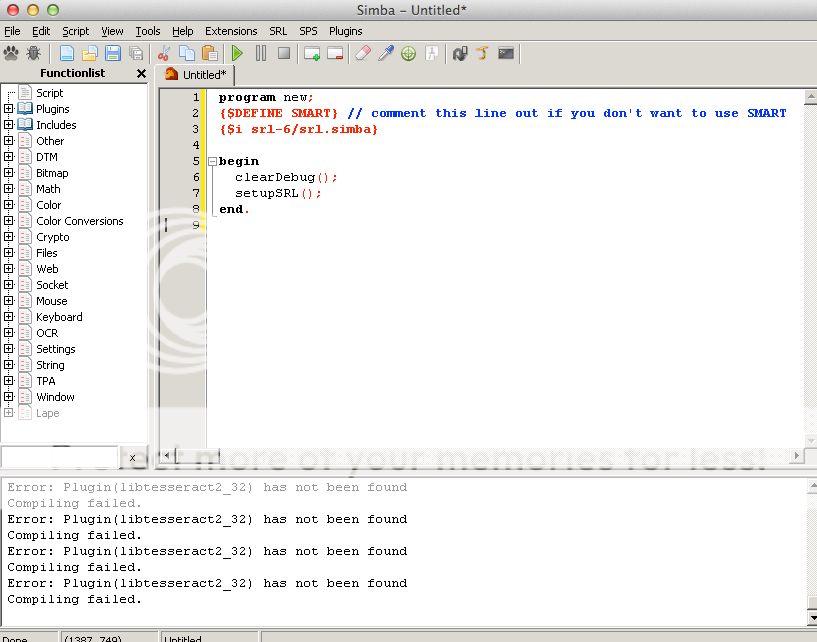
Please help me.
Clarity
2014-10-08 09:11:07
From: Prongs
This is what i'm getting when I try and press run:
Please help me.
Are all of these, specifically libtesseract2_32.dll, in your simba directory plugins folder?
https://github.com/SRL/SRL-Plugins/tree/master/plugins
Prongs
2014-10-10 11:50:51
From: Clarity
Are all of these, specifically libtesseract2_32.dll, in your simba directory plugins folder?
https://github.com/SRL/SRL-Plugins/tree/master/plugins
I don't know where to find the simba folder, i just opened it with Wine, can't find the folder.
Coh3n
2014-10-10 16:54:52
From: Prongs
I don't know where to find the simba folder, i just opened it with Wine, can't find the folder.
You'll have to find your Wine folder, then look in whatever folder represents the C:/ drive. My guess would be there's a Wine folder in your Applications folder (click Applications from the Finder).
SRL Jon
2014-12-04 20:52:27
I am having an issue, I used to use simba back in 2012 and got to a point where i was pretty good at it. Just came back, updated my JRE and my Java to a more updated 7+ version. Unfortunately, I get get this error after i start the script after picking my account to use.
Checking for script updates:
—–> Script revision: 9 | Online revision: 9
—–> You have the latest revision.
—- FATAL ERROR: smartSetupDrawing(): Unable to setup SMART drawing
Successfully executed.
Any advice would be helpful. Thank you. @Coh3n;@anybodywhocanhelp
Batmans Beard
2015-01-24 00:12:03
I'm having an issue with installing/setting up Simba. I've been following the setup guide, but I'll post what has happened. I can't get beyond this step. Can someone please help me through it? Thanks.
Loaded Font CharsTrade
Loaded Font CharsTrade07
Loaded Font FriendChars
Loaded Font LoginChars
Loaded Font MouseoverChars
Loaded Font SmallChars
Loaded Font SmallChars07
Loaded Font SmallCharsNS
Loaded Font StatChars
Loaded Font StatChars07
Loaded Font UpChars
Loaded Font UpChars07
Loaded Font UpChars07_s
Loaded Font UpCharsEx
Loaded Font XPChars
Loaded Font UpChars_s
Loading extension C:\Simba\Extensions\srl.sex
Extension Enabled
SRL Updater Enabled!
SPS Updater Enabled!
Plugins Updater Enabled!
Loading extension C:\Simba\Extensions\associate.sex
Extension Disabled - Did not compile
[Error] (14:3): Duplicate identifier 'TCharArray' at line 14
Coh3n
2015-02-01 20:56:03
From: Batmans Beard
I'm having an issue with installing/setting up Simba. I've been following the setup guide, but I'll post what has happened. I can't get beyond this step. Can someone please help me through it? Thanks.
Loaded Font CharsTrade
Loaded Font CharsTrade07
Loaded Font FriendChars
Loaded Font LoginChars
Loaded Font MouseoverChars
Loaded Font SmallChars
Loaded Font SmallChars07
Loaded Font SmallCharsNS
Loaded Font StatChars
Loaded Font StatChars07
Loaded Font UpChars
Loaded Font UpChars07
Loaded Font UpChars07_s
Loaded Font UpCharsEx
Loaded Font XPChars
Loaded Font UpChars_s
Loading extension C:\Simba\Extensions\srl.sex
Extension Enabled
SRL Updater Enabled!
SPS Updater Enabled!
Plugins Updater Enabled!
Loading extension C:\Simba\Extensions\associate.sex
Extension Disabled - Did not compile
[Error] (14:3): Duplicate identifier 'TCharArray' at line 14
You're going to have to go to View > Extensions and uncheck the associate.sex extension. Then restart Simba.
okan123
2015-02-07 16:23:41
I am so confused and extremely frustrated, someone please help me! It tells me it cannot find JRE 7 when I have it all downloaded. How do i redirect it so it can find it?
The Mayor
2015-02-07 16:59:47
From: okan123
I am so confused and extremely frustrated, someone please help me! It tells me it cannot find JRE 7 when I have it all downloaded. How do i redirect it so it can find it?
Did you install simba to the same drive where java is installed (i.e., both on C:/ ).
okan123
2015-02-08 15:54:02
From: The Mayor
Did you install simba to the same drive where java is installed (i.e., both on C:/ ).
I got it all working don't worry. I had to search Javaw.exe from search and move it into my java folder where it specified and it worked. Also I needed Java 7u7, downloaded it and worked. Thanks buddy
Czepa2
2015-02-28 01:03:52
hi i havent been to the villavu forums for atleast 6 or 7 years and i recall i made this account because something happened with my original account "Czepa" i tried to get to the thread to download msi.simba and it wont let me due to not being an SRL member anymore. i was quite active in 2005-2007, so i was just wondering if i could either get the email adress for the account (so i can recover through that) or get SRL member status again to be able to download this stuff correctly.
ive just started playing 07scape with a friend from back in school and theres no way im going to have the time to level a pure to high str without a working script XD
KeepBotting
2015-02-28 12:31:19
From: Czepa2
hi i havent been to the villavu forums for atleast 6 or 7 years and i recall i made this account because something happened with my original account "Czepa" i tried to get to the thread to download msi.simba and it wont let me due to not being an SRL member anymore. i was quite active in 2005-2007, so i was just wondering if i could either get the email adress for the account (so i can recover through that) or get SRL member status again to be able to download this stuff correctly.
ive just started playing 07scape with a friend from back in school and theres no way im going to have the time to level a pure to high str without a working script XD
MSI Phoenix was discontinued long ago. I realize you may still want to get your account back, but just know that MSI hasn't been updated for two(?) years now.
At any rate, welcome back to the community! Feel free to PM me if you've any questions :)
Harrier
2015-02-28 13:07:22
From: KeepBotting
MSI Phoenix was discontinued long ago. I realize you may still want to get your account back, but just know that MSI hasn't been updated for two(?) years now.
At any rate, welcome back to the community! Feel free to PM me if you've any questions :)
Tbh it could be slowly brought back on OSRS once
@Olly; is finished with the new include
Sogalishis
2015-03-03 00:38:13
so ive been away from SRL and runescape for 2 years or so i think so i figured id come back and catch up with all the changes. i deleted all my previous version of simba and after following coh3n's guide i set up simba.
but after trying to run the first code in the guide i get this error message
WARNING: Failed to find your Java path
along with this pop - up
windows cannot find 'c:/program files (x86)/java/jre7/bin/java.exe'. make sure you type the name correctly, and then try again.
any help or guidance would be greatly appritiated.
thank you in advanced.


