Lumbridge Jewellery Crafter
Version: 1.2
Status: retired*FAQ for fixing script issues:
[spoiler=FAQ]
Issue:
Help, I get this error when using the script!
Error: Duplicate declaration "deleteIndex" at line 309
Fix:Delete that procedure from the script.
Issue:
Help, I get this error when using the script!
Unable to find accurate numbers for current XP and level.
Fix:In the script, ctrl f for
Unable to find accurate numbers the delete the line after that says
terminateScript;
Issue:
The script only crafts a few items before running back to the bank, wat do?
Fix:Enable the production window as instructed in the instructions.
Issue:
Script does nothing/doesn't log in/etc
Fix:As instructed in the instructions, make sure your graphics are set up properly.
[/spoiler]

Features
[INDENT]
- Crafts all silver and gold jewellery (up to dragonstone)
- Optional and customize-able breaking and antiban
- Runs past 6 hours
- Optional onscreen progress report
- Easy to use SRL Playerform
[/INDENT]
Instructions
[INDENT]
- Setup Simba and SRL following this tutorial.
- Download the SPS map that is attached and put it in Simba/Includes/SPS/img/runescape_other/
- Disable XP popups.
- Zoom camera out all the way. This can be done with holding PgDn until it finished zooming out.
- Enable production progress screen.
- Set the 1st bank preset to withdraw the materials you require. If you're crafting silver or gold without gems, this is 28 gold or silver bars. If you're crafting with gems, this is 14 gold bars and 14 cut gems.
- Start player at the Lumbridge Combat Academy bank.
- Start the script.
- Carefully fill out the form, and save it if you wish to use it again later. (Stats username and password explained in the next section)
- Press the start button on the form to start the script.
[/INDENT]
Personalised Stats Tracking
[INDENT]
This script has the option of personal stats tracking. This means that in addition to the stats for everyone being put into a database, you can have your own individual stats recorded separately. You also can put a live stat image which shows your stats in your signature or somewhere else.
First you need to create a user profile. This user profile can be used for any of my supported scripts, although this is currently the only script that supports it. To create a user profile, go to httpx://srlbmwxi.tk/scripts/users/create.html and follow the directions.
Username:
You can choose any username that is made up of letters, numbers, or underscores as long as it is not taken, but I recommend using your Villavu username.
Password
Choose a password that you do NOT use for anything else. You will use this password to send stats to your personal stats collection.
I recommend you write down your username and password somewhere where you will not lose it as there is not a way for you to change it later.
Press the 'Create user' button. The next page that loads will tell you the status of your account creation. If you need to choose a different name, just press the back button in your browser and fill out the form again with a different name.
Now that you've finished the account creation you can start the script. In the form where it says 'Stats username' and 'Stats password' those are where you put the username and password of the stats account you've created.
When you want to check your personal stats, just go to httpx://srlbmwxi.tk/scripts/jewellery-crafter/stats/image.php?user=YOUR_USERNAME (replace YOUR_USERNAME with the username of the stats account you made)
This should give you an image that you can place in your signature or on the forums by placing the link inside an IMG tag like this

[/INDENT]
99's Acheived
[INDENT]
- @BMWxi;
- @DontStahp;
- @Paradox The Divine;
[/INDENT]
Known Bugs
[INDENT]
- None (Tell me if you find any)
[/INDENT]
Progress Reports
[INDENT]
Post these please. Either a screenshot of the paint or a copy of the text report would be great!
[spoiler=Reports]
BMWxi big man 1
 KeepBotting
 DontStahp
XP Gained: 467040
XP /h: 27516
Items Crafted: 23352
Time Running: 1 Days, 1 Hours, 15 Minutes and 27 Seconds
[/spoiler]
[/INDENT]
Future Updates
[INDENT]
Personalised stats tracking (like the image at the top of this thread but for individual users) Added in v1.1
[/INDENT]
Credits
[INDENT]
- Everyone who contributed to SRL and Simba
- @Ashaman88; for the MsToTime64 function
- @Coh3n; for the thread layout on which mine is based
- @putonajonny; for his tutorial on live script stat images
[/INDENT]
Updates
[INDENT]
- V1.1 released. Added personalised stats tracking and a version checker.
- V1.2 released. Reduced online depency. Now all mandatory script components are in-script, and if my site is offline the script will still function perfectly.
[/INDENT]
KeepBotting
2014-08-20 14:22:30
Gratz on the release!
Coh3n
2014-08-20 18:05:41
That is one sexy looking thread! ;) Congrats on the release!
chambo123
2014-08-20 18:07:49
Exception in Script: Closing parenthesis expected at line 167, column 127
I get that when I try to start the script?
ah fixed it.
chambo123
2014-08-20 18:21:03
Script withdraws the preset but then just stands there?
From: chambo123
Script withdraws the preset but then just stands there?
Do you have your graphics set correctly? What does the debug say?
chambo123
2014-08-20 19:59:32
From: BMWxi
Do you have your graphics set correctly? What does the debug say?
Walked.
Found 0 furnace slots.
Less than 3 slots found.
0
Did not click Furnace.
Walking to furnace
– WARNING: Lumbridge.getPlayerPos(): Didn't find enough matches accurately calc your postion
– Lumbridge.getPlayerPos(): result = {X = -1, Y = -1}, took 281 ms
From: chambo123
Walked.
Found 0 furnace slots.
Less than 3 slots found.
0
Did not click Furnace.
Walking to furnace
– WARNING: Lumbridge.getPlayerPos(): Didn't find enough matches accurately calc your postion
– Lumbridge.getPlayerPos(): result = {X = -1, Y = -1}, took 281 ms
Could you either post or PM me a screenshot of your screen and your settings menu?
chambo123
2014-08-20 20:07:14
It's working now, I had to start the script whilst at the furnace rather than bank.
From: chambo123
It's working now, I had to start the script whilst at the furnace rather than bank.
Good to hear, although it should walk to the bank if it can't find it. Maybe just an SPS issue though.
nkd2009
2014-08-21 12:37:02
After figuring out how to set up the preset, which I had no idea you could use, the script has run flawlessly. I really don't think I have seen a better script. Not one miss click in 8 hours, pretty crazy. The perfect amount of anti ban. Great job, BMW. I'll edit this post with a progress report later on today.
nutta124
2014-08-21 14:06:44
DOPE DUDEEEEEEEE, i really need this xD
gratz on release!
From: nkd2009
After figuring out how to set up the preset, which I had no idea you could use, the script has run flawlessly. I really don't think I have seen a better script. Not one miss click in 8 hours, pretty crazy. The perfect amount of anti ban. Great job, BMW. I'll edit this post with a progress report later on today.
Thanks
Great, I'll look forward to it :D
From: nutta124
DOPE DUDEEEEEEEE, i really need this xD
gratz on release!
Thanks, and enjoy!
Edit: V1.1 released, see 1st post for details!
Wu-Tang Clan
2014-08-22 12:28:41
I made a sapphire bracelet maker for edgeville furnace, and it doesn't run nearly as good of xp proggies as this. Good for you man
nkd2009
2014-08-22 14:57:42
Trying to get a long one but for some reason my minimap won't load after reloading the client causing the script to fail. I'm getting about 1k an hour with breaks so getting about 55k and 90k/hr with diamonds.
From: Wu-Tang Clan
I made a sapphire bracelet maker for edgeville furnace, and it doesn't run nearly as good of xp proggies as this. Good for you man
Thanks :)
From: nkd2009
Trying to get a long one but for some reason my minimap won't load after reloading the client causing the script to fail. I'm getting about 1k an hour with breaks so getting about 55k and 90k/hr with diamonds.
OpenGL or DirectX?
Does logging out and back in fix the minimap issue? If it does I could add that.
hopesluck
2014-09-01 08:11:14
crafting made easy!
chambo123
2014-09-01 15:59:17
Is it me or did the new grouping system update mess up a few scripts like this one?
Anyone else having this problem? It will click the skills icon but won't check the level and just carry on changing between the backpack and skill icon.
Hayhurst
2014-09-01 18:41:10
From: chambo123
Is it me or did the new grouping system update mess up a few scripts like this one?
Anyone else having this problem? It will click the skills icon but won't check the level and just carry on changing between the backpack and skill icon.
Yes, I've noticed this too. I expect it to fixed sometime soon.
From: chambo123
Is it me or did the new grouping system update mess up a few scripts like this one?
Anyone else having this problem? It will click the skills icon but won't check the level and just carry on changing between the backpack and skill icon.
There seems to be a bug in tabStats.isOpen (probably caused by the update). I'll see if I can fix it.
Edit: The problem is that Jagex have changed the stats tab icon.
Old:

New:

so gameTabs._findTab is looking for the old bitmap.
Edit2: I've submitted a pull request on GitHub so once that is merged the issue should be fixed.
nkd2009
2014-09-03 16:54:03
Is there a way to disable the gameTabs._findTab? Would that work?
Samson420
2014-09-03 21:44:46
to bad :( i was so looking forward to use this ! awesome Script dude ^^
nah hopefully it's fixed next week :thumbsup::thumbsup:
kotaku
2014-09-04 17:51:14
From: Samson420
to bad :( i was so looking forward to use this ! awesome Script dude ^^
nah hopefully it's fixed next week :thumbsup::thumbsup:
If you really want to use it, I'm pretty sure you can just comment out "getStartingStats;" in the "setupPlayer;" procedure and disable stats tracking
EDIT: No need for hotfix, see BMWxi's official update below
From: nkd2009
Is there a way to disable the gameTabs._findTab? Would that work?
From: Samson420
to bad :( i was so looking forward to use this ! awesome Script dude ^^
nah hopefully it's fixed next week :thumbsup::thumbsup:
From: kotaku
If you really want to use it, I'm pretty sure you can just comment out "getStartingStats;" in the "setupPlayer;" procedure and disable stats tracking
If you update to the new simba and matching new srl6 you should have the update, Olly put it into the new one instead of the old one.
New Simba:
https://villavu.com/forum/showthread.php?t=109970
New SRL6:
https://villavu.com/forum/showthread.php?t=109970&page=2&p=1307341#post1307341See this post
https://villavu.com/forum/showthread.php?t=109947&page=2&p=1307835#post1307835
From: BMWxi
If you update to the new simba and matching new srl6 you should have the update, Olly put it into the new one instead of the old one.
New Simba:
https://villavu.com/forum/showthread.php?t=109970
New SRL6:
https://villavu.com/forum/showthread.php?t=109970&page=2&p=1307341#post1307341
updated via the links provided but it still doesn't work? just clicks on the skills tab or something but doesn't move any further then that.. :I
Edit: I have commented out
//getStartingStats;
from the main loop so it clicks the bank and uses preset 1 but fails to do anything after that
Debug box says :
Waiting a bit...
There, ready.
Taking a break in 16 Hours, 47 Minutes and 50 Seconds
Failed to complete craftLoop too many times. Ending Script.
Successfully executed.
EDIT 2:So after some fidling and reinstalling simba via links and figuring out the Playermanager thing
still with the
//getStartingStats;
commneted out it manages to do the "loop"
though i think it thinks it's "level 1" crafting and only crafts 4-5 gold ammulets and rebanks and repeats
 Numbers crunched in 15ms.
LevelBefore: 1
Numbers crunched in 0ms.
LevelBefore: 1
Numbers crunched in 0ms.
LevelBefore: 1
Numbers crunched in 15ms.
Keeps spamming that.. any advice would be great
From: big man 1
updated via the links provided but it still doesn't work? just clicks on the skills tab or something but doesn't move any further then that.. :I
Edit: I have commented out //getStartingStats;
from the main loop so it clicks the bank and uses preset 1 but fails to do anything after that
Debug box says :
Waiting a bit...
There, ready.
Taking a break in 16 Hours, 47 Minutes and 50 Seconds
Failed to complete craftLoop too many times. Ending Script.
Successfully executed.
EDIT 2:
So after some fidling and reinstalling simba via links and figuring out the Playermanager thing
still with the //getStartingStats;
commneted out it manages to do the "loop"
though i think it thinks it's "level 1" crafting and only crafts 4-5 gold ammulets and rebanks and repeats
 Numbers crunched in 15ms.
LevelBefore: 1
Numbers crunched in 0ms.
LevelBefore: 1
Numbers crunched in 0ms.
LevelBefore: 1
Numbers crunched in 15ms.
Keeps spamming that.. any advice would be great
I linked to the new simba and srl without realizing that it was not using all of the fixed gametab.simba. I recommend downgrading to your original simba and SRL and just replacing C:\Simba\Includes\SRL-6\lib\interfaces\gametabs\gametab.simba with this file attached
From: BMWxi
I linked to the new simba and srl without realizing that it was not using all of the fixed gametab.simba. I recommend downgrading to your original simba and SRL and just replacing C:\Simba\Includes\SRL-6\lib\interfaces\gametabs\gametab.simba with this file attached
Thank you,
I don't know what you mean by downgrading so i just reinstalled simba from Wizzup.org
and you know updated srl & sps and then replaced the gametab with your one.. but
It just stands there after withdrawing bars
Using DirectX:    False
ItemString: Gold amulet
ItemBox: 4
Waiting a bit...
There, ready.
Taking a break in 1 Hours, 3 Minutes and 27 Seconds
Failed to complete craftLoop too many times. Ending Script.
Successfully executed.
Also just noticed that it doesn't click the skill tab so the debug says
LevelBefore: 1
Numbers crunched in 0ms.
From: big man 1
Thank you,
I don't know what you mean by downgrading so i just reinstalled simba from Wizzup.org
and you know updated srl & sps and then replaced the gametab with your one.. but
It just stands there after withdrawing bars
Using DirectX:    False
ItemString: Gold amulet
ItemBox: 4
Waiting a bit...
There, ready.
Taking a break in 1 Hours, 3 Minutes and 27 Seconds
Failed to complete craftLoop too many times. Ending Script.
Successfully executed.
Also just noticed that it doesn't click the skill tab so the debug says
LevelBefore: 1
Numbers crunched in 0ms.
That's odd, I tested it using normal simba and normal SRL (but with gametab.simba updated) and it worked fine. I think I was using OpenGL too.
If you don't have SRL Debug enabled could you enable that and then post the debug it gives you?
Compiled successfully in 1280 ms.
You have the newest version!
-- TPlayerArray.setup()
---- Loaded player:xxxxxx
-- TPlayerArray.setup(): Success
Casting metal:    Gold
ItemType:         Amulet
Gemstone:
Items to craft:   1000
Script Debug:     True
SRL Debug:        False
Script Paint:     True
Taking Breaks:    False
Using AntiBan:    False
Using DirectX:    False
loading Bitmaps.
Loaded 1 BMP meJzj1ipmlwtmFbKkBDEyyoCRMiWIicmYickGjJzJRszMPpQjVtZgyhELSzTliJU1mSDiV1JHRtjUZONBEF3nzzxGRmBz0FQW40LI2uHOQDIHoZKDoxoXQtaCSwQiSLwJcHFMEW7uJqwI2RBcauDKeHi6sCJkQ3CpgSvj4JiCFaF6h4AaVlbsCDUiUMThIgQNwWoOmgicy8LyGhfCn06Q2XgMgZiDNcUiW0HQEGSj4AhNHMz+TA1EFXMOU24OMCOzsExhYVnFyrqZbAQA+0KN6A==
Loaded 2 BMP
Loaded 3 BMP
Loaded 4 BMP
Loading Paths
Paths Loaded
Casting metal:    Gold
ItemType:         Amulet
Gemstone:
Items to craft:   1000
Script Debug:     True
SRL Debug:        False
Script Paint:     True
Taking Breaks:    False
Using AntiBan:    False
Using DirectX:    False
ItemString: Gold amulet
ItemBox: 4
Waiting a bit...
There, ready.
Starting with 158864 Crafting XP.
Starting with 54 levels.
Taking a break in 1 Hours, 3 Minutes and 31 Seconds
Starting bankLoop.
Walking to bank
Walked.
Waiting for bankScreen to close.
Banked: True
Walking to furnace
Walked.
Found 0 furnace slots.
Less than 3 slots found.
0
Did not click Furnace.
Walking to furnace
Walked.
Found 0 furnace slots.
Less than 3 slots found.
0
Did not click Furnace.
Walking to furnace
Walked.
Found 0 furnace slots.
Less than 3 slots found.
0
Did not click Furnace.
Walking to furnace
Walked.
Found 0 furnace slots.
Less than 3 slots found.
0
Did not click Furnace.
Walking to furnace
Walked.
Found 0 furnace slots.
Less than 3 slots found.
0
Did not click Furnace.
Walking to furnace
Walked.
Found 0 furnace slots.
Less than 3 slots found.
0
Did not click Furnace.
Walking to furnace
Walked.
Found 0 furnace slots.
Less than 3 slots found.
0
Did not click Furnace.
Walking to furnace
Walked.
Found 0 furnace slots.
Less than 3 slots found.
0
Did not click Furnace.
Walking to furnace
Walked.
Found 0 furnace slots.
Less than 3 slots found.
0
Did not click Furnace.
Walking to furnace
Walked.
Found 0 furnace slots.
Less than 3 slots found.
0
Did not click Furnace.
Walking to furnace
Walked.
Found 0 furnace slots.
Less than 3 slots found.
0
Did not click Furnace.
Failed to complete craftLoop too many times. Ending Script.
Successfully executed.
Restarted Pc Fresh installed simba ..replaced the gametab file and that's what it showed :I
I'm running it in OpenGL too , i tired switching to DirectX but the screen flickers like crazy as if it were refreshing on the top left it keeps saying 'loading"
Doesn't log player in ;[
Where it says " did not click furnace .. it didn't even move from the bank. so i don't know why it would say that.
Soo after some fiddling it came to mind that the mini map might be a problem too.. i walked towards the castle a bit to load up the mini map because in OpenGL im not sure if you guys have this problem or not but for me it doesn't load untill i reach a certain area where the "loading" screen pops up and it refreshes it or something so the mini map is "complete" so..
The script did 2 full inventories and stoped .. debug said .. "Failed to withdraw a full inventory. Ending Script."
though it was standing at the furnace with a full invent .. restarted script seeing how it goes. has done 3 loads so far.
From: big man 1
Soo after some fiddling it came to mind that the mini map might be a problem too.. i walked towards the castle a bit to load up the mini map because in OpenGL im not sure if you guys have this problem or not but for me it doesn't load untill i reach a certain area where the "loading" screen pops up and it refreshes it or something so the mini map is "complete" so..
The script did 2 full inventories and stoped .. debug said .. "Failed to withdraw a full inventory. Ending Script."
though it was standing at the furnace with a full invent .. restarted script seeing how it goes. has done 3 loads so far.
Well the minimap issue would be why it wasn't walking to the furnace, but I don't know why it would think the inventory wasn't full.
If you could post the debug with SRL Debug enabled from the last few loads if it happens again that would be great.
From: BMWxi
Well the minimap issue would be why it wasn't walking to the furnace, but I don't know why it would think the inventory wasn't full.
If you could post the debug with SRL Debug enabled from the last few loads if it happens again that would be great.
Compiled successfully in 1528 ms.
You have the newest version!
-- TPlayerArray.setup()
---- Loaded player:XXXXXXXXX
-- TPlayerArray.setup(): Success
Casting metal:    Gold
ItemType:         Amulet
Gemstone:
Items to craft:   10000
Script Debug:     True
SRL Debug:        True
Script Paint:     False
Taking Breaks:    False
Using AntiBan:    False
Using DirectX:    False
-- setupSRL()
---- Setting up SRL...
---- initSmart():
------ Attempting to pair to a previously spawned client
------ smartPairToExistingClient():
-------- Found 1 free client(s), attempting to pair to one...
---------- smartSetAsTarget(): Succesfully set SMART[4336] as Simba's target
-------- Succesfully paired to a existing client, SMART[4336]
------ smartPairToExistingClient(): result = true
------ Succesfully initialized via pairing to a previously spawned client
---- initSmart()
---- Waiting up to 5 minutes for RS to load...
------ TRSActionBar.__findButton(): Found the actionbar button @ {X = 566, Y = 397}
------ TRSActionBar.__find(): result = true (height = 75)
------ Dynamic interfaces have been set.
---- Client is ready.
---- Setup SRL in 125ms.
-- setupSRL(): True
loading Bitmaps.
Loaded 1 BMP meJzj1ipmlwtmFbKkBDEyyoCRMiWIicmYickGjJzJRszMPpQjVtZgyhELSzTliJU1mSDiV1JHRtjUZONBEF3nzzxGRmBz0FQW40LI2uHOQDIHoZKDoxoXQtaCSwQiSLwJcHFMEW7uJqwI2RBcauDKeHi6sCJkQ3CpgSvj4JiCFaF6h4AaVlbsCDUiUMThIgQNwWoOmgicy8LyGhfCn06Q2XgMgZiDNcUiW0HQEGSj4AhNHMz+TA1EFXMOU24OMCOzsExhYVnFyrqZbAQA+0KN6A==
Loaded 2 BMP
Loaded 3 BMP
Loaded 4 BMP
Loading Paths
-- Lumbridge.init()
---- Path exists (C:\Simba\Includes\SPS\img\runescape_other\lumbridge_crafter.png)
---- Setup area "lumbridge_crafter" in 47ms
-- Lumbridge.init()
Paths Loaded
Casting metal:    Gold
ItemType:         Amulet
Gemstone:
Items to craft:   10000
Script Debug:     True
SRL Debug:        True
Script Paint:     False
Taking Breaks:    False
Using AntiBan:    False
Using DirectX:    False
ItemString: Gold amulet
ItemBox: 4
-- TPlayer.login()
---- Already logged in
---- Logged in: XXXXXXX
-- TPlayer.login(): True
Waiting a bit...
-- exitTreasure()
-- exitTreasure(): result = False
There, ready.
---- TRSGameTab.__initTabs(): Setup gametab properties
-- TRSGameTabs.openTab(1)
---- Tab is already visible, bringing to front
-- TRSGameTabs.openTab(1): = True
-- tabStats.getSkillLevel(13): result = 55
---- TRSTabStats.getSkillInfo(): result = 182174
Starting with 182174 Crafting XP.
Starting with 55 levels.
Taking a break in 10 Hours, 5 Minutes and 26 Seconds
Starting bankLoop.
-- Lumbridge.getPlayerPos(): result = {X = 202, Y = 174}, took 110 ms
-- TRSBankscreen.__openChest()
---- isMouseOverText()
------ Current mouse-over text: "Use Bank chest"
------ Found "Use Bank" in mouse-over string: "Use Bank chest"
---- isMouseOverText(): True
---- Succesfully opened the bank
-- TRSBankscreen.__openChest() result = true
Waiting for bankScreen to close.
Banked: True
-- TRSGameTabs.openTab(2)
---- Opening tab via gametab navigation bar
-- TRSGameTabs.openTab(2): result = False
Walking to furnace
-- Lumbridge.getPlayerPos(): result = {X = 202, Y = 174}, took 94 ms
Walked.
Found 2 furnace slots.
Less than 3 slots found.
0
Did not click Furnace.
Walking to furnace
-- Lumbridge.getPlayerPos(): result = {X = 238, Y = 182}, took 94 ms
Walked.
Found 3 furnace slots.
Less than 5 slots found, found furnace
324
waiting for text
-- isMouseOverText()
---- Current mouse-over text: "Smelt Furnace"
---- Found "melt" in mouse-over string: "Smelt Furnace"
-- isMouseOverText(): True
-- isMouseOverText()
---- Current mouse-over text: ""
---- Current mouse-over text: "Smelt Furnace"
---- Found "melt" in mouse-over string: "Smelt Furnace"
-- isMouseOverText(): True
waiting for furnace interface
Clicked Furnace
LevelBefore: 55
Numbers crunched in 0ms.
---- TRSProductionScreen.getSelectedBoxText(): result = Gold amulet
Gold amulet is already selected.
Botmap yes :)
Botmap no :(
Starting bankLoop.
-- Lumbridge.getPlayerPos(): result = {X = 246, Y = 182}, took 94 ms
Walking to bank
-- Lumbridge.getPlayerPos(): result = {X = 246, Y = 182}, took 94 ms
updating progress
XPGained: 840
CraftingXP: 183014
LevelBefore: 55
LevelDifference1: 0
LevelDifference2: 0
------------------------------------------------------------------
Crafting: Gold amulet
XP Gained: 840
XP /h: 32707
Crafting Level: 55
Levels  Gained: 0
Items Crafted: 28
Time Running: 1 Minutes and 15 Seconds
TTL: 1 Minutes and 52 Seconds
------------------------------------------------------------------
Taking a break in 10 Hours, 4 Minutes and 11 Seconds
------------------------------------------------------------------
Numbers painted in 32ms.
Walked.
-- TRSBankscreen.__openChest()
---- isMouseOverText()
------ Current mouse-over text: "Use Bank chest"
------ Found "Use Bank" in mouse-over string: "Use Bank chest"
---- isMouseOverText(): True
---- Succesfully opened the bank
-- TRSBankscreen.__openChest() result = true
Waiting for bankScreen to close.
Banked: True
Walking to furnace
-- Lumbridge.getPlayerPos(): result = {X = 202, Y = 174}, took 109 ms
Walked.
Found 3 furnace slots.
Less than 5 slots found, found furnace
359
waiting for text
-- isMouseOverText()
---- Current mouse-over text: "Smelt Furnace"
---- Found "melt" in mouse-over string: "Smelt Furnace"
-- isMouseOverText(): True
-- isMouseOverText()
---- Current mouse-over text: "Smelt Furnace"
---- Found "melt" in mouse-over string: "Smelt Furnace"
-- isMouseOverText(): True
waiting for furnace interface
Clicked Furnace
LevelBefore: 55
Numbers crunched in 0ms.
---- TRSProductionScreen.getSelectedBoxText(): result = Gold amulet
Gold amulet is already selected.
Botmap yes :)
Botmap no :(
Starting bankLoop.
-- Lumbridge.getPlayerPos(): result = {X = 246, Y = 186}, took 109 ms
Walking to bank
-- Lumbridge.getPlayerPos(): result = {X = 246, Y = 186}, took 109 ms
updating progress
XPGained: 1680
CraftingXP: 183854
LevelBefore: 55
LevelDifference1: 0
LevelDifference2: 0
------------------------------------------------------------------
Crafting: Gold amulet
XP Gained: 1680
XP /h: 36521
Crafting Level: 55
Levels  Gained: 0
Items Crafted: 56
Time Running: 2 Minutes and 28 Seconds
TTL: 18 Seconds
------------------------------------------------------------------
Taking a break in 10 Hours, 2 Minutes and 57 Seconds
------------------------------------------------------------------
Numbers painted in 47ms.
Walked.
-- TRSBankscreen.__openChest()
---- isMouseOverText()
------ Current mouse-over text: ""
------ Current mouse-over text: "Use Bank chest"
------ Found "Use Bank" in mouse-over string: "Use Bank chest"
---- isMouseOverText(): True
---- Succesfully opened the bank
-- TRSBankscreen.__openChest() result = true
Waiting for bankScreen to close.
Banked: True
-- TRSGameTabs.openTab(2)
---- Opening tab via gametab navigation bar
-- TRSGameTabs.openTab(2): result = False
Walking to furnace
-- Lumbridge.getPlayerPos(): result = {X = 198, Y = 174}, took 110 ms
Walked.
-- TRSGameTabs.openTab(2)
---- Opening tab via gametab navigation bar
-- TRSGameTabs.openTab(2): result = False
Failed to withdraw a full inventory. Ending Script.
-- Succesfully freed SMART[4336]
-- Freeing gametabs bitmaps...
Successfully executed.
it's odd how it says time untill break is 10mins though in the pop form i typed in 600mins till next break.. but yeah .. it does like 2-3 loads and then withdraws full load and walks to the furnace and stands there and terminates script .. :(
From: big man 1
code
it's odd how it says time untill break is 10mins though in the pop form i typed in 600mins till next break.. but yeah .. it does like 2-3 loads and then withdraws full load and walks to the furnace and stands there and terminates script .. :(
-- TRSGameTabs.openTab(2): result = False
For some reason SRL isn't detecting that your backpack is open. This is why the script thinks you have failed to withdraw a full inventory, because tabBackpack.isFull() is returning false.
Also where does it say that the time until break is 10 minutes? The debug says it is in 10 hours:
------------------------------------------------------------------
Crafting: Gold amulet
XP Gained: 840
XP /h: 32707
Crafting Level: 55
Levels  Gained: 0
Items Crafted: 28
Time Running: 1 Minutes and 15 Seconds
TTL: 1 Minutes and 52 Seconds
------------------------------------------------------------------
Taking a break in 10 Hours, 4 Minutes and 11 Seconds
------------------------------------------------------------------
From: BMWxi
For some reason SRL isn't detecting that your backpack is open. This is why the script thinks you have failed to withdraw a full inventory, because tabBackpack.isFull() is returning false.
Also where does it say that the time until break is 10 minutes? The debug says it is in 10 hours:
what can i do to fix it ? ;o and some times it shows that its 10mins :I
From: big man 1
what can i do to fix it ? ;o and some times it shows that its 10mins :I
Well a good start would be taking a small screenshot of the backpack symbol in png format and sending it to me so I can compare it with the one I have. Not sure what the result of that will be because I'm using the same one without issues, but if they are different then that's interesting. Also I assume that your brightness is at maximum and your interfaces are correctly set up? If they're not then there's no point in me changing anything, so check that first.
[ATTACH=CONFIG]23976[/ATTACH]
Yes my settings are accurate all my other scripts work fine . brightness to max and interface set up as requested by OP
i have taken a snap shot of the backpack hope it helps
From: big man 1
[ATTACH=CONFIG]23976[/ATTACH]
Yes my settings are accurate all my other scripts work fine . brightness to max and interface set up as requested by OP
i have taken a snap shot of the backpack hope it helps
I'm going by memory, but that looks slightly different than the one I made a bmp of. Mine had a reddish pixel near the center.
go to gametabs.simba and replace line 170 with this:
_bmp := BitmapFromString(11, 5, 'meJxTkVMXkAziktRgZGAQlLJTcs2SMPKCiADZgU0LxEQEIGwgYuMXAyKgMiACCiqnVBWfeKcipw5kA0WUnTuACKgXJMusDDTHJnuiqGIBUAFEC8R8IAIqA5IgLSlVQPUQEyCGAHUBEUQZ0BCgAv22ZQAMpCD0');
I really appreciate your help mate , seems to have done around 6 loads so far without getting stuck .. my long haul will begin when i have superheated 10k+ gold ores .. for now its working alright :)
thank you again , will let you know if anything pops up
Cyanempire
2014-09-08 05:33:35
There, ready.
Unable to find accurate numbers for current XP and level.
From: big man 1
Nice proggy, I'll add it to the main post!
From: Cyanempire
There, ready.
Unable to find accurate numbers for current XP and level.
That means that the numbers that it got from your crafting XP did not match up with your crafting level.
I've added some debug to this function and will PM it to you. If you run it with SRL Debug and Script Debug enabled that should tell us what the problem is.
Cyanempire
2014-09-08 08:52:03
it keeps clicking the nav bar tab specifically the stats and backpack tab.. then comes up with that error.
From: Cyanempire
it keeps clicking the nav bar tab specifically the stats and backpack tab.. then comes up with that error.
The problem is that it isn't finding the stats tab. Are you using the version of gametab.simba that I posted a few posts back? (You may also need to change the backpack bmp to the one I posted after that, but try just the gametab.simba update first)
Cyanempire
2014-09-08 10:07:57
i already changed it with the ones you posted awhile back
it still keeps pressing the stat tab and backpack tab then ends.
From: Cyanempire
i already changed it with the ones you posted awhile back
it still keeps pressing the stat tab and backpack tab then ends.
PM me a png image of the tab symbols, I guess the bitmaps aren't working again. We might need a better way of finding them than bitmaps if Jagex are altering them so much.
Cyanempire
2014-09-09 04:08:10
[ATTACH=CONFIG]23994[/ATTACH]
[ATTACH=CONFIG]23995[/ATTACH]
[ATTACH=CONFIG]23996[/ATTACH]
[ATTACH=CONFIG]23997[/ATTACH]
Yeah, I'm having the same issue. The updated gametab.simba and code temporarily fixed it, but the script bugged out after an hour. Restarted the script and it didn't even work. It messes around 'trying' to find the gametab, ends up clicking on the skill tab, walks to the furnace and then logs me out.
From: Cyanempire
[ATTACH=CONFIG]23994[/ATTACH]
[ATTACH=CONFIG]23995[/ATTACH]
[ATTACH=CONFIG]23996[/ATTACH]
[ATTACH=CONFIG]23997[/ATTACH]
From: Kato
Yeah, I'm having the same issue. The updated gametab.simba and code temporarily fixed it, but the script bugged out after an hour. Restarted the script and it didn't even work. It messes around 'trying' to find the gametab, ends up clicking on the skill tab, walks to the furnace and then logs me out.
Until the part of the SRL include that detects the game tabs is back in working order the script will not work properly.
I'm going to see if I can find out why the tab symbols keep changing for you guys but until there's been a fix they won't be detected reliably.
From: BMWxi
Until the part of the SRL include that detects the game tabs is back in working order the script will not work properly.
I'm going to see if I can find out why the tab symbols keep changing for you guys but until there's been a fix they won't be detected reliably.
Can you post a bug in the section with what's up?
From: Olly
Can you post a bug in the section with what's up?
I'm not sure exactly what's up, but it seems the symbols for the backpack/skill tabs (maybe others too) keep changing.
From: BMWxi
I'm not sure exactly what's up, but it seems the symbols for the backpack/skill tabs (maybe others too) keep changing.
Maybe have the script take a screenshot at the start, then when it fails to select tab take another? then compare em!
Cyanempire
2014-09-10 02:28:13
Alright, just pm me if you need help with anything.
Samson420
2014-09-18 17:32:11
Maybe they started to use the same functions they were already using for Guild-Doors.
Guild door colors are different from server to server and change every 12 hours. Which is pretty good to counter color-detection-bots.
if they start this on the whole interface we will have a rough time getting scripts working for a long time …
it's just a probability though ^^….
tulpiuka
2014-09-19 03:00:58
Flawless. Did all the aforementioned fixes
baboushkah
2014-09-21 23:12:21
Hey good people,
I think I found something here. Like someone else, the script was also ending randomly for me with the error: "Failed to withdraw a full inventory. Ending Script." My inventory was completely full. So I wondered how all of a sudden it would do a few loads then stop randomly. After observing this happen a few times I saw that the inventory location was changing randomly. At first, your inventory is located here: [ATTACH=CONFIG]24050[/ATTACH] but after a while something triggered it to move here:

. This is what's causing the script to think your inventory is empty. I'm not quite sure about this, but I think the first picture is the preset Old School and the second is how the inventory looks in the preset RS3 Classic. You can easily move the inventory back by just dragging it to it's position in the first picture but it just reverts back again and the script stops. Weird stuff.
baboushkah
2014-09-21 23:24:01
Hey good people,
I noticed that the inventory place is changing causing the script to result in "Failed to withdraw a full inventory. Ending Script." at random times. Somehow the inventory place just changes from this spot:

to this spot:
The script then ends because it can't detect the inventory. I think this happens because the first pic is the Old School preset and the second pic is the RS3 Classic preset and somehow the Old School just changes to RS3 Classic preset and what seems to be a random time (Or else the some of the script's movement must cause it). Weird Stuff.
herolym
2014-09-22 11:46:21
"
………………
Unable to find accurate numbers for current XP and level.
Successfully executed."
herolym
2014-09-22 11:54:55
Script Debug: True
SRL Debug: True
Script Paint: True
Taking Breaks: False
Using AntiBan: True
Using DirectX: False
Chance of AntiBan: 0.1
ItemString: Gold amulet
ItemBox: 4
– TPlayer.login()
—- Already logged in
—- Logged in: xxxx
– TPlayer.login(): True
Waiting a bit…
There, ready.
—- TRSGameTab.__initTabs(): Setup gametab properties
– TRSGameTabs.openTab(1)
—- Opening tab via gametab navigation bar
– TRSGameTabs.openTab(1): result = False
– TRSGameTabs.openTab(1)
—- Opening tab via gametab navigation bar
– TRSGameTabs.openTab(1): result = False
– TRSGameTabs.openTab(1)
—- Opening tab via gametab navigation bar
– TRSGameTabs.openTab(1): result = False
– TRSGameTabs.openTab(1)
—- Opening tab via gametab navigation bar
– TRSGameTabs.openTab(1): result = False
– TRSGameTabs.openTab(1)
—- Opening tab via gametab navigation bar
– TRSGameTabs.openTab(1): result = False
– TRSGameTabs.openTab(1)
—- Opening tab via gametab navigation bar
– TRSGameTabs.openTab(1): result = False
– TRSGameTabs.openTab(1)
—- Opening tab via gametab navigation bar
– TRSGameTabs.openTab(1): result = False
– TRSGameTabs.openTab(1)
—- Opening tab via gametab navigation bar
– TRSGameTabs.openTab(1): result = False
– TRSGameTabs.openTab(1)
—- Opening tab via gametab navigation bar
– TRSGameTabs.openTab(1): result = False
– TRSGameTabs.openTab(1)
—- Opening tab via gametab navigation bar
– TRSGameTabs.openTab(1): result = False
Unable to find accurate numbers for current XP and level.
– Succesfully freed SMART[6036]
– Freeing gametabs bitmaps…
Successfully executed.
debug record
From: herolym
Script Debug: True
SRL Debug: True
Script Paint: True
Taking Breaks: False
Using AntiBan: True
Using DirectX: False
Chance of AntiBan: 0.1
ItemString: Gold amulet
ItemBox: 4
– TPlayer.login()
—- Already logged in
—- Logged in: xxxx
– TPlayer.login(): True
Waiting a bit…
There, ready.
—- TRSGameTab.__initTabs(): Setup gametab properties
– TRSGameTabs.openTab(1)
—- Opening tab via gametab navigation bar
– TRSGameTabs.openTab(1): result = False
– TRSGameTabs.openTab(1)
—- Opening tab via gametab navigation bar
– TRSGameTabs.openTab(1): result = False
– TRSGameTabs.openTab(1)
—- Opening tab via gametab navigation bar
– TRSGameTabs.openTab(1): result = False
– TRSGameTabs.openTab(1)
—- Opening tab via gametab navigation bar
– TRSGameTabs.openTab(1): result = False
– TRSGameTabs.openTab(1)
—- Opening tab via gametab navigation bar
– TRSGameTabs.openTab(1): result = False
– TRSGameTabs.openTab(1)
—- Opening tab via gametab navigation bar
– TRSGameTabs.openTab(1): result = False
– TRSGameTabs.openTab(1)
—- Opening tab via gametab navigation bar
– TRSGameTabs.openTab(1): result = False
– TRSGameTabs.openTab(1)
—- Opening tab via gametab navigation bar
– TRSGameTabs.openTab(1): result = False
– TRSGameTabs.openTab(1)
—- Opening tab via gametab navigation bar
– TRSGameTabs.openTab(1): result = False
– TRSGameTabs.openTab(1)
—- Opening tab via gametab navigation bar
– TRSGameTabs.openTab(1): result = False
Unable to find accurate numbers for current XP and level.
– Succesfully freed SMART[6036]
– Freeing gametabs bitmaps…
Successfully executed.
debug record
As you can see from
-- TRSGameTabs.openTab(1): result = False
your SRL can't detect that your skills tab is open. You could try various fixes posted earlier in this thread, or if those don't work you could try updating your SRL and Simba to the new ones. They might have this fixed.
I'll test when I get home whether the new Simba and SRL have the gametabs fixed so i can say for sure which way will work.
EDIT: I tested it, here is what you need:
Simba from here:
https://villavu.com/forum/showthread.php?t=110246SRL from here:
https://github.com/SRL/SRL-6/archive/New_Simba.zipThere may be other working combinations of things, so if you have something that works you can continue using it. If something isn't working, try using those. :)
herolym
2014-09-23 09:30:09
Tyvm.it works for me now.
Assassinranger
2014-10-07 15:10:19
It takes the bars from the bank then smelts then it just stands there.
From: Assassinranger
It takes the bars from the bank then smelts then it just stands there.
Debug please.
Edit:
@Assassinranger;
The script has been updated, please see the 1st post for more information. Also a note, do
not go to my site. I am currently having DNS issues and you will be redirected to sites not in my control.
Machu
2014-10-27 18:15:16
After making 4-6 tiara the script bankloop and stop.
From: Machu
After making 4-6 tiara the script bankloop and stop.
I heard that Jagex updated the production screen. I think
@Turpinator; updated the SRL function that detects it, so update your SRL and try again.
Machu
2014-10-27 19:06:40
Is there a link related to his work?
Turpinator
2014-10-27 19:21:58
From: Machu
Is there a link related to his work?
Hmm? Just open simba, go to the SRL dropdown menu and click update. It should update itself and work again. (that is unless jagex did something crazy so that our method no longer works, which i dont believe happened)
From: Machu
Is there a link related to his work?
https://github.com/SRL/SRL-6/commit/47a763e155c51ca20fc288125ec9487dd0747032It should be in the SRL autoupdate though so all you should have to do is go to Simba and click SRL > Check for update
Machu
2014-10-27 20:10:11
Still doesn't work, after 1-4 seconds of crafting the bot go bankloop and keep doing this until it crash.
''Failed to complete bankLoop too many times. Ending Script.''
From: Machu
Still doesn't work, after 1-4 seconds of crafting the bot go bankloop and keep doing this until it crash.
''Failed to complete bankLoop too many times. Ending Script.''
The script is working for me.
Do you have the production progress screen enabled?

Sulferx
2014-10-27 22:33:29
Works well for me. Thanks BMWxi!
Machu
2014-10-27 23:26:56
Got to it work, but no more then 5 minutes. I get this error after the 1st trip.
Failed to complete bankLoop too many times. Ending Script.
From: Machu
Got to it work, but no more then 5 minutes. I get this error after the 1st trip.
Failed to complete bankLoop too many times. Ending Script.
Could you paste the recent script debug? (With script debug and SRL debug enabled)
Cyanempire
2014-10-31 21:11:30
walks to the lumbridge smelter then just stands there.
KeepBotting
2014-10-31 21:25:54
From: Cyanempire
walks to the lumbridge smelter then just stands there.
Seems to do that to me if I'm not zoomed out all the way. Tap PgDn a few times.
Lipcot
2014-10-31 21:55:33
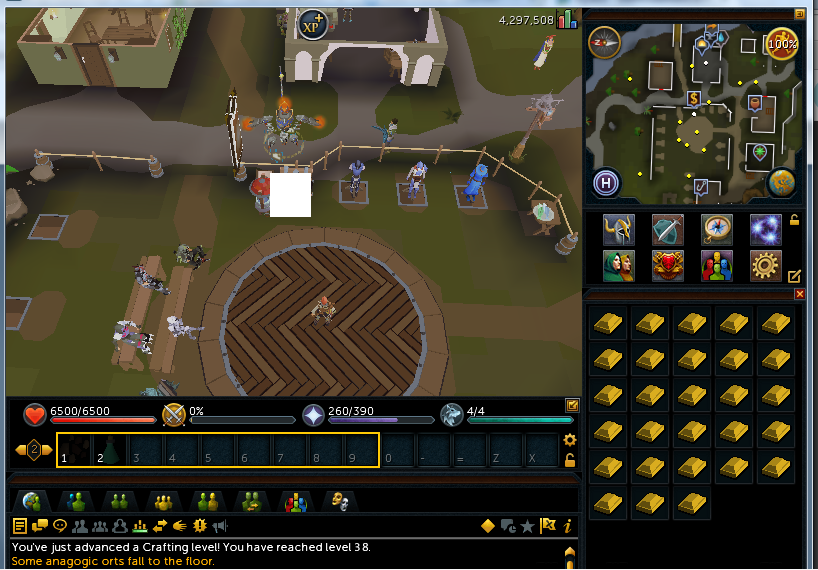
I've tried to use it, but after fixing exp detection, it will think i dont get a full pack of items.. and even after that, it doesent detect when it clicks the furnace, and starts clicking it and clicking it.. :( i have SPS, SRL and NEW simba, all up to date (double checked that) this is me:
From: undorak7
I've tried to use it, but after fixing exp detection, it will think i dont get a full pack of items.. and even after that, it doesent detect when it clicks the furnace, and starts clicking it and clicking it.. :( i have SPS, SRL and NEW simba, all up to date (double checked that) this is me: 
Do you have progress screen enabled? Also you should set your interface transparency to 0% not 100%
Lipcot
2014-10-31 22:22:48
From: BMWxi
Do you have progress screen enabled? Also you should set your interface transparency to 0% not 100%
duuuuuuuuuude, i cant believe this, i've used 100% transparency like, forever. thats why SRL-6 is kinda buggy with me… i serioulsy have to check my vision, i've read the setup guide like 1000 times and was 100% sure its was 100% transparency to be used. thx a lot , silly error of me :redface:
everything works A+ now lols :spot:
From: undorak7
duuuuuuuuuude, i cant believe this, i've used 100% transparency like, forever. thats why SRL-6 is kinda buggy with me… i serioulsy have to check my vision, i've read the setup guide like 1000 times and was 100% sure its was 100% transparency to be used. thx a lot , silly error of me :redface:
everything works A+ now lols :spot:
Good to hear! A progress report after you're done would be nice too if it's not too much trouble :)
KeepBotting
2014-10-31 22:53:30

Works like a charm.
Lipcot
2014-10-31 22:57:17
From: BMWxi
Good to hear! A progress report after you're done would be nice too if it's not too much trouble :)
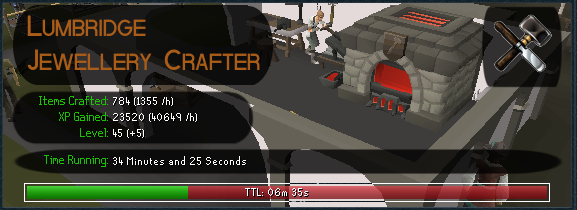
ofc! Will leave it overnight though :)
Cyanempire
2014-11-01 01:00:34
Failed to complete craftLoop too many times. Ending Script. what am i doing wroong :(
scratch that :P
you have to be fully zoomed out @_@ will give you a proggy later
From: Cyanempire
Failed to complete craftLoop too many times. Ending Script. what am i doing wroong :(
scratch that :P
you have to be fully zoomed out @_@ will give you a proggy later
Yeah, I guess I should add that to the instructions.
KeepBotting
2014-11-01 16:48:57
OP, I notice that when the production screen is open, Simba.exe eats a ton of CPU. As soon as it closes, usage normalizes.
exampleIs this intentional?
From: KeepBotting
OP, I notice that when the production screen is open, Simba.exe eats a ton of CPU. As soon as it closes, usage normalizes.
example
Is this intentional?
If by intentional you mean that I specifically made Simba be a CPU hog while crafting to limit the amount of accounts someone can use with the script: No. ;)
I think it's because I set a wait to the wrong number causing it to check for a bitmap more frequently than it needs to.
If you go to line 717 you'll find
wait(10);
which should probably be changed to a more suitable number like
wait(100);
Try that and see if it's better. Nice catch btw, thanks.
KeepBotting
2014-11-01 17:23:29
From: BMWxi
If by intentional you mean that I specifically made Simba be a CPU hog while crafting to limit the amount of accounts someone can use with the script: No. ;)
I think it's because I set a wait to the wrong number causing it to check for a bitmap more frequently than it needs to.
If you go to line 717 you'll find
wait(10);
which should probably be changed to a more suitable number like
wait(100);
Try that and see if it's better. Nice catch btw, thanks.
Thanks, that did the trick.
(disabled the progress report for this run)
I also added some crappy multiplayer (didn't implement it right, constants set by the srl player form don't get changed). I'm sure you could do it better but if you want it I can pm it to you
From: KeepBotting
Thanks, that did the trick.
(disabled the progress report for this run)
I also added some crappy multiplayer (didn't implement it right, constants set by the srl player form don't get changed). I'm sure you could do it better but if you want it I can pm it to you
Thanks for the report, I'll add it to the 1st post. As for the multiplayer, I don't like to use it myself but I might add it later if I change my mind, so you can send it :)
From: KeepBotting
Thanks, that did the trick.
(disabled the progress report for this run)
I also added some crappy multiplayer (didn't implement it right, constants set by the srl player form don't get changed). I'm sure you could do it better but if you want it I can pm it to you
Thanks for the report, I'll add it to the 1st post. As for the multiplayer, I don't like to use it myself but I might add it later if I change my mind, so you can send it :)
Also I'll fix the cpu hog thing and put it in 1.3, whenever that gets done.
KeepBotting
2014-11-02 22:22:49
From: BMWxi
Thanks for the report, I'll add it to the 1st post. As for the multiplayer, I don't like to use it myself but I might add it later if I change my mind, so you can send it :)
Also I'll fix the cpu hog thing and put it in 1.3, whenever that gets done.
Cool
I'll refine it over the next few days - if I forget, bother me on Skype about it :P

KeepBotting
2014-11-08 09:48:34
Just a heads-up: script is broken as of a couple days ago when tpa.deleteIndex() functions were added to SRL-6.
Easy fix, just remove the one in the script or change it to override SRL-6's.
Commit log:
https://github.com/SRL/SRL-6/commit/78f4b38b63fb2320b6c2ae53c594d9e2e0a49a06
croberger
2014-11-24 11:42:25
The script stopped logging in and won't proceed even if I manually do so. Any fixes?
From: croberger
The script stopped logging in and won't proceed even if I manually do so. Any fixes?
It sounds like your graphics settings are wrong. Remember: Fixed size, Min graphics, Max brightness. The ingame instructions are in the first post of this thread, so once the script logs you in make sure those are correct too.
croberger
2014-11-24 11:56:03
I switched to DirectX and everything worked properly.
DontStahp
2014-11-25 12:39:54
Hey BMWxi, thanks for your script. Thanks for 5-89 crafting!
Here's my latest proggy:
XP Gained: 467040
XP /h: 27516
Items Crafted: 23352
Time Running: 1 Days, 1 Hours, 15 Minutes and 27 Seconds
From: DontStahp
Hey BMWxi, thanks for your script. Thanks for 5-89 crafting!
Here's my latest proggy:
XP Gained: 467040
XP /h: 27516
Items Crafted: 23352
Time Running: 1 Days, 1 Hours, 15 Minutes and 27 Seconds
Wow, that's a great report, thanks! :D
Cyanempire
2014-11-30 07:30:00
Script fails to compile any recent change or fix?
Error: Duplicate declaration "deleteIndex" at line 309
Compiling failed.
Deleted that part got the script to work, will monitor
and post a proggy.
——————————————————————
Crafting: Gold necklace
XP Gained: 118160
XP /h: 26032
Crafting Level: 58
Levels Gained: 7
Items Crafted: 5908
Time Running: 4 Hours, 30 Minutes and 51 Seconds
TTL: 21 Minutes and 6 Seconds
slushpuppy
2014-12-11 01:23:40
script crashes simba without any apparent errors :x
Script name will be: JewelleryCrafter1.2
Plugin libtesseract2_32 already loaded: 0
Plugin libsmartremote32 already loaded: 1
Plugin sps32 already loaded: 2
formWriteln: Compiled successfully in 4571 ms.
formWriteln: It seems version checking is down. As a result, the script will dis
able any online stats reporting.
formWriteln: The script will still be functioning, so you can ignore this messag
e if you do not want stats features.
SRL: Logfile = C:\Simba\Include\SRL-6/logs/SRL log (11-12-14 at 02.23.02 PM).txt
C:\Simba>
No forms pop up
From: slushpuppy
script crashes simba without any apparent errors :x
No forms pop up
Here's a script that is just the playerform to try, let me know what it does:
program new;
{$i srl-6/srl.simba}
{$i srl-6/lib/misc/srlplayerform.simba}

procedure initPlayerForm();
begin
  with playerForm do
  begin
    name := 'Test Form!';
    scriptSettingsPath := AppPath + 'Scripts\testForm.txt';
    checkBoxLabels := ['Does this form open?'];
    checkBoxDefaults := ['False'];
  end;
end;

begin
  writeln('trying to initPlayerForm');
  initPlayerForm();
  writeln('trying to runPlayerForm');
  runPlayerForm();
  if (not playerForm.isScriptReady) then
    terminateScript;
  writeln('Form worked and script starting.');
end.
Also you seem to have some sort of customized debug, if this is a modified simba or something that you're using you could try using the normal one. (If not just ignore that I guess)
slushpuppy
2014-12-11 03:38:04
From: BMWxi
Here's a script that is just the playerform to try, let me know what it does:
program new;
{$i srl-6/srl.simba}
{$i srl-6/lib/misc/srlplayerform.simba}

procedure initPlayerForm();
begin
  with playerForm do
  begin
    name := 'Test Form!';
    scriptSettingsPath := AppPath + 'Scripts\testForm.txt';
    checkBoxLabels := ['Does this form open?'];
    checkBoxDefaults := ['False'];
  end;
end;

begin
  writeln('trying to initPlayerForm');
  initPlayerForm();
  writeln('trying to runPlayerForm');
  runPlayerForm();
  if (not playerForm.isScriptReady) then
    terminateScript;
  writeln('Form worked and script starting.');
end.
Also you seem to have some sort of customized debug, if this is a modified simba or something that you're using you could try using the normal one. (If not just ignore that I guess)
Simba Crash. Thanks for the assistance. I just replied directly to playerforms thread. I managed to continue botting by hardcoding the vlaues myself xD
From: slushpuppy
Simba Crash. Thanks for the assistance. I just replied directly to playerforms thread. I managed to continue botting by hardcoding the vlaues myself xD
Ok, good to hear you found a workaround. :)
kozak94
2014-12-14 12:36:29
Hello! This is a great script. I used it to reach level 61 crafting as one of the requirements of the Lunar Diplomacy quest. It worked like a charm, no crashes and was stopped manually when 61 was reached. It's also not a bad money making script, i got 125-130k per hour smithing gold bars into gold necklaces. Unfortunately, I run Simba in Win7 VM on a Mac Book Pro, and I always forget to save the proggies before shutting down.
Cyanempire
2014-12-23 19:26:07
Crafting: Gold necklace
XP Gained: 189840
XP /h: 26519
Crafting Level: 69
Levels Gained: 3
Items Crafted: 9492
Time Running: 7 Hours, 7 Minutes and 26 Seconds
TTL: 47 Minutes and 10 Seconds
DontStahp
2014-12-24 15:12:21
After some breaks, today I got 99 crafting with 50M+ profit. Thank you, BMWxi!
From: kozak94
Hello! This is a great script. I used it to reach level 61 crafting as one of the requirements of the Lunar Diplomacy quest. It worked like a charm, no crashes and was stopped manually when 61 was reached. It's also not a bad money making script, i got 125-130k per hour smithing gold bars into gold necklaces. Unfortunately, I run Simba in Win7 VM on a Mac Book Pro, and I always forget to save the proggies before shutting down.
Thanks, it's great to hear :)
From: Cyanempire
Crafting: Gold necklace
XP Gained: 189840
XP /h: 26519
Crafting Level: 69
Levels Gained: 3
Items Crafted: 9492
Time Running: 7 Hours, 7 Minutes and 26 Seconds
TTL: 47 Minutes and 10 Seconds
Nice report!
From: DontStahp
After some breaks, today I got 99 crafting with 50M+ profit. Thank you, BMWxi!
Awesome, I'll add you to the list! :D
Hitac
2014-12-27 11:39:48
Help please.
It says:
Error: Duplicate declaration "deleteIndex" at line 309
Compiling failed.
From: srpronto
Help please.
It says:
Error: Duplicate declaration "deleteIndex" at line 309
Compiling failed.
Go to line 309. Delete this:
procedure T2DPointArray.deleteIndex(const index : Integer);
var
  I : Integer;
begin
  if not inRange(index, low(self), length(self)) then
  begin
    sWriteLn('ERROR: deleteIndex: index larger than array length.');
    Exit;
  end;

  for I := index to high(self)-1 do
    self[I] := self[I+1];
  setLength(self, length(self)-1);
end;
Save the script, then run it again. It should work after that.
Hitac
2014-12-28 05:54:23
From: BMWxi
Go to line 309. Delete this:
procedure T2DPointArray.deleteIndex(const index : Integer);
var
  I : Integer;
begin
  if not inRange(index, low(self), length(self)) then
  begin
    sWriteLn('ERROR: deleteIndex: index larger than array length.');
    Exit;
  end;

  for I := index to high(self)-1 do
    self[I] := self[I+1];
  setLength(self, length(self)-1);
end;
Save the script, then run it again. It should work after that.
It keeps saying that:
ItemString: Gold amulet
ItemBox: 4
Waiting a bit…
There, ready.
Unable to find accurate numbers for current XP and level.
Successfully executed.
It just change all over the tabs (skill tab, bag tab, tasks tab…) and does nothing.
From: srpronto
It keeps saying that:
ItemString: Gold amulet
ItemBox: 4
Waiting a bit…
There, ready.
Unable to find accurate numbers for current XP and level.
Successfully executed.
It just change all over the tabs (skill tab, bag tab, tasks tab…) and does nothing.
Could you send a screenshot of your screen? (cover any information if you need to)
Hitac
2014-12-29 05:43:45
From: BMWxi
Could you send a screenshot of your screen? (cover any information if you need to)
Crafting: Gold ring
XP Gained: 28560
XP /h: 21193
Crafting Level: 48
Levels Gained: 4
Items Crafted: 1904
Time Running: 1 Hours, 19 Minutes and 48 Seconds
TTL: 18 Minutes and 8 Seconds
Thanks for all the help and for this amazing script.
Hitac
2014-12-30 08:06:38
Got a bigger one today:
Crafting: Gold ring
XP Gained: 57960
XP /h: 20672
Crafting Level: 56
Levels Gained: 4
Items Crafted: 3864
Time Running: 2 Hours, 47 Minutes and 15 Seconds
TTL: 30 Minutes and 35 Seconds
warlord94
2014-12-30 21:36:12
I deleted the line 309 stuff since I was having the same issue as the person above. For some reason, no matter what I craft, the script banks after only making 5 things.
Cyanempire
2014-12-30 21:45:47
From: warlord94
I deleted the line 309 stuff since I was having the same issue as the person above. For some reason, no matter what I craft, the script banks after only making 5 things.
Make x progress window.
Hitac
2014-12-31 08:23:28
Crafting: Gold ring
XP Gained: 77280
XP /h: 20850
Crafting Level: 60
Levels Gained: 3
Items Crafted: 5152
Time Running: 3 Hours, 41 Minutes and 21 Seconds
TTL: 48 Minutes and 33 Seconds
From: srpronto
Crafting: Gold ring
XP Gained: 28560
XP /h: 21193
Crafting Level: 48
Levels Gained: 4
Items Crafted: 1904
Time Running: 1 Hours, 19 Minutes and 48 Seconds
TTL: 18 Minutes and 8 Seconds
Thanks for all the help and for this amazing script.
From: srpronto
Got a bigger one today:
Crafting: Gold ring
XP Gained: 57960
XP /h: 20672
Crafting Level: 56
Levels Gained: 4
Items Crafted: 3864
Time Running: 2 Hours, 47 Minutes and 15 Seconds
TTL: 30 Minutes and 35 Seconds
From: srpronto
Crafting: Gold ring
XP Gained: 77280
XP /h: 20850
Crafting Level: 60
Levels Gained: 3
Items Crafted: 5152
Time Running: 3 Hours, 41 Minutes and 21 Seconds
TTL: 48 Minutes and 33 Seconds
Thanks for the reports! :D
From: warlord94
I deleted the line 309 stuff since I was having the same issue as the person above. For some reason, no matter what I craft, the script banks after only making 5 things.
As
@Cyanempire; said, you need to have the progress window enabled.
warlord94
2014-12-31 14:27:13
From: BMWxi
Thanks for the reports! :D
As @Cyanempire; said, you need to have the progress window enabled.
Man I am just so dumb. I should have known it had something to do with that. I turned on the debugger and it said something about the map so I was toying around with that for so long. Thanks.
warlord94
2014-12-31 21:58:18
Crafting: Tiara
XP Gained: 501270
XP /h: 70702
Crafting Level: 75
Levels Gained: 6
Items Crafted: 9548
Time Running: 7 Hours, 5 Minutes and 11 Seconds
TTL: 1 Hours, 45 Minutes and 26 Seconds
From: warlord94
Crafting: Tiara
XP Gained: 501270
XP /h: 70702
Crafting Level: 75
Levels Gained: 6
Items Crafted: 9548
Time Running: 7 Hours, 5 Minutes and 11 Seconds
TTL: 1 Hours, 45 Minutes and 26 Seconds
500k xp, nice report! :)
Cyanempire
2015-01-08 07:02:53
Crafting: - - - -
XP Gained: 323120
XP /h: 25837
Crafting Level: 89
Levels Gained: 0
Items Crafted: 16156
Time Running: 12 Hours, 30 Minutes and 8 Seconds
TTL: 5 Hours, 36 Second
Hitac
2015-01-10 09:50:11
Crafting: Gold ring
XP Gained: 112560
XP /h: 20561
Crafting Level: 74
Levels Gained: 2
Items Crafted: 7504
Time Running: 5 Hours, 27 Minutes and 27 Seconds
TTL: 5 Hours, 15 Minutes and 30 Seconds
Another one. Been using the bot for over 2 weeks no ban yet and 7M done ( in a test account :D )
johnjoseph09
2015-01-12 05:29:25
worked amazing, done it for some time. Thanks for the script :)
Crafting: Diamond necklace
XP Gained: 41580
XP /h: 86445
Crafting Level: 65
Levels Gained: 1
Items Crafted: 462
Time Running: 28 Minutes and 17 Seconds
TTL: 17 Minutes and 47 Seconds
——————————————————————
jarofhearts
2015-01-13 14:34:34
I'm having trouble getting the script to run for more than 15 minutes. Everything starts out fine, but after 15 minutes or so it fails to find the furnace multiple times and eventually shuts down. Anyone else have this problem or know how to fix it?
From: jarofhearts
I'm having trouble getting the script to run for more than 15 minutes. Everything starts out fine, but after 15 minutes or so it fails to find the furnace multiple times and eventually shuts down. Anyone else have this problem or know how to fix it?
debug/screenshots?
jarofhearts
2015-01-14 11:41:18
I've had the script running for ~2 hours now with no issues, so I'm not sure what was the problem before. But if it fails again I'll definitely post the debug.
Antonio
2015-01-17 14:57:57
Running this now! Will report back and let you know how it is :)
salmon
2015-01-23 10:01:00
Great script. Love how fast the banking is!
salmon
2015-01-26 10:38:31
It worked perfectly earlier. I have changed nothing/done anything new that i hadn't done earlier and for some reason i'm getting this 'unable to find accurate xp and numbers' thing that others seem to be getting. Couldn't figure out how to fix it so I had to remove the part of the script that gets current xp and stats to make it work :/ any ideas?
wowgnomes
2015-01-26 18:22:21
do you make or lose money using this script?
and only gold necklaces or can you make gold bracelets too?
From: wowgnomes
do you make or lose money using this script?
and only gold necklaces or can you make gold bracelets too?
It makes all jewellery excluding onyx
Profitable ones can be found here:
http://runescape.wikia.com/wiki/Calculator:Crafting/Jewellery
Neva Banned
2015-01-27 13:04:23
I am having trouble with the script only making 3 rings at a time, I keep looking through the script but I am not seeing why it would only make 3.
From: Neva Banned
I am having trouble with the script only making 3 rings at a time, I keep looking through the script but I am not seeing why it would only make 3.
From: BMWxi
- Enable production progress screen.
:-)
Neva Banned
2015-01-27 13:12:17
Well I feel like an idiot, thank you very much I ended up changing waitWhileCrafting to (22000, 23500) which is perfect, I will just have to remember to put on production.
Thanks
Hey BMWxi,would it be better to use OpenGL or DirectX? I have noticed that OpenGL is reccomended by Cohen in his setup guide, but it bugs out more than DirectX, specifically in this script. All of my other settings are correct.
Script makes 135k/hr with gold bracelets, so thanks for that also btw. Ran it for more than 96 hours (Yes i'm a bit reckless haha, will need to post progress report too)
Sorry I meant gold necklaces, I apologize for spamming, don't want to get anyone confused. Bracelets are even higher at 175k gp/hr
SlipperyPickle
2015-01-30 12:35:12
From: Atom
Sorry I meant gold necklaces, I apologize for spamming, don't want to get anyone confused. Bracelets are even higher at 175k gp/hr
You do know you have an edit button? But 96 hours is not a 'bit' reckless ;)
:facepalm: thanks for the tip. I'm still new to SRL, so I still have plenty of stuff to learn. And again, I'm not a spammer, because as a new member, I can't really do much besides reporting bugs and statistics. If someone can point me to an SRL programming thread, I will appreciate it.
From: Atom
Hey BMWxi,would it be better to use OpenGL or DirectX? I have noticed that OpenGL is reccomended by Cohen in his setup guide, but it bugs out more than DirectX, specifically in this script. All of my other settings are correct.
I use DX but they should both work.
From: Atom
Script makes 135k/hr with gold bracelets, so thanks for that also btw. Ran it for more than 96 hours (Yes i'm a bit reckless haha, will need to post progress report too)
I'd certainly like to see the proggy :)
From: Atom
:facepalm: thanks for the tip. I'm still new to SRL, so I still have plenty of stuff to learn. And again, I'm not a spammer, because as a new member, I can't really do much besides reporting bugs and statistics. If someone can point me to an SRL programming thread, I will appreciate it.
The tutorials section is here, they're grouped by how advanced they are
https://villavu.com/forum/forumdisplay.php?f=642And don't worry if you're just reporting bugs and statistics, that's really useful and there is never enough of it. Also, welcome to Villavu! :)
The Mayor
2015-01-31 17:03:28
7.5k steel on my ironman ;)

From: The Mayor
7.5k steel on my ironman ;)
Thanks for the proggy! :)
Pompus
2015-02-01 13:55:47
I am very much looking forward to using this but I am getting this error when hitting the start button
Error: Duplicate declaration "deleteIndex" at line 309
Compiling failed.
From: Pompus
I am very much looking forward to using this but I am getting this error when hitting the start button
Error: Duplicate declaration "deleteIndex" at line 309
Compiling failed.
Delete that procedure, it was added to SRL a while ago so it can't be in the script anymore.
Pompus
2015-02-01 20:51:46
Thank you champ! It has loaded up now. I will test the script later on :)
Pompus
2015-02-01 21:07:55
I keep getting this return now :( starts script in front of lumby chest and then just nothing.
Taking a break in 1 Hour, 45 Minutes and 16 Seconds
Failed to complete bankLoop too many times. Ending Script.
Successfully executed.
TotalMassacre
2015-02-02 18:13:56
Deleting that procedure fixed everything for me. Nice job on the script! Small proggy to test the waters

Pompus
2015-02-03 00:14:29
Everything seems to be fine starting up then it checks my crafting lvl and this happens
—- TRSGameTab.__initTabs(): Setup gametab properties
– tabStats.getSkillLevel(13): result = 75
—- TRSTabStats.getSkillInfo(): result = -1
– tabStats.getSkillLevel(13): result = 75
—- TRSTabStats.getSkillInfo(): result = 22244
– tabStats.getSkillLevel(13): result = 75
—- TRSTabStats.getSkillInfo(): result = 22244
– tabStats.getSkillLevel(13): result = 75
—- TRSTabStats.getSkillInfo(): result = 22244
– tabStats.getSkillLevel(13): result = 75
—- TRSTabStats.getSkillInfo(): result = 22244
Unable to find accurate numbers for current XP and level.
– Succesfully freed SMART[6396]
– Freeing gametabs bitmaps…
Successfully executed.
From: Pompus
Everything seems to be fine starting up then it checks my crafting lvl and this happens
—- TRSGameTab.__initTabs(): Setup gametab properties
– tabStats.getSkillLevel(13): result = 75
—- TRSTabStats.getSkillInfo(): result = -1
– tabStats.getSkillLevel(13): result = 75
—- TRSTabStats.getSkillInfo(): result = 22244
– tabStats.getSkillLevel(13): result = 75
—- TRSTabStats.getSkillInfo(): result = 22244
– tabStats.getSkillLevel(13): result = 75
—- TRSTabStats.getSkillInfo(): result = 22244
– tabStats.getSkillLevel(13): result = 75
—- TRSTabStats.getSkillInfo(): result = 22244
Unable to find accurate numbers for current XP and level.
– Succesfully freed SMART[6396]
– Freeing gametabs bitmaps…
Successfully executed.
See my post here:
https://villavu.com/forum/showthread.php?t=110877&page=3&p=1328660#post1328660 :)
Pompus
2015-02-03 11:45:47
Thank you for the heads up. I shall wait ready to finally use your awesome script :) thank you sir
Sawyer
2015-02-06 20:24:51
From: Pompus
I keep getting this return now :( starts script in front of lumby chest and then just nothing.
Taking a break in 1 Hour, 45 Minutes and 16 Seconds
Failed to complete bankLoop too many times. Ending Script.
Successfully executed.
I am encountering the same issue.
@BMWxiI am having problems with the script locating the lumbridge bank chest. I believe it continually fails to perform
bankScreen.open(BANK_CHEST_LUMBRIDGE);
Pompus
2015-02-06 21:03:40
I am still facing the same issues, he did say in a previous post he was fixing this in an update. I guess it hasn't happened yet. Hopefully soon :) I would do anything to help out if I knew.
wowgnomes
2015-02-07 09:15:26
This script worked wonders a few days ago, now I'm getting the error
"Failed to withdraw a full inventory. Ending Script.
Successfully executed."
It withdrawls fine, just begins to say that once I approach the furnace.
edit: I fixed the script by deleting "TerminateScript;" from after the check inventory part of the script, it still prints an error but proceeds with the scripts adn works
Tristana
2015-02-08 12:59:30
Error: Duplicate declaration "deleteIndex" at line 309
Compiling failed.
I got this error running the script.
From: Tristana
Error: Duplicate declaration "deleteIndex" at line 309
Compiling failed.
I got this error running the script.
Delete that procedure, it was added to SRL so it can't be in the script anymore.
KeepBotting
2015-02-08 19:39:07
From: BMWxi
Delete that procedure, it was added to SRL so it can't be in the script anymore.
I pastebinned the script with a fix (didn't delete the function, but rather overrode it) so you can push an update if you want
http://paste.villavu.com/show/6562/
To anybody wondering about the issues outlined in the previous posts, I've been too busy to put out a new script update with all the fixes so while people are waiting I made a helpful FAQ for any issues. It's at the top of the first post.
ckbbe
2015-02-13 13:15:34
Error: Duplicate declaration "deleteIndex" at line 309
Compiling failed.
Error: Unknown declaration "index" at line 311
Compiling failed.
Error: Unknown declaration "index" at line 311
Compiling failed.
Error: Unknown declaration "index" at line 317
Compiling failed.
Error: Unknown declaration "self" at line 318
Compiling failed.
Error: Unknown declaration "self" at line 319
Compiling failed.
Compiled successfully in 3713 ms.
Successfully executed
Deleted all these errors and it executes but then after 3 sec it turn itself off without doing nothing.Doesent load or do anything :) ?
From: ckbbe
Error: Duplicate declaration "deleteIndex" at line 309
Compiling failed.
Error: Unknown declaration "index" at line 311
Compiling failed.
Error: Unknown declaration "index" at line 311
Compiling failed.
Error: Unknown declaration "index" at line 317
Compiling failed.
Error: Unknown declaration "self" at line 318
Compiling failed.
Error: Unknown declaration "self" at line 319
Compiling failed.
Compiled successfully in 3713 ms.
Successfully executed
Deleted all these errors and it executes but then after 3 sec it turn itself off without doing nothing.Doesent load or do anything :) ?
You must delete the entire procedure.
Before:
procedure T2DPointArray.deleteIndex(const index : Integer);
var
  I : Integer;
begin
  if not inRange(index, low(self), length(self)) then
  begin
    sWriteLn('ERROR: deleteIndex: index larger than array length.');
    Exit;
  end;

  for I := index to high(self)-1 do
    self[I] := self[I+1];
  setLength(self, length(self)-1);
end;
After:
I like how no one posts anymore :D
Sorry that I couldn't copy and paste a paint proggy for you, so I'll give it to you in words.
40k xp/hr multiplied by 113 hours, which is about 4520000 xp total. I got this while running with no breaks. That is with gold amulets.
So yeah, your script is still stable, even though the cpu does have a high usage when a production progress window is open.
From: Atom
I like how no one posts anymore :D
Sorry that I couldn't copy and paste a paint proggy for you, so I'll give it to you in words.
40k xp/hr multiplied by 113 hours, which is about 4520000 xp total. I got this while running with no breaks. That is with gold amulets.
So yeah, your script is still stable, even though the cpu does have a high usage when a production progress window is open.
Good to see you're getting good use out of it, thanks for the post :)
As for the cpu usage, it's something I'm aware of (there might even be a fix somewhere in this thread, can't remember) and once I have a bit more time I'll have a new version out.
KeepBotting
2015-03-01 18:52:57
From: BMWxi
Good to see you're getting good use out of it, thanks for the post :)
As for the cpu usage, it's something I'm aware of (there might even be a fix somewhere in this thread, can't remember) and once I have a bit more time I'll have a new version out.
Just increasing the wait time per loop is the easiest fix I guess. You use a bitmap to determine if the progressScreen is open, but it could probably be replaced with something else "lighter" if performance becomes a huge issue
@Atom; to decrease cpu usage when the progress screen is open, go to line 700 which should look like
wait(random(50));
remove the random() and change it to something larger like
wait(500);
or 750 or 1000, play around with it. Increasing it will decrease the responsiveness of the script (only when recognizing that the progressScreen is gone) so you'll have to find a value you're comfortable with
Paradox The Divine
2015-03-15 01:17:05
68-82 in just a few days, the buy limit on jewels is destroying my progress.
Crafting: Sapphire bracelet
XP Gained: 270480
XP /h: 62320
Crafting Level: 82
Levels Gained: 1
Items Crafted: 4508
Time Running: 4 Hours, 20 Minutes and 9 Seconds
ltztakechi1
2015-03-19 00:16:57
why will it only craft 4-5 each trip?
it makes like a count then stops…
how can i make it to craft all 14?
From: Paradox The Divine
68-82 in just a few days, the buy limit on jewels is destroying my progress.
Thank you for the progress report! :)
From: ltztakechi1
why will it only craft 4-5 each trip?
it makes like a count then stops…
how can i make it to craft all 14?
Please refer to the instructions in the first post.
scar_operater
2015-03-28 19:53:15
Failed to withdraw a full inventory. Ending Script.
Successfully executed.
after starting script, loads inventory then goes to the place to make jewelery, but does nothing and logs out.
nvm fixed by deleting terminate script under failed to withdraw full inventory.
toxjq
2015-04-04 17:31:58
are there any advantage enabling direct-x?
From: toxjq
are there any advantage enabling direct-x?
I heard it rs runs better for some people, but otherwise they should be the same.
HqBanana
2015-04-09 10:53:47
How to set-up the preset?
KeepBotting
2015-04-09 10:56:37
boscolamhk
2015-04-10 04:56:40
I am trying to use the script to make gold amulets…but it only makes 4-5 gold amulets and then heads back to the bank (with 4-5 amulets and 23-24 gold bars). Any idea??
I have followed all the instructions except the OpenGL/Direct-X mode (due to some reason, i cannot use OpenGL in SMART…). Is there any way to make the waiting time for crafting items longer?
From: boscolamhk
I am trying to use the script to make gold amulets…but it only makes 4-5 gold amulets and then heads back to the bank (with 4-5 amulets and 23-24 gold bars). Any idea??
I have followed all the instructions except the OpenGL/Direct-X mode (due to some reason, i cannot use OpenGL in SMART…). Is there any way to make the waiting time for crafting items longer?
Are you in safemode? I wouldn't expect the script to work st all in safemode, the colours are usually very far off. I'd focus on trying to get into OpenGL or DirectX mode, as those are the only supported graphics modes for SRL6
boscolamhk
2015-04-10 11:26:16
From: BMWxi
Are you in safemode? I wouldn't expect the script to work st all in safemode, the colours are usually very far off. I'd focus on trying to get into OpenGL or DirectX mode, as those are the only supported graphics modes for SRL6
Sorry?what is safe mode? I use SMART and DirectX mode ?shown in the setting in login page?
Threshold
2015-04-10 11:37:32
From: boscolamhk
Sorry?what is safe mode? I use SMART and DirectX mode ?shown in the setting in login page?
Have you tried to enable the progress screen like it says on the instructions/FAQ ?
From: boscolamhk
Sorry?what is safe mode? I use SMART and DirectX mode ?shown in the setting in login page?
You said you didn't follow the direction that said to use either OGL or DirectX, and the only other option is safemode. If you're using DrirectX though that's fine and will work fine.
As
@Doa Envy; suggested, make sure you've followed the directions and enabled the progress screen. That is almost certainly the reason for the script's behaviour as you described it.
boscolamhk
2015-04-11 02:28:26
From: BMWxi
You said you didn't follow the direction that said to use either OGL or DirectX, and the only other option is safemode. If you're using DrirectX though that's fine and will work fine.
As @Doa Envy; suggested, make sure you've followed the directions and enabled the progress screen. That is almost certainly the reason for the script's behaviour as you described it.
Oh….yea, it's my mistake…the script runs well now after I enable the progress screen. (I thought I have enabled it…Sorry for that :( ) Thanks for your help.
From: boscolamhk
Oh….yea, it's my mistake…the script runs well now after I enable the progress screen. (I thought I have enabled it…Sorry for that :( ) Thanks for your help.
No problem, enjoy the script.
Paradox The Divine
2015-04-14 20:23:53
Well, I hit 99 last night, this script worked great. Thanks for the levels!
From: Paradox The Divine
Well, I hit 99 last night, this script worked great. Thanks for the levels!
Congratulations! Thanks for letting me know :)
danielribeiro
2015-04-16 10:44:56
Hey could someone help me solving this issue? [ATTACH=CONFIG]25645[/ATTACH]
From: danielribeiro
Hey could someone help me solving this issue? [ATTACH=CONFIG]25645[/ATTACH]
Looks like bankScreen.open failed (due to lag perhaps, if the options menu opened late). The script will try up to 10 times to use bank, which involves walking to the chest and then using bankscreen.open. Unfortunately, and possibly this should be removed for situations such as this, the script checks to make sure it's not already right at the bank before walking to it. Because you already are at it, the script knows it doesn't need to walk anywhere. The script now tries to open the bank again, but can't because the options menu is still blocking the chest. If the mouse was moved off the menu it would disappear, but it isn't so it doesn't. The script now "tries" this 8 more times, not realizing that nothing is actually happening. If you were to watch the script while this was happening the mouse would just stay still.
What you can do:
1. Run the script and hope bankScreen.open doesn't bug out after right-clicking the chest. This is probably pretty rare, so try it.
2. Wait for me to put out a new version of the script that doesn't get stuck in this manner.
What I can do:
1. Make the script move the mouse around after a failed banking attempt in order to close the options menu.
OR
2. Make the script walk to the bank even though it's already right at it. I'm not going to do this because it's unnecessary and strange.
Hopefully this information is helpful :)
danielribeiro
2015-04-16 16:21:54
The information was very helpful, thanks for your support. This is really annoying cause I get this bug always I run the script, it just do some trips to the bank and then it bug…
Yuskie
2015-04-17 14:22:52
Alright… So first off… Thanks for getting 99 crafting for me. The only issue I encountered was how it detect the furnace. I believed i lowered the amount of stripes it has to detect and I got it working for a tad longer than I would with the numbers you gave me. Besides that, there's the every-now and then mistake of the script detecting not full invo when it's full.
photomac54
2015-04-29 02:52:49
Hey I am having problems getting the script to complete one round of crafting. I followed all the steps in the instructions and after a while got it to walk to the furnace. Now at the furnace it stops and this is what comes up: (repeats itself over and over)
Walking to furnace
– Lumbridge.getPlayerPos(): Angle is at 72.784797757682, Setting angle to 0 degrees
—- minimap.mouseOffCompass(): Succesfully moved mouse off of compass
—- TRSMinimap.clickCompass(): Clicked compass
– Lumbridge.getPlayerPos(): result = {X = 242, Y = 186}, took 2886 ms
Walked.
Found 0 furnace slots.
Less than 3 slots found.
0
Did not click Furnace.
Walking to furnace
– Lumbridge.getPlayerPos(): Angle is at 72.784797757682, Setting angle to 0 degrees
– TRSChooseOption._select():
—- Options found: [Face North, Face South, Cancel]
—- Found option "Face No" in "Face North"
– TRSChooseOption.select() result = true
—- minimap.mouseOffCompass(): Succesfully moved mouse off of compass
—- TRSMinimap.clickCompass(): Clicked compass
– Lumbridge.getPlayerPos(): result = {X = 242, Y = 186}, took 3775 ms
Walked.
Found 0 furnace slots.
Less than 3 slots found.
0
Did not click Furnace.
There is also a lot of spamming of the compass and rotating the camera, I've tried to reduce that but I dont want to accidentally delete something important.
—- Opening tab via gametab navigation bar
– TRSGameTabs.openTab(1): result = False
– TRSGameTabs.openTab(1)
—- Opening tab via gametab navigation bar
– TRSGameTabs.openTab(1): result = False
– TRSGameTabs.openTab(1)
—- Opening tab via gametab navigation bar
Opening tab via gametab navigation bar
– TRSGameTabs.openTab(2): result = False
Walking to furnace
– Lumbridge.getPlayerPos(): Angle is at 72.784797757682, Setting angle to 0 degrees
—- minimap.mouseOffCompass(): Succesfully moved mouse off of compass
—- TRSMinimap.clickCompass(): Clicked compass
I am not sure if I am suppose to delete more things from the script like mentioned in the intro or if something is going wrong. Right now the biggest problem I am having is it clicking on the furnace.[ATTACH=CONFIG]25726[/ATTACH]
From: Yuskie
Alright… So first off… Thanks for getting 99 crafting for me. The only issue I encountered was how it detect the furnace. I believed i lowered the amount of stripes it has to detect and I got it working for a tad longer than I would with the numbers you gave me. Besides that, there's the every-now and then mistake of the script detecting not full invo when it's full.
Congrats! :D
From: photomac54
Hey I am having problems getting the script to complete one round of crafting. I followed all the steps in the instructions and after a while got it to walk to the furnace. Now at the furnace it stops and this is what comes up: (repeats itself over and over)
Walking to furnace
– Lumbridge.getPlayerPos(): Angle is at 72.784797757682, Setting angle to 0 degrees
—- minimap.mouseOffCompass(): Succesfully moved mouse off of compass
—- TRSMinimap.clickCompass(): Clicked compass
– Lumbridge.getPlayerPos(): result = {X = 242, Y = 186}, took 2886 ms
Walked.
Found 0 furnace slots.
Less than 3 slots found.
0
Did not click Furnace.
Walking to furnace
– Lumbridge.getPlayerPos(): Angle is at 72.784797757682, Setting angle to 0 degrees
– TRSChooseOption._select():
—- Options found: [Face North, Face South, Cancel]
—- Found option "Face No" in "Face North"
– TRSChooseOption.select() result = true
—- minimap.mouseOffCompass(): Succesfully moved mouse off of compass
—- TRSMinimap.clickCompass(): Clicked compass
– Lumbridge.getPlayerPos(): result = {X = 242, Y = 186}, took 3775 ms
Walked.
Found 0 furnace slots.
Less than 3 slots found.
0
Did not click Furnace.
There is also a lot of spamming of the compass and rotating the camera, I've tried to reduce that but I dont want to accidentally delete something important.
—- Opening tab via gametab navigation bar
– TRSGameTabs.openTab(1): result = False
– TRSGameTabs.openTab(1)
—- Opening tab via gametab navigation bar
– TRSGameTabs.openTab(1): result = False
– TRSGameTabs.openTab(1)
—- Opening tab via gametab navigation bar
Opening tab via gametab navigation bar
– TRSGameTabs.openTab(2): result = False
Walking to furnace
– Lumbridge.getPlayerPos(): Angle is at 72.784797757682, Setting angle to 0 degrees
—- minimap.mouseOffCompass(): Succesfully moved mouse off of compass
—- TRSMinimap.clickCompass(): Clicked compass
I am not sure if I am suppose to delete more things from the script like mentioned in the intro or if something is going wrong. Right now the biggest problem I am having is it clicking on the furnace.[ATTACH=CONFIG]25726[/ATTACH]
I'm currently in the process of updating this script (including the furnace finding). There might not be a whole lot you can do now except logging out and in for different colours. I'll try to have the new script up soon.
photomac54
2015-04-29 17:36:44
From: BMWxi
I'm currently in the process of updating this script (including the furnace finding). There might not be a whole lot you can do now except logging out and in for different colours. I'll try to have the new script up soon.
Thanks for the update (no pun intended). do you use opengl or directx? I have been looking through the forums trying to get opengl to run but it seems like many just use directx with no problems. My question boils down to does it matter for all scripts or just certain ones?
From: photomac54
Thanks for the update (no pun intended). do you use opengl or directx? I have been looking through the forums trying to get opengl to run but it seems like many just use directx with no problems. My question boils down to does it matter for all scripts or just certain ones?
If your graphics card is working properly OGL and DirectX should look exactly the same for almost everything. Some transparent things like water might be different but for almost all scripts OGL and DirectX can be used interchangeably (same for this script).
I use DirectX because OpenGL doesn't display properly because of the age of my card's drivers.
KeepBotting
2015-04-29 19:09:25
From: photomac54
Thanks for the update (no pun intended). do you use opengl or directx? I have been looking through the forums trying to get opengl to run but it seems like many just use directx with no problems. My question boils down to does it matter for all scripts or just certain ones?
From: BMWxi
If your graphics card is working properly OGL and DirectX should look exactly the same for almost everything. Some transparent things like water might be different but for almost all scripts OGL and DirectX can be used interchangeably (same for this script).
I use DirectX because OpenGL doesn't display properly because of the age of my card's drivers.
Water colors are
very different between display modes. I haven't come across any other color shifts that can't be compensated for by increasing tolerance 2 or 3 points manually.
Once upon a time, there was a glitch (on Jagex's side) that would prevent the minimap from showing up in OpenGL mode. Thus, for a while, scripts that used walking limited users to DirectX-only. iKaramjaFisher is an example of a script that still does this. No school like the old school :)
Depending on your OS, graphics card, and drivers, one mode may offer a small performance advantage over the other. DirectX tends to perform better on Windows, while Linux plays nicer with OpenGL.
abdul981
2015-05-01 12:26:07
it was working a while ago when i restarted my computer and now it doesnt click on furnace at all and freezes up while spam clicking the map if i try and move and says its stuck on a craftloop
From: abdul981
it was working a while ago when i restarted my computer and now it doesnt click on furnace at all and freezes up while spam clicking the map if i try and move and says its stuck on a craftloop
I'm in the process of updating the script, try it again after I've put up a new version.
abdul981
2015-05-01 16:25:16
ty good sir
SmallP3n0r
2015-05-24 09:42:53
Working well! On my way to 75 crafting.
Krzysztof
2015-06-01 15:36:01
Very nice script. There has been a few 'botbreaking' occurences, however.
The bot walks to the bank correctly. Trouble is, on a few occasions the player ventures a bit too far from the bank chest, and despite the largest zoomOut the bank chest isn't visible, isn't clicked on, and the bot stops.
EDIT:
It also seems the newest update screwed the bot by not letting it check the exp. Or maybe it's just me. Any way, I fixed it in my simba by changing getStartingStats procedure:
begin
  while (sF < 6) do
  begin
    inc(sF);
    if (sF > 5) then
    begin
      writeLn('Unable to find accurate numbers for current XP and level.');
      terminateScript;
    end;
    tmpStartLevel:= 1 ;//tabStats.getSkillLevel(SKILL_CRAFTING);
    tmpStartCraftingXP:= 1 ;//tabStats.getSkillInfo(SKILL_CRAFTING, INFO_CURRENT_XP);
     //if (getLevelFromXP(tmpStartCraftingXP) = tmpStartLevel) then
      break;
  end;
EDIT2:
Worken for 1,5h pretty much flawlessly. Prog stated 1002 necklaces per hour. Thanks a lot for the script :)
edit: 75 crafting so far. This script is tremendous!
