SPS Walking Guide (The Basics) By Aligndude
Hey
SPS, stands for SRL POSITIONING SYSTEM.
SPS is a way of making a script walk.(… Yea).
Lets Start.
The Includes This has to be located at the Top of the Script.
{$i srl/srl.simba}
{$i sps/sps.simba}
To set SPS up. You always have to do this before you start SPS.
SPS_Setup(RUNESCAPE_SURFACE,['3_1']);
You can see RUNESCAP_SURFACE. This is saying that you want to walk on the Main Map of RS. If you want to Walk in Different area's you can find them by going: C:\Simba\Includes\SPS\img\
You should see a list of folders like this:

These are the different RS Area.
Next you can see this:
, [3_1]]);
There are two ways to get these the '3_1' (There are loads not just that).
To get these and make the Path I use a Program Called "Path Creator" you can download this Here:
http://villavu.com/forum/showthread.php?t=64891&highlight=path+creatorOnce you have Downloaded it Open it up.
Should Look like this.

Next you Click on New Image and it should Show Something like this:

Find The File Runescape_Surface.PNG and Open it.
It should load and it looks like it hasn't becuase all you can see is blue, but it is there :P to find Locations you can either scroll along the map or use the pre made locations I'm going to use that to go to Varrock for this Tutorial.

Then you should be able to see Varrock, if you Click on the Map You'll Be able to see a Blue square with a Blue Ring Around it like in the image below.

This is a TPoint (Spot where the Bot will Walk to). The blue ring is the MiniMap (So its what the MiniMap can See).
To make your PathClick in the blue ring in the direction you want to go to, Like this:

Once made your Path if you look to the bottom of the Program you should be able to see this:

Click Generate path in the larger Box, and then it will look like this:

This is your Path.
Copy that and Paste it in to Simba: (Also Included SRL and Put SetupSRL; Before everything (My Bad :P))

If you Notice I have nothing in the
SPS_Setup's {[]}
this is because I haven't copied it(the SPS Area) from the Path Creator.
Before that I always do this before I copy it, I click in a huge square around my path as you can see in the image below (The red shaped things to show you my extra points):

I do this because a lot of the time it fails to walk even though the Path is Correct and the Areas are what the Path Creators says.
Before More Points:
SPS_Setup(RUNESCAPE_SURFACE,['11_7','11_6']);
After More Points:
SPS_Setup(RUNESCAPE_SURFACE,['11_7','11_6','10_6','10_7','12_7','12_6']);
I found adding more works better but if you don't want to it may work with out.
Ow I almost Forgot, The Vars.
The Path Name can be Anything you want it doesn't matter, but thr Var has to be the same.
Var
  MyPath:TPointArray;
If its only one point it will be:
Var
  MyPath:TPoint;
This will be if you only have to walk to one point say at CW Bank, after you've teleported there.
Making it WalkOnce you Have everything made the Path and the Area, Now you can make it walk.
There are Two Commands One for a path walking and one for a single position walking.
SPS_WalkPath();
Path Walking
SPS_WalkToPos();
Walking to a Position.
All InWith every thing in your Script should look similar to this:
program SPSTut;
{$i srl/srl.simba}
{$i sps/sps.simba}
Var
  myPath:TPointArray;
begin
  SetupSRL;
  SPS_Setup(RUNESCAPE_SURFACE,['11_7','11_6','10_6','10_7','12_7','12_6']);//SPS Areas
  myPath := [Point(4684, 2963), Point(4675, 2957), Point(4667, 2947),
  Point(4662, 2936), Point(4644, 2936), Point(4638, 2927), Point(4628, 2918),
  Point(4628, 2905), Point(4622, 2891), Point(4619, 2872), Point(4619, 2863),
  Point(4597, 2851), Point(4580, 2840), Point(4557, 2841), Point(4534, 2837),
  Point(4517, 2831), Point(4510, 2816), Point(4503, 2804), Point(4502, 2792),
  Point(4500, 2778), Point(4509, 2773), Point(4526, 2776), Point(4543, 2774),
  Point(4550, 2766), Point(4553, 2756), Point(4564, 2748)];//Path
  SPS_WalkPath(myPath);
end.
SUCCESS! If you have Followed my Tutorial your Script should be able to walk to any Location.There are Some things you may want to know SPS isn't the Best in the Deserts or Snowy area, but Hopefully SPS 2 should improve this!Hope this Has Helped Some People :)Mat
Nice!
The writing is a bit sloppy, but the guide is still easy to understand so it's not a problem.
I'm gonna try this on now!
Yea my Grammar and English is terrible :D Even tho I am English :D
Mat
Wetish
2012-01-08 13:34:07
Im going to try this out. :)
Edit:
Nope… SPS still doesnt work well for me. It missclicks and gets suck halfway through my path.
Failedpure
2012-01-08 14:08:57
Very helpful guide. Was wondering why it wasn't working in Al-Kharid but then I remembered it didn't work very well in the desert
From: Siel
Im going to try this out. :)
Edit:
Nope… SPS still doesnt work well for me. It missclicks and gets suck halfway through my path.
Try making your path points closer together it, might not seem they are needed as it clicks the furthest one away.
Try that.
Mat
dread4
2012-01-08 16:30:45
thanks this helped alot im trying to learn how to code a bot to help the community out;)!
putonajonny
2012-01-08 16:40:28
Good guide, you should add things like more of the SPS functions and what they can be used for
marpis
2012-01-08 18:00:26
SPS stands for SRL Positioning System.
EDIT: Nice guide, thanks!
lilcmp1
2012-01-08 22:55:34
Great guide, this has been needed. Hero helps me with this awhile ago, it was actually one of your scripts that got me interested in it. It is a fantastic walking method (usually).
Scaper
2012-01-09 14:44:53
I cant get it to add the area? why>?
By that you mean?
SPS_Setup(RUNESCAPE_SURFACE,['12_1','11_1']);
That part?
Mat
Hunaja
2012-01-17 13:29:00
Helped a lot to understand the basics. Thanks :)
'Toxin
2012-01-18 12:24:06
This actually helped me… and I thought I knew enough about SPS as it is… apparently there's more to know, lol. Awesome guide dude.
Inception
2012-01-18 13:56:54
Nice guide, I plan on testing this out soon!
fearlesskiller
2012-01-21 12:11:30
WOW thank you so much that help me so much !!!!
Thanks alot! I can start making my scrips walking now! :D
lol305
2012-01-21 16:16:58
NVM hope this work if it does my first script made ^^
lol305
2012-01-21 16:53:39
 program rockfishwalker;
{$i srl/srl.simba}
{$i sps/sps.simba}
 Var
  myPath:TPointArray;
begin
  SPS_Setup(living_rock_caverns,[0_1]);//SPS Area
myPath := [Point(159, 167), Point(159, 167), Point(166, 167),
Point(166, 167), Point(171, 166), Point(171, 166), Point(173, 172),
Point(173, 172), Point(175, 181), Point(175, 181), Point(174, 193),
Point(174, 193), Point(175, 201), Point(175, 201), Point(173, 212),
Point(173, 212), Point(169, 219), Point(169, 219), Point(163, 225),
Point(163, 225), Point(156, 238), Point(156, 238), Point(153, 243),
Point(153, 243), Point(152, 246), Point(151, 250)];
end
Okay so tryed to test it but keep saying this
[Error] (8:13): Unknown identifier 'living_rock_caverns' at line 7
Compiling failed.
Nebula
2012-01-21 21:20:47
Wow this is a really great tutorial. I wish you made it sooner, it was hard for me to figure out SPS.
From: lol305
 program rockfishwalker;
{$i srl/srl.simba}
{$i sps/sps.simba}
 Var
  myPath:TPointArray;
begin
  SPS_Setup(living_rock_caverns,[0_1]);//SPS Area
myPath := [Point(159, 167), Point(159, 167), Point(166, 167),
Point(166, 167), Point(171, 166), Point(171, 166), Point(173, 172),
Point(173, 172), Point(175, 181), Point(175, 181), Point(174, 193),
Point(174, 193), Point(175, 201), Point(175, 201), Point(173, 212),
Point(173, 212), Point(169, 219), Point(169, 219), Point(163, 225),
Point(163, 225), Point(156, 238), Point(156, 238), Point(153, 243),
Point(153, 243), Point(152, 246), Point(151, 250)];
end
Okay so tryed to test it but keep saying this
[Error] (8:13): Unknown identifier 'living_rock_caverns' at line 7
Compiling failed.
Hey Man its saying that the RS Area is there meaning the folder isn't there for the Living Rock Caverns you'd have to create your Own Map.
Mat
slakan
2012-01-25 06:02:32
this like up to date now?? or what walking should we use?
SPS_Areas := ['0_0','0_1'];
  myPath := [Point(361, 318), Point(360, 377), Point(365, 397), Point(363, 429), Point(323, 439), Point(293, 417), Point(254, 409), Point(234, 415)];
I get an error -
[SPS] SPS_Setup() took 156 ms. Loaded 1 areas.
Error: Exception: Access violation at line 146
at line 146
SmallMap := SPS_BitmapToMap(Minimap, 5);
Pl0x help :c
I'm trying to walk through Taverly Dungeon btw :0
Sps 1.5?
If So I couldn't get it to work as I always got that no matter what I tried to do.
Sorry :(
Mat
Goku123
2012-01-28 13:53:39
program SPSTut;
{$i srl/srl.simba}
{$i sps/sps.simba}
Var
  myPath:TPointArray;
begin
  SetupSRL;
  SPS_Setup(RUNESCAPE_SURFACE,['11_7','11_6','10_6','10_7','12_7','12_6']);//SPS Areas
  myPath := [Point(4684, 2963), Point(4675, 2957), Point(4667, 2947),
  Point(4662, 2936), Point(4644, 2936), Point(4638, 2927), Point(4628, 2918),
  Point(4628, 2905), Point(4622, 2891), Point(4619, 2872), Point(4619, 2863),
  Point(4597, 2851), Point(4580, 2840), Point(4557, 2841), Point(4534, 2837),
  Point(4517, 2831), Point(4510, 2816), Point(4503, 2804), Point(4502, 2792),
  Point(4500, 2778), Point(4509, 2773), Point(4526, 2776), Point(4543, 2774),
  Point(4550, 2766), Point(4553, 2756), Point(4564, 2748)];//Path
  SPS_WalkPath(myPath);
end.
On Your code i get an error Exception in Script: Unable to find file 'sps/sps.simba' used from ''
From: Goku123
program SPSTut;
{$i srl/srl.simba}
{$i sps/sps.simba}
Var
myPath:TPointArray;
begin
SetupSRL;
SPS_Setup(RUNESCAPE_SURFACE,['11_7','11_6','10_6','10_7','12_7','12_6']);//SPS Areas
myPath := [Point(4684, 2963), Point(4675, 2957), Point(4667, 2947),
Point(4662, 2936), Point(4644, 2936), Point(4638, 2927), Point(4628, 2918),
Point(4628, 2905), Point(4622, 2891), Point(4619, 2872), Point(4619, 2863),
Point(4597, 2851), Point(4580, 2840), Point(4557, 2841), Point(4534, 2837),
Point(4517, 2831), Point(4510, 2816), Point(4503, 2804), Point(4502, 2792),
Point(4500, 2778), Point(4509, 2773), Point(4526, 2776), Point(4543, 2774),
Point(4550, 2766), Point(4553, 2756), Point(4564, 2748)];//Path
SPS_WalkPath(myPath);
end.
On Your code i get an error Exception in Script: Unable to find file 'sps/sps.simba' used from ''
hey well it should work the one you posted. Have you got the sps plugin enabled?
Mat
Striken
2012-01-28 23:45:47
This guide has helped me out a lot with the walking. Thanks Dude.
From: Phyaskou
This guide has helped me out a lot with the walking. Thanks Dude.
:) Glad it Helped :)
Here's a image of one of my newest Paths 79 Points…

:D
Mat
Phantom866
2012-02-03 22:29:40
Can't get it to even run, can you please tell me what I'm doing wrong? Lunar island btw,
program LunarCrafting;
{$DEFINE SMART}
{$i SRL\SRL.simba}
{$i sps/sps.simba}
Var
myPath:TPointArray;
begin
SetupSRL;
SPS_Setup(RUNESCAPE_SURFACE,['0_2']);
myPath := [Point(247, 170), Point(258, 169), Point(267, 169),
Point(276, 169), Point(284, 170), Point(289, 178), Point(291, 190),
Point(290, 201), Point(287, 213), Point(286, 225), Point(284, 238),
Point(285, 251), Point(290, 263), Point(293, 273), Point(295, 282),
Point(300, 288), Point(301, 299), Point(306, 312), Point(315, 321),
Point(321, 330), Point(327, 339), Point(334, 345), Point(342, 351),
Point(350, 354), Point(362, 357), Point(372, 363), Point(379, 369),
Point(380, 380), Point(381, 392), Point(388, 392), Point(396, 391),
Point(405, 391), Point(414, 390), Point(430, 390), Point(438, 386),
Point(451, 382)];
SPS_WalkPath(myPath);
end.
Nebula
2012-02-07 17:29:11
Mat do you know how to create & use your own sps maps? post here/pm me if you do.
thanks.
Nebula
2012-02-07 17:31:20
From: Phantom866
Can't get it to even run, can you please tell me what I'm doing wrong? Lunar island btw,
Your y coordinates look wrong. When I made a path on lunar isle, they were all 1000+. Try remaking your path.
From: Phantom866
Can't get it to even run, can you please tell me what I'm doing wrong? Lunar island btw,
Okay, from the looks of it you are not using the runescape_surface.png you are using 0_2. Open the runescape_surface.png and re create your path, then copy you path in to simba and before you take the areas make 4 more points in a box shape around the path and then it should work.
Mat
Phantom866
2012-02-10 12:32:00
Thanks very much! It worked!
Blakerey
2012-02-10 19:08:17
NOTE: I HAVE FIXED THIS..I JUST MADE THE PATH THIS:

And it works fine, at every willow tree there, so, this will do for now.
———————
For educational purposes, the problem is still there for you to look at:
Wondering if anyone can give me any guidance?
I am trying to make it walk from the Willows in Draynor to the bank..
Here is my walking code:
Procedure WalkToBank;
      Var
        walkBank:TPointArray;

      begin
        SetupSRL;
        SPS_Setup(RUNESCAPE_SURFACE,['10_9','11_9','11_8','9_8','9_9']);
        walkBank := [
          Point(4151, 3695), Point(4152, 3693), Point(4155, 3689),
          Point(4156, 3685), Point(4157, 3683), Point(4159, 3679),
          Point(4160, 3676), Point(4161, 3671), Point(4162, 3667),
          Point(4163, 3662), Point(4163, 3656), Point(4164, 3654),
          Point(4167, 3649), Point(4169, 3648), Point(4173, 3648),
          Point(4176, 3647), Point(4181, 3647), Point(4185, 3649),
          Point(4187, 3652), Point(4188, 3656), Point(4188, 3659),
          Point(4185, 3661), Point(4184, 3662), Point(4184, 3664)];
        SPS_WalkPath(walkBank);
      end;
And here is the points.. There are so many, because someone suggested to use more if it fails.. Seems this doesn't work either. Also the big square is for the surface as explained in the tutorial.

Now, It walks, just not to the right direction, it decides to just go in a line, I have used the app to show this.

Can someone give me some help?
AND YES, I have included SRS and SRL.
Thanks! :)
What is your Tolerance Set too?
In the SPS.Simba there is a tolerance from what you are saying it could be that.
Tolerance := 0.5;
Put that on Line 60 in the SPS.Simba file. I found that works very well on RS Surface.
Mat
kaiman299
2012-02-12 16:48:47
This isn't working in the wilderness, as the wilderness map is a lot different than what is shown on the runescape surface map. How would I go about updating this?
There is a section of new Map Here:
http://villavu.com/forum/showthread.php?t=74442Just Download the PNG maps and replace the ones you already have.
Mat
cmxz1
2012-02-13 20:57:44
I'm trying to make Fist of Guthix firemaker and i want to use SPS for walking back to banker. Only problem is there isn't map for Fist of Guthix lobby, how can i make one?
momotron
2012-02-16 07:38:34
Oi nub! Pm me idea's of how to add fail safes in SPS walking procedures ;P <3 much love
From: momotron
Oi nub! Pm me idea's of how to add fail safes in SPS walking procedures ;P <3 much love
Well you can do
If SPS_WalkPath(Nub) then
  GoJumpOffABuilding else GiveMeABJ;
You can do stuff like that so have a fail safe of DTM Walking Maybe.
Mat
MrBubbles
2012-02-16 18:16:42
I get an error when I open the program:
The application failed to initialize properly (0xc0000135). Click on OK to terminate the application.
Would this have to do with .NET framework?
EDIT: I believe I've answered my own question. :)
fretje12
2012-02-17 23:41:03
Good tutorial i know it will help a lot of people :). +Rep
Jagex_Fagex
2012-02-19 12:26:37
Thanks for this, helped me a lot. I just couldn't get it to work.
Sir Ducksworthy
2012-02-25 20:22:01
Nice guide thx alot buddy
Sps is really amazing Color botting really is the way to go where starting to advance and this is a prime example of it.
begginer
2012-02-26 14:57:36
Thanks a million.
VillaVuFTW
2012-02-26 19:40:53
Hey Mat,
Figured I'd post..
Credits to Flight on this one:
       program MyCoords;
  {$DEFINE SMART}

  {$i SRL/srl.simba}
  {$i SPS/sps.simba}


  begin
    Smart_Server := 10;
    Smart_Members := True;
    Smart_Signed := True;
    Smart_SuperDetail := False;
    SetupSRL;

  SPS_Setup(RUNESCAPE_SURFACE, ['0_2', '1_2']);  //Change this to your SPS areas
  SPS_Continue := True;

  Repeat
    ClearDebug;
    Writeln('Tile: '+IntToStr(SPS_GetMyPos.X)+', '+IntToStr(SPS_GetMyPos.Y));
    Wait(500);
  Until(False)
end.
  end.
It tells you the Tile you're on (Point) It will print saying "Tile": (but really that means point(x, y)
:3
That path maker you have.. is outdated
cool13bro
2012-02-26 21:13:49
Hey I'm a beginner scripter, and I recently posted something about wanting to remain in a safe spot for a ranging script. The answers were a bit confusing (again I am a beginner), but they referred to the use of SPS. So, can anyone on this thread help me to keep my player in a safe spot using SPS. Sorry, if my terminology is a bit off, new to all of this.
Thanks.
Your could create a box with sps points and say is ur pos in this box if not then walk back the the area
Jagex_Fagex
2012-03-02 11:56:05
From: VillaVuFTW
Hey Mat,
Figured I'd post..
Credits to Flight on this one:
       program MyCoords;
  {$DEFINE SMART}

  {$i SRL/srl.simba}
  {$i SPS/sps.simba}


  begin
    Smart_Server := 10;
    Smart_Members := True;
    Smart_Signed := True;
    Smart_SuperDetail := False;
    SetupSRL;

  SPS_Setup(RUNESCAPE_SURFACE, ['0_2', '1_2']);  //Change this to your SPS areas
  SPS_Continue := True;

  Repeat
    ClearDebug;
    Writeln('Tile: '+IntToStr(SPS_GetMyPos.X)+', '+IntToStr(SPS_GetMyPos.Y));
    Wait(500);
  Until(False)
end.
  end.
It tells you the Tile you're on (Point) It will print saying "Tile": (but really that means point(x, y)
:3
That path maker you have.. is outdated
May I ask how the path maker is outdated? It is fat superior to that script on every way. You don't have to log into runescape and walk around, you don't have to pick which areas it is(what if you don't know the areas), and instead of having to put the variable together at the end(the one that holds the points), the path maker creates it all for you. So no, that script is outdated, and the path maker is definately the way to go.
Nemesis3X
2012-03-02 13:10:25
Great guide, Helped me out with a few things!
cool13bro
2012-03-02 23:13:15
From: Mat
Your could create a box with sps points and say is ur pos in this box if not then walk back the the area
Wow, thanks. It finally made sense and after playing around and looking at this tut, it worked. Now I Just need to work on an antiban and I will have my first script.
Anyways, appreciate your help.
blazingrobin
2012-03-03 05:01:44
Edit: never mind saw error by looking at older posts multiple times. got it running perfectly!!! thank you so much!!!
craggs
2012-03-06 17:35:44
Is it possible/wise to include multiple paths from A-B in a script using this method? i would assume that using the exact same path over a period of time would become quite noticable, or is this not an issue?
I like the simplicity of this method and until i get a few hours to wrap my head around DTMs and RadialWalk i wouldnt mind messing about with it. cheers in advance!
From: craggs
Is it possible/wise to include multiple paths from A-B in a script using this method? i would assume that using the exact same path over a period of time would become quite noticable, or is this not an issue?
I like the simplicity of this method and until i get a few hours to wrap my head around DTMs and RadialWalk i wouldnt mind messing about with it. cheers in advance!
Well you SPS isn't very accurate anyway, so its not gonna looks bot like but you can make a random case of 1 and have two paths and every time it will randomly choose one of them :)
Mat
Nebula
2012-03-06 17:47:39
Also, SPS has a built in x+y randomness of 1. So the point will be automatically be randomized a bit, then randomized even more by the accurateness.
craggs
2012-03-06 17:53:40
awesome, tyvm!
Thanks a lot! I had no idea the SPS map files were IN simba… I was stressing out trying to find links to map surfaces.
*LIFESAVER*
gabrieldu832
2012-03-15 15:42:53
How to put that code in an other script ?
From: gabrieldu832
How to put that code in an other script ?
{$i sps/sps.simba}
press Ctrl + space, type "sps" for a list of functions
surfboards2
2012-03-17 23:13:55
hey mat im just starting scripting and im trying to get banking working on living rock caverns though when i extract the dungeons file all the folders are empty without the picture of the map. What is rong? to i need to update/re dl simba?
surfboards2
2012-03-18 01:21:37
i got a map from somebody but which was

(if u can see that)
i keep getting this error this is my script so far:
SetupSRL;
SPS_Setup(living_rock_caverns),['0_1','0_0','];//SPS Areas
myPath := myPath := [Point(310,413),Point(306,402),Point(303,391),
Point(300,380),Point(292,374),Point(282,364),Point(271,353),
Point(269,339),Point(268,324),Point(267,314),Point(267,296),
Point(267,283),Point(267,273),Point(266,263),Point(259,255),
Point(245,250)];//Path
SPS_WalkPath(myPath);
end.
error is [Error] (10:11): Unknown identifier 'living_rock_caverns' at line 9
Compiling fail. Please help
From: surfboards2
i got a map from somebody but which was *removed img, too damn big* (if u can see that)
i keep getting this error this is my script so far:
SetupSRL;
SPS_Setup(living_rock_caverns),['0_1','0_0','];//SPS Areas
myPath := myPath := [Point(310,413),Point(306,402),Point(303,391),
Point(300,380),Point(292,374),Point(282,364),Point(271,353),
Point(269,339),Point(268,324),Point(267,314),Point(267,296),
Point(267,283),Point(267,273),Point(266,263),Point(259,255),
Point(245,250)];//Path
SPS_WalkPath(myPath);
end.
error is [Error] (10:11): Unknown identifier 'living_rock_caverns' at line 9
Compiling fail. Please help
Im no expert on SPS but did you make a living_rock_caverns folder in C:\Simba\Includes\SPS\img and put the 0_1 and 0_1 image in it?
From what I can understand it fails to find the folder.
surfboards2
2012-03-18 08:25:39
yeh i put the map in there if that what you mean.
instagib2001
2012-03-20 16:44:02
Ok i got this to run and compile but it dosnt typ my user name and password i dont know whats going on anyone help =((( ????
program falador wine;
{$DEFINE SMART} /////
{$I SRL/SRL.SIMBA} /////
{$I SI/MAIN.SIMBA} /////
{$DEFINE SRL/SRL/MISC/PAINTSMART.SIMBA}
{$i sps/sps.simba}
const
////////////////////////////////////////////////////////////////////////////////
////////// Global Settings ///////////////////////////////
////////////////////////////////////////////////////////////////////////////////
/////
http://stats.villavu.com /////
SRLStats_Username = ''; ///// SRL Stats Username /////
SRLStats_Password = ''; ///// SRL Stats Password /////
////////////////////////////////////////////////////////////////////////////////
////////// Player Settings ///////////////////////////////
////////////////////////////////////////////////////////////////////////////////
Procedure DeclarePlayers; /////
Var /////
HowManyPlayers: Integer; /////
Begin /////
HowManyPlayers := 1; /////
NumberOfPlayers(HowManyPlayers); /////
CurrentPlayer := 0; /////
With Players[0] Do ////////////////////////////////////////////////
Begin ///// /////
Name := ''; ///// Runescape Login /////
Pass := ''; ///// Runescape Password /////
Pin := ''; ///// Runescape Bank Pin /////
Active := True; ///// Use this Player /////
End; ///// /////
End; ///// /////
////////////////////////////////////////////////////////////////////////////////
////////// End of Settings ////////////////////////////
////////////////////////////////////////////////////////////////////////////////
var
myPath:TPointArray;
begin
SetupSRL;
SPS_Setup(RUNESCAPE_SURFACE,['20_11']);//SPS Areas
myPath := [Point(137, 343), Point(171, 294), Point(136, 189),
Point(127, 135), Point(124, 90), Point(122, 55), Point(110, 55)];//Path
SPS_WalkPath(myPath);
end.
Nebula
2012-03-20 16:57:32
You have to put "LoginPlayer;" in the mainloop.
go look at my separate tutorial for map making explains about making new areas.
SPS_Setup(RUNESCAPE_SURFACE,['6_6','7_6','6_5','6_4','5_4','5_5','5_7','6_7','7_7','8_7','8_6','7_5','7_4']);
  Path_ToBank := [Point(2530, 1789), Point(2533, 1837), Point(2528, 1881), Point(2512, 1924), Point(2507, 1969), Point(2493, 2011), Point(2482, 2029), Point(2486, 2065), Point(2491, 2103), Point(2489, 2128), Point(2488, 2177), Point(2456, 2208), Point(2452, 2243), Point(2450, 2296), Point(2449, 2333), Point(2460, 2351), Point(2477, 2375), Point(2477, 2410), Point(2528, 2418), Point(2538, 2447), Point(2559, 2461), Point(2586, 2455), Point(2614, 2466), Point(2636, 2472), Point(2659, 2467), Point(2713, 2469), Point(2745, 2473), Point(2766, 2479), Point(2787, 2488), Point(2801, 2506), Point(2803, 2563), Point(2801, 2613), Point(2801, 2660), Point(2776, 2692), Point(2754, 2702), Point(2740, 2705), Point(2737, 2681)];
  if SPS_WalkPath(Path_ToBank) then
 begin
 SPS_WalkPath(Path_ToBank);
 writeln('We are at the bank!');
Can you see anything wrong with that? It's meant to walk from rockcrabs to bank. It DID work a day or so ago, but now it walks to a certain point and gets stuck. I've tried redoing the points, redoing the SPS_Areas. All no luck. Gets stuck same place.
Not sure how to fix it..
Cheers,
Luke
try changing the tolerance on SPS.
pencilbi
2012-03-21 11:21:01
thanks, it's helpful for beginners
From: Mat
try changing the tolerance on SPS.
I already whacked it up to 0.5. I'll try it on 1.5 and see how it goes.. Not sure how sensitive it is.
Luke
EDIT:
Changed tolerance to 0.7 1.0 and 1.5. Anything above 0.6 for me lags the SMART client out.
0.6 didn't help - made it worse. 0.1 doesn't work. ARGH.. It walks halfway and just stops! there's this one gap in the map it just doesn't want to walk across. It'll get to it from either direction(To crabs or To bank) and just stop.
Hmm
miniEDIT(PS - I no longer lagout when tol is above 0.9)
EDIT2:
I give up. SPS is broken for that area. Pretty sure it's the runescape_surface_map. No idea where to get the new one. I tried other map walking methods but they're all too unreliable to walk all the way from crabs to bank. Toooo many windy roads/bridges/trees
/defeated :(
From: Zota
I already whacked it up to 0.5. I'll try it on 1.5 and see how it goes.. Not sure how sensitive it is.
Luke
EDIT:
Changed tolerance to 0.7 1.0 and 1.5. Anything above 0.6 for me lags the SMART client out.
0.6 didn't help - made it worse. 0.1 doesn't work. ARGH.. It walks halfway and just stops! there's this one gap in the map it just doesn't want to walk across. It'll get to it from either direction(To crabs or To bank) and just stop.
Hmm
miniEDIT(PS - I no longer lagout when tol is above 0.9)
EDIT2:
I give up. SPS is broken for that area. Pretty sure it's the runescape_surface_map. No idea where to get the new one. I tried other map walking methods but they're all too unreliable to walk all the way from crabs to bank. Toooo many windy roads/bridges/trees
/defeated :(
can I ask where are you trying to walk>?
Seers to Rockcrabs.
I've got it working now. ALMOST. It's still very buggy.
Spent AGES adding about a bajillion failsafe checks to the walking.
I find that these failsafes help if your SPS path is not working: going from most effective to least.
1. Logout and in.
2. Use mainscreen and move a couple points.
3. Teleport to a nearby lodestone/location(walk from lodestone to desired spot)
4. Rotate camera(not sure if this works at all but it doesn't hurt) (reset to north/high)
DEPENDANT ON LOCATION:
1. Combination of DTMs etc.
2. Symbol Finding/sps
Cheers,
Luke
Edit: Never mind, fixed that problem.
But uh, do I have to declare the path and then use WalkPath in the same procedure/function?
Kept saying it couldn't find it.
vacacow1
2012-03-28 19:17:59
Hey i keep getting a compiling error even though i have done everything in your guide i wanted to know if you could help me please
program LRCwalker;
{$i SRL/SRL.simba}
{$i SPS/SPS.simba}
Var
  myPath:TPointArray;
begin
  SetupSRL;
  SPS_Setup(LIVING_ROCK_CAVERNS,['0_1','0_0']);//SPS Areas
  myPath := [Point(307, 412), Point(300, 389), Point(294, 377),
  Point(286, 362), Point(281, 343), Point(276, 325), Point(273, 310),
  Point(269, 288), Point(267, 273), Point(260, 257), Point(241, 262)];//Path
  SPS_WalkPath(myPath);
end
Error
[Hint] C:\Simba\Includes\SRL/SRL/core/mapwalk.simba(1353:3): Variable 'BOX' never used at line 1352
[Error] (1:1): period ('.') expected at line 0
Compiling failed.
I don't know it's giving me a Hint, but i went to mapwalk.simba and looked at line 1352's procedure and didn't find the BOX Variable, so i don't know what is wrong if you could please help me i'm trying to do my first script but it's hard as hell
From: vacacow1
Hey i keep getting a compiling error even though i have done everything in your guide i wanted to know if you could help me please
program LRCwalker;
{$i SRL/SRL.simba}
{$i SPS/SPS.simba}
Var
  myPath:TPointArray;
begin
  SetupSRL;
  SPS_Setup(LIVING_ROCK_CAVERNS,['0_1','0_0']);//SPS Areas
  myPath := [Point(307, 412), Point(300, 389), Point(294, 377),
  Point(286, 362), Point(281, 343), Point(276, 325), Point(273, 310),
  Point(269, 288), Point(267, 273), Point(260, 257), Point(241, 262)];//Path
  SPS_WalkPath(myPath);
end
Error
[Hint] C:\Simba\Includes\SRL/SRL/core/mapwalk.simba(1353:3): Variable 'BOX' never used at line 1352
[Error] (1:1): period ('.') expected at line 0
Compiling failed.
I don't know it's giving me a Hint, but i went to mapwalk.simba and looked at line 1352's procedure and didn't find the BOX Variable, so i don't know what is wrong if you could please help me i'm trying to do my first script but it's hard as hell
the last end is missing a period.
end.
Stanger
2012-03-30 10:27:19
Hello
Nice tut only I got an problem. I made my own map and when I make a path to go straight(on the Y example to the right) on at the Y split. It always click one time at the wrong direction. Is this problem in my map? I made it on 100% and resize it to 500x500.
It is in the Misthalin Underground. The dungeon @ Edgeville.
Stanger
2012-03-30 10:47:57
Fixed it my map was wrong.
XRaye
2012-04-10 23:46:35
Wow thanks, this really simplified it. When I first heard about SPS I was like lolwut? It actually works quite well though.
catanado15
2012-04-14 13:29:13
[Hint] C:\Simba\Includes\SRL/SRL/core/mapwalk.simba(1353:3): Variable 'BOX' never used at line 1352
Compiled successfully in 515 ms.
SPS_GetArea ERROR: Exception: Error while reading stream: Unable to open file "C:\Simba\Includes\SPS\img\runescape_surface\12_9.png"
I got this error…. How can i fix this ?
rjk1990
2012-04-16 12:09:08
Hey. Thank you for the Tut. I got it to work perfectly.. But i don't really have ANY idea how to intregate it into a proper script.. Could you maybe explain more on that please?
does all this go above the main procedure/functions and when you need them, you just call the SPS_WALKPATH() string? I tried using multiple paths (to and fro a bank) and called both up in different procedures but nothing worked xD
Recursive
2012-04-22 16:43:19
Question!
I followed the guide to the end and it worked perfectly, I was able to walk from castle wars to the ogre place with this. I noticed though that as it walked, it waited till my char stopped before it clicked the next point.
How do I make it to click the next point when my char is x distance from the flag thing?
And also if you don't mind, how do I check for if the door in castle wars is closed or not so that it does not get stuck?
You can't the only way I found of speeding SPS up is using a Custom Map.
On the Door, you could try making it walk through it and then check the area of your Player then carry on, if its through the gate.
Mat
Element17
2012-04-29 00:27:58
Whenever I use the SPS generator it always gives me (RUNESCAPE_SURFACE, ['0_0']. I know what map it should be but it always gives me 0_0 when I generate it in sps generator.
m34tcode
2012-04-29 01:55:53
just change 0_0 to the name of your image file, without the file extension
Imanoobbot
2012-04-29 13:23:10
From: Mat
Yea my Grammar and English is terrible :D Even tho I am English :D
Mat
For me as I am not english it is perfect hehe I am understanding it better as if someone is talking as in a lexicon or something like that :)
Good tut! +rep!
Element17
2012-05-01 22:50:20
From: m34tcode
just change 0_0 to the name of your image file, without the file extension
Still doesn't seem to work.
m34tcode
2012-05-01 23:41:08
paste your code please. We can only speculate to your problem as we have not seen the code.
NoUserName
2012-05-04 14:56:13
Is there no way to use fflag to help stop the player stoping looks really bot like but really good tut helped me a lot
Element17
2012-05-05 14:55:12
Simba Code:
[Hint] C:\Simba\Includes\SRL/SRL/core/mapwalk.simba(1353:3): Variable 'BOX' never used at line 1352
[Error] C:\Simba\Includes\sps/sps.simba(300:3): Unknown identifier 'SPS_FilterMinimap' at line 299
Compiling failed.
I'm getting that, but my sps.dll in in Simba/Plugins?
farseer
2012-05-11 06:51:35
Nice guide.
Moron
2012-05-13 15:49:51
Help please!

tmn16
2012-05-18 14:42:14
Your tutorial was very easy to follow and helped me a lot. Unfortunately I ran into a problem if you can please help me out with:
Begin;
program TravsAstral;
{$i srl/srl.simba}
{$i sps/sps.simba}
Var
  myPath:TPointArray;
begin
  SetupSRL;
  SPS_Setup(RUNESCAPE_SURFACE,['0_2']);
  myPath := [Point(458, 1179), Point(417, 1200), Point(383, 1157), Point(332, 1128), Point(295, 1085), Point(288, 1029), Point(289, 979), Point(246, 957), Point(97, 930), Point(205, 1212), Point(494, 1192), Point(488, 923), Point(295, 963)];//Path
  SPS_WalkPath(myPath);
end.
[Error] (6:1): Identifier expected at line 5
Compiling failed.
^Which is the bold part above
If you can help me that would be great, thanks!
WeLoveTrees
2012-05-18 20:19:29
You have a 'Begin;' above the program TravsAstral..;
program TravsAstral;
{$i srl/srl.simba}
{$i sps/sps.simba}
Var
  myPath:TPointArray;
begin
  SetupSRL;
  SPS_Setup(RUNESCAPE_SURFACE,['0_2']);
  myPath := [Point(458, 1179), Point(417, 1200), Point(383, 1157), Point(332, 1128), Point(295, 1085), Point(288, 1029), Point(289, 979), Point(246, 957), Point(97, 930), Point(205, 1212), Point(494, 1192), Point(488, 923), Point(295, 963)];//Path
  SPS_WalkPath(myPath);
end.
Your going to need a bit more code to get it going thought, Especially if your starting with the Runescape client closed.
tmn16
2012-05-18 20:33:35
From: WeLoveTrees
You have a 'Begin;' above the program TravsAstral..;
program TravsAstral;
{$i srl/srl.simba}
{$i sps/sps.simba}
Var
myPath:TPointArray;
begin
SetupSRL;
SPS_Setup(RUNESCAPE_SURFACE,['0_2']);
myPath := [Point(458, 1179), Point(417, 1200), Point(383, 1157), Point(332, 1128), Point(295, 1085), Point(288, 1029), Point(289, 979), Point(246, 957), Point(97, 930), Point(205, 1212), Point(494, 1192), Point(488, 923), Point(295, 963)];//Path
SPS_WalkPath(myPath);
end.
Your going to need a bit more code to get it going thought, Especially if your starting with the Runescape client closed.
Genius. Thank you very much. I'm going through the tutorials and it seems challenging but I got this! Thanks again
University
2012-05-20 18:59:13
I am trying to walk to one position.
I followed the guide but I get "Type mismatch" error at line 6 when compiling.
procedure GetIntoPos;
var
  myPath:TPoint;
begin
  if OutsideRange then
    myPath := [Point(2519, 2977)];
    SPS_WalkToPos(myPath);
end;
Edit: I figured out the answer.
line 5 should be removed and 6 should be written like this:
SPS_WalkToPos(Point(x,y))
Stanger
2012-05-22 17:54:55
I got problems with walking. I have made 3 custom maps but neither of them is working. It do nothing, it isnt clicking. Is this my map that is wrong?
cadet54
2012-05-29 16:05:47
Wow this is epic just what i was looking for nice, clear and simple thanks very much for the time you put into the guide :) + rep
spin3x
2012-05-29 17:41:56
Does this work on a RsPs? Im trying but it doesnt seem to do anything :S
My code:
program Fungus;
{$i srl/srl.simba}
{$i sps/sps.simba}
Var
  MyPath:TPointArray;
begin
 SPS_Setup(RUNESCAPE_SURFACE,['14_6']);
 myPath := [Point(215, 352), Point(211, 311), Point(186, 319), Point(167, 333), Point(143, 345), Point(117, 355), Point(121, 374), Point(122, 392), Point(123, 406), Point(128, 423)];//Path
 SPS_WalkPath(myPath);
end.
From: spin3x
Does this work on a RsPs? Im trying but it doesnt seem to do anything :S
My code:
program Fungus;
{$i srl/srl.simba}
{$i sps/sps.simba}
Var
  MyPath:TPointArray;
begin
 SPS_Setup(RUNESCAPE_SURFACE,['14_6']);
 myPath := [Point(215, 352), Point(211, 311), Point(186, 319), Point(167, 333), Point(143, 345), Point(117, 355), Point(121, 374), Point(122, 392), Point(123, 406), Point(128, 423)];//Path
 SPS_WalkPath(myPath);
end.
From the look of that mate, your using the points on that map, you need to use the RS Large Map, which is found in the same folder.
Thanks
Mat
TehNeonFishy
2012-06-21 21:08:54
Sweet, got my script to walk. Admittedly only to just outside the bank but that's all I need anyway.
Is there any randomness in this? Say I say walk to this point, will it always go to the same tile?
rsplayer001
2012-06-28 23:03:33
From: 14578
Still doesn't seem to work.
I was having the same issue until I read that I was using the wrong .png file. Make sure that runescape_surface.png is in the same folder as your Path Creator v0.9.exe. Right now you are opening the .png file for the area you are working on.
bishknight
2012-06-29 18:49:07
Thanks, this helped me loads! With this, I'll hopefully have my first script finished quickly :)
From: bishknight
Thanks, this helped me loads! With this, I'll hopefully have my first script finished quickly :)
Glad it helped :)
Good Luck, I hope to see it soon :)
Mat
l6bustank
2012-11-09 15:09:40
Got the same question as theneonfishy, how can I randomise it (if at all)?
E: just made a simple path from varrock center to GE! It Works! Woot! :D , but misses a bit too much to use for sth that is entirely based on walking (like RC).
Justin
2012-11-09 18:35:15
From: l6bustank
Got the same question as theneonfishy, how can I randomise it (if at all)?
E: just made a simple path from varrock center to GE! It Works! Woot! :D , but misses a bit too much to use for sth that is entirely based on walking (like RC).
I've noticed SPS in Varrock can be in-accurate, I suggest you look into (D)DTM walking
From: [J]ustin
I've noticed SPS in Varrock can be in-accurate, I suggest you look into (D)DTM walking
Or the use of custom maps :) That should help it :)
Mat
mounty
2012-11-23 12:39:27
Great tutorial. Helped a lot. Didn't know it was so easy to do. The name always made it sound more complex.
Thanks
tweakmeup
2012-11-25 14:59:16
Does this script work for runescape classic private servers as well? such as project rsc?
I'm trying to use this code to walk on a private server but it isn't working. I get the error:
Error: Exception: The bitmap[0] does not exist at line 579
My full code is:
program Flax;
{$i srl/srl.simba}
{$i sps/sps.simba}
Var
  myPath:TPointArray;
  i:Integer;

procedure Click;
begin
  movemouse(648,245)
  wait(200)
  ClickMouse(648, 245, 1)
end;

function FlaxColor: Integer;
var
  arP: TPointArray;
  arC: TIntegerArray;
  tmpCTS, i, arL: Integer;
begin
  tmpCTS := GetColorToleranceSpeed;
  ColorToleranceSpeed(2);
  SetColorSpeed2Modifiers(0.06, 0.16);

  if not (FindColorsTolerance(arP, 12301909, MSX1, MSY1, MSX2, MSY2, 3)) then
  begin
    Writeln('Failed to find the color, no result.');
    ColorToleranceSpeed(tmpCTS);
    SetColorSpeed2Modifiers(0.2, 0.2);
    Exit;
  end;

  arC := GetColors(arP);
  ClearSameIntegers(arC);
  arL := High(arC);

  for i := 0 to arL do
  begin
    Result := arC[i];
   // Writeln('AutoColor = ' + IntToStr(arC[i]));
    Break;
  end;

  ColorToleranceSpeed(tmpCTS);
  SetColorSpeed2Modifiers(0.2, 0.2);
end;

procedure PickFlax;
var x, y, w, h: integer;
begin
    GetClientDimensions(w,h);
    repeat
      if FindColor(x,y,FlaxColor,0,0,w-1,h-1) then
      begin
        MoveMouse(x,y)
        wait(200)
        ClickMouse(x,y,1)
        wait(3000)
      end;
    until(isKeyDown(116))
end;

begin
  SPS_SETUP(RUNESCAPE_SURFACE, ['6_7','6_6','7_6','7_7']);
  myPath := [Point(2780, 2875), Point(2777, 2872), Point(2775, 2868),
  Point(2775, 2862), Point(2773, 2856), Point(2769, 2851),
  Point(2762, 2847), Point(2757, 2841), Point(2754, 2834),
  Point(2752, 2829), Point(2749, 2820), Point(2743, 2814),
  Point(2743, 2807), Point(2745, 2800), Point(2747, 2792),
  Point(2750, 2787), Point(2750, 2780), Point(2748, 2771),
  Point(2744, 2762), Point(2744, 2754), Point(2744, 2745),
  Point(2743, 2736), Point(2740, 2727), Point(2742, 2719),
  Point(2747, 2710), Point(2741, 2705), Point(2739, 2688),
  Point(2738, 2678), Point(2738, 2674)];
  Click;
  wait(1000);
  SPS_WalkPath(myPath);
end.
Can anyone help? I'm thinking maybe I simply can't use SPS to walk on a private server.
schnubbel15
2012-12-05 11:11:07
First of all, nice tutorial^^
but i got a prbolem. everything is working fine but when i only use my function WalkToBank it works great but when i try to use it IN my script it wont do anything. so heres my script, i hope u can help me :P
Edit: Still not fixed >_>
Script writer
2012-12-05 13:36:10
Would if put this at the bottom of my script after it gets full inv then would I need to add a code to bank and walk back to willows?
schnubbel15
2012-12-05 16:09:31
Not sure if i didnt saw, but i think you missed SetupSRL; :)
From: ewan
I'm trying to use this code to walk on a private server but it isn't working. I get the error:
Error: Exception: The bitmap[0] does not exist at line 579
My full code is:
program Flax;
{$i srl/srl.simba}
{$i sps/sps.simba}
Var
  myPath:TPointArray;
  i:Integer;

procedure Click;
begin
  movemouse(648,245)
  wait(200)
  ClickMouse(648, 245, 1)
end;

function FlaxColor: Integer;
var
  arP: TPointArray;
  arC: TIntegerArray;
  tmpCTS, i, arL: Integer;
begin
  tmpCTS := GetColorToleranceSpeed;
  ColorToleranceSpeed(2);
  SetColorSpeed2Modifiers(0.06, 0.16);

  if not (FindColorsTolerance(arP, 12301909, MSX1, MSY1, MSX2, MSY2, 3)) then
  begin
    Writeln('Failed to find the color, no result.');
    ColorToleranceSpeed(tmpCTS);
    SetColorSpeed2Modifiers(0.2, 0.2);
    Exit;
  end;

  arC := GetColors(arP);
  ClearSameIntegers(arC);
  arL := High(arC);

  for i := 0 to arL do
  begin
    Result := arC[i];
   // Writeln('AutoColor = ' + IntToStr(arC[i]));
    Break;
  end;

  ColorToleranceSpeed(tmpCTS);
  SetColorSpeed2Modifiers(0.2, 0.2);
end;

procedure PickFlax;
var x, y, w, h: integer;
begin
    GetClientDimensions(w,h);
    repeat
      if FindColor(x,y,FlaxColor,0,0,w-1,h-1) then
      begin
        MoveMouse(x,y)
        wait(200)
        ClickMouse(x,y,1)
        wait(3000)
      end;
    until(isKeyDown(116))
end;

begin
  SPS_SETUP(RUNESCAPE_SURFACE, ['6_7','6_6','7_6','7_7']);
  myPath := [Point(2780, 2875), Point(2777, 2872), Point(2775, 2868),
  Point(2775, 2862), Point(2773, 2856), Point(2769, 2851),
  Point(2762, 2847), Point(2757, 2841), Point(2754, 2834),
  Point(2752, 2829), Point(2749, 2820), Point(2743, 2814),
  Point(2743, 2807), Point(2745, 2800), Point(2747, 2792),
  Point(2750, 2787), Point(2750, 2780), Point(2748, 2771),
  Point(2744, 2762), Point(2744, 2754), Point(2744, 2745),
  Point(2743, 2736), Point(2740, 2727), Point(2742, 2719),
  Point(2747, 2710), Point(2741, 2705), Point(2739, 2688),
  Point(2738, 2678), Point(2738, 2674)];
  Click;
  wait(1000);
  SPS_WalkPath(myPath);
end.
Can anyone help? I'm thinking maybe I simply can't use SPS to walk on a private server.
Slashed
2012-12-05 16:52:31
Thank's for the time put into this tutorial. Really helped me!
Angel Heart
2013-01-17 23:39:30
Awesome guide. Just made my 1st walking script. I was going to use all DTMs but got discouraged.
Your guide saved my script.
johnlukey
2013-01-23 04:43:31
will this work in private servers like prox? im wondering because somet hing like uptext dont
l6bustank
2013-01-28 06:45:10
I have a problem with SPS: when trying to walk from edgeville telespot to SW portal, it seems to amplify the points i get from the path generator by x times so instead it tries to walk to somewhere in barbarian village. How can i fix this?
E: got it working again but the odd thing is that so far, I have been using this path flawlessly:
RoadToPortal := [Point(4114, 2650), Point(4118, 2670),
  Point(4129, 2683), Point(4150, 2706), Point(4149, 2723),
  Point(4156, 2740), Point(4155, 2751)];
After the current one failed, i made a new one that makes me end up in the SAME LOCATION but with completely different coordinates:
RoadToPortal := [Point(4109, 2633), Point(4109+(1/5), 2646), Point(4109, 2702)];
fuck logic 0_o
DannyRS
2013-01-28 08:59:03
From: l6bustank
I have a problem with SPS: when trying to walk from edgeville telespot to SW portal, it seems to amplify the points i get from the path generator by x times so instead it tries to walk to somewhere in barbarian village. How can i fix this?
E: got it working again but the odd thing is that so far, I have been using this path flawlessly:
RoadToPortal := [Point(4114, 2650), Point(4118, 2670),
  Point(4129, 2683), Point(4150, 2706), Point(4149, 2723),
  Point(4156, 2740), Point(4155, 2751)];
After the current one failed, i made a new one that makes me end up in the SAME LOCATION but with completely different coordinates:
RoadToPortal := [Point(4109, 2633), Point(4109+(1/5), 2646), Point(4109, 2702)];
Edgeville has been a tad off with the shading on the minimap now, remember SPS is a math algorithm that tries to calculate your position via small boxes, it can have deadspots/false positives, if you make a perfect (near inpossible) custom map, it should work alot better, my SPS map i made for my Edge furnace script seems to be working almost flawlessly, try that if you want, think you would have to increase the size a little tho
What do you mean amplify the points?
Its most likely calculating your position and thinks you are lower/higher than you actually are on the map, so it clicks further away, then can find itself again mid path, also if it can't find your position, it is returned as -1, -1, meaning if your point is positive, many sps functions will just click down because they are trying to move from -1-1 to the x,y, you are giving them,
It sounds like the map you are using is not accurate enough for edge now, if you make a map, anything that is on your minimap all the time, bankers or other non moving NPC dots, should be included, the closer you can get it to the way the minimap will look, the better the walking functions will work in sps
l6bustank
2013-01-28 14:37:50
From: DannyRS
Edgeville has been a tad off with the shading on the minimap now, remember SPS is a math algorithm that tries to calculate your position via small boxes, it can have deadspots/false positives, if you make a perfect (near inpossible) custom map, it should work alot better, my SPS map i made for my Edge furnace script seems to be working almost flawlessly, try that if you want, think you would have to increase the size a little tho
What do you mean amplify the points?
Its most likely calculating your position and thinks you are lower/higher than you actually are on the map, so it clicks further away, then can find itself again mid path, also if it can't find your position, it is returned as -1, -1, meaning if your point is positive, many sps functions will just click down because they are trying to move from -1-1 to the x,y, you are giving them,
It sounds like the map you are using is not accurate enough for edge now, if you make a map, anything that is on your minimap all the time, bankers or other non moving NPC dots, should be included, the closer you can get it to the way the minimap will look, the better the walking functions will work in sps
ok, thx for explaining. How do I make my own map btw?
DannyRS
2013-01-28 14:43:27
From: l6bustank
ok, thx for explaining. How do I make my own map btw?
Check this out, by
@Googlehttp://villavu.com/forum/showthread.php?t=84360
l6bustank
2013-01-28 16:18:42
From: DannyRS
Check this out, by @Google
http://villavu.com/forum/showthread.php?t=84360
ok, thanks again :)
Sh4d0wf0x
2013-03-03 19:29:46
I'm trying to run around in the flax field at catherby but my char doesnt move:
program SPSTut;
{$i srl/srl.simba}
{$i sps/sps.simba}
Var
  myPath:TPointArray;
begin
  SetupSRL;
  SPS_Setup(RUNESCAPE_SURFACE,['6_7','7_6','6_6','];//SPS Areas
  myPath := [Point(2764, 2814), Point(2750, 2803), Point(2744, 2809),
             Point(2744, 2817), Point(2746, 2821), Point(2755, 2825),
             Point(2815, 2744), Point(2740, 2738), Point(2691, 2777),
             Point(2697, 2823), Point(2769, 2870)];
  SPS_WalkPath(myPath);
end.
From: Sh4d0wf0x
I'm trying to run around in the flax field at catherby but my char doesnt move:
program SPSTut;
{$i srl/srl.simba}
{$i sps/sps.simba}
Var
  myPath:TPointArray;
begin
  SetupSRL;
  SPS_Setup(RUNESCAPE_SURFACE,['6_7','7_6','6_6','];//SPS Areas
  myPath := [Point(2764, 2814), Point(2750, 2803), Point(2744, 2809),
             Point(2744, 2817), Point(2746, 2821), Point(2755, 2825),
             Point(2815, 2744), Point(2740, 2738), Point(2691, 2777),
             Point(2697, 2823), Point(2769, 2870)];
  SPS_WalkPath(myPath);
end.
Hey.
Long time since I posted here :P Before I carry on I'd like to thanks all the people for helping everyone :)
Right, I'm not to sure why its not walking but for a start you have syntax problems on the SPS_Setup.
you've got
SPS_Setup(RUNESCAPE_SURFACE,['6_7','7_6','6_6','];//SPS Areas
It should be:
SPS_Setup(RUNESCAPE_SURFACE,['6_7','7_6','6_6']);//SPS Areas
Your Path seems to be okay, for that area.
I'm not to sure maybe the maps need updating.
Try the SPS_Setup Fix first.
Mat
sciflyer
2013-04-10 20:19:12
Thank you for the guide, very helpful.
PsychoticPk
2013-06-02 23:30:37
program SpsWalktest;

{$i srl-osr/srl.simba}
{$i sps/sps.simba}

Var
  OrePath:TPointArray;

begin
  SetupSRL;
  SPS_Setup (RUNESCAPE SURFACE, ['5_10','4_9','4_10','6_10','6_9' ]);
  OrePath := [Point(2239, 4233), Point(2223, 4229), Point(2223, 4225), Point(2223, 4211),
  Point(2238, 4197), Point(2253, 4188), Point(2262, 4175), Point(2278, 4154), Point(2279, 4145),
  Point(2285, 4119), Point(2290, 4105), Point(2294, 4087), Point(2294, 4081), Point(2297, 4067),
  Point(2302, 4058), Point(2302, 4052), Point(2303, 4042), Point(1762, 3948), Point(1755, 4362),
  Point(2512, 4286), Point(2414, 3967)];
  SPS_WalkPath(OrePath);
end.
Exception in Script: Plugin(sps32) has not been found
Makes the walk path not work, any ideas? - I realize its for 07scape, since i cant find another tut showing how to sps on 07.. using a browser to test it, thats why theres no smart or anything.
DylanHolmes
2013-06-12 20:29:07
From: Mat
Hey
/SIZE]
Mat
 Procedure WalkToAltar;
var
  location: TPointArray;
Begin
  location := [Point(5327, 3530), Point(5313, 3539), Point(5296, 3537), Point(5273, 3539), Point(5241, 3542), Point(5209, 3541), Point(5178, 3529), Point(5153, 3531), Point(5121, 3537), Point(5097, 3548), Point(5096, 3568), Point(5096, 3590), Point(5094, 3615), Point(5086, 3638), Point(5066, 3667), Point(5048, 3665), Point(5030, 3660), Point(5024, 3631), Point(5035, 3610), Point(5038, 3595)];
  SPS_Setup(RUNESCAPE_SURFACE, ['13_8','12_8','12_9']);
  SPS_WalkPath(location);
End;
When this code executes nothing happens. No errors. But nothing happens. Any Help?
ty6567
2013-06-20 01:44:20
this is probably a stupid question and a problem i caused by messing up, but when i make a path and put it in the script and try and run the script it gives me the error "Unknown identifier 'myPath' at line 20"
this is line 20 of my script and i copied straight from the path creator to the script (i don't know how to do the code box sorry):
myPath := [Point(651, 494), Point(583, 480), Point(529, 436), Point(466, 403), Point(415, 358), Point(355, 387), Point(326, 449)];
i have the srl and sps includes at the top of the script and i have the SPS_Setup typed exactly like in the guide (yes i changed the 3_1 to the correct numbers). any help is appreciated, and thank you in advance.
From: ty6567
this is probably a stupid question and a problem i caused by messing up, but when i make a path and put it in the script and try and run the script it gives me the error "Unknown identifier 'myPath' at line 20"
this is line 20 of my script and i copied straight from the path creator to the script (i don't know how to do the code box sorry):
myPath := [Point(651, 494), Point(583, 480), Point(529, 436), Point(466, 403), Point(415, 358), Point(355, 387), Point(326, 449)];
i have the srl and sps includes at the top of the script and i have the SPS_Setup typed exactly like in the guide (yes i changed the 3_1 to the correct numbers). any help is appreciated, and thank you in advance.
Did you declare myPath?
Var
  myPath: TPointArray;
ty6567
2013-06-20 04:41:54
From: al4k
Did you declare myPath?
Var
  myPath: TPointArray;
That was what was wrong, and thanks for helping. Another stupid question, how do you do the code box when you comment?
From: ty6567
That was what was wrong, and thanks for helping. Another stupid question, how do you do the code box when you comment?
'Go Advanced' on your reply and there are tags you can use
Or put your text between {SIMBA}{/SIMBA} or {CODE}{/CODE}. (
replace curly braces with square brackets)
ty6567
2013-06-20 11:14:35
From: al4k
'Go Advanced' on your reply and there are tags you can use
Or put your text between {SIMBA}{/SIMBA} or {CODE}{/CODE}. (replace curly braces with square brackets)
ok, and Thanks for the help.
Dick Trickle
2013-06-26 02:44:31
alright so trying to get this to walk in the morytania dungeon, form the trapdoor to the wall, and i cant get it to move? im assuming something is up with it not grabbing the file/folder.
begin
        FindNormalRandoms;
        SPS_Setup(RUNESCAPE_OTHER, ['morytania_underground']);
        trap2wall := [Point(610, 31), Point(616, 64)];
        SPS_WalkPath(trap2wall);
     end;
telebrb
2013-06-30 03:14:42
It doesn't work, I'm trying to walk from Falador bank to the temple.
program SPSTut;
{$i srl/srl.simba}
{$i sps/sps.simba}
Var
myPath:TPointArray;
begin
SetupSRL;
SPS_Setup(RUNESCAPE_SURFACE,['8_7']);//SPS Areas
myPath := [Point(382, 332), Point(376, 302), Point(398, 295),
Point(414, 279), Point(432, 273), Point(454, 262), Point(455, 244),
Point(456, 217), Point(454, 194), Point(455, 155), Point(440, 140),
Point(423, 131), Point(405, 119), Point(391, 106), Point(386, 88),
Point(385, 68), Point(383, 49), Point(382, 31), Point(379, 17)];//Path
SPS_WalkPath(myPath);
end.
denart5
2013-06-30 09:57:31
Outdated? It doesnt work
Athylus
2013-08-14 14:33:15
can you use this for ORS?
mariothecashcow
2014-09-28 15:16:33
hey guys may be that the maps are outdated or some valid reason behind why my script wont walk but here itis:
 procedure BankRun;
 Var
  MyPath:TPointArray;
 begin
SPS_Setup(RUNESCAPE_SURFACE,['10_9']);
      myPath := [Point(4147, 3634), Point(4149, 3652), Point(4149, 3667),
       Point(4153, 3677), Point(4160, 3686), Point(4172, 3694), Point(4180, 3696),
       Point(4187, 3697), Point(4195, 3697), Point(4198, 3697), Point(4198, 3706),
       Point(4198, 3712), Point(4196, 3715)];

      SPS_WalkPath(mypath);
 end;
my script will log me in, cut the logs (as its a woodcutter) but when inv is full and i want it to walk to bank …. nothing happens? i have included the procedure in the mainloop ;) everything loads up fine and works until he has to run, and then script does nothing
any suggestion guys? (btw this script is running from normal trees in draynor to the bank). tree are slightly north from bank :)
hope i was as clear as possible explaining my problem
any help would be great :cartman:
The Spark
2014-09-28 15:22:12
From: mariothecashcow
hey guys may be that the maps are outdated or some valid reason behind why my script wont walk but here itis:
 procedure BankRun;
 Var
  MyPath:TPointArray;
 begin
SPS_Setup(RUNESCAPE_SURFACE,['10_9']);
      myPath := [Point(4147, 3634), Point(4149, 3652), Point(4149, 3667),
       Point(4153, 3677), Point(4160, 3686), Point(4172, 3694), Point(4180, 3696),
       Point(4187, 3697), Point(4195, 3697), Point(4198, 3697), Point(4198, 3706),
       Point(4198, 3712), Point(4196, 3715)];

      SPS_WalkPath(mypath);
 end;
my script will log me in, cut the logs (as its a woodcutter) but when inv is full and i want it to walk to bank …. nothing happens? i have included the procedure in the mainloop ;) everything loads up fine and works until he has to run, and then script does nothing
any suggestion guys? (btw this script is running from normal trees in draynor to the bank). tree are slightly north from bank :)
hope i was as clear as possible explaining my problem
any help would be great :cartman:
I believe you haven't setup your SPS Map correctly, it should be something like:
SPS.setup('Name of SPS Map', RUNESCAPE_SURFACE);
and I'm not sure about this, but I believe your sps.setup always needs to be inside your MAIN loop, right after SetupSRL
You also need to change SPS_Walkpath(mypath); to
SPS.WalkPath(mypath);
Google
2014-09-28 15:23:01
The guide is a little outdated give this a try not sure if the maps are working either I haven't been around here for a long time.
procedure bankRun;
var
  myPath: TPointArray;
begin
  sps.setup(runescape_Surface, ['10_9']);
  myPath := [Point(4147, 3634), Point(4149, 3652), Point(4149, 3667), Point(4153, 3677), Point(4160, 3686), Point(4172, 3694), Point(4180, 3696), Point(4187, 3697), Point(4195, 3697), Point(4198, 3697), Point(4198, 3706), Point(4198, 3712), Point(4196, 3715)];
  sps.walkPath(myPath);
end;
xreflectx
2014-09-29 07:07:27
Interesting..trying to understand this now. Thanks for the useful info!!
mariothecashcow
2014-09-29 21:13:02
From: sparkyownage
I believe you haven't setup your SPS Map correctly, it should be something like:
SPS.setup('Name of SPS Map', RUNESCAPE_SURFACE);
and I'm not sure about this, but I believe your sps.setup always needs to be inside your MAIN loop, right after SetupSRL
You also need to change SPS_Walkpath(mypath); to
SPS.WalkPath(mypath);
i have just changed my SPS_walkpath(mypath); to what you said, and now im getting:
[Error] C:\Simba\Scripts\basic temp3.simba(105:3): Unknown identifier 'SPS' at line 105
Compiling failed. :(
also [Error] C:\Simba\Scripts\basic temp3.simba(109:3): Unknown identifier 'SPS' at line 109
Compiling failed. shows for when i add "SPS.setup" to the main loop :/
would it be easier to see my script?
The Spark
2014-09-29 21:49:50
From: mariothecashcow
i have just changed my SPS_walkpath(mypath); to what you said, and now im getting:
[Error] C:\Simba\Scripts\basic temp3.simba(105:3): Unknown identifier 'SPS' at line 105
Compiling failed. :(
also [Error] C:\Simba\Scripts\basic temp3.simba(109:3): Unknown identifier 'SPS' at line 109
Compiling failed. shows for when i add "SPS.setup" to the main loop :/
would it be easier to see my script?
The problem is this:
At the beginning of every script, there should be:
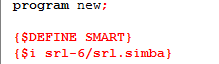
You need to add a new line underneath all of that, and that line needs to have the following information:
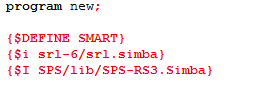
{$I SPS/lib/SPS-RS3.Simba}
What this does is it loads all of the SPS Include files, so you can use procedures like sps.setup and sps.walkpath in your scripts
When you're done, it should look a little something like this:
BigRedJapan
2015-03-08 05:05:48
Whats the include for OSR SPS