SRL Archive - OSR Intermediate Scripting Tutorials

Creating Custom SPS MiniMap Maps Using Photoshop + Using Them


Google

2012-06-11 18:22:08

Request Me A SPS Minimap Map


This may be a length guide or seem challenging, but it took me a lot of time and I hope some appreciate it, and if you ever need help I'm always available on skype. I've been asked quite a few times and seen quite a few forum threads about how to make custom maps for areas that are outdated on the runescape_surface map so I decided to make my first tutorial. And others to come if my method of teaching is good.:garfield:

Making The MinimapMap

For now I will start with something simple that I was just requested to me.

I use the Snipping Tool found in Start-up > All Programs > Accessories.

Step 1) Go to the area you wish to make a map for, I will use Falador east bank to the garden keep it small and simple for now. Right Click the map and click face north for an accurate map, Always make sure its RS absolute north.

Step 2) Open up the " Snipping Tool " and take a snapshot of just the Minmap area shown below.
And Remember once you take the Snip with the " Snipping Tool " hit control + C and paste it into paint, or else it will have a very poor image quality.

< Correct

Example of saving the picture through Snipping Tool:
< Distorted
^^ See how it distorts the image quality? You don't want that and your map will not work in the end.

Step 3) Repeat This process moving quite a few tiles until you got the whole area you are making a map for. Picture below for the example I'm doing. As I said in "Step 2" remember after taking the Snippit use Control + C then paste into paint.
Note: Always leave some white space under your Minimaps so you will have space to work with when using Photoshop.


Step 4) Now after you have all your minimap shots into paint as shown above^^ save them as a .png file to your desktop or anywhere that you like. After you have saved the file open it up with Photoshop.

Step 5) You should now have something like this, shown below. Now you must select the " Elliptical Marquee Tool " that is circled by the red box.

Step 6) Now we will use the " Elliptical Marquee Tool " to draw a circle around the Minimap image, then once done right click and create a new layer from cut. Always remember after making a cut click back on layer 0 or the " Base " layer to make your next cut.


Step 7) Repeat step 6 Until all the pictures are cut and on new layers, Then click on the "Eye Symbol" for the " Base " or Layer 0 to hide the background, circled in red in the picture below.
Now you should have something that looks like this.

Step 8) This is my personal preference but I like to flip all the layers around besides the first one(Base Layer or Layer 0), It helps with blending the maps together easier since colors change when the map gets loaded through the game client. I will show in a picture below.
^^ Notice before it was 0, 4, 3, 2, 1, now its 0, 1, 2, 3, 4.

Step 9) Now that we got all the hard parts out of the way I know it might be overwhelming but this is really the easiest part, and I've seen some people do it funky ways.

We are going to start with layer 1 > Which is now our base going to select the " Move Tool " or press " V " on the keyboard, select layer 1 and drag it to the bottom of the canvas. If you don't know what the canvas is it is the checkered box in the background. Picture below. The Move Tool + The Layer are circled by Red.

Google

2012-06-11 18:23:08

Step 10) Now this will probably be the hardest part to show through a written tutorial. While still using the "Move Tool" select layer 2 and drag it over layer one and decrease the opacity as shown in the picture. Then use the fence, bank outlines + road to line the two pictures perfectly together. Picture Below.
^^ Notice how the fence, roads + bank are stacked over each other in both pictures.
Once the two are lined up drag the opacity back to 100% it will now look like this.

^^ After you lined them up bring the opacity back to 100%.

Step 11) Now select with layer 3 and drag the minimap picture over the others, reduce the opacity and line them up. Picture Below.
^^ Line them both up with both pictures, do not worry about symbols we can remove them later.
^^ After you lined them up bring the opacity back to 100%.

Step 12) Now select with layer 3 and drag the minimap picture over the others, reduce the opacity and line them up. Picture Below.
^^ Make sure they are all lined up correctly..
^^ After you lined them up bring the opacity back to 100%.

Step 13) Second to last step just need to do some touch-ups fixing the Tree Patch + bank symbol, so you would have to click the " Eye " once again to which picture has the most defined | most accurate position. In my case I will be using " Layer 1 for the bank symbol " , and " Layer 2 for the Tree Patch ".

First off for the bank symbol we are going to hide layer 1, then select layer 3 since that layer has the symbol we are trying to remove, then press " E " or go to the " Eraser Tool ", Now we are going to erase the bank symbol + yellow npc dot with the eraser tool, then enable layer1 again to see result. Picture Below.
Result Below:

Repeat step 13 until all unnecessary symbols are removed.

Step 14) In order to finish the photo were going to need to select layers 1-4 you can do this by clicking layer 1, then holding down shift and clicking layer 4. This will highlight all the layers in between and layer 4. Next you need to link the pictures together. Which is circled in the picture below, its the chain on the menu box at the bottom.

After they are linked select layer one, then the paint bucket and paint the layer black. after then un-hide "Base Layer or Layer 0" and then you are finished.

Now just save the photo as a .png to your desktop, open it up in paint and just re-size the canvas to your liking, the smaller the better I believe. Once your done with that just re-save using " Save As ' hit save, and if the transparent window pops up click OK and you're good to go.

Final Result:

- Whole process takes about 2 mins tops to make a map through photoshop.

Google

2012-06-11 18:24:16

Using The Minimap Map In Your Script


First off you will down to download the path maker I will give two links below.

M34tcode's Path Maker: http://villavu.com/forum/showthread.php?t=80134&highlight=path <- I use this one
Wolygon's Path Maker: http://villavu.com/forum/showthread.php?t=64891&highlight=path

Now the easiest part of the tutorial making a walking path. We will take this mini-map we just made and put it into the folder runescape_other.

^ This is how you get to the folder or you can click startup and where it says search all programs and files type " runescape_other" then open that folder.

After putting it into the runescape_other folder open up your path maker, for this tutorial I'm going to be using M34tcode's Path Maker. After it has opened go to Image > Load Different Map.


A box will pop up just go back to the runescape_other folder and select the map you just made.

^ It should look like this, now all you do is click on the map and make points of where to walk. I'm going to start at the bank and end at the garden. Closer the points I've found to be more accurate paths.
^^ The red arrow is my first point and it ends at the garden, now to take the path coordinates and implement them into a script.
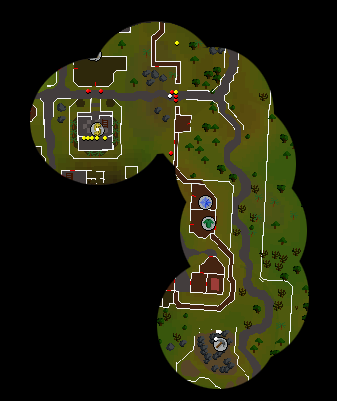
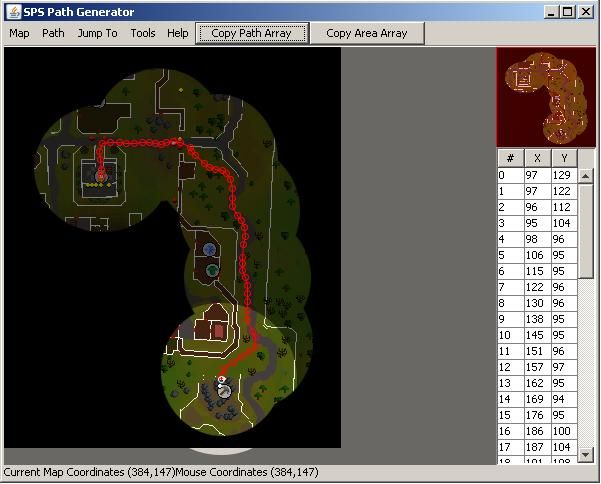
Now just open up a blank Simba file and were going to test the path now.

First you must copy then path array which is found on the path creator, there is a picture below then you can use the Simba code below as a guide.

Program TestPath;
{$DEFINE SMART} //< Edit this out if using Rs Client
{$i srl/srl.Simba}
{$i sps/sps.simba}

var //{path name}
//{delcare the sps variable}
togarden: tpointarray;

status: string;

procedure paths;
begin
togarden := [Point(188, 226), Point(183, 221), Point(176, 219), Point(169, 218), Point(162, 216), Point(155, 214), Point(144, 210), Point(134, 204), Point(125, 197), Point(120, 193), Point(126, 174), Point(142, 173), Point(152, 171), Point(172, 180), Point(180, 181), Point(191, 181), Point(202, 181), Point(212, 177), Point(217, 174), Point(229, 161)]
end;
procedure testpath;
begin
if sps_walkpath(togarden) then
status := 'walking to the garden'
else begin
status :='failed walking to the garden';
writeln(status + ' + time running:' +timerunning);
end;
writeln(status + ' + time running:' +timerunning);
end;
begin
srl_sixhourfix := true;
smart_fixspeed := true;

setupsrl;
paths; //{call path variables here}
//{Mistake I see a lot only call the map once, Not in the procedure}
//{If using multiple accounts it will always give an error when trying to pull the map}
sps_setup(runescape_other,['falador_test']);

clicknorth(srl_angle_high);

testpath;

repeat
until(false)
end.

Congratuations if you followed all the steps correctly you can do any walking | create a map for any situation.
If you have any question please feel free to post or send me a message on skype.

Olly

2012-06-11 18:25:41

Isn't there already a tutorial for this?

Google

2012-06-11 18:28:52

From: Ollybest
Isn't there already a tutorial for this?


Don't think so would be quite upsetting if there was. I think the other one was for making just one snap shot for a map.

Flight

2012-06-11 23:04:51

You did great on this tutorial, job well done. :)

Google

2012-06-12 00:08:23

From: Flight
You did great on this tutorial, job well done. :)


Thank you very much flight.

x[Warrior]x3500

2012-06-12 00:19:36

great job google. i might have to actually start using SPS now. :P

J J

2012-06-12 09:20:32

I was actually planning of adding a section like this to my tutorial, but no-one ever requested me to make a map for them. Well, I was actually planning to make a video of the process of merging maps together. Good job on the tutorial but I suggest that you also show how to delete the unwanted symbols and npc/player dots.

Google

2012-06-12 10:53:25

From: x[Warrior]x3500
great job google. i might have to actually start using SPS now. :P

Thanks Glad its not to hard to understand took me a while and started to slack off towards the end.

From: J J
I was actually planning of adding a section like this to my tutorial, but no-one ever requested me to make a map for them. Well, I was actually planning to make a video of the process of merging maps together. Good job on the tutorial but I suggest that you also show how to delete the unwanted symbols and npc/player dots.


I was going to add a video tut onto this because it was a little to hard to show removing symbols etc through a tutorial, but I can't find the right screen capture program.

NoUserName

2012-06-12 12:54:38

Are custom maps more reliable?

Olly

2012-06-12 12:57:40

From: NoUserName
Are custom maps more reliable?


Alot, Try it and you will never go back :P

Silentcore

2012-06-12 13:01:42

Google this is such a great tutorial, im going to practice some SPS making once I get home from school. Keep it up Google. Rep+1

600th Post.!!

NoUserName

2012-06-12 13:08:38

im more off a fireworks person, but i am going to try this soon i will let you know how i get on.

i find normal maps miss cords and mess up every so often

Google

2012-06-12 13:29:43

From: NoUserName
Are custom maps more reliable?

Ah yes I just posted on your thread few seconds ago, extremely accurate and fast. There is a request link at the top I can make maps if you are having trouble. Was considering making a whole world map but I honestly don't have the time to go around and take snap shots of everywhere.

From: Ucantseemebot
Google this is such a great tutorial, im going to practice some SPS making once I get home from school. Keep it up Google. Rep+1

600th Post.!!


Thank you glad its not too messy:blink:

From: NoUserName
im more off a fireworks person, but i am going to try this soon i will let you know how i get on.

i find normal maps miss cords and mess up every so often


It is because the map is too outdated, I found almost 70% of the areas are unstable and do not work.

NoUserName

2012-06-12 14:05:33

From: GOOGLE

It is because the map is too outdated, I found almost 70% of the areas are unstable and do not work.


though it would be something like this.

Google

2012-06-12 14:10:19

From: NoUserName
though it would be something like this.


If you need help or the map made for you just visit the other thread at the top of this tutorial. I'm making map requests considering making a whole world map.

NoUserName

2012-06-12 14:22:15

a whole world map would be amazing would be willing to help on that if i ever get the hang off it why do you have too use the mini map why not just just the world map pop out?

Google

2012-06-12 14:36:11

From: NoUserName
a whole world map would be amazing would be willing to help on that if i ever get the hang off it why do you have too use the mini map why not just just the world map pop out?


Because if you open the world map every single color is off, next time your logged on check it out,

NoUserName

2012-06-12 14:41:09

though so, how dose sps actually work?

Google

2012-06-12 14:47:20

From: NoUserName
though so, how dose sps actually work?


It's a color positioning system that gives you tile-like information of your current position on the map.

I think:confused:

King

2012-06-21 18:28:43

Google, this is an amazing tutorial, I absolutely love it. It was easy to understand and the first map I created using this was easily the most accurate SPS has ever been. I love it, keep them coming! I repped as well(;

Google

2012-06-22 07:40:10

From: SRLKing
Google, this is an amazing tutorial, I absolutely love it. It was easy to understand and the first map I created using this was easily the most accurate SPS has ever been. I love it, keep them coming! I repped as well(;


Thanks glad to hear it helped you out

Gl3nn IV

2012-07-02 15:31:29

I just wondered, say if there is red dots on the minimap, would that affect the sps at all? Or would you have to erase them?
Amazing tutorial btw.

Google

2012-07-02 15:50:36

Yes you would have to erase them but you can also just avoid them while making your path.

Gl3nn IV

2012-07-02 16:57:38

Ah okay, thanks. Just i had loads of red dots at VeB due to fires so i wasn't sure. Cheers for the clear-up :)

grats

2012-07-02 17:01:38

Good tut same way I've always done that :P

also a tip, the map stuff changes by a few pixels every few mins so I usually take all the screen shots real fast this way you don't come back and find stuff doesn't match up with new minimap s/s's

Google

2012-07-11 15:40:25

Thanks, and im not sure if that has any affect since you can mess around with walk tolerance but I can add that later.

VastlySuperior

2012-07-16 13:44:26

Google, I have a question here fro you.

Where did you get this name:
['falador_test']

Is it the file name you created or just a Fictitious name you provide?

E. Ok, I figured it out. Its the file name you saved.

whaevr

2012-07-16 14:34:13

Just a hint, if you hit Save As… in the snipping tool you can choose to save the image as a PNG. The distortion you have shown in your example in from saving it as a jpg.

This way you dont have to copy it over to paint everytime and save it that way :p

Google

2012-07-17 14:56:39

From: VastlySuperior
Google, I have a question here fro you.

Where did you get this name:
['falador_test']

Is it the file name you created or just a Fictitious name you provide?

E. Ok, I figured it out. Its the file name you saved.


Yeah you can choose any file name you wish.

From: whaevr
Just a hint, if you hit Save As… in the snipping tool you can choose to save the image as a PNG. The distortion you have shown in your example in from saving it as a jpg.

This way you dont have to copy it over to paint everytime and save it that way :p


Its faster if you just control copy the Snippit and paste it over in the paint file so you can load all the mini map shots into photoshop rather than editing say 20 different snips on a new tab then putting them all onto a single tab.

tristen8878

2012-10-12 14:37:45

ty so much for this guide it has helped me create custom maps really fast and easy

Google

2012-10-12 23:57:47

From: tristen8878
ty so much for this guide it has helped me create custom maps really fast and easy


No problem man

crezzur

2012-10-19 06:27:42

Is it important that the npc dots are on the minimap?

Because i could make a PrivateClient of runescape using there cache and enlarge the minimap so we can see a larger image of the minimap so u wont need to cut as mutch as now.

slushpuppy

2012-10-19 07:20:52

ty for this awesome tutorial

Google

2012-10-19 11:40:48

From: crezzur
Is it important that the npc dots are on the minimap?

Because i could make a PrivateClient of runescape using there cache and enlarge the minimap so we can see a larger image of the minimap so u wont need to cut as mutch as now.


No they dont matter so much just avoid making a path all over the dots.

From: slushpuppy
ty for this awesome tutorial


No problem.

Roflme

2012-11-04 07:15:24

Are there any programs that can be used besides Photoshop for making the map? Paint can't crop in circles and I don't own Photoshop so I'm looking for some alternative :p

marc2333

2012-11-05 14:37:13

nice tutorial, will try to apply this to rsps scripts who need to walk :)

Itankbots

2012-11-06 21:53:27

<333333 your the best! Could never get SPS to walk a path before, but i followed your tutorial to make my own map and it worked the first time! Rep+ Thank you haha

@ Roflme You can download the newest photoshop from there website for free, a 30 day trial but it works and thats what i used

Google

2012-11-07 10:54:48

From: Roflme
Are there any programs that can be used besides Photoshop for making the map? Paint can't crop in circles and I don't own Photoshop so I'm looking for some alternative :p


There is some alternatives, and are you sure paint doesn't have a circle cutting tool?

Alternatives: GIMP, Krita, Paint.net, Chocoflap

P.S You can just google and find many great programs, most are free but you can always find paid ones for free..

From: Itankbots
<333333 your the best! Could never get SPS to walk a path before, but i followed your tutorial to make my own map and it worked the first time! Rep+ Thank you haha

@ Roflme You can download the newest photoshop from there website for free, a 30 day trial but it works and thats what i used


No problem thats what its here for. :)

alucard123

2012-11-11 13:55:31

which photoshop do u use im still using radialwalk lol

Chris Reborn

2012-11-11 13:58:51

pretty good tut and i have ps6

Google

2012-11-12 21:48:53

From: alucard123
which photoshop do u use im still using radialwalk lol


I use cs5 but all versions work fine.

From: idodew
pretty good tut and i have ps6


Thanks

runw

2012-12-01 07:18:34

Hey I'm new to SPS and Scripting in general but I'm trying to make a path for a runescape private server called nr2006 and when I run the script it does nothing. Could you hint me what I'm missing? Here's my progress:


Program IronBanker;
{$i srl/srl.Simba}
{$i sps/sps.simba}

Const
SRLStats_Username = '';
SRLStats_Password = '';
BreakEvery = 120;
BreakFor = 5;
Version = '1.0';
NumbOfPlayers= 1;
StartPlayer= 0;

procedure DeclarePlayers;
var i:integer;
begin
NumberOfPlayers(NumbOfPlayers);
CurrentPlayer := StartPlayer;
with Players[0] do
begin
Name := '';
Pass := '';
Active := True;
Integers[1] := 4;
Integers[2] := 4;
end;
end;

function FindAndSetTarget(TitlePrefix: String; SetAsTarget: Boolean): Boolean;
var
T : TSysProcArr; // Array of processes
I : Integer;
begin
T := GetProcesses;
for I := High(T) downto 0 do
if Pos(TitlePrefix, T[I].Title) <> 0 then
begin
Result := True; // True if TitlePrefix is found as part of a title in a process of the array of processes
if SetAsTarget then SetTarget(T[I]); // If found that process is set as the client
Exit;
end;
end;

Procedure TestPath;
Var
{Declare the variables}
ToMine: TPointArray;
Begin
{Path Name < can name anything you want + Path Array Points}
ToMine := [Point(97, 129), Point(97, 122), Point(96, 112), Point(95, 104), Point(98, 96), Point(106, 95), Point(115, 95), Point(122, 96), Point(130, 96), Point(138, 95), Point(145, 95), Point(151, 96), Point(157, 97), Point(162, 95), Point(169, 94), Point(176, 95), Point(186, 100), Point(187, 104), Point(191, 108), Point(200, 116), Point(205, 120), Point(211, 122), Point(218, 123), Point(222, 126), Point(226, 132), Point(228, 141), Point(228, 151), Point(228, 159), Point(233, 168), Point(237, 173), Point(240, 180), Point(241, 189), Point(239, 197), Point(238, 210), Point(238, 216), Point(238, 223), Point(241, 230), Point(243, 238), Point(243, 246), Point(243, 254), Point(243, 263), Point(243, 272), Point(248, 284), Point(251, 290), Point(251, 299), Point(245, 304), Point(237, 309), Point(229, 315), Point(220, 321), Point(217, 328), Point(217, 332)]
{Walks the path using the furthest point it can find}
SPS_WalkPath(ToMine);
{If it walks the path successfully it will debug made it, then log off.}
If Sps_WalkPath(ToMine) Then
Begin
Writeln('We Made It To The Mine, Logging Out');
Logout;
TerminateScript();
End;
End;
Begin

SetupSRL;
DeclarePlayers;
FindAndSetTarget('Near Reality', True); // If SRL is found as part of a window title the first window found with that will be set as client

if FindAndSetTarget('Near Reality', True) then // If SRL is found as a window title then
WriteLn('Yay Near Reality is found as a window title');

if not FindAndSetTarget('BenLand100', True) then // If BenLand100 is 'not' found as a window title then
WriteLn('BenLand100 cannot be found O_O as a window title');
if FindAndSetTarget('Near Reality', True) then
ActivateClient;
{Mistake I see a lot only call the map once, Not in the procedure}
{If using multiple accounts it will always give an error when trying to pull the map}
SPS_Setup(runescape_other,['iron_banker']);
Repeat
TestPath;
Until(Not(LoggedIn))
End.

Google

2012-12-05 14:35:37

Is your custom map called " iron banker ", and placed in the runescape_other folder ? Also that map isn't absolute north so it will be inaccurate.

SOUPalmighty

2012-12-13 14:37:20

awesome tut google, thx for the help

Google

2012-12-13 14:40:59

From: SOUPalmighty
awesome tut google, thx for the help


no problem

rj

2012-12-13 23:23:33

So this would be useable on private servers even if the camera shifts?

Google

2012-12-13 23:26:02

From: rjj95
So this would be useable on private servers even if the camera shifts?


I am not the guy to answer this correctly but I posted on your open thread with my thoughts. I'm pretty sure you will have to use an alternative walking method.

Justin

2012-12-13 23:26:03

From: rjj95
So this would be useable on private servers even if the camera shifts?


Depends on how much the colors have changed since the map, also SPS only works if the compass is north, no it, it wont work if the camera shifts away from north (angle can be any)

Google

2012-12-13 23:29:56

From: [J]ustin
Depends on how much the colors have changed since the map, also SPS only works if the compass is north, no it, it wont work if the camera shifts away from north (angle can be any)


I'm pretty sure the area of the mini map is different now with the nav-bar so it would not even be able to get a position on a rsps. My best guess would be to edit the variables for the mmx1-y to have it work.
^ If this makes sense to you.

Edit: updated snippet for current update.

Pew

2012-12-24 10:59:00

I am also trying to use this for a private server and all it did was try to set compass North then stopped. Obviously it couldn't do that as it is rs from 2006 and once I removed that action it simply does nothing at all just like previous user. I can't find any methods of walking and it sucks.

Program TestPath;
{$i srl/srl.Simba}
{$i sps/sps.simba}

var //{path name}
//{delcare the sps variable}
mypath: tpointarray;

status: string;

procedure paths;
begin
myPath := [Point(185, 72), Point(164, 134), Point(162, 198), Point(128, 255), Point(82, 284), Point(82, 309)];
end;
procedure testpath;
begin
if sps_walkpath(mypath) then
status := 'walking to the garden'
else begin
status :='failed walking to the garden';
writeln(status + ' + time running:' +timerunning);
end;
writeln(status + ' + time running:' +timerunning);
end;
begin
setupsrl;
paths; //{call path variables here}
//{Mistake I see a lot only call the map once, Not in the procedure}
//{If using multiple accounts it will always give an error when trying to pull the map}
sps_setup(runescape_other,['walkpath']);

testpath;

repeat
until(false)
end.


So something is going wrong in this part here. I would imagine it could be changed to the new minimap location but I'm really not sure how.

// Walks the path "Path"; always walks to the furthest point possible
function SPS_WalkPath(Path: TPointArray): boolean;
var
I, H, T, D: integer;
P, MM: TPoint;
begin
H := High(Path);
T := GetSystemTime + 20000 + Random(5000);

while (not Result) and (GetSystemTime < T) do
begin
RunEnergy(20);

P := SPS_GetMyPos;
for I := H downto 0 do
begin
MM.X := MMCX + Path[I].X - P.X;
MM.Y := MMCY + Path[I].Y - P.Y;

D := Distance(MM.X, MM.Y, MMCX, MMCY);

if (D < 10) then
break
else
if (D < 70) then
begin
if (SPS_MultiMouse) then
MultiMouse(MM.X, MM.Y, 25, 3, false)
else
Mouse(MM.X, MM.Y, 5, 5, mouse_Left);

FFlag(Integer(I <> H) * 15);

T := getSystemTime + 20000 + Random(1000);
Break;
end;
end;

Result := (I = H);
end;
end;

Olly

2012-12-24 12:04:43

Lol ^ sps isn't designed to work with private servers..

Pew

2012-12-25 02:23:51

From: Ollybest
Lol ^ sps isn't designed to work with private servers..


Lol^ I didn't know that I'm only starting out.. :f:

Can anyone suggest any walking methods that might work?

DannyRS

2012-12-25 02:29:35

From: Pew
Lol^ I didn't know that I'm only starting out.. :f:

Can anyone suggest any walking methods that might work?


DTMs, TPA's, ATPA's, radialwalk, colorclicking, blind clicking, pretty much anything besides sps

neeger

2012-12-29 18:30:13

Yeah nice Tut, replaced walking in my 2 scripts works like a charm, btw didn't get edgeville to work, I think because there are so many symbols? It clicks outside bank not inside :(

And btw Pew, you can make it work with private server if you downgrade some SPS procedures/functions to RS 2006 :P Just look into what SPS uses for walking and change it in srl.

Google

2013-01-20 13:23:46

From: neeger
Yeah nice Tut, replaced walking in my 2 scripts works like a charm, btw didn't get edgeville to work, I think because there are so many symbols? It clicks outside bank not inside :(

And btw Pew, you can make it work with private server if you downgrade some SPS procedures/functions to RS 2006 :P Just look into what SPS uses for walking and change it in srl.


You can try adjusting the tolerance usually fixes the problem if the map is still off, sorry for the late response.

digitalninja

2013-02-02 16:37:01

Hey Google … I tried following this script and for my 1st round made a few mistakes … with the marquee tool I made the circles too big so when I was trying to line them up there was a small "border" around the images. My bad! Learned from that mistake. I had a few followup questions:

1). Is it best to use the same graphic settings as simba requires?

2). How perfect does the alignment need to be … this was easily the hardest part (although I am also BRAND new to photoshop)

Thanks!

DN

digitalninja

2013-02-02 22:21:59

Hey Google … couple more questions … I cant get my sps to work :duh:

I get a compile failed for both these:

srl_sixhourfix := true;
smart_fixspeed := true;

I also dont understand the code and what I am supposed to be entering? Do I need to enter stuff at these points?

var //{path name}
//{delcare the sps variable}

paths; //{call path variables here}
//{Mistake I see a lot only call the map once, Not in the procedure}
//{If using multiple accounts it will always give an error when trying to pull the map}

Thanks!

DN

t4q

2013-03-17 04:09:41

thank you, I finally understand SPS walking

Kakneushoofd

2013-03-20 12:11:08

Amazing job Google!
Very clear and easy to understand, this will definetly help alot of people with walking in their scripts!

StickToTheScript

2013-03-24 23:35:11

Dude! Thanks so much! This has helped me a lot! You made my love for SPS come back! Ha ha! XD

BigRedJapan

2013-03-25 03:57:41

Thanks for the TUT! Its hard as Fk to make a Custom Map! Photoshop sucks with Alignment!

Debug

2013-03-27 23:33:11

From: Rules of Joe
Thanks for the TUT! Its hard as Fk to make a Custom Map! Photoshop sucks with Alignment!


Second this, photoshop is one of the most painful proggies to use properly

deathcrow

2013-04-05 00:22:49

This is a great tutorial. I will definitely be using this. :D

kwp4peter

2013-04-12 11:43:57

I'm getting this error:

[Error] (1:1): Unexpected end of file at line 0
Compiling failed.

Not entirely sure why, but here's my code so far:

program CatherbyLobbies;
{$DEFINE SMART8} //< Edit this out if using Rs Client
{$i srl/srl.Simba}
{$i sps/sps.simba}

var Catherby: tpointarray;

status: string;

procedure paths;
begin
Catherby := [Point(109, 125), Point(111, 131), Point(110, 134), Point(110, 139), Point(115, 143), Point(122, 143), Point(128, 142), Point(137, 142), Point(146, 142), Point(151, 140), Point(155, 139), Point(164, 139), Point(174, 140), Point(179, 141), Point(184, 140), Point(192, 140), Point(195, 140), Point(201, 141), Point(209, 144), Point(211, 148), Point(213, 154), Point(216, 158), Point(219, 159), Point(228, 159), Point(232, 159), Point(240, 159), Point(245, 161), Point(251, 164), Point(256, 168), Point(258, 169), Point(263, 175), Point(268, 178), Point(273, 182), Point(279, 185), Point(280, 187), Point(292, 191), Point(300, 191), Point(306, 187), Point(310, 182), Point(317, 179), Point(321, 179)]
end;
procedure testpath;
begin
if sps_walkpath(Catherby) then
status := 'walking to the shore'
else begin
status :='failed walking to the shore';
writeln(status + ' + time running:' +timerunning);
end;
writeln(status + ' + time running:' +timerunning);
end;
begin
srl_sixhourfix := true;
smart_fixspeed := true;

setupsrl;
paths;
sps_setup(runescape_other,['MMap']);

clicknorth(srl_angle_high);

testpath;

repeat
until(false)

rsbots2013

2013-04-14 02:47:39

Do I need to download any SPS thing to make SPS stuff work? Or is Simba and SRL all I need. BAsically following YOHOJO's video guide to installing Simba and SPS all I need?

Won

2013-05-28 12:40:59

From: kwp4peter
I'm getting this error:

[Error] (1:1): Unexpected end of file at line 0
Compiling failed.

Not entirely sure why, but here's my code so far:


You forgot an "end." at the very end of the script

Dick Trickle

2013-06-26 14:06:26

I noticed in your testing script that it says
{Mistake I see a lot only call the map once, Not in the procedure} 

are you saying that I cant use Runescape_Surface and RuneScape_Other in the same script? I'm trying to do that but it will only move if there is one or the other, not both.

yes both paths do work, I've tested them separately.

BeRy

2013-06-28 05:02:31

thanks for this google :) great tutorial. Will be using

footballjds

2013-12-03 02:58:01

just used this guide to create a great custom map.

Thanks a ton for the in-depth guide!!! xD

now that SPS is working with srl-6 and rs3, xD

footballjds

2021-01-17 16:18:25

From: footballjds
just used this guide to create a great custom map.

Thanks a ton for the in-depth guide!!! xD

now that SPS is working with srl-6 and rs3, xD


7 years later…

I used the default paint app to create this:

https://i.imgur.com/Xw4BGCc.png

Tips to improve it?

Emarian

2021-01-19 20:40:50

Rswalkers map grabber works great

footballjds

2021-01-22 11:23:47

From: Emarian
Rswalkers map grabber works great


ended up using RuneLite's "instance map"

footballjds

2021-01-31 10:12:26

From: Emarian
Rswalkers map grabber works great


it doesn't compile. I guess 1,000 days since RSWalker update would be the reason.

Emarian

2021-02-01 03:16:15

From: footballjds
it doesn't compile. I guess 1,000 days since RSWalker update would be the reason.


Hey bud I use a separate instance of simba for rswalker's map grabber. Simba 1206-fixes. It compiles fine under that. If you have any issues let me know and I'll upload that folder for you

EDIT:
Ended up uploading this and sending it to him. Anyone wants it lmk

footballjds

2021-02-01 11:07:16

From: Emarian
Hey bud I use a separate instance of simba for rswalker's map grabber. Simba 1206-fixes. It compiles fine under that. If you have any issues let me know and I'll upload that folder for you

EDIT:
Ended up uploading this and sending it to him. Anyone wants it lmk


link he pm'd me:
https://cdn-109.anonfiles.com/LaseAdE5p6/0210f558-1612196090/oldersimba.tar.gz

Emarian

2021-02-01 23:06:02

Hope it helps!

EDIT:
On second thought, I feel like you went over that file with a fine tooth comb and then posted it for others to inspect with their own fine tooth comb as well. I love the internet haha

Just so you know I promise you that you know more about this stuff than I do. I wish I knew what you guys did