xtrapsp
2012-10-07 13:18:14
Hey guys,
This is my first tutorial so hopefully I can do this properly if you don't understand something or I don't explain it properly give me a message and I will update it :) . In this tutorial I will be showing you:
Setting Up
Before we get started I suggest you create a template for the content. If you have never created a website template I suggest you visit these links:
http://datsik.webs.com/html-xml
http://www.w3schools.com/html/default.asp
In this tutorial I will be showing you how to create a BASIC Pythagoras theorem calculator.
I have supplied a template below for use with this calculator.
In this tutorial I will not show you how to style the site. This is mainly because there are other guides out there. I may do this in the future.
So now that we have a Semi basic site We need to create a form. It's always wise to plan ahead but as we have an example I'm going to tell you :p because I am that nice…
So we need 3 Sides to the triangle
Side A , Side B and Side C.
Using Forms is done in HTML and for an indepth guide theres this:
http://www.w3schools.com/html/html_forms.asp
The most IMPORTANT part of making a form when hooking it up to Javascript is to make sure you keep the names easy to remember and Identify.
NAME="" is very important, if these don't match up the the variables you declare in the JavaScript then it wont work.
Value is what is written by default inside the form element. Value = 0 makes a predefined 0 inside the input fields.
Now we have a basic function of the form. we are 1/3 of the way there! WOOO
Next up is creating the Javascript.
Creating the JavaScript
To open up the Javascript we use this tag right here:
<script type="text/javascript">
and close with
</script>
Now we are going to setup Variables inside our first function. This is very similar to the way pascal works so you should be able to pick it up fairly quickly ;)
Give the function a name, I decided to write Checkinputs as the name
Now we need to store some local Variables. So type
Var
Now we want to define the names of the sides, These should not match the names in the inputs so to keep this easier to remember I have used just the letters.
ParseInt means it will contain whatever is in these fields. So for example. The value of A will always equal whatever is in document.triangleform.SideA.value
So "SideA" is the same as the SideA input we created in the HTML form.
Same would be for SideB and SideC.
So now we are giving it a value.. GREAT! But it's not doing anything now… it's got this value and just storing it… so now what?
Well we need to do some equations don't we?
Pythagoras Theorem
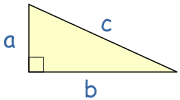
Now you can use algebra to find any missing value, as in the following examples:
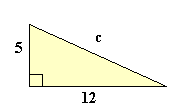
I know some of you guys aren't great at maths… but I will continue this tutorial later…
This is my first tutorial so hopefully I can do this properly if you don't understand something or I don't explain it properly give me a message and I will update it :) . In this tutorial I will be showing you:
- How to use form fields to allow inputs
- Calculate with the fields
- Understand ID's
- What ParseInt means and is
- Link Javascript with HTML
Setting Up
Before we get started I suggest you create a template for the content. If you have never created a website template I suggest you visit these links:
http://datsik.webs.com/html-xml
http://www.w3schools.com/html/default.asp
In this tutorial I will be showing you how to create a BASIC Pythagoras theorem calculator.
I have supplied a template below for use with this calculator.
<html>
<head>
<link href="stylesheet/stylesheet.css" rel="stylesheet" type="text/css">
</head>
<body>
<div id="Container">
   <div id="Form">
   </div>
</div>


</body>
</html>
In this tutorial I will not show you how to style the site. This is mainly because there are other guides out there. I may do this in the future.
So now that we have a Semi basic site We need to create a form. It's always wise to plan ahead but as we have an example I'm going to tell you :p because I am that nice…
So we need 3 Sides to the triangle
Side A , Side B and Side C.
Using Forms is done in HTML and for an indepth guide theres this:
http://www.w3schools.com/html/html_forms.asp
The most IMPORTANT part of making a form when hooking it up to Javascript is to make sure you keep the names easy to remember and Identify.
<FORM NAME="triangleform">
                    Enter the triangle values below: <br>
                    <p>
                    <h4>Side A: </h4><BR>
                    <INPUT TYPE="Integer" NAME="SideA" Value="0"/><P>
                    <h4>Side B: </h4><BR>
                    <INPUT TYPE="Integer" NAME="SideB" Value="0"/><P>
                    <h4>Side C:</h4> <BR>
                    <INPUT TYPE="Integer" NAME="SideC" Value="0"/><P>

                    <INPUT TYPE="button" NAME="Submit" Value="Submit" onClick="" />
</FORM>NAME="" is very important, if these don't match up the the variables you declare in the JavaScript then it wont work.
Value is what is written by default inside the form element. Value = 0 makes a predefined 0 inside the input fields.
Now we have a basic function of the form. we are 1/3 of the way there! WOOO
Next up is creating the Javascript.
Creating the JavaScript
To open up the Javascript we use this tag right here:
<script type="text/javascript">
and close with
</script>
Now we are going to setup Variables inside our first function. This is very similar to the way pascal works so you should be able to pick it up fairly quickly ;)
Give the function a name, I decided to write Checkinputs as the name
Now we need to store some local Variables. So type
Var
function checkinputs() {

var
		//Sides Section
   A = parseInt(document.triangleform.input1.value),
   B = parseInt(document.triangleform.input2.value),
   C = parseInt(document.triangleform.input3.value),
Now we want to define the names of the sides, These should not match the names in the inputs so to keep this easier to remember I have used just the letters.
ParseInt means it will contain whatever is in these fields. So for example. The value of A will always equal whatever is in document.triangleform.SideA.value
So "SideA" is the same as the SideA input we created in the HTML form.
Same would be for SideB and SideC.
So now we are giving it a value.. GREAT! But it's not doing anything now… it's got this value and just storing it… so now what?
Well we need to do some equations don't we?
Pythagoras Theorem
Now you can use algebra to find any missing value, as in the following examples:
a2 + b2 = c2
52 + 122 = c2
25 + 144 = c2
169 = c2
c2 = 169
c = ?169
c = 13
I know some of you guys aren't great at maths… but I will continue this tutorial later…