[INDENT]
What is a color
[/INDENT]

[INDENT]
RGB
[/INDENT]
[RIGHT]Difficulty:


[/RIGHT]
When describing a color, you have to split it in components. RGB is one of these systems where a color is described by the amount of
Red,
Green and
Blue. When all three components are zero the color will be black. The higher the number the lighter the color. When all three components are it its highest the color will be white. It is important to fully understand this when comparing colors.
[INDENT]

Some of you might have learned that the three basic colors are red,
yellow and blue. This however only applies on to paint and other pigment based color mixing. It is important to drop that knowledge while reading this.[/INDENT]
If you are new to this concept then I suggest looking at the next images and playing around with some color tools. A
link to a colortool where you can play with RGB colors provided by
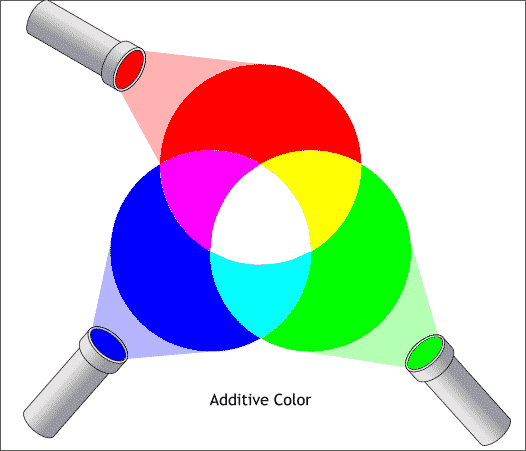
colortools.net. Change the three RGB components to see which color that outputs. Yellow for example is 100% red with 100% green and no blue. A color with an equal amount of all three components is a gray color.
[INDENT]An overview of how RGB mixes:
[/INDENT]
Since there are three components involved, creating a 2D image with all the colors isn't easy. I personally prefer to display it as a cube. Where the three axes normally represent the x, y and z value, they now represent the amount of red, green and blue. It is important to note that grey is in the middle while the more colorful colors can be found on the outside. The corner where the purple, cyan and yellow touches each other is white, while on the other side it will be black.
[INDENT]A RGB cube with a bite out:

[/INDENT]
[INDENT]
Integers and number systems.
[/INDENT]
[RIGHT]Difficulty:
[/RIGHT]
In this paragraph I will explain how the color is stored in simba. Different ways to set it. And how to read it or extract individual RGB components. In simba an integer is not just an integer, but a 32bit signed integer. So what does that mean? An integer in simba can be written in the binary numeral system(ones and zeros) like this 0 0000000 00000000 00000000 00000000.
[INDENT]
If you just read this tutorial for the basic understanding of runescape botting I suggest to continue at chapter 2: Comparing the color. [/INDENT]
0 0000000 00000000 00000000 00000000
Describes if the integer is positive or negative, not used in simba for colors.
00000000 00000000 00000000 00000000
The whole first byte isn't used for colors. In other situations this is used for the alpha(transparency) component. Often they use unsigned integers aka uints for that.
0 0000000
00000000 00000000 00000000
This byte holds blue component.
0 0000000 00000000
00000000 00000000
This byte holds green component.
0 0000000 00000000 00000000
00000000This byte holds red component.
But what do those eight ones and zeros mean? Let say the red component is 01100101 and you want to make it a readable decimal number. Since every one represent an 2 to the power of its position you can create the following:
[INDENT]

[/INDENT]
Though I advice learning to translate binary to decimal numbers, it is not required for this tutorial. As you could see the color components are exactly eight bits or one byte long. This is the same as a two digit hexadecimal number. Ever seen a number being described as A1 FF 00? That is an example of a color noted as a hexadecimal number. Where our decimal number system has 10 different digits, the binary has 2 digits and the hexadecimal got 16 digits. Here is a list with all hexadecimal digits against the others. Note how one hexadecimal F got the same value as four 1's in binary, so with one hexadecimal digit, you have the same highest value as with four binary digits(bits).
hexadecimal   |   decimal   |   binary
 0                  0           0
 1                  1           1
 2                  2           01
 3                  3           11
 4                  4           100
 5                  5           101
 6                  6           110
 7                  7           111
 8                  8           1000
 9                  9           1001
 A                  10          1010
 B                  11          1011
 C                  12          1100
 D                  13          1101
 E                  14          1110
 F                  15          1111
So how are we going to relate that to colors in simba. Well, an F in hexadecimal is the same as 1111 in binary, we can assume that FF in hexadecimal is the same as 11111111 in binary(eight ones). A color of three bytes, or 24 bits, can be written in only six hexadecimal digits. I made a table of a couple possible colors below. Note that the decimal number is how it is written in simba. The hexadecimal number is how you can write it with the biggest readability in my opinion. The long 24bits binary number is how it is stored in your computers memory. We won't do a lot with that.
Hexadecimal      |         binary            |   decimal  |  color
00 00 00          00000000 00000000 00000000   0              black
33 33 33          00110011 00110011 00110011   335543         dark grey
66 66 66          01100110 01100110 01100110   6710886        grey
AA AA AA          10101010 10101010 10101010   11184810       light grey
FF FF FF          11111111 11111111 11111111   16777215       white
FF 00 00          11111111 00000000 00000000   16711680       blue
00 FF 00          00000000 11111111 00000000   65280          green
00 00 FF          00000000 00000000 11111111   255            red
FF 00 01          11111111 00000000 00000001   16711681       blue with a bit of red
01 00 FF          00000001 00000000 11111111   65791          red with a bit of blue
The last two colors of that table got almost no difference in color to their pure variant. Red with a bit of blue, will still be blue to my eyes. The difference is so small, most of you wouldn't even be able to notice it. The decimal number however is completely different. So the decimal number doesn't give an good indication which colors are more, and which are less alike. The first byte will have a lot more power to the decimal number then the last one. Comparing these numbers will give very odd results. The hexadecimal number gives a more accurate difference. You can easily spot only one bit of a component has been added. That is why it is important to see the differences.
[INDENT]
Reading a color
[/INDENT]
[RIGHT]Difficulty:
[/RIGHT]
In the previous paragraph I've showed you how to express a color in a hexadecimal number system. It is really important to get this if you want to write readable colors in your code. The first thing I am going to show you is how to set these numbers in pascal. Note that when you read the integer, it is always transformed in a decimal number.
Here is an example setting five integers with the three different methods. It is important to note that the last example with the binary number only works on
lape. When you call
Writeln with any of these integers as parameter you will receive the decimal number.
program NumberSystems;

var
  numbers: Array of Integer;

begin
  SetLength(numbers,5); //I will give you five examples

  numbers[0] := 11;           //decimal, the number is 11
  numbers[1] := $11;         //hexadecimal, the number is 17
  numbers[2] := $FF00FF;  //hexadecimal, the number is 16711935 and the color is FF blue + FF red = purple

  //if you run lape
  numbers[3] := %11;        //binary, then number is 3
  numbers[4] := %111111110000000000000000; //binary, the number is 16711680 and the color is FF blue = blue
end.
As you may have noticed by know, is that the hexadecimal number is actually a bit readable. It is good enough if the colors are simple or you don't need to know the exact color.
Let's take $E3A13E for example. Do you know which color it is? Well, with a bit of practice you will notice that it got a lot of blue, a fair amount of green and little bit of red. So it is a blue color with a bit cyan and with a tiny bit of red. The red will probably only make it a bit lighter, and the cyan wouldn't change the color a lot. What color is it? Take a color in mind. Here it is:

As you can see, I was close. It is important to have a rough idea what the three components will be when added together. With that skill the abstract number will become a color, which is much easier to work with. Don't be afraid if you still aren't able to read a color by looking at the hexadecimal number. If you aren't familiar with it, it might take some time. It is not really necessary for botting in simple games.
Of course you might find colors noted like this 3209829 or colors that you converted to a string with Writeln(x) or such. Those can be impossible to read. The number you see says very few about the color. Well, of course it contains the information, but it is almost unreadable for a human. That is why it is also important to be able to transform a normal integer color in the red, green and blue components.
The simple way:
program TestColor;

procedure TestColor(color:Integer);
var
  red, green, blue: Integer;
begin
  ColorToRGB(color, red, green, blue);
  Writeln('red  = ' + IntToStr(red));
  Writeln('green = ' + IntToStr(green));
  Writeln('blue = ' + IntToStr(blue));
end;

begin
  TestColor(4231022);
end.
This is an easy and a fast way to split it up in components. Everybody can use this. As you will see the components will be written in the decimal number system. If you want to read them as a hex you can use this code:
program TestColor;

procedure TestColor(color:Integer);
var
  red, green, blue: Integer;
begin
  ColorToRGB(color, red, green, blue);
  Writeln('red  = ' + IntToHex(red));
  Writeln('green = ' + IntToHex(green));
  Writeln('blue = ' + IntToHex(blue));
end;

begin
  TestColor(4231022);
end.
As you can see
4231022 is the same as
$408F6E. Noting it as a hexadecimal number will give you advantage over noting it as a decimal number.
But there is another way to get the color. With bitwise operators, yes, shit just got real. In the following piece of code I will show you another way of achieving it. I will explain it very roughly because there already a few good tutorials about it.
Yakman his tutorial and
Alpha Kue his tutorial.
procedure TestColor(color:Integer);
var
  red, green, blue: Integer;
begin
  Writeln('red  = ' + toStr(color and $FF));
  //with and $FF it will read the last two hexadecimal digits

  Writeln('green = ' + toStr(color shr 8 and $FF));
  //I move the color 8 binary(2 hex) digits to the right

  Writeln('blue = ' + toStr(color shr 16 and $FF));
  //the same but now with 16
end;
[INDENT]
Examples
[/INDENT]
[RIGHT]Difficulty:
[/RIGHT]
A few color examples:
[INDENT]

~
Red [INDENT]
255 red 0 green 0 blue color := 255;[INDENT]or[/INDENT]
color := $0000FF;[/INDENT]
[/INDENT]
[INDENT]

~
Blue [INDENT]
0 red 0 green 255 blue color := 16711680;[INDENT]or[/INDENT]
color := $FF0000;[/INDENT]
[/INDENT]
[INDENT]

~
Green [INDENT]
0 red 255 green 0 blue color := 65280;[INDENT]or[/INDENT]
color := $00FF00;[/INDENT]
[/INDENT]
[INDENT]

~
White [INDENT]
255 red 255 green 255 blue color := 16777215;[INDENT]or[/INDENT]
color := $FFFFFF;[/INDENT]
[/INDENT]
[INDENT]

~
Grey [INDENT]
127 red 127 green 127 blue color := 8355711;[INDENT]or[/INDENT]
color := $7F7F7F;[/INDENT]
[/INDENT]
[INDENT]

~
Black [INDENT]
0 red 0 green 0 blue color := 0;[INDENT]or[/INDENT]
color := $0;[/INDENT]
[/INDENT]

 [/INDENT]
 [/INDENT]


