SRL Archive - S.M.A.R.T.

Exception in Script: Plugin(libsmartremote32) has not been found


DeeMR

2012-08-02 06:22:49

It says "Exception in Script: Plugin(libsmartremote32) has not been found" when I try running script.

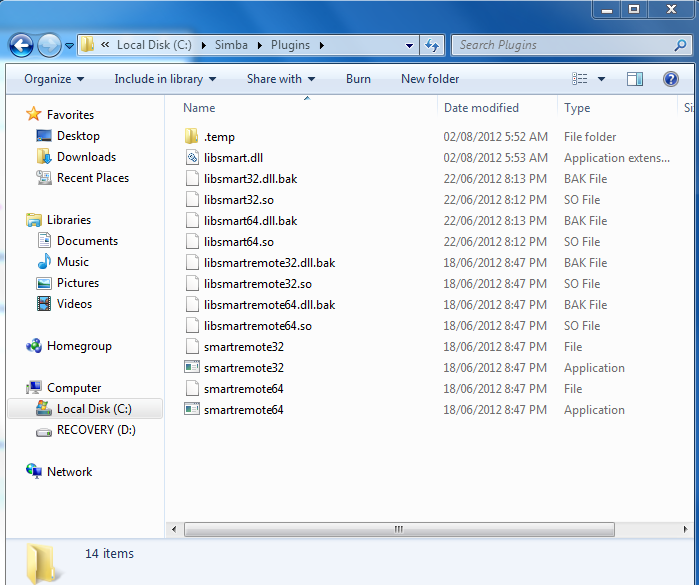
These are the files in which I have in Simba/Plugins (downloaded new SMART and extracted files in there)


EDIT: Now, after having done what people have said, I get this issue:


and then this in the debug box:

"SRL Compiled in 16 msec
** Fatal Error: Pairing Clients; Terminating Script **
Successfully executed."

EDIT2:

Alright, now the script has compiled but no SMART appears. Nothing is in the debux box other than the script compiled in 0msec, etc… Why won't it appear? I've waited long but still no SMART.

Flight

2012-08-02 06:34:13

You're missing "libsmartremote32.dll". Here, download this attachment and put it there in your Plugins folder.

Eh nevermind, I guess we can't attach DLLs here. :/ I'll upload it to UppIT, you can just download it from there.

http://uppit.com/y2t0l3f6kd6d/libsmartremote32.dll

DeeMR

2012-08-02 06:40:37

Thanks, I've done that and it fixed it. Now, a new problem arises. It says "Exception in Script: Plugin(sps32) has not been found" now.

/sigh

Flight

2012-08-02 07:11:32

Here's SPS.dll. It should work for your error.
http://uppit.com/712m225z5isy/sps.dll

DeeMR

2012-08-02 07:27:35

Oh okay but when I try to then update SPS after adding it, it says downloading, decompressing and then asks me whether I want to override the plugins? If I say yes, It will say that the two files are missing that we just added, if I say no and then try to run the script, I get this

"SRL Compiled in 16 msec
** Fatal Error: Pairing Clients; Terminating Script **
Successfully executed."

What should I do? It's issues after issues, I feel as if I'm going in circles.

BenLand100

2012-08-02 17:41:59

Did no one else notice his libraries were .dll.bak instead of .dll?

DeeMR

2012-08-02 18:17:28

Hmm.. I'm not sure what I had done wrong. I copied what was inside the SMART 7.2 download .zip to Simba/Plugins. How can I fix this?

DeeMR

2012-08-02 18:36:03

I've edited my main post with the problem I'm having now.

Le Jingle

2012-08-02 18:39:56

google msvcr100.dll,
download the .zip
for 32 bit computers, open C:\Windows\System32
copy the dll from the downloaded .zip file and paste in into system32 folder

DeeMR

2012-08-02 21:10:28

seems to be working now. Thanks!

DeeMR

2012-08-02 23:52:01

Alright, now the script has compiled but no SMART appears. Nothing is in the debux box other than the script compiled in 0msec, etc… Why won't it appear? I've waited long but still no SMART.

DeeMR

2012-08-03 19:33:45

Can anyone explain why SMART won't open after I've ran the script? It just says Script compiled in 0msec and nothing else.. the script says is still running but I don't see any SMART.

raees

2012-08-06 13:54:30

you might wanna get the new SMART V8.0 which works beautifully, first post in this thread