SRL Archive - OSR Help

Click on object(trap)


jman1208

2012-07-20 00:25:34

I'm having trouble getting my script to click on a certain area, the script needs to click on the area put in the picture in order to make i across the trap if it clicks in the middle or anywhere else but that area i defined it will fail. This is really holding my script back any help is greatly appreciated!
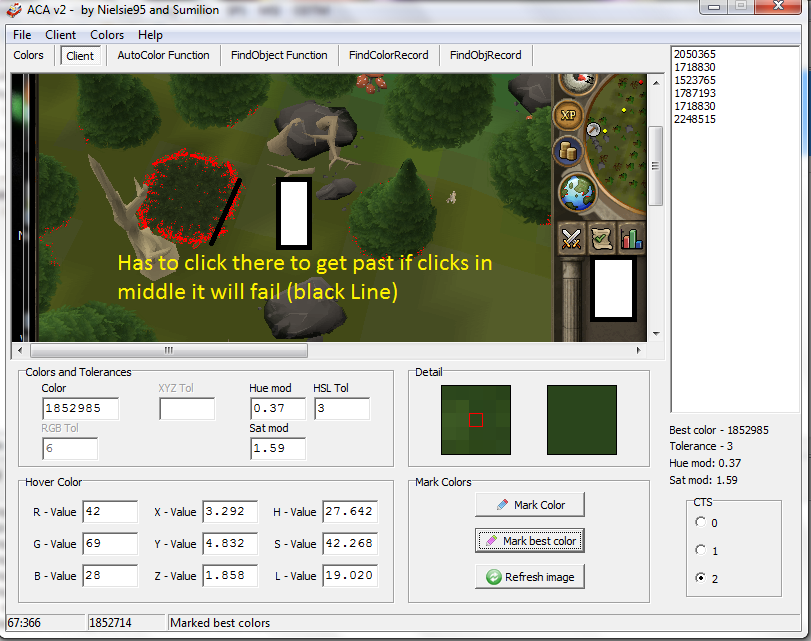


Some things that may help


AutoColor

function AutoColor: Integer;
var
arP: TPointArray;
arC: TIntegerArray;
tmpCTS, i, arL: Integer;
R, G, B: Integer;
X, Y, Z: Extended;
begin
tmpCTS := GetColorToleranceSpeed;
ColorToleranceSpeed(2);
SetColorSpeed2Modifiers(0.37, 1.59);

FindColorsSpiralTolerance(MSCX, MSCY, arP, 1852985, MSX1, MSY1, MSX2, MSY2, 3);
if (Length(arP) = 0) then
begin
Writeln('Failed to find the color, no result.');
ColorToleranceSpeed(tmpCTS);
SetColorSpeed2Modifiers(0.2, 0.2);
Exit;
end;

arC := GetColors(arP);
ClearSameIntegers(arC);
arL := High(arC);

for i := 0 to arL do
begin
ColorToRGB(arC[i], R, G, B);

if (R >= 45) and (R <= 68) and (G >= 57) and (G <= 80) and (B >= 22) and (B <= 35) then
begin
ColorToXYZ(arC[i], X, Y, Z);

if (X >= 2.81) and (X <= 5.42) and (Y >= 3.66) and (Y <= 6.92) and (Z >= 1.47) and (Z <= 2.58) then
begin
Result := arC[i];
Writeln('AutoColor = ' + IntToStr(arC[i]));
Break;
end;
end;
end;

ColorToleranceSpeed(tmpCTS);
SetColorSpeed2Modifiers(0.2, 0.2);

if (i = arL + 1) then
Writeln('AutoColor failed in finding the color.');
end;


FindOBject
function FindObject(var fx, fy: Integer): Boolean;
var
arP, arAP: TPointArray;
arC, arUC: TIntegerArray;
ararP: T2DPointArray;
tmpCTS, i, j, arL, arL2: Integer;
P: TPoint;
X, Y, Z: Extended;
begin
tmpCTS := GetColorToleranceSpeed;
ColorToleranceSpeed(2);
SetColorSpeed2Modifiers(0.37, 1.59);

if not(FindColorsTolerance(arP, 1852985, MSX1, MSY1, MSX2, MSY2, 3)) then
begin
Writeln('Failed to find the color, no object found.');
ColorToleranceSpeed(tmpCTS);
SetColorSpeed2Modifiers(0.2, 0.2);
Exit;
end;

arC := GetColors(arP);
arUC := arC;
ClearSameIntegers(arUC);
arL := High(arUC);
arL2 := High(arC);

for i := 0 to arL do
begin
ColorToXYZ(arC[i], X, Y, Z);

if (X >= 2.81) and (X <= 5.42) and (Y >= 3.66) and (Y <= 6.92) and (Z >= 1.47) and (Z <= 2.58) then
begin
for j := 0 to arL2 do
begin
if (arUC[i] = arC[j]) then
begin
SetLength(arAP, Length(arAP) + 1);
arAP[High(arAP)] := arP[j];
end;
end;
end;
end;

SortTPAFrom(arAP, Point(MSCX, MSCY));
ararP := SplitTPAEx(arAP, 10, 10);
arL := High(ararP);

for i := 0 to arL do
begin
if (Length(ararP[i]) < 10) then Continue;
P := MiddleTPA(ararP[i]);
MMouse(P.x, P.y, 5, 5);
Wait(100 + Random(100));
if (IsUpText('Jump')) then
begin;
Result := True;
Break;
end;
end;

ColorToleranceSpeed(tmpCTS);
SetColorSpeed2Modifiers(0.2, 0.2);

if (i = arL + 1) then
begin
Writeln('FindObject could not find object.');
Exit;
end;

GetMousePos(fx, fy);
end;

(s)okkr7

2012-07-20 00:45:31

My advise? Use bitmaps…

Nebula

2012-07-20 01:16:17

Use RemoveDistTPointArray to remove the middle points, then click the closest ATPA to (MSCX, MSCY)

jman1208

2012-07-20 08:32:08

From: Nebula
Use RemoveDistTPointArray to remove the middle points, then click the closest ATPA to (MSCX, MSCY)


Ok, ill have to give that a try. Maybe you can start me off with an example? I've yet to experiment with ATPA's

Nebula

2012-07-20 08:54:24

From: jman1208
Ok, ill have to give that a try. Maybe you can start me off with an example? I've yet to experiment with ATPA's


Well I'm not going to write an in depth ATPA guide; check out the tutorials section for that. But I will give a basic structure of what you should use once you're ready.


begin
FindColorsSpiralTolerance(); //To find the trap and all of its points...
RemoveDistTPointArray(); //Remove the points inside a certain radius of the middle of the TPA
TPAToATPAEx(); //Make the width and height of this the measurements of what you want to click
SortATPAFrom(); sort all of the points by distance to you
for i := 0 to high(ATPA) do
begin
mmouse, blah blah if isuptext() click
end;
end;

Vinyl Scratch

2012-07-20 11:22:43

Nebula, WaitUpText('blah'); is better, and if you're needing multiple uptexts, WaitUpTextMulti('', '', ''); ig good. If you're right clicking, WaitOptionMulti('', '', ''); is your best bet. I learned that the hard way. Lol.

Edit: Nebula, looked at the code you put, you forgot to return the boolean on the function.

jman1208

2012-07-20 18:34:31

From: Nebula
Well I'm not going to write an in depth ATPA guide; check out the tutorials section for that. But I will give a basic structure of what you should use once you're ready.


begin
FindColorsSpiralTolerance(); //To find the trap and all of its points...
RemoveDistTPointArray(); //Remove the points inside a certain radius of the middle of the TPA
TPAToATPAEx(); //Make the width and height of this the measurements of what you want to click
SortATPAFrom(); sort all of the points by distance to you
for i := 0 to high(ATPA) do
begin
mmouse, blah blah if isuptext() click
end;
end;


Ok thanks, i will definitively give this a try when i have time been busy lately and ill post the results!

Nebula

2012-07-20 19:07:56

From: xXTrollXx
Nebula, WaitUpText('blah'); is better, and if you're needing multiple uptexts, WaitUpTextMulti('', '', ''); ig good. If you're right clicking, WaitOptionMulti('', '', ''); is your best bet. I learned that the hard way. Lol.

Edit: Nebula, looked at the code you put, you forgot to return the boolean on the function.


It was just a basic structure of what he should do.. I know about WaitUpTextMulti and all that.

Brandon

2012-07-20 19:22:02

Just going from the picture you posted..

Colour….Tol……………Area………………..Speed..
1387812, 3, IntToBox(261, 239, 687, 507), [0.37, 1.02];

SortTPAFrom(TPA, Point(478, 340));
Result := TPA[0];

jman1208

2012-07-22 20:31:34

Thank you guys sooooo MUCH i got it working i appreciate all the help THANK YOU!!!

How i got it working


Function JumpLeaves:boolean;
var
TPA : TpointArray;
ATPA : TPointArrayArray;

i, h, w, x, y, l, xas, yas : integer;
begin
xas := MSCX;
yas := MSCY;
FindColorsTolerance(TPA, 2050878, MSX1, MSY1, MSX2, MSY2, 3);
if Length(TPA) > 0 then
begin
SortTPAFrom(TPA, Point(MSCX, MSCY));
ATPA := TPAToATPAEx(TPA, 17, 10);

L := High(ATPA)
for i := 0 to L do
if Length(ATPA[i]) > 0 then
begin
MiddleTPAEx(ATPA[i], xas, yas);
MMouse(xas, yas, 0, 0);
Wait(50 + random(50));
if IsUpText('Jump') then
begin
Result := True;
status('Object found!');
Mouse(xas, yas, 3, 3, mouse_Left);
exit;
end;
end;
end;
end;

Vinyl Scratch

2012-07-23 00:15:23

From: Nebula
It was just a basic structure of what he should do.. I know about WaitUpTextMulti and all that.


Yeah, I know, but he was probably going to copy it, make it easier. I wasn't trying to insult you, if I did. Sorry if I did.

Good luck with your script! remember to credit who helped you! (Nebula, Brandon)