SRL Archive - News and General

Keylogger


Ashihtaka

2012-06-25 03:40:13

So I've had this little bugger popping up everytime I restart my computer:

It says it's been dealt with as in the following:
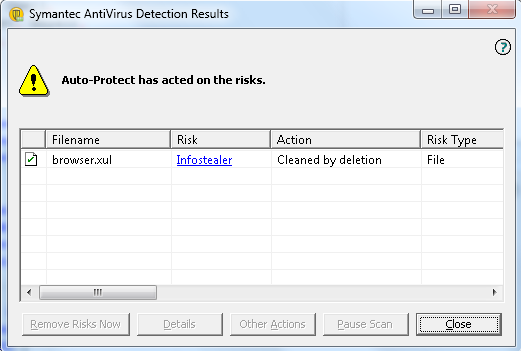
However it shows up after everything I log into my windows user regardless of "Cleaned by deletion".

I've tried scanning and removing by:
- MalwareBytes
- Spybot
- Mcafee
- Norton

Yet it still re-appears every time. Any suggestions other than rebooting my entire computer?

YoHoJo

2012-06-25 03:42:55

Try Microsoft Security Essentials
Also try Hijack this and manually remove it.
Can you open to it's location and manually delete?

Neznam

2012-06-25 04:04:13

Malwarebyte works great for me, you sure you have the newest version?

Hijackthis is great… be careful though you can mess up the computer if you dont know what you are doing…
Scan with hijack then go to jihackthis.de and uplload it there and they show u what to remove.

one1988

2012-06-25 04:45:13

Exterminate-it is by far the best

Sex

2012-06-25 05:03:03

Browser.xul is for Firefox btw.

Ashihtaka

2012-06-25 13:49:09

From: YoHoJo
Try Microsoft Security Essentials
Also try Hijack this and manually remove it.
Can you open to it's location and manually delete?


I've tried searching for it, but either it's undetectable manually, or the main file is being deleted before I can find it, and then re-installed after. I'll give Hijack this a go.

From: Neznam
Malwarebyte works great for me, you sure you have the newest version?
Hijackthis is great… be careful though you can mess up the computer if you dont know what you are doing…
Scan with hijack then go to jihackthis.de and uplload it there and they show u what to remove.


Malwarebytes usually gets everything all the other scanners can't for me too, for this particular virus it finds infected files and removes them too, but it still comes back.

From: Sex
Browser.xul is for Firefox btw.

I've only used chrome for the past year, so that's odd. Maybe that's why nothing's happened yet

Striken

2012-06-25 19:20:55

Do System Restore to a time which is like a year maybe.

Dannyownz

2012-06-25 19:25:47

Go into safe mode and download AVG, then scan it. It got rid of a rat that kept appearing.

Abu

2012-06-25 19:28:35

Run MalwareBytes and locate where the file is.
Go to that file and delete it.
Watch it re-appear.

Now remember the location.
Restart your computer in Safe Mode (google it)
Go back to the file.
Delete it from the folder.
Delete it from your recycling bin.
You will see it no longer re-appears

Run another scan while in safe mode.
Restart your computer.
Run another scan.
Restart your computer.

Should be gone.