SRL Archive - OSR Help

Opening Multiple Doors Right By Each Other


Gushers

2012-01-02 03:51:07

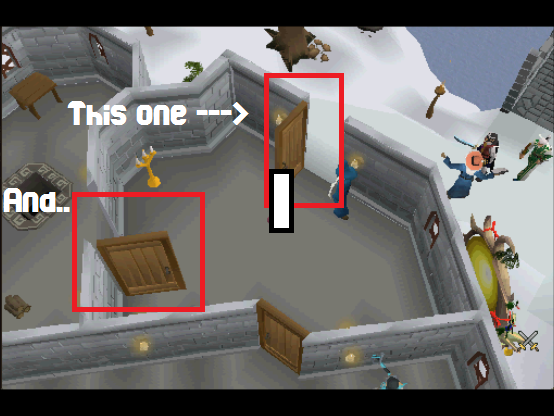
Okay so I need help with opening two doors that are right by each other. There are three doors that are the exact same.
I only need it to open two of them, when the two doors are closed the script works fine, but when the first one is opened it messes up and continues on with the rest of the script.
I have it to open the first door, run closer to the second, and open the second one. Please help.
Here's the doors that I need it to open:
Here's my code:
procedure OpenTheDoors;
var
X, Y: Integer;
begin
MakeCompass('N');
SetAngle(true);
If FindObj(x,y,'Open',2770782,5) then
Begin
StatsGuise('Opening Door...');
ClickMouse2(True);
if not DidRedClick then //If we missed, then exit so we can try again (maybe use a label here?)
exit;
While IsMoving do
Wait(1);
end else
if FindObj(x,y,'Close',2770782,5) then //The door is already open, so let's exit
Exit;
Wait(3000);
Mouse(622, 102, 0, 0, true);
Wait(3000);
begin
If FindObj(x,y,'Open',2770782,5) then
Begin
StatsGuise('Opening Door...');
ClickMouse2(True);
if not DidRedClick then //If we missed, then exit so we can try again (maybe use a label here?)
exit;
While IsMoving do
Wait(1);
end else
if FindObj(x,y,'Close',2770782,5) then //The door is already open, so let's exit
Exit;
end;
end;

Gushers

2012-01-02 10:46:13

Did I explain enough? Please help!

nickrules

2012-01-02 11:06:13

Wait(1); waits for 1 milisecond, which is nearly useless. I suggest 300-500 ish.


What is the problem with what you have right now? Opens the wrong door?

Since you know you're going to be in front of the first door, you could use a funky search area.

You could try clicking the ladder on the MM to more close, too.

Gushers

2012-01-02 11:28:41

Whenever the first door is already opened it goes to the 3rd door, that I don't need opened and since it's in a new spot from opening the third door the clicking for the ladder on the MM is messed up. I need it to open the first door if not already opened, than move to the second and open it if not already opened. While staying away from the 3rd door.

nickrules

2012-01-02 12:16:46

There are 3 drops always in that room. Can you work with that? There's also a symbol to go down.

Wait, will that function put you next to the door you want to open? And does the camera have to be at that angle?

P1nky

2012-01-02 12:25:24

You should try setangle(false) , so the other 2 doors could get blocked off.
Small silly stuff like that can get you pass your obstacle ;)

Gushers

2012-01-02 12:26:22

From: nickrules
There are 3 drops always in that room. Can you work with that? There's also a symbol to go down.

Wait, will that function put you next to the door you want to open? And does the camera have to be at that angle?


The camera does not have to be at the angle, I'll set it to whichever works best and the function is only a MouseClick on the MM I have it click (x, y)
… Throw something better at me please? This is the only part I'm stuck on.

nickrules

2012-01-02 12:46:23

Get as close to the door you want to open, then search for that area.

like this. Stand in the orange though (or that'd be best, atleast).

Experiment with different angles and such, as needed.


And to get closer, if you so chose, you could click the red dots in that area of MM or the symbol.

Gushers

2012-01-02 12:50:41

P1nky - I'm trying out SetAngle(false);
nickrules - How do you just search that area? And the problem with my script is that if that first door is opened it will mess up not letting it get to that second door and it tries to open the third door.

nickrules

2012-01-02 13:00:13

From: Gushers
How do you just search that area?


FindObjEx

From: Gushers
And the problem with my script is that if that first door is opened it will mess up not letting it get to that second door and it tries to open the third door.


More failsafes & smaller search areas are the best way, imo. Are you walking to a consistent spot for the first door too?

… Or perhaps calculating the door's position based on the MM. That's a bit more tricky and doesn't completely solve the problem either. Maybe the more seniorly people staring at the thread can provide us a flash of brilliance?

P1nky

2012-01-02 13:03:11

From: Gushers
P1nky - I'm trying out SetAngle(false);


Let me know how it goes, get the angle to block out the other 2 doors, you should be just fine mate.

Gushers

2012-01-02 13:06:33

nickrules - Hopefull they will help us.. I'm so lost and I've been working at this one part forever!
P1nky - I believe the angles might work, so I found a angle I want. Now how do I turn this angle on the screen into code?

nickrules

2012-01-02 13:10:21

From: Gushers
nickrules - Hopefull they will help us.. I'm so lost and I've been working at this one part forever!
P1nky - I believe the angles might work, so I found a angle I want. Now how do I turn this angle on the screen into code?


setangle(false); //lowers compass all the way
MakeCompass(<angle>); //rotates compass to where you want it


to get the angle you're at, use
rs_GetCompassAngleDegrees

Hero

2012-01-02 13:14:57

You could possibly look into WindWalk(search it) for the inside door. Have it open the outside door then Windwalk to the second door and then have it find the object starting from the center of the screen(you'd be in front of the door so that would be the closest door found?)


Edit: WindWalk can be extremely accurate with points if the area is small enough.

Gushers

2012-01-02 13:19:38

nickrules - trying the angles out now.
Hero - WindWalk would work perfect, now how do I get it start searching from the center?

Hero

2012-01-02 13:21:04

MSCX, MSCY(not sure what the rest if, if anything else has to go with it anyways) instead of MSX1, MSY1, MSX2, MSY2. in your second door finding piece of script with spiraltolerance? I only use my one object finding method because I haven't had time to do much else :P

nickrules

2012-01-02 13:28:16

From: Gushers
nickrules - trying the angles out now.
Hero - WindWalk would work perfect, now how do I get it start searching from the center?


how to search from the center, or the left side?

Center would be to use the spiral color finders.


Left side would be to get a point from the top right corner of MS (msx1,msy1 - i think) and then get a custom point for the opposite corner (bottom edge, center of screen - i get 256,335.

Gushers

2012-01-02 13:29:39

Hero - Alright man I haven't used spiraltolerance before, just like you I try to stick to my object finding method. Think you could help me out even more and type that one part?

nickrules

2012-01-02 13:41:18

{*******************************************************************************
function FindObjEx(var cx, cy: Integer; Text: TStringArray; Color: TIntegerArray;
Tol, Step, xs, ys, xe, ye: Integer): Boolean;
By: Starblaster100
Description: Searches for an object using an array of colors and texts within the area
you specify. Will start searching from the middle and returns true if found.
Parameters:
cx, cy: Coordinate Position of object if result is true - aka result coords
Text: Array of string you want to search for
Color: Array of colors you want to search for
Tol: Tolerance of the colors you will allow
Step: How big you want to make the search squares. 50 = Default. 30-70 Recommended
xs, ys, xe, ye: Bounds you want to search in
*******************************************************************************}
function FindObjEx(var cx, cy: Integer; Text: TStringArray; Color: TIntegerArray; Tol, Step, xs, ys, xe, ye: Integer

Fill in the variables.

FindObjEx(x,y,[TEXT],[COLORS],TOL, 50, msx1,msy1,256,335);


Also, learning how to make a proper object finder on your own is something you should learn to do. It's at the core of just about every script, and teaches you tons of things in the process.

Gushers

2012-01-02 13:44:03

Alright I'll try this out!
For TEXT I would put "Open,Door" and COLORS I would put "21515121,2315523" <— I just wrote random colors, but correct or just one?

Gushers

2012-01-02 14:00:21

GOT IT! (:
Thank you so much nickrules, P1nky, and Hero!
If there's anything you need help with just let me know. I'll post the code once I finish it.

Home

2012-01-02 14:50:46

If you are still interested.
You must be Approx at the first door (Outside of the castle with this function)

This will open Both doors if they are closed.
This will get Length of TPA so it won't check UpText Closed.
(It won't move mouse to doors if they are Open)


I hope that you learn something from this.
Don't hesitate to ask questions.


function FindCandle(var X, Y :Integer) :Boolean;
var
aTPA : T2DPointArray;
TPA: TPointArray;
MiddlePoint :TPoint;
TempCTS, Hi, I :Integer;
begin
Result := False;
TempCTS := GetColorToleranceSpeed;
ColorToleranceSpeed(2);
SetColorSpeed2Modifiers(0.01, 1.18);

FindColorsSpiralTolerance(MSCX, MSCY, TPA, 1089249, MSX1, MSY1, MSX2, MSY2, 10);
If Length(TPA) = 0 Then Exit;
aTPA := TPAToATPAEx(TPA, 20, 30);
SortATPASize(aTPA, True);

MiddlePoint := MiddleTPA(aTPA[0]);
X := MiddlePoint.X;
Y := MiddlePoint.Y
Result := True;
ColorToleranceSpeed(TempCTS);
SetColorSpeed2Modifiers(0.2, 0.2);
end;


function OpenDoor() :Boolean;
var
aTPA : T2DPointArray;
TPA: TPointArray;
SDPoint, SortPoint, MiddlePoint :TPoint;
DBox :TBox;
XX, YY, Dist, Count, TempCTS, Hi, I :Integer;
begin
MakeCompass('W');
Result := False;
TempCTS := GetColorToleranceSpeed;

ColorToleranceSpeed(2);
SetColorSpeed2Modifiers(0.04, 0.91);

If FindCandle(XX, YY) then
begin
ColorToleranceSpeed(2);
SetColorSpeed2Modifiers(0.04, 0.91);
SDPoint := Point(XX + 60, YY + 65);
DBox := IntToBox(SDPoint.X - 20, SDPoint.Y - 20, SDPoint.X + 20, SDPoint.Y + 40);
FindColorsTolerance(TPA, 2773360, DBox.X1, DBox.Y1, DBox.X2, DBox.Y2, 9);
If Length(TPA) < 500 then
begin
FindColorsSpiralTolerance(MSCX, MSCY, TPA, 2773360, MSX1, MSY1, MSX2, MSY2, 9);
aTPA := TPAToATPAEx(TPA, 3, 3);
SortATPAFromFirstPoint(aTPA, Point(MSCX - 10, MSCY));

Hi := Length(aTPA);
for I := 0 to Hi - 1 do
begin
MiddlePoint := MiddleTPA(aTPA[I]);
MMouse(MiddlePoint.X, MiddlePoint.Y, 0, 0);
If WaitUpTextMulti(['Open D', 'pen D'], 250) then
begin
ClickMouse2(False);
WaitOptionMulti(['Open', 'pen'], 250);
Flag;
While IsMoving Do Wait(100);
Break;
end;
end;
end;
end;

If FindCandle(XX, YY) then
begin
ColorToleranceSpeed(2);
SetColorSpeed2Modifiers(0.04, 0.91);
SDPoint := Point(XX - 90, YY);
DBox := IntToBox(SDPoint.X - 20, SDPoint.Y - 20, SDPoint.X + 20, SDPoint.Y + 40);
FindColorsTolerance(TPA, 2773360, DBox.X1, DBox.Y1, DBox.X2, DBox.Y2, 9);
If Length(TPA) > 500 then
begin
MMouse(MiddleBox(DBox).X, MiddleBox(DBox).Y, 0, 0);
If WaitUpTextMulti(['Open D', 'pen D'], 250) then
begin
ClickMouse2(False);
WaitOptionMulti(['Open', 'pen'], 250);
Flag;
While IsMoving Do Wait(100);
end;
end;
end;

ColorToleranceSpeed(TempCTS);
SetColorSpeed2Modifiers(0.2, 0.2);
end;


~Home

Gushers

2012-01-02 21:41:32

Wow Home that's just amazing, I have no clue how you did that but I'll try my best to understand it and one day hopefully get on your level. Now I just need it to get to that ladder and the script will be almost done!

Jhangir

2012-01-02 21:48:10

You can use the simplest method. Set the angle to north or w/e. Then use mmouse and click. Randomize the clicks by a few coords and your good. Or you could use the complicated stuff above.

Gushers

2012-01-02 22:03:54

True that, I might just use Mouse.. But I'm gonna challenge myself and try to click on a symbol on the Mini Map.
Anybody know a thread already created for doing this?

nickrules

2012-01-02 22:26:22

{*******************************************************************************
Valid Arguments are:
- agility - furnace - rare trees, tree
- altar - gem stall - rest, resting spot
- anvil - guide - sandpit
- apothecary - hair dresser - saw mill
- archery shop - herbalist - scimitar shop
- arrow - house - shield
- axe shop - hunter store - shop, store
- bar - hunter training - short cut
- bank - jewelery - silk stall
- candle shop - kebab shop - silver stall
- churn - mace shop - slayer master
- clothes shop - magic shop - spice stall
- cookery shop - makeover mage - spinning wheel, spin
- cookery, cook - mill - staff shop
- crafing shop - minigame - summoning store
- dungeon - mining shop - sword shop
- farming shop - pet shop - tanner
- farming spot - platebody shop - training dummy
- fishing shop, fish store - plateskirt shop - underground
- fishing spot, fish - portal (to player owned houses) - water source, water
- food shop - pottery, pot - weave
- fur trader - quest - windmill

*******************************************************************************}
function FindSymbol(var rx, ry: Integer; Name: string): Boolean;


There are a number of tutorials on finding symbols. I suggest using the search button and finding some. There are also a number of other clever methods if you want to check them out.

Gushers

2012-01-02 22:29:48

Alright thanks again man! I'll be releasing this quest script very soon!