SRL Archive - Help

Search files containing text in windows 7


YoHoJo

2011-11-10 03:46:01

I want to search a folder full of txt files for a file that contains the word 'bla'.
How the hell do I so this?
I have the folder indexed and txt file type is selected and 'Index Properties and File Contents' is checked under the Indexing Options settings. So WTF….

I'm in the folder and type the word 'the' in the box and I get no results, and I know I've used the word the many times in these .txt files. Could I get some help, or someone to suggest an alternate program to search files containing terms?
nielsie95

2011-11-10 03:50:16

http://answers.microsoft.com/en-us/windows/forum/windows_7-files/in-windows-7-i-want-to-search-for-all-files/aadfe1f1-4a33-406b-8e72-bb920efa4f30

I always use Notepad++, though. Works pretty good too :)

Markus

2011-11-10 03:51:46

Got Git installed? If so you also have grep and then it's easy :) Run this from git bash:
http://www.tonyspencer.com/2005/10/14/grep-all-files-and-sub-directories-in-a-directory-for-a-string/

YoHoJo

2011-11-10 03:51:54

I've sen that, no idea how to get to :
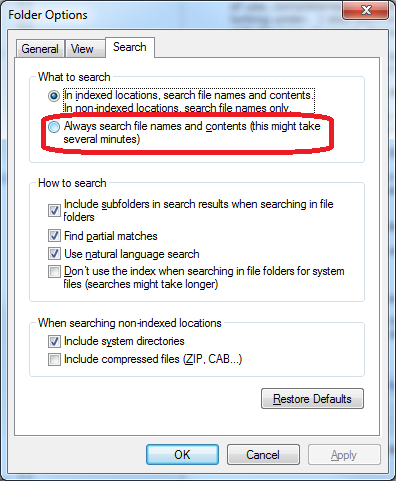
http://skeene.net/answers/searchOptions.png
When I right click the folder>Properties there is no 'search' tab.

nielsie95

2011-11-10 03:54:26

It's not in the rightclick menu, but rather where you also can enable viewing hidden files etc. It's the button on the top left ("Organize"?).

YoHoJo

2011-11-10 04:00:35

From: nielsie95
It's not in the rightclick menu, but rather where you also can enable viewing hidden files etc. It's the button on the top left ("Organize"?).


Wow how wierd… should be in properties I say.
Anyways, I did that (in fact my settings were already like the image (I have 'Always search file names and contents' checked, is that right?)

Sorry but this is FASRAKING stupid, why is it so difficult to do this… windows XP did it just fine without having to edit or change any settings….

I just manually Ctrl+Fed a bunch of notepads and found what I wanted, but this is still very bothersome WTFFFFFF

Nava2

2011-11-10 08:12:23

grep -e $PATTERN ./*

Gu3st...

2011-11-10 08:13:14

I made a script for this in Simba, but I only designed it to search through folders and sub-folders (not sub-sub folders and so on)

Here:
// Made by Zyt3x
const
DEBUG = FALSE;

DIR = IncludePath + 'SRL\SRL\';
SearchStr = 'Pos(''k''';
EXT = 'scar'; // Extension. (CompileSRL.scar, Setup.simba)

var
Directories, S, S2, Files, AllFiles : TStringArray;
H, Hi, I, Int, F : Integer;

begin
ClearDebug;
Directories := GetDirectories(DIR);
H := High(Directories);
SetArrayLength(Directories, H+2);
WriteLn(DIR);
for I := 0 to H+1 do
begin
if Length(Directories[I]) <> 0 then
if Directories[I][Length(Directories[I])] <> '\' then Directories[I] := Directories[I] + '\';
if DEBUG then
WriteLn(DIR + Directories[I]);
Files := GetFiles(DIR + Directories[I], EXT);
Hi := High(Files);
for Int := 0 to Hi do
begin
if DEBUG then
WriteLn(' - ' + DIR + Directories[I] + Files[Int]);
if FileExists(DIR + Directories[I] + Files[Int]) then
begin
F := OpenFile(DIR + Directories[I] + Files[Int], False);
SetArrayLength(S, Length(S)+1);
SetArrayLength(AllFiles, Length(AllFiles)+1);
ReadFileString(F, S[High(S)], FileSize(F));
AllFiles[High(AllFiles)] := DIR + Directories[I] + Files[Int];
CloseFile(F);
end;
end;
end;
H := High(S);
WriteLn('');
WriteLn(SearchStr + ' found in:');
for I := 0 to H do
begin
if Pos(LowerCase(SearchStr), LowerCase(S[I])) <> 0 then
WriteLn(' + ' + AllFiles[I]);
end;
end.