Hobbit
2007-02-19 00:43:42
Question: What is a mask?
Answer: A mask is a flatened inverted bitmap that is almost black, it is 100% reliable if setup correctly.
The only function to utilise mask is:
[LEFT]FindBitmapMaskTolerance(mask:Integer;var x,y:Integer;x1,y1,x2,y2:Integer,Tolerance,ContourTolerance:Integer):Boolean [/LEFT]
Step 1: Understanding the function:
What does all this mean? Well i'll tell you,
1: mask:integer is the name of the mask, jsut like in bitmaps(this will be explained more later)
2:var x,y:integer well i hope we all know what that part is, but if you don't, what this does is once the script finds the mask it will put the coordinates where it is into variable x and y so then you can do something like
and the script will move the mouse to the coordinates found.
3:x1,y1,x2,y2 this is the area where to sript is going to search..take paint for example when your selecting an area

4:Tolerance and Contour Tolerance these are how much "slack" you want to give it…if you set them to 0 it will look for EXACT match if you set them to 1 then it has a little bit of breathing room… I suggest setting to 1
Step2: Capturing desired image:
1:Have the window of with the image you want visible
2:If you look by the F12 key beside it is a key called "Prt Scrn" or non abreviated…print screen. Press it.
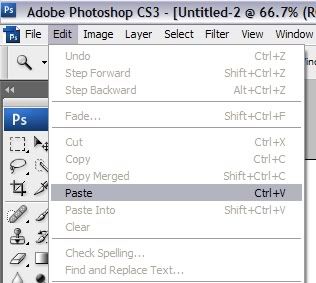
3:Open Photoshop, have a new document open then go to Edit>Paste then you will have the whole screenshot to work with
Step 3: Cutting it down:
1:Select the magnifing glass tool (press z) and zoom in on the object you want
2:Press w to use the selection tool and highlight the object you want

3:Go to Edit then select cut or copy (not in right click options)
4:Go to File>New… then press ok to open another new document and paste image into it
Step 4: Flattening and Inverting:
1:Once you got the object you want to make a mask go to Image>Mode>Graysacle then in the box that pops up select the flatten option then the next pop up box press discard


2:You will now have a flat gray looking image, now go to Image>Adjustments>Brightness/Contrast (bolded so you dont miss)

3:Set the Brightness to 55% or higher and the Contrast to 100% and press ok (bolded so you dont miss)

4: Press Ctrl + I and *POOF* the image is inverted and you've created a mask…it should look like this
 5:Save as a bmp file, but since its a mask the highest resolution you can save it in it 8bit…and that's fine
Step 5: Setting up the function:
1:Open scar and go to script>Picture to String

2:Open the disired mask, then select a portion of it just like we did before in photoshop so that it has the dotted line box around it then press ok
3:The string on the mask will appear in the debug box at the bottom on the window
4:Put the name of your mask into variables ex:
5:Copy the code into a procedure called LoadBmps.
Should look like this so far:
6:Now create another procedure, for this tutorial it will move the mouse to the bit map and i'll call it move, then in that after begin type in FindBitmapMaskTolerance(<required info>) then MoveMouse(x,y);
Now is should look something like this(I have the search box set to my whole screen):
7: Add procedures into main loop and your DONE.
Final product:
I hope you've enjoyed this Tutoral if you did feel free to +rep me (took 2.5 hours to make so you better like the pics! :p ). Any Questions or comments pm or email me at [EMAIL="chris.hobbs@hotmail.com"]chris.hobbs@hotmail.com[/EMAIL]
Answer: A mask is a flatened inverted bitmap that is almost black, it is 100% reliable if setup correctly.
The only function to utilise mask is:
[LEFT]FindBitmapMaskTolerance(mask:Integer;var x,y:Integer;x1,y1,x2,y2:Integer,Tolerance,ContourTolerance:Integer):Boolean [/LEFT]
Step 1: Understanding the function:
What does all this mean? Well i'll tell you,
1: mask:integer is the name of the mask, jsut like in bitmaps(this will be explained more later)
2:var x,y:integer well i hope we all know what that part is, but if you don't, what this does is once the script finds the mask it will put the coordinates where it is into variable x and y so then you can do something like
MoveMouse(x,y);and the script will move the mouse to the coordinates found.
3:x1,y1,x2,y2 this is the area where to sript is going to search..take paint for example when your selecting an area
4:Tolerance and Contour Tolerance these are how much "slack" you want to give it…if you set them to 0 it will look for EXACT match if you set them to 1 then it has a little bit of breathing room… I suggest setting to 1
Step2: Capturing desired image:
1:Have the window of with the image you want visible
2:If you look by the F12 key beside it is a key called "Prt Scrn" or non abreviated…print screen. Press it.
3:Open Photoshop, have a new document open then go to Edit>Paste then you will have the whole screenshot to work with
Step 3: Cutting it down:
1:Select the magnifing glass tool (press z) and zoom in on the object you want
2:Press w to use the selection tool and highlight the object you want
3:Go to Edit then select cut or copy (not in right click options)
4:Go to File>New… then press ok to open another new document and paste image into it
Step 4: Flattening and Inverting:
1:Once you got the object you want to make a mask go to Image>Mode>Graysacle then in the box that pops up select the flatten option then the next pop up box press discard
2:You will now have a flat gray looking image, now go to Image>Adjustments>Brightness/Contrast (bolded so you dont miss)
3:Set the Brightness to 55% or higher and the Contrast to 100% and press ok (bolded so you dont miss)
4: Press Ctrl + I and *POOF* the image is inverted and you've created a mask…it should look like this
5:Save as a bmp file, but since its a mask the highest resolution you can save it in it 8bit…and that's fineStep 5: Setting up the function:
1:Open scar and go to script>Picture to String
2:Open the disired mask, then select a portion of it just like we did before in photoshop so that it has the dotted line box around it then press ok
3:The string on the mask will appear in the debug box at the bottom on the window
4:Put the name of your mask into variables ex:
var
mask : integer;5:Copy the code into a procedure called LoadBmps.
Should look like this so far:
program New;
var
mask : integer;
procedure LoadBmps;
begin
   mask := BitmapFromString(21, 17, 'z78DA8D9559B2DC201004AF24' +
       '81D83ED176FF23D955D91183636CC7237F341243F54E2AE937CF2' +
       'ECA2DD2616EE3B575739862AA793EECACC34C739BEB431D623C62' +
       'BB05BAFD12C729CA10698AD0CA66D14DD93CE6357EE675585E0D8' +
       'B0F5DA035B2B8A6C0B9760BFE159E029E36D18E0FC723EA2E7A11' +
       'F912589E9AB1623A45F63ABCBC319F5DD8DDB2BFE20F5D2BA25E5' +
       '32C44DE191E780D5C8FB3A93D78CBB77221ABE35A2EBE9779FD94' +
       'E7157411C7E01A299C9E4');
end;6:Now create another procedure, for this tutorial it will move the mouse to the bit map and i'll call it move, then in that after begin type in FindBitmapMaskTolerance(<required info>) then MoveMouse(x,y);
Now is should look something like this(I have the search box set to my whole screen):
program New;
var
mask : integer;
procedure LoadBmps;
begin
   mask := BitmapFromString(21, 17, 'z78DA8D9559B2DC201004AF24' +
       '81D83ED176FF23D955D91183636CC7237F341243F54E2AE937CF2' +
       'ECA2DD2616EE3B575739862AA793EECACC34C739BEB431D623C62' +
       'BB05BAFD12C729CA10698AD0CA66D14DD93CE6357EE675585E0D8' +
       'B0F5DA035B2B8A6C0B9760BFE159E029E36D18E0FC723EA2E7A11' +
       'F912589E9AB1623A45F63ABCBC319F5DD8DDB2BFE20F5D2BA25E5' +
       '32C44DE191E780D5C8FB3A93D78CBB77221ABE35A2EBE9779FD94' +
       'E7157411C7E01A299C9E4');
end;
Procedure move;
begin
 FindBitmapMaskTolerance(mask,x,y,0,0,1024,768,1,1);
 MoveMouse(x,y);
end;7: Add procedures into main loop and your DONE.
Final product:
program New;
var
mask : integer;
procedure LoadBmps;
begin
   mask := BitmapFromString(21, 17, 'z78DA8D9559B2DC201004AF24' +
       '81D83ED176FF23D955D91183636CC7237F341243F54E2AE937CF2' +
       'ECA2DD2616EE3B575739862AA793EECACC34C739BEB431D623C62' +
       'BB05BAFD12C729CA10698AD0CA66D14DD93CE6357EE675585E0D8' +
       'B0F5DA035B2B8A6C0B9760BFE159E029E36D18E0FC723EA2E7A11' +
       'F912589E9AB1623A45F63ABCBC319F5DD8DDB2BFE20F5D2BA25E5' +
       '32C44DE191E780D5C8FB3A93D78CBB77221ABE35A2EBE9779FD94' +
       'E7157411C7E01A299C9E4');
end;
Procedure move;
var
x,y : integer;
begin
 FindBitmapMaskTolerance(mask,x,y,0,0,1024,768,1,1);
 MoveMouse(x,y);
end;
begin
 LoadBmps;
 move;
end.
I hope you've enjoyed this Tutoral if you did feel free to +rep me (took 2.5 hours to make so you better like the pics! :p ). Any Questions or comments pm or email me at [EMAIL="chris.hobbs@hotmail.com"]chris.hobbs@hotmail.com[/EMAIL]