SRL Archive - NOTA

Zune


game over

2010-06-11 07:25:23

Hey, I just bought a zune and every time I plug it into my computer, It has this error message:
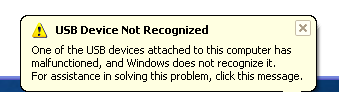
Things to know:
~I have the software.
~I uninstalled/reinstalled it many times.
~I tried all my USB ports
~Not using a USB hub
~I reset the zune
~I reset my computer/the zune many times

If you could help that would be awesome. Thanks.

Capricorn

2010-06-11 07:42:10

Do other USB devices work?

i luffs yeww

2010-06-12 02:23:23

Zune HD?

Hobbit

2010-06-12 02:41:11

I'd say the unit is defective, take it back and get a new one.

game over

2010-06-12 04:18:44

Other USB devices work, Not a zune HD, and It works just fine on my cousins computer…Don't know why it does it on mines.

cycrosism

2010-06-12 08:46:44

Plug it in and leave it undetected for a while, it should detect it after a few minutes

Hobbit

2010-06-12 14:04:51

From: game over
Other USB devices work, Not a zune HD, and It works just fine on my cousins computer…Don't know why it does it on mines.


What OS is your cousins computer?

i luffs yeww

2010-06-12 14:53:34

^ I'm 99% sure his cousin runs Windows, as Zune isn't cross-platform compatible. Wouldn't recognize it at all on Ubuntu for me. Microsoft did that for a reason, I think. And I know Zune software works with XP, Vista, and 7.

Nava2

2010-06-12 15:30:09

Drivers perhaps..?

Hobbit

2010-06-12 15:31:24

From: i luffs yeww
^ I'm 99% sure his cousin runs Windows, as Zune isn't cross-platform compatible. Wouldn't recognize it at all on Ubuntu for me. Microsoft did that for a reason, I think. And I know Zune software works with XP, Vista, and 7.


I figured that much… What version of windows.

game over

2010-06-12 23:16:45

I have windows vista

i luffs yeww

2010-06-12 23:26:38

^ There's your problem. ;)

Does your cousin also run Windows Vista? Try redownloading the correct Zune software for Windows Vista.

Hobbit

2010-06-13 02:59:07

From: game over
I have windows vista


Why did you post a picture of XP then?

>.>


Another thing you can try is this…

Go to C:\WINDOWS\inf\
Delete ALL of the files with the .PNF extension (and ONLY the .PNF files)
Restart computer
Try pugging in again.

i luffs yeww

2010-06-13 03:09:38

>_>

And why is the image from online-tech-tips.com?

http://www.online-tech-tips.com/computer-tips/usb-device-not-recognized/

Also, Hobbit, there are SOOOO many .pnf files in inf/.

In case this isn't a weird troll, and isn't from the URL above, you could run something like..


cd C:\Windows\inf
del *.pnf

I think.

Hobbit

2010-06-13 17:33:31

From: i luffs yeww

also, hobbit, there are soooo many .pnf files in inf/.


There are 478 (IRCC)

i luffs yeww

2010-06-13 17:36:18

^ Doing that by hand would be bothersome. Would what I posted work? :3

Hobbit

2010-06-13 17:40:50

From: i luffs yeww
^ Doing that by hand would be bothersome. Would what I posted work? :3


Meh, only took about 5 min for me to do, its pretty much every second file.

And theoretically it should work.

Capricorn

2010-06-13 17:42:17

Or you could just click the column for file type to sort out the .pnf files :)

i luffs yeww

2010-06-13 17:43:12

I'm still confus about that exact image coming from http://www.online-tech-tips.com/computer-tips/usb-device-not-recognized/ ..

game over

2010-06-14 07:16:37

I'll try those methods, thanks a bunch guys.

game over

2010-06-17 21:05:41

I tried all those methods, nothing worked…btw I used that image because i cbf taking the pic, cropping, uploading, ect. But if you want I can do that.

Capricorn

2010-06-17 21:08:11

Call Customer Service maybe?

Or try this link http://support.microsoft.com/kb/935420

sylvawarrior

2010-06-17 22:30:57

My dad works for microsoft. Uninstall libusb. Thats the main cause of the problems that are driver related.

game over

2010-06-19 04:37:34

I'll try those, thanks.