SRL Archive - OSR Help

Could someone check to see if i used the DTM functions right?


Ace257

2010-06-09 10:12:54

//By: Polo
program blacksmith;
var
A, X, Y: Integer;
function var A, X, Y:Integer): Boolean;
begin
A := DTMFromString('78DA639466606050604001DFFB7918FE03694' +
'620FE0F048C52400633AA9A9FD39DC0342394CF68002414D1D494' +
'59A3AA0199638CAAE6479711AA1A564CF760A81101126204EC520' +
'212E204D42803090D026A40F6A8A1A9399684A20600913516A8');
Result :=FindDTM(A, X, Y, MSX1, MSY1, MSX2, MSY2);
FreeDTM(A);
end;
begin
if(FindDTM(A, X, Y))then
begin
MoveMouse(x,y);
Wait(1000+random(100));
ClickMouse(x, y, True);
end;
end.

HyperSecret

2010-06-09 10:17:07

Yes, you're using it correctly, but honestly that script doesn't do anything…

Just returns true/false if it finds the dtm 'DTM'.

Your variable 'a' for findbitmap has no value, so you will never get to Move/ClickMouse.

Also, FreeBitmap(DTM) does absolutely nothing.


This script doesn't even compile does it?

Ace257

2010-06-09 10:30:58

From: HyperSecret
Yes, you're using it correctly, but honestly that script doesn't do anything…

Just returns true/false if it finds the dtm 'DTM'.

Your variable 'a' for findbitmap has no value, so you will never get to Move/ClickMouse.

Also, FreeBitmap(DTM) does absolutely nothing.


This script doesn't even compile does it?


ok i think i've fixed it thanks for checking it, this is just a script of multiple DTM's that i have to create, still have to figure out the mouse thing…

Tim0suprem0

2010-06-09 12:00:41

Change the name of your function from FindDTM otherwise you'll get a duplicate identifier error, since there's already a FindDTM in the SRL include (which you use actually).

You can just do FindDTM2 or something.

But as far as implementation of DTM finding goes, it looks fine.

Rich

2010-06-09 12:01:39

From: Ace257
ok i think i've fixed it thanks for checking it, this is just a script of multiple DTM's that i have to create, still have to figure out the mouse thing…


What do you need to figure out?

mrpickle

2010-06-09 15:26:21

// if you are only going to load a dtm once in entire script, you dont need to free it.

function FindDTM(var A, X, Y:Integer): Boolean;
var
begin
A := DTMFromString('78DA639466606050604001DFFB7918FE03694' +
'620FE0F048C52400633AA9A9FD39DC0342394CF68002414D1D494' +
'59A3AA0199638CAAE6479711AA1A564CF760A81101126204EC520' +
'212E204D42803090D026A40F6A8A1A9399684A20600913516A8');
Result :=FindDTM(A, X, Y, MSX1, MSY1, MSX2, MSY2);
FreeDTM(A);/// If you put free dtm here. it just erased what you loaded above.
end;

Ogre

2010-06-09 15:31:57

From: mrpickle
// if you are only going to load a dtm once in entire script, you dont need to free it.


What are you talking about? Yes you do.

[12:30:39] <Ogre> Wizzup, even if you use a DTM once, you should free it, right?
[12:30:49] <Wizzup> Ogre: yes, if you create it.

MylesMadness

2010-06-09 15:37:29

ALWAYS load your dtms right before they are needed and free them right after, dont just load it once and forget…

mrpickle

2010-06-09 15:47:06

oh, i had out of range errors before because I freed it in my script right after it was used. I laoded DTMs only once at start of script.

I removed the free dtm in my function, and it worked :)… I'm just going by experience here.

Ace257

2010-06-09 17:33:51

From: Tim0suprem0
Change the name of your function from FindDTM otherwise you'll get a duplicate identifier error, since there's already a FindDTM in the SRL include (which you use actually).

You can just do FindDTM2 or something.

But as far as implementation of DTM finding goes, it looks fine.


i edited the function would this work?

Ace257

2010-06-09 17:39:59

From: R1ch
What do you need to figure out?


i need to know how to find the main screen edge point MX1, MY1, MX2, MY2. I've looked at the tutorials but i dont understand. also the screen is in 600x800 if that helps any. thanks

Ogre

2010-06-09 17:48:50

This is for runescape right?

MSX1, MSY1, MSX2, MSY2 Main Screen x1 and y1 are coords for top left x2 and y2 are coords for bottom right (main screen doesn't include the chat box, minimap, or inv screen)

MIX1, MIY1, MIX2, MIY2 Inventory Screen

MMX1, MMY1, MMX2, MMY2 Minimap

MBX1, MBY1, MBX2, MBY2 Bank Screen

MCX1, MCY1, MCX2, MCY2 Chat Screen


Also, there's M*CX, and M*CY for the point of the middle of that section

Frement

2010-06-09 17:50:33

From: Ogre
This is for runescape right?

MSX1, MSY1, MSX2, MSY2 Main Screen x1 and y1 are coords for top left x2 and y2 are coords for bottom right (main screen doesn't include the chat box, minimap, or inv screen)

MIX1, MIY1, MIX2, MIY2 Inventory Screen

MMX1, MMY1, MMX2, MMY2 Minimap

MBX1, MBY1, MBX2, MBY2 Bank Screen

MCX1, MCY1, MCX2, MCY2 Chat Screen


Also, there's M*CX, and M*CY for the point of the middle of that section


I don't think this is for RS. I think I saw in some other thread that this was for puzzle pirates or something?

Ogre

2010-06-09 17:53:12

Ace527, If it's not for Runescape, you just get the points manually by mousing over the point and then look at the bottom left of Simba/SCAR to see the point coords.

Ace257

2010-06-09 18:03:44

this is my script and yes it is for ypp any of you can use it, it works, but it wont do any combos, which is why i've created bitmaps and i'm just really stumpt on how i can better the first code i showed yall into this script, but that script above isnt all the bitmaps i need to incorporate atleast 18 bitmaps and make a bunch of if statements which will take a lot of time lol. then my script will finally be complete. If their are anymore suggestions let me know and thanks everyone! :)


//By: Ace
program blacksmith;
var
x,y,d,e,c:integer;
procedure orange;
begin
repeat
c:=0
repeat
c:=c+1
wait(1)
until(c>1999)or
findcolortolerance(x,y,8188414,56,92,413,411,2)
if(findcolortolerance(x,y,8188414,56,92,413,411,2))then
begin
movemousesmooth(x+26,y+26,1,1)
clickwindmouse(x+26,y+26,1,1,true)
c:=c-100
end;
wait(1000)
until(c>1999)
end;

procedure grays;
begin
repeat
d:=0
repeat
d:=d+1
wait(1)
until(d>1999)or
findcolortolerance(x,y,4970714,56,92,413,411,2)or
findcolortolerance(x,y,8188414,56,92,413,411,2)
if(findcolortolerance(x,y,8188414,56,92,413,411,2))then
begin
movewindmouse(x,y,1,1)
clickwindmouse(x,y,1,1,true)
d:=d-100
end;
if(findcolortolerance(x,y,4970714,56,92,413,411,2))then
begin
movewindmouse(x,y,1,1)
clickwindmouse(x,y,1,1,true)
d:=d-100
end;
wait(1000)
until(d>1999)
end;

procedure silver;
begin
repeat
e:=0
repeat
e:=e+1
wait(1)
until(e>1999)or
findcolortolerance(x,y,9625049,56,92,413,411,2)or
findcolortolerance(x,y,8188414,56,92,413,411,2)or
findcolortolerance(x,y,4970714,56,92,413,411,2)
if(findcolortolerance(x,y,8188414,56,92,413,411,2))then
begin
movewindmouse(x,y,1,1)
clickwindmouse(x,y,1,1,true)
e:=e-100
end;
if(findcolortolerance(x,y,4970714,56,92,413,411,2))then
begin
movewindmouse(x,y,1,1)
clickwindmouse(x,y,1,1,true)
e:=e-100
end;
if(findcolortolerance(x,y,9625049,56,92,413,411,2))then
begin
movewindmouse(x+26,y+26,1,1)
clickwindmouse(x+26,y+26,1,1,true)
e:=e-100
end;
wait(1000)
until(e>1999)
end;

procedure restart;
begin
if(findcolortolerance(x,y,8188414,56,92,413,411,2))then
begin
d:=d-100
end;
end;

begin
clickwindmouse(234,269,150,150,true)
repeat
orange
grays
restart
until(d>1999)
silver
end.
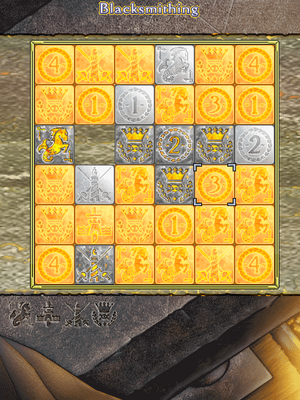

Ace257

2010-06-09 18:37:06

Here's some more info to show you what i'm talking about.
This is the board


also here are the colors/integers that change to the next one left to right once you click on them.


and here are the variables


Basically the script i have is for the colors. Which is why i was trying to create that first script at the very beginning to try and get atleast one variable down once i find out how to fully do that and incorporate it in my 2nd script i posted i will be able to do the rest on my own. :) but still need some help if anyone can let me know. thanks
