caused
2010-02-24 20:20:45
Alright, this is supposed to be a really short tutorial. Anyways, if you don't understand anything, feel free to ask.
Intro
Scar uses Pascal Script, which was invented by "RemObjects". Special functions in scar are additions to the basic syntax of Pascal Script.
Requirements
Step 1
a) Open Up Delphi
b) Create a new Project
Step 2
a) Find the PsScript Component and drop it onto your form. ( Additionally add "uPSComponent" to your uses list and create a PsScript Object).
Step 3
a) Add two richedit fields to your form.
b) name one Debug and one Code
c) Add A Button
Step 4
a) Add this code to the onclick event of your button.
Step 5
Adding Own Functions is simple !
a) In the OnCompile Event of your PSScript1 Object add:
This adds the ShowMessage Function from Delphi to our "scar" ;].
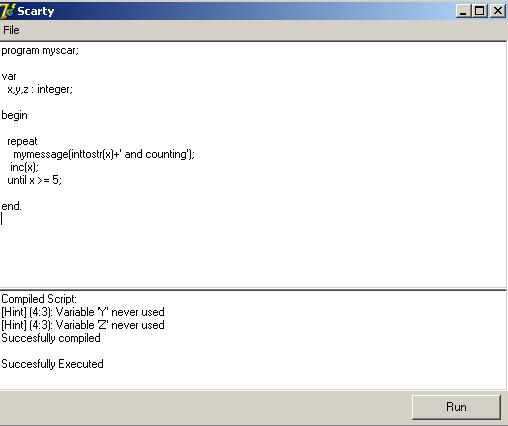
Alright, you're done. Now Add Tons of functions and features, and you got scar ;)… or simba.
~caused
Intro
Scar uses Pascal Script, which was invented by "RemObjects". Special functions in scar are additions to the basic syntax of Pascal Script.
Requirements
- Delphi 7 or highher
- Pascal Script Installed
Step 1
a) Open Up Delphi
b) Create a new Project
Step 2
a) Find the PsScript Component and drop it onto your form. ( Additionally add "uPSComponent" to your uses list and create a PsScript Object).
Step 3
a) Add two richedit fields to your form.
b) name one Debug and one Code
c) Add A Button
Step 4
a) Add this code to the onclick event of your button.
procedure TForm1.Button1Click(Sender: TObject);
var
  i:integer; //var for counting
  Messages: string; //Messages collected by pascal script
  compiled: boolean; // Script compiled or not ?
begin

  // PsScript1.Script.Text is the script that you want to execute for example "var x:integer; begin end." ( Same as in scar ;) ... )
  PSScript1.Script.Text := Code.Text;

  //Compile the script and return success to "Compiled"
  Compiled := PSScript1.Compile;

  //Put all compiler Messages in "Messages"
  for i := 0 to PSScript1.CompilerMessageCount -1 do
    Messages := Messages +
                PSScript1.CompilerMessages[i].MessageToString +
                #13#10;

  //If compiled succesfully
  if Compiled then
    Messages := Messages + 'Succesfully compiled'#13#10;

  //Adding messages to the debug box
  Debug.Text := 'Compiled Script: '#13#10+Messages;

  //Show "Succesfully Executed" if there were no errors, otherwise, Popup a message.
  if Compiled then begin
    if PSScript1.Execute then
      debug.text := debug.text + #13#10 + 'Succesfully Executed'
    else
      ShowMessage('Error while executing script: '+
                  PSScript1.ExecErrorToString);

  end;
end;
Step 5
Adding Own Functions is simple !
a) In the OnCompile Event of your PSScript1 Object add:
PsScript1.AddFunction(@ShowMessage,'procedure MyMessage(const Msg: string)');
This adds the ShowMessage Function from Delphi to our "scar" ;].
Alright, you're done. Now Add Tons of functions and features, and you got scar ;)… or simba.
~caused