SRL Archive - Graphics and Multimedia

Siggy?


Kyle Undefined

2009-12-28 01:35:45

I was bored so I made a quick sig. It's not the best but it's decent. Rate/Hate/Comment

~Camo

Dervish

2009-12-28 05:01:42

From: Camo Developer
I was bored so I made a quick sig. It's not the best but it's decent. Rate/Hate/Comment

~Camo


I wanted that render, but couldn't find it >.<

Its very nice, 9/10. I think there could be a liiiittle more filling up on the right side, but its very nice as it is ! :)

Keep going, I'm amazed TBH.

code841

2009-12-28 07:02:32

I don't know what it is, but the resizing didn't go to well? I mean it seems to be pretty pixelated (the person) and unless this was a deliberate effect, I'm going to guess the original render is massive.

Orbital

2009-12-28 08:16:06

From: code841
I'm going to guess the original render is massive.


How does that make any difference?

code841

2009-12-28 08:56:42

From: newbiezkid
How does that make any difference?

Because in it's large original form it was probably very detailed hence why resizing it caused it to pixelate.

MylesMadness

2009-12-28 12:11:04

From: Dr D. Dervish
I wanted that render, but couldn't find it >.<
http://www.planetrenders.net/renders/displayimage.php?pos=-51905

anyway its a bit big, and the text is over kill, but besides that its goode

Torrent of Flame

2009-12-28 13:54:53

From: code841
Because in it's large original form it was probably very detailed hence why resizing it caused it to pixelate.


No, if it was big it would blur, not pixelate, when resized. Small renders pixelate when enlarged.

Kyle Undefined

2009-12-28 14:01:31

@Dervish, thanks :) I just didn't know what to fill the upper corner with so I left it alone.

@Code, I didn't notice it till now. The monitor I was using is a little on the darkside and it looks pretty smooth on there, I can try to resize it better.

@Myles, yeah I know :( but that's the only size I could get it to look ok in. Thanks :)

I had another render that looked pretty sick with that background. I'll do that one and post it. Also, the background I'm using is a full size background that I edited, if you want it let me know.

~Camo

Edit: Here's the other render with a glow added. It still looks a little pixelated, I've tried everything to fix it :(

The only other thing I can think of is to get the background to the size I want then overlay the render. I make the images way bigger than needed then resize them, maybe the double resize is messing with the render, I really don't know.

NiCbaZ

2009-12-29 04:00:07

From: Torrent of Flame
No, if it was big it would blur, not pixelate, when resized. Small renders pixelate when enlarged.


No he is correct, when very large and detailed images are made smaller, all the details cram together and create a pixelated effect.

Kyle Undefined

2009-12-29 05:10:42

I was able to make most of the pixelated look go away, I just installed PS so I'll give that a try.

~Camo

Dervish

2009-12-29 06:01:34

Try smudging/blurring a copy of the render layer, at the edges, and put it over the non smudge/blurred layer at an opacity range of 35-60% and you shouldn't be able to notice the pixelated stuff anymore.

Orbital

2009-12-29 08:24:20

From: NiCbaZ
No he is correct, when very large and detailed images are made smaller, all the details cram together and create a pixelated effect.


No? If you downsize something that is already pixelated it goes blurry… So your saying it goes from smooth to pixelated to blurry?

Gu3st...

2009-12-29 08:31:37

From: newbiezkid
No? If you downsize something that is already pixelated it goes blurry… So your saying it goes from smooth to pixelated to blurry?
This render isn't pixelated.
EDIT: When you enlarge something it goes blurry, like this:
When you downsize something then it goes pixelated.

Orbital

2009-12-29 08:33:09

I didn't say that? I'm saying if you can downsize a large render to become pixelated then why does resizing it again cause it to become blurry… it makes no sense…

Nothing pixelates!

http://i46.tinypic.com/2rzcl8j.png
http://i49.tinypic.com/6fd24y.png

They are both anti aliased!

Gu3st...

2009-12-29 08:57:03

From: newbiezkid
I didn't say that? I'm saying if you can downsize a large render to become pixelated then why does resizing it again cause it to become blurry… it makes no sense…

Nothing pixelates!

http://i46.tinypic.com/2rzcl8j.png
http://i49.tinypic.com/6fd24y.png

They are both anti aliased!
It does make sense, this isn't vector graphics, and when you make anything smaller then you are taking away some of the information (in this case pixels)

Hmm… Try oping a large image in your browser and zoom out so that it isn't the actual size, does it pixelate then? It does for me; http://www.noaanews.noaa.gov/stories/images/goes-12-firstimage-large081701.jpg

Orbital

2009-12-29 09:07:12

but we are not talking about zooming in web browsers…

and it doesn't really pixelate…

and why does it matter if it's a vector?

Gu3st...

2009-12-29 13:15:16

From: newbiezkid
but we are not talking about zooming in web browsers…

and it doesn't really pixelate…

and why does it matter if it's a vector?
They scale, so yes we are talking about zooming in web browsers too..

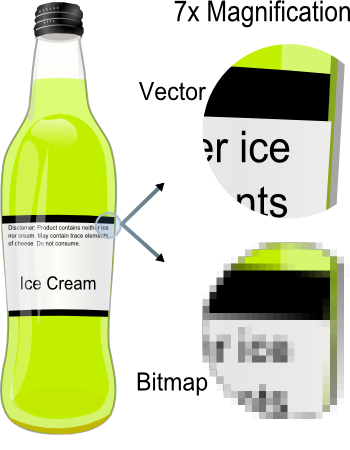
You know what vector graphic is, right? Aren't you a flash-master? Or am I confusing you with someone? Anyways: http://upload.wikimedia.org/wikipedia/commons/b/b4/VectorBitmapExample.png

Orbital

2009-12-29 23:56:50

Scaling in web browsers is different to scaling in digital programs so no, we are not talking about scaling in web browsers… Second, what I was trying to say is, it doesn't matter if it's a vector, it makes no difference when resizing…

Kyle Undefined

2009-12-30 05:21:45

Here's my very first PS sig. I haven't read any tuts or anything, just going by what I knew from Gimp. I know it sucks so what can I do to enhance it?

~Camo