caused
2009-10-01 19:18:37
If you're lazy you can use these procedures to debug directly on the runescape canvas.
They will show the Points Found by FindColors(or other functions that return dots) or boxes(SplitTpaex or such…) until you either press f2 oder f3.
I guess it enhances the workflow.
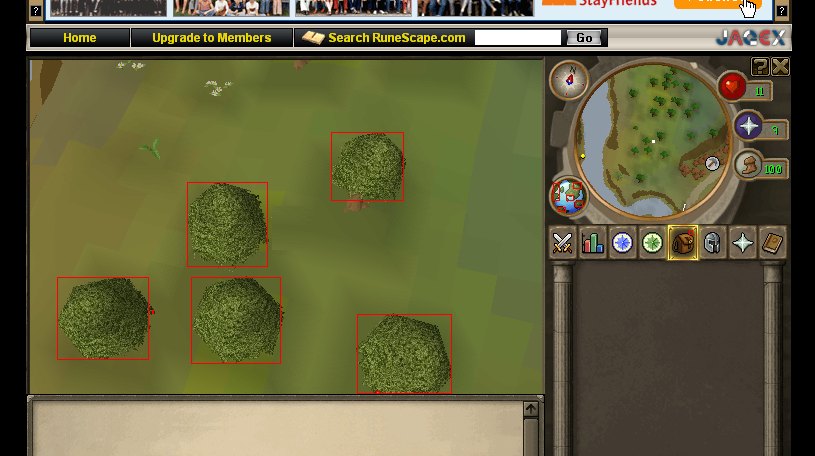
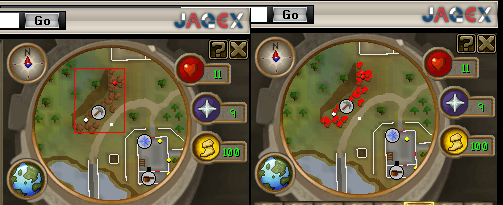
Heres an example for my mining site detection showing the points it found(right), and the box it generated(left).
Left: procedure DrawBoxes(boxes:T2Dpointarray; Right: procedure DrawDots(pixels : TpointArray);
~caused
They will show the Points Found by FindColors(or other functions that return dots) or boxes(SplitTpaex or such…) until you either press f2 oder f3.
I guess it enhances the workflow.
Heres an example for my mining site detection showing the points it found(right), and the box it generated(left).
Left: procedure DrawBoxes(boxes:T2Dpointarray; Right: procedure DrawDots(pixels : TpointArray);
procedure DrawBoxes(boxes : T2DPointarray);
var
  i,x,y,w,h : integer;
  drawing : TBitmap;
  B : Tbox;
begin
  drawing := TBitmap.Create;
  drawing.canvas.handle := GetTargetDC;
  drawing.canvas.Pen.Color := CLRED;

  repeat
    for i:= 0 to high(boxes) do
    begin
      B := GetTPABounds(boxes[i]);
      drawing.canvas.moveto(B.x1,B.y1);
      drawing.canvas.LineTo(B.x2,B.y1);
      drawing.canvas.LineTo(B.x2,B.y2);

      drawing.canvas.LineTo(B.x1,B.y2);
      drawing.canvas.LineTo(B.x1,B.y1);

    end;
    wait(30);
  until(IsFkeyDown(3));

end;

procedure DrawDots(pixels : TpointArray);
var
  i,x,y : integer;
  drawing : TBitmap;
begin
  drawing := TBitmap.Create;
  drawing.canvas.handle := GetTargetDC;
  drawing.canvas.Pen.Color := CLRED;

  repeat
    for i:= 0 to high(pixels) do
    begin
      drawing.canvas.moveto(pixels[i].x-1,pixels[i].y);
      drawing.canvas.LineTo(pixels[i].x,pixels[i].y);
    end;
    wait(30);//Lag Reduction
  until(IsFKeyDown(2));
end;
~caused