SRL Archive - OSR Intermediate Scripting Tutorials

Ultimate Bitmap Tutorial!


cycrosism

2009-07-04 15:07:55

Welcome to my bitmap tutorial. I will explain to you what bitmaps are, what they can be used for and how the can be used. This tutorial has been edited to work with Simba.

A bitmap is a picture (.bmp), which can be stored as a string in Simba and can be used for whatever reason.

I will teach you how to use bitmaps in 5 easy to understand steps.

Step 1. Creating the bitmap.

First off, click the printscreen button (Left to the scroll lock button). This will take a picture of your screen and save it to your clipboard. Open the run dialog by pressing Windows key + R then typing in mspaint


When paint opens, click Ctrl + V to paste the screenshot. Using the "select" tool drag your mouse over the image that you want to create a bitmap of. When that's done, right click then press cut. Click File > New then when the dialog box comes up asking you to save click No.

In your new canvas, click Ctrl + V again and the bitmap will be pasted into paint. Zoom in as much as you can, and crop it with the select tool a bit more until you have it perfect. It should look something like this


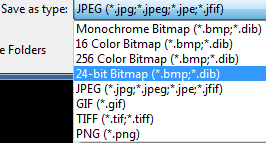
Click File > Save then make sure you select 24 Bitmap

Step 2. Loading the bitmap into memory.

To load the bitmap into the memory you have to use the function BitmapFromString


BitmapFromString(Width, Height: Integer; data: string);

Lets say for example we wanted to find a bitmap of a copper ore.


When creating a bitmap you should not create it like the above picture. It should look like the picture below.


Now you have to declare a new variable which is an integer, and call it anything, in this case I will call it copperore. Everything the bitmap contains will be stored in this integer, which we will later use to find the bitmap.


Program new;
Var
copperore:Integer;
Begin
End.

We can then set copper to be the bitmap by using


copperore := BitmapFromString(10, 11, 'beNoLVPZwMGFgYASi7Rl6p4' +
'qNIAgiAkFlzrIrE7SQRQwUFCAIyG70VNiSrgvUuzhWEy4FNBN ibLe' +
'/ElB2f67BoTyDTak6QBGIFER2SogqUBZo3ZkS4/Nlxnuz9eEKgIy5' +
'UeoQ2WtVpjerzYDoeCHCYWuStIHqgbru1ZnfrjUHygLZQAVAu 4CyQ' +
'I1AG4EiQCkgApoAZB8tMISYDySByoCWAsWBslcqTYFsoGCRow w8NI' +
'BGAcWBxgJJIDfZQqLKVQ7ISPAzSwu2AjKABgJl4UHUBwA9B16 H');

To do this, open Simba then click Tools > Bitmap Conversion.


In the dialog box click Open then load the .bmp file. When you click "To string" you will get the bitmap printed into the debug box. I will show you how to use this.


Step 3. Finding the bitmap

There are many ways to find a bitmap and I will go through the ones most commonly used.

Lets make a procedure that load the bitmap into the memory.


Procedure FindCopper;
Var //Variables are declared here
copper, X, Y:Integer; //Declare bitmaps as Integers


Begin
copper := BitmapFromString(10, 11, 'beNoLVPZwMGFgYASi7Rl6p4' +
'qNIAgiAkFlzrIrE7SQRQwUFCAIyG70VNiSrgvUuzhWEy4FNBN ibLe' +
'/ElB2f67BoTyDTak6QBGIFER2SogqUBZo3ZkS4/Nlxnuz9eEKgIy5' +
'UeoQ2WtVpjerzYDoeCHCYWuStIHqgbru1ZnfrjUHygLZQAVAu 4CyQ' +
'I1AG4EiQCkgApoAZB8tMISYDySByoCWAsWBslcqTYFsoGCRow w8NI' +
'BGAcWBxgJJIDfZQqLKVQ7ISPAzSwu2AjKABgJl4UHUBwA9B16 H');

If (FindBitmap(copper, X, Y)) Then //This will search the screen for the bitmap
Writeln('Found the copper bitmap') //Tells us it found it
Else
Writeln('Could not find copper'); //Tells us we didn't find it
End;

Just a quick run down of some commonly used bitmap functions.

**The greater colour range you want, the higher the tolerance parameter should be.

FindBitmap(copper, X, Y);
This is the simplest way to search for a bitmap.

FindBitmapTolerance(copper, X, Y, 15);
This works just like FindBitmap except you can add some tolerance. I made it 15.

FindBitmapIn(copper, X, Y, 0, 0, 100, 100);
This will search for the bitmap in a defined area of your screen. In this example it will search for the bitmap from 0, 0 to 100, 100

FindBitmapToleranceIn(copper, X, Y, 0, 0, 100, 100, 15);
This is FindBitmapTolerance and FindBitmapIn put together.

FindBitmapSpiral(copper, 50, 50, 0, 0, 100, 100);
This will search for the bitmap from 0, 0 to 100, 100 but starting at 50, 50 (X, Y) and looking outwards from there.

FindBitmapSpiralTolerance(copper, 50, 50, 0, 0, 100, 100, 15);
Works like FindBitmapSpiral but you can add tolerance.

FindBitmapRotated(copper, 50, 50, 360, 0, 0, 100, 100);
Works like FindBitmap, but rotates the bitmap after each search by 1 degree. You most likely won't need to use this unless you are finding something that rotates. Will keep rotating until it reaches the angle you define, i set it to 360 so it rotates fully.

Step 4. Clicking the bitmap.

Have the variables ready and the bitmap loaded then we can start to click the bitmap.

How it works: Simba will search the area you define and if it finds the bitmap, it will set the coords of it into the X, Y (Which is why you set these to variables/integers). By using SRL's Mouse function it clicks the X, Y coordinates which is why it is termed "Clicking the bitmap". Example:


Procedure FindCopper;
{.Include SRL/SRL.scar} //This will add the SRL include to Simba

Var //Variables
copper, X, Y:Integer; //Declare bitmaps as Integers


Begin
SetupSRL; //This sets up SRL
copperore := BitmapFromString(10, 11, 'beNoLVPZwMGFgYASi7Rl6p4' +
'qNIAgiAkFlzrIrE7SQRQwUFCAIyG70VNiSrgvUuzhWEy4FNBN ibLe' +
'/ElB2f67BoTyDTak6QBGIFER2SogqUBZo3ZkS4/Nlxnuz9eEKgIy5' +
'UeoQ2WtVpjerzYDoeCHCYWuStIHqgbru1ZnfrjUHygLZQAVAu 4CyQ' +
'I1AG4EiQCkgApoAZB8tMISYDySByoCWAsWBslcqTYFsoGCRow w8NI' +
'BGAcWBxgJJIDfZQqLKVQ7ISPAzSwu2AjKABgJl4UHUBwA9B16 H');
If (FindBitmapToleranceIn(copperore, X, Y, 0, 0, 100, 100, 25)) Then //This will search the screen for the bitmap
Mouse(X, Y, 5, 5, True); //Clicks on the copper bitmap if found with a randomness of 5
End.

Step 5. Freeing the bitmap from the memory.

After you use a bitmap (even if it doesn't find it) you should always free the bitmap. It's very simple to use:

FreeBitmap(copper);

And that's it. Make sure you put this line after all the finding bitmap and clicking script.


If (FindBitmapToleranceIn(copper, x, y, 0, 0, 100, 100, 25)) Then
Begin
Writeln('Found the copper bitmap') //Tells us it found it
Mouse(X, Y, 5, 5, true); //Clicks the bitmap with a randomness of 5, 5
FreeBitmap(copper); //This then frees the bitmap
End;

In English: You call the bitmap and then click it, but if you don't free it, it will just stay in the memory doing nothing. When you call this bitmap again, it loads into the memory again and after a while simba will crash or stop working because of a memory leak, so it is VERY important to free it.

That's the basics of bitmaps. If you have mastered this and want still want learn more about bitmaps, continue reading to learn about Advanced Bitmaps.

There are some good ways to use more advanced bitmaps and they come in good use too. They are very easy to use just follow this guide and if you need any help or have any problems please post in this thread.

FindDeformedBitmapToleranceIn(copper, x, y, 0, 0, 100, 100, 25, 0, false, A);

What this function does, is it looks for a bitmap but skips any part that has the colour of 0 (Black). This is great if the background of the item changes so the script will always find the bitmap.

If we wanted to use FindDeformedBitmapToleranceIn to look for some iron ore, this is what you have to do.

After creating the bitmap, it will look like this.


This is pretty big and has some colours in it that do not need to be used. So using paint, colour in any part of the bitmap black that you do not want the script to look for so it looks like this.


You must remember never to use the whole item as a bitmap, only use part of it.


Now lets say we wanted to find the last picture we can set up the function like this:

FindDeformedBitmapToleranceIn(IronOre, X, Y, 0, 0, 100, 100, 30, 0, false, acc);

The last 3 parts of this are Range, AllowPartialAccuracy and accuracy. If range is 0 (Which it should be on), it checks pixels at positions that match bitmap we are looking for. If the range is 1, it will check the pixels around the bitmap, if range is bigger, it checks further.

AllowPartialAccuracy allows accuracy that is not a 100% match. This should be set to false. Accuracy returns accuracy of found bitmap to bitmap we are looking for. Put in something such as "acc" or even "a" and declare it as an Extended. (An extended is a variable that can hold decimal places)


Var
A:Extended;

RotateBitmap(iron, 3.14);

This basically just rotates the bitmap if you ever need to, but to be honest I have never needed to use this function.To make is rotate the bitmap 180 degrees set the value to 3.14 (Which is the value of Pi)

If you need any help with bitmaps or have any problems, please post in this thread and please state what you need help with

Gu3st...

2009-07-04 15:41:25

Well explained tutorial, good work :)
Keep it up! :D

Might want to add FindDeformedBitmap?

cycrosism

2009-07-04 15:55:03

Yeah I guess I could a bit later, I was just running through some of the main ones

Awkwardsaw

2009-07-04 18:28:26

nice little refresher :) i almost forgot about bitmaps.

Infantry001

2009-07-04 19:49:17

You might also want to mention that you have to fill the background in with black ;)

Awkwardsaw

2009-07-04 19:51:09

you dont need to do that if your just doing a peice of the bitmap :P like the copper ore example

Infantry001

2009-07-04 20:16:28

But the way you're doing it now, it will also look for the inventory background color.

I guess it doesn't matter if you are simply planning on using the bitmap for the inventory. But it's probably better practice to make them usable everywhere.

skvatboy

2009-07-04 23:49:33

Good work

cycrosism

2009-07-05 05:35:33

Okay I added a few "advanced bitmaps" if anyone needs help with any thing to do with bitmaps please just post here and I will help you

CowFish

2009-07-09 22:07:36

Good job Cycro :P

I never knew you could find deformed bitmaps lol :D

cycrosism

2009-08-02 13:27:52

bump ^_^

Smarter Child

2009-08-05 03:56:30

Deformed method is slightly slower.

cycrosism

2009-08-06 09:45:20

Yes it will take a bit longer to find the bitmap if you make the Boolean in FindDeformedBitmapToleranceIn true because it will alter the bitmap and make it bigger/smaller and try to search for it so yeah that might take a little bit longer to find

Main

2009-08-23 12:24:07

I love you? ^_^
One question, does bit maps click in the center of the bitmap (assuming you didn't set randoms)? or any where on it?

cycrosism

2009-08-23 14:06:58

No it wont click on the center of the bitmap, but you can make it.

If the bitmap size is lets just say 14, 14 then do

Mouse(X+(7), Y+(7), 0, 0, True);

And that will click in the middle of it. If you dont it will click the bitmap on the top left corner of where it finds it

Naum

2009-08-23 14:51:51

From: cycrosism
No it wont click on the center of the bitmap, but you can make it.

If the bitmap size is lets just say 14, 14 then do

Mouse(X+(7), Y+(7), 0, 0, True);

And that will click in the middle of it. If you dont it will click the bitmap on the top left corner of where it finds it


Or you could use GetBitmapSize(Bitmap, W, H); and find the middle of that via shr 1 (which is basically '/ 2').

Example:

If FindBitmap(Bit, x, y) Then
Begin
GetBitmapSize(Bit, W, H);
Middle := Point(x + w shr 1, y + h shr 1);
Mouse(Middle.x, Middle.y, 0, 0, True);
End;

That will work is you have variables 'w' and 'h' as integers and 'Middle' as a TPoint.

Great tutorial, Rep+

Main

2009-08-23 21:40:57

thanks ^^

cycrosism

2009-09-05 02:47:29

I might add a guide on how to make bitmaps in Ubuntu, i'm not sure if I should do it because I don't know how many people here use Ubuntu

mrpickle

2009-11-10 20:52:29

Wait… what happened to your tutorial??? =[

TRiLeZ

2009-11-10 22:03:24

People insulted him so he was going to quit and deleted all of his tutorials.
The reason why me made these tutorials was a tut cup and he didn't get it so…

Find the thread about him quitting and read all of his posts.

mrpickle

2009-11-10 22:08:10

ah. i should've looked before asking. :\.

Comon cycro, don't deny us the priveledge of our education here…

cycrosism

2010-01-30 04:21:38

My tutorial has been restored, Enjoy!

cycrosism

2010-02-24 19:57:24

If anyone wants things added to this tutoral, post here or PM me and I will update it.

noobscam

2010-12-11 04:19:06

Nice tutorial! I actually learnt alot :P

By the way,

If(FindBitmapToleranceIn(copper, x, y, MIX1, MIY1, MIX2, MIY2, 35)) then
begin
Writeln('Found the copper bitmap') //[I](Shouldnt it be a semicolon there? :P )[/I]
[B]Mouse(X, Y, 5, 5, true);[/B] // [B]This thing doesn't seem to work ? ;o It does nothing :([/B]
end else Writeln('Could not find bitmap'); //Says that we could not find it
FreeBitmap(copper); //This then frees the bitmap

cycrosism

2011-01-23 05:44:17

From: noobscam
Nice tutorial! I actually learnt alot :P


No worries, this tutorial was made for SCAR so I will update it for Simba (Even though most of the stuff is the same)

By the way,

If(FindBitmapToleranceIn(copper, x, y, MIX1, MIY1, MIX2, MIY2, 35)) then
begin
Writeln('Found the copper bitmap') //[I](Shouldnt it be a semicolon there? :P )[/I]
[B]Mouse(X, Y, 5, 5, true);[/B] // [B]This thing doesn't seem to work ? ;o It does nothing :([/B]
end else Writeln('Could not find bitmap'); //Says that we could not find it
FreeBitmap(copper); //This then frees the bitmap


For the second line, no there doesn't need to be a semicolon there if it is just a If … Then … Else. If it was a If … Then Begin … End Else yes it would need a semicolon. The one that doesnt use begin and end will only support one line. Let me give an example.


If FindDeformedBitmapToleranceIn(YouSTA, STX, STY, 10, STY+1, 145, 400, 50, 0, False, A) Then
STY := STY + 1
Else
Harv := True;

That is some code from a script I am currently working on, as you can see it doesn't require a semicolon after the STY line. However if I were to do the begin and end it would need one, refer to the following code.


If Not FindColorTolerance(X, Y, 16760704, 11, 32, 13, 49, 5) Then
Begin
Writeln('Blah');
TerminateScript;
End Else Writeln('Whatever');

Hope that clears things up. And for the Mouse line you have to make sure you use the SRL Include and call SetupSRL; first thing in your script, for example


Program new;
{.Include SRL/SRL.scar}
Begin
SetupSRL;
MMouse(50, 50, 4, 4);
End;

Edit:This tutorial has been remade with more pictures added and more bitmap functions and has been changed to work properly with Simba.

Gu3st...

2011-01-23 10:13:50

From: cycrosism
For the second line, no there doesn't need to be a semicolon there if it is just a If … Then … Else. If it was a If … Then Begin … End Else yes it would need a semicolon. The one that doesnt use begin and end will only support one line. Let me give an example.
"If(FindBitmapToleranceIn(copper, x, y, MIX1, MIY1, MIX2, MIY2, 35)) then
begin" :p

cycrosism

2011-01-23 11:22:25

From: Zyt3x
"If(FindBitmapToleranceIn(copper, x, y, MIX1, MIY1, MIX2, MIY2, 35)) then
begin" :p


I don't see what you are getting at …

Gu3st...

2011-01-23 11:50:41

From: cycrosism
I don't see what you are getting at …
You told him he was wrong, then proved he was correct. "If it was a If … Then Begin … End Else yes it would need a semicolon" that's exactly what the example is

cycrosism

2011-01-23 18:52:26

Oh wow didn't notice that, but when I ran it through scar I got this


It compiled in Simba too

Compiled succesfully in 2157 ms.
SRL Compiled in 297 msec
Could not find bitmap
Exception in Script: The bitmap[0] does not exist

Gu3st...

2011-01-24 14:18:09

Yeah, it will work as PascalScript accepts lines without an ; at the end in lines like that, but it should always be an ; at the end of such lines either way :)

WT-Fakawi

2011-03-06 04:02:34

Stickied and Cuppyfied.

grats

2011-03-07 00:44:35

Awesome tutorial, very easy to follow thanks! rep+

learned how to do some bitmaps autoing for some school work :P

kyocera

2012-02-04 22:31:56

ERROR loading the file: C:\Simba\Scripts\Enchant1.bmp


whad i do wrong :(?

Abu

2012-02-24 02:29:11

In your guide, the following needs to be in Simba code:

FindDeformedBitmapToleranceRotationIn(bitmap: Integer; var x, y: Integer; x1, y1, x2, y2: Integer; tolerance: Integer; Range: Integer; var accuracy: Extended; AngleIntervals: Extended; StartAngle, MaxAngle: Extended; var angle: Extended);

You wrote it as normal text like that - very hard to understand.


Thanks

edgee awaits

2012-06-12 17:09:06

My Bitmap doesnt seem to work, im trying to pick in item out of the bank, i could be doing something wrong but I'm new so I'm not sure
program BitmapTest;
{$i SRL\SRL.simba}
Var
Trout, X, Y: Integer;
Begin
ClearDebug;
SetupSRL;
Trout := BitmapFromString(2175, 750, 'meJzs209P2wUcx/HfzotPwGz' +
'u4E2NiX/QGAOog46NEP6EbszBVmzXbqxqQTpKaUtbGIXxZ+CY4nAb' +
'YsRMzTTqxeuWePQB6EFjYrz5FHSBSDTx4O2XX/J65fsA3vdPvkHwL' +
'9///Ft1db3ppdbDhx9/8qmmtli8s+tsb3/6TwAAAAAAAP6Hfy4v93' +
'/8ZfWjnUcPHWl68Wis49SJrsGevmR8YOT0YC7sTAAAAAAAgGjYX15' +
'++P2Pxc2tgwcfaX2tu6PzTFfPcE9/On46e+bs2LlkIexMAAAAAACA' +
'aNgfXyauLDzx9HMtr3R3dp/rjadP/j27pDLlC9l62JkAAAAAAADRs' +
'Le8jFVnj3b0tMXiA4NvDyXyb6RLmUv1bK6RG18aL6yN5pfDzgQAAA' +
'AAAIiGvfGlpf3YM882J1KTqQvl4eQ72VxjvLBWKL8/Vd2crGzki9f' +
'DzgQAAAAAAIiG/fHl+RdezVyqjbw1k0yNjl1emqrerF7Zqs1tT0zd' +
'mCi9F3YmAAAAAABANARB8OCnX1tjx19uPp4dnR+7fG2idKNc+7A2t' +
'z179dOHV6xsFKdvhp0JAAAAAAAQDUEQHHrsSHffcDY3ny+uT1Y+qN' +
'Rv7S4vO42lzx5eqbZZrt0KOxMAAAAAACAagiA4EAT9py5Oljcq9dv' +
'1xsezCzuNxbsLK18srn15dfXe9Mzt6uydsDMBAAAAAACiYW98GXj9' +
'zemZOzPznzSW7s6vfL547d7yu1+trH+zfP3r2tx2b//5sDMBAAAAA' +
'ACiIQiC5rZY38nUUGI8kSwMp4rJdCmVKZ+/OJ0ZqaVHakOJfPuJ3r' +
'AzAQAAAAAAoiHY1dJ+7MDuC8x/3ta334WdCQAAAAAAAAAAAAAAAAA' +
'AAAAAAAAAAAAAAAAAAAAAAAAAAAAAAAAAAAAAAAAAAAAAAAAAAAAA' +
'AAAAAAAAAD81R4cEAAAAAAI+f+6IQEAAAAAAAAAAAAAAAAAAAAAAA' +
'AAAAAAAAAAAAAAAAAAAAAAAAAAAAAAAAAAAAAAAAAAAAAAAAAAAAA' +
'AAAAAAAAAAAAAAAAAAAAYCGdU5nf');
If (FindBitmapToleranceIn(Trout, X, Y, MSX1, MSY1, MSX2, MSY2, 35)) Then
Mouse(X, Y, 5, 5, True);
FreeBitmap(Trout);
end.

Google

2012-06-12 17:55:07

nice troll?

edgee awaits

2012-06-12 18:11:41

Lol no, im serious.. I might be doing something wrong with the bitmap picture or somthing, i dont know. :/ I've also been having troubles with DTM's, but idunno what im doing wrong with those either. I mean, something looks wrong with the Bitmap in general, its all abunch of A's instead of basically all the other ones ive seen :/

Google

2012-06-12 18:18:58

From: edgee awaits
Lol no, im serious.. I might be doing something wrong with the bitmap picture or somthing, i dont know. :/ I've also been having troubles with DTM's, but idunno what im doing wrong with those either. I mean, something looks wrong with the Bitmap in general, its all abunch of A's instead of basically all the other ones ive seen :/


Well its a little outdated but you want a unique small piece of the trout not the whole thing + more, your code should be only 2-4 lines long.

edgee awaits

2012-06-12 18:26:17

From: GOOGLE
Well its a little outdated but you want a unique small piece of the trout not the whole thing + more, your code should be only 2-4 lines long.

I'm only using the head of the trout, but on pain im zoomed in the whole way, the background of it is black, should i just use it at 100% instead of zooming till its maxed then?

Master BAW

2012-06-18 15:02:25

thanks for this tutorial.:spot:

ragebugger

2012-06-28 16:29:42

Posted this elsewhere.

riwu

2012-07-02 06:35:07

From: cycrosism

FindBitmapSpiral(copper, 50, 50, 0, 0, 100, 100);

Isn't the parameter 50,50 wrong since its supposed to be variables?
I always thought that spiral functions automatically search from center so there is no need to define the center?

Footy

2012-07-02 11:55:25

Thanks for the Tut! Very useful for onscreen proggies!

salbakuta

2013-02-02 10:42:04

i got an error Error: Exception: The bitmap[0] does not exis

Gucci

2013-02-02 12:19:02

From: salbakuta
i got an error Error: Exception: The bitmap[0] does not exis


What are you trying to run?

salbakuta

2013-02-02 12:52:13

program bitmaptest;
{$i srl/srl.simba}

var
x,y,shark:integer;

procedure BMP;
begin
shark := BitmapFromString(14, 23, 'meJxt0sFKAmEUxXF7BaG9j9AycD' +
'e0CtxFq5LETDLNzMxMMzMb08xpIIooat9T9qdDl8tMcJCP4cf57v0' +
'wKGwHv8lvbq1kMv3+Xev00qd5cqEEf1Ks1xt3u6NOZ0ja7YHCmY++' +
'cHAVppkkSUg6vVxGb4pJ2PD6Xrf/K4mXiU7PEpJOzZkulISNbxe+0' +
'7ZQ9FaSo5u5dRrjINM4Pq/Xz3yn3e5BrdaqVpsYMpksE50wM5VKo1' +
'w+kgzDCMmQ2eyqSRimVDos7h1gcrk1fqfTWLW2EbdzNYW07ezum5z' +
'Nnm1Ok9yOpFNMcv7wwgBg34nU7ZJafPH4ygBe2lJWKMn7M4DtBbal' +
'rNAkA6jWv5UvlPz8+o6e3oV5BDAD6LWNGUYyrWZgAL2zL+QPLBnHH' +
'4RCb3zh+kbBatNGPdapcDZjXxL5AdUHZSY=');
end;

Procedure freeBMP;
begin
freebitmap(shark);
end;

procedure findshark;


begin
if findbitmaptolerancein(shark,x,y,0,0,509,333,100) then
movemouse(x,y);
end;

begin
BMP;
freeBMP;
findshark;
end.


i'm trying to see if i can move my mouse to that bitmap which is the raw shark but i keep getting error not found.

Sjoe

2013-02-02 12:55:21

From: salbakuta
i'm trying to see if i can move my mouse to that bitmap which is the raw shark but i keep getting error not found.


begin
SETUPSRL; // don't forget to setup srl so u can use those nifty functions :)
BMP;
Addonterminate('freeBMP'); // I added AddOnTerminate so the bitmap will free when the script stops.
findshark;
end.

Changed your coding, u freed the bitmaps immediately after calling them, gotta free them when we're stopping the script.

EDIT: try to use Simba brackets around your script next time. thanks

salbakuta

2013-02-02 13:19:55

wow TY SO MUCH i just moved freeBMP under findshark and it works

Sjoe

2013-02-02 13:27:13

From: salbakuta
wow TY SO MUCH i just moved freeBMP under findshark and it works


Using AddonTerminate() is better though ;)

Gucci

2013-02-02 13:47:48

From: Sjoekeloe
Using AddonTerminate() is better though ;)


That's true although I have a bad habit of not using it :)

SmellyPenguin

2013-03-08 20:22:40

Thank you very much for this tutorial. Very helpful and you explained everything clearly, except for the memory leak, because I'm not too sure what that is. I can look it up anyways and I don't think its a necessity in your guide, but it wouldn't hurt explaining the concept of memory leaks lightly. ;)

Eleq

2013-03-31 09:48:39

Error: Exception: Mask is invalid. Width/Height: (9,6). WhiteHi/BlackHi: (-1,53) at line 780
The following DTMs were not freed: [0, 1, 2, 3, SRL - Lamp bitmap, SRL - Book of Knowledge]
The following bitmaps were not freed: [SRL - Mod bitmap, SRL - Admin bitmap, SRL - Minimap Mask bitmap]

cycrosism

2013-11-11 21:41:54

Your script is all out of wack. I would have done it like this instead.


program runes;

Var mind, x, y:Integer;
begin
mind := BitmapFromString(20, 19, 'meJx9ks1KQlEUhaGxr1LPUOAgIT' +
'EiMzHTzMzUNDMVMzUzEyWLkuhnIE2a9DK9QA/TBws2h3srWIPLvft' +
'ba519br3Rb7dHgeIX6nQm3e4t6l3eof7VPRpcPwxvZmg0ehqP n6fT' +
't8fZ+8vrx3z+2WwOUKs1FI4PDn+ZaAaJrZ31UL3Rx0Hv8cHBb 6KvO' +
'CDSwaunXWQOMllYXHL1axOOUC6fo8rJBZKPB5T8TcALhXqp1E Qy0a' +
'Q5qIyetRb3RPl8DeGANKMabigOfpzoQPXbpAFPDfNRB3c+e1B BucM' +
'q0ow6GO6yyEA2lt4rZvaPEQ6acU8hB1uCXQe12VUqdfQPrv56 qYuw' +
'nwE2mcyBuw7+C3L7G84fAos8G3BBpeuT4fpJEomsUUS7/dmelXfNy' +
'dUdxeMZcKV7ytv+5SCQXN0y+MbmDrjHAdz6G25rt1VHItvgsV ga1s' +
'XFKt36CycanPRQaD0cjsohurVLAXd76u+yyLa9vLIaDK65DnS wI/i' +
'Pj4NF/wDVP8hY');
If FindBitmapIn(mind, X, Y, 0, 0, 400, 400) Then movemouse(X, Y);
FreeBitmap(mind);
end.