caused
2009-06-28 23:22:24
(I cant create a Thread in the Tutorial Island, where i want to o_o, and since this topic might be interesing for some of you i'll do it here).
Introduction:
Ok, heres the method i'm using to make my scripts standalone exe files. It will work for any scar script. You will have a nice user-friendly .exe file : D. I'm using an simple c++ Programme to Directly run the script and Hide the scar window, but still show the Form Window. Than im putting it all together in a Winrar SFX archive and Change some settings to temporarily safe it and open the script after Opening the SFX file.
Requirements:
1. Create a script (Optional with Form).. I'll explain you how to make only your Form show up, not scar, anyways… you don't need to create a form..
2. Create a clean copy of your scar Folder, with only the Include Files you will need.
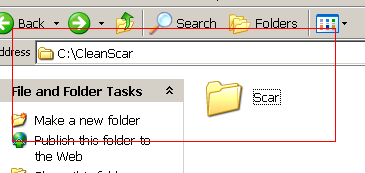
3. Copy your Clean Scar to C:\CleanScar\ .. like this:
4. Copy the script you want to make standalone to C:\CleanScar\Scar\(yourscript.scar).
5. Create the following programme in C++.. I commented it alot, so you can understand what it does ;).
6. Move your compiled .exe File to: C:\CleanScar\(YourExe.exe).
Congratulations, you'r nearly done :D…
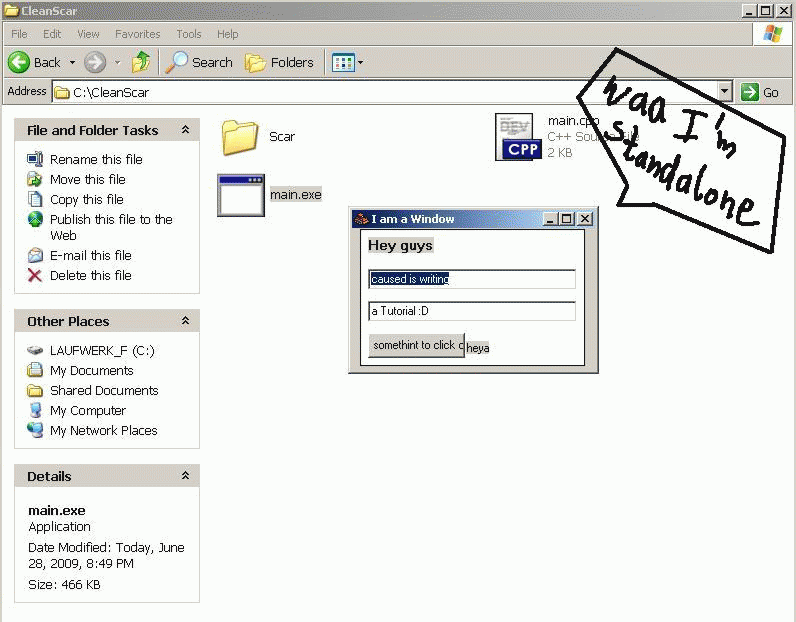
You can test your progress now, by launching your compiled .exe. And you will only get your Form-Window:
7. Now we're doing some magic, to Create Only One .exe File… ( We could do that solely with some functions of c++, but that would kill the frame of this tutorial : 'D )
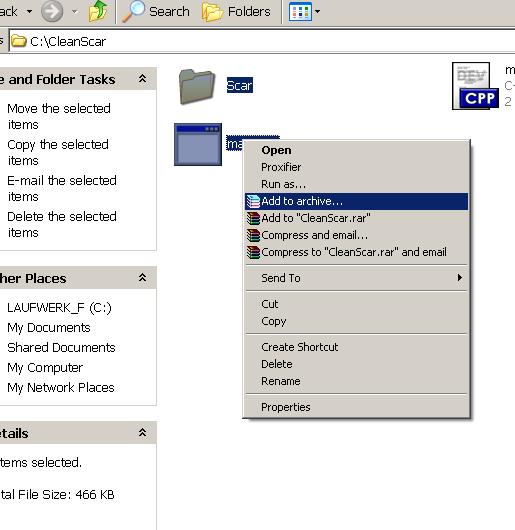
Mark Your.exe File and Your Scar Folder, Right Click and Choose: Add to archive
8. Setting Up Archive Options…
8.1
On "General". Select:
- Create SFX archive
8.2
Click on "Advanced".
- Click on the "SFX options…" Button.
8.3
On "General".
- Goto "Run after extraction, and type in the name of your .exe File
8.4
On Modes Select:
- Unpack to temporary folder
- Silent Mode: Hide all
8.4 a)
Now you may also want to add another Icon for your Standalone programme. You can do that via the "Text and Icon Options"….
8.5
- Click OK
- Click OK
Winrar will now Create The customized SFX archive…
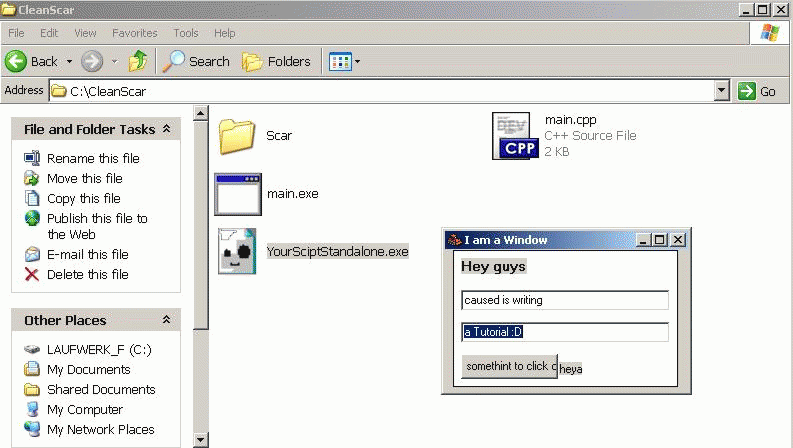
And there you go, I even customized the icon ;) :
Conclusion:
So, since the script waits for the window handle of your form, the scar window will be visible for some milliseconds. I dont think thats annoying. But if you know a way to prevent that, feel free to tell me : 'D…
Anyways Comments and Feedback is welcome.
~caused
Introduction:
Ok, heres the method i'm using to make my scripts standalone exe files. It will work for any scar script. You will have a nice user-friendly .exe file : D. I'm using an simple c++ Programme to Directly run the script and Hide the scar window, but still show the Form Window. Than im putting it all together in a Winrar SFX archive and Change some settings to temporarily safe it and open the script after Opening the SFX file.
Requirements:
- Scar
- A Script (optional: that generates a Form)
- C Compiler (I'm, using Dev-C++)
- Winrar
1. Create a script (Optional with Form).. I'll explain you how to make only your Form show up, not scar, anyways… you don't need to create a form..
2. Create a clean copy of your scar Folder, with only the Include Files you will need.
3. Copy your Clean Scar to C:\CleanScar\ .. like this:
4. Copy the script you want to make standalone to C:\CleanScar\Scar\(yourscript.scar).
5. Create the following programme in C++.. I commented it alot, so you can understand what it does ;).
//Include files for the required functions..
#define _WIN32_WINNT 0x0500
#include <windows.h>
#include <iostream>
#include <stdlib.h>

int main() {
  HWND scar, script;


  HWND hWnd = GetConsoleWindow(); //searches for the console Window
  ShowWindow( hWnd, SW_HIDE ); //hides the console Window

  popen("Scar\\scar.exe -open yourscript.scar -run", "r"); //This Opens scar and runs your script


  //Waiting for your script to be run
  while(FindWindow(NULL, "I am a Window") == FALSE) {
    Sleep(2);
  }

  //Putting the window Handles in Vars
  scar = FindWindow(NULL, "SCAR divi CDE");

  //Fill in your WIndow Caption at "I am a Window"
  //Search for  "[B]frmDesign.Caption[/B]"( := 'I am a Window';) in scar
  script = FindWindow(NULL, "I am a Window");

  //Hiding scar and showing the Form Window
  ShowWindow(scar,SW_MINIMIZE);
  ShowWindow(scar,SW_HIDE);
  ShowWindow(script,SW_SHOWNORMAL);

  //EDIT: Its better to make the form window show up in the foreground, or it might be hidden behind Windows Folder or something ;)
  SetForegroundWindow(script);

  //Waiting for the Form window to dissappear
  while(FindWindow(NULL, "I am a Window")) {
    Sleep(2);
  }

  //Killing scar, when Form window is closed
  system("taskkill /f /im scar.exe");


  return 0;
}
6. Move your compiled .exe File to: C:\CleanScar\(YourExe.exe).
Congratulations, you'r nearly done :D…
You can test your progress now, by launching your compiled .exe. And you will only get your Form-Window:
7. Now we're doing some magic, to Create Only One .exe File… ( We could do that solely with some functions of c++, but that would kill the frame of this tutorial : 'D )
Mark Your.exe File and Your Scar Folder, Right Click and Choose: Add to archive
8. Setting Up Archive Options…
8.1
On "General". Select:
- Create SFX archive
8.2
Click on "Advanced".
- Click on the "SFX options…" Button.
8.3
On "General".
- Goto "Run after extraction, and type in the name of your .exe File
8.4
On Modes Select:
- Unpack to temporary folder
- Silent Mode: Hide all
8.4 a)
Now you may also want to add another Icon for your Standalone programme. You can do that via the "Text and Icon Options"….
8.5
- Click OK
- Click OK
Winrar will now Create The customized SFX archive…
And there you go, I even customized the icon ;) :
Conclusion:
So, since the script waits for the window handle of your form, the scar window will be visible for some milliseconds. I dont think thats annoying. But if you know a way to prevent that, feel free to tell me : 'D…
Anyways Comments and Feedback is welcome.
~caused

