SRL Archive - Discussions and Debates

Debugging in the client?


Cazax

2009-02-03 09:59:32

The idea is to debug the progress report in the screen. How? here is an example:
program New;
{.include SRL/SRL.scar}
Var
Bmp : Integer;

Procedure DebugTime;
var
Canvas : TCanvas;
W, H : Integer;
Begin
bmp := BitmapFromString(0, 0, '');
Canvas := GetClientCanvas;
Bmp := CreateBitmapMaskFromText('Time running: ' + TimeRunning, UpChars);
FastReplaceColor(Bmp, ClBlack, 10799322);
GetBitmapSize(Bmp, W, H);
SafeCopyCanvas(GetBitmapCanvas(Bmp), Canvas, 0, 0, W, H, 205, 387, 205 + W, 387 + H);
FreeBitmap(Bmp);
SetTimeout(1, 'DebugTime');
End;

begin
ActivateClient;
SetupSRL;
Wait(500);
DebugTime;
Repeat
MMouse(Random(500), Random(500), Random(100), Random(100));
Wait(500 + Random(500));
Until False;
end.
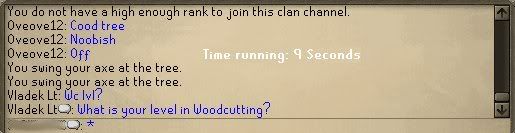
It will debug the time running while moving the mouse. It doesn't affect the mouse movements as you can see. It will replace the rs canvas with a text, and it sets a timout to call it every 1 seconds(canvas change). What do you think? Here is a picture:

Lee Lok Hin

2009-02-03 10:13:14

Used before. Take a look at Jukka's Reflection scripts, noticeably his Rune Essence crafter, which is outdated.

Remember, do not gravedig.

Method

2009-02-03 10:15:33

From: Lee Lok Hin
Used before. Take a look at Jukka's Reflection scripts, noticeably his Rune Essence crafter, which is outdated.

Remember, do not gravedig.


This isn't done on SMART, though (as far as I know).

Cazax

2009-02-03 10:17:10

I'm not talking about SMART, because I know you can, I'm talking about the real rs.

n3ss3s

2009-02-03 10:52:27

You can't the canvas refreshes too fast. Even when we paint in SMART, we don't paint the client canvas, we paint on SMART's own debug canvas.

Cazax

2009-02-03 10:57:48

From: n3ss3s
You can't the canvas refreshes too fast. Even when we paint in SMART, we don't paint the client canvas, we paint on SMART's own debug canvas.

The canvas in the mainscreen refreshes fast. The canvas in the chat box does not(like every 0.8 seconds).

Sir R. M8gic1an

2009-02-03 14:06:58

humm… isn't there a chance this might affect color finding?

anyway, it looks cool :p But it might not be too practical when script is at 23h, 17 Mins 45 seconds. might take up a lot of space.

~RM

Wizzup?

2009-02-03 14:12:18

The problem with this is that, without SMART, you'll have to redraw really fast. This takes a lot of CPU, and it will still flicker.

At least, when I tried it a few years ago, it definitely flickered.

EDIT: I see. So the ChatBox doesn't redraw fast.
Nice find. It's still too much a waste of CPU, though. :)

NCDS

2009-02-03 14:16:02

From: Rasta Magician
humm… isn't there a chance this might affect color finding?


Just out of curiosity, how would this affect Color finding?

mastaraymond

2009-02-03 14:18:20

It's not worth the extra CPU use it uses.

Cazax

2009-02-03 15:09:12

So, if this takes a lot of CPU, wouldn't be good if you press a F key and the proggy appears for 5 seconds? just an idea.

Wizzup?

2009-02-03 16:11:37

From: Cazax
So, if this takes a lot of CPU, wouldn't be good if you press a F key and the proggy appears for 5 seconds? just an idea.


Would still use quite some CPU, why not just write to the SCAR Debug Box?
It's there for a reason… :)

Cazax

2009-02-03 16:17:03

To look at the proggy while autoing without maximizing SCAR? I don't think drawing canvas for 5 secs will take some quite CPU, or does it?

Gu3st...

2009-02-03 16:22:37

I agree with Cazax, its a waste of time to pause scar, maximize it, find the debug-information, minimize itand then resume scar instead of just clicking F12…

Wizzup?

2009-02-03 17:18:11

From: Cazax
To look at the proggy while autoing without maximizing SCAR? I don't think drawing canvas for 5 secs will take some quite CPU, or does it?


Or position your SMART over your scar so you can still see the debug box…

MylesMadness

2009-02-03 17:35:07

From: Wizzup?
Or position your SMART over your scar so you can still see the debug box…
THIS ISN'T FOR SMART!

TViYH

2009-02-03 18:08:51

I always thought that you could put some sort of text AROUND the minimap. Like, above the gametabs.

Home

2009-02-10 18:59:30

I always Disguise my Proggies like Trips: XP: TimeRunning:

And so on.. no need to maximize :)

~Home