SRL Archive - OSR Advanced Scripting Tutorials

ColorToleranceSpeed and XYZ


Cazax

2009-01-15 07:23:37

I'm not explaining what XYZ means, I'll just show you how to use it in functions and its properties.

XYZ is the fourth color tolerance speed, to call it, you have to use the procedure ColorToleranceSpeed(3). Here is the order:
CTS 0(Color32) = Extremely fast, but not accurate at all.
CTS 1(RGB) = Fast, Accurate.
CTS 2(HSL) = More accurate than CTS1, but less faster.
CTS 3(XYZ) = Extremely accurate, not fast at all.

Note: about the fastness, the difference is not big, between 40 - 100 ms.

The more accurate a CTS is, the less tolerance you have to use.
example:
CTS 0 Tol = 20
CTS 1 Tol = 15
CTS 2 Tol = 10
CTS 3 Tol = 5


Now, I'll compare them(finding a tree):

CTS 0:
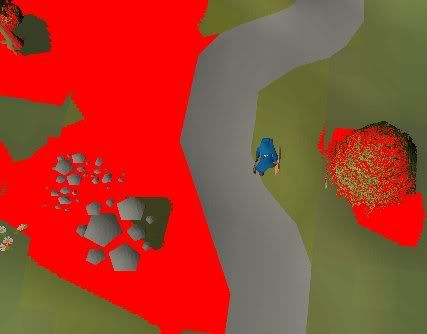
CTS 1:
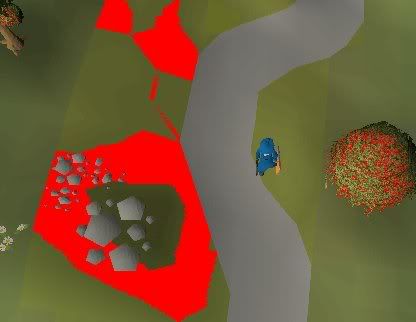
CTS 2:
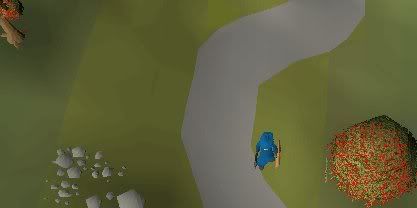
CTS 3:
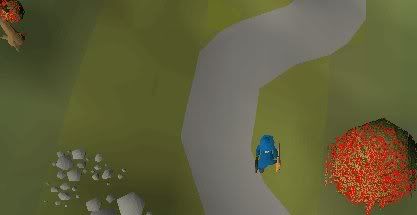
So, CTS 3 was the most accurate picture.


Functions used with XYZ:

1:
Procedure ColorToleranceSpeed(3)

Calls XYZ. Default CTS is 1 (for setting it back).

2:
Procedure SetColorSpeed3Modifiers(Sensitivity : Integer)
Have you ever heard of SetColorSpeed2Modifiers? This does the same thing, but with other value. The higher a sensitivity is, the lower tolerance you should use. Default sensitivity is 4 (for setting it back).
An example:
Function FindRockPoints: TPointArray;
Begin
ColorToleranceSpeed(3);
SetColorSpeed3Modifiers(10);
FindColorsSpiralTolerance(MSCX, MSCY, Result, RockColor, MSX1, MSY1, MSX2, MSY2, 2);
SetColorSpeed3Modifiers(4);
ColorToleranceSpeed(1);
End;
Note: SetColorSpeed3Modifiers just influence the tolerance you need to input, nothing more. So it is your choose to use it, but I'll use it in the tutorial.

3:
Procedure ColorToXYZ(Color : TColor; Var X, Y, Z : Extended)
Gets the XYZ values of a color, mostly used in autocoloring(minimap). In autocoloring, you have to use these values to compare them other values, like I did in my last tutorial(my sig):
Function FindWaterColor: Integer;
Var
TPA : TPointArray;
I, H : Integer;
X, Y, Z, X2, Y2, Z2 : Extended;
TIA : TIntegerArray;
Begin
FindColorsSpiralTolerance(MSCX, MSCY, TPA, WaterColor, MMX1, MMY1, MMX2, MMY2);
ColorToXYZ(WaterColor, X, Y, Z);
If Length(TPA) = 0 Then
Exit;
H := High(TPA);
TIA := GetColors(TPA);
For I := 0 To H Do
Begin
ColorToXYZ(TIA[I], X2, Y2, Z2),
If ((X2 - X) < 4) And ((X2 - X) > 2) Then
If ((Y2 - Y) < 2) And ((Y2 - Y) > 0) Then
If ((Y2 - Y) < 5) And ((Y2 - Y) > 3) Then
Begin
Writeln('WaterColor = ' + IntToStr(TIA[I]);
Result := TIA[I];
Exit;
End;
End;
End;
You can use this while finding objects in the main screen, like ACA2 does with RGB and HSL.


4:
Function XYZToColor(X, Y, Z : Extended): Integer
Transforms XYZ values to a color.


These are all the functions related to XYZ in SCAR. How a function would look:
Function FindChicken(Var CX, CY : Integer): Boolean;
Var
TPA : TPointArray;
ATPA : T2DPointArray;
I, H, J : Integer;
X, Y, Z, X2, Y2, Z2 : Extended;
Begin
ColorToleranceSpeed(3);
SetColorSpeed3Modifiers(10);
FindColorsSpiralTolerance(MSCX, MSCY, TPA, ChickenColor, MSX1, MSY1, MSX2, MSY2, 3);
SetColorSpeed3Modifiers(4);
ColorToleranceSpeed(1);
ColorToXYZ(ChickenColor, X, Y, Z);
ATPA := TPAtoATPAex(TPA, 5, 5);
H := High(ATPA);
For I := 0 To H Do
For J := 0 To High(ATPA[i]) Do
Begin
ColorToXYZ(GetColor(ATPA[i][J].X, ATPA[I][J].Y), X2, Y2, Z2);
If ((X2 - X) < 4) And ((X2 - X) > 2) Then
If ((Y2 - Y) < 2) And ((Y2 - Y) > 0) Then
If ((Y2 - Y) < 5) And ((Y2 - Y) > 3) Then
Begin
CX := ATPA[i][J].X;
CY := ATPA[i][J].Y;
Writeln('ChickenColor = ' + IntToStr(GetColor(ATPA[i][J])));
Result := True;
Exit;
End;
End;
End;
Note: You should add a uptext checker for a more accurate result.

Freddy's words:
From: Freddy1990
The fourth tolerance mode compares colors based on the human eye, so if you think a color looks alike, so will SCAR using that mode, making it extremely sensitive and accurate. You can also change the sensitivity which will make it so you have to use a higher or lower tolerance to achieve a similar effect.


Final Note :p : What to do with XYZ? experiment with it! compare ranges, differences, distances, sizes, tolerances, lengths, etc. :)

mastaraymond

2009-01-15 08:51:59

afaik no color algorithm can 100% exclude grass when looking for tree's..

Cazax

2009-01-15 21:26:18

From: mastaraymond
afaik no color algorithm can 100% exclude grass when looking for tree's..

My debugger does not say the same…
program New;

//Wizzup?
Function DebugTPA(Points: TPointArray; BmpName: String): Boolean;

Var
Width, Height, ClientBMP, I: Integer;
xs, ys, xe, ye: Integer;

Begin
Try
Begin
xe := xs xor xs;
ye := ys xor ys;
xs := 1 shl 20;
ys := 1 shl 20;

For I := 0 To High(Points) Do
Begin
xs := Min(xs, Points[i].X);
ys := Min(ys, Points[i].Y);

xe := Max(xe, Points[i].X);
ye := Max(ye, Points[i].Y);
End;

Width := xe - xs;
Height := ye - ys;

DisplayDebugImgWindow(0, 0);
DisplayDebugImgWindow(Width, Height);
ClientBMP := BitmapFromString(Width, Height, '');

CopyClientToBitmap(ClientBMP, xs, ys, xe, ye);
For I := 0 To High(Points) Do
FastSetPixel(ClientBMP, Points[i].X - xs, Points[i].Y - ys, 255);
If BmpName <> '' Then
SaveBitmap(ClientBMP, ScriptPath + BmpName + '.bmp');
SafeDrawBitmap(ClientBMP, GetDebugCanvas, 0, 0);
DisplayDebugImgWindow(Width, Height);

FreeBitmap(ClientBMP);
End
Except
FreeBitmap(ClientBMP);
End;
Result := True;
End;

Procedure DebugTree;
Var
TPA : TPointArray;
I : Integer;
Begin
For I := 0 To 3 Do
Begin
ColorToleranceSpeed(CTS);
FindColorsTolerance(TPA, 2053706, MSX1, MSY1, MSX2, MSY2, 10);
DebugTPA(TPA, 'cts ' + inttostr(I));
End;
End;

begin
ActivateClient;
Wait(500);
DebugTree;
end.
Try it with a tree and look at the pics saved in the script's folder.

n3ss3s

2009-01-16 01:03:57

afaik no color algorithm can 100% exclude grass when looking for tree's..


I shit my pants too when CTS 3 was released, I found willows in draynor, without any confusing to with grass :o

mastaraymond

2009-01-16 05:37:51

From: n3ss3s
I shit my pants too when CTS 3 was released, I found willows in draynor, without any confusing to with grass :o


I've had XYZ + CMYK color finding way before it was released in scar. Yet I couldn't 100% exclude the grass. Simply for one reason, it was identical to colors in the trees.
Of course 99/100 times it didn't find the grass, but yet that doesn't make 100%.
I might have got the BMP somewhere on my harddisk..

Dervish

2009-01-16 06:44:38

When you talk about speed… When is it slower ?

EvilChicken!

2009-01-16 07:13:17

Nice tutorial, Cazax. I really like people who keep posting useful stuff even after receiving a cup, that proves that they're not only after glory.

Rep+ for you.

From: Dr D. Dervish
When you talk about speed… When is it slower ?


A thumb rule is, the higher CTS, the slower it gets.

Edit: Lol, Dervish, did you even read the tutorial?
Very first part of tutorial:

CTS 0(Color32) = Extremely fast, but not accurate at all.
CTS 1(RGB) = Fast, Accurate.
CTS 2(HSL) = More accurate than CTS1, but less faster.
CTS 3(XYZ) = Extremely accurate, not fast at all.

Dervish

2009-01-16 07:27:41

I mean, when while color finding is it slower. In which moment ? In the actual finding..?

EvilChicken!

2009-01-16 07:32:19

Oh, I see.

Well, CTS is basically different color comparison modes. Basically, they define which colorspace to use when comparing colors in a search for a color with tolerance.
CTS 1 compares the colors within the tolerance range with RGB, which is faster than using HSL for comparison, as CTS 2 does. Naturally, CTS 3 is the slowest, as it uses XYZ.

Did I explain it clearly enough?

mormonman

2009-02-05 00:01:29

your findchicken doesn't even compile…

Nose Smasher

2009-02-27 17:59:13

This:
XYZToColor(GetColor(ATPA[i][J]), X2, Y2, Z2);
Should be this:
ColorToXYZ(GetColor(ATPA[i][J].x, ATPA[i][J].y), X2, Y2, Z2);

because X2, Y2, and Z2 all don't have any values set to them… so the color you will get from:
XYZToColor(X2, Y2, Z2); //the RIGHT way to call this function
color will be 0 (or rubbish depending on default values)

I'm assuming it was just a typo, but it's nice to have working functions in tuts :) like GetColor for example, should look like this:
GetColor(ATPA[i][J].x, ATPA[i][J].y) // need the x and y values

Other than that, good tut :)

Cazax

2009-02-27 18:15:58

From: nose_smasher
This:
XYZToColor(GetColor(ATPA[i][J]), X2, Y2, Z2);
Should be this:
ColorToXYZ(GetColor(ATPA[i][J].x, ATPA[i][J].y), X2, Y2, Z2);

because X2, Y2, and Z2 all don't have any values set to them… so the color you will get from:
XYZToColor(X2, Y2, Z2); //the RIGHT way to call this function
color will be 0 (or rubbish depending on default values)

I'm assuming it was just a typo, but it's nice to have working functions in tuts :) like GetColor for example, should look like this:
GetColor(ATPA[i][J].x, ATPA[i][J].y) // need the x and y values

Other than that, good tut :)

Thanks for finding those typos :) glad you like this :p

Nose Smasher

2009-02-28 01:34:20

Np :)

Question, with this:
If ((X2 - X) < 4) And ((X2 - X) > 2) Then
If ((Y2 - Y) < 2) And ((Y2 - Y) > 0) Then
If ((Y2 - Y) < 5) And ((Y2 - Y) > 3) Then
Where you get those numbers from? random? or is there a special way to figure out what the ranges should be?

Cazax

2009-02-28 16:39:25

From: nose_smasher
Np :)

Question, with this:
If ((X2 - X) < 4) And ((X2 - X) > 2) Then
If ((Y2 - Y) < 2) And ((Y2 - Y) > 0) Then
If ((Y2 - Y) < 5) And ((Y2 - Y) > 3) Then
Where you get those numbers from? random? or is there a special way to figure out what the ranges should be?

Use ColorToXYZ() with the original color to get the numbers, then you can look for similar ranges

Naum

2009-04-26 18:51:30

Procedure ColorToleranceSpeed(3)

maybe want to change it to:

procedure ColorToleranceSpeed(x: Integer);