dudude
2009-01-05 02:28:26
You may have at hand many fantastic DVD movies and video files, which you definitely love very much. Also, you have a smart BlackBerry Storm and you really want to watch these DVD movies and video files on your BlackBerry and take them on the road.
However, BlackBerry Strom only supports:
Video format support: MPEG4 H.263, MPEG4 Part 2 Simple Profile, H.264, WMV
Audio format support: MP3, AAC, AAC+, eAAC+, WMA, WMA ProPlus
Clone2Go DVD to BlackBerry Converter comes to the rescue! This DVD to BlackBerry Converter has the following three features:
1. Rip DVD movies to BlackBerry (DVD ripper)
2. Convert videos files to BlackBerry (video converter)
3. Download YouTube videos to BlackBerry (YouTube downloader)
So, you just need Clone2Go DVD to BlackBerry Converter to help you rip DVD movies, convert video files and download YouTube videos to the video format accepted by BlackBerry Storm and then transfer the output video files to your BlackBerry Storm. Now let's take a look at how it performs:
Step 1. Import DVD movies, video files and YouTube videos

Insert the DVD disc into the disc drive, click the "Open DVD" button to import it if you are going to watch the DVD movie on your BlackBerry Storm. Or if the DVD movie is saved as a folder on your computer, you need to click the "Add Video" button to locate that folder, which is composed of two separate folders: VIDEO_TS and AUDIO_TS. From the VIDEO_TS folder, select the .vob file to import and then click "OK".
You can also import videos stored on your PC by clicking the "Add Video" button and then click "OK". The supporting formats are shown as follows:
Audio Files (*.mp2;*.mp3;*.wav)
Windows Media Files (*.avi;*.wmv;*.asf;*.dvr-ms;*.ms-dvr)
MOV/MP4 Files (*.mov;*.mp4;*.3gp;*.m4v;*.qt)
Real Media Files (*.rm;*.rmvb)
Flash Video Files (*.flv)
MKV Video Files (*.mkv)
AviSyth Scripts (*.avs)
Other Video Files (*.mpq;*.dv;*.vob;*.m1v;*.m2v;*.dat;*.amv)
If you want to watch YouTube videos on your BlackBerry Storm, click the "YouTube" button on the main interface. In the pop-up window, copy and paste the URLs of the YouTube videos one by one.
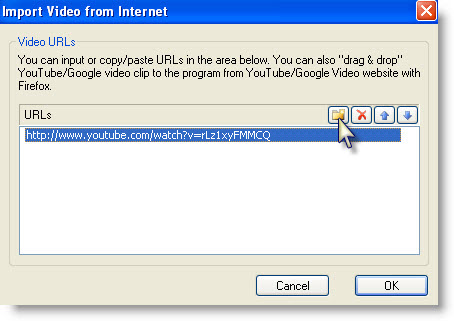
There will be a list of the added YouTube videos, which will be downloaded automatically one by one. The downloading status is clearly shown on the list. After the status of all of them indicates "Completed", you can tick whichever videos you want to watch on your BlackBerry Storm.

After the DVD's, videos or YouTube videos are imported, you can preview it on the main interface. If you only want a clip of the DVD/video, you can drag the "Start to trim" and "Stop to trim" buttons to get the certain segment.
Step 2. Choose a proper profile and start encoding
From the drop-down list of "Profile", you can select the most appropriate profile:
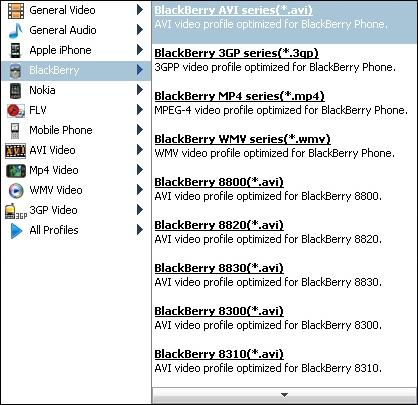
Now you can click the "Start Encode" button to starting ripping DVD movies, converting video files and converting YouTube videos for your BlackBerry Storm.
Step 3. Transfer output videos to BlackBerry Storm
After you get the output video files, you can now begin to transfer them to your BlackBerry Storm.
However, BlackBerry Strom only supports:
Video format support: MPEG4 H.263, MPEG4 Part 2 Simple Profile, H.264, WMV
Audio format support: MP3, AAC, AAC+, eAAC+, WMA, WMA ProPlus
Clone2Go DVD to BlackBerry Converter comes to the rescue! This DVD to BlackBerry Converter has the following three features:
1. Rip DVD movies to BlackBerry (DVD ripper)
2. Convert videos files to BlackBerry (video converter)
3. Download YouTube videos to BlackBerry (YouTube downloader)
So, you just need Clone2Go DVD to BlackBerry Converter to help you rip DVD movies, convert video files and download YouTube videos to the video format accepted by BlackBerry Storm and then transfer the output video files to your BlackBerry Storm. Now let's take a look at how it performs:
Step 1. Import DVD movies, video files and YouTube videos
Insert the DVD disc into the disc drive, click the "Open DVD" button to import it if you are going to watch the DVD movie on your BlackBerry Storm. Or if the DVD movie is saved as a folder on your computer, you need to click the "Add Video" button to locate that folder, which is composed of two separate folders: VIDEO_TS and AUDIO_TS. From the VIDEO_TS folder, select the .vob file to import and then click "OK".
You can also import videos stored on your PC by clicking the "Add Video" button and then click "OK". The supporting formats are shown as follows:
Audio Files (*.mp2;*.mp3;*.wav)
Windows Media Files (*.avi;*.wmv;*.asf;*.dvr-ms;*.ms-dvr)
MOV/MP4 Files (*.mov;*.mp4;*.3gp;*.m4v;*.qt)
Real Media Files (*.rm;*.rmvb)
Flash Video Files (*.flv)
MKV Video Files (*.mkv)
AviSyth Scripts (*.avs)
Other Video Files (*.mpq;*.dv;*.vob;*.m1v;*.m2v;*.dat;*.amv)
If you want to watch YouTube videos on your BlackBerry Storm, click the "YouTube" button on the main interface. In the pop-up window, copy and paste the URLs of the YouTube videos one by one.
There will be a list of the added YouTube videos, which will be downloaded automatically one by one. The downloading status is clearly shown on the list. After the status of all of them indicates "Completed", you can tick whichever videos you want to watch on your BlackBerry Storm.
After the DVD's, videos or YouTube videos are imported, you can preview it on the main interface. If you only want a clip of the DVD/video, you can drag the "Start to trim" and "Stop to trim" buttons to get the certain segment.
Step 2. Choose a proper profile and start encoding
From the drop-down list of "Profile", you can select the most appropriate profile:
Now you can click the "Start Encode" button to starting ripping DVD movies, converting video files and converting YouTube videos for your BlackBerry Storm.
Step 3. Transfer output videos to BlackBerry Storm
After you get the output video files, you can now begin to transfer them to your BlackBerry Storm.