SRL Archive - Other Scripts

Password and PIN Generators


Rich

2008-08-28 05:55:31

Here I'm presenting you with my password and PIN generators. I know that they are not the best, and could probably be made to work much more efficiently, but hey, where do you learn to script?

The password generator makes 7 character passwords. You only really need to start the script, and then stop it straight away, as this report proves:
Ran for 1 Seconds.
Or 1109 milliseconds to be exact.
And made 487 passwords!

The PIN generator does the same, but makes PINs instead :duh: Again, you only need to run it for a fraction of a second.
Ran for 1 Seconds.
Or 1375 milliseconds to be exact.
And made 641 PINS!

Both scripts use cases to create the outcome, and like I said before, it may not have been the most efficient way, but I used the way I know.

If you wish to get a report once you've finished using either script, press F9. If not, stop it as usual.
Daniel.Blaze

2008-08-28 06:21:49

Nice try.

Try learning off of this one:


program New;

function GeneratePassOrPin(Pin: Boolean; Length: Integer): string;
var
i, AChar: Integer;
begin
for i := 0 to Length-1 do
begin
if not(Pin) then
begin
AChar := 65 + Random(58);
if InRange(AChar, 91, 96) then
begin
i := i - 1;
Continue;
end;
Result := Result + Chr(AChar);
end else
Result := Result + Chr(48 + Random(10));
end;
end;

var
c: Integer;

begin
for c := 0 to 1000 do
Writeln(GeneratePassOrPin(False, 7));
end.

Rich

2008-08-28 06:40:14

If I'm honest, I just read that, and it just totally went over my head. Could you explain it a bit please?

Thanks,
Rich

Daniel.Blaze

2008-08-28 06:51:35

Sure thing dude.

function GeneratePassOrPin(Pin: Boolean; Length: Integer): string;
The parameters of the function allow you to choose whether you want to generate a pin or a password, and how long you want it to be.

for i := 0 to Length-1 do
We start a loop so that it will loop through the whole function "Length" amount of times. So if we set it to 3, it will loop through the procedure 3 times.

if not(Pin) then
If the parameter Pin is set to false, the user must want a password. Therefore, we have to generate letters instead of numbers.

AChar := 65 + Random(58);
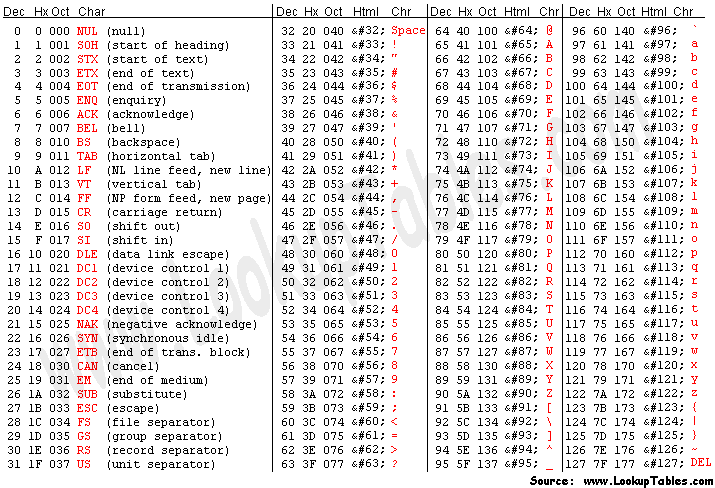
Set a variable "AChar" to 65 + a random amount of 58. That means the variable "AChar" can have the value 58 all the way to 122. The reason I have chosen these numbers is because they are the ASCII valuse of all the letters in the alphabet, upper and lowercase:

(Look at the Dec value)


if InRange(AChar, 91, 96) then
begin
i := i - 1;
Continue;
end;
You will notice that between the uppercase and lowercase letters in the table above, there are a few random symbols. We don't want this in our password, so if the AChar value is in the range of 91 - 96, then we want to go back one step in our loop, and skip this number. If we didn't go back one step in the loop, then we would skip the number and our password would be one letter short. If we didn't skip the number then we would have symbols in our password.

Result := Result + Chr(AChar);
If the number is OK, turn it into it's corresponding letter, and add it to the end of the current result.

Result := Result + Chr(48 + Random(10));
If we do want a pin, then we simple have to Chr the number 48 (as this is the number 0 in the table above) and add a random 10 onto the number, so the value can be anywhere between 0 and 9.

Hopefully that helps, tell me if you need anymore clarification

EDIT: You could also try commenting out some parts of my example above and seeing what happens. It's a nice way to see what is happening.

jakeyboy29

2008-08-28 07:16:08

mint,i have so little chance of guessing my mums pin code.

Rich

2008-08-28 07:26:30

If you work it out, there are 10,000 different 4 digit PIN codes that use 0 - 9. So nope, you don't stand a chance.