SRL Archive - SRL Archives

BIG UPDATE: Laptop mouse movements! (Lmouse/Lcmouse)!! By Hobbit


Hobbit

2008-06-28 12:05:01

Well here are my new functions!

They move the mouse in a segmented laptop motion(lmouse) and click(lcmouse)
This will give us a wider range of options when picking way to be less detectable.

Enjoy!

Thanks to Nielsie95, Smartzkid and other who helped me out :)

Update: increased humanization and authenticity. Moves more like lap top. Mouse strokes stop faster… more sparratic movements. Movement is faster.

Update 2: Added in MissChance and more humanization.

program New;
{.include SRL/SRL.scar}

{*******************************************************************************
procedure lmouse(x, y, randomx, randomy, overshot : Integer);
By: Hobbit with help from Nielsie95 & Smartzkid
Description: Moves the mouse in a segmented laptop motion.
MissChance: The chances of your mouse missing the target and having
to correct. So like 1/# of chaces. For example if overshot=50 then
there is a 1/50 chance it will overshoot the target.
*******************************************************************************}

procedure lmouse(x, y, randomx, randomy, misschance : Integer);
Var
cx, cy, seg, e, f, g, nx, ny, zx, zy, hypo : integer;
a, b, c, randSpeed : extended;
miss : boolean;
begin
MouseSpeed:= RandomRange(14,17);
miss:= False;
if(Random(misschance) = 0) then
miss:= True;
e:= 0;
GetMousePos(cx, cy);
a:= x - cx;
b:= y - cy;
c:= Pow(a,2) + Pow(b,2)
hypo:= Round(Sqrt(c));
case hypo of
0: Exit;
1..225: seg:=1;
226..600: seg:= Random(2) + 1;
601..1800: seg:= random(3) + 2;
else seg := 5;
end;
f:= Round( a / seg);
g:= Round( b / seg);
repeat
Wait(30 + random(50));
{Begin: Modified from MMouse by Benland100}
randSpeed:= (random(MouseSpeed) / 2.0 + MouseSpeed) / 10.0;
if randSpeed = 0.0 then
randSpeed := 0.1;
getMousePos(cx,cy);
nx:= (cx + (f * e)) + random(randomx);
ny:= (cy + (g * e)) + random(randomy);
{End: Modified from MMouse by Benland100}
if(miss = true)then
begin
nx:= nx + RandomRange(5,10);
ny:= ny + RandomRange(5,10);
end;
WindMouse(cx,cy,nx,ny,11.0,8.0,10.0/randSpeed,12.0/randSpeed,10.0*randSpeed,10.0*randSpeed);
e:= e + 1;
until(e = seg);
GetMousePos(cx, cy);
if Distance(x, y, cx, cy) > 5 then
begin
Wait(30 + random(30));
WindMouse(cx,cy,(x + random(randomx)),(y + random(randomy)),11.0,6.0,10.0/randSpeed,15.0/randSpeed,10.0*randSpeed,10.0*randSpeed);
end;
end;

{*******************************************************************************
procedure lcmouse(x, y, randomx, randomy : Integer; left : Boolean);
By: Hobbit with help from Nielsie95 & Smartzkid
Description: Moves the mouse in a segmented laptop motion then clicks
MissChance: The chances of your mouse missing the target and having
to correct. So like 1/# of chaces. For example if overshot=50 then
there is a 1/50 chance it will overshoot the target.
*******************************************************************************}

procedure lcmouse(x, y, randomx, randomy, misschance : Integer; left : Boolean);
Var
cx, cy, seg, e, f, g, j, nx, ny, o, p, zx, zy, hypo : integer;
a, b, c, randSpeed : extended;
miss : boolean;
begin
MouseSpeed:= RandomRange(14,17);
miss:= False;
if(Random(misschance) = 0) then
miss:= True;
e:= 0;
GetMousePos(cx, cy);
a:= x - cx;
b:= y - cy;
c:= Pow(a,2) + Pow(b,2)
hypo:= Round(Sqrt(c));
case hypo of
0: begin
Mouse(x,y,0,0,left);
Exit;
end;
1..225: seg:=1;
226..600: seg:= Random(2) + 1;
601..1800: seg:= random(3) + 2;
else seg := 5;
end;
f:= Round( a / seg);
g:= Round( b / seg);
repeat
Wait(30 + random(50));
{Begin: Modified from MMouse by Benland100}
randSpeed:= (random(MouseSpeed) / 2.0 + MouseSpeed) / 10.0;
if randSpeed = 0.0 then
randSpeed := 0.1;
getMousePos(cx,cy);
nx:= (cx + (f * e)) + random(randomx);
ny:= (cy + (g * e)) + random(randomy);
{End: Modified from MMouse by Benland100}
if(miss = true)then
begin
nx:= nx + RandomRange(16,26);
ny:= ny + RandomRange(16,30);
end;
WindMouse(cx,cy,nx,ny,11.0,8.0,10.0/randSpeed,12.0/randSpeed,10.0*randSpeed,10.0*randSpeed);
e:= e + 1;
until(e = seg);
repeat
GetMousePos(cx, cy);
if Distance(x, y, cx, cy) > 5 then
begin
Wait(30 + random(30));
WindMouse(cx,cy,(x + random(randomx)),(y + random(randomy)),11.0,6.0,10.0/randSpeed,15.0/randSpeed,10.0*randSpeed,10.0*randSpeed);
end;
until(Distance(x, y, cx, cy) > 5)
Wait(20 + Random(20));
GetMousePos(cx, cy);
HoldMouse(cx + random(3), cy, left);
repeat
Wait(20 + Random(30));
j := j + 1;
until (j > 4);
GetMousePos(cx, cy);
ReleaseMouse(cx, cy, left);
Wait(100 + Random(100));
end;

begin
end.
Lee Lok Hin

2008-06-28 12:47:41

Glad to see you finally released it despite bouts of unbelevness and general laughter in the irc. One question though, Is'nt mousespeed 8 a biiiit to slow?

Hobbit

2008-06-28 21:59:40

From: Lee Lok Hin
Glad to see you finally released it despite bouts of unbelevness and general laughter in the irc. One question though, Is'nt mousespeed 8 a biiiit to slow?


Meh… i used my moms laptop to get roughly average speed and its 7 - 9 mayyyybe 10 at highest

WhoCares357

2008-06-28 22:08:51

Is this going to be added to the next SRL release?

Hobbit

2008-06-28 22:24:36

I don't know… I'm not a dev :p

Its a miracle i even made this mostly by myself :p

Daniel

2008-06-29 01:05:37

Hmm, not that bad but it stops about 3 or four times during a movement that is not that far away. Since i can on my laptop, drag my finger right across the touch-screen, it'll move the mouse about half-way across the screen (17" inch, 1280x800). So, maybe not too many stops. Oh, and the stops seem a bit un-realistic as-well ;)

MylesMadness

2008-06-29 11:16:52

Yeah, too long stops and too short movements

Gu3st...

2008-06-29 17:07:37

make the stops faster, otherwise, great! it looks really like a human laptopper :p

Hobbit

2008-06-30 00:28:36

Updated!!!

EvilChicken!

2008-06-30 03:26:10

Hobbit, you're good. Quite nice, indeed.

But, for clicking, shouldn't you be using lmouse + click instead of adding the whole procedure again?

(I haven't bothered to read through code precisely, so I can't tell if there's any difference between the two mouse functions, except for clicking part.)

Hobbit

2008-06-30 13:13:03

From: EvilChicken!
Hobbit, you're good. Quite nice, indeed.

But, for clicking, shouldn't you be using lmouse + click instead of adding the whole procedure again?

(I haven't bothered to read through code precisely, so I can't tell if there's any difference between the two mouse functions, except for clicking part.)


Thanks :) I've been hearing a lot of "Its too good for me" :(
But I do admit I did surprise myself by making this.

There is a little bit of a difference besides the clicking.
The lcmouse checks the position more before it clicks.

P1nky

2008-06-30 18:30:34

dude great job must try it out later ;) should be added into srl! hobbit im impressed, creative :)

Hobbit

2008-06-30 19:04:21

From: P1NKY
should be added into srl! hobbit im impressed, creative :)


I doubt it will. But thanks :)

Bam Bam

2008-07-04 15:50:58

Looks nice Hobbit!
This would make a real nice addition to SRL :)

Plus it could be used after logging back in or something to make it seem a little more like changing computers.

-Bam Bam

Zezi

2008-07-05 01:49:25

Tested Something to add
'Doubling back' on yourself ie
: You press the mouse pad, then you attempt to hit your mousepad back, but accidently your finger trails across the pad, so the mouse trail is like :

Bad example, but if you add this, then you're human IMHO, then it's a perfect movement, because atm while you're movement is good, NO ONE, ever could do such perfect straight movements, without moving some random direction :D

Unless you're amazing, but more 'anitban' / human error the better :)

Scaper

2008-07-05 14:46:17

were do i add this function in the core part of SRL..?
and wow hobbit looks realy cool man very good indeed thanx man

should be added in the next SRL

Hobbit

2008-07-06 00:47:49

From: Zezi
Tested Something to add
'Doubling back' on yourself ie
: You press the mouse pad, then you attempt to hit your mousepad back, but accidently your finger trails across the pad, so the mouse trail is like :

Bad example, but if you add this, then you're human IMHO, then it's a perfect movement, because atm while you're movement is good, NO ONE, ever could do such perfect straight movements, without moving some random direction :D

Unless you're amazing, but more 'anitban' / human error the better :)


Thanks for the input!
I'll work on adding that in, thats a good idea.

@Scraper you would add it in at the end out the mouse.scar file.

UPDATE: I did more updating to make it more humanistic. And added in a new Param called "MissChance" (See description for details)

Zezi

2008-07-06 07:42:39

misschance is good that it's user inputted, miss chance should be placed into magic, ie when moving to spells etc it's sometimes REALLY hard on a laptop + computer (:crys:) for me to get it accurately.

Is there a way, to infact make it less MORE random in movement? :\

IE, your path atm in red, normal path in blue :o

Kai, i went and tested 3-4 laptops and what i THOUGHT occurred, DIDN'T. LOL!

nvm =x ;p Nice update ;)

Hobbit

2008-07-07 00:55:36

From: Zezi
misschance is good that it's user inputted, miss chance should be placed into magic, ie when moving to spells etc it's sometimes REALLY hard on a laptop + computer (:crys:) for me to get it accurately.

Is there a way, to infact make it less MORE random in movement? :\

IE, your path atm in red, normal path in blue :o

Kai, i went and tested 3-4 laptops and what i THOUGHT occurred, DIDN'T. LOL!

nvm =x ;p Nice update ;)


I didn't understand the second part so i will nod my head and smile :)

Zezi

2008-07-08 00:21:02

You've got such a great smile… *mesmerised*

Anyways, as i attempted to say, i drew a picture then i went to confirm my thoughts on a laptop. And what i drew the picture of, didn't actually happen on a laptop. I beleived that your mouse 'jumped' locations, but it turned out it didn't… some how *wonders* :P

Anyways nice update but it's not human enough imho i can't explain what's wrong with the movements sadly, but keep trying i suppose…

Hobbit

2008-07-08 00:42:26

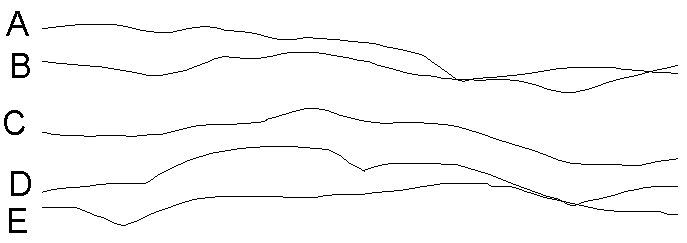
Ok here is a little quiz.

Choose which are human and which are my mouse.
I'm not going to tell you how many of each there are.
But I will tell you there are alteast one of each.


Markus

2008-07-08 17:03:20

E and B are human I think.

Hobbit

2008-07-08 17:13:12

You are half right.

one of E and B are human.. other is my mouse

Markus

2008-07-09 04:14:42

Then B is the human one :)

Hobbit

2008-07-09 04:16:20

From: Markus
Then B is the human one :)


Wrong E is human.

There is one more human.
Can you guess the last one?

You already know B is my procedure
And E is human.

:p

Markus

2008-07-09 04:17:13

Hmm, C?

Hobbit

2008-07-09 04:23:12

No… My procedure is better than i thought :p

Nava2

2008-07-09 07:23:02

A is human… process of elimination! :)

Nava2

Hobbit

2008-07-09 15:18:02

From: Nava2
A is human… process of elimination! :)

Nava2


Wow….

Wrong…. :p

D & E were human A B C were my mouse :p

Nava2

2008-07-10 07:45:03

They were all almost the exact same :(

Jerk… playing with our heads like that. Basically… great procedure! :)

Nava2

Zezi

2008-07-10 11:42:10

yea sexy

Hobbit

2008-07-10 16:03:16

I like mind games :)

Thanks :)