Cazax
2008-04-15 19:02:39
AUTOCOLORING
With RGB, HSL and XYZ!
First, a short explainment of them:
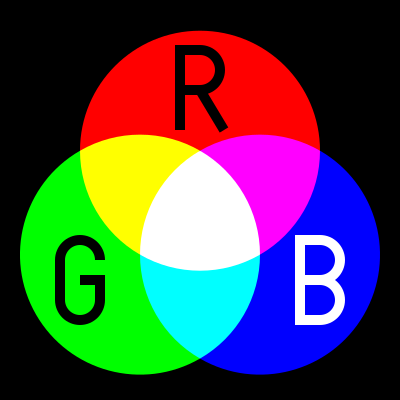
RGB:
Red
Green
Blue
From: Wikipedia
The RGB color model is an additive color model in which red, green, and blue light are added together in various ways to reproduce a broad array of colors. The name of the model comes from the initials of the three additive primary colors, red, green, and blue.
HSL:
Hue
Saturation
Lightness
From: Wikipedia
HSL and HSV are two related representations of points in an RGB color space, which attempt to describe perceptual color relationships more accurately than RGB, while remaining computationally simple. HSL stands for hue, saturation, lightness, while HSV stands for hue, saturation, value.
HSI and HSB are alternative names for these concepts, using intensity and brightness; their definitions are less standardized, but they are typically interpreted as synonymous with HSL.
Both HSL and HSV describe colors as points in a cylinder whose central axis ranges from black at the bottom to white at the top with neutral colors between them, where angle around the axis corresponds to “hue”, distance from the axis corresponds to “saturation”, and distance along the axis corresponds to “lightness”, “value”, or “brightness”.
P.S. We arent going to use HSV.

XYZ:
From: Wikipedia
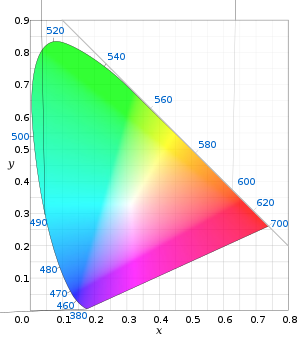
The human eye has receptors (called cone cells) for short (S), middle (M), and long (L) wavelengths. Thus in principle, three parameters describe a color sensation. The tristimulus values of a color are the amounts of the three primary colors in a three-component additive color model needed to match that test color. The tristimulus values are most often given in the CIE 1931 color space, in which they are denoted X, Y, and Z.
Any specific method for associating tristimulus values with each color is called a color space. CIE XYZ, one of many such spaces, is special because it is based on direct measurements of human visual perception, and serves as the basis from which many other color spaces are defined.
——————————————————————————————————————————————–
Now, we are going to learn how to autocolor with them:
1) Create your function :):
Function MyFirstAutocolor: Integer;2)Set the variables:
var
  R,G,B,TestColor : Integer; // Red, Green and Blue.
  H,S,L : Extended; // HSL have decimal numbers
  X,Y,Z : Extended; // This one too!
  MyColor : Integer; Your Color
  ColorsTPA : TPointArray; // We are going to use TPA's
  C1 : TIntegerArray; //  we are going to use them later
i,C2 : Integer;3) Now we go through the autocoloring:
MyColor := {put your color here};FindColorsSpiralTolerance(MSCX, MSCY, ColorsTPA, MyColor, MMX1, MMY1, MMX2, MMY2, {Set a tolerance}); ColorsTPA: The TPA will store the coords of the colors found on the minimap.
MyColor: The color you want to search
MMX1,MMY1,MMX2,MMY2: The coords of the minimap
{set a tolerance}: Set a tolerance to search the color. 60 is good enough, remember, we need high tolerance for a better result.
atm, our function should look like this:
function MyFirstAutocolor: Integer;
var
  R,G,B,TestColor : Integer;
  H,S,L : Extended;
  X,Y,Z : Extended;
  MyColor : Integer;
  ColorsTPA : TPointArray;
  C1 : TIntegerArray;
  i,C2 : Integer;
begin
  MyColor := 5123364;
  FindColorsSpiralTolerance(MSCX, MSCY, ColorsTPA, MyColor, MMX1, MMY1, MMX2, MMY2, 60);
Then:
C1 := GetColors(ColorsTPA);C2 := High(C1);The function atm:
function MyFirstAutocolor: Integer;
var
  R,G,B,TestColor : Integer;
  H,S,L : Extended;
  X,Y,Z : Extended;
  MyColor,NewColor : Integer;
  ColorsTPA : TPointArray;
  C1 : TIntegerArray;
  i,C2 : Integer;
begin
  MyColor := 5123364;
  FindColorsSpiralTolerance(MSCX, MSCY, ColorsTPA, MyColor, MMX1, MMY1, MMX2, MMY2, 60);
  C1 := GetColors(ColorsTPA);
  C2 := High(C1);
Now we start the loop:
for i := 0 to C2 do
begin
then a failsafe:
if rs_OnMinimap(ColorsTPA[i].X, Colors[i].Y) then
begin
If the current color(remember, the TPA stored all colors found) is inside the MM then…
TestColor := GetColor(ColorsTPA[i].X, ColorsTPA[i].Y);if SimilarColors(NewColor, MyColor, 50) then
beginColorToRGB(NewColor, R, G, B);
ColorToHSL(NewColor, H, S, L);
ColorToXYZ(NewColor, X, Y, Z);Now, we need to open another SCAR and then run this:
program New;
var
  R,G,B : Integer;
  H,S,L,X,Y,Z : Extended;
const
  Color = 516564; // set your color
begin
ColorToRGB(Color, R, G, B);
ColorToHSL(Color, H, S, L);
ColorToXYZ(Color, X, Y, Z);
Writeln('R: '+inttostr(R));
Writeln('G: '+inttostr(G));
Writeln('B: '+inttostr(B));
Writeln('');
Writeln('H: '+floattostr(H));
Writeln('S: '+floattostr(S));
Writeln('L: '+floattostr(L));
Writeln('');
Writeln('X: '+floattostr(X));
Writeln('Y: '+floattostr(Y));
Writeln('Z: '+floattostr(Z));
end.Press run:
You will get the RGB,HSL and XYZ values of your color!
something like this:
// Example:
R: 212
G: 225
B: 7

H: 17,6605507731438
S: 93,9655184745789
L: 45,4901963472366

X: 54,1149417708884
Y: 67,8628162129347
Z: 10,4476862998244
then we continue our function without closing the other SCAR window with the values, but listen now:
a) Get the value of R - G
b) Get Value of R - B
c)Get the value of G - B
d) get the value of S - H
e) get the value of L - H
f) get the value of S - L
g) get the value of X - Y
h) get the value of Y - Z
then we just compare them and if they are between the range then you just get the color:
if InRange(R - G, {your range here}, {your range here}) then
             if InRange(R - B, {your range here}, {your range here}) then
               if InRange(G - B, {your range here}, {your range here}) then
                 if InRange(Round(S) - Round(H), {your range here}, {your range here}) then
                   if InRange(Round(L) - Round(H), {your range here}, {your range here}) then
                     if InRange(Round(S) - Round(L), {your range here}, {your range here}) then
                       if InRange(Round(X) - Round(Y), {your range here}, {your range here}) then
                         if InRange(Round(Y) - Round(Z), {your range here}, {your range here}) then
but wait! the will only work with your color, so we need to add a "tolerance":
if InRange(R - G, {your range here - 20}, {your range here + 20}) thenfor HSL use -15 and +15.
And forum XYZ use -7 and +7.
if your color changes too much you just add a higher range…
now the last part:
if GetColor(ColorsTPA[A].X + 2, ColorsTPA[A].Y + 2) = TestColor then
if GetColor(ColorsTPA[A].X + 1, ColorsTPA[A].Y + 1) = TestColor thenWriteln('MyColor = '+Inttostr(TestColor));
Result := TestColor;
Exit;Woot! our function should look something like this:
function MyFirstAutocolor: Integer;
var
R,G,B,TestColor : Integer;
H,S,L : Extended;
X,Y,Z : Extended;
MyColor : Integer;
ColorsTPA : TPointArray;
C1 : TIntegerArray;
i,C2: Integer;
begin
MyColor := 5123364;
FindColorsSpiralTolerance(MSCX, MSCY, ColorsTPA, MyColor, MMX1, MMY1, MMX2, MMY2, 60);
C1 := GetColors(ColorsTPA);
C2 := High(C1);
for i := 0 to C2 do
begin
if RS_OnMinimap(ColorsTPA[i].X, ColorsTPA[i].Y) then
begin
TestColor := GetColor(ColorsTPA[i].X, ColorsTPA[i].Y);
if SimilarColors(TestColor, 1322555, 50) then
begin
ColorToRGB(TestColor, R, G, B);
ColorToHSL(TestColor, H, S, L);
ColorToXYZ(TestColor, X, Y, Z);
if InRange(R - G, -6, 29) then
if InRange(R - B, 25, 55) then
if InRange(G - B, 12, 40) then
if InRange(Round(S) - Round(H), 28, 48) then
if InRange(Round(L) - Round(H), -4, 14) then
if InRange(Round(S) - Round(L), 23, 47) then
if InRange(Round(X) - Round(Y), -8, 9) then
if InRange(Round(Y) - Round(Z), -7, 9) then
if GetColor(ColorsTPA[i].X + 2, ColorsTPA[i].Y + 2) = TestColor then
if GetColor(ColorsTPA[i].X + 1, ColorsTPA[i].Y + 1) = TestColor then
begin
Writeln('MyColor = '+Inttostr(TestColor));
                               Result := TestColor;
                               Exit;
end;
end;
end;
end;
Writeln('Couldnt find My Color!');
Result := 0;
end;P.S if your function failed, try expanding the range.
Thats all!