SRL Archive - General

Compiling .bat into exe?


Hobbit

2008-01-01 16:56:46

Is there any way I could compile around, oh, 60 batch files into one exe file?
I Googled it and didn't find anything that works.

ZaSz

2008-01-01 17:06:58

vbs.softalizer.com is this what u looking for?

Hobbit

2008-01-01 17:15:32

Sort of…

With that I could only convert 1 batch file to exe.
I need all 60 to run off same exe. I could use that but then I would have to rewrite the entire layout of the files.

Is there anyway to compile a bunch of patch files to run as exe as they would if they were plain batch.

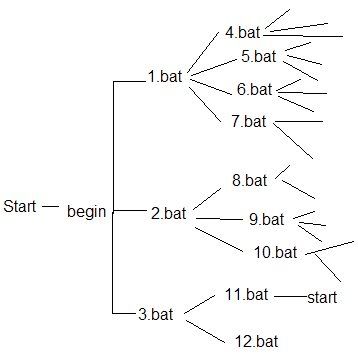
Like what I'm doing is creating a "Choose you own adventure story" for my infotech class.

So this is basically how it's set up


and it just keeps treeing out like that.

R0b0t1

2008-01-01 18:48:27

You can do this…


//inside batch1.bat
echo "some stuff"

if whatever
call Batch2.bat

Now, if you are making all of them into .exe files, replace "call" with "run Batch2.exe".


I don't think you can combine them all into a file like you could with a JAR, though.

Hobbit

2008-01-01 18:54:08

Dang

If I have to make the all into exe and even then they will still be separate files I might as well leave as .bat

Thanks

JuKKa

2008-01-01 19:18:55

Its possible to make VB support .bat thingy or whatever - So maybe if i would read a few tutorials maybe i could do it. Not sure..

R0b0t1

2008-01-01 19:37:15

You would still need all of the batch files.


Well, actually, its something like calling the function 'console("CMD command");', and you could wrap the different batch files in their own function.

You could still just write in VB with Prints though, so just keep it as batches or something…

Hobbit

2008-01-01 19:54:15

Well it doesn't matter that much.
It's just a project with batches we're doing (Uber easy, mine has asciimation :D)
But it would have been nice to compile into one executable instead of a folder full of batches.

If I really wanted to I guess I could make it all one batch file and instead of calling the batch just to put them as gotos…. but that'd get very messy…

Yakman

2008-01-02 09:02:36

you could write something like this c++ source file, then compile it


#include <iostream>

using namespace std;

int main(int argc, char** argv) {
system("@echo off");
system("echo hello world!");
system("ping www.google.com");
}

dont know how well that would work though

Hobbit

2008-01-02 17:14:26

I don't want to mess around too much with it yet. But thanks I'll maybe try that after though

GoF

2008-01-04 10:08:32

hmm. Wouldn't it be possible to turn all of them into .exe and then bind them into 1 file or something? Not sure, but I think I've read about something like this before :p

E: Although, batch phails.

R0b0t1

2008-01-04 16:02:00

No no no….


It

EPIC FAILS

Jason2gs

2008-01-04 16:11:57

I have a bit of a question… Actually, two.

1) Why go through the trouble of making 60 batch files, instead of just one?

2) Why not just write a normal exe?

Hobbit

2008-01-04 20:51:18

1) because it would be to muddled up

2) because it's an assignment for school and needs to be in batch

Putting into 1 file was for my own use

GoF

2008-01-05 12:02:47

I think you can make a self extracting archive or something in winrar (says SFX, not sure what it really is XD) and put all the .bat's there and then go to advanced and SFX Options and put the path to extract to whatever you like and then make it run the first .bat on extraction :p … Very lame, but easiest I can think of :D