Setup Scar 3.15 and SRL Repository!
Dark_Sniper
2007-09-23 23:34:13
Tutorial
Install New SRL and work SVN With FAQ.
How-To Download SRL 4.
1. Download and
Install Subversion 1.4.5 from Tigris. It's all SourceForge open-source, 100% trustworthy.
(for details please check smartz detailed post here :
http://www.srl-forums.com/forum/downloading-installing-subversion-p223353.html#post223353)
2. Download and install
SCAR 3.15 from Freddy1990's SCAR 3.15 Download
NOTICE
Do not use the Download SRL feature. This will download only rev#1. Use Subversion 1.4.5 to obtain the latest revisions of SRL.Open SCAR 3.12.
now go to:
Tools > Options
The go to SRL Download Tab.
you should get this:
//image stole from WT-F\\

Check the Subversion repository bullet.
-Check FAQ if you cannot check the Subversion Repository-
Click Checkout.
A DOS window will come up; wait for the DOS to finish.
You do not have to click the button "Move Plugins".
Click OK and your finished.
(Follow WT-F's tutorial to get a bit more info:
http://www.villavu.com/forum/showthread.php?t=17869 )
FAQ:
Q. I cannot get Subversion Repository.
A. Download and install :
http://subversion.tigris.org/files/documents/15/39559/svn-1.4.5-setup.exe , and retry.
Q. I have a different OS and this SVN is not compatible.
A. Find and download the version for your OS here :
http://subversion.tigris.org/project_packages.html (if your OS is vista check further down for answers).
Q. I get an error in Text.scar.
A. You have to get SRL updates by using Repository(check tutorial above).
Q. I get this long error:
The dynamic link library MSVCP60.dll could not be found in the specified path C:\Program Files\Subversion\bin;.;C:\WINNT\System32;C:\WINNT\ system;C:\WINNT;C:\Program Files\Subversion;C:\WINNT\system32;C:\WINNT;C:\WIN NT\System32\Wbem;C:\Program Files\Subversion\bin
A. Wins NT is missing a file Download here:
http://www.dll-files.com/dllindex/dll-files.shtml?msvcp60 < Credit goes to kingarabian >
Q. How do I get it to auto-update ?
A. Open Scar. Go to Tools > Options … then to the SRL download tab.
check the "Check Repos During Runtime" box.
Set your time.
Press OK.
(NOTE: This will only check if there is a newer rev out. please follow the next Q & A to get the updates)
Q. How do I manually update?
A. Go to File > Update SRL SVN

A DOS box will appear wait for it to finish.
Q. The newest version of SRL is messed up and the older one was better.
A. Go to File > Update SRL SVN to Rev
A box will appear:

Please input the rev # you want SRL to be.
Q. My script has a problem with booleans.
A. Take out the "HowManyBooleans" variable, and LoadPlayerArray; .
(it will work but you can set the booleans, strings, integer… if your more advance)
Q. Would a message appear during a script run that could interfere the script run if I enabled 'check during runtime'?
A. No there should not be anything to interfere with runtime.
Q. It wont move plugins and im on vista.
A. Use the SVN link above (the one for windows) and make sure your on the Admin account for the computer and then try everything in the tutorial. < Credit goes to kingarabian >
A(2). http://www.srl-forums.com/forum/fix-could-not-p224180.html#post224180 < Credit goes to kingarabian : Ask him for help with vista if you have problems >
Q. Are the bitmaps/DTMs look different is this right?
A. Yes, The coding for the Bitmaps/DTMs has been altered to be better :).
Q. Help I cannot download .EXE files!
A. I attached the files below.
Q. My question is not here.
A. Post the question I will attempt to answer it.// attached file notes:
download all 3 files into same directory
(like your desktop)
and extract the first one where you can double click the icon to install
now follow smarts very detailed post on how to install if you do not have the knowledge on how to install things.
\\
Great tut .. should answer alot of questions !
Hobbit
2007-09-23 23:40:47
Thanks, I was just trying to get this all firgured out. The link in the announcemnt only lead to a .zip download that didnt have any executable install files.
IronTeapot
2007-09-24 00:00:42
Thanks, this subversion thing is going to be really helpful with the quick fixes of things. What do we do the the plugins in the 'place inside plugins folder' items?
Dark_Sniper
2007-09-24 00:16:45
when i use repos it automatically puts the plugins in my plugin folder.
IronTeapot
2007-09-24 00:17:55
ah, alright. i just looked. i think it did that for mine as well. I wonder why SRL devs kept that "stick me in plugin folder or die" folder in the repo? :S
Dark_Sniper
2007-09-24 00:56:56
they might have forgot it there…
no ones perfect.
or maybe they are and its there for a reason XD :p
only time shall tell.
IronTeapot
2007-09-24 01:06:34
From: Dark_Sniper
they might have forgot it there…
no ones perfect.
or maybe they are and its there for a reason XD :p
only time shall tell.
lol, if it dissapears in the next repo they should give us credit ;) lol j/k :P
Dark_Sniper
2007-09-24 01:13:00
no they should XD
never hesitate to ask for credit :p (if you actully did something XD)
IronTeapot
2007-09-24 01:20:02
Lol, well technically we never DID anything, just pointed something out.
Freddy1990
2007-09-24 01:49:06
Ur missing the point here, you don't maually update by pressing checkout every time, that's just plain stupid… And the "automatic update" as you call it just checks if there's a new version, you'll still have to click the update button in the file menu
(EDIT: Btw, don't take any offence in this, just trying to point it out :) It's early :p)
ShowerThoughts
2007-09-24 02:01:53
whats and sub version i know what it mean but i just use the newest srl
Wanted
2007-09-24 02:01:59
Would a message appear during a script run that could interfere the script run if I enabled 'check during runtime'?
WT-Fakawi
2007-09-24 05:46:44
Stickyfied.
awsome!! i updated everything before i even read this .
The Claw
2007-09-24 08:13:22
So how does this actually work? I mean, does it automatically update on my computer when the devs make a change or somethign? And does it overwrite the SRL that I have? cause I've made a fair few tweaks to it, just for my preference, so I'm wondering if they will dissapear next time someone updates the repository?
Dark_Sniper
2007-09-24 08:18:36
Freddy thanks for pointing that out :p.
I put up some pictures.
I'll put some more up later today I have to go to school.
Edit
@ claw
lol you have to go and manually download yourself.
check my tut i updated it with 2 pictures as well.
@ ice
From: IceFire908
Would a message appear during a script run that could interfere the script run if I enabled 'check during runtime'?
no there should not be a message in the middle of runtime(that will interfere with the script).
If I do not answer any questions just ask someone will figure it out for you.
Freddy1990
2007-09-24 10:15:42
From: IceFire908
Would a message appear during a script run that could interfere the script run if I enabled 'check during runtime'?
No, but the SRL download button in the file menu will clearly show that an update is available
n3ss3s
2007-09-24 10:45:49
O.o I didnt have to it the way from Tools > Options etc,
I just pressed the Download SRL, downloaded, told me that SRL 400 has been installed, then I put
program New;
{.include SRL/SRL.scar}
begin
  SetupSRL;
end.
And it runs succesfully
SRL version 400 has been downloaded and installed.
Successfully compiled
SRL Compiled in 3266 msec
Successfully executed
Successfully compiled
SRL Compiled in 16 msec
Successfully executed
Umm 3 second difference in compiling? xD
Anyways, great job. I gotta go somewhere read what new is in SRL 4 :p
EDIT: oh, I've got a lil suggestion removing this thread
http://www.villavu.com/forum/showthread.php?t=9331?t=10537like, SRL 3.7 FTW lol
Dark_Sniper
2007-09-24 16:08:38
From: n3ss3s
O.o I didnt have to it the way from Tools > Options etc,
I just pressed the Download SRL, downloaded, told me that SRL 400 has been installed, then I put
program New;
{.include SRL/SRL.scar}
begin
  SetupSRL;
end.
And it runs succesfully
SRL version 400 has been downloaded and installed.
Successfully compiled
SRL Compiled in 3266 msec
Successfully executed
Successfully compiled
SRL Compiled in 16 msec
Successfully executed
Umm 3 second difference in compiling? xD
Anyways, great job. I gotta go somewhere read what new is in SRL 4 :p
EDIT: oh, I've got a lil suggestion removing this thread http://www.villavu.com/forum/showthread.php?t=9331?t=10537
like, SRL 3.7 FTW lol
read the bolded notice in the tutorial.
I'll make it red.
das terminator
2007-09-24 16:41:22
Great tut, now i don't need to place the srl4 manually in the folders for the new scar 3.12. Thanks!
RudeBoiAlex
2007-09-24 16:47:10
ty <3 :D
Dark_Sniper
2007-09-24 17:11:11
no questions about this yet?
o and thank you WT-F for the stickiness
RudeBoiAlex
2007-09-24 17:17:02
because it explain everythink except one thing
why cant i click the link then a new page opens then i click this thing at the top saying download file but it never works, but when i type it into the adress bar myself it works. not really about the tut :p
kingarabian
2007-09-24 17:21:26
From: Dark_Sniper
no questions about this yet?
o and thank you WT-F for the stickiness
oh yea 1 question, how come this is such a great tut :D
fastler
2007-09-24 17:25:25
"Internet Explorer cannot download SCAR312setup.exe from freddy1990.com.
Internnet Explorer was not able to open this internet site. The requested site is either unavailable or cannot be found. Please try again later."
this came up after trying to download…
I tried again later…(15 min later) and still didnt work…
used different computer… still didnt work…
I know firefox would help but this computer has CLean SLaTe installed…
Clean Slate® - Nonrestrictive Disk Protection, No Partitioning Ever, Effortless Windows Critical Updates Support, Seamless AV Updates, Easy Application Blocking, Enable-Disable-Configure with No Rebooting Ever, Super Flexible, Easy, Secure!
blah!
I hate it; cant run any progs off flash drive or any thing… (Including SCAR…)
any hope for me?
kingarabian
2007-09-24 17:30:51
From: fastler
"Internet Explorer cannot download SCAR312setup.exe from freddy1990.com.
Internnet Explorer was not able to open this internet site. The requested site is either unavailable or cannot be found. Please try again later."
this came up after trying to download…
I tried again later…(15 min later) and still didnt work…
used different computer… still didnt work…
I know firefox would help but this computer has CLean SLaTe installed…
Clean Slate® - Nonrestrictive Disk Protection, No Partitioning Ever, Effortless Windows Critical Updates Support, Seamless AV Updates, Easy Application Blocking, Enable-Disable-Configure with No Rebooting Ever, Super Flexible, Easy, Secure!
blah!
I hate it; cant run any progs off flash drive or any thing… (Including SCAR…)
any hope for me?
of course. burn firefox onto a cd. install it there.
fastler
2007-09-24 17:34:45
From: kingarabian
of course. burn firefox onto a cd. install it there.
:S forgot to tell you…
i dont have a computer at home or anywhere to use to burn cds/use internet/anything…
wait could i save to cd and install from cd on the same computer?
Dark_Sniper
2007-09-24 17:46:33
with Freddy's permission i might be able to provide a mirror on my site?
you got the SVN okay though right?
maybe I could attach Scar 3.12 in this post? idk.
fastler
2007-09-24 17:48:10
From: Dark_Sniper
with Freddy's permission i might be able to provide a mirror on my site?
you got the SVN okay though right?
maybe I could attach Scar 3.12 in this post? idk.
try attaching id greatly appriciate :)
i just need install :)
thanks to your tut I wont be confused once i download and install SCAR 3.12 :)
ty
Dark_Sniper
2007-09-24 17:51:23
well Im very reluctant to attach it because it could really bite me in the ass later :p.
Can you give me a bit.
I'll ask Freddy for permission to mirror on my site, or if I could attach the file to this post.
fastler
2007-09-24 17:55:47
From: Dark_Sniper
well Im very reluctant to attach it because it could really bite me in the ass later :p.
Can you give me a bit.
I'll ask Freddy for permission to mirror on my site, or if I could attach the file to this post.
haha yeah your right
I'm just really stresed cause I was supposed to go home an hour ago lol
but this will be worth it :)
BobboHobbo
2007-09-24 18:03:11
Nice tut, had to quickly install scar while my internet is in offpeak, got capped in peak time :D
Dark_Sniper
2007-09-24 18:13:02
fastler can you try my link again on front page?
Freddy is getting some of the mirror sites to update to Scar 3.12.
fastler
2007-09-24 18:22:01
From: Dark_Sniper
fastler can you try my link again on front page?
Freddy is getting some of the mirror sites to update to Scar 3.12.
umm…
it takes me to scar download page and when i try it does the same thing…
maybe a mirror would help…
ty
g2g… might be back later probably tommarow…
:)
ill try later the mirrors :)
drizzt
2007-09-24 19:02:16
"Couldn't move the plugins from the SRL folder to the Plugins Folder"
i'm running Vista is that a possible problem?
kingarabian
2007-09-24 19:06:01
From: fastler
:S forgot to tell you…
i dont have a computer at home or anywhere to use to burn cds/use internet/anything…
wait could i save to cd and install from cd on the same computer?
save to a floppy would work but cds i think you can only burn.
"Couldn't move the plugins from the SRL folder to the Plugins Folder"
i'm running Vista is that a possible problem? yes it is also try run as admin see if it helps otherwise just ask me for my way of how i got it work.
drizzt
2007-09-24 19:11:19
k i'll try that, gotta figure it out first lol, i know there was a guide on here somewhere that told how to run on admin, i'll pm you if it doesn't work
EDIT: Running as admin worked, thank you much, but should i run as admin everytime i start SCAR?
champianbob9
2007-09-24 19:18:30
I need to find a SVN for Window Vista… If anyone else finds one… please tell me. I really need to know.
It wont work on my Vista laptop :( :( :(
Dark_Sniper
2007-09-24 19:35:37
use the one svn in a link for windows(I provided in first post)
then like king says is run it while your on your admin account and it should work.
lopinator131
2007-09-24 20:29:35
Thank you very much ive tried to successfuly use scar so many times but failed until now…
Dark_Sniper
2007-09-24 20:37:17
Does anything else need to be added as of now?
gillian
2007-09-25 10:39:14
Here's one: I click to Checkout .. and the response I get is
"Couldn't move the plugins from the SRL folder to the plugins folder"
EDIT: same error as Drizzt, but I am not using Vista.
Dark_Sniper
2007-09-25 16:30:34
have you tried being on the admin account?
fastler
2007-09-25 17:51:28
ok im back…
and i tried a mirror…
lol
and that hopefully proves my theroy…
CleanSlate blocks you from downloading exes…
ive downloaded rar files and all but not exes and now that i did they dont download…
so…
I figure i need a mirror with the setup ziped…
or some1 can send to my email as zip:
[email]centillion50@yahoo.com[/email]
I would greatly appreciate :)
Dark_Sniper
2007-09-25 19:22:39
I attached the files in my first post :p
follow instructions / notes I put above the attached files.
guys i installed it like all the tuts say but when ik wanna run a script it keeps givig error's
Line 712: [Error] (3090:43): Unknown identifier 'MCX1' in script C:\Documents and Settings\Administrator\Desktop\srl scripts\SRL/SRL/Core/Text.scar
Line 289: [Error] (289:1): Unknown identifier 'Mouse' in script C:\Documents and Settings\Administrator\Desktop\srl scripts\SRL\SRL\Core\Text.scar
i cant get it to work on any script and i only downt the new ones for srl 4
pls help me
Smartzkid
2007-09-25 21:24:55
From: jgcw
guys i installed it like all the tuts say but when ik wanna run a script it keeps givig error's
Line 712: [Error] (3090:43): Unknown identifier 'MCX1' in script C:\Documents and Settings\Administrator\Desktop\srl scripts\SRL/SRL/Core/Text.scar
Line 289: [Error] (289:1): Unknown identifier 'Mouse' in script C:\Documents and Settings\Administrator\Desktop\srl scripts\SRL\SRL\Core\Text.scar
i cant get it to work on any script and i only downt the new ones for srl 4
pls help me
You're using an old script. Get an updated one or be patient and wait for the author of the script you're using to update it.
but its the new fletching script of FNM & [-Jesus-]
and they just updated it!
Method
2007-09-25 21:34:41
Make sure you've downloaded rev 4 then. I've heard there was a typo or something causing Text.scar to mess up.
i have rev 4 are there more peeps with this prob?
i cant auto now!!!
need help…..:(
kingarabian
2007-09-26 00:15:05
From: jgcw
but its the new fletching script of FNM & [-Jesus-]
and they just updated it!
yea um…that was for srl 4 beta.
gillian
2007-09-26 00:40:10
From: Dark_Sniper
have you tried being on the admin account?
Yes, I am the admin :)
I ended up just using "download SRL" and "download includes" .. will figure out the Subversion auto update another time.
Thanks!
EDIT: duh .. I r retarded .. can't manually install the new SRL :p okies, trying the Subversion route again ..
they updated it yesterday and i get the smae errors with all the scripts
fastler
2007-09-26 14:43:14
ok i got the download for setup at school :P
lol i forgot my second resource…
guys how come i still got those error's??
even tried new scripts
kingarabian
2007-09-27 05:53:04
From: jgcw
guys how come i still got those error's??
even tried new scripts
What are the errors bro?
Line 712: [Error] (3090:43): Unknown identifier 'MCX1' in script C:\Documents and Settings\Administrator\Desktop\srl scripts\SRL/SRL/Core/Text.scar
Line 289: [Error] (289:1): Unknown identifier 'Mouse' in script C:\Documents and Settings\Administrator\Desktop\srl scripts\SRL\SRL\Core\Text.scar
kingarabian
2007-09-27 06:40:27
From: jgcw
Line 712: [Error] (3090:43): Unknown identifier 'MCX1' in script C:\Documents and Settings\Administrator\Desktop\srl scripts\SRL/SRL/Core/Text.scar
Line 289: [Error] (289:1): Unknown identifier 'Mouse' in script C:\Documents and Settings\Administrator\Desktop\srl scripts\SRL\SRL\Core\Text.scar
Install everything correctly….
i did that installed subversion first than scar then did all what was on the forrums but still get those errors
bujbju
2007-09-27 09:28:17
Thanks for this its cleared alot up for me :)
guys i realy need help i keep getting errors!
i installed all well and how the forrums say it but keep getting errors
someone pls tell me what i did wrong
Katsumoto
2007-09-29 15:21:39
Wow thanks, answered alot of questions.
Dark_Sniper
2007-09-29 19:52:59
From: jgcw
guys i realy need help i keep getting errors!
i installed all well and how the forrums say it but keep getting errors
someone pls tell me what i did wrong
explain everything with details….
what kind of error.
OS you have.
ect…
raffie
2007-10-03 02:15:10
this is nice man!
thisi s nice
nice keep it up man
didnt work for me :C
i dont get the contributy or something
this is nice thanks L:D
ican better start with the noobs tut lol
lol this sucks but nvm lol
woops double post
thanks man :D
this is gunna help me alot
this will help us from leechers i think
w0ot thanks,
one day ill make my own scripts lol
isn't this the same sort as burn and cut?
altrough nice job
worked for me for like 4 hours!
Attention Spammers and Leechers…
alvar99
2007-10-03 12:41:43
thanks for help
ok. i`ll try it out.
i undrestood that.:P
thats good for dummys:D
ok. thanks:D
rofl u got banned?
nice:D
im gonna try it out:D
ok.
thanks.
good.
gratz.
2,6m gp lol:D
good job.

 Attention Spammers and Leechers...
 RAM
alvar99
2007-10-04 10:07:53
i was just posting, is that a crime?
ModSebastian
2007-10-05 16:38:03
Kay I've done all this and it still doesn't work. It updated with the dos box, but When I try to run a script it still says I need si.scar and sometimes others, I've tryed the download includes but it only downloads ph.scar. Help.
Dark_Sniper
2007-10-05 21:59:58
you are using way out of date scripts..
every include is dead besides SRL - if you do not consider MSI to be an include.
SI is dead long dead so find a SRL script and use it instead.
chulo92
2007-10-06 01:01:42
should there be something in my srl folder
m3dtem
2007-10-06 01:09:29
ty man
mike_2922
2007-10-06 03:30:33
hey thanx i think im getting a hang of this
CheetahNub
2007-10-06 05:33:35
Q. I get this long error:
The dynamic link library MSVCP60.dll could not be found in the specified path C:\Program Files\Subversion\bin;.;C:\WINNT\System32;C:\WINNT\ system;C:\WINNT;C:\Program Files\Subversion;C:\WINNT\system32;C:\WINNT;C:\WIN NT\System32\Wbem;C:\Program Files\Subversion\bin

A. Wins NT is missing a file Download here: http://www.dll-files.com/dllindex/dl....shtml?msvcp60 < Credit goes to kingarabian >
thaaaaaankkkkk youuuuuuuuuuu soooooooo muchhhhhh kingarabian!!! :D:D
Great tutorial.
ViljarV
2007-10-06 14:59:33
ty for link.. got it now
Dark_Sniper
2007-10-07 01:02:49
From: chulo92
should there be something in my srl folder
what do u mean?
your welcome you guys.
x hot pker x
2007-10-07 08:27:07
nice tutorial , well explained really helped me , thx
Negaal
2007-10-08 15:26:53
omg, big thanks for the exe file, i was so stuck with getting it installed, cause did find any exe or setup files from deafult svn link:D:D:D:D:D:D:D rep++
Dark_Sniper
2007-10-10 20:39:41
if you like it put :
Dark_Sniper for tut writers cup!
in your post XD
( I think one more tut and i should be able to get that cup :p(even though ironically this one is stickied XD which has to mean it good :p))
you guys are all welcome
Lord michie
2007-10-12 11:27:02
real nice post
it hellpt me lods
schoony
2007-10-13 11:57:09
Thank you for posting this.
I could not find the subversion files…
Dark_Sniper
2007-10-14 14:13:39
you are welcome.
If anyone gets any problem post it and I will refer you to the answer or find the answer.
Rawr_Cabbage
2007-10-14 17:52:16
Ah, forgot to download the 1.4.5 svn setup. I was wondering why I couldn't change the download option. Thanks for the detailed info, Should get scar up and running soon again ;D.
Dark_Sniper
2007-10-15 19:20:05
Your welcome :p
bogga
2007-10-16 01:37:58
Thx, it was rly good, it help me alot, now I can use SRL 4. :)
Ownt?
2007-10-22 02:17:04
Nice tut. Still have an error. Can't move MassBitmap access denied. Something to do with vista? Please help
Thanks, this guide really helped!
*adds rep*
ShowerThoughts
2007-10-22 07:42:13
still nice work dude!!
Darkzombie
2007-10-22 09:26:52
Hey dudes :) i know this is first time i post but i have a problem, i have do ARYTHING Right! but when i press "checkout"
the OS cmd come up but it always frezee did will not download scar 4 :S
mepure155
2007-10-22 13:53:51
i do everything you say with the whole download procedure but when i try to run a script it always says unknown identifer on certain stuff
Dark_Sniper
2007-10-22 16:12:44
are you guys on admin accounts :p
vista… i have no clue all i can tell you is get someone to take it from you for 50$ cause the garbage wont even except that kind of shit.
Darkzombie
2007-10-22 16:25:40
From: Dark_Sniper
are you guys on admin accounts :p
vista… i have no clue all i can tell you is get someone to take it from you for 50$ cause the garbage wont even except that kind of shit.
Yes im at the admin account but i try make a new one and try there , i have xp, i have follow your guide 100% and try to uinstall and install like 5times :S but same old problem.
It dont begin to download all the thing like Mining.scar or what the are called
:/ it just frezze up :S !
Dark_Sniper
2007-10-22 16:56:43
have you tried getting new version of scar ?
completely redownload and install…
Ownt?
2007-10-22 23:21:28
Haha sniper I wish
Kurbsta
2007-10-25 21:50:58
When I click "checkout" a DOS screen will popup and than after a very fast message wich i cant read it dissapears. =/ help?
Lacky
2007-10-29 05:15:32
You said to post a question if it isn't on there so:
When I try to download it from the Subversion Repository, the option is greyed out. What is wrong? Is it because I downloaded it from File Download SRL in the first place, or is it because I don't have the portable mode?
supadude
2007-11-01 00:06:29

im on my vista laptop it i am the administrator and it worked fine on my pc (windows xp service pack 2) so i dont know whats wrong with it please help if you can.
lmao range
2007-11-03 11:04:29
thanks srl repository didnt work for me before ill try this
Cerium
2007-11-05 08:27:35
Done:)
not2fly
2007-11-09 21:12:47
WOW! This was VERY helpful. I was about to go crazy when i couldn't work with the winrar subversion. Thank you.
Ownt?
2007-11-09 21:29:57
Guy's if you're having trouble using the subversion download of SRL on vista. Right click SCAR then click run as administrator. Then go through all the other steps. Worked for me.
whatsthat
2007-11-12 20:57:33
woot got srl 4 rev 6 thanks man
this tutorial must be really good, but i got a problem just at the beginning:
[ATTACH]8406[/ATTACH]
so i just cant select that "Subversion repository"
I tried reinstalling all stuff, and it doesn't work.
SCAR 3.12, TortoiseSVN 1.4.5
Help pls
Matsetst
2007-11-16 19:31:50
Thanks, i forgotted the subversion :)
curiousgeorge322
2007-11-16 19:42:25
Wow thanks I couldn't figure out why scripts didn't work! The one FAQ I looked at didn't have the subversion download.
Sadguy
2007-11-19 02:17:35
Thanks man this helped heaps
RuneKid
2007-11-19 12:38:41
Q: This comes up: Include file C:\Programfiler\SCAR 3.12\includes\SRL\SRL.scar does not exist.
Failed when compiling
How do I download include file via web?
This guide REALLY helped alot, I should've looked here sooner.
Splicer16
2007-11-23 18:08:39
I got the same problem as tiri…
Im a real newb when it comes to computers and some tutorials are very complicated for me…
Did i miss something?
I download the subversion from Tigris.com but now its just sitting around in my Firefox download area.
Still, a good tutorial since it helped most people…GW
Splicer16
2007-11-23 18:45:05
Nvm…problem solved…
everything is fixed
ConneX
2007-11-25 13:44:19
What i do wrong ?
There is my video!
http://two.xthost.info/ConneX/Runescape/wtf%20!.rarPost your video and i learn.
m matt j
2007-11-25 15:37:46
i accendantly block it and its wont let me move the plugin, its say it isnt able to move it
C4rl1t0
2007-11-25 21:45:12
nice but now my chars logg in but dont move -.-
so, what about my question? i updated SCAR to 3.13, but have the same problem.
Whack, how did u solve it?
brasil
2007-12-02 04:29:51
Even though I already knew this, good job imo.
omegashin
2007-12-03 13:01:58
So all i need is SCAR 3.12 and srl 4, I saw something about 1.45 or something, what is that and do i need it to auto?
footballjds
2007-12-03 14:44:16
thank you very much! that tut helped a ton!
k1ngy
2007-12-03 21:29:18
ok you mean folder by directory, sorry for the noobish questiong but i have an extreme headache and ths whole things is pissing me off, why can't the download srl thing from scar WORK on its own without downloading this subversion crap!
Same problem as runekid!
srl doesnt install WTF!!!!!!!!!!!!!!!!!!!!!!
naruto430
2007-12-04 09:16:25
Great Tips, this is very heplful Ty Pal' :garfield:
souppy
2007-12-09 12:17:01
How can I download SRL # 5?
I need it in order to run a script.
Dracody
2007-12-18 00:12:31
Thanks i did what you said and worked succesfully , thanks!
shro0ms
2007-12-18 17:28:25
really good tutorial :) helped me out
jrak321
2007-12-21 20:50:46
wow thanks dude, good guide! i was having trouble downloading scar and srl! this helped so much!! =D thank you!! good job:(h): !
No one of the scripts i've used has worked.. I have downloaded so many scripts and scar 3.12 and srl 4 and i have used the instructions on it. But when i use scripts, i press play, then it just says "Running script…" and nothing happens..
What's the problem?
Da Grim Raper
2007-12-23 20:51:28
dude thnks for this.. really helped me a lot.
snowman frosty
2007-12-24 15:05:21
ty man
beezelabus
2007-12-25 03:42:41
I have done all that is said on scar 3.12 and 3.13; but i am not able to tick the subversion repository? Any suggestions would be most appreciated.
NiCbaZ
2007-12-25 03:45:35
From: souppy
How can I download SRL # 5?
I need it in order to run a script.
it not you you do you mean REV#5?
tylying213
2007-12-25 15:11:49
From: beezelabus
I have done all that is said on scar 3.12 and 3.13; but i am not able to tick the subversion repository? Any suggestions would be most appreciated.
you will want to read the very first step of the directions download 1.4.5 tigris then you will beable to click subversion repository box thing the you ca checkout!
—————————————————————————————–
Now for my question:o
i'v ran many scripts on scar 3.12 and when i downlaoded scar 3.13 this happened:
after checking out the subversion biox comes up and almost everything loads then at the very end this comes up in the subversion box:
In Directory 'Mass BitmapToString'
Can't move 'Mass BitmapToString\.svn\tmp\SCAR Mass Bitmap converter.exe.tmp to 'Mass BitmapToString\.svn\tmp\SCAR Mass Bitmap converter.exe.' :access is denied
Then abox comesup saying : couldn't moveplugins frm te SL older to the Plugins folder
i would be happy if anyone could help me ty:fiery:
beezelabus
2007-12-30 06:07:10
yeah figured it out after awhile the error of my ways … made me feel good to do it on my own … thanks for the consideration.
piepolo
2008-01-18 10:30:49
i get shit error
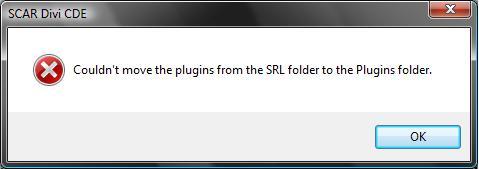
piepolo
2008-01-18 12:10:36
From: tylying213
you will want to read the very first step of the directions download 1.4.5 tigris then you will beable to click subversion repository box thing the you ca checkout!
—————————————————————————————–
Now for my question:o
i'v ran many scripts on scar 3.12 and when i downlaoded scar 3.13 this happened:
after checking out the subversion biox comes up and almost everything loads then at the very end this comes up in the subversion box:
In Directory 'Mass BitmapToString'
Can't move 'Mass BitmapToString\.svn\tmp\SCAR Mass Bitmap converter.exe.tmp to 'Mass BitmapToString\.svn\tmp\SCAR Mass Bitmap converter.exe.' :access is denied
Then abox comesup saying : couldn't moveplugins frm te SL older to the Plugins folder
i would be happy if anyone could help me ty:fiery:
i have it to:fiery: :fiery: :fiery:
gamer 5
2008-01-18 12:47:40
I know this thread is old, but it came in handy
Thanks :p
Crunk_Muffin
2008-01-21 15:18:40
From: tylying213
you will want to read the very first step of the directions download 1.4.5 tigris then you will beable to click subversion repository box thing the you ca checkout!
—————————————————————————————–
Now for my question:o
i'v ran many scripts on scar 3.12 and when i downlaoded scar 3.13 this happened:
after checking out the subversion biox comes up and almost everything loads then at the very end this comes up in the subversion box:
In Directory 'Mass BitmapToString'
Can't move 'Mass BitmapToString\.svn\tmp\SCAR Mass Bitmap converter.exe.tmp to 'Mass BitmapToString\.svn\tmp\SCAR Mass Bitmap converter.exe.' :access is denied
Then abox comesup saying : couldn't moveplugins frm te SL older to the Plugins folder
i would be happy if anyone could help me ty:fiery:
My problem aswell. Don't know what it means, so i can't do anything about it.
dedj124
2008-01-21 16:45:42
when i go to checkout the dos window comes up but nothing happens
dedj124
2008-01-24 17:03:57
srry to double post but i fixed it by wipein my hd was gonna do it anyways
HairyDonkey123
2008-01-24 22:25:01
when i tryed to do this with 3.12 when i click Update SRL SVN the DOS box opens…but then it closes and i cant see what the error is :(
im using vista if that has anything to do with it….any help is appretiated
dillbagz
2008-01-28 18:44:52
i have problems with string1 any help?
corhen
2008-01-30 20:37:29
it took me forever, but i got it to work, thanks for the help!
Ace257
2008-02-05 02:35:28
Great tut it told me exactly what to do!!! thank god i found this :)
meoth
2008-02-05 05:39:39
Thank you for the tutorial, i have been trying to get the Subversion working for a week now. Finally set it up.
XxD3ATHSLAY3RxX
2008-02-09 13:47:12
wow thanks for that wondering why scripts were not working ;) :P
blueberry jam
2008-02-10 01:18:19
Thanks for tut dark sniper, i had it all just couldnt figure out the Rev part thanks again.
Arnos
2008-02-14 12:01:19
Thanks i was searching the subversion repository for a while :spot:
bobo1172
2008-02-15 20:24:47
ok i downloaded but i cant check the box for subversion repo… whatever. help?
Evan N
2008-02-16 19:01:38
Ty, that helped alot
Canifis
2008-02-19 09:39:33
Finally, i got my scar working, thanks, i had the very old version of scar lol
kaslim
2008-02-21 06:02:10
Well I did everything you told me too in the guide and i still can't seem to be able to download SRL4. Everything else is working except Subversion doesn't download the files. Can't move to plugins folder, something like that. Tried all the fixes for this, I am using xp and I am an admin. I think it's cause I'm working behind a proxy, I've tried to configure subversion to go through the proxy but that doesn't work. Is there anywhere i could manually download the files?
jaimefire2
2008-02-21 15:53:54
Thank you this helped alot:D:bart:
Dextima
2008-03-02 20:41:12
From: bobo1172
ok i downloaded but i cant check the box for subversion repo… whatever. help?
Same here, I have read plenty of threads talking about how to download Subversion, but it never allows me to click the Subversion Repository box.
Help anyone?
xprincex
2008-03-03 11:36:03
Thnx helped alot
aksar
2008-03-03 21:27:00
Thanks for taking the time making this TuT. You saved me loads of browsing time. :)
nasty
2008-03-04 05:54:57
thnx a lot!!!!
im pretty new at this, so im still learning ^_^
daw_guy
2008-03-16 14:18:58
Thank you for this tutorial. Lost my data and forgot how to do this. Thanks again.
kollmann
2008-03-17 20:08:08
I didnt know about the respirotory thing before!
Hopefully that's why I couldn't get any scripts to start!
Thanks a whole bunch!
quiescent_87
2008-03-27 11:26:42
It took me like an hour to figure this out… I was missing a step somewhere but i got it now lol
jelmer gf
2008-03-27 12:56:33
nice soult answer alot of qaustions
jelmer gf
2008-03-27 13:00:52
it helpt me so tnx
gotspice
2008-03-27 14:46:46
thank, does this apply for scar3.15?
Lacky
2008-03-28 07:51:57
Yes….It applies to every version that is capable of doing this.
Dextima
2008-04-08 19:47:54
*sigh*, I still can't get Subversion to work, which means I can't get the latest version of SRL… can anyone upload Scar 3.15 and the newest SRL for me? Thanks.
retybob
2008-04-10 09:31:33
i used this tut to set up my new vista laptop and i had to right click scar icon and run as admin and it went smoothly thx
tetazoo
2008-04-13 11:56:45
I saw it once, but can't for the life of me find the post again. I've got all the Subversion software set up and trying to set up (in options) SCAR to retrieve latest SRL via Subversion, but it's asking for a URL to connect to. What is that URL?
Griff
2008-04-14 19:12:32
how do i get the gametab 4 update?
Lacky
2008-04-15 02:00:20
It should automatically come with SRL I assume.
mastadeath01
2008-04-17 00:03:16
This is nice
i always get errors when i try to run scripts like
Line 23: [Error] (23:38): Unknown identifier 'MIX1' in script C:\Program Files\SCAR 3.15\Includes\SRL\SRL\core\AntiRandoms\Box.scar
and like every script uses something like that.
can anyone point me to some answers?
Dusk412
2008-05-17 17:37:38
I have been looking for a while (really sorry if someone has already posted the answer somewhere - which they probably have, I'm unlucky like that) and I have gotten the latest updates, moved my plugins, redownloaded everything, gotten Subversion, and I still get this error when I try to run anything. If you could help I would be very greatful. Sorry if I am blind and just can't find the post.
Unable to register function function FindGapsTPA(TPA : TPointArray; MinPixels: Integer): T2DPointArray; in script
Edit: Also when I close Scar I get these weird errors:
The exception unknown software exception (0x0eedfade) occured in the application at location 0x7c812a5b
The instruction at "0x01e5307c" referenced memory at "0x018ab1f4". The memory could not be "red". Click on OK to terminate the program
Exception EAccessViolation in module WizzyPlugin.dll at 0000307C. Access Violation at address 01E5307C in module 'WizzyPlugin.dll'. Read of address 018AB1F4.
- Then those last two just repeat over and over and I have to use Windows task Manager just to escape the wrath of little popup boxes. Hope you can help because I had to actually write all those little error numbers out because it wouldn't copy or paste so it took forever lol.
Another Edit: I ended up deleting everything and redownloading and it worked perfectly. If anyone else has the same problem, there is one solution. Sorry for the super long post, but I didn't want to double post :D.
DGKbattle
2008-05-18 09:18:14
Thanks DARK_SNIPER REALLY HELPFUL
DGKbattle
2008-05-18 09:22:03
lol i got loads of levels up thanks to this
maxwell1170
2008-05-26 11:34:28
lolz ty for the tut
:)
Clever Alias
2008-06-05 05:47:57
My apologies if this has been asked before but I recently downloaded a WC auto (RM PowerCutter 2.0) and upon running, this error shows up:
"[Error] (238:11): Unknown identifier 'CreateTPAFromBMP' in script C:\Program Files\SCAR 3.12\includes\SRL/SRL/Core/Math.scar"
I believe this is what it is having trouble with:
Function CreateTPAFromText(Txt : String; Chars : Integer) : TPointArray;
var
TempBMP : integer;
begin;
TempBMP := CreateBitmapMaskFromText(Txt,Chars);
Result := CreateTPAFromBMP( GetBitmapDC(TempBMP));
FreeBitmap(TempBMP);
end;
I successfully installed svn. So as far as I know, that couldn't be the problem. Any ideas?
Thanks in advance.
ScarMasterSRL
2008-06-05 12:50:59
OMFG i need help i realy do i just dont understand it i'm on my pc for hours now and i still dont get it!! omfg: Unable to execute file: C:\Program Files\SCAR 3.12\scar.exe CreateProcess Failed; Code 2.
m0n3ym5k3r
2008-06-12 02:54:42
Thanks needed this program :)
omarzum2002
2008-07-12 07:53:59
good work
vip3r
2008-07-13 21:23:19
thanks for da great tut!!!
Rizzelet
2008-07-15 18:14:59
Wow, this cleared up all the last few questions I had.
Should start autoing by tomorrow.
Thanks
bion92
2008-07-15 23:16:01
great tutorial
i couldn't get scar to work but now it works perfectly
siraren3
2008-07-23 21:15:08
ok you said about vista and all that but umm iam on vista and it still didint work I did what you said Iam always on an admin anyway (only account) so what do i do cant move plugins
thank you vary much retybob i did what you did and it worked lol ty
mint25642
2008-07-30 16:24:53
erm yeah. it gets like half way through the DOS screen then an error message box comes up and says -
'Couldn't move the pluggins from the SRL folder to the pluggins folder'
im on vista, and its not mentioned on your FAQ.
any help please?
EDIT: lol never mind i never looked a post above me XD i found out howto do it now.
I_cyde_I
2008-07-31 04:11:23
:|in SCAR:
trojan horse backdoor.Generic9.AUPD
C:\program files\SCAR 3.15\includes\SRL\SCSS\SCSS.exe
rs2 cheating roks!
2008-08-02 13:55:17
nice tut! :)
for me when the dos finishes it says that plugins could not be moved.
help?
Kaspersky found a Trojan - Backdoor.Win32.Delf.ixb
isaacxia10
2008-08-09 00:22:10
Yay- Finally answered all my questions!
BTW Avg free found a Trojan somewhere (I forgot where =\)……..
threesouljadown
2008-08-09 20:45:34
thx now i know how to get srl.
u g0t pked x
2008-08-11 07:03:24
hey uhm i got this script from my friend, on his runescape it works fine but when i load it onto Scar, this error comes up:
Failed when compiling
Line 552: [Error] (6031:73): Type mismatch in script C:\Program Files\SCAR 3.15\includes\SRL/SRL/Core/Mapwalk.scar
CAN SOMEBODY HELP ME PLEASE!!!!!!!!
fireflash712
2008-08-18 15:12:10
Just saying that this worked and that it is a good tut.
atomnooblet
2008-08-25 09:32:47
I figured that there is an update for revision to 23…should I use 16/20/23 as my version?
Lacky
2008-08-26 02:22:45
ALWAYS use the latest SRL Repository Version.
NeoXeo
2008-09-05 10:25:13
Yayy I'm at Rev 24 ;)
pini3000
2008-09-18 08:34:33
From: isaacxia10
Yay- Finally answered all my questions!
BTW Avg free found a Trojan somewhere (I forgot where =\)……..
There are no virus' if you download from this site or freddy1990.com
Its probably being oversensative :p
chris123456
2008-09-18 16:17:25
confusing but ill give it a go.
masterpsp
2008-09-20 12:37:38
Hi, I'm new to all this. I downloaded Sub version, installed. Downloaded SCAR and installed. I went to SRL Download and followed the instructions. I'm not sure if there is anything else I need to do. That's literally all I've done.
Only reason I'm asking is when I've downloaded a script (RM's powercutter, for example) it says 2 particular variables 'I' and 'H' are never used in script and there is a type mismatch on another line apparently.
Anyone able to help?
EDIT:
I Partially sorted it for now :)
shatok
2008-09-20 16:45:24
great tutorial, thanks for the help i managed to do everything correctly
i will start autoing soon
BanditX
2008-09-25 10:45:17
Nice! this is exactly what I needed to know. Great tut.
coty owns rs
2008-09-26 14:56:16
i used to be a 137 before i got banned for saying g'day ( gay with a letter inside as avoiding) MY ASS.. i made a new acc and im ready to auto the shit out of it.. and your the people to see i heard from a friend of mine.. i want to hax jagex fuckfaces -.-…. my friend said i need to be a junior member… msg me to tell me more at [email]motocrossncoty@hotmail.com[/email] ill prob forget to check msgs here.. so ty :) or.. new acc on rs.. Coty Owns Rs:mad: :duh: :f: :google: :stirthepot:
Macros
2008-09-26 18:35:51
every time i try to run a script it gives me some stupid error along the lines of:
"Failed when compiling
Line 32: [Error] (16140:12): Unknown identifier 'STRING1' in script C:\[…]"
or
"Failed when compiling
Line 35: [Error] (16143:12): Unknown identifier 'BOOLEAN1' in script C:\[…]"
i read some threads and i think the problem may be that i don't have my plugins in the correct folder?! (i've done all the tools -> options checkout stuff, and clicked "Move plugins"…)
help!
Nuaik
2008-09-28 08:15:46
Thanks a lot for the tutorial it helped me get started autoing again, the last time I touched Scar or Runescape was back when Scar 2.0.3 was around just after the huge 20 thousand account ban that happened so a lot had changed.
RSplaya1
2008-10-01 15:59:15
It doesn't install right i followed everything in this tutorial 100's of times
I get to the checkout part it says "Cant move plugins into the plugins folder"
Also there is NOTHING in the includes folder just a txt file.
What am i doing wrong.. I download install subversion. I download and install scar 3.15. I open scar tools options click subversion repository. I click checkout it goes then i get the plugin error. I hit ok i file download includes. and thats it nothing works right.
also i try a random script that i know works i usd it 2 days ago i get this Include file C:\Program Files\SCAR 3.15\includes\SRL\SRL.scar does not exist.
cheese gun
2008-10-05 15:23:34
Thank You Soooo Much I Have Vista And Almost Gave Up!!!!!! This One Helped A Lot
koolkats102
2008-10-05 16:17:47
Thank you, It defineitly helped me, i can run the script i want to now :D
EDIT: I did everything, twice, and i get the error "Couldn't move plugins from the SRL folder into the Plugins folder"
Help??
forsaken1
2008-10-10 04:34:10
thanks a ton man, I had problems with my vista pc and now were good. kudos!
ak268
2008-10-10 13:41:49
it says cannot move plugins fom srl folder to plugin folder ???wat does this meen
Arcadium
2008-10-10 19:00:07
Thanks for this tut! it is a Godsend for newbies like me :p
Masterchainsaw1
2008-10-11 07:39:48
There is only one include which i can download and it is called PH.scar i press the overwrite and i press play Include file C:\Program Files\SCAR 3.15\includes\SRL\SRL.Scar does not exist.
Include file C:\Program Files\SCAR 3.15\includes\SRL\SRL\Skill\Fighting.Scar does not exist.
Failed when compiling for whatever script i use please help ;)
mazo1
2008-10-11 17:47:16
nope no use wats so ever no offence bu i dun everything follow otehr tuts and still it says couldnt move plugin i have windows vista and yes i did use the vista help ok this wat i did
1.Downlaod subversion onto programe files.
2.downladoed scar 3.15b
3.went onto my desktop and opened up scar 3.15b
4. went onto options srl download subversion and clicked checkout
5. couldnt ove plugins any help and send me in a private messages tht will be easier :)
Lord michie
2008-10-12 09:52:27
thanks this realy helped, hevent played in a wile and scar has changed a bit
realrocker00
2008-10-17 20:09:05
wt-f says to download scar 3.13, is this going to work with 3.15 also? and when it says error with the plugins, that is normal right? i think that is what you said but I was a little confused, thanks:cool:
ow oww owww
2008-10-20 05:31:10
hey this was easy and perfect thank you
vikrant60
2008-10-20 06:29:23
Scars simple lol.
All you need to do is just use a kit and ur sweet.
ekamjit
2008-10-21 21:30:27
when i download i get this error i have vista i think thats the problem
couldnt move the srl plugins to plugins folder. help
lanboyo
2008-10-26 13:07:46
Okay thanks works well so far.
Lorken
2008-10-31 23:37:27
seems good hope it works!
Lorken
2008-10-31 23:43:08
umm… i just tried a script that everyone says works:
http://www.villavu.com/forum/showthread.php?t=17880but for me it didnt work it said:
New client targeted
Include file C:\Program Files\SCAR 3.15\includes\SRL\SRL\misc\Bitmaps\Prayer.scar does not exist.
Failed when compiling
can anyone help or tell me whats wrong?
could you pm it to me?
killerkorndog
2008-11-01 21:00:32
Awesome! thanks so much you rock thanks for this tutorial!
killerkorndog
2008-11-01 21:04:21
Vista is so much easier if you disable UAC (User Account Control) Search on youtube "how to disable uac in vista" somthing should come up. Watch it, do it, no more vista security crap. If you do this you will not need administrative properties for running programs.
wonkapwnage
2008-11-01 22:28:25
w00t!!!! success! rep ++
EliteHacker
2008-11-09 22:42:08
Finally i got SCAR to work!! Thank you !! :)
\±/EliteHacker\±/
motive
2008-11-10 00:20:32
question: why when i run script it just sits?
brian2640
2008-11-10 08:12:20
Thank you very much :D
shorty444222
2008-11-11 00:19:28
nice tutorial thank you helped me out now i need to figure out how to download reflection
silentknifez
2008-11-11 06:20:30
i already downloaded SCAR a while ago
i just opend it and it said its outdated etc
and it updated it, should it work now?or do i have to follow the tutorial?
Fruit!
2008-11-11 08:41:56
My computer found backdoor trojan from srl 4 or something..
hutic
2008-11-16 19:39:24
yay i got it to work thanks
illpwntunoob
2008-11-17 08:14:58
thanks helped me out
boomitzben
2008-11-17 21:34:42
Thanks i updated to revision flawlessly and downgraded to revision 16 to run a script
boomitzben
2008-11-17 21:36:03
Thanks i updated to revision 28 flawlessly and downgraded to revision 16 to run a script.
khronicc
2008-11-23 00:21:22
uhmm im getting an error :(
Line 205: [Error] (389:1): Semicolon (';') expected in script C:\Program Files\SCAR 3.15\includes\SRL/SRL/Core/Math.scar
HELPPPP
magixboy
2008-11-29 22:57:45
After we downloaded this & follow these steps, We shuld be able to download scripts rite? So its there any wcuting scripts that banks yew???????
blink
2008-12-05 00:04:17
Line 1: [Error] (1:1): Unable to register function function FindGapsTPA(TPA : TPointArray; MinPixels: Integer): T2DPointArray; in script
i get this message in debug box, what shall i do to fix it?
r3dr4g0n
2008-12-13 04:51:14
Failed when compiling
Line 88: [Error] (16186:1): Unexpected end of file in script C:\Program Files (x86)\SCAR 3.15\Includes\SRL\SRL.scar
When I try setting up SRL.
No, im not a newbie at this… but I am confused.
elvarg4
2008-12-13 09:37:51
thanks, this was really helpful
mine or die4
2008-12-16 09:25:12
thank you , helped me alolt
Verta000
2008-12-20 19:47:44
Error:
couldnt move the plugins from the SRL folder to the Plugins folder
please help its urgent!!!!!!!
:confused: :confused: :confused:
drum4crimson
2008-12-20 20:03:03
From: Fruit!
My computer found backdoor trojan from srl 4 or something..
Whoa… How come nobodyelse got the same message?? my sugestion would be check that your downloading the correct srl from scar
SoulCal
2008-12-22 17:56:00
thank you, this helped alot!
uhit2low
2008-12-22 19:54:14
Q. I've made a long list of random things to do for a wide range of scripts. However, I don't want to have to Copy and Paste such a large chunk of code in every single script I make. Is there a way to include the saved procedure list so I can use the procedures without having to have the coding with them? just like when including SRL.
Thanks in advance for any help you can offer.
capst0k
2008-12-23 21:45:46
First of all thx for all the great work explaining and teaching :)
Still i got 1 problem, maybe u can teach me how to install this if i dont have admin rights…. maybe it can be installed someway else? or maybe portable version ?
greetz
Pointers
2008-12-24 14:27:58
very nice guide….i havent tryed setting up smart yet i think its going to be difficult :(
danielOATH
2008-12-25 09:37:57
much appreciated :)
SoulCal
2008-12-27 18:39:30
nice, ty for the info:)
I get an error after dling srl:
Error:Couldnt move the plugins from srl folder to plugins folder
ash1205
2009-01-06 20:11:18
i filled in line 75-85, pressed run then
Line 581: [Error] (16951:1): Unknown identifier 'NextPlayerOrder' in script C:\Documents and Settings\Ash\My Documents\My Downloads\Derek-s Ultimate PCer V2.61.scar
came up
I downloaded srl by opening scar > file > download srl
I have scar divi 3.15B
elementbryce
2009-01-22 23:24:55
Simple guide had no problems.
kossa
2009-01-31 21:25:59
Line 46: [Error] (254:11): Unknown identifier 'CreateTPAFromBMP' in script C:\Program Files\SCAR 3.15\includes\SRL/SRL/Core/Math.scar
any help??
jpuura
2009-02-09 14:59:03
Thanks :) Nice guide!
Z3pla12
2009-02-11 11:23:00
Kaspersky detected a virus but i know you wouldnt crash my comp right?
cjyogi
2009-02-15 12:09:02
is the download link for scar down?
Awkwardsaw
2009-02-17 09:42:52
eddit:
the link to download revision is out dated, the newer link is on the same page where you download SCAR
its all working now =D
dark bl00d23
2009-02-17 11:27:33
TYVM for this, was getting errors with outdated stuff.Thanks!
dark bl00d23
2009-02-17 11:30:37
From: ash1205
i filled in line 75-85, pressed run then
Line 581: [Error] (16951:1): Unknown identifier 'NextPlayerOrder' in script C:\Documents and Settings\Ash\My Documents\My Downloads\Derek-s Ultimate PCer V2.61.scar
came up
I downloaded srl by opening scar > file > download srl
I have scar divi 3.15B
The PCer but is most likely outdated.If you followed this entire tut you shouldn't have any problems.
Thanks for the great tutorial. Very informational and hopefully will get me set up with this whole SCAR thing.
-Thanks.
skilz 543
2009-02-20 15:49:41
help plz look at pic
chilla
2009-02-23 03:43:36
:/ i need some help… after it finished it came up with an error saying "couldd'nt move plugins from srl folder to plugins folder"
what shouls i do about this?
runeman666
2009-02-25 15:00:46
wow I didnt know that
thanks this was usefull
FOR ALL OF YOU PEOPLE'S ERRORS!Most likely you have Vista. if you do, right click SCAR, Run as Administrator, then do the Tools > Options > Subversion Download :)
if you DO NOT have Vista.. here's what to do (this works for the "Line 46: [Error] (254:11): Unknown identifier 'CreateTPAFromBMP' in script C:\Program Files\SCAR 3.15\includes\SRL/SRL/Core/Math.scar" error)
UNINSTALL your tortoise SVN (if you have it), Subversion, SCAR, Java, and (if you have it) RSBot..
DO NOT REINSTALL ANYTHING
now, go to
www.runescape.com/game.ws?m=0&j=1 and install the plug in (Java)
Now (in this order) reinstall :
Subversion
SCAR
(now check if you can download SRL.. Tools > Options > Subversion Download > Checkout)
Tortoise SVN (If you have it.. this is only for reflection I think..)
RSBot (If you have it)
now run..
program New;
{.include SRL/SRL.scar}

begin
  SetupSRL;
end.
:)
if that doesn't work.. tell me ;D
cricketfreak210
2009-03-09 04:45:57
Thanks, good tutorial helped me alot. :)
Isaiah
2009-03-09 23:33:46
I downloaded the stuff this tutorial showed me, but when i tried to auto, i always get an pop-out error message saying "This application has failed to start because MSVCR71.dll was not found. Re-installing this application may fix this problem" =S
please help me
Turtle Dude
2009-03-11 19:03:54
Thanks Dark_Sniper. I've been looking for a tutorial to help me set everything up right.
mormonman
2009-03-11 19:39:09
From: Turtle Dude
Thanks Dark_Sniper. I've been looking for a tutorial to help me set everything up right.
I just set it up for you last night… well some of it. :p
shadowmyst
2009-03-25 15:58:33
I'm new to this and trying my hardest but I'm lost. I'm running vista currently (that will change when can get other machine to connect). I've right-clicked, run as administrator, tried downloading, still get cannot move plug-ins error. I've tried the suggestion of manually copying them over from includes folder; but seems there's just a bunch of empty folders and 2 files of type .file. I've done everything suggested and so far the only include I have is the oft overwritten ph.scar. Please can someone help me?
5aith
2009-03-25 16:06:19
Great guide, trully great guide there's not much more I can say…
04basir
2009-03-25 16:28:44
i have subversion installed and when i go on scar 3.15 i go on tools,options
srl downloads and subversion repository is ticked and i press checkout and i get this error
Couldnt move the plugins from SRL folder to the plugins folder
i am using windows xp btw
lychees
2009-03-28 08:50:36
nice tut now i gonne start on my fist script
achokshi
2009-04-01 18:06:43
Am a COMPLETE noob and new to SCAR and I was able to setup all of this. Awesome tutorial!
xit_itwasluck
2009-04-07 19:45:42
Ok i followed each step,
but when i go to srl download,
checkout, it works but it says i cant move the flug ins,

themoz
2009-04-07 21:26:49
From: 99_
FOR ALL OF YOU PEOPLE'S ERRORS!
Most likely you have Vista. if you do, right click SCAR, Run as Administrator, then do the Tools > Options > Subversion Download :)
if you DO NOT have Vista.. here's what to do (this works for the "Line 46: [Error] (254:11): Unknown identifier 'CreateTPAFromBMP' in script C:\Program Files\SCAR 3.15\includes\SRL/SRL/Core/Math.scar" error)
UNINSTALL your tortoise SVN (if you have it), Subversion, SCAR, Java, and (if you have it) RSBot..
DO NOT REINSTALL ANYTHING
now, go to www.runescape.com/game.ws?m=0&j=1 and install the plug in (Java)
Now (in this order) reinstall :
Subversion
SCAR
(now check if you can download SRL.. Tools > Options > Subversion Download > Checkout)
Tortoise SVN (If you have it.. this is only for reflection I think..)
RSBot (If you have it)
now run..
program New;
{.include SRL/SRL.scar}

begin
  SetupSRL;
end.
:)
if that doesn't work.. tell me ;D
Ugh stupid vista :duh: THANK YOU
By the way xit_itwasluck, look at my quote.
zeline
2009-04-08 18:37:35
2 Things:
When I try to update says cant move plugins
Also it says im missing \includes\SRL\Srl.scar
What is this and how do I fix it?
skatedevil62
2009-04-13 15:22:46
Couldn't move the plugins from the SRL folder to the plugins folder. I click checkout and I get that. The server tomporarily down?If someone could post a link to the latest srl in a .zip format I could install manually- that'd be great.
randy marsh
2009-04-14 20:13:00
rsbot here i go
Stevo44
2009-04-22 08:42:15
Ok so ive read this forum and other sites …. i have vista i right click and run as admin …. still get this (Couldnt move the plugins from srl folder to plugins folder) ive redled it more than once ive redled subversion …. what else is there to do and yes i read to post above. ive read them all seems like noone can solve this problem.
thomaswood5
2009-04-26 13:41:01
Good work, saved me a lot of time
Thanks, this helped a lot. I got SCAR working. :p
King Klutz
2009-06-14 04:16:42
From: LolL
Thanks, this helped a lot. I got SCAR working. :p
Hehe, same here. A couple months ago when I visited these forums I would've liked to find a topic like this so I wouldn't have been deterred and decide to give up on SCAR. Anyhow, thanks!
goreonius
2009-09-13 00:41:28
Thought i would add you have to run scar as admin for this to work (right-click > run as admin)
P.s. thanks, i was wondering why scar wouldn't work
Vapour knuckles
2010-08-19 12:29:49
The scar link does not work for me, you should probably replace with this link:
http://freddy1990.com/index.php?page=product&name=scar
Frement
2010-08-19 12:30:58
I think we all use Simba now for RS related stuff.
james151
2010-08-19 12:31:24
From: kingarabian
oh yea 1 question, how come this is such a great tut :D
Amen this really helped me a lot. want to say thanks


