Br0d3r1ck
2022-04-14 20:43:26
STANDOUT FEATURES
Ability to fish in virtually any location thanks to RuneLite detection
Advanced humanoid gameplay for increased resistance against bot fingerprinting
Easily modifiable user settings to allow for new locations + fish
Efficient script management for reduced CPU usage
Extremely intelligent failsafe system for extended script-run stability
Built on the actively developed & maintained SRL-F include
The Lazy Fisher uses 100% colour interaction
MORE FEATURES
Quickly drops via shift dropping
Unique custom AFK break system
Humanlike nature for increased antiban
Incorporates use of RuneLite's built in skills tab
Saves a screenshot when leveling up
TESTED METHOD @ LOCATION + FISH TYPE
Net Fishing @ Lumbridge Swamp + (Shrimp / Anchovy)
Fly Fishing @ Lumbridge Goblins + (Trout / Salmon)
Fly Fishing @ Barbarian Village + (Trout / Salmon)
Cage Fishing @ Karamja + (Lobster)
Harpoon Fishing @ Karamja + (Tuna / Swordfish) <—- Use RuneLite's Menu Entry Swapper plugin to have harpoon option on hover instead of cage
SCRIPT REQUIREMENTS
Latest version of Simba
Lastest version of RuneLite
Up-to-date copy of SRL-F
[ATTACH=CONFIG]28888[/ATTACH] <— Place in your Scripts folder (Normally C:\Simba\Scripts)
[ATTACH=CONFIG]28879[/ATTACH] <— Unzip in your .runelite folder and then backup and replace the pre-existing settings.properties file and Plugin folder with the new ones (Normally C:\Users\YourUser\.runelite)
Once unzipped, restart RuneLite, go to Multicolor Highlights settings, and make sure 'NPCs to highlight with Color 1' is set to your desired fishing spot. (Do not include the first word ie 'Lure') (Do not change the colour! Only the NPC text!)
SCRIPT SETUP RECOMMENDATIONS

Screen layout (click screenshot to expand)
Red box is your Simba client with script loaded
Yellow box is your RuneLite client with expanded skills tracker tab, the screen fully zoomed out + your compass settings setup in the script
OPTIONAL: Green box is your Simba output
Pink box is your AFK window
Light blue box is an example of the recommened AFK_Bounds box
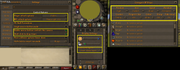
In-game settings (click screenshot to expand)
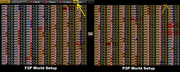
Login screen world switcher setup - Left is F2P / Right is P2P (click screenshot to expand)
All tools + items you need for fishing already in your inventory
Standing near your desired fishing spots when starting the script
Setup & modify any required user settings within the script + Multicolor Highlights before starting
ADDITIONAL INFO
I have tested this script with a multitude of overnight sessions, and am quite happy with the overall stability. This script has only been tested to run in F2P locations, but all members fishing spots + fish should work with the correct user settings in the script + Multicolor Highlights NPC text.
If you find any bugs, have any questions, or just want to say thanks with some nice progress reports, please post them here! :)
PS. Thank you to everyone on the SRL discord and forums for answering my infinite questions!
PROGRESS REPORTS
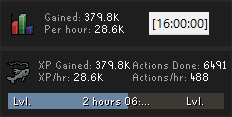
Net Fishing @ Lumbridge Swamp + (Shrimp / Anchovy)
Fly Fishing @ Lumbridge Goblins + (Trout / Salmon)
Fly Fishing @ Barbarian Village + (Trout / Salmon)
Cage Fishing @ Karamja + (Lobster)
Harpoon Fishing @ Karamja + (Tuna / Swordfish) <—- Use RuneLite's Menu Entry Swapper plugin to have harpoon option on hover instead of cage
SCRIPT REQUIREMENTS
Latest version of Simba
Lastest version of RuneLite
Up-to-date copy of SRL-F
[ATTACH=CONFIG]28888[/ATTACH] <— Place in your Scripts folder (Normally C:\Simba\Scripts)
[ATTACH=CONFIG]28879[/ATTACH] <— Unzip in your .runelite folder and then backup and replace the pre-existing settings.properties file and Plugin folder with the new ones (Normally C:\Users\YourUser\.runelite)
Once unzipped, restart RuneLite, go to Multicolor Highlights settings, and make sure 'NPCs to highlight with Color 1' is set to your desired fishing spot. (Do not include the first word ie 'Lure') (Do not change the colour! Only the NPC text!)
SCRIPT SETUP RECOMMENDATIONS
Screen layout (click screenshot to expand)
Red box is your Simba client with script loaded
Yellow box is your RuneLite client with expanded skills tracker tab, the screen fully zoomed out + your compass settings setup in the script
OPTIONAL: Green box is your Simba output
Pink box is your AFK window
Light blue box is an example of the recommened AFK_Bounds box
In-game settings (click screenshot to expand)
Login screen world switcher setup - Left is F2P / Right is P2P (click screenshot to expand)
All tools + items you need for fishing already in your inventory
Standing near your desired fishing spots when starting the script
Setup & modify any required user settings within the script + Multicolor Highlights before starting
ADDITIONAL INFO
I have tested this script with a multitude of overnight sessions, and am quite happy with the overall stability. This script has only been tested to run in F2P locations, but all members fishing spots + fish should work with the correct user settings in the script + Multicolor Highlights NPC text.
If you find any bugs, have any questions, or just want to say thanks with some nice progress reports, please post them here! :)
PS. Thank you to everyone on the SRL discord and forums for answering my infinite questions!
PROGRESS REPORTS


