R0b0t1
2007-09-08 22:57:50
Welcome to the land of XYZ!
What is XYZ you may ask? As Wikipedia puts it:
From: Wikiworld
In the study of the perception of color, one of the first mathematically defined color spaces was the CIE XYZ color space (also known as CIE 1931 color space), created by the International Commission on Illumination (CIE) in 1931.
The human eye has receptors for short (S), middle (M), and long (L) wavelengths, also known as blue, green, and red receptors. That means that one, in principle, needs three parameters to describe a color sensation. A specific method for associating three numbers (or tristimulus values) with each color is called a color space: the CIE XYZ color space is one of many such spaces. However, the CIE XYZ color space is special, because it is based on direct measurements of the human eye, and serves as the basis from which many other color spaces are defined.
The CIE XYZ color space was derived from a series of experiments done in the late 1920s by W. David Wright (Wright 1928) and John Guild (Guild 1931). Their experimental results were combined into the specification of the CIE RGB color space, from which the CIE XYZ color space was derived. This article is concerned with both of these color spaces.
Now then, WTF is that you ask? Then I say:
From: r0b0t1
XYZ color, as the last part of its name implies, is another way to define color. The main difference between XYZ and RGB, HSL, and Color32, is that XYZ allows every color in the visible light spectrum to be created, by mixing its values, X, Y, and Z.
Now, if you wikipedia the phrase "XYZ color space" you will find some cryptic information, but this is the reason I am here: To dumb it down for you!
Geek Speak:
X is the value of the cyan/blue wavelength, Y of the purple/magenta, and last but least, Z, which is the value of the yellow wave. These are the three (3) wavelengths our eyes can see, respectively short, medium, and long. (X, Y, Z).
Lay Speak:
X is cyan, Y is magenta, Z is yellow.
Leet:
X 1s Cy4n; 7 3s m@9ENT4, Z is t3H YyeL1l0wz0r5.
Now, if you haven't grasped that, this may help…

See? Pictures speak a thousand words.
Now, the simple way would be to download a program made to deal with XYZ color, and have it pick value for you… Nope, we do it that hard way! Go into SCAR, pick a color, and make a new script. Type in this:
program XYZExample;

Var X, Y, Z: Extended;

begin;
  ColorToXYZ({Color you picked}, X, Y, Z);
  WriteLn('X: '+FloatToStr(X));
  WriteLn('Y: '+FloatToStr(Y));
  WriteLn('Z: '+FloatToStr(Z));
end;
See how harder that was? Well, try to do it with out the procedure ColorToXYZ… Actually, don't try it. You'll get a headache.
Currently, there are no RS related applications, as said by Boreas (Should we trust him?), but if you think hard enough, you might come up with one… Well, probably not, but you could try really extra special hard, and blow up :). And after you blow up, probably the last thing you would want to know, is the comparison of XYZ to RGB. Right? All of you are uninterested of course?
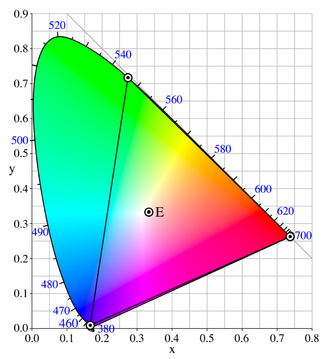 The colors in the triangle are RGB spectrum. All of the colors on that diagram are in XYZ color. Those blue numbers in the hundreds are the wavelengths of the respective colors.
 Do you see why I took the trouble to explain XYZ color? So many possibilities… Though I'm bummed that computers produce 16 mil colors, and we percieve 12 mil! (I work in the Department of Useless Information FTW!).
I hope this helped you in one way or another, but it probably didn't :p.
EDIT: OMG! GUESS WHAT! I FOUND A USE FOR XYZ COLOR!
OMG! HEAD OVER TO THE SNIPPETS SECTION NOW! (Well, let me make it first :p Keep checking).