Guide to creating and running VMs
lolpie
2007-06-28 13:22:23
A Virtual Machine is essentially a computer inside of a computer. It's main purpose to us is to allow you to auto on the VM while doing something else like playing a game or chatting, since it doesn't use your mouse or keyboard.

Things you need before you can start:
- VMWare Workstation 6 - Illegal. No links for you. Hint: Torrents
- TinyXP Beast Edition - Not illegal. Links for you. Download, Another one, And another, And another
- A blank CD. If you don't want to burn it to a disk then ignore all of the CD-related steps in this tutorial.
- Deepburner (for burning TinyXP onto a CD) - Download
- Install VMWare Workstation (now referred to as VMW) and burn TinyXP onto a disk.
- In VMW, click on New Virtual Machine
- Click:
Custom - Next - Microsoft Windows - Version XP Pro
Number of processors - One, even if you have a dual core machine
Memory to allocate - If you have 1GB or more, then 256MB is fine(TinyXP is a lot less bloated than the original OS)
Use Bridged Networking
Next
Create a new virtual disk
Next
Disk Size - 3GB works fine. Check the first box
Name it something if you want. Hit Finish!
- Put the TinyXP CD into your computer and click the Play button to start the VM. If it asks you something about a floppy drive, click on Disconnect or whatever the option is to disable it (because you will never use it).
- Install XP. Choose option 1. Choose NTFS (Quick) for the formatting.
- After it's installed, change the resolution if you want, start downloading SCAR, Java, etc…
You're done! Now you can auto!
Make sure you install VMTools. To do this, free your mouse, then right click the VM's tab and hit Install VMTools. Now go to My Computer in the VM and start VMTools
Well, I guess that's it. Please post comments and enjoy your autoing! I hope this mini tut helped you guys :). And no, I don't know how to make the autoing mouse visible, nor do I care to because personally I like it that way.
Some notes:
-If Bridged Networking doesn't work for you, try using NAT instead
-Sometimes Bridged will NOT give you a separate IP because some ISPs only allow one IP per household. The only way to fix this is to use a proxy each time you play
-If you don't want to burn the OS onto a disk, then simply go into the VM's settings and set it to boot straight from the ISO instead of the disk.
-If VMW lags for you, try Microsoft Virtual PC 2007. The steps to setting up a VM are virtually identical.
RudeBoiAlex
2007-06-28 14:16:01
ahhh man i need to know were vmware is located and is it for vista anyway nice guide
lolpie
2007-06-28 16:32:58
Bobarkinator
2007-06-28 17:31:57
I'm getting VMW right now and will install it soon. Good tut.
YoHoJo
2007-06-28 18:55:32
You know you dont need a cd to burn.
You can get just an iso of tiny xp, and mount it to a virtual drive liek Deamon Tools.
Thats saves burning it to a cd.
lolpie
2007-06-28 19:32:56
I know but I burned it to a CD because Daemon never works for me :(
jeffreytuner
2007-06-30 07:45:19
downloading the vm software now thx for the tut
RudeBoiAlex
2007-06-30 08:53:21
do u have to have tinyxp?
lolpie
2007-06-30 13:08:07
Huh? It's on the torrent link above
e-man
2007-07-02 20:57:42
nvm i know what is TinyXP
me going try it out now =]
and what if we have VMware-workstation-5.5.2-29772?
lolpie
2007-07-02 23:37:42
I haven't tried that one, but it should be basically the same…
e-man
2007-07-02 23:41:57
okie dokie
4 more hours till TinyXP finish downloading :D
is TinyXP like WindowXP and do we need a serial key or w/e
Santa_Clause
2007-07-03 00:15:31
Serial? If you did he would have told you.
lolpie
2007-07-03 10:48:31
Nope no serial
e-man
2007-07-03 17:47:03
it says
The file 'asms' on windows XP professional Service pack 2 CD is needed.
Type the path where the file is located, and then click OK.
what do i need?
lolpie
2007-07-03 18:19:30
Woops double post, read the newer one
lolpie
2007-07-03 18:21:54
From: lolpie
When does that happen? You should be putting the TinyXP CD in after you've installed the VM…
http://support.microsoft.com/?kbid=311755
e-man
2007-07-03 18:27:00
lol i got it to work thx =]
me autoing already lol thx again
IEatJ00erBaybees
2007-07-03 20:01:40
Good, easy tutorial..but I use Microsoft Virtual Machine..I LOVE IT. It's so much faster than VMWare.
e-man
2007-07-04 01:05:11
aww i lag =[
i can auto in my virtual machine but i cant auto on real computer
lolpie
2007-07-04 03:04:42
The whole point of VMs is so you don't auto on your real computer -.-
e-man
2007-07-05 00:51:45
no i mean so i can auto on both virtual and host
but i found out i needed more RAM because i only have 448 MB of RAM
so i cant auto with both
RudeBoiAlex
2007-07-10 13:54:26
ermm can u heplp plz that guide to getting vmware on vista is confusing i dont get it
Dan Cardin
2007-07-10 14:13:41
is there a way to get a free licence thing for vmware?
edit:i think i got it
Also, Microsoft is giving out their VM software at the moment.
Dan Cardin
2007-07-10 20:42:30
question about how to do the tinyxp thing-when u open it thers:xPerience,HashCalc, and a bunch of WinRarArchives. and when u do the archives it asks for a serial number. then, what exactly do u need to do to be able to burn it…im so sad…someone add me on msn,aim, or yahoo so i dont haveto wait for posts please
lolpie
2007-07-10 22:07:27
You extract the .rar archives and it should spit out an iso. Then burn the ISO to a disk using Deepburner and you're all set
shaunthasheep
2007-07-10 22:13:23
on Microsoft Virtual Machine you can just mount .iso's :p
Dan Cardin
2007-07-10 22:13:50
i tried extracting 1 and used a pass 'admin', but there was nothing in the folder
RudeBoiAlex
2007-07-11 08:33:43
lolpie u got mnsn? i need help pl0x
Dan Cardin
2007-07-11 11:38:15

comes up when i try to extract the Archives:(
Looks like you downloaded a stupid one. Look for better torrents, or the password should be on the site somewhere.
lolpie
2007-07-11 15:20:48
Ya, the original one didn't have any passwords.
Also I tried Microsoft's VM but it sucks for me. Stays at the loading screen saying DHCP…etc and doesn't do anything.
rudeboi: Yeah, it's in my profile. Add me
Maybe he downloaded a warez copy?
lolpie
2007-07-11 15:31:57
dan cardin give me the link to where to you downloaded it from. I suggest you download Beast edition because it's so small
Here: Probably, there's only 1 copy floating around on torrents and there's no password on it.
Dan Cardin
2007-07-11 16:17:11
i downloaded the 1 that u have at the top of the page :(
lolpie
2007-07-11 16:25:10
The password is there. I just looked at it.
lolpie
2007-07-12 17:20:41
Hey guys, are you getting a seperate IPs in the VM and the actual computer? I forgot to check that. Because I'm not and I'm pretty sure I had before…
You do not get separate IPs if you are behind a router. I'm not sure what would happen if you were directly connected to the modem.
lolpie
2007-07-12 17:55:31
What if I go into the router settings page and add a seperate IP? Then assign the VM computer that IP? Let me try that.
sherlockmeister
2007-07-13 13:01:51
to see mouse after you are running script press "alt+f4" (must free input first!!!)
and choose "run in background". then press "winkey+r" and type in "vmware" (without quotes) and press "ok". you should be able to see mouse now.
lolpie
2007-07-15 13:10:20
Updated with a better version of TinyXP that lags a lot less on slower computers.
Dan Cardin
2007-07-15 13:40:53
can u go on aim or msn so that i can talk to u about the tiny xp beast edition thing?
Beast is 142 mb. It's AMAZINGLY fast. You have nothing to lose.
Dan Cardin
2007-07-15 13:54:01
no…the unpacking thing…i dont know what to unpack(cuz theres like 50 archives) and how to get it to being able to be burnt
and i think itll take more than 1 post
lolpie
2007-07-15 23:40:34
From: Here
Beast is 142 mb. It's AMAZINGLY fast. You have nothing to lose.
I thought you were a WINBLOWS hater?
From: dan cardin
no…the unpacking thing…i dont know what to unpack(cuz theres like 50 archives) and how to get it to being able to be burnt
and i think itll take more than 1 post
Ok, I've been trying to get on MSN but my computer is being gay so I can't.
If it's a ton of archives, just right click on any one of them and choose Extract Here. To burn it, download Deepburner (linked in the tut), the rest is pretty simple to understand in the program
Dan Cardin
2007-07-16 10:29:42
actually i'd like to use daemon(cuz i dont have any more blank cds and i dont have any money at the moment), but i dont know how
EDIT: and i tried to burn but it failed
lolpie
2007-07-16 16:43:54
From: dan cardin
actually i'd like to use daemon(cuz i dont have any more blank cds and i dont have any money at the moment), but i dont know how
EDIT: and i tried to burn but it failed
I got it…make your VM, then click on Edit virtual machine settings. Then click on CD-ROM and choose the option that says use ISO image. Browse to your ISO and it should load it :)
Dan Cardin
2007-07-16 17:01:46
i cant get on the internet on my vm:(so many problems
From: lolpie
I thought you were a WINBLOWS hater?
I thought I made it clear that I hated WinBLOATS.
lolpie
2007-07-17 11:10:18
From: dan cardin
i cant get on the internet on my vm:(so many problems
It should have auto connected…are you using Bridged networking? And both of your OS's should be Windows XP
Dan Cardin
2007-07-17 12:06:24
yes to both it says bridged network, but it also says limited or no connection, and yes both are xp
does the fact that i did NTFS (not the quick 1) make a difference?
lolpie
2007-07-17 15:24:50
No that shouldn't affect your network at all. What's your network speed? Since it says Limited/No connection I'm thinking you're on a slow connection…
Dan Cardin
2007-07-17 15:49:00
uhhh,well…yea how do i find that out??
lolpie
2007-07-17 17:14:36
Dan Cardin
2007-07-17 17:24:18
Download Speed: 5170 kbps (646.3 KB/sec transfer rate)
Upload Speed: 450 kbps (56.3 KB/sec transfer rate)
lolpie
2007-07-17 19:25:13
That's weird…try MS Virtual PC 2007 and see if that works for you
billben
2007-07-19 08:49:27
kinda new here i downlaod VMware and tiny xp beast edition i mounted the iso and when i told the virtul machine to boot from it it strated running the xp installation then blue screened any ideas?
Dan Cardin
2007-07-19 09:05:38
sry but i have no clue mine wont get past the 'welcome' screen:(…which is why im posting…do i do the same thing with MS Virtual PC 2007(and will it work with home edition(it says only prof.))? and how do i delete vms?
lolpie
2007-07-19 14:03:21
billben what's the blue screen say?
dan: Yeah it's pretty much the same…I'm guessing your computer just isn't fast enough if it won't go past the Welcome screen. What're your specs? You delete VMs by going into My Docs > My Virtual Machines, then right click it and delete.
Dan Cardin
2007-07-19 14:46:41
oh i thought that you'd have to do something special cuz u allotted a max memory or whatever for it…and uhh, about the whole specs thing…how do i find that?(u can tell that i dont know much about computors:p)
lolpie
2007-07-19 16:03:31
Start Menu > Right click on My Computer
billben
2007-07-19 17:14:26
![]()
theres a pic of my error
Dan Cardin
2007-07-20 09:33:13
what do u want like this:Windows XP Home Edition
emachines t6212
AMD Athlon™ 64 processor
3200+
1.99 GHz, 384MB of RAM
so yea will the windows VM work even though its supposed to be for prof. edition? and which 1(32 or 64)? im guessing 64 (
64 processor
)
lolpie
2007-07-20 10:19:08
The problem is your RAM. XP Takes 128MB, so you only have 256MB left. Now add a VM which takes even more memory…that's why it won't go past the Welcome screen. You should upgrade to at least 512. RAM is really cheap nowadays
Dan Cardin
2007-07-20 10:26:46
so once i get more RAM thatll be solved…only problem now is that my internet didnt work(though i only got on my vm once…)
lolpie
2007-07-20 12:28:55
Yep
How do you connect to the internet? Through a router?
Dan Cardin
2007-07-20 12:39:00
ethernet cable(thats what its called right? my parent are too cheap to buy a router
cyclone2527
2007-07-21 11:57:47
I can't get the internet access to work either, I'm using Wireless on the host PC and bridged on the virtual
lolpie
2007-07-21 14:29:24
Does it give you any errors? What OS is your host PC?
cyclone2527
2007-07-21 19:20:31
I am using Windows XP Home as host and Windows XP Home as VM. I have wireless PCI network adapter, and can get the VM to connect to the internet using NAT (which I believe means that both have the same IP address)
sherlockmeister
2007-07-21 21:42:39
if you do not have a router then you must use nat, idk why. i know this because i used a bridged network until my router broke and then only nat worked.
klh6686
2007-07-22 18:51:01
i've tried the vmware thing, i used tinyxp rev 06 and for some reason runescape lags. its a weird lag though, like when it lags on my main comp, it freezes for a sec then comes back. On the tinyxp install (on tinyxp and the VM) it is almost unresponsive, its as if i was emulating a processor and its not running up to speed. its smooth, but its like 75% as speed and responsive as my main OS install.
The way i set it up was i put a fresh install of tinyxp on a new partition, then i installed vmware and tinyxp on it, the whole thing with VM running used less than 400mb, i have 512.
I may try another stripped version of xp tho and report back.
lolpie
2007-07-23 08:53:05
I get that sometimes. The only way to fix it is to put more RAM in the VM. Try adding another 512MB stick to your computer
klh6686
2007-07-23 21:40:13
well what i was talking about happened in tinyxp w/o the vm running. when i switched back to my retail install it works responsively and perfectly. it might just be an issue w/ my install.
darky
2007-08-07 19:48:23
May I ask how you install TinyXP without a cd?
No probs if yah can't :D
lolpie
2007-08-08 01:28:20
After you set up the VM, click on Edit this VM, then go to CD-ROM, then select the option to boot using an .iso, etc…
darky
2007-08-08 05:29:56
Thanks so much! Help much appreciated but i'm just too confused.. I Don't want to be a hassle so i'll try and work things out myself a bit more :D
Don't wanna be a hassle now do I!
Xtream
2007-08-09 07:32:49
Can i run multiple virtual machines with this? Cuz i got a shitload of ram:D
n3ss3s
2007-08-09 09:35:09
lolpie, I have the CD IDE using the tinyxp iso, but first time I ran the VM, it got to sum blue screen, when you had to use ENTER, D and something (I think) to select options but it didnt do anything when I pressed. Now, it wont even get to the blue screen, it only stays in the black one with a "-" in the top left corner after it has loaded the first lil gray loadin bar right in the start… :(
lolpie
2007-08-09 10:32:47
You were at the formatting screen. Are you loading from an iso or from a disc?
n3ss3s
2007-08-09 13:27:59
iso..
lolpie
2007-08-09 17:52:40
So basically it won't go to the formatting screen anymore? I'm confused…
n3ss3s
2007-08-10 06:46:04
Yes, let me take a pic.
Ill post here then..
Yeah, when I start it, it loads the gray loading bar like in rs the gray thing, and then it stops to the thing in image.

lolpie
2007-08-10 10:11:53
Where did you download the iso from? Looks like it got corrupted or something. Try DLing it again.
n3ss3s
2007-08-10 12:24:36
Yeah I'll do that.
Eicca
2007-08-15 15:54:56
I don't get it why don't you just download daemon tools and mount the tinyxp.iso to the program and you will save a cd and the burning job? :P
Krispy101
2007-08-16 14:31:00
NO! Don't use Daemon Tools!
I tried that and PowerISO and Failed!
**TUT: For Using an ISO as a disc in VMW without using an external program*
1)Click on VM at the top..
2) Click on Settings
3) Click on CD Drive
4) it should either be on Auto-detect or the drive you're currently using =]
5)Instead, click Use ISO at the bottom!
6) Select your ISO (TinyXP Beast Edition)
7) Click OK Twice
8) Click play and all should be normal =]
9)ENJOY!
**EDIT**
Also, Not working on Vista? Getting application error 0x80004003 (or any other) messages?
Have no fear! Look here;
**TUT**
1) Unzip Folder
2) Ignore the .bat files for now.
3) Run subinacl.exe
4) Run vmware.6.0_0x80004003_reg_fix.bat (NOT the vmware.5 one!)
5) Try running VMW again after running these, and it should work =] Then you can install your OS =]
Diablo1123
2007-08-19 19:03:11
You can always download the VMWare Workstation Trial Legally
Or someone could provide the virutal PC, VMWare player is free :)
My computer can support 2 Virutal Pcs and the regualr pc
Light
2007-09-01 03:24:47
Great tutorial! Easy to understand, I already have it all setup.
Now I need even more accounts! lol
im autoing again yipee nice tut man
ttoast
2007-09-03 14:13:07
this has helped me a lot thanks man !:(h):
munchkinruss
2007-09-04 20:27:54
Thanks for this! I will try it on my XP comp
wonly
2007-09-04 20:53:06
i attempted to run a vm one time and it was much more complicated than that very good, nice and easy after i had software didn't take much time at all to get it up and running
munchkinruss
2007-09-05 04:44:35
Thanks so much for posting that tut =D Every part was straight forward and easy to understand.
Thanks working fine for me :}
Krispy101
2007-09-07 13:45:47
Again, sorry I forgot to say thanks :P
lolpie
2007-09-29 00:56:24
Added some minor updates, etc. I added links to torrents that had lots of sources so you can actually download the isos
RudeBoiAlex
2007-10-12 18:00:15
idc if this is a bump but i click install vmware tools it never does it just stays there saying cancel vmw tools install
lolpie
2007-10-12 18:15:58
In the VM, go to My Computer. There should be a CD drive that you can click on…try that
RudeBoiAlex
2007-10-12 18:26:15
i cant find the cd drive :|
HellBoyz
2007-10-12 21:31:06
Power off your vm in first hand and right click your fav machine and choose setting you will find the cd drive there
RudeBoiAlex
2007-10-13 06:44:54
Thanks but i found out why i dont even have my computer on my vm.
i got tinyxp ebeast edition burn onto a disc and its iso, then i use that it still just says you do not a vmware tools all i got is a blank black screen
lolpie
2007-10-13 13:11:38
You take the CD out after Beast is installed, then click on Install VM Tools from the menu, then click on My Computer (inside the VM), and find the drive labeled VM Tools or something like that
RudeBoiAlex
2007-10-13 16:18:10
Thanks i gonna try that in a min (when my other comps intenet gets back up)
EDIT: i try that then it says tinxp beast edition does not exist help pl0x :D
RudeBoiAlex
2007-10-14 08:22:02
soz for double post but how do you install tinyxp?
das terminator
2007-10-14 14:59:15
As in the tut, you use virtual drives (some good ones are daemon tools and alcohol 120%. Google)
It's best to install them IN the virtual machine. Then mount the iso or whatever image you downloaded.
PS: Lolpie, want a 1 on 1 on UT99 LOL ;)
[-jesus-]
2007-10-15 02:23:09
THANK YOU LOLPIE!!!!!! :p. Works great! & your tut was easy to follow ;). Also: Can you have 2 VM's running at the same time + your normal comp?
How do I make the screen for VM bigger though?:

Jonnee
2007-10-15 07:53:24
Nice tutorial dude! Thanks a lot for this! :)
+Respect
das terminator
2007-10-15 09:12:33
@ jesus you probably can, but with every VM your CPU and RAM usage gets higher, I would not recommend it if you want to run your main OS lag free (unless you have a quad core processor and 2gig RAM ofcourse)
For fullscreen use ctrl alt and enter ;). You also may to need to change the screen resolution
@ Lolpie nice guide, just a tip, you can generate a serial key for a 30 day trial while you use bittorrent to download VMware. Other possibility that if the serial comes in a seperate file in the bittorrent, download only that file and just download the program from the main site (post link soon for both)
Jonnee
2007-10-15 12:13:58
Problem Solved.
[-jesus-]
2007-10-15 15:07:16
From: das terminator
@ jesus you probably can, but with every VM your CPU and RAM usage gets higher, I would not recommend it if you want to run your main OS lag free (unless you have a quad core processor and 2gig RAM ofcourse)
For fullscreen use ctrl alt and enter ;). You also may to need to change the screen resolution
That just black out the surrounding areas, how do I make the VM's "Monitor" bigger? so its like a regular comp & not shrunk down.
Edit: Nvm, I fixed it ;)
RudeBoiAlex
2007-10-15 17:24:03
I still need help :(
i still only gots a blank black screen
weequ
2007-10-15 18:05:50
Thank you :)
HellBoyz
2007-10-15 21:53:51
you can still try this below
1. Select your vm.
2. Right click it and select settings
3. select CD-ROM
4. Under Connection tab select Use ISO image
5. Click Browse and find your tinyxp Beast ISO
6. Click OK.
7. Press Play button for vm to install.
8. After Full complete installation.
9. When you see your tinyXP
10. Right Click your VM Workstation on top
11. Select VMware Tools
12. Wait for your cdrom disconnect and re-connect at the bottom of icon
13. In TinyXP windows -> goto your my computer
14. check whether you have your vmware tools cd in drive d:
15. double click the cdrom or open the cdrom adn choose the setup file.
16. you will prompt to restart the pc
17. after restart your work done.
All system update complete. lol
FrÕzÑ_§ÕµL
2007-10-16 01:34:12
Sweet thanks sooo much! +Rep! Only problem is that my download site is a 3 part .rar archive cause its so big… and rapidshare won't let you download anymore than a certain amount in a certain amount of time… so after the first part (99mb) i gotta wait 207 minutes! NVM I trying to get an IP changer to bypass the limit hehe. Thanks again you ROCK!
RudeBoiAlex
2007-10-16 17:26:46
NOOOOOOOOOOO my vmware got deleted now i gotta install again
thanks hell for the great mini tut :D
edit: it still stays as a blank black screen should i try waiting a few mins?
HellBoyz
2007-10-16 21:35:24
It do depend on your computer speed I'm curious why it still blank screen
RudeBoiAlex
2007-10-17 13:49:34
well im gonna leave on for like 20 mins starting from now see if its still a blank black screen
RudeBoiAlex
2007-10-17 14:20:34
now i just get a blue error message when its installing :(
[-jesus-]
2007-10-17 16:24:49
From: RudeBoiAlex
now i just get a blue error message when its installing :(
=/ ^^.
LolPie: Do you know why my VM Tools wont stay downloaded? Every time I re-open the VM I have to download again.
HellBoyz
2007-10-17 21:24:04
From: RudeBoiAlex
now i just get a blue error message when its installing :(
BLUE? wow thats was bad. possible of memory not enough or something
RudeBoiAlex
2007-10-18 11:34:15
is says there isnt and hard drive disks and i donwloaded tiny xp ok then i find the download location and use that as the hard drive thing and that never works but then when i use it in my disk drive thing it gets up to the install screen then the blue error happens,
pic:
lolpie
2007-10-18 14:00:21
From: [-jesus-]
=/ ^^.
LolPie: Do you know why my VM Tools wont stay downloaded? Every time I re-open the VM I have to download again.
When you click on download VM Tools, you have to go to My Computer inside of the VM, then double click on the CD-drive. It launches the program from there.
Nikize
2007-10-18 14:58:39
Am i the only one whose antivirus ( Avast 4.7 Pro ) says that it contains a trojan in /system32 ( most essential part for OS to work ) ?
RudeBoiAlex
2007-10-18 16:10:40
Am i ever going ot be able to get a vm on vista?
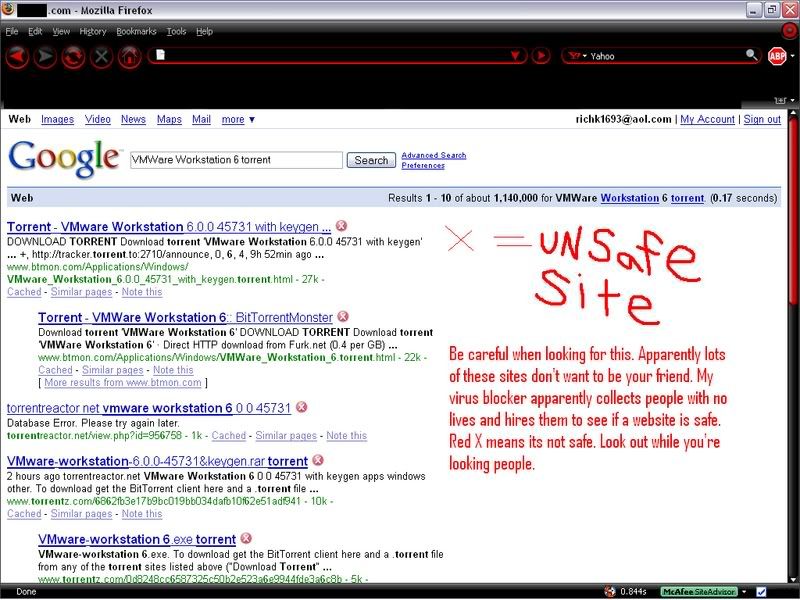
richk1693
2007-10-18 16:28:24
das terminator
2007-10-18 16:48:03
Well I have tried running 2 VM's. IT doesn't run very well (probably because it's my laptop with a shit video card) but it works nontheless, probably only at 3/4 of the speed but ohh wel, in the end if you add up its 1 1/2 :p.
When running 2 chatting like msn, music and internet still work, but you can forget games (UT,CSS anyone).
Recommended settings for 2;
1 processor,
3GB harddisk (best to Preallocate)
256MB RAM
I would recommend to only run 2 when your PC really can handle it (without letting your video card go to 61 degrees Celsius but meh xD)
nickisfat
2007-10-18 17:15:23
thats decent lol
nefar
2007-10-18 18:24:23
Couldn't find anyone serving with the torrent for tinyxp but found someone on packetnews with it. Very nice. I had heard of a tweaked xp version but never got around finding it till now. So much of a space saver.
Nikize
2007-10-19 04:04:10
Dudes, is there a virus or not ( or maybe you just dont have AVs? )?
Two guys have now detected a trojan in system32, which means deleting ( it cannot be repaired ) it may result in OS to brake ( worst case it wont start ).
Nikize
2007-10-19 04:04:10
Dudes, is there a virus or not ( or maybe you just dont have AVs? )?
Two guys have now detected a trojan in system32, which means deleting ( it cannot be repaired ) it may result in OS to brake ( worst case it wont start ).
HellBoyz
2007-10-19 04:48:30
Hmm, i haven't found any of this, but wait why install AV in your VM? If the vm serve for auto purpose then don't install it. It won't effect your main pc unless you have oopen up the share folder
Nikize
2007-10-19 05:08:51
Dude, i ment you would scan the VMW.iso file, not installed station.
Nikize
2007-10-19 05:30:57
Hmm virtual internet doesnt seem to work.
So by default, it doesnt work, and NAT also.
Im using LAN, but i have also wireless, but i concider LAN much more faster, so if anyone could tell me how to check internet settings and setup them correctly, i would appreciate it really much ( i wouldnt think i would be the only one ).
please help, as soon as you can,
-Nikize
P.S Lolpie, you could add it to your tutorial.
kinkeriix
2007-10-19 06:05:23
NAT internet in my VMs have always worked. Just make sure you restarted your computer after installing the VMware software, and in the 'guest' OS, make sure it gets an IP using dhcp.
[-jesus-]
2007-10-19 11:16:29
From: lolpie
When you click on download VM Tools, you have to go to My Computer inside of the VM, then double click on the CD-drive. It launches the program from there.
Thanks!! :D
Wait.. Just got this:

'
It said it still installed correctly, but idk if this will mess anything up^
@Richk:
 http://info.vmware.com/content/GLP_VMwareWkstn
Use that site^
vanir 00
2007-10-19 12:59:55
Man this is one great TUT… thx for post =)
HellBoyz
2007-10-19 21:42:56
From: Nikize
Dude, i ment you would scan the VMW.iso file, not installed station.
Strange my one which downloaded was tinyxp.iso and it aren't contain any virus.
From: [-jesus-]
It said it still installed correctly, but idk if this will mess anything up^
No it won't mess up others don't worry.
Nebuli
2007-10-20 08:13:44
This helped me sooo much :) thanks!:sasmokin:
matto
2007-10-20 16:29:54
thanks for sharing. this was a useful tut. For people who are looking for the illegal program, *hint* warez, torrents…
omg...
2007-10-20 19:54:21
is this vm thing rlly as good as some ppl say?
lolpie
2007-10-20 21:24:33
-It lets you trade items between accounts without being detected
-You can auto and do other stuff o your computer at the same time
You decide :D
mark9510
2007-10-20 22:03:29
well vmware has a option to use an iso to make a vm just rightclick the harddrive icon on vmware and look for the option
Twisted
2007-10-21 09:54:20
I downloaded VMware station 6, but it asks for a serial key… is there something I did wrong? Also, I've seen some things called "keygens" am I supposed have got that with the VMware?
lolpie
2007-10-21 11:54:15
Not sure which torrent you downloaded, but the one I posted comes with a keygen. If yours is different, then look for a ZWT keygen on torrent sites
the scar noob
2007-10-21 12:17:52
I can only find a 30 free trial version, damn it:(
-Tsn.
Twisted
2007-10-21 15:54:58
Ok, well I was at the piratebay or whatever and found the workstation 6 with keygen.. Is this what i was supposed to get? It's downloading right now.
EDIT: Nevermind, I got it now. It's downloading the XP right now.
dritar
2007-10-22 07:46:00
i didnt use tinyxp, i used siemens windows xp home editition cd and it worked perfectly, thanks for good tut
dritar
2007-10-22 08:28:08
:( it freezed when "installing devices" and it says 33mins removing but i waited 33 minutes and its still same
Twisted
2007-10-22 18:49:07
ON your cd? Or TinyXP? I like TinyXP because its a small file = less memory to use up on "Hard Drive"
proresearch
2007-10-23 13:20:46
i have vm ware 6.0 legit serial key i purchased, i will email to anyone, just send me email to [email]proresearch@gmail.com[/email] then you can download it from wmware.com.
VonKnorring
2007-10-23 16:34:11
Nice guide, currently im using Virtual PC 2007 from microsoft instead of VMW, but its basicly the same. First I tried off with Win98 but couldnt get more than 640*480 on 32bit colour, so now im going to try out Tiny XP.
And really simple since you can just load the ISO file directly in the computer without burning it.
lolpie
2007-10-24 01:09:25
From: VonKnorring
Nice guide, currently im using Virtual PC 2007 from microsoft instead of VMW, but its basicly the same. First I tried off with Win98 but couldnt get more than 640*480 on 32bit colour, so now im going to try out Tiny XP.
And really simple since you can just load the ISO file directly in the computer without burning it.
Make sure you install VMW Tools so you can get a higher resolution
corl455
2007-10-24 21:11:50
im using Microsoft Virtual Machine 2007 too, you can get it free of the microsoft site..
but ive got bitzip, and i downloaded the tiny xp torrent, but its not downloading (ive never worked with torrents) i open the 11kb file i download from piratebay, then i wait, and the thing just turns red and say unknown everything exept size…
lolpie
2007-10-24 21:32:55
Try using Bitlord or something, that usually gets much faster speeds
corl455
2007-10-24 21:38:18
ok, ill try that, but leme clear this up. i torrent is a file that a client uses to download the actual file from another site?
HellBoyz
2007-10-24 22:30:39
torrent file is a community sharing file which share download among the community use a program called bittorrent or bitcomet or Flashget
lolpie
2007-10-24 23:14:35
From: corl455
ok, ill try that, but leme clear this up. i torrent is a file that a client uses to download the actual file from another site?
A torrent is a file a client uses to download the actual file from other people's computers.
dritar
2007-10-25 11:07:08
lolpie, help me i got the xp in .iso file, what i need to do next?
deathie
2007-10-25 12:18:42
Thanks for typing this guide up.
lolpie
2007-10-25 13:36:32
From: dritar
lolpie, help me i got the xp in .iso file, what i need to do next?
After you make the VM, go to "Edit this VM's settings"
Scroll down to the CD drive options
Check the option to use an iso
Browse to the iso
Click on, then start the VM
dritar
2007-10-25 14:52:24
Thank you very much! But will it lagg the normal system then?
lolpie
2007-10-25 18:21:06
Depends…what are the computer specs
corl455
2007-10-26 09:17:30
so if it depends on specs, here my specs, think ill lag?:
512mb ram
1.5mgh proccesser pentum M(for laptops)
anything else you need, just ask.
lolpie
2007-10-26 13:46:49
Yeah, it'll definately lag both the VM and the main PC. I would recommend running the VM at 200 RAM
julian0
2007-10-27 16:02:50
thx for ur help.
chulo92
2007-10-28 13:12:46
but if i take vm off it will unlag my pc?
lolpie
2007-10-28 15:19:13
Yar
03699
2007-10-28 23:38:09
Im using microsoft VM and how can i extend the window size so i can see the whole of runescape instead of half a picture?
mark9510
2007-10-29 00:18:07
im to lazy to do the math right now so if i want to run 12vms for a 24hour period without lagging how much ram and harddrive space do i need
lolpie
2007-10-29 02:08:16
12 VMs? You would need around 8 gigs of RAM
03699
2007-10-29 02:10:27
lol pie can you please answer my question
HellBoyz
2007-10-29 11:35:24
From: mark9510
im to lazy to do the math right now so if i want to run 12vms for a 24hour period without lagging how much ram and harddrive space do i need
I think it would be nice to run a spec as below
Intel Xeon C2D 3.66 Processor - 2 unit under blade server
4 - 8Gb ddr3 ram
1 tera scsi hdd
with this you will definitely running 20++ of it (imagine the speed. lol)
lolpie
2007-10-29 20:55:23
From: 03699
lol pie can you please answer my question
Well I've never used Microsoft Virtual PC so I have no clue. The option should be pretty much the same though…(Edit > Settings > Display)
HellBoyz
2007-10-29 21:03:45
03699: Probably you will need to set your host display to 1024 x 768 and your VPC to 800 x 600
03699
2007-10-30 00:43:47
ok, ill try that
Edit: Thanks it worked very helpful
HellBoyz
2007-10-30 21:06:47
Gratz you on your track in VM world now
man slaughter
2007-10-31 18:29:55
VMWare Workstation 6 - Illegal. No links for you. Hint: Torrents
your cracking me up. thanks for the tut. i am a true wannabe IT and i hadn't thought of this all though i had read about it.
Lacky
2007-11-01 03:38:48
A8HC7-1GGR0-E4PD4-4T694
The Serial Number For VMWare Workstation 6.X - Should Work. I haven't tested it yet.
For the Microsoft one, 32 Bit or 64 Bit should I download?
HellBoyz
2007-11-01 04:24:27
You should get a tinyxp for it
Lacky
2007-11-01 05:12:28
I am. I am just saying though, Which one should I get if TinyXP lags?
Lacky
2007-11-01 05:30:41
Sorry for double post, but, does this reformat your computer? You say something about that, then say start download Scar and Java etc.
lolpie
2007-11-01 12:36:10
From: Lacky
Sorry for double post, but, does this reformat your computer? You say something about that, then say start download Scar and Java etc.
Nope it doesn't reformat. It's for the OS inside of VMW
From: Lacky
I am. I am just saying though, Which one should I get if TinyXP lags?
TinyXP Beast is pretty much the fastest OS out there right now. If that lags, then I don't think anything else will work
Lacky
2007-11-01 18:10:04
Alright. What do I do? I try to burn the iso to a cd with deepburner, but when I click on erase (since next is greyed out) it says "This medium cannot be erased" or something.
And you said I can run it without burning, what and how do I do it and what do I have to do? It says it doesn't know what type of file to open the iso with. What do I do?
[S]paz
2007-11-01 18:30:53
basically ur cd or dvd is -r so its not rewritable … u dont have to burn it.. i didnt
when vmware is open click setting under VM and go to the second tab
at the bottom there is a place where u can browse the dir of the iso or make it read form disk
hope that helps :)
spaz
HellBoyz
2007-11-01 23:10:08

This is the screen to set the iso
fsfhunter
2007-11-01 23:12:14
Everyone, WATCH WHERE YOU ARE DOWNLOADING FROM OR ELSE. I downloaded VMware from the first listing, think it is b.oux.com or around that. Internet stopped working next day. Next week I struggled to get my computer working when in fact it was a dataminer. A level 9 out of 10 threat from ad aware. Worst of all, I had to do a COMPLETE SYSTEM RESTORE just to fix this, aka back to square one. This caused me so much trouble, everyone be VERY careful with sites that look fishy.
supadude
2007-11-02 03:06:43
thanks for the guide i've downloaded VMW but i cant find tiny xp beast edition not sure how torrents work fully downloaded that one you put link for it opened it in limewire and said connecting for like 4 hours where can you add a non-torrent link to tinyxp or show me how to dl it?
EDIT: dw got it dling now
supadude
2007-11-02 03:32:52
ok i downloaded bittorrent and im downloading tinyxp off that torrent on pirate bay its going a bit slow but thanks it'll get there its just guna take like an hour and a half thats all
supadude
2007-11-02 05:00:24

ahh help please ive burned the tinyxp iso to a cp using deepburner and its in drive d but i get this error
supadude
2007-11-02 05:58:55
nvm ty so much got it all up and running just cant install the tools thing but it works and its autoing now :D
Lacky
2007-11-02 06:01:06
From: spaztaz666
basically ur cd or dvd is -r so its not rewritable … u dont have to burn it.. i didnt
when vmware is open click setting under VM and go to the second tab
at the bottom there is a place where u can browse the dir of the iso or make it read form disk
hope that helps :)
spaz
Yeh, I asked my dad, and he said exactly the same thing that it was only a cdr not a cdwr. I have it working now, I just looked around yesterday. ^^ I just booted within VMWare. In my opinion, it's better as you can just leave the setting instead of having to run from CD. Although, it would be good for portable use.
From: hellbb88
This is the screen to set the iso
Thanks.
From: fsfhunter
Everyone, WATCH WHERE YOU ARE DOWNLOADING FROM OR ELSE. I downloaded VMware from the first listing, think it is b.oux.com or around that. Internet stopped working next day. Next week I struggled to get my computer working when in fact it was a dataminer. A level 9 out of 10 threat from ad aware. Worst of all, I had to do a COMPLETE SYSTEM RESTORE just to fix this, aka back to square one. This caused me so much trouble, everyone be VERY careful with sites that look fishy.
I doubt that if you got it from here, then it would screw you up. You probably clicked on something else. Because I downloaded it all (but tinyxp which I found a clean torrent for) here and nothing happened.
You should also scan files. :p ^^
From: supadude
thanks for the guide i've downloaded VMW but i cant find tiny xp beast edition not sure how torrents work fully downloaded that one you put link for it opened it in limewire and said connecting for like 4 hours where can you add a non-torrent link to tinyxp or show me how to dl it?
EDIT: dw got it dling now
I have a link for the tinyxp beast edition, but I see you have it dling lol.
From: supadude
ok i downloaded bittorrent and im downloading tinyxp off that torrent on pirate bay its going a bit slow but thanks it'll get there its just guna take like an hour and a half thats all
Mine was a bit slow, because of all the stuff I had open, but actually, I was amazed at how fast it did download though. It was pretty quick for about 250mb! I read somewhere that supposedly it was a fast download as well…Downloading on BitTorrent FTW! :spot:
Virtual Machines are cool! Lolpie, you are god! lol I set the thing to 3gb hard drive, about 224mb ram, and it doesnt lag at all! Only when I run scar and RS it only lags the tiniest bit, it is awesome!!!
One thing though, even though I shouldn't need to, can I change the 3gb thing to about 5gp without reformatting etc.? And does it take gb from my normal hard drive? I dont think it does, because I had less than 3gb left on my 20gb hard drive when I first installed. I only have about 1-2gb left though because of all the components. So it's pretty good ^^. :p
HellBoyz
2007-11-02 06:30:26
Well it do consume some space in your host Hdd proximately 1-2gb and resize hdd will be considering re-format the whole damn thing but the other benefit was you can try clone then instead of install for multiple tinyxp for multiple autos usage
gamer716
2007-11-02 06:39:34
nice guide thanks
Lacky
2007-11-02 19:43:28
From: hellbb88
Well it do consume some space in your host Hdd proximately 1-2gb and resize hdd will be considering re-format the whole damn thing but the other benefit was you can try clone then instead of install for multiple tinyxp for multiple autos usage
Sorry, can you explain that in stupid dumb peoples english language please? :p
Oh, and for all those Vista Users out there, I have found a link that might tell you something about it, I think it did:
http://www.vmware.com/pdf/ws6_manual.pdf - Clicky
On another related note, I think I can do other stuff on my virtual machine while autoing. Yesterday when I autoed on it for the first time, it actually moved the mouse on the VM, now it moves an "invisible" mouse and I can move the VM mouse around…it's odd…but I haven't tested it yet as it might screw it up (and I don't want that to happen :p).
HellBoyz
2007-11-02 23:47:51
From: Lacky
Sorry, can you explain that in stupid dumb peoples english language please? :p
Oh, and for all those Vista Users out there, I have found a link that might tell you something about it, I think it did:
http://www.vmware.com/pdf/ws6_manual.pdf - Clicky
On another related note, I think I can do other stuff on my virtual machine while autoing. Yesterday when I autoed on it for the first time, it actually moved the mouse on the VM, now it moves an "invisible" mouse and I can move the VM mouse around…it's odd…but I haven't tested it yet as it might screw it up (and I don't want that to happen :p).
Lol. ok the more stupid damn english style, do not try to to resize the vm client hard disk and it would not happen…
use the VM ware clone service to add more client instead of re-create and install client
Mouse feature do exists in vm client but invisible to your eye use ctrl + alt to let loose the mouse on vm client and to prevent you miss click anything same like when you run scar on your host.
EvilChicken!
2007-11-03 10:27:20
OMFG TY SO FAWKING MUCH! TinyXP Beast Edition owns soo hard!! Rep+++++++++++!:D
RudeBoiAlex
2007-11-03 16:56:20
this is the blue error screen i get:

Mr.Klean
2007-11-03 17:03:58
From: RudeBoiAlex
this is the blue error screen i get:
What Virtual machine program are you running? VMware, VPC, VirtualBox?
I know the error is due to you not either creating the HDD in the program or not setting the VM up with the HDD you created.
Maybe you could hop on MSN someday and I could help you there.
I noticed you screaming you have problems and I have been checking if you have been on for a day or so now, to help you.
RudeBoiAlex
2007-11-03 17:04:59
im coming on msn now im using VMware
I once had VM ware installed, then shupidly un installed it when i thought autoing was no longer possible XD
Thanks very much for reminding me about this ! :O
AWESOME
VERY VERY VERY GOOD
Now I can macro and make scripts at the same time hehehe…
VERY good tutorial
RobotGangsta
2007-11-08 14:23:30
Awesome tutorial. Didn't know a program like this even existed..
sovuf
2007-11-08 17:09:07
Sweet guide! I found it very useful. Thanks! :D
Toncster
2007-11-09 00:00:05
Uhh, what is VM's?
TheGhostofChristmasPast
2007-11-09 18:20:34
how can i check if its getting diff ips? just form like logging into rs and such?
how can I use proxies.. i just go into internet options right?
brave
2007-11-09 20:11:04
Is there a way to move files from my Computer to my VM ? What i want to copy over is my scar folder is it possible ?
mark9510
2007-11-09 22:27:46
okay i have a thread about this but barely any people answer so if i get a computer with 2ghz dual core and around 4gb ram maybe 2gb how many vms will i be able to hold and maintain a good virtual pc without lag and run microsoft word and firefox on the host
Swift
2007-11-10 08:41:31
You can run about 10 VMs with 4gb ram.
nhstarter10
2007-11-10 22:26:31
My computer is
Intel(R)
Pentium(R) 4 CPU 2.80GHz
2.79 GHz, 512 MB of RAM
I am currently running Microsoft Virtual PC but if I try and auto on both the VM and my host I lag slightly… making it possible to auto (i guess) but not as fast as I would like it to be. Do you think that if I run VMware instead of Microsoft then I would lag less? or maybe not lag at all if I'm trying to auto on both my host and VM?
lolpie
2007-11-11 03:53:31
I don't think switching programs will make a difference…your best bet is to add more RAM.
Negaal
2007-11-11 08:31:20
Pretty nice guide, i'm curently installing MS VM, but witch one is better then VMW or MS VM, why do you prefer VMW lolpie ?
Thx for nice guide to Swift too!
Versace
2007-11-11 13:37:43
I'm running vista, (specs in sig) would it be possible to install VMW and then use tiny xp also? It would be like having an xp system inside a vista system right? I've never worked with VMs before, but it seems like this would be easier than installing vista inside vista (don't know of any "tinyVista").
lolpie
2007-11-11 16:08:34
From: negaal
Pretty nice guide, i'm curently installing MS VM, but witch one is better then VMW or MS VM, why do you prefer VMW lolpie ?
Thx for nice guide to Swift too!
Either one is fine, but some people say MSVM lags less on their computer, so it's up to you.
From: Versace
I'm running vista, (specs in sig) would it be possible to install VMW and then use tiny xp also? It would be like having an xp system inside a vista system right? I've never worked with VMs before, but it seems like this would be easier than installing vista inside vista (don't know of any "tinyVista").
Don't worry, you'll be able to install VMW and TinyXP…I have a C2D @ 1.8GHz and 2GB of RAM, and I can run 2 VMs without any lag.
Versace
2007-11-11 23:20:45
This thing is sweet. I just downloaded MS Virtual PC because it was free. Installing Tiny XP on it now. Really easy to do thanks for the tut!
Hugolord
2007-11-12 15:23:48
I keep getting this error when im trying to install VMware, says it was stopped and couldn't finish installing.
Does anyone know how to fix this??
napper
2007-11-15 00:27:25
is it supposed to take a pretty long time for xp to download when ur running vm?
TheGhostofChristmasPast
2007-11-15 17:13:07
how does this allow you to auto on two accts at once or to auto on the vm and surf on your regular one, for me the mouse is stuck in either, or i can make it be able to go back and forth between the two… the thing is tho the cursor isn't free for the last one
btw i'm using ms virtual 07
macromacro123
2007-11-15 20:34:09
when i run it it says i need a serial number?
Chaosis
2007-11-28 18:43:29
Could someone PM me about how to get VMware Workstation 6, I have downloaded some of their other programs befor but…… $189!!!
Also how many VM's might I be able to run with a quad-core w/ 3GB ram? Yes, be very jealous! HEHEHE!!!
lolpie
2007-11-29 11:31:15
From: macromacro123
when i run it it says i need a serial number?
The torrent should have come with a keygen…try that.
From: Chaosis
Could someone PM me about how to get VMware Workstation 6, I have downloaded some of their other programs befor but…… $189!!!
Also how many VM's might I be able to run with a quad-core w/ 3GB ram? Yes, be very jealous! HEHEHE!!!
I can run 2 on mine while playing CS source or Oblivion, and I have a C2D E4300 w/ 2GB…my guess would be 5 or 6 on yours
Chaosis
2007-11-30 19:30:29
Thanks. I found a keygen… I want to be able to run 10 bots at once, so I might buy some flash drives and use them as RAM, I believe I read how to do that somewhere…..
Great guide though!
______________________________________________________________________________
I cannot find out how to make a .ISO bootable disk. I have all the stuff (VMware Workstaion 6, TinyXP, DeepBurner, disks, and keygen.
I first register VMware WS6, then I load DeepBurner, I choose make a .ISO disk, I locate TinyXP.torrent, then I burn the disk, then I set up a new VM with XP Pro, then I load the VM and it goes to some black screen and says nothing useful.
What am I doing wrong?!?! I did this stuff alot with Linux a year ago, but I forget and I wasnt using a .torrent file. The only thing I remember is it took me about a month to get it to work. lol.
lolpie
2007-12-01 01:21:38
From: Chaosis
I cannot find out how to make a .ISO bootable disk. I have all the stuff (VMware Workstaion 6, TinyXP, DeepBurner, disks, and keygen.
I first register VMware WS6, then I load DeepBurner, I choose make a .ISO disk, I locate TinyXP.torrent, then I burn the disk, then I set up a new VM with XP Pro, then I load the VM and it goes to some black screen and says nothing useful.
What am I doing wrong?!?! I did this stuff alot with Linux a year ago, but I forget and I wasnt using a .torrent file. The only thing I remember is it took me about a month to get it to work. lol.
There's no need to burn it to a disk. Just have the iso somewhere on your computer, then create the workstation. Go to Edit Settings, find the settings for CD drives, then make it boot the iso.
Chaosis
2007-12-01 10:45:59
Thank you for answering my question, I am going to look at running other operation systems, maybe this wornt work for me…. Before I do I am going to look at the tinyxp website…
I B X R
2007-12-04 17:19:22
Do you think a pc with only 448 MB of ram can support VMware?
yerda
2007-12-04 19:06:41
Thank you so much. I can't thank you enough omfg.
I never knew this was possible!!! Ttytytyty.
TurtleVVisperer
2007-12-04 21:29:22
Do virtual machines need an anti-virus installed on them to be safe or does the host computer's anti-virus take care of that?
I B X R
2007-12-04 23:40:10
Hey. Uhh, how do I burn that first link your gave me for tiny xp to a cd. I also tried downloadin, but then it just opened limewire… and was really slow, man, and I used to think I was computer literate. Lol :o
lolpie
2007-12-05 03:00:52
From: I B X R
Hey. Uhh, how do I burn that first link your gave me for tiny xp to a cd. I also tried downloadin, but then it just opened limewire… and was really slow, man, and I used to think I was computer literate. Lol :o
You don't need to burn it TinyXp to a CD. Just create the VM, then go to Edit Settings -> CD-drives -> set it to boot from an iso -> browse to the TinyXP iso
From: TurtleVVisperer
Do virtual machines need an anti-virus installed on them to be safe or does the host computer's anti-virus take care of that?
You shouldn't need an antivirus on your VM…I mean, all you're doing is autoing on RS, right? The host AV won't take care of the problem since the entire VM is just one big file.
I B X R
2007-12-05 08:10:40
Yeah, well, I didn't download tiny xp, when I started to download it, it opended limewire and was taken for ever!
Do I need to download bitcomet?
lolpie
2007-12-05 12:19:00
If limewire isn't working, then yeah
I B X R
2007-12-05 16:59:13
Ok…
you know when you have to burn the tinyXp onto 5a cd… can you use a memory stick?
wait i cant find the settings to change the thing to boot… i clicked on edit virtual machine settings but it doesnt show it there :-(
bballer
2008-07-24 23:37:06
It took 4 hours t o get wvm, How can I use my windows xp and vista Cd I already have?
Also, Can i use a mac os with this?
firefoxx
2008-10-16 11:09:23
thx great tut.Ill be using this
tokkar
2008-11-01 19:07:36
I successfully setup a virtual machine thanks to this guide. its up and autoing as i write this.;) Thanks alot for the guide, its a great walkthrough.
+rep to you:)
noidea
2008-11-01 20:29:36
From: billben
![]()
theres a pic of my error
Wow, I just clicked on that and my Anti-Virus poped up with a trojan. WTF…