SRL Archive - Includes, Plugins, and Snippets

OGL ID Highlight Tool


Clarity

2015-05-25 20:51:25

OGL ID Highlight Tool
Version 2.0 (updated December 17th, 2015)

GLX v3.7 | ogLib v1.0a | ogLib Development | Beginner's Tutorial | ID Highlight Tool


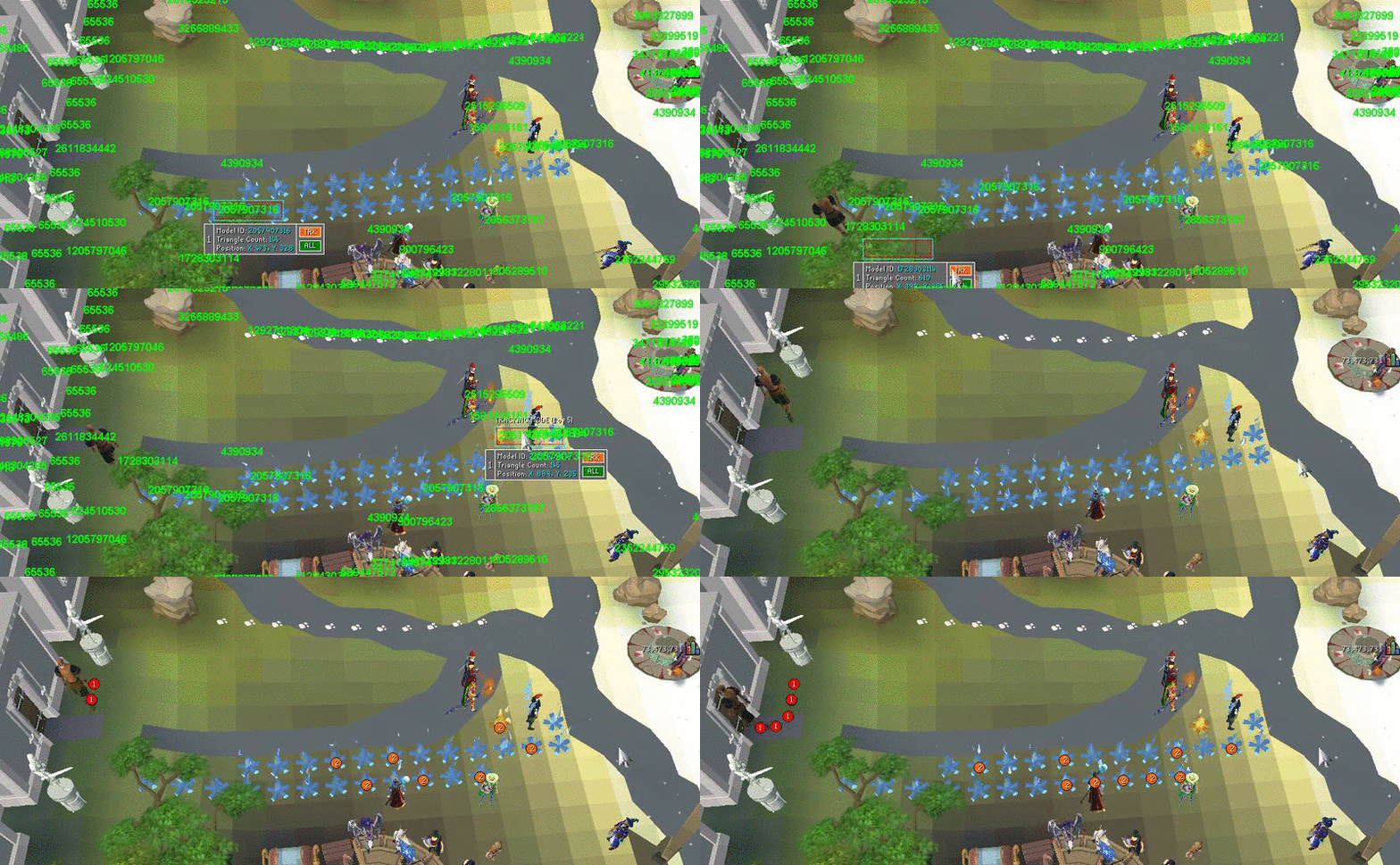
Features
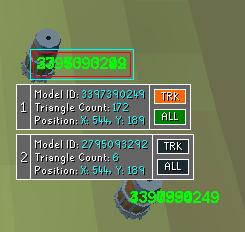
- Hover your mouse over any model, texture, or both to get their information.
- All information is debugged to the Simba console.
- Hold the SHIFT key to reveal all model or texture IDs within a stack, demonstrated in the second GIF.
- Change GLX debug modes with the TAB key.
- Supports Old School RS3 viewport.
- TRK button allows you to select up to five model IDs to track. Press CTRL to begin tracking, or it will start automatically when five are selected. Press CTRL again to stop tracking.
- ALL button will instantly highlight all models or textures of the same ID. Press CTRL to return to normal highlighting.
- Supports 4K or retina screen scaling. Enter your display scale percentage into the script options.
- Customize IDs for the tool to ignore, such as 65536.
- Customize the delay time between scans, as well as the mouse distance thresholds.
- Automatic pairing to your SMART window.


Direct Download: idHighlighting.simba (v2.0)
Alternatively, simply update ogLib to download the tool.

- Requires ogLib

Enjoy! :)

StickToTheScript

2015-05-25 20:52:22

Great work man! Totally plan on using this!

Thanks!

;)

Citrus

2015-05-25 20:57:47

This is huge! Totally clears one of the biggest roadblocks I was having with OGL.

Clarity

2015-05-25 21:28:06

From: evilcitrus
This is huge! Totally clears one of the biggest roadblocks I was having with OGL.


My pleasure! Let me know if you have any questions about using the tool.

Lucidity

2015-05-25 21:39:42

It's great, will definitely be using. TY

Clarity

2015-05-25 21:51:00

If anyone has ideas for more features, post here and I'll see about adding them!

Clutch

2015-05-25 21:57:16

From: Clarity
If anyone has ideas for more features, post here and I'll see about adding them!


Really wish I could test this out! Will definitely be using it when I get SMART up and running again.

Twinki

2015-05-26 10:18:38

I'd like to report @Clarity for this procedure:

procedure deleteSystem32();

He is haxing my system and I don't like it.

Naw, this should make debugging a lot simpler, thanks :)

Ross

2015-05-26 14:40:59

Can you give an option for client size so it can pair with the currently open smart?

Obscurity

2015-05-26 15:46:19

It'll pair even if the client sizes differ.

Ross

2015-05-26 19:09:13

From: Obscurity
It'll pair even if the client sizes differ.


Interesting, it always spawns a new SMART for me. Maybe I need to update ogLib.

Clarity

2015-05-26 21:09:51

From: Ross
Interesting, it always spawns a new SMART for me. Maybe I need to update ogLib.

That happens to me occasionally with SRL-6 as well, I've found that Simba will always pair to the randomly spawned SMART thereafter, so I close the old one and use the new. But yeah, this shouldn't be happening. Been using this tool for many hours!

Thomas

2015-06-02 16:44:56

Can you add stack support for textures aswell?

Ross

2015-06-02 19:28:40

Also another cool feature would be the ability to specify a texture/model for the tool to highlight so you can see where they're located and get more info.

Krzysztof

2015-06-05 17:10:23

McClarity - I'm lovin' it!

But watch out, if you're not careful while using this awesomesauce of a tool, your System32 might get deleted!