Clarity
2015-05-02 12:27:01
SRL-6 RS Messaging System
Version 1.0
This utility include file, when set up properly, will allow you to receive and respond to in-game PMs while your scripts are running via smartphone. You can also speak in public chat, remotely shut down your script, or log out. I am also working on screenshots of SMART being sent to your phone.
Example in action:
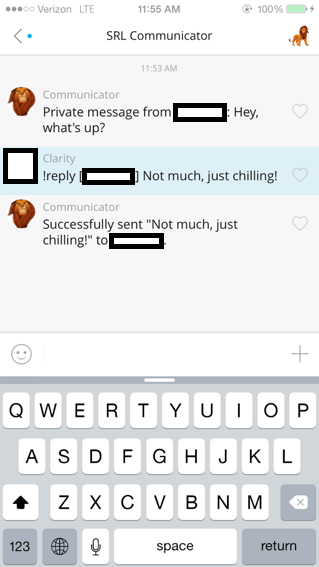
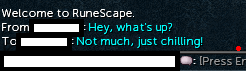
Supported Commands:
!reply [Username] Message
!reply [Public] Message
!logout
!terminate
More commands will be added soon :)
Setup Instructions:
You will need to have a web server with mySQL and PHP support. If you do not have this, I am happy to provide a mySQL table for you from my own!
These scripts assume a mySQL table (titled "Communicator") layout like so:
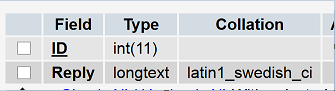
Here are the PHP scripts I used. I'm a PHP novice, so I'm sure there are better/more optimal ways of doing this, but it worked for me so I was satisfied. I welcome any feedback.
[spoiler=PHP Script - GroupMe Handler]
[PHP]<?php
# Based on a script by Sha1Sum, modified by Clarity
class GroupMeBot {
public $group, $id, $user_id, $group_id;
public function __construct($id) {
$this->id = $id;
}
public function post($message) {
$post_text = utf8_encode($message);
$ch = curl_init();
$post_contents = array(
'bot_id' => $this->id,
'text' => $post_text,
);
$post = json_encode($post_contents);
$arr = array();
array_push($arr, 'Content-Type: application/json; charset=utf-8');
curl_setopt($ch, CURLOPT_HTTPHEADER, $arr);
curl_setopt($ch, CURLOPT_URL, 'https://api.groupme.com/v3/bots/post');
curl_setopt($ch, CURLOPT_POST, true);
curl_setopt($ch, CURLOPT_POSTFIELDS, $post);
curl_exec($ch);
curl_close($ch);
}
}
$bot = new GroupMeBot('Your GroupMe Bot ID Here');
$msg_json = file_get_contents('php://input');
$msg = json_decode($msg_json);
$user_id = $msg->user_id;
$group_id = $msg->group_id;
$inquirer_name = $msg->name;
$from = $msg->name;
$text = $msg->text;
if (!substr($text, 0, 1) == '!')
exit();
$available_keywords = array(
'reply',
'logout',
'terminate'
);
$no_trigger = strtolower(substr($text, 1));
$unstripped_keywords = explode(' ', $no_trigger);
$keywords = array();
foreach ($unstripped_keywords as $keyword) {
$keywords[] = trim($keyword, ' ,');
}
if (in_array('reply', $keywords) || in_array('logout', $keywords) || in_array('terminate', $keywords)) {
$username = "mySQL username";
$password = "mySQL password";
$database = "mySQL database";
$server = "mySQL server address";
$db_handle = mysql_connect($server, $username, $password);
$db_found = mysql_select_db($database, $db_handle);
if ($db_found) {
$SQL = "SELECT * FROM Communicator WHERE ID = 1";
$result = mysql_query($SQL);
if($result){
$SQL = "UPDATE `Communicator` SET `Reply` = '".$text."' WHERE `ID` = 1";
$result = mysql_query($SQL);
if($result)
print "Success - command added.";
else
print "Failure - command was not added.";
}
}
}
?>
[/PHP]
[/spoiler]
[spoiler=PHP Script - Reply]
[PHP]
<?php
$username = "mySQL username";
$password = "mySQL password";
$database = "mySQL database";
$server = "mySQL server address";
$db_handle = mysql_connect($server, $username, $password);
$db_found = mysql_select_db($database, $db_handle);
if ($db_found) {
$SQL = "SELECT * FROM Communicator WHERE ID = 1";
$result = mysql_query($SQL);
if($result){
while ($db_field = mysql_fetch_assoc($result)){
$reply = $db_field['Reply'];
}
if($result)
print "$reply";
else
print "Failure.";
}
}
?>
[/PHP]
[/spoiler]
[spoiler=PHP Script - Clear]
[PHP]
<?php
$username = "mySQL username";
$password = "mySQL password";
$database = "mySQL database";
$server = "mySQL server address";
$db_handle = mysql_connect($server, $username, $password);
$db_found = mysql_select_db($database, $db_handle);
if ($db_found) {
$SQL = "SELECT * FROM Communicator WHERE ID = 1";
$result = mysql_query($SQL);
if($result){
$SQL = "UPDATE `Communicator` SET `Reply` = '".$command."' WHERE `ID` = 1";
$result = mysql_query($SQL);
if($result)
print "Success - commands cleared.";
else
print "Failure - commands were not cleared.";
}
}
?>
[/PHP]
[/spoiler]
- Download the free app GroupMe (https://groupme.com/) for your smartphone. This can also be used on a computer via https://app.groupme.com/signin.
- Create a new group chat titled "SRL Communicator" or something similar.
- Navigate to https://dev.groupme.com/bots and follow the steps to create a bot, selecting your new group chat as the bot's residency.
- Place the three PHP scripts somewhere where Simba and GroupMe will be able to access them.
- Set the Callback URL as your PHP GroupMe handler script location on your server.
- Remember your Bot ID, and place it inside the first script (GroupMe Handler) as indicated.
- Download the Communicator include.
- Use the test script below to try it out! Have a conversation with an alternate account of yours :)
program communicatorTest;

{$DEFINE SMART}
{$i srl-6/srl.simba}
{$i srl-6/lib/misc/communicator.simba}

begin
  smartEnableDrawing := True;
  setupSRL();

  communicator.setup(10,                                 //No. of lines to scan
    '<Your GroupMe Bot ID Here>',                        //BotID
    'http://www.srlclarity.com/communicator/reply.php',  //ReplyPHPScriptURL
    'http://www.srlclarity.com/communicator/clear.php'); //ClearPHPScriptURL

  repeat
    communicator.updateGroupMe();
    communicator.processCommands();
    wait(random(5000, 10000));
  until false;

end.
Include Download: [ATTACH]25771[/ATTACH]
Enjoy! Please help me make this better by reporting any bugs or issues :)
Credits:
@Justin for helping me test PMing on him all night.


