Clarity
2015-03-28 03:45:52
by @Clarity and @Obscurity
Last updated on November 30th, 2015
GLX v3.7 | ogLib v1.0a | ogLib Development | Beginner's Tutorial | ID Highlight Tool
What is OpenGL Scripting?
[INDENT]
Like injection, reflection, and color, OpenGL scripting is yet another alternative method of creating RS3 macro programs. After reading this tutorial, you will be able to create powerful and flawless scripts, capable of complex tasks usually discarded as too difficult for color only. Pending an ogLib update to support SRL-6, You will also learn how to incorporate both color and OpenGL methods into your scripts, combining the two scripting approaches to get the best of both worlds.
Without going into unnecessary detail, OpenGL allows us to examine the information being sent to your computer's graphics card, giving information on models, textures, chars, and more. We can script in resizable mode, easily interact with environments regardless of camera angle, and even get perfectly accurate player minimap and 3D world locations. It is not without its flaws, however, when used correctly and cleverly, OpenGL can accomplish some awesome things!
It is highly recommended to first familiarize yourself with SRL-6 scripting before learning OpenGL, as the combined information will give you many more creative options. This tutorial assumes basic understanding of Lape and beginner SRL-6 scripting concepts. If you have any questions, feel free to post.
[/INDENT]
Table of Contents
- Part 1: [jumpto=01]Setting up OpenGL[/jumpto]
- Part 2: [jumpto=2]OpenGL Data Types[/jumpto]
- Part 3: [jumpto=3]Spawning and Saving SMART with OpenGL[/jumpto]
- [jumpto=31]Script 3.1[/jumpto] - Setup
- Part 4: [jumpto=4]Retrieving Chars, Textures, and Models[/jumpto]
- [jumpto=41]Script 4.1[/jumpto] - Retrieval methods
- [jumpto=42]Script 4.2[/jumpto] - Visual client debugging
- Part 5: [jumpto=5]Basic Scripting with OpenGL[/jumpto]
- [jumpto=51]Script 5.1[/jumpto] - Setup
- [jumpto=52]Script 5.2[/jumpto] - Debugging models (basic)
- [jumpto=53]Script 5.3[/jumpto] - Locating models
- [jumpto=54]Script 5.4[/jumpto] - Interacting with models
- [jumpto=55]Script 5.5[/jumpto] - Debugging models (advanced)
- [jumpto=56]Script 5.6[/jumpto] - Extracting models
- [jumpto=57]Script 5.7[/jumpto] - Delaying reactions
- [jumpto=58]Script 5.8[/jumpto] - Using multiple reactions
- [jumpto=59]Script 5.9[/jumpto] - Debugging textures
- [jumpto=510]Script 5.10[/jumpto] - Interacting with textures
- Part 6: [jumpto=6]ogLib Development Thread[/jumpto]
- Part 7: [jumpto=7]Conclusion[/jumpto]
[anchor=01]Part 1 :: Setting up OpenGL[/anchor]
[INDENT]
OpenGL scripting and program execution requires some modified dynamic link libraries (.DLLs) for RS3 and Simba to use. Additionally, we use a different set of includes (ogLib) to develop OpenGL scripts. This library currently supports RS3 - EoC only.
Automatic Installation
Download ProSocks.dll and place it into Simba\Plugins\
Download [ATTACH]27083[/ATTACH] and place it into Simba\Scripts\. Open and run the script.
Manual Installation
Download the OpenGL32.dll and GLX.dll plugins, developed by @Brandon, here: GLX v3.7
Download the ogLib includes, a library designed and developed by @Clarity and @Obscurity, here: ogLib v1.0a
Note that ogLib is an ongoing project, and contributions are welcomed! Some elements have yet to be added, such as in-depth mouse movement and SRL-6 compatibility. We are tackling the priority elements first, such as interfaces, mapping, and combat.
Once you have extracted the contents, copy OpenGL32.dll and GLX.dll into your C:\…\Simba\Plugins\ directory. Next, copy the ogLib\ folder into your C:\…\Simba\Includes\ directory. It's that simple!
[/INDENT]
[anchor=2]Part 2 :: OpenGL Data Types[/anchor]
[INDENT]
Before we go any further, you've got to know the basics of OpenGL and the various data types. Unique to OpenGL, these types are:
- glChar / glCharArray - {TEXTUREID = 0, COLOUR = 0, X = 0, Y = 0, LETTER = , SHADOW = False, TRANSLATE = [0, 0, 0], BOUNDS = {X1 = 0, Y1 = 0, X2 = 0, Y2 = 0}} Description: Each and every character on screen, be it a letter, number, or special character, may be viewed as a glChar. The glChar record contains vital information regarding each character; Things like color, font, and location on screen. Record:
- TextureID: Think of a character's texture ID as its font. Much like Comic Sans MS, for example, a right click menu typically uses the fonts 17 and 91.
- Colour: This property simply contains the colour of the character. The orange colour from hovering over a chat option, for example, is 37083.
- X / Y: The position at which a character can be found on screen can be viewed in its X and Y properties. This coordinate is to the center-point of the character.
- Letter: This is likely the most important property of a glChar. Letter contains the character which was found. This will always be a single character and could consist of any alphanumeric or special character.
- Shadow: The shadow property, which is very rarely true, is quite simply whether or not the text contains a shadow. Although some text appears to have a shadow, it may not. Take the following image for example:
- Bounds: The bounds of a glChar simply contain the coordinates of each corner. Calculating the center-point of them would result in the glChar's X / Y, as mentioned earlier.
- glModel / glModelArray - {ID = 0, TID = 0, X = 0, Y = 0} Description: For the most part, it's fairly safe to assume that any 3D object or any item that appears in the 3D plane of RuneScape is a glModel; From players, to monsters, to target reticles, to the animated flag shown on screen while waiting for a Pest Control game to start. They're all models. Record:
- ID: Each model in RuneScape has an ID. These typically tend to remain constant. For example, it's fairly safe to assume that if you check and see that a Rorarius has an ID of 3227299924, it'll always have that ID.
- TID: A model's triangle count. Essentially, it should "technically" be "almost" as accurate as the ID.
- X / Y: The position at which a model can be found on screen can be viewed in its X and Y properties. Keep in mind that if drawn on the 3D plane, the model's X and Y will be located at the base of the model. Take the following image for example:
- glTexture / glTextureArray - {ID = 0, ColourID = 0, FullColourID = 0, X = 0, Y = 0, BOUNDS = {X1 = 0, Y1 = 0, X2 = 0, Y2 = 0}} Description: Almost everything that seems 2D in RuneScape can be retrieved as a glTexture. These are most often used for buttons, icons, interfaces, inventory items, equipped items, abilities, and anything in-between. Record:
- ID: glTextures, like glModels, always have an ID. However, this ID is rarely unique, making relying on solely this property for locating items and objects unreliable. For example, different potion flasks, summoning pouches, runes, tend to share a texture ID. Take the following GIF for example:
- ColourID: As mentioned before, textures can share a TextureID. To distinguish between these textures, we often use the ColourID. For now, lets just call it a summary of all colours within the texture.
- X / Y: The position at which a texture can be found on screen can be viewed in its X and Y properties. This is coordinate is the center-point of the texture.
- Bounds: The bounds of a glTexture simply contain the coordinates of each corner. Calculating the center-point of them would result in the glTexture's X / Y, as mentioned earlier.
 Surely each one of those characters has a black shadow? This is incorrect. While they appear to have shadows, it's simply a 200 drawn ontop of a slightly offset, black 200. Therefore, the total number of characters in the image is 6.
 In this case, the model's X and Y is positioned at the base of the player near the feet.
 Here we can see that a Super restore (6) shares a texture ID with an Overload flask (1).
[anchor=3]Part 3 :: Spawning and Saving SMART with ogLib[/anchor]
[INDENT]
Before we do anything requiring OpenGL, you need to spawn a SMART client with the OpenGL plugin. To do this, you have to setup ogLib using ogl.setup(). See the sample [anchor=31]Script 3.1[/anchor] below:
program ogLib;
{$i ogLib\lib\core\core.simba}

begin
  ogl.setup([800, 600], [0, 0, 800, 600]);
end.
Client Size vs. Viewport Size
The client size is the size of the entire RuneScape game within the SMART client. This is commonly 800x600. The viewport is the size of the 3D world within RuneScape, usually referred to in SRL-6 terms as the mainscreen. For accurate model positioning to work, you need to ensure your viewport is correctly set with ogLib. If you do not do this, debugged model IDs will be vastly offset from their actual positions. If using resizable mode without any special alterations, your viewport will match the client size. The following images demonstrate this concept:
[SPOILER=Understanding Viewport Sizes]
 [/spoiler]
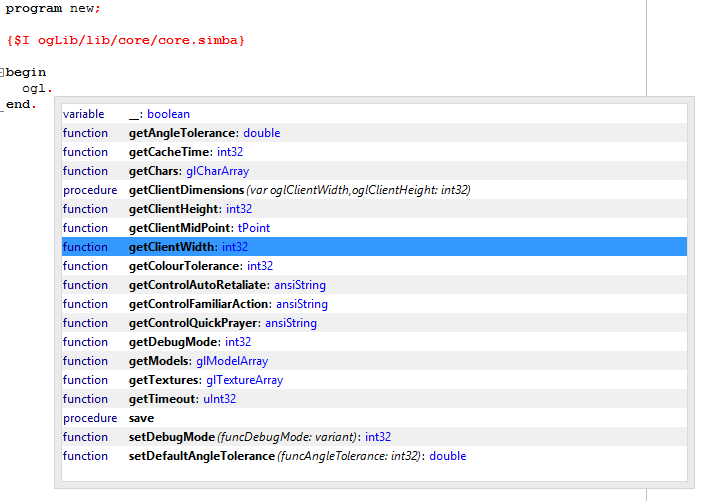
By default, ogLib assumes 800x600 client dimensions, and a viewport of the same size (resizable mode). These default values can be more easily called by simply writing ogl.setup() without any parameters. The default values can be changed using ogl.setDefaultClientHeight() and ogl.setDefaultClientWidth(). When ogLib is set up, it loads the default cache time, color tolerance, controls - auto-retaliate, familiar action, quick heal, quick prayer, and size, if needed. These can be changed with ogl.setDefaultCacheTime(), ogl.setDefaultControlAutoRetaliate(), et cetera.
To save all of the current SMART's parameters, mentioned above, as defaults, use ogl.save().
[/INDENT]
[anchor=4]Part 4 :: Retrieving Chars, Models, and Textures[/anchor]
[INDENT]
What makes OpenGL and ogLib so powerful is their ability to instantly locate chars, models, and textures on the screen. Or, equally important, it can be used to tell you if something is not present on the screen. To do this, we have the vital methods ogl.getChars(), ogl.getModels(), and ogl.getTextures().
Each of the above methods can be used to find their respective types on the screen. See the sample [anchor=41]Script 4.1[/anchor] below.
program ogLib;
{$i ogLib\lib\core\core.simba}

procedure mainLoop;
var
  textureArray: glTextureArray;
begin
  textureArray := ogl.getTextures(1275);
  writeln(textureArray);
end;

begin
  ogl.setup([800, 600], [0, 0, 800, 600]);
  repeat
    mainLoop;
  until false;
end.
In the example above, 1275 is the texture ID of the red flag that appears whenever a player is moving or beginning an interaction with a game object. You can also get every char, model, or texture currently on the screen by not using any limiting search parameter. A returned texture array might look something like this:
[{ID = 33556, COLOURID = 2432529, FULLCOLOURID = 2630421, X = 912, Y = 528, BOUNDS = {X1 = 0, Y1 = 0, X2 = 1824, Y2 = 1057}},
{ID = 57120, COLOURID = 2894355, FULLCOLOURID = 2631441, X = 912, Y = 457, BOUNDS = {X1 = 884, Y1 = 455, X2 = 940, Y2 = 460}}]
To visually debug texture and model IDs, you can use the ID Highlighting Tool. Or, you can use ogLib's debug functions, shown in the sample [anchor=42]Script 4.2[/anchor] below:
program ogLib;
{$i ogLib\lib\core\core.simba}

begin
  ogl.setup([800, 600], [0, 0, 800, 600]);

  ogl.setDebugMode('none');
  ogl.setDebugMode('texture');
  ogl.setDebugMode('model');
  ogl.setDebugMode('font');

  ogl.setDebugMode('nones');
  ogl.setDebugMode('textures');
  ogl.setDebugMode('models');
  ogl.setDebugMode('fonts');

  ogl.setDebugMode('N');
  ogl.setDebugMode('T');
  ogl.setDebugMode('M');
  ogl.setDebugMode('F');

  ogl.setDebugMode(0);
  ogl.setDebugMode(1);
  ogl.setDebugMode(2);
  ogl.setDebugMode(3);
end.
ogl.setDebugMode() is very flexible in what it accepts: if you want to debug onscreen models, you can use ogl.setDebugMode('models'), ogl.setDebugMode('M'), or ogl.setDebugMode(2), whichever you find more convenient! Doing so will cause these IDs to appear on SMART's debug:
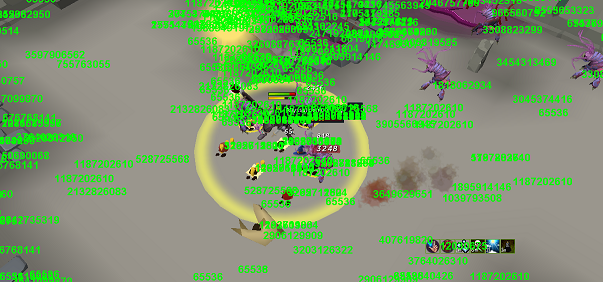
Depending on your screen resolution, the green ID numbers may appear differently. Use ingame zooming and camera movement to see the numbers more clearly if needed. If too many models are stacked on top of each other, you will need to use text debugging methods such as writeln(ogl.getModels()).
[/INDENT]
[anchor=5]Part 5 :: Basic Scripting with OpenGL[/anchor]
[INDENT=1]
To start off with, scripting with OpenGL can be much different then using colour. Before continuing, we highly recommend reading @Kevin's thread on Function Pointers, as we'll be touching on it a lot throughout this tutorial. His methods are fantastic when used with OpenGL.
So, let's make our first very basic auto-fighter. For learning's sake, head to the Troll Brutes in Burthorpe.
- Step 1 - Starting the OpenGL plugin To start using the OpenGL plugin, we need to create a basic script, beginning with our basic setup call mentioned earlier. [anchor=51][/anchor][SPOILER=Script 5.1]
program ogLib;
{$i ogLib\lib\core\core.simba}
begin
ogl.setup([800, 600], [0, 0, 800, 600]);
end. [/SPOILER]
program ogLib;
{$i ogLib\lib\core\core.simba}
begin
ogl.setup([800, 600], [0, 0, 800, 600]);
ogl.setDebugMode('models');
end. [/SPOILER]
program ogLib;
{$i ogLib\lib\core\core.simba}

procedure mainLoop;
var
  trollBrutes: glModelArray;
begin
  trollBrutes := ogl.getModels(403123861);
  clearDebug;
  if trollBrutes.isEmpty() then
    writeln('No troll brutes were found.')
  else
  begin
    writeln(trollBrutes.indexes(),' troll brutes were found:');
    writeln(trollBrutes);
  end;
  wait(150);
end;

begin
  ogl.setup([800, 600], [0, 0, 800, 600]);
  ogl.setDebugMode('models');
  repeat
    mainLoop;
  until false;
end.8 Troll brutes found:
[{ID = 403123861, TID = 706, X = 658, Y = 670}, {ID = 403123861, TID = 706, X = -20, Y = 414}, {ID = 403123861, TID = 706, X = 352, Y = 348}, {ID = 403123861, TID = 706, X = 629, Y = 364}, {ID = 403123861, TID = 706, X = 367, Y = 207}, {ID = 403123861, TID = 706, X = 261, Y = 184}, {ID = 403123861, TID = 706, X = 301, Y = 151}, {ID = 403123861, TID = 706, X = 278, Y = 133}]program ogLib;
{$i ogLib\lib\core\core.simba}
procedure mainLoop;
var
trollBrutes: glModelArray;
begin
trollBrutes := ogl.getModels(403123861);
clearDebug;
if trollBrutes.isEmpty() then
writeln('No troll brutes were found.')
else
mouse.click(clientCenter.closest(trollBrutes)[0].randomizePointEllipse(15));
wait(random(1000, 2000));
end;
begin
ogl.setup([800, 600], [0, 0, 800, 600]);
clientCenter := ogl.getClientMidPoint();
repeat
mainLoop;
until false;
end.- Red: Target.
- Red and Yellow: Retaliating target.
- Yellow: Aggressive monster.
 [/SPOILER]
Therefore, we need to resort to the debug window and use ogl.getModels() to its full potential - retrieving all models on screen. As you can see from Figure 2.3, there can be thousands of models on screen, so attempt to zoom in to narrow the search as much as possible and edit the script.
[anchor=55][/anchor][SPOILER=Script 5.5]
[/SPOILER]
Therefore, we need to resort to the debug window and use ogl.getModels() to its full potential - retrieving all models on screen. As you can see from Figure 2.3, there can be thousands of models on screen, so attempt to zoom in to narrow the search as much as possible and edit the script.
[anchor=55][/anchor][SPOILER=Script 5.5]program ogLib;
{$i ogLib\lib\core\core.simba}
var
clientCenter: TPoint;
procedure mainLoop;
var
allModels, trollBrutes: glModelArray;
begin
allModels := ogl.getModels();
clearDebug;
writeln(allModels);
wait(250);
{
trollBrutes := ogl.getModels(403123861);
if trollBrutes.isEmpty() then
writeln('No Troll brutes found.')
else
mouse.click(clientCenter.closest(trollBrutes)[0].randomizePointEllipse(15));
wait(random(1000, 2000));
}
end;
begin
ogl.setup([800, 600], [0, 0, 800, 600]);
clientCenter := ogl.getClientMidPoint();
repeat
mainLoop;
until false;
end. [/SPOILER]
If done correctly, your debug window should contain something similar to the following figure. Copy the contents into Notepad or any text editor.
[SPOILER=Figure 5.5]
[/SPOILER]
If done correctly, your debug window should contain something similar to the following figure. Copy the contents into Notepad or any text editor.
[SPOILER=Figure 5.5][{ID = 487932993, TID = 107, X = -197, Y = 669}, {ID = 208265157, TID = 84, X = -28, Y = 591}, {ID = 528332493, TID = 195, X = 780, Y = 695}, {ID = 2410841246, TID = 121, X = 539, Y = 603}, {ID = 3258171939, TID = 53, X = 249, Y = 597}, {ID = 3587280739, TID = 248, X = 798, Y = 462}, {ID = 4105139511, TID = 59, X = 265, Y = 452}, {ID = 545440014, TID = 60, X = 277, Y = 326}, {ID = 403123861, TID = 706, X = -87, Y = 141}, {ID = 3097012422, TID = 135, X = 239, Y = 173}, {ID = 545440014, TID = 45, X = 93, Y = 135}, {ID = 4105139511, TID = 59, X = -1, Y = 143}, {ID = 2477500689, TID = 49, X = -68, Y = 66}, {ID = 427589626, TID = 80, X = 687, Y = 90}, {ID = 1580736461, TID = 57, X = 4, Y = -1}, {ID = 4105139511, TID = 29, X = 853, Y = 20}, {ID = 2297058922, TID = 62, X = 323, Y = -58}, {ID = 528332493, TID = 130, X = 450, Y = -72}, {ID = 1279548371, TID = 49, X = 827, Y = -36}, {ID = 0, TID = 0, X = 0, Y = 0}, {ID = 0, TID = 0, X = 2821, Y = -1545}, {ID = 403123861, TID = 706, X = 520, Y = 336}, {ID = 1452224228, TID = 21, X = 520, Y = 336}, {ID = 1212609603, TID = 1444, X = 400, Y = 331}, {ID = 2209194569, TID = 18, X = 45, Y = -122}, {ID = 0, TID = 0, X = -2278, Y = -5033}]program ogLib;
{$i ogLib\lib\core\core.simba}
var
allModels, targetReticules, trollBrutes: glModelArray;
canAttack: tCountDown;
clientCenter: TPoint;
procedure mainLoop;
begin
allModels := ogl.getModels([1452224228,403123861]);
targetReticules := allModels.getModels(1452224228);
trollBrutes := allModels.getModels(403123861);
if trollBrutes.isEmpty() then
writeln('No Troll brutes found.')
else if targetReticules.isEmpty() then
mouse.click(clientCenter.closest(trollBrutes)[0].randomizePointEllipse(15));
end;
begin
ogl.setup([800, 600], [0, 0, 800, 600]);
clientCenter := ogl.getClientMidPoint();
repeat
mainLoop;
until false;
end. program ogLib;
{$i ogLib\lib\core\core.simba}
var
allModels, targetReticules, trollBrutes: glModelArray;
canAttack: tCountDown;
clientCenter: TPoint;
procedure attackTrollBrute;
begin
mouse.click(clientCenter.closest(trollBrutes)[0].randomizePointEllipse(15));
canAttack.setTime(random(250, 1500));
end;
procedure doNothing;
begin
writeln('We did nothing!');
end;
procedure mainLoop;
var
reaction: procedure() = @doNothing;
begin
allModels := ogl.getModels([1452224228, 403123861]);
targetReticules := allModels.getModels(1452224228);
trollBrutes := allModels.getModels(403123861);
if trollBrutes.isEmpty() then
writeln('No Troll brutes found.')
else if targetReticules.isEmpty() and canAttack.isFinished() then
reaction := @attackTrollBrute;
reaction();
end;
begin
ogl.setup([800, 600], [0, 0, 800, 600]);
clientCenter := ogl.getClientMidPoint();
repeat
mainLoop;
until false;
end.program ogLib;
{$i ogLib\lib\core\core.simba}
var
allModels, targetReticules, trollBrutes: glModelArray;
canAttack: tCountDown;
clientCenter: TPoint;
procedure attackTrollBrute;
begin
mouse.click(clientCenter.closest(trollBrutes)[0].randomizePointEllipse(15));
canAttack.setTime(random(250, 1500));
end;
procedure doNothing;
begin
writeln('We did nothing!');
end;
procedure rotateCamera;
begin
minimap.setDegrees(random(45, 90));
end;
procedure mainLoop;
var
reaction: procedure() = @doNothing;
begin
allModels := ogl.getModels([1452224228,403123861]);
targetReticules := allModels.getModels(1452224228);
trollBrutes := allModels.getModels(403123861);
if trollBrutes.isEmpty() or clientCenter.closest(trollBrutes)[0].isVisible() then
reaction := @rotateCamera
else if targetReticules.isEmpty() and canAttack.isFinished() then
reaction := @attackTrollBrute;
reaction();
end;
begin
ogl.setup([800, 600], [0, 0, 800, 600]);
clientCenter := ogl.getClientMidPoint();
repeat
mainLoop;
until false;
end.program ogLib;
{$i ogLib\lib\core\core.simba}
var
allModels, targetReticules, trollBrutes: glModelArray;
canAttack: tCountDown;
clientCenter: TPoint;
procedure attackTrollBrute;
begin
mouse.click(clientCenter.closest(trollBrutes)[0].randomizePointEllipse(15));
canAttack.setTime(random(250, 1500));
end;
procedure doNothing;
begin
writeln('We did nothing!');
end;
procedure rotateCamera;
begin
minimap.setDegrees(random(45, 90));
end;
procedure mainLoop;
var
reaction: procedure() = @doNothing;
begin
allModels := ogl.getModels([1452224228,403123861]);
targetReticules := allModels.getModels(1452224228);
trollBrutes := allModels.getModels(403123861);
if trollBrutes.isEmpty() or not clientCenter.closest(trollBrutes)[0].isVisible() then
reaction := @rotateCamera
else if targetReticules.isEmpty() and canAttack.isFinished() then
reaction := @attackTrollBrute;
reaction();
end;
begin
ogl.setup(800, 600);
clientCenter := ogl.getClientMidPoint();
ogl.setDebugMode('textures');
{
repeat
mainLoop;
until false;
}
end. [/SPOILER]
From this, we can see that Bones, while in the inventory, have a texture ID of 52275.
[/SPOILER]
From this, we can see that Bones, while in the inventory, have a texture ID of 52275.
program ogLib;
{$i ogLib\lib\core\core.simba}

var
  allModels, bonesModels, targetReticules, trollBrutes: glModelArray;
  bonesTextures: glTextureArray;
  canAttackTrollBrute, canBuryBones, canTakeBones: tCountDown;
  clientCenter: TPoint;

procedure attackTrollBrute;
var
  clickPoint: TPoint;
begin
  clickPoint := clientCenter.closest(trollBrutes)[0].randomizePointEllipse(15);
  if random(2) then
    mouse.click(clickPoint)
  else
    mouse.rightClickOption(clickPoint, 'Attack');
  canAttackTrollBrute.setTime(random(1000, 5000));
  canTakeBones.setTime(random(1000, 5000));
end;

procedure buryBones;
var
  clickPoint: TPoint;
begin
  clickPoint := mouse.getPoint().closest(bonesTextures)[0].randomizePointEllipse(36);
  if random(2) then
    mouse.click(clickPoint)
  else
    mouse.rightClickOption(clickPoint, 'Bury');
  canBuryBones.setTime(random(250, 1500));
end;

procedure doNothing;
begin
  writeln('We did nothing!');
end;

procedure rotateCamera;
begin
  minimap.setDegrees(random(45, 90));
end;

procedure takeBones;
var
  clickPoint: TPoint;
begin
  clickPoint := clientCenter.closest(bonesModels)[0].randomizePointEllipse(15);
  mouse.rightClickOption(clickPoint, 'Take Bones');
  canTakeBones.setTime(random(1000, 5000));
  canAttackTrollBrute.setTime(random(1000, 5000));
end;

procedure mainLoop;
var
  reaction: procedure() = @doNothing;
begin
  allModels := ogl.getModels([1452224228, 2406257549, 403123861]);
  bonesModels := allModels.getModels(2406257549);
  targetReticules := allModels.getModels(1452224228);
  trollBrutes := allModels.getModels(403123861);

  bonesTextures := ogl.getTextures(52275);

  if (not bonesTextures.isEmpty()) and canBuryBones.isFinished() then
    reaction := @buryBones
  else if (not bonesModels.isEmpty()) and canTakeBones.isFinished() then
    reaction := @takeBones
  else if trollBrutes.isEmpty() or not clientCenter.closest(trollBrutes)[0].isVisible() then
    reaction := @rotateCamera
  else if targetReticules.isEmpty() and canAttackTrollBrute.isFinished() then
    reaction := @attackTrollBrute;

  reaction();
end;

begin
  ogl.setup(800, 600);
  clientCenter := ogl.getClientMidPoint();
  repeat
    mainLoop;
  until false;
end.[anchor=6]Part 6 :: ogLib Development Thread[/anchor]
[INDENT]The official development thread for ogLib can be found here: ogLib Development. This thread will serve as a reference for the continuing improvement and development of ogLib. Any questions or suggestions regarding development should be posted there - any educational questions related to using the library should be posted on this tutorial thread!
[/INDENT]
[anchor=7]Part 7 :: Conclusion[/anchor]
[INDENT]
We hope that you have as much fun trying your hand at OpenGL as we have! As said before, the ogLib project is a work in progress. Updates to the plugins themselves, as well as to ogLib, are under way to allow even more capabilities within the 3D world. This tutorial's function list will be maintained with the latest changes. Eventually, we plan to have an include library as comprehensive and complete as SRL-6. Feel free to offer your thoughts on the thread!
ogLib GitHub: https://github.com/ObscuritySRL/ogLib
[/INDENT]
Best of luck with your botting endeavors!
Clarity & Obscurity
Clarity & Obscurity