SRL Archive - General Botting Help

PlayerForm help


GTFO_Jagex

2015-01-04 09:06:32

Can anyone explain what's wrong , I tried following https://villavu.com/forum/showthread.php?t=107572&highlight=srl+playerform+guide this guide but everything i try seem to cause an error

procedure declarePlayers();
var
i: integer;
begin
players.setup(playerForm.players); // load the SPF players from the SRL Player Manager
currentPlayer := 0; // player to use first

// set player attributes based on the settings from the form
for i := 0 to high(players) do
with players[i] do
begin
// convert the integers
integers[0] := strToInt(playerForm.players[i].settings[0]);
integers[1] := strToInt(playerForm.players[i].settings[1]);
integers[2] := strToInt(playerForm.players[i].settings[2]);

// booleans
booleans[0] := strToBool(playerForm.players[i].settings[4]);

end;
end;

procedure initPlayerForm();
begin
with playerForm do
begin
name := 'SRL Player Form ~ Test'; // the title of the SPF, usually the name of your script
scriptHelpThread := ''; // a link to a help thread, if set to '' will link to my setup guide

editBoxLabels := ['Minutes to run', 'Minutes before breaking', 'Logs to burn']; // edit boxes are created for each array element
editBoxDefaults := ['80', '5', '1000']; // optional default values for each edit box; array length must equal editBoxLabel length

checkBoxLabels := ['Find Spirit?']; // same as editBoxLabels but for check boxes
checkBoxDefaults := ['False'];


end;
end;

GTFO_Jagex

2015-01-04 11:04:50

bump

Harrier

2015-01-04 11:37:36

From: GTFO_Jagex
bump

You only posted this 2 hours ago…

Turpinator

2015-01-04 12:31:30


works fine for me.

err. rev 1040 of srl, lemme update just to make sure.

GTFO_Jagex

2015-01-04 12:44:32

From: Turpinator

works fine for me.

err. rev 1040 of srl, lemme update just to make sure.

Its like this for me

The Spark

2015-01-04 12:48:42

From: GTFO_Jagex

integers[0] := strToInt(playerForm.players[i].settings[0]);
integers[1] := strToInt(playerForm.players[i].settings[1]);
integers[2] := strToInt(playerForm.players[i].settings[2]);

// booleans
booleans[0] := strToBool(playerForm.players[i].settings[4]);


Pretty sure that last line has to be
 booleans[0] := strToBool(playerForm.players[i].settings[3]);
If you don't have that, the player form will still be able to load, but it won't be able to declare players.

Otherwise, just make sure you have
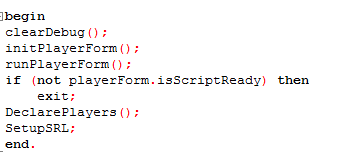
at the top of your script, and make sure the player form one goes after the SRL One, and then your main loop should look somethin like:

GTFO_Jagex

2015-01-04 12:53:31

From: The Spark
Pretty sure that last line has to be
 booleans[0] := strToBool(playerForm.players[i].settings[3]);
If you don't have that, the player form will still be able to load, but it won't be able to declare players.

Otherwise, just make sure you have
at the top of your script, and make sure the player form one goes after the SRL One, and then your main loop should look somethin like:

Still getting this
Error: "False" is an invalid integer at line 39


program SRLPlayerFormTest;
{$DEFINE SMART}
{$i srl-6/srl.simba}
{$i srl-6/lib/misc/srlplayerform.simba}

// initiates the SRL player form (you aren't restricted to the procedure name; it can be whatever you want)
procedure initPlayerForm();
begin
with playerForm do
begin
name := 'SRL Player Form ~ Test'; // the title of the SPF, usually the name of your script
scriptHelpThread := ''; // a link to a help thread, if set to '' will link to my setup guide

editBoxLabels := ['Minutes to run', 'Minutes before breaking', 'Logs to burn']; // edit boxes are created for each array element
editBoxDefaults := ['80', '5', '1000']; // optional default values for each edit box; array length must equal editBoxLabel length

checkBoxLabels := ['Find Spirit?']; // same as editBoxLabels but for check boxes
checkBoxDefaults := ['False'];


end;
end;

// again, not restricted to the procedure name, although it's recommended
procedure declarePlayers();
var
i: integer;
begin
players.setup(playerForm.players); // load the SPF players from the SRL Player Manager
currentPlayer := 0; // player to use first

// set player attributes based on the settings from the form
for i := 0 to high(players) do
with players[i] do
begin
// convert the integers
integers[0] := strToInt(playerForm.players[i].settings[0]);
integers[1] := strToInt(playerForm.players[i].settings[1]);
integers[2] := strToInt(playerForm.players[i].settings[2]);

// booleans
booleans[0] := strToBool(playerForm.players[i].settings[3]);

end;
end;

procedure debugSPFSettings();
var
i: integer;
begin
writeln('');

for i := 0 to high(players) do
begin
writeln('Minutes to run: ', players[i].integers[0]);
writeln('Logs to chop: ', players[i].integers[1]);
writeln('Minutes before breaking: ', players[i].integers[2]);
writeln('Hatchet Equipped: ', players[i].booleans[0]);

writeln('');
end;
end;

begin
clearDebug();

initPlayerForm(); // initiate your settings
runPlayerForm(); // run the form

// use this so the script doesn't continue if the user exits out of the form
if (not playerForm.isScriptReady) then
exit;

declarePlayers();
debugSPFSettings(); // this can be removed if you're satisfied with the result
//setupSRL();
end.

Turpinator

2015-01-04 13:03:25

From: GTFO_Jagex
Its like this for me


Why did you not post this from the start?


Force update on your SRL?
You may have a recalled version of the player form… (which was changed and accepted without the implications being considered)

GTFO_Jagex

2015-01-04 13:10:05

From: Turpinator
Why did you not post this from the start?


Force update on your SRL?
You may have a recalled version of the player form… (which was changed and accepted without the implications being considered)

Still the same :/
Can you post your playerform code here ?

Edit : Re-installed Simba , its fine now

Thanks for the help