The *Real* Way to get into Busy Worlds
Timothegreat
2007-06-01 23:20:15
This is my first tutorial!
THIS IS THE BEST WAY TO GET INTO BUSY WORLDS!!!!!!
NO WAIT WHATSOEVER!!!INSTANT ACCESS TO
LOADING WORLDS!!!!! :spot: :spot:
UPDATED TO FIX WORLD 3 AND 6 - JULY 12th, PLEASE RE-DOWNLOADRep I have recieved from this tutorial:
From: gsonic4000
greatly appreiciated ty
From: Shawn1533
this is a exeleent TUT and the pics are great
From: PingPong
Hehe nice guide! My days of waiting to get into a busy world are over! Officially!
If you want to add to my rep use this link:
http://www.srl-forums.com/forum/reputation.php?p=125519NOTE: You must have java for it to work in internet explorer
(works in firefox even if you dont have java (h) )
IF YOU WANT TO REQUEST A BUSY WORLD I WILL MAKE IT FOR YOU!
FIRST WAY (RECOMMENDED) *less time*
——————————————-
1. Save the attachment file onto your computer. (html files in a zip file)
2. Unzip and put them on your desktop or somewhere for easy access.
3. Open the world 1.html file to get into world 1, world 2.html for world 2 and so forth.
4. You are now ready to play :spot: :spot:
SECOND WAY *more time and hassle*
——————————
1. Open up notepad.
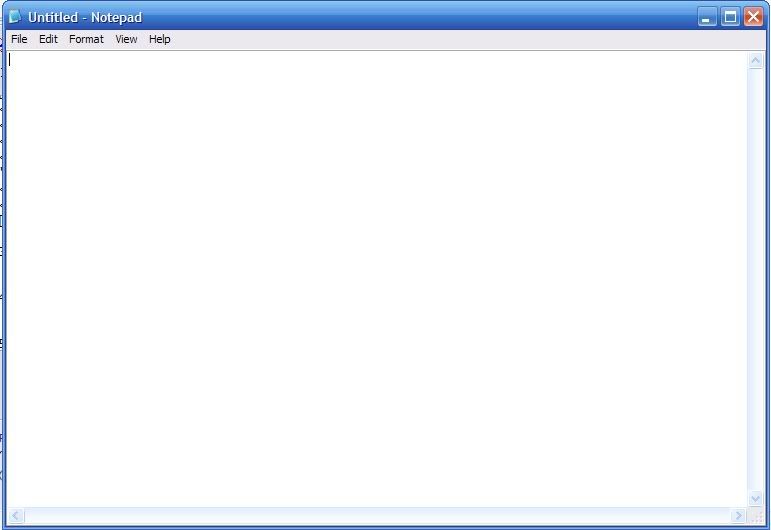
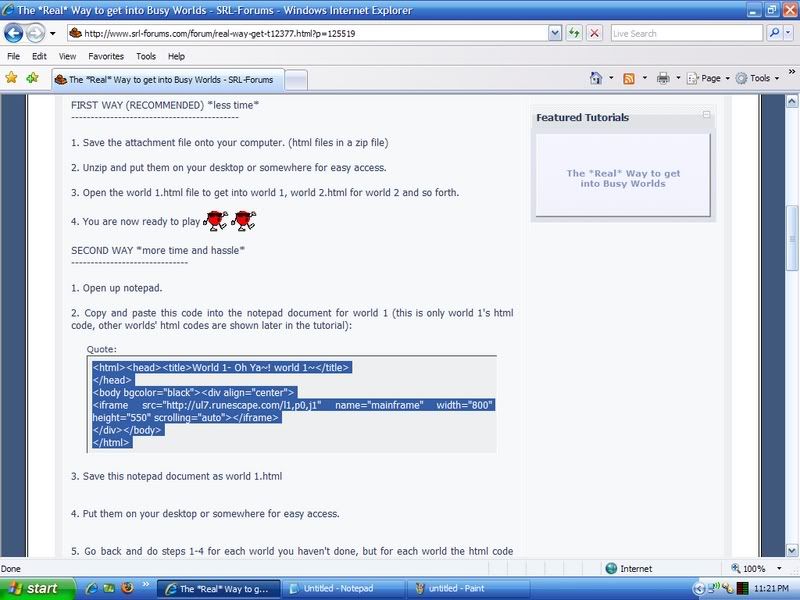
2. Copy and paste this code into the notepad document for world 1 (this is only world 1's html code, other worlds' html codes are shown later in the tutorial):
<html><head><title>World 1- Oh Ya~! world 1~</title>
</head>
<body bgcolor="black"><div align="center">
<iframe src="http://ul7.runescape.com/l1,p0,j1" name="mainframe" width="800" height="550" scrolling="auto"></iframe>
</div></body>
</html>
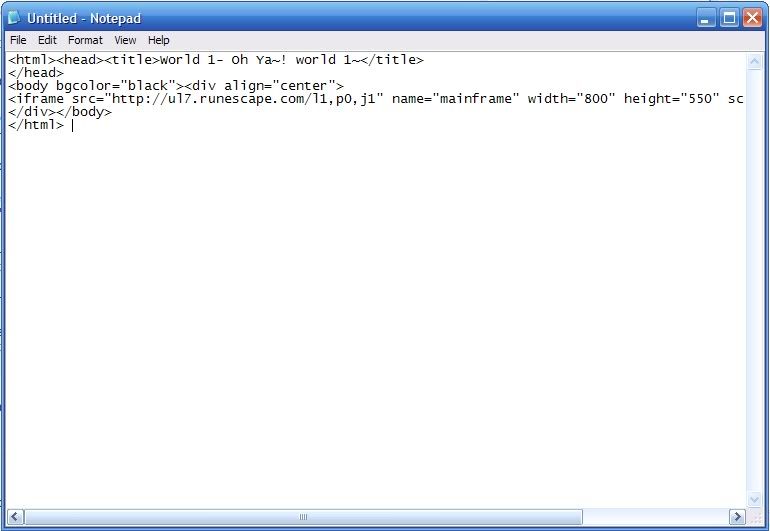
3. Save this notepad document as world 1.html (make sure you click all files)
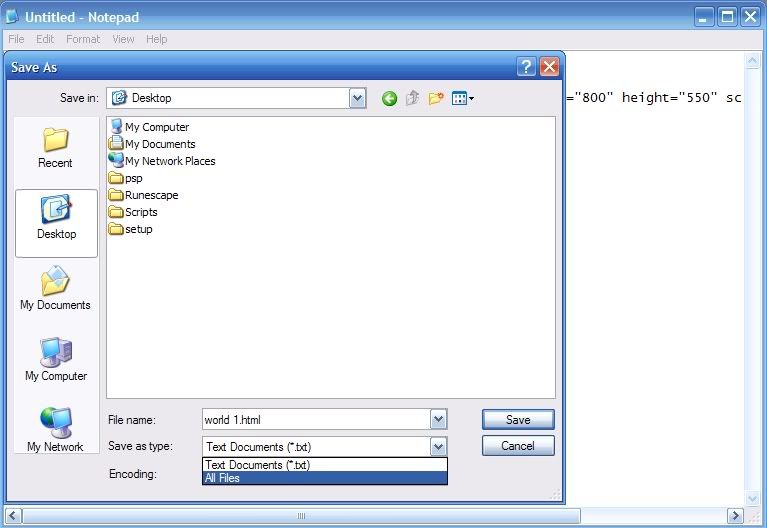
4. Put them on your desktop or somewhere for easy access.

5. Go back and do steps 1-4 for each world you haven't done, but for each world the html code (posted further down) is different (obviously)
6. Open the world 1.html file to get into world 1, world 2.html for world 2 and so forth.
(I EXPLORER USERS):just double click on it.
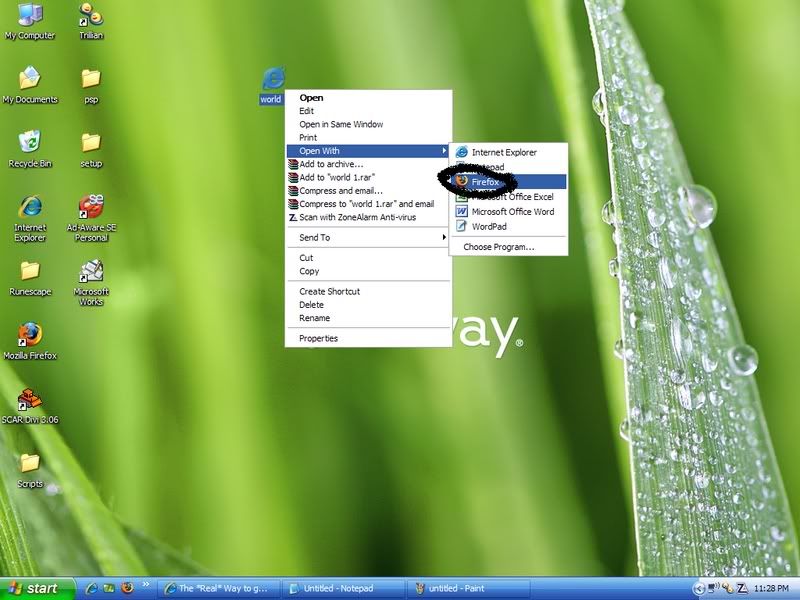
(FIREFOX USERS): see below.
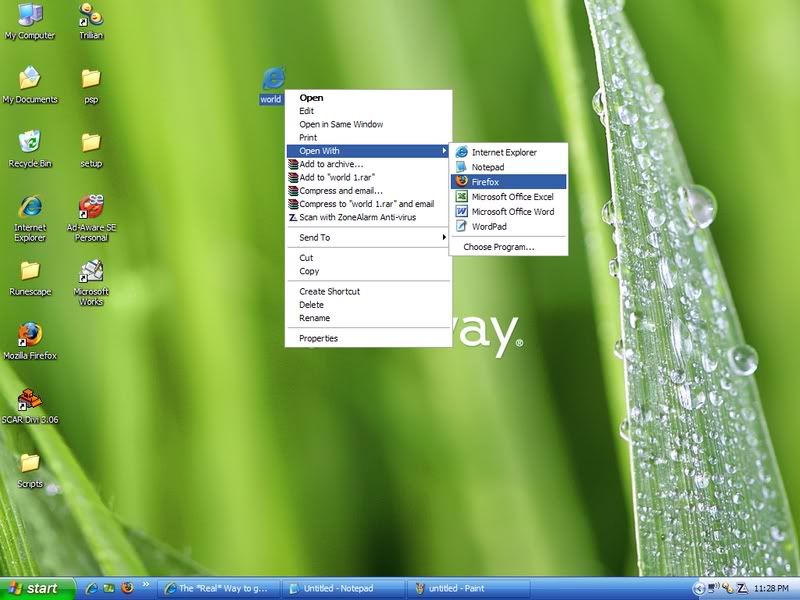
IF YOUR MENU THINGY THERE DOESNT SHOW FIREFOX AS AN OPTION, YOU WILL HAVE TO BROWSE FOR FIREFOX IN THE (Program Files/Mozilla Firefox) FOLDER.
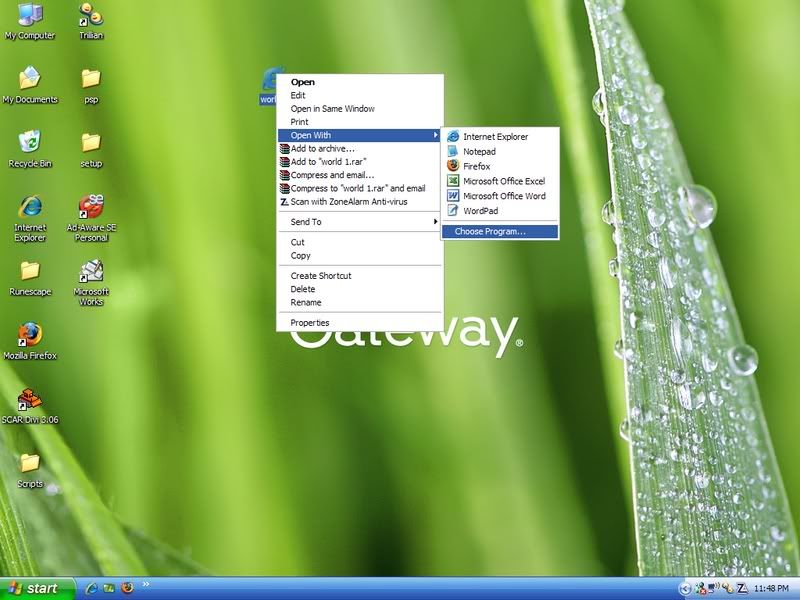
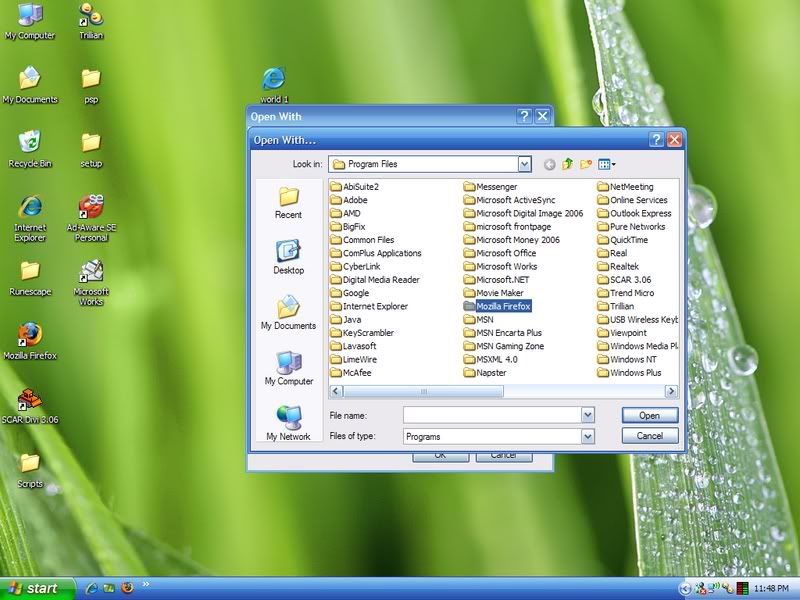
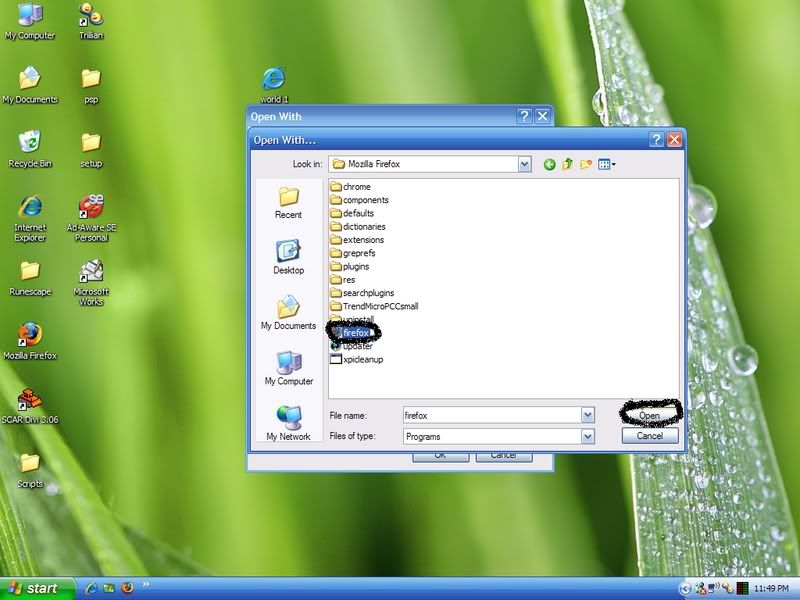
THEN YOU ARE ALL SET TO DO THIS:
7. You are now ready to play. :spot: :spot:
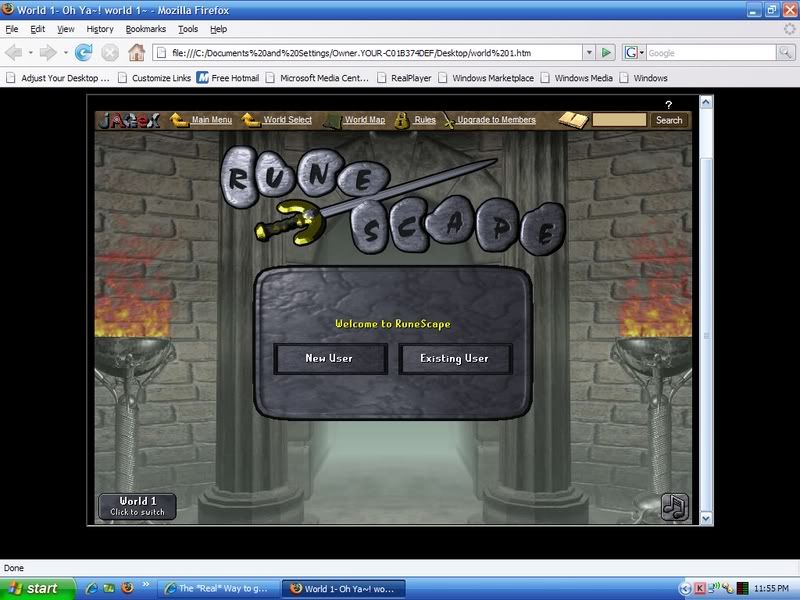 html codes:
 (switch the html code in step 2 with the respective worlds html code that you want to make) *will not work otherwise*
world 1:
<html><head><title>World 1- Oh Ya~! world 1~</title>
</head>
<body bgcolor="black"><div align="center">
<iframe src="http://ul7.runescape.com/l1,p0,j1" name="mainframe" width="800" height="550" scrolling="auto"></iframe>
</div></body>
</html>
world 2:
<html><head><title>World 2- Oh Ya~! world 2~</title>
</head>
<body bgcolor="black"><div align="center">
<iframe src="http://ul8.runescape.com/l1,p0,j1" name="mainframe" width="800" height="550" scrolling="auto"></iframe>
</div></body>
</html>
world 3:
<html><head><title>World 3- Oh Ya~! world 3~</title>
</head>
<body bgcolor="black"><div align="center">
<iframe src="http://sl1.runescape.com/l1,p0,j1" name="mainframe" width="800" height="550" scrolling="auto"></iframe>
</div></body>
</html>
world 4:
<html><head><title>World 4- Oh Ya~! world 4~</title>
</head>
<body bgcolor="black"><div align="center">
<iframe src="http://po4.runescape.com/l1,p0,j1" name="mainframe" width="800" height="550" scrolling="auto"></iframe>
</div></body>
</html>
world 5:
<html><head><title>World 5- Oh Ya~! world 5~</title>
</head>
<body bgcolor="black"><div align="center">
<iframe src="http://po5.runescape.com/l1,p0,j1" name="mainframe" width="800" height="550" scrolling="auto"></iframe>
</div></body>
</html>
world 6:
<html><head><title>World 6- Oh Ya~! world 6~</title>
</head>
<body bgcolor="black"><div align="center">
<iframe src="http://sl10.runescape.com/l1,p0,j1" name="mainframe" width="800" height="550" scrolling="auto"></iframe>
</div></body>
</html>
world 7:
<html><head><title>World 7- Oh Ya~! world 6~</title>
</head>
<body bgcolor="black"><div align="center">
<iframe src="http://above2.runescape.com/l1,p0,j1" name="mainframe" width="800" height="550" scrolling="auto"></iframe>
</div></body>
</html>
Thats the end of the tutorial. Feel free to ask questions and suggest worlds. :D
If your having trouble with the second way just do the first way and download the html files. It takes 10-30 seconds to do that way or 5-10 minutes to do the second way.
SHOULD WORK IF YOU FOLLOWED INSTRUCTIONS.
It's against the rules to ask for rep.. And the rep system doesn't even work right now :p
But it's a good guide, I prefer to just keep clicking back and forth until I get in :p
Where I have the serious trouble (Well.. "Had" I should say since I don't play anymore :P) is clicking log in and it saying this world is full and to try again. I'd sit there for like 10 minutes straight clicking log in with still no luck :p
But good tutorial, keep em coming!
Timothegreat
2007-06-01 23:59:37
Thank you very much JAD!
I just updated the tutorial and put pics in :)
Very user friendly now!
PwNZoRNooB
2007-06-02 01:24:46
Nice tut :)
Good job.
I Karma I
2007-06-02 03:10:33
Nice tutorial, the pics make it extremely understandable!
Or go here for every world.
Then theres no fiddling round and stuff.
http://theta.in/world/1Replace 1 with whatever world you wanna go to e.g. 112.
Nice try though, good use of pictures!
Kayze
2007-06-02 05:17:09
Nice tutorial!
Taught me something new. :D
Timothegreat
2007-06-02 10:07:24
neG this is easier if you unzip the html files, then there is no fiddling.
You just open them the way your supposed to and voila!
ricekrispies
2007-06-03 10:30:10
this thing doesnt work for me…
Timothegreat
2007-06-03 18:02:15
follow the directions step by step and it should work i dont know how it doesnt for you..
gamer716
2007-06-03 18:10:23
very good tut…i always wanted to do someething like this
Dan Cardin
2007-06-03 20:18:36
yes…this workd very good…ty
supersayian2224
2007-06-06 23:04:05
One questoin.. will this work at school??? It looks like as if it won't block it.
Timothegreat
2007-06-07 15:42:39
im not sure if this works at school you might still need a proxy
Timothegreat
2007-07-06 22:41:32
anyone else using this?
Just Kidding
2007-07-06 22:55:51
Thanks alot.
john_smith
2007-07-11 22:55:17
great job! mind if I fix it up to be a little more user-friendly?
Also, how did you get the code to the specific world?
By that i mean-
<iframe src="
http://ul7.runescape.com/l1,p0,j1"
that.
also, world 3 dosent work for me. I'll look more into it…
Pancakes
2007-07-11 23:10:54
From my experience, this doesn't work. Runescape has a system using frames to stop this type of thing. You just get redirected to the main runescape homepage. You have to load the world inside of the frame…
Just my 2 cents. Pancakes
thetechgeek
2007-07-12 11:40:26
it works great for me… i'm using the new ie
(i know, should be using firefox!! ie is bloated and makes my computer lag!:f: )
Timothegreat
2007-07-12 11:48:26
Hey your right, i now fixed world 3 and 6! Everyone please redo the coding world 3 and 6. or redownload the zip file to correct changes done by jagex
and pancake you are loading it in a frame by doing this lol see the html coding.
Miitchyy
2007-07-13 05:35:05
http://www.freewebs.com/dafilestorage/Mitch/Runescape.htmlIts a nice tut though.
About the frame stuff, In the runescape pages(Except the first) there is some javascript thing thats like "try { if top = self then window.location = '
http://www.runescape.com'; } catch (err) { void }" (I made up some of that but thats what its like. Thats why you sue Iframe or Frames :P
Timothegreat
2007-07-18 22:01:31
good to see people using this
john_smith
2007-07-19 13:38:59
okay, i made the page a little more user friendly.
I just sorta threw this together.
Please dont comment on this, it's timothegreat's tutorial, anyway.
Pm me to tell me what u think about it :rolleyes:
here's the link-
http://www.opmstech.org/rsbusyworlds/world1.html
Timothegreat
2007-07-23 15:57:16
John_Smith, i like the way you put my tutorial to good use :D
mynameisjoe
2007-08-07 16:58:55
Nice Tut.
Works excellent for me. Easy merchanting while playing legit. :D
Wizzup?
2007-08-07 17:24:08
Use SCSS, get's me there instantly.
The Element
2007-08-09 13:24:14
Great guide!
rotflmfwao
2007-08-16 14:10:48
Oh, btw, If you don't wanna use Theta and you want to create your own HTML source, this is for you.
To find the address for each runescape world, use theta to get to the world you want, then right click right of the runescape client window, and select [View Page Source].
You should get something like this:
<html>
<head>
<title>Theta: QuickWorld - By: Antiaverage - [World 103 (Members), 1537 Players, US East 2, 7]</title>
</head>
<script type="text/javascript">
<!--
if(top.document.location.href != self.document.location.href) top.document.location.href = "http://theta.in";
//-->
</script>
<body bgcolor="black">
<iframe name="world" id="world" frameborder="0" src="blank.php" style="width: 100%; height: 100%; border: none;">You can't load iframes.</iframe>
<span id="test"></span>
<script type="text/javascript">
<!--
if(top.world) top.world.location.href = 'http://at9.runescape.com/l1,p0,j1';
else if(document.getElementById('world')) document.getElementById('world').src = 'http://at9.runescape.com/l1,p0,j1';
else document.write('Your browser does not support this script.');
//-->
</script>
</body>
</html>
Find the part that says:
http://at9.runescape.com/l1,p0,j1
and copy that to a text doc.
Now, you'll wanna remember what world you were in, and save your text doc as "World{whatever world}.txt"
Now, take this frame
<html><head><title>Your title for the page here</title>
</head>
<body bgcolor="black"><div align="center">
<iframe src="Put the URL from earlier in here" name="mainframe" width="800" height="550" scrolling="auto"></iframe>
</div></body>
</html>
and fill in the title and URL.
Next, save it as whatever you did earlier, but this time, save it with an html extension.
EX:
Save As>RunescapeWorldWhatever.html
Now, open it with firefox or IE, and you win.
R0b0t1
2007-08-17 00:20:53
I used to do this, but I had the worlds for CW, trading, pest control, and stuff all on the same page.
Might want to try that and put it in your guide.
Or have a combo box on the top to select a world :).
Timothegreat
2007-09-04 11:49:28
thx for the idea rob0t i might do that
miku12
2007-09-04 13:16:26
Now i can get to the w1 really quick! Merchanting is going faster now. Tyvm! :)
Hoopo
2007-09-05 09:47:51
nice tutor m8 got mine working fine ty
works great for me on firefox :D
buck cakes
2007-09-05 20:16:33
great guide
im sick of waiting and refreshing endlessly at the world screen
beachescool
2007-09-05 21:06:45
this is sweet
Destrukt
2007-09-07 10:35:09
Yeah i new this. You can also make it a bit more advanced and have a drop down menu where you can select the world and it will load the url in the frame. good tutorial tho ;)
owned1112
2007-09-07 12:04:38
Been posted 1k times..
Krispy101
2007-09-07 13:37:10
Wow. Thanks <3 used a few times :D
cyberspace07
2007-09-07 14:08:52
Thanks!
xzsz33
2007-09-07 17:26:09
Good guide and good jobs with the pics it makes it easy to do!
Timothegreat
2007-09-10 16:04:32
your very welcome just thought i would share some of my useful knowledge
Icon1993
2007-09-21 09:22:42
But world 117 then?
13lacknova
2007-09-22 23:11:37
Dang! This thing is good! The pics in the TUT help heaps.
Scottjc16
2007-09-22 23:15:18
woa ur smart, thanks for this :spongebob:
Oranges_Exist
2007-09-23 01:03:51
You should make the frame a little bigger because I hate seeing the scrollbar, but thats just me.
Drumm3r
2007-09-23 19:38:44
Cool, thanks man!
opeth dm
2007-09-23 19:48:42
It's so simple :P
CodyTheBaddie
2007-09-26 23:10:01
This is something I used to do, before I quit, but now i'm getting started up again.
Jinijini
2007-09-27 03:20:17
Works great for me.
Cheers
thefirst
2007-09-29 14:37:03
sweet, it works. Thank you so much, Ive been sitting around refreshing the server list every time i need to buy or sell anything lol
§hãttêrëd Rèƒlé¢tîøñ
2007-09-29 15:35:25
Thanks, I hate waiting to get into busy worlds. This will help about oodles.
ojkid
2007-09-29 21:07:11
wish had known u posted here i had to do myself lol
Timothegreat
2007-09-30 11:35:06
glad you all find this useful and i love your comments
Randol_8o8
2007-09-30 21:12:39
not bad i didnt think of this myself
alartt
2007-10-01 13:02:57
wow,it works nicely
SimpleAs
2007-10-01 15:17:54
Omg! I never knew it could be that easy :P I usually spend 30 mins refreshing to get in. Lol.
pinapple-->
2007-10-01 15:47:58
Hey Or instead of saving in to your desktop just add it to your favorites.
Click on favorites and then click on add to favorites and then name is as world 1 or what ever world you want. then to accecss it without the wait just click on the world name is the favorites list and log on just a sugestion.
oh and by the way my runescape accounts name is ninja star z not pinapple–>
Edit:Oh wait guys im sorry i just figured out adding it to your favorites dosent work anymore.
saurkulsh
2007-10-25 13:17:08
what a god tut i will say
CRYPTK33PER
2007-10-26 23:28:14
this is great thanks so much easier for world 1!
VonKnorring
2007-10-27 11:16:42
Nice1, ive done this myself although never thought of doing a tutorial about it. Good post!
iwannabeacheat
2007-10-31 06:04:20
Thank Man
Timothegreat
2007-11-19 15:25:06
Thanks for your comments guys. I like to get feedback on stuff i do. :)
stnrscott2
2007-11-20 20:03:26
Very nice tut =]
I hate sitting there waiting to get into world 1 :mad:
Daniel
2007-11-21 00:04:07
I tried this on a full world and it said: Sorry, this world is full. Try again later!
artic
2007-11-21 20:50:30
ive seen similar things before
this is the only one that is halway understandable
nice job
I spike I
2007-11-22 05:21:03
well displayed but..
defintally easier just to click in the bottom left
change world.
world 20
change world
world 20
& so forth untill the world u want is open.
dr.quantumphysics
2007-11-29 18:35:08
ill stick to swiching back and forth
not much use now with the grand exchange
Timothegreat
2007-11-30 18:18:35
I still use this as this is still the easiest way ;)
Shawn1533
2007-12-18 17:55:21
this is a exeleent TUT and the pics are great
gsonic4000
2007-12-28 18:20:42
greatly appreiciated ty
Hurgymcgurgygurg
2007-12-30 05:21:38
Finally, I have had people try to explain this to me many times before, at least I have found a nice guide with pictures and an actual explanation instead of some Rs person trying to tell it 10 words at a time.
Thank you
beezelabus
2007-12-30 05:57:30
Awesome … tutorial … I was wonder just the other day on how to go about this for world 2 … LOL … this forum is pretty thorough…
Phlame1
2007-12-31 11:50:54
Sweet guide, you should try to crack some of the hidden worlds.
PingPong
2007-12-31 12:30:31
Hehe nice guide! My days of waiting to get into a busy world are over! Officially!
Timothegreat
2007-12-31 20:01:15
From: Phlame1
Sweet guide, you should try to crack some of the hidden worlds.
I can crack any world there is… :D
Ortman
2008-01-02 13:53:04
Thanks. It's really nice to get into crowded worlds, since people are to busy selling and buying that they don't notice autoers :D
forgottenlife
2008-01-03 03:31:39
kl i never new this should be fun :D
Timothegreat
2008-01-10 15:41:43
Thanks guys for the feedback :)
coolkid221
2008-01-10 21:49:26
Its a long way at first – but it works like a charm in the end! nice job!
Pur3 x mage7
2008-01-12 22:00:59
thats tight i didnt realize you could do that :O
Sniper777
2008-01-20 19:01:16
very nice tut!
Timothegreat
2008-01-28 16:18:59
thank you for the feedback, nice to see this is still being used :)
FagetHax0r
2008-01-29 05:25:40
Yes Nice tutorial With the picture'' s And shit
On the normal runescape page u can see how much people the are in the world if there are 2000 people and you use that way you see the are 2001 People ?
Lol
Negaal
2008-01-29 06:09:42
IF YOU WANT TO REQUEST A BUSY WORLD I WILL MAKE IT FOR YOU!
Lol? You just have to get prefixes-.-
GJ though
carbonchain
2008-01-30 22:57:14
Once you get into the page, then its easy to get in. Just make a autohotkey script which clicks like mad and you should be in super fast :)
RusinaRange
2008-01-31 02:20:14
great tut
Not a L33cher
2008-02-08 17:04:38
Wow really work might use it later. Thanks!
mike3667
2008-02-10 01:22:03
This is awesome! it works fine. I got into world 2 no problem.
imlvl127
2008-02-10 19:09:04
This reminds me of when rs crashed a long time ago and there was 0 players for over 30 mins. The first thing i did was go into fire-fox and save the page so every world had 0 players lol. Worked well. But now adays worlds aren't as crowded since most people just go to grand exchange for its convenience.
Nice tut though
brygge2
2008-02-12 01:14:18
Really nice trick! I had no idea that was possible, but is there a way to use this with RS clients like ScarScape and SwiftKit?
red eyes 20
2008-02-13 15:24:05
just use the elite switch client from sythe.org
it's the best rs client ever. better then ss used to be!
Hackspawn
2008-02-15 11:29:09
From: neG
Or go here for every world.
Then theres no fiddling round and stuff.
http://theta.in/world/1
Replace 1 with whatever world you wanna go to e.g. 112.
Nice try though, good use of pictures!
Who's site is that? It would seem to me that a site like that could retain Password and login information. Not trying to pick on ya, but security is always an issue.
By the way nice job using the iframe coding. did you teach this to yourself?
Peterabott
2008-02-15 23:29:30
Nice tut. I knew each world had it's own sub-division of the Runescape site, but I never bothered myself to find out what they were :P
Thanks for doing that for us! :P
Timothegreat
2008-03-10 21:42:59
From: Hackspawn
Who's site is that? It would seem to me that a site like that could retain Password and login information. Not trying to pick on ya, but security is always an issue.
By the way nice job using the iframe coding. did you teach this to yourself?
yea i taught myself, and found the links to the worlds and iframed them.
had to bump this up cuz its useful info…
redmans
2008-03-20 02:41:38
hmm this probably would have been a huge help 2 me back in the day when i was a merchanter lol but with the ge and all merchanters have kinda ben put out 2 pasture lol but i will still use it every 1s and a while 2 get into high pop worlds thanks for the tut.
dlinkb
2008-03-21 17:26:14
nice guide, i always wondered how people did this
jelmer gf
2008-03-27 12:55:29
W00t tnx alot it helpt me realy
ALil'Hope
2008-03-28 18:25:09
Thanks, I might use this later on. Can I post this guide on my forum?
Cazabacca
2008-04-04 17:21:21
omg nice, no more waiting!
tyvm!
Mclarenvj
2008-04-09 11:30:17
wouldnt it be easier just to:
1. Right Click On Desktop - New - Shortcut
2. Open Up This Thread
http://www.villavu.com/forum/showthread.php?t=257683. Then Find The World You Wanted To Get Into
4. Copy And Paste The World's URL Into The Shortcut Box Thingy Majig.
5. Click Finish.
6. And Hey Pronto You Got Your World!
Dustein
2008-04-09 11:46:22
Thanks a lot!I was looking for a good way to get into world 1-2!
kazhang
2008-04-10 19:19:33
Personnaly, just download eliteswitch, great cover, has calculators, alot of random stuff, stat lookup…and you just put in w/e world you want and your in, no hassle, type in world 1, ur in…very easy and useable, as well as guides for everything member/non, great way though!
tylertiner
2008-05-22 12:44:08
Thanks for this.
blueguisee
2008-05-25 23:00:32
doesn't work for me..
unable to connect :confused:
Shinigami
2008-06-12 10:49:07
Nice this should make selling stuff a bit easier!
moody
2009-10-09 20:10:19
great tutorial ty for this now i dont have to wait to get into world 1 :P