SRL Archive - SRL Positioning System

Map creation and SPS inconsistencies.


Camel

2014-07-03 15:37:37

I've been working a nature rune crafter for the past few days and now that my script is "done" my only problems are SPS related. I understand its not a problem with SPS but more then likely my maps.

I'll run my script and it will go through its regular rotation: bank, graahk, walk to the altar, craft, tele, walk to bank. But then when the script loops it will bank, graahk then SPS can't find my player location. I didn't stop the script or anything, and I find very bizarre.

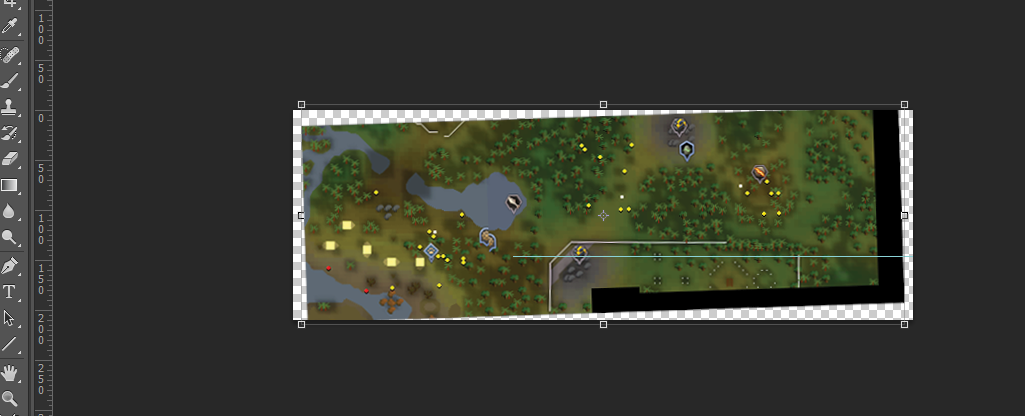
As you will see, my map is rather bad because the map from the minimap "warps" from different locations when I take multiple screenshots of it.

So can anyone shed some light on the inconsistency or how to make maps in the current version of runescape.

Here is the code that I use to walk, I don't think the problem lies here though.
procedure WalkToAltar();
var
pathToAltar: TPointArray;
begin
SPS.setup('NatureAltar', RUNESCAPE_SURFACE);
if not isLoggedIn() then
exit;
//pathToAltar := [Point(124, 143), Point(167, 131), Point(197, 122), Point(223, 106), Point(243, 107), Point(267, 104), Point(292, 97), Point(311, 75), Point(329, 50), Point(357, 38), Point(377, 39), Point(397, 40), Point(426, 51), Point(444, 65), Point(451, 75)];
pathToAltar := [Point(119, 132), Point(166, 109), Point(212, 106), Point(255, 110), Point(289, 107), Point(313, 83), Point(335, 55), Point(368, 41), Point(399, 44), Point(427, 60), Point(438, 81), Point(454, 96)];
if SPS.walkPath(pathToAltar) then
minimap.waitPlayerMoving();
end;

[ATTACH=CONFIG]23482[/ATTACH]

Also, if anyone has a map of the nature altar path and gives it me, I'll love you. Forever.
Clarity

2014-07-03 16:07:23

The first thing I notice is that the Shilo Village fence is slanted, and therefore the whole map is slanted. Fix that in an image editing program, using a drawn line for reference if needed:


After that, fill in the gaps so you have a final rectangular image (no weird slants and transparencies).

Second, SPS maps shouldn't have minimap icons. Minimap icons change locations and orientations all the time independent of the actual map, which will confuse SPS if the icons are part of the map (therefore you are telling SPS that the icons are static).

Best of luck with the script! :)

Ian

2014-07-03 16:13:52

From: Clarity
The first thing I notice is that the Shilo Village fence is slanted, and therefore the whole map is slanted. Fix that in an image editing program, using a drawn line for reference if needed:


After that, fill in the gaps so you have a final rectangular image (no weird slants and transparencies).

Second, SPS maps shouldn't have minimap icons. Minimap icons change locations and orientations all the time independent of the actual map, which will confuse SPS if the icons are part of the map (therefore you are telling SPS that the icons are static).

Best of luck with the script! :)


What program is that?

Camel

2014-07-03 16:14:23

From: Clarity
The first thing I notice is that the Shilo Village fence is slanted, and therefore the whole map is slanted. Fix that in an image editing program, using a drawn line for reference if needed:

After that, fill in the gaps so you have a final rectangular image (no weird slants and transparencies).

Second, SPS maps shouldn't have minimap icons. Minimap icons change locations and orientations all the time independent of the actual map, which will confuse SPS if the icons are part of the map (therefore you are telling SPS that the icons are static).

Best of luck with the script! :)


Thanks. How do I remove Minimap icons? And the fence, I was at perfect north (I clicked the compass) when I took the pictures and it was just slanted.

Olly

2014-07-03 16:14:26

Make the map bigger, ie. grab a bigger image of the map.

Camel

2014-07-03 16:17:35

From: Olly
Make the map bigger, ie. grab a bigger image of the map.

You can only enlarge the minimap to certain extent.

Clarity

2014-07-03 16:37:54

From: BMWxi
What program is that?

Photoshop CS6

Olly

2014-07-03 17:01:21

From: buttdestroyr
You can only enlarge the minimap to certain extent.


Uh yea? And just walk about and crop all the pictures into one.

Camel

2014-07-03 17:03:29

From: Olly
Uh yea? And just walk about and crop all the pictures into one.
Thats what I did orginally, I don't think size is the issue though. The map covers every bit that the minimap will ever see.

Clarity

2014-07-03 17:05:55

From: buttdestroyr
Thanks. How do I remove Minimap icons? And the fence, I was at perfect north (I clicked the compass) when I took the pictures and it was just slanted.

Interesting. Jagex intentionally skews maps but SPS accounts for this and usually the straight(most perfect) map works the best.
You can remove minimap icons using clone tools in photoshop, or manually editing pixel by pixel in MSPaint, which actually is the better option since photoshop tools will create weird blurs.

Camel

2014-07-03 17:50:30

So I made a new map and redid the pathing and all. I've tested it 3 times and the results are very strange.

SPS will find my player location every single time and walk the path given it is the first iteration of the script. Then the script will go on and work fine, the second iteration it can't find the player location.

All 3 tests had this outcome.. I honestly have no idea…

Here is the new map..

[ATTACH=CONFIG]23484[/ATTACH]

mxtrix

2014-07-04 05:57:54

This seems to be an issue with me too. Here is the output from the console: I modified it to display the accuracy at each position. It was around 0.74 for the first run however after the script teleported to the same spot and looped it dropped to 0.35. I have tried this numerous times to identify if it was a one off issue but it seems to persist (even when I relog).


-- setupSRL(): True
-- sps.init()
---- Path exists (C:\Simba\Includes\SPS\img\Runescape_Surface\varcen.png)
---- Setup area "varcen" in 31ms
-- sps.init()
-- sps.getPlayerPos(): result = {X = 222, Y = 198}, took 125 ms. The accuracy was: 0.74121020069413/0.4
-- sps.getPlayerPos(): result = {X = 142, Y = 170}, took 125 ms. The accuracy was: 0.737186258236507/0.4
---- Waiting while the player is moving...
-- sps.walkPath(): result = True
---- Waiting while the player is moving...
-- sps.init()
---- Path exists (C:\Simba\Includes\SPS\img\Runescape_Surface\varcen.png)
---- Setup area "varcen" in 32ms
-- sps.init()
-- WARNING: sps.getPlayerPos(): Didn't find enough matches accurately calc your postion
-- sps.getPlayerPos(): result = {X = -1, Y = -1}, took 156 ms. The accuracy was: 0.353302147779287/0.4
-- WARNING: sps.getPlayerPos(): Didn't find enough matches accurately calc your postion
-- sps.getPlayerPos(): result = {X = -1, Y = -1}, took 172 ms. The accuracy was: 0.353302147779287/0.4
-- WARNING: sps.getPlayerPos(): Didn't find enough matches accurately calc your postion
-- sps.getPlayerPos(): result = {X = -1, Y = -1}, took 157 ms. The accuracy was: 0.352497359287762/0.4
-- WARNING: sps.getPlayerPos(): Didn't find enough matches accurately calc your postion
-- sps.getPlayerPos(): result = {X = -1, Y = -1}, took 171 ms. The accuracy was: 0.352497359287762/0.4
-- WARNING: sps.getPlayerPos(): Didn't find enough matches accurately calc your postion
-- sps.getPlayerPos(): result = {X = -1, Y = -1}, took 157 ms. The accuracy was: 0.353302147779287/0.4
-- WARNING: sps.getPlayerPos(): Didn't find enough matches accurately calc your postion
-- sps.getPlayerPos(): result = {X = -1, Y = -1}, took 157 ms. The accuracy was: 0.353302147779287/0.4
-- WARNING: sps.getPlayerPos(): Didn't find enough matches accurately calc your postion
-- sps.getPlayerPos(): result = {X = -1, Y = -1}, took 156 ms. The accuracy was: 0.353302147779287/0.4
-- sps.walkPath(): result = False
SPS Walking Failed- Calling BmpWalk Procedure
=== New trial ===
Accuracy: 0.996539792387543
X-Coord: 668
Y-Coord: 62
-- Succesfully freed SMART[6372]

Coh3n

2014-07-04 08:07:44

Can you guys post your SPS code and where it's called? Remember that you only have to call SPS_Setup (I think that's what it's called) only once. You shouldn't be calling it every iteration of the loop.

mxtrix

2014-07-04 08:12:23

^I cannot believe I overlooked that. Calling it before the loop makes it work fine. May I ask what causes it to not work when it is called a second time?

Sin

2014-07-04 10:20:17

From: buttdestroyr
I've been working a nature rune crafter for the past few days and now that my script is "done" my only problems are SPS related. I understand its not a problem with SPS but more then likely my maps.

I'll run my script and it will go through its regular rotation: bank, graahk, walk to the altar, craft, tele, walk to bank. But then when the script loops it will bank, graahk then SPS can't find my player location. I didn't stop the script or anything, and I find very bizarre.

As you will see, my map is rather bad because the map from the minimap "warps" from different locations when I take multiple screenshots of it.

So can anyone shed some light on the inconsistency or how to make maps in the current version of runescape.

Here is the code that I use to walk, I don't think the problem lies here though.
procedure WalkToAltar();
var
pathToAltar: TPointArray;
begin
SPS.setup('NatureAltar', RUNESCAPE_SURFACE);
if not isLoggedIn() then
exit;
//pathToAltar := [Point(124, 143), Point(167, 131), Point(197, 122), Point(223, 106), Point(243, 107), Point(267, 104), Point(292, 97), Point(311, 75), Point(329, 50), Point(357, 38), Point(377, 39), Point(397, 40), Point(426, 51), Point(444, 65), Point(451, 75)];
pathToAltar := [Point(119, 132), Point(166, 109), Point(212, 106), Point(255, 110), Point(289, 107), Point(313, 83), Point(335, 55), Point(368, 41), Point(399, 44), Point(427, 60), Point(438, 81), Point(454, 96)];
if SPS.walkPath(pathToAltar) then
minimap.waitPlayerMoving();
end;

[ATTACH=CONFIG]23482[/ATTACH]

Also, if anyone has a map of the nature altar path and gives it me, I'll love you. Forever.


Funnily enough, i'm working on one too. Is it just me or does the Interact option not work when you use the summoning icon?

Brandon

2014-07-04 14:09:25

From: Sin
Funnily enough, i'm working on one too. Is it just me or does the Interact option not work when you use the summoning icon?


Not just you. It's actually completely broken. I wrote one using the OpenGL hook plugin and I thought it was me at first but it wasn't. This makes it way harder to find "your" graahk among a shit ton of others using colour..

Camel

2014-07-04 16:41:45

I managed to fix it by calling SPS.setup(..) outside of the loop. I had it resetup each time so I could use 2 different maps (one to the altar, one to the bank).

I used DTMs from minimap icons to navigate to the bank and now I have a somewhat "flawless" nature crafter. Thanks everyone for the help.

Also is there a way to use two different sps maps without running into this error?

Camel

2014-07-04 16:43:25

From: Sin
Funnily enough, i'm working on one too. Is it just me or does the Interact option not work when you use the summoning icon?


Yeah you have find the graahk on screen and interact with it. You have to be careful though because its hard to find your graahk in case someone else has one out.

The Mayor

2014-07-04 16:54:24

From: buttdestroyr
now I have a somewhat "flawless" nature crafter.


Ready for release? :smile:

mxtrix

2014-07-05 06:35:37

^^ like buttdestroyr asked. How can SPSSetup be called twice, having multiple paths is a problem atm.

KeepBotting

2014-07-05 08:56:19

From: mxtrix
^^ like buttdestroyr asked. How can SPSSetup be called twice, having multiple paths is a problem atm.
pretty sure it takes an array

Coh3n

2014-07-05 10:14:36

From: mxtrix
^I cannot believe I overlooked that. Calling it before the loop makes it work fine. May I ask what causes it to not work when it is called a second time?

From: buttdestroyr
I managed to fix it by calling SPS.setup(..) outside of the loop. I had it resetup each time so I could use 2 different maps (one to the altar, one to the bank).

I used DTMs from minimap icons to navigate to the bank and now I have a somewhat "flawless" nature crafter. Thanks everyone for the help.

Also is there a way to use two different sps maps without running into this error?

You should create a new TSPSArea variable for each map you have. This makes it much easier to manage, plus is makes your code clear for others who might read it.

var
spsJungle, spsAltar: TSPSArea;

// somewhere in the mainloop
begin
spsJungle.setup({parameters here});
spsAltar.setup({parameters here});
end.
That's how it should be done, but theoretically it should still work if you were to reset the variable (i.e. call the .setup() function inside a loop). @Olly; might know more about this as he's the one who "SRL-6ified" SPS. There might have just been a logic error in your guys' code that caused the variable to be set incorrectly.

@mxtrix; and @buttdestroyr; let me know if the above works for you guys.

Olly

2014-07-05 10:16:39

From: Coh3n
You should create a new TSPSArea variable for each map you have. This makes it much easier to manage, plus is makes your code clear for others who might read it.

var
spsJungle, spsAltar: TSPSArea;

// somewhere in the mainloop
begin
spsJungle.setup({parameters here});
spsAltar.setup({parameters here});
end.
That's how it should be done, but theoretically it should still work if you were to reset the variable (i.e. call the .setup() function inside a loop). @Olly; might know more about this as he's the one who "SRL-6ified" SPS. There might have just been a logic error in your guys' code that caused the variable to be set incorrectly.


Yea i made the whole TSPSArea so you can multiple maps at once. :)

But yea, Maybe calling setup() is appending old vars? Not sure.. Il add it to my to-do list :p

Camel

2014-07-05 13:23:25

From: The Mayor
Ready for release? :smile:

I don't think I'm going to release it because if too many people run the same script I run a bigger risk of getting banned and crashing nature runes.

However, while I was a learning how to code with SRL and the whole pascal syntax, I was experimenting with an air rune crafter. I'll definitely release that once I spice it up a bit more

The Mayor

2014-07-05 17:45:28

From: Olly
Yea i made the whole TSPSArea so you can multiple maps at once. :)

But yea, Maybe calling setup() is appending old vars? Not sure.. Il add it to my to-do list :p


Oh and by the way SPS walkPath doesn't timeout if you repeatedly click to an un-walkable location (i.e. over a fence or over the wilderness line). The flag appears and disappears but your player obviously doesn't move. It just keeps clicking in the same over and over.

E: Took a look. It looks as if the timer is reset each loop?