[SRL-6] ClarityAltar
Clarity
2014-03-01 08:27:53
 Version: 2.00 [Outdated](Script will automatically update to 2.00 when run)Last Updated: October 14th, 2014Up to 900K XP/HR with Frost Dragon Bones & Pack YakSupports ALL Beast of Burden Familiars
 An example progress report while using Dragon bones and a War Tortoise familiar (Credit: w00ty).
- DirectX Support for better reliability (if you don't have the plugin, get it here: http://villavu.com/forum/showthread.php?t=107256)
- Automatic installation of script assets to your computer (feel free to check the code to see what is being downloaded).
- Script will automatically check for a new version and update itself if a newer version exists, so you only need to download the attachment here once.
- Supports any type of bone or ashes.
- Supports all beasts of burden familiars.
- Paints progress on the SMART client, including total XP, XP per hour, total bones offered, and total bones offered per hour.
- Incredibly fast banking with the TzHaar ring method.
- Customized banking as well as bank preset usage for faster runs.
- User-specified level of antiban.
- Renews familiars when their timers expire.
Requirements- A player-owned house. Wooden/brown color house decoration style strongly discouraged. This script was created and tested with fancy and dark stone.
- Level 75 Construction to build a gilded altar and marble burners. OTHER ALTARS/BURNERS WILL NOT WORK. Chapel room must be directly adjacent to house portal. Specify North, South, East, or West in the script.
- Corresponding Summoning level for familiars. Can specify 'None' if you do not want to use a familiar.
- TzHaar teleport ring (must have completed The Elder Kiln quest).
- Bones, herbs, pouches, enough supplies to last the duration of your botting session. The script will not stop if supplies run out!
- PoH doors always OPEN.
Instructions:- Download the script attached to this post.
- Fill in all the information and make sure you have admin rights or the installation procedure may not work.
- Use a world with a low amount of players and low ping. Make sure your bank slot information is correct and that your default bank tab contains your supplies, else the script will immediately fail.
- You need the following in your bank with the slot specified: BONES, MARRENTILL HERBS, FAMILIAR POUCHES, and either a stack of summoning potions or stat restore potions. For example, the following arrangement with properly specified slots in declarePlayers():

- Start the script at the TzHaar fight cave banker with house teleport tablets in your last inventory slot (set to quick-inventory slot B), and a familiar already summoned, with an empty inventory. Your TzHaar ring should be bound to the first slot in your action bar, as shown in the sample progress report picture.
- Level your prayer skill with incredible speed and efficiency!
General Setup Example: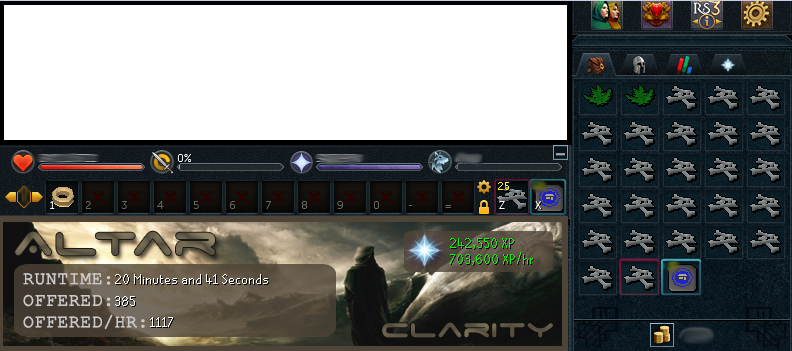 Bank Preset Setup Example (as of October 14th, 2014, only one preset is used):
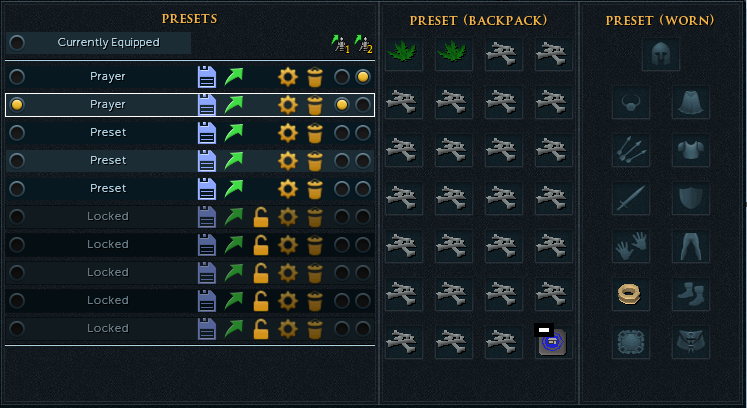 Known Bugs:
- Altar is sometimes not detected, resulting in script termination. For best results, use an 'East' chapel location and 'East' altar orientation. I will try my best to update the other orientations when I have the time.
SCRIPT DOWNLOAD: [ATTACH]23030[/ATTACH]Questions/Issues?Please ensure your SRL and Simba installations are up to date before posting. If you encounter a bug that is not easy to explain, please provide the debug log and a relevant screenshot so I can work to fix it as quickly as possible.
Best of luck in your botting endeavors,
~Clarity
Wooty
2014-03-01 10:17:02
Looks very promising! Going to test it out very soon, need to buy me some bones first :P.
Clarity
2014-03-01 10:50:19
From: w00ty
Looks very promising! Going to test it out very soon, need to buy me some bones first :P.
Enjoy some fast levelling ;)
Been updating the script since I posted it, so make sure you are running the latest version (it should update automatically).
itsha123
2014-03-01 12:58:43
Looks awesome, going to test it out now! Thanks Clarity :)
Clarity
2014-03-01 17:13:40
From: itsha123
Looks awesome, going to test it out now! Thanks Clarity :)
Have fun with the script, post some progress reports when ya get em! :)
Wooty
2014-03-02 07:24:45
Everything goes well until it tries to find my altar using DirectX:
47 | == ClarityDebug == | At Bank: False
48 | == ClarityDebug == | At Bank: False
49 | == ClarityDebug == | lightBurners initiated.
50 | == ClarityDebug == | locateBurners initiated.
51 | == ClarityDebug == | locateAltar initiated.
Exception in Script: Runtime error: "Access violation" at line 418, column 22 in file "C:\Simba\Includes\SRL-6\lib\utilities\types\tpointarrays.simba"
The following bitmaps were not freed: [Minimap Mask, SMART Debug Image, 2, Gametab Bitmap[0], Gametab Bitmap[1], Gametab Bitmap[2], Gametab Bitmap[3], Gametab Bitmap[4], Gametab Bitmap[5], Gametab Bitmap[6], Gametab Bitmap[7], Gametab Bitmap[8], Gametab Bitmap[9], Gametab Bitmap[10], Gametab Bitmap[11], Gametab Bitmap[12], Gametab Bitmap[13], 17]
File[C:\Simba\Includes\SRL-6/logs/SRL log (02-03-14 at 01.22.43 PM).txt] has not been freed in the script, freeing it now.
EDIT: running script using OpenGL, looks great! Will post proggy later on :).
EDIT2: When using tort, the scripts sometimes think the tort is a banker and keeps hovering over it.
Wooty
2014-03-02 11:12:09
1hr proggy:

Options used:
-Dragon bones with tort
-OpenGL (since I couldn't get DX to work)
Clarity
2014-03-02 14:05:25
From: w00ty
Everything goes well until it tries to find my altar using DirectX:
47 | == ClarityDebug == | At Bank: False
48 | == ClarityDebug == | At Bank: False
49 | == ClarityDebug == | lightBurners initiated.
50 | == ClarityDebug == | locateBurners initiated.
51 | == ClarityDebug == | locateAltar initiated.
Exception in Script: Runtime error: "Access violation" at line 418, column 22 in file "C:\Simba\Includes\SRL-6\lib\utilities\types\tpointarrays.simba"
The following bitmaps were not freed: [Minimap Mask, SMART Debug Image, 2, Gametab Bitmap[0], Gametab Bitmap[1], Gametab Bitmap[2], Gametab Bitmap[3], Gametab Bitmap[4], Gametab Bitmap[5], Gametab Bitmap[6], Gametab Bitmap[7], Gametab Bitmap[8], Gametab Bitmap[9], Gametab Bitmap[10], Gametab Bitmap[11], Gametab Bitmap[12], Gametab Bitmap[13], 17]
File[C:\Simba\Includes\SRL-6/logs/SRL log (02-03-14 at 01.22.43 PM).txt] has not been freed in the script, freeing it now.
EDIT: running script using OpenGL, looks great! Will post proggy later on :).
EDIT2: When using tort, the scripts sometimes think the tort is a banker and keeps hovering over it.
Weird…are your instructions for locating the altar all correct? Idk why it would work for one graphics mode and not the other since I assume nothing changes between them. I'll look into this.
Re: tortoise, okay, thanks for the heads up. Never tested with a tortoise, only yak, so my fault for missing this.
From: w00ty
1hr proggy:
Options used:
-Dragon bones with tort
-OpenGL (since I couldn't get DX to work)
Thanks for posting, glad to see it working for ya! :)
Wooty
2014-03-02 14:28:31
From: Clarity
Weird…are your instructions for locating the altar all correct? Idk why it would work for one graphics mode and not the other since I assume nothing changes between them. I'll look into this.
Yes, it's weird because my instructions are correct I think. Do I have to zoom the camera all the way out?
Also, my tort is still often seen as a banker :P
Clarity
2014-03-02 14:30:58
From: w00ty
Yes, it's weird because my instructions are correct I think. Do I have to zoom the camera all the way out?
Also, my tort is still often seen as a banker :P
Yes you need to be zoomed totally out, that's standard unless otherwise specified in a scripter's instructions :p
I'll edit the bank search function to account for that in the next update.
Wooty
2014-03-02 14:32:53
Alright, but when I zoom all the way out, the script thinks my pet feeder is a G Altar :P.
Another bug I found is that it sometimes won't close my BOB interface and just hangs there.
EDIT: sorry for being so difficult man!
Clarity
2014-03-02 14:41:39
No, no. This is very helpful :) because people have random rooms next to their altars that I didn't have when testing. I'll modify the search function in the next update to look in a limited area.
Constructive posts like this are appreciated!
Wooty
2014-03-02 16:46:04
Ok :).
Here are some new bugs I found:
- Script only lights one burner and starts offering bones. (maybe it should first check if both marrentils are gone before it starts offering)
- Tries to withdraw bones twice. (it only does this when it withdraws bones to store it in BOB I think)
- BOB sometimes dies while being in the POH or at the bank causing the bones to drop on the floor.
Will stop testing for today, thanks for the awesome script man! Will continue to test it tomorrow :).
Over 1.4M xp from testing/babysitting the script:

:D
Clarity
2014-03-02 20:34:55
Fail, I also just realized today that during my entire time here I've been scripting for the wrong camera type ('Classic' not 'RS3').
Luckily, this explains a number of bugs people have been having with my scripts. Stay tuned for a fix.
Ashaman88
2014-03-02 20:45:57
From: Clarity
Fail, I also just realized today that during my entire time here I've been scripting for the wrong camera type ('Classic' not 'RS3').
Luckily, this explains a number of bugs people have been having with my scripts. Stay tuned for a fix.
I don't know if there was ever a decision on that.. so wrong is a strong word.
@Olly; may know for sure
Clarity
2014-03-02 21:05:33
From: Ashaman88
I don't know if there was ever a decision on that.. so wrong is a strong word. @Olly; may know for sure
Do you know which angle was used when writing MMtoMS?
From: Ashaman88
I don't know if there was ever a decision on that.. so wrong is a strong word. @Olly; may know for sure
Wat we said to use classic
Ashaman88
2014-03-02 21:18:21
From: Clarity
Do you know which angle was used when writing MMtoMS?
Since it was written by Olly I assume classic :)
Clarity
2014-03-02 21:26:12
Lol well from what I can tell, RS3 has a better aerial view type angle which would make a lot of things easier, however player movement is a bit different in that the camera does not move completely with the player (there is a small delay and the camera plays catch up with you as you stop moving).
But if the includes were written with classic I guess that's the answer for now?
Ashaman88
2014-03-02 21:32:24
From: Clarity
Lol well from what I can tell, RS3 has a better aerial view type angle which would make a lot of things easier, however player movement is a bit different in that the camera does not move completely with the player (there is a small delay and the camera plays catch up with you as you stop moving).
But if the includes were written with classic I guess that's the answer for now?
Yeah I suppose so - if you still want to use rs3 though you can always add that to the instructions. Users typically don't even know about that option and seem to randomly have it one way or the other haha.. so really the best thing is to write in classic, but make it usable for users doing rs3 mode (unless it's not worth it to spend that much time on it)
Clarity
2014-03-03 02:16:50
From: w00ty
Ok :).
Here are some new bugs I found:
- Script only lights one burner and starts offering bones. (maybe it should first check if both marrentils are gone before it starts offering)
- Tries to withdraw bones twice. (it only does this when it withdraws bones to store it in BOB I think)
- BOB sometimes dies while being in the POH or at the bank causing the bones to drop on the floor.
Will stop testing for today, thanks for the awesome script man! Will continue to test it tomorrow :).
Over 1.4M xp from testing/babysitting the script:
:D
-Edit: able to reproduce tortoise/banker confusion, will update.
-I cannot reproduce the only offering once bug. I assume the cause is your pet feeder being detected as an altar, which it then uses to find the burners so it's screwing up, so this should be fixed with the limited altar search.
-Hanging at the BoB inventory: I can't reproduce this bug either but I'll keep trying.
-Withdrawing multiple times: solve this by having supplies in slots on the left side of your bank so the backpack is not covered by overtext when withdrawing items.
-BoB dying will be fixed in the next update.
Again, THANK YOU so much for the helpful posts, some people just leech free scripts and never say a word. Helpful feedback like yours is awesome, keep it up man.
Clarity
2014-03-03 04:56:23
Update 1.10
-Burner search is now more refined.
-Added support for the Tier 3 pig familiar and the Kalphite.
-Fixed tortoise/banker confusion.
-Altar search is more refined but this will be improved later, don't have time to rewrite the function atm. I'd suggest using a chapel that isn't surrounded by a bunch of random stuff (mine is totally surrounded by grass).
-Script won't let familiars die anymore, will stop a trip midway and go back to the bank to renew rather than let it die and get stuck.
Wooty
2014-03-03 05:13:46
Awesome! Time for some more testing! :D
What camera mode should I use with this version? Last time I used "classic".
Clarity
2014-03-03 05:19:28
From: w00ty
Awesome! Time for some more testing! :D
What camera mode should I use with this version? Last time I used "classic".
I wrote it while using classic, and apparently all the includes for SRL were as well, so go with classic unless some change is announced :)
Wooty
2014-03-03 05:30:49
Hmm, it was running great until it crashed after like 10 minutes when it was unable to find the second burner.
The boxes around the burners were drawn on smart in the right position though.
904 | == ClarityDebug == | Unable to locate a burner.
905 | == ClarityDebug == | Attempts: 10
Exception in Script: Runtime error: "Access violation" at line 629, column 12
The following bitmaps were not freed: [Minimap Mask, SMART Debug Image, 2, Gametab Bitmap[0], Gametab Bitmap[1], Gametab Bitmap[2], Gametab Bitmap[3], Gametab Bitmap[4], Gametab Bitmap[5], Gametab Bitmap[6], Gametab Bitmap[7], Gametab Bitmap[8], Gametab Bitmap[9], Gametab Bitmap[10], Gametab Bitmap[11], Gametab Bitmap[12], Gametab Bitmap[13], 17, 25, 34, 42]
File[C:\Simba\Includes\SRL-6/logs/SRL log (03-03-14 at 11.20.10 AM).txt] has not been freed in the script, freeing it now.
Clarity
2014-03-03 05:40:45
From: w00ty
Hmm, it was running great until it crashed after like 10 minutes when it was unable to find the second burner.
The boxes around the burners were drawn on smart in the right position though.
904 | == ClarityDebug == | Unable to locate a burner.
905 | == ClarityDebug == | Attempts: 10
Exception in Script: Runtime error: "Access violation" at line 629, column 12
The following bitmaps were not freed: [Minimap Mask, SMART Debug Image, 2, Gametab Bitmap[0], Gametab Bitmap[1], Gametab Bitmap[2], Gametab Bitmap[3], Gametab Bitmap[4], Gametab Bitmap[5], Gametab Bitmap[6], Gametab Bitmap[7], Gametab Bitmap[8], Gametab Bitmap[9], Gametab Bitmap[10], Gametab Bitmap[11], Gametab Bitmap[12], Gametab Bitmap[13], 17, 25, 34, 42]
File[C:\Simba\Includes\SRL-6/logs/SRL log (03-03-14 at 11.20.10 AM).txt] has not been freed in the script, freeing it now.
Edited color search. Try now. I've created the color search over many logins so if this continues to be a problem for many people I will have to come up with a new method I suppose.
Wooty
2014-03-03 06:04:27
v1.11 is running very stable atm! :D
Edit: Renewing the BoB works great now too!
Edit2: After 18 minutes of flawless botting it got stuck at the BoB inventory after it deposited bones in it (probably caused by a lagspike I think). It was trying to find the banker while the BoB inventory was still open. Manually closing the interface fixed it. Script still going.
Clarity
2014-03-03 07:39:58
From: w00ty
v1.11 is running very stable atm! :D
Edit: Renewing the BoB works great now too!
Edit2: After 18 minutes of flawless botting it got stuck at the BoB inventory after it deposited bones in it (probably caused by a lagspike I think). It was trying to find the banker while the BoB inventory was still open. Manually closing the interface fixed it. Script still going.
Uploaded v1.12, now it will not continue the script until the familiar box is closed. Previously it would try closing it five times and then move on, which was silly of me, now that I think about it.
Thanks again for testing man! Super helpful in making this script bug-free :)
Wooty
2014-03-03 08:40:10
Been running it for almost 3 hours now with v1.11!
Thanks for the fix!, will restart the script using v1.12.
Here is my proggy (Dbones/Tort/DX):
Also, thanks for the feedback, really appreciate it! ;)
Clarity
2014-03-10 12:11:20
Script is broken for now due to recent update, will fix asap.
rjn978
2014-03-12 23:59:43
Hey Clarity,
I last botted using simba before the release of RS3.
Once your script is back up, do I need to download anything else? It's been awhile and I'm not computer savy.
On the simba client, I updated the SRL, SPS, MSI, ODTM. Idk if that helps.
Thanks.
Clarity
2014-03-13 00:05:33
From: rjn978
Hey Clarity, I last botted using simba before the release of RS3. To use your script, do I need to download anything else? On the client, I updated the SRL, SPS, MSI, ODTM. Idk if that helps.
Thanks.
Hey :)
At the moment, due to the minimap update this week, my script won't work, but I'm coming out with a fix soon.
To use our RS3 scripts in general though, you need to make sure that your includes (Simba/Includes/srl-6) are up to date. We use SRL-6 for RS3 scripting.
You can get the latest include versions here:
https://github.com/SRL/SRL-6Let me know if you have any more questions :)
rjn978
2014-03-13 00:24:36
So I downloaded the file SRL-6-Master zip file. Do just drag it into my original Simba folder?
I appreciate the fast reply. Thanks for your help. Cheers!
Clarity
2014-03-13 00:54:10
From: rjn978
So I downloaded the file SRL-6-Master zip file. Do just drag it into my original Simba folder?
I appreciate the fast reply. Thanks for your help. Cheers!
Put the contents of the zip file into Simba/Includes/SRL-6, and you should be good provided everything else was updated, and your ingame settings match all the pictures in this guide:
http://villavu.com/forum/showthread.php?t=107365Check back tomorrow for a script fix.
No worries, welcome back to SRL! :)
Godless
2014-03-13 03:15:21
After I finish 99 Divination and sell my energies I will give this a crack and try and get you some nice progress reports! :D
rjn978
2014-03-13 21:15:01
Now I got a socket error :( i looked into the faqs and it told me to set interpreter to lape. i downloaded brandons direct x plugin that came with two od the ddl's, pasted it into my plugins folder and it just gave me the socket error. idk if i did something wrong?
tehYosh
2014-03-14 05:26:40
From: rjn978
Now I got a socket error :( i looked into the faqs and it told me to set interpreter to lape. i downloaded brandons direct x plugin that came with two od the ddl's, pasted it into my plugins folder and it just gave me the socket error. idk if i did something wrong?
When you're in Simba, go up to the top and select 'Script' (next to 'Edit' and 'View'), hover over 'Interpreter' and then select 'Lape'.
On Topic: Nice stuff Clarity, I'd love to give this script a try but unfortunately my construction level leaves a lot more to be desired, best of luck and hopefully I'll get to use this soon! :)
rjn978
2014-03-14 09:37:31
thats what I did. But anywho, my client wasn't running right so i uninstalled my old simba stuff, and re-downloaded it all over again and waiting to see what happens next. so far so good.
From: tehYosh
When you're in Simba, go up to the top and select 'Script' (next to 'Edit' and 'View'), hover over 'Interpreter' and then select 'Lape'.
On Topic: Nice stuff Clarity, I'd love to give this script a try but unfortunately my construction level leaves a lot more to be desired, best of luck and hopefully I'll get to use this soon! :)
rjn978
2014-03-14 13:08:47
So I finally got the script to log into my acc. Only problem is, I still keep getting the "Socket disconnected; unpairing" message.
And on the client messages, it says,
"Exception in Script: Runtime error: "Access violation" at line 619, column 10
The following bitmaps were not freed: [Minimap Mask, SMART Debug Image, 2, Gametab Bitmap[0], Gametab Bitmap[1], Gametab Bitmap[2], Gametab Bitmap[3], Gametab Bitmap[4], Gametab Bitmap[5], Gametab Bitmap[6], Gametab Bitmap[7], Gametab Bitmap[8], Gametab Bitmap[9], Gametab Bitmap[10], Gametab Bitmap[11], Gametab Bitmap[12], Gametab Bitmap[13]]
File[C:\Simba\Includes\SRL-6/logs/SRL log (14-03-14 at 01.05.17 PM).txt] has not been freed in the script, freeing it now"
Any solutions?
Clarity
2014-03-15 17:15:09
From: rjn978
So I finally got the script to log into my acc. Only problem is, I still keep getting the "Socket disconnected; unpairing" message.
And on the client messages, it says,
"Exception in Script: Runtime error: "Access violation" at line 619, column 10
The following bitmaps were not freed: [Minimap Mask, SMART Debug Image, 2, Gametab Bitmap[0], Gametab Bitmap[1], Gametab Bitmap[2], Gametab Bitmap[3], Gametab Bitmap[4], Gametab Bitmap[5], Gametab Bitmap[6], Gametab Bitmap[7], Gametab Bitmap[8], Gametab Bitmap[9], Gametab Bitmap[10], Gametab Bitmap[11], Gametab Bitmap[12], Gametab Bitmap[13]]
File[C:\Simba\Includes\SRL-6/logs/SRL log (14-03-14 at 01.05.17 PM).txt] has not been freed in the script, freeing it now"
Any solutions?
Can you team view?
Hadley
2014-03-28 02:17:24
Are there any updates for that "Socket disconnected; unpairing" ? I seem to be getting that issue as well. :(
Hadley
2014-03-28 02:56:57
To fix the 'unrepairing' issue rafiki does have to be filled out for those still having issues with that.
But after that it doesn't seem to want to work. It teleports to the bank, sits there then errors out:
Warning! You passed a wrong xs to a finder function: -16. That is below 0, thus out of bounds. Setting the value to 0 for now.
Warning! You passed a wrong ys to a finder function: -70. That is below 0, thus out of bounds. Setting the value to 0 for now.
Warning! You passed a wrong xs to a finder function: -16. That is below 0, thus out of bounds. Setting the value to 0 for now.
Warning! You passed a wrong ys to a finder function: -70. That is below 0, thus out of bounds. Setting the value to 0 for now.
Warning! You passed a wrong xs to a finder function: -16. That is below 0, thus out of bounds. Setting the value to 0 for now.
Warning! You passed a wrong ys to a finder function: -70. That is below 0, thus out of bounds. Setting the value to 0 for now.
Warning! You passed a wrong xs to a finder function: -16. That is below 0, thus out of bounds. Setting the value to 0 for now.
Warning! You passed a wrong ys to a finder function: -70. That is below 0, thus out of bounds. Setting the value to 0 for now.
Warning! You passed a wrong xs to a finder function: -16. That is below 0, thus out of bounds. Setting the value to 0 for now.
Warning! You passed a wrong ys to a finder function: -70. That is below 0, thus out of bounds. Setting the value to 0 for now.
Warning! You passed a wrong xs to a finder function: -16. That is below 0, thus out of bounds. Setting the value to 0 for now.
Warning! You passed a wrong ys to a finder function: -70. That is below 0, thus out of bounds. Setting the value to 0 for now.
Warning! You passed a wrong xs to a finder function: -16. That is below 0, thus out of bounds. Setting the value to 0 for now.
Warning! You passed a wrong ys to a finder function: -70. That is below 0, thus out of bounds. Setting the value to 0 for now.
Warning! You passed a wrong xs to a finder function: -16. That is below 0, thus out of bounds. Setting the value to 0 for now.
Warning! You passed a wrong ys to a finder function: -70. That is below 0, thus out of bounds. Setting the value to 0 for now.
Warning! You passed a wrong xs to a finder function: -16. That is below 0, thus out of bounds. Setting the value to 0 for now.
Warning! You passed a wrong ys to a finder function: -70. That is below 0, thus out of bounds. Setting the value to 0 for now.
Warning! You passed a wrong xs to a finder function: -16. That is below 0, thus out of bounds. Setting the value to 0 for now.
Warning! You passed a wrong ys to a finder function: -70. That is below 0, thus out of bounds. Setting the value to 0 for now.
Exception in Script: Runtime error: "Access violation" at line 619, column 10
The following bitmaps were not freed: [Minimap Mask, SMART Debug Image, 2, Gametab Bitmap[0], Gametab Bitmap[1], Gametab Bitmap[2], Gametab Bitmap[3], Gametab Bitmap[4], Gametab Bitmap[5], Gametab Bitmap[6], Gametab Bitmap[7], Gametab Bitmap[8], Gametab Bitmap[9], Gametab Bitmap[10], Gametab Bitmap[11], Gametab Bitmap[12], Gametab Bitmap[13]]
File[C:\Simba\Includes\SRL-6/logs/SRL log (27-03-14 at 11.41.28 PM).txt] has not been freed in the script, freeing it now.
Clarity
2014-03-28 11:04:28
Sorry I haven't been round to updating this yet, I was busy finishing my Armadyl script. I'll look at this later today for sure. It's probably a one or two line fix due to an update :p
Clarity
2014-03-28 11:58:42
Uploaded 1.14 which fixed the above I believe, running flawlessly for me at the moment.
None of my scripts use the player manager at the moment, but I suppose I should upgrade them soon. Disabling that would fix any rafiki related problems I think?
Hadley
2014-03-28 16:11:46
From: Clarity
Uploaded 1.14 which fixed the above I believe, running flawlessly for me at the moment.
None of my scripts use the player manager at the moment, but I suppose I should upgrade them soon. Disabling that would fix any rafiki related problems I think?
Awesome thanks Clarity! I will try it when I get home. ;)
If the script doesn't use rafiki why would it give that error? Is it default with scripts and you have to disable it manually within the script?
Hadley
2014-03-29 00:24:11
Can you tell me what your setup is like? Is your camera facing noth and zoomed all the way out? The script gets to the alter and errors out. I am using directx and version 1.14.
40 | == ClarityDebug == | At Bank: False
---- Waiting while the player is moving...
41 | == ClarityDebug == | At Bank: False
42 | == ClarityDebug == | lightBurners initiated.
43 | == ClarityDebug == | locateBurners initiated.
44 | == ClarityDebug == | locateAltar initiated.
45 | == ClarityDebug == | Unable to locate an altar.
46 | == ClarityDebug == | Attempts: 1
47 | == ClarityDebug == | Unable to locate an altar.
48 | == ClarityDebug == | Attempts: 2
49 | == ClarityDebug == | Unable to locate an altar.
50 | == ClarityDebug == | Attempts: 3
51 | == ClarityDebug == | Unable to locate an altar.
52 | == ClarityDebug == | Attempts: 4
53 | == ClarityDebug == | Unable to locate an altar.
54 | == ClarityDebug == | Attempts: 5
55 | == ClarityDebug == | Unable to locate an altar.
56 | == ClarityDebug == | Attempts: 6
57 | == ClarityDebug == | Unable to locate an altar.
58 | == ClarityDebug == | Attempts: 7
59 | == ClarityDebug == | Unable to locate an altar.
60 | == ClarityDebug == | Attempts: 8
61 | == ClarityDebug == | Unable to locate an altar.
62 | == ClarityDebug == | Attempts: 9
63 | == ClarityDebug == | Unable to locate an altar.
64 | == ClarityDebug == | Attempts: 10
Warning! You passed a wrong xs to a finder function: -16. That is below 0, thus out of bounds. Setting the value to 0 for now.
Warning! You passed a wrong ys to a finder function: -70. That is below 0, thus out of bounds. Setting the value to 0 for now.
65 | == ClarityDebug == | Unable to locate a burner.
66 | == ClarityDebug == | Attempts: 1
Warning! You passed a wrong xs to a finder function: -16. That is below 0, thus out of bounds. Setting the value to 0 for now.
Warning! You passed a wrong ys to a finder function: -70. That is below 0, thus out of bounds. Setting the value to 0 for now.
67 | == ClarityDebug == | Unable to locate a burner.
68 | == ClarityDebug == | Attempts: 2
Warning! You passed a wrong xs to a finder function: -16. That is below 0, thus out of bounds. Setting the value to 0 for now.
Warning! You passed a wrong ys to a finder function: -70. That is below 0, thus out of bounds. Setting the value to 0 for now.
69 | == ClarityDebug == | Unable to locate a burner.
70 | == ClarityDebug == | Attempts: 3
Warning! You passed a wrong xs to a finder function: -16. That is below 0, thus out of bounds. Setting the value to 0 for now.
Warning! You passed a wrong ys to a finder function: -70. That is below 0, thus out of bounds. Setting the value to 0 for now.
71 | == ClarityDebug == | Unable to locate a burner.
72 | == ClarityDebug == | Attempts: 4
Warning! You passed a wrong xs to a finder function: -16. That is below 0, thus out of bounds. Setting the value to 0 for now.
Warning! You passed a wrong ys to a finder function: -70. That is below 0, thus out of bounds. Setting the value to 0 for now.
73 | == ClarityDebug == | Unable to locate a burner.
74 | == ClarityDebug == | Attempts: 5
Warning! You passed a wrong xs to a finder function: -16. That is below 0, thus out of bounds. Setting the value to 0 for now.
Warning! You passed a wrong ys to a finder function: -70. That is below 0, thus out of bounds. Setting the value to 0 for now.
75 | == ClarityDebug == | Unable to locate a burner.
76 | == ClarityDebug == | Attempts: 6
Warning! You passed a wrong xs to a finder function: -16. That is below 0, thus out of bounds. Setting the value to 0 for now.
Warning! You passed a wrong ys to a finder function: -70. That is below 0, thus out of bounds. Setting the value to 0 for now.
77 | == ClarityDebug == | Unable to locate a burner.
78 | == ClarityDebug == | Attempts: 7
Warning! You passed a wrong xs to a finder function: -16. That is below 0, thus out of bounds. Setting the value to 0 for now.
Warning! You passed a wrong ys to a finder function: -70. That is below 0, thus out of bounds. Setting the value to 0 for now.
79 | == ClarityDebug == | Unable to locate a burner.
80 | == ClarityDebug == | Attempts: 8
Warning! You passed a wrong xs to a finder function: -16. That is below 0, thus out of bounds. Setting the value to 0 for now.
Warning! You passed a wrong ys to a finder function: -70. That is below 0, thus out of bounds. Setting the value to 0 for now.
81 | == ClarityDebug == | Unable to locate a burner.
82 | == ClarityDebug == | Attempts: 9
Warning! You passed a wrong xs to a finder function: -16. That is below 0, thus out of bounds. Setting the value to 0 for now.
Warning! You passed a wrong ys to a finder function: -70. That is below 0, thus out of bounds. Setting the value to 0 for now.
83 | == ClarityDebug == | Unable to locate a burner.
84 | == ClarityDebug == | Attempts: 10
Exception in Script: Runtime error: "Access violation" at line 629, column 10
The following bitmaps were not freed: [Minimap Mask, SMART Debug Image, 2, Gametab Bitmap[0], Gametab Bitmap[1], Gametab Bitmap[2], Gametab Bitmap[3], Gametab Bitmap[4], Gametab Bitmap[5], Gametab Bitmap[6], Gametab Bitmap[7], Gametab Bitmap[8], Gametab Bitmap[9], Gametab Bitmap[10], Gametab Bitmap[11], Gametab Bitmap[12], Gametab Bitmap[13], 17, 18, 19, 20, 21, 22, 29]
File[C:\Simba\Includes\SRL-6/logs/SRL log (28-03-14 at 09.21.19 PM).txt] has not been freed in the script, freeing it now.
Clarity
2014-03-29 00:54:46
From: Hadley
Can you tell me what your setup is like? Is your camera facing noth and zoomed all the way out? The script gets to the alter and errors out. I am using directx and version 1.14.
40 | == ClarityDebug == | At Bank: False
---- Waiting while the player is moving...
41 | == ClarityDebug == | At Bank: False
42 | == ClarityDebug == | lightBurners initiated.
43 | == ClarityDebug == | locateBurners initiated.
44 | == ClarityDebug == | locateAltar initiated.
45 | == ClarityDebug == | Unable to locate an altar.
46 | == ClarityDebug == | Attempts: 1
47 | == ClarityDebug == | Unable to locate an altar.
48 | == ClarityDebug == | Attempts: 2
49 | == ClarityDebug == | Unable to locate an altar.
50 | == ClarityDebug == | Attempts: 3
51 | == ClarityDebug == | Unable to locate an altar.
52 | == ClarityDebug == | Attempts: 4
53 | == ClarityDebug == | Unable to locate an altar.
54 | == ClarityDebug == | Attempts: 5
55 | == ClarityDebug == | Unable to locate an altar.
56 | == ClarityDebug == | Attempts: 6
57 | == ClarityDebug == | Unable to locate an altar.
58 | == ClarityDebug == | Attempts: 7
59 | == ClarityDebug == | Unable to locate an altar.
60 | == ClarityDebug == | Attempts: 8
61 | == ClarityDebug == | Unable to locate an altar.
62 | == ClarityDebug == | Attempts: 9
63 | == ClarityDebug == | Unable to locate an altar.
64 | == ClarityDebug == | Attempts: 10
Warning! You passed a wrong xs to a finder function: -16. That is below 0, thus out of bounds. Setting the value to 0 for now.
Warning! You passed a wrong ys to a finder function: -70. That is below 0, thus out of bounds. Setting the value to 0 for now.
65 | == ClarityDebug == | Unable to locate a burner.
66 | == ClarityDebug == | Attempts: 1
Warning! You passed a wrong xs to a finder function: -16. That is below 0, thus out of bounds. Setting the value to 0 for now.
Warning! You passed a wrong ys to a finder function: -70. That is below 0, thus out of bounds. Setting the value to 0 for now.
67 | == ClarityDebug == | Unable to locate a burner.
68 | == ClarityDebug == | Attempts: 2
Warning! You passed a wrong xs to a finder function: -16. That is below 0, thus out of bounds. Setting the value to 0 for now.
Warning! You passed a wrong ys to a finder function: -70. That is below 0, thus out of bounds. Setting the value to 0 for now.
69 | == ClarityDebug == | Unable to locate a burner.
70 | == ClarityDebug == | Attempts: 3
Warning! You passed a wrong xs to a finder function: -16. That is below 0, thus out of bounds. Setting the value to 0 for now.
Warning! You passed a wrong ys to a finder function: -70. That is below 0, thus out of bounds. Setting the value to 0 for now.
71 | == ClarityDebug == | Unable to locate a burner.
72 | == ClarityDebug == | Attempts: 4
Warning! You passed a wrong xs to a finder function: -16. That is below 0, thus out of bounds. Setting the value to 0 for now.
Warning! You passed a wrong ys to a finder function: -70. That is below 0, thus out of bounds. Setting the value to 0 for now.
73 | == ClarityDebug == | Unable to locate a burner.
74 | == ClarityDebug == | Attempts: 5
Warning! You passed a wrong xs to a finder function: -16. That is below 0, thus out of bounds. Setting the value to 0 for now.
Warning! You passed a wrong ys to a finder function: -70. That is below 0, thus out of bounds. Setting the value to 0 for now.
75 | == ClarityDebug == | Unable to locate a burner.
76 | == ClarityDebug == | Attempts: 6
Warning! You passed a wrong xs to a finder function: -16. That is below 0, thus out of bounds. Setting the value to 0 for now.
Warning! You passed a wrong ys to a finder function: -70. That is below 0, thus out of bounds. Setting the value to 0 for now.
77 | == ClarityDebug == | Unable to locate a burner.
78 | == ClarityDebug == | Attempts: 7
Warning! You passed a wrong xs to a finder function: -16. That is below 0, thus out of bounds. Setting the value to 0 for now.
Warning! You passed a wrong ys to a finder function: -70. That is below 0, thus out of bounds. Setting the value to 0 for now.
79 | == ClarityDebug == | Unable to locate a burner.
80 | == ClarityDebug == | Attempts: 8
Warning! You passed a wrong xs to a finder function: -16. That is below 0, thus out of bounds. Setting the value to 0 for now.
Warning! You passed a wrong ys to a finder function: -70. That is below 0, thus out of bounds. Setting the value to 0 for now.
81 | == ClarityDebug == | Unable to locate a burner.
82 | == ClarityDebug == | Attempts: 9
Warning! You passed a wrong xs to a finder function: -16. That is below 0, thus out of bounds. Setting the value to 0 for now.
Warning! You passed a wrong ys to a finder function: -70. That is below 0, thus out of bounds. Setting the value to 0 for now.
83 | == ClarityDebug == | Unable to locate a burner.
84 | == ClarityDebug == | Attempts: 10
Exception in Script: Runtime error: "Access violation" at line 629, column 10
The following bitmaps were not freed: [Minimap Mask, SMART Debug Image, 2, Gametab Bitmap[0], Gametab Bitmap[1], Gametab Bitmap[2], Gametab Bitmap[3], Gametab Bitmap[4], Gametab Bitmap[5], Gametab Bitmap[6], Gametab Bitmap[7], Gametab Bitmap[8], Gametab Bitmap[9], Gametab Bitmap[10], Gametab Bitmap[11], Gametab Bitmap[12], Gametab Bitmap[13], 17, 18, 19, 20, 21, 22, 29]
File[C:\Simba\Includes\SRL-6/logs/SRL log (28-03-14 at 09.21.19 PM).txt] has not been freed in the script, freeing it now.
procedure declarePlayers;
begin
  setLength(players, 1);
  with players[0] do
  begin
    //Basic Information
    loginName        := 'Username';
    password         := 'Password';
    bankPIN          := '****';
    isActive         := true;
    isMember         := true;
    world            := -1;

    //Script Specific Information
    showScriptDebug  := true;             //Display script general debug info (text and onscreen)?
    showScriptPaint  := true;             //Display on screen script paint?

    bonesSlot        := 4;                //What bank item slot contains your bones?
    marrentillSlot   := 5;                //What bank item slot contains your marrentills?
    pouchSlot        := 2;                //Which bank item slot contains your familiar pouches?
    restoreSlot      := 1;                //Which bank item slot contains your summoning restore item?
    boneType         := 'Frost Dragon';   //What kind of bones are you offering? Scroll down to line 901 for supported bone/ash types and what to type in.
    familiarType     := 'Yak';            //'None' if no familiar.  Supports 'Yak', 'Pig' (Tier 3 pig only), 'Tortoise', 'Terrorbird', 'Ant', and 'Kalphite'.
    travelMethod     := 'House Teleport'; //Only supported teleportation method at the moment.
    chapelLocation   := 'East';           //Where is your chapel located relative to your house portal?  Must be adjacent by one room.
    altarOrientation := 'East';           //How is your altar positioned in the chapel (what wall is it closest to)?

    //Lag and Accuracy Modifiers
    antibanThreshold := 15000;            //Adjust to increase or decrease the amount of antiban the script performs.  Threshold below 5000 not recommended.
  end;
  currentPlayer := 0;
end;
Eastern altar, eastern room, fully zoomed out compass facing north, DirectX. Sorry you're having problems, once they get sorted out it'll be well worth it :)
East/East with a northern compass would be the same as North/North with the compass turned in a different direction (West), so you could change the settings to East/East and turn the camera to whatever position you need (S/E/W) until I fix the script for other orientations.
Hadley
2014-03-29 02:20:41
Only things I am changing are the bones to 'dragon' and 'none' for familiar. Current poh setup has East chapel, east alter, fancy walls, marble burners/gilded alter etc. Camera orientation is automatically setup by pressing the icon to face north. Oldschool layout for the rs window. And yet I still keep getting that error 'xception in Script: Runtime error: "Access violation" at line 629, column 10' when it tries to light the burners. Damnit :( any tips on what else I could do to figure this out?
procedure declarePlayers;
begin
  setLength(players, 1);
  with players[0] do
  begin
    //Basic Information
    loginName        := '****';
    password         := '****';
    bankPIN          := '****';
    isActive         := true;
    isMember         := true;
    world            := -1;

    //Script Specific Information
    showScriptDebug  := true;            //Display script general debug info (text and onscreen)?
    showScriptPaint  := true;             //Display on screen script paint?

    bonesSlot        := 4;                //What bank item slot contains your bones?
    marrentillSlot   := 5;                //What bank item slot contains your marrentills?
    pouchSlot        := 2;                //Which bank item slot contains your familiar pouches?
    restoreSlot      := 1;                //Which bank item slot contains your summoning restore item?
    boneType         := 'Dragon';   //What kind of bones are you offering? Scroll down to line 901 for supported bone/ash types and what to type in.
    familiarType     := 'None';            //'None' if no familiar.  Supports 'Yak', 'Pig' (Tier 3 pig only), 'Tortoise', 'Terrorbird', 'Ant', and 'Kalphite'.
    travelMethod     := 'House Teleport'; //Only supported teleportation method at the moment.
    chapelLocation   := 'East';           //Where is your chapel located relative to your house portal?  Must be adjacent by one room.
    altarOrientation := 'East';           //How is your altar positioned in the chapel (what wall is it closest to)?

    //Lag and Accuracy Modifiers
    antibanThreshold := 15000;            //Adjust to increase or decrease the amount of antiban the script performs.  Threshold below 5000 not recommended.
  end;
  currentPlayer := 0;
end;
Clarity
2014-03-29 02:45:29
From: Hadley
Only things I am changing are the bones to 'dragon' and 'none' for familiar. Current poh setup has East chapel, east alter, fancy walls, marble burners/gilded alter etc. Camera orientation is automatically setup by pressing the icon to face north. Oldschool layout for the rs window. And yet I still keep getting that error 'xception in Script: Runtime error: "Access violation" at line 629, column 10' when it tries to light the burners. Damnit :( any tips on what else I could do to figure this out?
procedure declarePlayers;
begin
  setLength(players, 1);
  with players[0] do
  begin
    //Basic Information
    loginName        := '****';
    password         := '****';
    bankPIN          := '****';
    isActive         := true;
    isMember         := true;
    world            := -1;

    //Script Specific Information
    showScriptDebug  := true;            //Display script general debug info (text and onscreen)?
    showScriptPaint  := true;             //Display on screen script paint?

    bonesSlot        := 4;                //What bank item slot contains your bones?
    marrentillSlot   := 5;                //What bank item slot contains your marrentills?
    pouchSlot        := 2;                //Which bank item slot contains your familiar pouches?
    restoreSlot      := 1;                //Which bank item slot contains your summoning restore item?
    boneType         := 'Dragon';   //What kind of bones are you offering? Scroll down to line 901 for supported bone/ash types and what to type in.
    familiarType     := 'None';            //'None' if no familiar.  Supports 'Yak', 'Pig' (Tier 3 pig only), 'Tortoise', 'Terrorbird', 'Ant', and 'Kalphite'.
    travelMethod     := 'House Teleport'; //Only supported teleportation method at the moment.
    chapelLocation   := 'East';           //Where is your chapel located relative to your house portal?  Must be adjacent by one room.
    altarOrientation := 'East';           //How is your altar positioned in the chapel (what wall is it closest to)?

    //Lag and Accuracy Modifiers
    antibanThreshold := 15000;            //Adjust to increase or decrease the amount of antiban the script performs.  Threshold below 5000 not recommended.
  end;
  currentPlayer := 0;
end;
Fancy walls is probably the problem as the white color probably causes a lot of incorrect matches. I wrote the script in dark stone, can you use that? If that doesn't work then we should teamview and figure it out.
Good to bring that up though, I sort of forgot how people can have multiple house color schemes. :(
Hadley
2014-03-29 03:03:27
From: Clarity
Fancy walls is probably the problem as the white color probably causes a lot of incorrect matches. I wrote the script in dark stone, can you use that? If that doesn't work then we should teamview and figure it out.
Good to bring that up though, I sort of forgot how people can have multiple house color schemes. :(
ah no I can't use the dark stone, If I can get around to doing that quest eventually I'll try the script again. :p
Clarity
2014-03-29 03:08:17
From: Hadley
ah no I can't use the dark stone, If I can get around to doing that quest eventually I'll try the script again. :p
It probably will work fine with some other scheme that isn't white, like the wood one or the other stone one. Sorry I didn't take this into account, I will have to come out with an update since I'm sure this affects more than just you.
Hadley
2014-03-29 04:47:21
From: Clarity
It probably will work fine with some other scheme that isn't white, like the wood one or the other stone one. Sorry I didn't take this into account, I will have to come out with an update since I'm sure this affects more than just you.
Just did Love Story, script still doesnt work even after changing the scheme to the dark stone. The error hasn't changed either, it's still not finding the burners. Banking and everything else works fine.
Edit: Script managed to do 2 proper runs this time, 3rd time it errored out at the 'locateburners' function (same error mentioned previously).
I'll try again tomorrow.
Clarity
2014-03-29 11:27:05
From: Hadley
Just did Love Story, script still doesnt work even after changing the scheme to the dark stone. The error hasn't changed either, it's still not finding the burners. Banking and everything else works fine.
Edit: Script managed to do 2 proper runs this time, 3rd time it errored out at the 'locateburners' function (same error mentioned previously).
I'll try again tomorrow.
Wow this is very strange. We should teamview. It's working fine for me :(
Hadley
2014-03-29 18:42:32
From: Clarity
Wow this is very strange. We should teamview. It's working fine for me :(
I decided to go over setting up simba properly again and lo and behold I forget to adjust the brightness…

Been running it for about 20 minutes now and everything is fine. Thanks Clarity :p
Clarity
2014-03-29 18:47:44
From: Hadley
I decided to go over setting up simba properly again and lo and behold I forget to adjust the brightness…
Been running it for about 20 minutes now and everything is fine. Thanks Clarity :p
Haha, glad you figured it out! Feel free to post progress reports when you get em :)
Hadley
2014-03-29 18:51:52
From: Clarity
Haha, glad you figured it out! Feel free to post progress reports when you get em :)
will do!
Hadley
2014-04-04 16:15:07
The progress report paint errors the script out at the beginning for reason when I have it set to true, so I had to use false the whole time. I will get an error report for you when I get home, if I remember. :p Got to 95 in a few days though so great script. On rare occasions it wouldn't light a burner and then keep 1 marrentil in the inventory for the rest of the time spent training. It was just 1 less inventory space so no biggy. ;)
Clarity
2014-04-06 23:24:13
From: Hadley
The progress report paint errors the script out at the beginning for reason when I have it set to true, so I had to use false the whole time. I will get an error report for you when I get home, if I remember. :p Got to 95 in a few days though so great script. On rare occasions it wouldn't light a burner and then keep 1 marrentil in the inventory for the rest of the time spent training. It was just 1 less inventory space so no biggy. ;)
What was the paint error? Have not seen that at all.
And okay, thanks for noticing that, I shall add a failsafe so it detects the marrentill thing. :)
Hadley
2014-04-07 15:49:40
It's me , I started up the script last night and got no error with the paint.
yogiman1998
2014-04-11 06:48:04
Hey Clarity, I was wondering if this script supports going into friends home and using their altars because ,personally, I'm not that high of a level in construction yet.
Clarity
2014-04-15 12:17:13
From: yogiman1998
Hey Clarity, I was wondering if this script supports going into friends home and using their altars because ,personally, I'm not that high of a level in construction yet.
No, but it shouldn't be that hard to add in.
Gonna update the script later to use bank presets, that should speed up XP/hr considerably.
luxrath
2014-04-16 21:55:07
Does this script support holding the tzarr teleprot ring in the inventory? Because I'd like to wear the first age ring for the prayer exp bonus
Clarity
2014-04-16 23:32:55
From: luxrath
Does this script support holding the tzarr teleprot ring in the inventory? Because I'd like to wear the first age ring for the prayer exp bonus
That would actually decrease XP/hr.
Ring gives +1% experience, but you are losing out on the experience of one extra bone per trip which in almost every case equals less experience per trip.
jimmy2929
2014-04-19 11:54:24
hey, it wont find the tele tabs in inventory , this is what is outputted:
17 | == ClarityDebug == | At Bank: True
18 | == ClarityDebug == | Teleporting to house.
19 | == ClarityDebug == | Searching for house teleportation success bitmap. (Attempt 0)
20 | == ClarityDebug == | Did not find bitmap, reattempting.
21 | == ClarityDebug == | Searching for house teleportation success bitmap. (Attempt 1)
22 | == ClarityDebug == | Did not find bitmap, reattempting.
23 | == ClarityDebug == | Searching for house teleportation success bitmap. (Attempt 2)
24 | == ClarityDebug == | Did not find bitmap, reattempting.
25 | == ClarityDebug == | Searching for house teleportation success bitmap. (Attempt 3)
26 | == ClarityDebug == | Did not find bitmap, reattempting.
27 | == ClarityDebug == | Searching for house teleportation success bitmap. (Attempt 4)
28 | == ClarityDebug == | Did not find bitmap, reattempting.
29 | == ClarityDebug == | Searching for house teleportation success bitmap. (Attempt 5)
30 | == ClarityDebug == | Did not find bitmap, reattempting.
31 | == ClarityDebug == | Searching for house teleportation success bitmap. (Attempt 6)
32 | == ClarityDebug == | Did not find bitmap, reattempting.
33 | == ClarityDebug == | Searching for house teleportation success bitmap. (Attempt 7)
34 | == ClarityDebug == | Did not find bitmap, reattempting.
35 | == ClarityDebug == | Searching for house teleportation success bitmap. (Attempt 8)
36 | == ClarityDebug == | Did not find bitmap, reattempting.
37 | == ClarityDebug == | Searching for house teleportation success bitmap. (Attempt 9)
38 | == ClarityDebug == | Did not find bitmap, reattempting.
39 | == ClarityDebug == | Searching for house teleportation success bitmap. (Attempt 10)
40 | == ClarityDebug == | Did not find bitmap, reattempting.
Many thanks
41 | == ClarityDebug == | Searching for house teleportation success bitmap. (Attempt 11)
42 | == ClarityDebug == | Did not find bitmap, reattempting.
43 | == ClarityDebug == | Searching for house teleportation success bitmap. (Attempt 12)
44 | == ClarityDebug == | Did not find bitmap, reattempting.
45 | == ClarityDebug == | Searching for house teleportation success bitmap. (Attempt 13)
46 | == ClarityDebug == | Did not find bitmap, reattempting.
47 | == ClarityDebug == | Searching for house teleportation success bitmap. (Attempt 14)
48 | == ClarityDebug == | Did not find bitmap, reattempting.
49 | == ClarityDebug == | Searching for house teleportation success bitmap. (Attempt 15)
50 | == ClarityDebug == | Did not find bitmap, reattempting.
51 | == ClarityDebug == | Searching for house teleportation success bitmap. (Attempt 16)
52 | == ClarityDebug == | Did not find bitmap, reattempting.
53 | == ClarityDebug == | Searching for house teleportation success bitmap. (Attempt 17)
54 | == ClarityDebug == | Did not find bitmap, reattempting.
55 | == ClarityDebug == | Searching for house teleportation success bitmap. (Attempt 18)
56 | == ClarityDebug == | Did not find bitmap, reattempting.
57 | == ClarityDebug == | Searching for house teleportation success bitmap. (Attempt 19)
58 | == ClarityDebug == | Did not find bitmap, reattempting.
59 | == ClarityDebug == | Antiban called with no action performed. (11087)
The following bitmaps were not freed: [Minimap Mask, SMART Debug Image, 2, Gametab Bitmap[0], Gametab Bitmap[1], Gametab Bitmap[2], Gametab Bitmap[3], Gametab Bitmap[4], Gametab Bitmap[5], Gametab Bitmap[6], Gametab Bitmap[7], Gametab Bitmap[8], Gametab Bitmap[9], Gametab Bitmap[10], Gametab Bitmap[11], Gametab Bitmap[12], Gametab Bitmap[13], 17, 18, 19, 20, 21]
gawain
2014-06-03 16:26:18
i dunno know but it seems like the script has problems to find the bank, because he teleports to fight caves and then just runs east and script terminates
10 | == ClarityDebug == | Our progress was painted.
11 | == ClarityDebug == | At Bank: False
12 | == ClarityDebug == | Opening teleportation menu.
13 | == ClarityDebug == | Selecting Fight Caves option.
14 | == ClarityDebug == | Antiban called with no action performed. (4467)
15 | == ClarityDebug == | At Bank: False
16 | == ClarityDebug == | At Bank: False
17 | == ClarityDebug == | At Bank: False
—- Waiting while the player is moving…
18 | == ClarityDebug == | At Bank: False
19 | == ClarityDebug == | lightBurners initiated.
20 | == ClarityDebug == | locateBurners initiated.
21 | == ClarityDebug == | locateAltar initiated.
22 | == ClarityDebug == | Unable to locate an altar.
23 | == ClarityDebug == | Attempts: 1
24 | == ClarityDebug == | Unable to locate an altar.
25 | == ClarityDebug == | Attempts: 2
26 | == ClarityDebug == | Unable to locate an altar.
27 | == ClarityDebug == | Attempts: 3
28 | == ClarityDebug == | Unable to locate an altar.
29 | == ClarityDebug == | Attempts: 4
30 | == ClarityDebug == | Unable to locate an altar.
31 | == ClarityDebug == | Attempts: 5
32 | == ClarityDebug == | Unable to locate an altar.
33 | == ClarityDebug == | Attempts: 6
34 | == ClarityDebug == | Unable to locate an altar.
35 | == ClarityDebug == | Attempts: 7
36 | == ClarityDebug == | Unable to locate an altar.
37 | == ClarityDebug == | Attempts: 8
38 | == ClarityDebug == | Unable to locate an altar.
39 | == ClarityDebug == | Attempts: 9
40 | == ClarityDebug == | Unable to locate an altar.
41 | == ClarityDebug == | Attempts: 10
Warning! You passed a wrong xs to a finder function: -16. That is below 0, thus out of bounds. Setting the value to 0 for now.
Warning! You passed a wrong ys to a finder function: -70. That is below 0, thus out of bounds. Setting the value to 0 for now.
42 | == ClarityDebug == | Unable to locate a burner.
43 | == ClarityDebug == | Attempts: 1
Warning! You passed a wrong xs to a finder function: -16. That is below 0, thus out of bounds. Setting the value to 0 for now.
Warning! You passed a wrong ys to a finder function: -70. That is below 0, thus out of bounds. Setting the value to 0 for now.
44 | == ClarityDebug == | Unable to locate a burner.
45 | == ClarityDebug == | Attempts: 2
Warning! You passed a wrong xs to a finder function: -16. That is below 0, thus out of bounds. Setting the value to 0 for now.
Warning! You passed a wrong ys to a finder function: -70. That is below 0, thus out of bounds. Setting the value to 0 for now.
46 | == ClarityDebug == | Unable to locate a burner.
47 | == ClarityDebug == | Attempts: 3
Warning! You passed a wrong xs to a finder function: -16. That is below 0, thus out of bounds. Setting the value to 0 for now.
Warning! You passed a wrong ys to a finder function: -70. That is below 0, thus out of bounds. Setting the value to 0 for now.
48 | == ClarityDebug == | Unable to locate a burner.
49 | == ClarityDebug == | Attempts: 4
Warning! You passed a wrong xs to a finder function: -16. That is below 0, thus out of bounds. Setting the value to 0 for now.
Warning! You passed a wrong ys to a finder function: -70. That is below 0, thus out of bounds. Setting the value to 0 for now.
50 | == ClarityDebug == | Unable to locate a burner.
51 | == ClarityDebug == | Attempts: 5
Warning! You passed a wrong xs to a finder function: -16. That is below 0, thus out of bounds. Setting the value to 0 for now.
Warning! You passed a wrong ys to a finder function: -70. That is below 0, thus out of bounds. Setting the value to 0 for now.
52 | == ClarityDebug == | Unable to locate a burner.
53 | == ClarityDebug == | Attempts: 6
Warning! You passed a wrong xs to a finder function: -16. That is below 0, thus out of bounds. Setting the value to 0 for now.
Warning! You passed a wrong ys to a finder function: -70. That is below 0, thus out of bounds. Setting the value to 0 for now.
54 | == ClarityDebug == | Unable to locate a burner.
55 | == ClarityDebug == | Attempts: 7
Warning! You passed a wrong xs to a finder function: -16. That is below 0, thus out of bounds. Setting the value to 0 for now.
Warning! You passed a wrong ys to a finder function: -70. That is below 0, thus out of bounds. Setting the value to 0 for now.
56 | == ClarityDebug == | Unable to locate a burner.
57 | == ClarityDebug == | Attempts: 8
Warning! You passed a wrong xs to a finder function: -16. That is below 0, thus out of bounds. Setting the value to 0 for now.
Warning! You passed a wrong ys to a finder function: -70. That is below 0, thus out of bounds. Setting the value to 0 for now.
58 | == ClarityDebug == | Unable to locate a burner.
59 | == ClarityDebug == | Attempts: 9
Warning! You passed a wrong xs to a finder function: -16. That is below 0, thus out of bounds. Setting the value to 0 for now.
Warning! You passed a wrong ys to a finder function: -70. That is below 0, thus out of bounds. Setting the value to 0 for now.
60 | == ClarityDebug == | Unable to locate a burner.
61 | == ClarityDebug == | Attempts: 10
Exception in Script: Runtime error: "Access violation" at line 629, column 10
The following bitmaps were not freed: [Minimap Mask, SMART Debug Image, 2, Gametab Bitmap[0], Gametab Bitmap[1], Gametab Bitmap[2], Gametab Bitmap[3], Gametab Bitmap[4], Gametab Bitmap[5], Gametab Bitmap[6], Gametab Bitmap[7], Gametab Bitmap[8], Gametab Bitmap[9], Gametab Bitmap[10], Gametab Bitmap[11], Gametab Bitmap[12], Gametab Bitmap[13], 17, 18, 19, 20, 31]
File[C:\Simba\Includes\SRL-6/logs/SRL log (03-06-14 at 10.23.23 PM).txt] has not been freed in the script, freeing it now.
fl admi
2014-07-22 15:37:31
From: Clarity
No, but it shouldn't be that hard to add in.
Gonna update the script later to use bank presets, that should speed up XP/hr considerably.
???
Sulferx
2014-07-22 20:43:07
Rogue Sniper
2014-07-23 04:41:12
[ATTACH]23633[/ATTACH]
[ATTACH=CONFIG]23634[/ATTACH]
[ATTACH]23635[/ATTACH]
I'd really like to get this to work since the Double Summer Xp Aura is gonna end soon and because Prayer Running gets Boring…
Clarity
2014-08-11 12:46:18
A number of people have contacted me about this script. Sorry about being absent! I have been away due to my real life job and now that university is starting back up I will have more time to dedicate to looking at all my past scripts.
Not sure if you have updated it recently, but it spam teleports tokkul ring and when its at tzhaar bank it just walks south and stops
Clarity
2014-08-28 11:51:39
I'm about to train prayer on an alternate account so I'll update this today.
They changed the minimap logos since the last update so I expect it can't find the bank anymore.
Will repost when update is done.
Clarity
2014-08-28 17:22:55
Hey everyone. Updated this script finally, sorry for the delay! Running flawless for me now at the moment, so if you have any problems just ask and it'll probably be something to do with your RS or script settings.
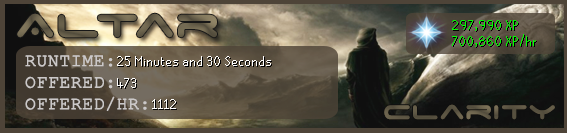
650k+ xp/hr with frosts and tortoise familiar.
Clarity
2014-08-28 18:43:35
Bank presets now live! Sped up to about 750k+/hr now.
If anybody can get a nice progress report with pack yak, frost bones, and bank presets I'd appreciate it!
Cheers clarity. I'll be sure to post a proggy of around 30k d bones (w/ yak) by end of tomorrow :)
EDIT : Had to change the altar location from south to east because it would always terminate, no biggie though. Seems to work fine now. Sometimes might relight the same burner but that could be due to my decoration because with wood it works whereas with stone it does not.
EDIT 2: @Clarity - Here's a small proggy
http://gyazo.com/3e35b698229050811007cedafb1648ebIt did last night however, clear 6 hours for me but did not reload smart therefore the script terminated so I couldn't give you a 8-10hr proggy now :/
Wooty
2014-08-30 12:41:53
Bank presets are working like a charm! Still had some problems with detecting the burners correctly, but changing my altar orientation did the job. Thanks man, 10/10 script! :)
Clarity
2014-08-30 14:02:26
From: uhit
Cheers clarity. I'll be sure to post a proggy of around 30k d bones (w/ yak) by end of tomorrow :)
EDIT : Had to change the altar location from south to east because it would always terminate, no biggie though. Seems to work fine now. Sometimes might relight the same burner but that could be due to my decoration because with wood it works whereas with stone it does not.
EDIT 2: @Clarity - Here's a small proggy http://gyazo.com/3e35b698229050811007cedafb1648eb
It did last night however, clear 6 hours for me but did not reload smart therefore the script terminated so I couldn't give you a 8-10hr proggy now :/
From: Wooty
Bank presets are working like a charm! Still had some problems with detecting the burners correctly, but changing my altar orientation did the job. Thanks man, 10/10 script! :)
When the script messes up, what happens in the debug (both the text log and the visual debug)?
Wooty
2014-08-30 14:23:07
From: Clarity
When the script messes up, what happens in the debug (both the text log and the visual debug)?
It still detects the "MM_SYMBOL_BANK" after teleporting to my house, so it still thinks I'm at the bank. I checked the coords of where it detects the banking symbol and it seems like the Worldmap Orb is sometimes detected as a banking symbol (it has similar colors).
Wooty
2014-08-31 05:32:32
Here's the debug when that happens:
Using darkstone in my POH and altar orientation is east.
ClarityAltar v1.17
Initializing script...
-- setupSRL()
---- Setting up SRL...
---- initSmart():
------ Attempting to pair to a previously spawned client
------ smartPairToExistingClient():
-------- Found 1 free client(s), attempting to pair to one...
---------- smartSetAsTarget(): Succesfully set SMART[9848] as Simba's target
-------- Succesfully paired to a existing client, SMART[9848]
------ smartPairToExistingClient(): result = true
------ Succesfully initialized via pairing to a previously spawned client
---- initSmart()
------ smartSetupDrawing(): Succesfully setup SMART drawing
---- Waiting up to 5 minutes for RS to load...
------ TRSActionBar.__findButton(): Found the actionbar button @ {X = 566, Y = 397}
------ TRSActionBar.__find(): result = true (height = 75)
------ Dynamic interfaces have been set.
---- Client is ready.
---- Setup SRL in 109ms.
-- setupSRL(): True
0 | == ClarityDebug == | ClarityAltar v1.17
1 | == ClarityDebug == | Script initialized successfully.
2 | == ClarityDebug == | Checking for script updates...
3 | == ClarityDebug == | Online Script Version: 1.17
4 | == ClarityDebug == | Local Script Version: 1.17
5 | == ClarityDebug == | You have the latest version of the script!
6 | == ClarityDebug == | Please wait...now installing ClarityAltar image assets to your computer...
7 | == ClarityDebug == | -- INSTALLATION STATUS: Script Paint exists.
8 | == ClarityDebug == |
9 | == ClarityDebug == | GRAPHICS MODE: DirectX
---- TRSGameTab.__initTabs(): Setup gametab properties
====== ClarityAltar Debug Progress Report ======
Time Running:  3 Seconds
Total Offered: 0
Offered/Hr:    0
Total XP:      0 XP
XP/Hr:         0 XP/hr
====== ================================== ======
10 | == ClarityDebug == | Our progress was painted.
-- TRSMinimap._getSymbolColor()
---- Loaded symbol: Bank
---- Found symbol bitmap 73
---- Found Bank symbol at {X = 788, Y = 178}
-- TRSMinimap._getSymbolColor(): 2171165
11 | == ClarityDebug == | At Bank: True
-- TRSMinimap._getSymbolColor()
---- Loaded symbol: Bank
---- Found symbol bitmap 73
---- Found Bank symbol at {X = 788, Y = 178}
-- TRSMinimap._getSymbolColor(): 2171165
12 | == ClarityDebug == | At Bank: True
13 | == ClarityDebug == | bankItems initiated.
14 | == ClarityDebug == | Attempting to withdraw items from the bank.
-- TRSMinimap._getSymbolColor()
---- Loaded symbol: Bank
---- Found symbol bitmap 73
---- Found Bank symbol at {X = 788, Y = 178}
-- TRSMinimap._getSymbolColor(): 2171165
15 | == ClarityDebug == | At Bank: True
16 | == ClarityDebug == | openBank initiated.
-- isMouseOverText()
---- Current mouse-over text: ""
---- Current mouse-over text: "Bank TzHaar-Mej-Jal"
---- Found "ank" in mouse-over string: "Bank TzHaar-Mej-Jal"
-- isMouseOverText(): True
---- TRSChooseOption.optionsExist(): Succesfully found option "Bank" in "Bank TzHaar-Mej-Jal"
-- TRSChooseOption._select():
---- Options found: [Bank TzHaar-Mej-Jal, Talk to TzHaar-Mej-Jal, Collect TzHaar-Mej-Jal, Walk here Pax Aurelius, Examine TzHaar-Mej-Jal, Follow Pax Aurelius, Trade with Pax Aurelius, Report Pax Aurelius, Follow Esqorial, Trade with Esqorial, Report Esqorial, Cancel]
---- Found option "Bank" in "Bank TzHaar-Mej-Jal"
-- TRSChooseOption.select() result = true
-- TRSChooseOption._select():
---- Options found: [Take BoB, Cast, Attack, Summon Pet, Open Pet Interface, Dismiss, Call Follower, Follower Details, Interact, Renew Familiar, Select leM-click option, Cancel]
---- Found option "Interact" in "Interact"
-- TRSChooseOption.select() result = true
17 | == ClarityDebug == | Familiar inventory is open.
-- isMouseOverText()
---- Current mouse-over text: "Store-1 Dragon L'ones"
---- Found "S" in mouse-over string: "Store-1 Dragon L'ones"
-- isMouseOverText(): True
-- TRSChooseOption._select():
---- Options found: [Store-1 Dragon bones, Store-5 Dragon bones, Store-10 Dragon bones, Store-All Dragon bones, Store-X Dragon bones, Examine Dragon bones, Cancel]
---- Found option "All" in "Store-All Dragon bones"
-- TRSChooseOption.select() result = true
-- TRSMinimap._getSymbolColor()
---- Loaded symbol: Bank
---- Found symbol bitmap 73
---- Found Bank symbol at {X = 788, Y = 178}
-- TRSMinimap._getSymbolColor(): 2171165
18 | == ClarityDebug == | At Bank: True
19 | == ClarityDebug == | openBank initiated.
-- isMouseOverText()
---- Current mouse-over text: "Attack"
---- Current mouse-over text: "Attack"
---- Current mouse-over text: "Attack"
---- Current mouse-over text: "Attack"
---- Current mouse-over text: "Attack"
---- Current mouse-over text: "Attack"
---- Current mouse-over text: "Attack"
---- Current mouse-over text: "Attack"
---- Current mouse-over text: "Attack"
---- Current mouse-over text: "Attack"
---- Current mouse-over text: "Attack"
---- Current mouse-over text: "Attack"
---- Current mouse-over text: "Attack"
---- Current mouse-over text: "Attack"
-- isMouseOverText(): False
20 | == ClarityDebug == | Unable to locate the banker.
21 | == ClarityDebug == | Attempts: 1
-- isMouseOverText()
---- Current mouse-over text: ""
---- Current mouse-over text: "Bank TzHaar-Mej-Jal"
---- Found "ank" in mouse-over string: "Bank TzHaar-Mej-Jal"
-- isMouseOverText(): True
---- TRSChooseOption.optionsExist(): Succesfully found option "Bank" in "BankTzHaar-Mej-Jal"
-- TRSChooseOption._select():
---- Options found: [BankTzHaar-Mej-Jal, Talkto TzHaar-Mej-Jal, Collect TzHaar-Mej-Jal, Walk here, Examine TzHaar-Mej-Jal, Cancel]
---- Found option "Bank" in "BankTzHaar-Mej-Jal"
-- TRSChooseOption.select() result = true
-- TRSMinimap._getSymbolColor()
---- Loaded symbol: Bank
---- Found symbol bitmap 73
---- Found Bank symbol at {X = 788, Y = 178}
-- TRSMinimap._getSymbolColor(): 2171165
22 | == ClarityDebug == | At Bank: True
[B][COLOR="#FF0000"]23 | == ClarityDebug == | Teleporting to house.[/COLOR][/B]
24 | == ClarityDebug == | Searching for house teleportation success bitmap. (Attempt 0)
25 | == ClarityDebug == | Did not find bitmap, reattempting.
26 | == ClarityDebug == | Searching for house teleportation success bitmap. (Attempt 1)
27 | == ClarityDebug == | Did not find bitmap, reattempting.
28 | == ClarityDebug == | Searching for house teleportation success bitmap. (Attempt 2)
29 | == ClarityDebug == | Did not find bitmap, reattempting.
30 | == ClarityDebug == | Searching for house teleportation success bitmap. (Attempt 3)
31 | == ClarityDebug == | Did not find bitmap, reattempting.
32 | == ClarityDebug == | Searching for house teleportation success bitmap. (Attempt 4)
33 | == ClarityDebug == | Did not find bitmap, reattempting.
34 | == ClarityDebug == | Searching for house teleportation success bitmap. (Attempt 5)
35 | == ClarityDebug == | Did not find bitmap, reattempting.
36 | == ClarityDebug == | Searching for house teleportation success bitmap. (Attempt 6)
37 | == ClarityDebug == | Did not find bitmap, reattempting.
38 | == ClarityDebug == | Searching for house teleportation success bitmap. (Attempt 7)
39 | == ClarityDebug == | Did not find bitmap, reattempting.
40 | == ClarityDebug == | Searching for house teleportation success bitmap. (Attempt 8)
41 | == ClarityDebug == | Did not find bitmap, reattempting.
42 | == ClarityDebug == | Searching for house teleportation success bitmap. (Attempt 9)
-- TRSMinimap._getSymbolColor()
---- Loaded symbol: Bank
---- Found symbol bitmap 73
[B][COLOR="#FF0000"]---- Found Bank symbol at {X = 732, Y = 116}[/COLOR][/B]
-- TRSMinimap._getSymbolColor(): 3290679
43 | == ClarityDebug == | At Bank: True
-- TRSMinimap._getSymbolColor()
---- Loaded symbol: Bank
---- Found symbol bitmap 73
---- Found Bank symbol at {X = 732, Y = 116}
-- TRSMinimap._getSymbolColor(): 3290679
44 | == ClarityDebug == | At Bank: True
-- TRSMinimap._getSymbolColor()
---- Loaded symbol: Bank
---- Found symbol bitmap 73
---- Found Bank symbol at {X = 732, Y = 116}
-- TRSMinimap._getSymbolColor(): 3290679
45 | == ClarityDebug == | At Bank: True
-- TRSMinimap._getSymbolColor()
---- Loaded symbol: Bank
---- Found symbol bitmap 73
---- Found Bank symbol at {X = 732, Y = 116}
-- TRSMinimap._getSymbolColor(): 3290679
46 | == ClarityDebug == | At Bank: True
====== ClarityAltar Debug Progress Report ======
Time Running:  31 Seconds
Total Offered: 0
Offered/Hr:    0
Total XP:      0 XP
XP/Hr:         0 XP/hr
====== ================================== ======
47 | == ClarityDebug == | Our progress was painted.
-- TRSMinimap._getSymbolColor()
---- Loaded symbol: Bank
---- Found symbol bitmap 73
---- Found Bank symbol at {X = 732, Y = 116}
-- TRSMinimap._getSymbolColor(): 3290679
48 | == ClarityDebug == | At Bank: True
-- TRSMinimap._getSymbolColor()
---- Loaded symbol: Bank
---- Found symbol bitmap 73
---- Found Bank symbol at {X = 732, Y = 116}
-- TRSMinimap._getSymbolColor(): 3290679
49 | == ClarityDebug == | At Bank: True
50 | == ClarityDebug == | bankItems initiated.
51 | == ClarityDebug == | Attempting to withdraw items from the bank.
-- TRSMinimap._getSymbolColor()
---- Loaded symbol: Bank
---- Found symbol bitmap 73
---- Found Bank symbol at {X = 732, Y = 116}
-- TRSMinimap._getSymbolColor(): 3290679
52 | == ClarityDebug == | At Bank: True
53 | == ClarityDebug == | openBank initiated.
-- isMouseOverText()
---- Current mouse-over text: ""
---- Current mouse-over text: ""
---- Current mouse-over text: ""
---- Current mouse-over text: ""
---- Current mouse-over text: ""
---- Current mouse-over text: ""
---- Current mouse-over text: ""
---- Current mouse-over text: ""
---- Current mouse-over text: ""
---- Current mouse-over text: ""
---- Current mouse-over text: ""
---- Current mouse-over text: ""
---- Current mouse-over text: ""
---- Current mouse-over text: ""
-- isMouseOverText(): False
54 | == ClarityDebug == | Unable to locate the banker.
55 | == ClarityDebug == | Attempts: 1
Clarity
2014-09-01 21:46:02
Ah, that should be a pretty simple fix then (decrease the size of the search area). Will do, thanks for the very informative bug report.
Wooty
2014-09-02 02:53:35
Thanks Clarity! :)

RlagkRud
2014-09-07 20:23:34
Been getting this error:
---- Found symbol bitmap 73
---- Found Bank symbol at {X = 689, Y = 91}
-- TRSMinimap._getSymbolColor(): 3390179
27 | == ClarityDebug == | At Bank: True
28 | == ClarityDebug == | Teleporting to house.
29 | == ClarityDebug == | Searching for house teleportation success bitmap. (Attempt 0)
30 | == ClarityDebug == | Did not find bitmap, reattempting.
31 | == ClarityDebug == | Searching for house teleportation success bitmap. (Attempt 1)
32 | == ClarityDebug == | Did not find bitmap, reattempting.
33 | == ClarityDebug == | Searching for house teleportation success bitmap. (Attempt 2)
-- TRSMinimap._getSymbolColor()
---- Loaded symbol: Bank
---- Found symbol bitmap 73
-- TRSMinimap._getSymbolColor(): -1
-- TRSMinimap._getSymbolColor()
---- Loaded symbol: Minigame
---- Found symbol bitmap 83
-- TRSMinimap._getSymbolColor(): -1
-- TRSMinimap._getSymbolColor()
---- Loaded symbol: Transportation
---- Found symbol bitmap 90
-- TRSMinimap._getSymbolColor(): -1
34 | == ClarityDebug == | At Bank: False
---- Waiting while the player is moving...
-- TRSMinimap._getSymbolColor()
---- Loaded symbol: Bank
---- Found symbol bitmap 73
-- TRSMinimap._getSymbolColor(): -1
-- TRSMinimap._getSymbolColor()
---- Loaded symbol: Minigame
---- Found symbol bitmap 83
-- TRSMinimap._getSymbolColor(): -1
-- TRSMinimap._getSymbolColor()
---- Loaded symbol: Transportation
---- Found symbol bitmap 90
-- TRSMinimap._getSymbolColor(): -1
35 | == ClarityDebug == | At Bank: False
36 | == ClarityDebug == | lightBurners initiated.
37 | == ClarityDebug == | locateBurners initiated.
38 | == ClarityDebug == | locateAltar initiated.
39 | == ClarityDebug == | Unable to locate an altar.
40 | == ClarityDebug == | Attempts: 1
41 | == ClarityDebug == | Unable to locate an altar.
42 | == ClarityDebug == | Attempts: 2
43 | == ClarityDebug == | Unable to locate an altar.
44 | == ClarityDebug == | Attempts: 3
45 | == ClarityDebug == | Unable to locate an altar.
46 | == ClarityDebug == | Attempts: 4
47 | == ClarityDebug == | Unable to locate an altar.
48 | == ClarityDebug == | Attempts: 5
49 | == ClarityDebug == | Unable to locate an altar.
50 | == ClarityDebug == | Attempts: 6
51 | == ClarityDebug == | Unable to locate an altar.
52 | == ClarityDebug == | Attempts: 7
53 | == ClarityDebug == | Unable to locate an altar.
54 | == ClarityDebug == | Attempts: 8
55 | == ClarityDebug == | Unable to locate an altar.
56 | == ClarityDebug == | Attempts: 9
57 | == ClarityDebug == | Unable to locate an altar.
58 | == ClarityDebug == | Attempts: 10
Warning! You passed a wrong xs to a finder function: -16. That is below 0, thus out of bounds. Setting the value to 0 for now.
Warning! You passed a wrong ys to a finder function: -70. That is below 0, thus out of bounds. Setting the value to 0 for now.
59 | == ClarityDebug == | Unable to locate a burner.
60 | == ClarityDebug == | Attempts: 1
Warning! You passed a wrong xs to a finder function: -16. That is below 0, thus out of bounds. Setting the value to 0 for now.
Warning! You passed a wrong ys to a finder function: -70. That is below 0, thus out of bounds. Setting the value to 0 for now.
61 | == ClarityDebug == | Unable to locate a burner.
62 | == ClarityDebug == | Attempts: 2
Warning! You passed a wrong xs to a finder function: -16. That is below 0, thus out of bounds. Setting the value to 0 for now.
Warning! You passed a wrong ys to a finder function: -70. That is below 0, thus out of bounds. Setting the value to 0 for now.
63 | == ClarityDebug == | Unable to locate a burner.
64 | == ClarityDebug == | Attempts: 3
Warning! You passed a wrong xs to a finder function: -16. That is below 0, thus out of bounds. Setting the value to 0 for now.
Warning! You passed a wrong ys to a finder function: -70. That is below 0, thus out of bounds. Setting the value to 0 for now.
65 | == ClarityDebug == | Unable to locate a burner.
66 | == ClarityDebug == | Attempts: 4
Warning! You passed a wrong xs to a finder function: -16. That is below 0, thus out of bounds. Setting the value to 0 for now.
Warning! You passed a wrong ys to a finder function: -70. That is below 0, thus out of bounds. Setting the value to 0 for now.
67 | == ClarityDebug == | Unable to locate a burner.
68 | == ClarityDebug == | Attempts: 5
Warning! You passed a wrong xs to a finder function: -16. That is below 0, thus out of bounds. Setting the value to 0 for now.
Warning! You passed a wrong ys to a finder function: -70. That is below 0, thus out of bounds. Setting the value to 0 for now.
69 | == ClarityDebug == | Unable to locate a burner.
70 | == ClarityDebug == | Attempts: 6
Warning! You passed a wrong xs to a finder function: -16. That is below 0, thus out of bounds. Setting the value to 0 for now.
Warning! You passed a wrong ys to a finder function: -70. That is below 0, thus out of bounds. Setting the value to 0 for now.
71 | == ClarityDebug == | Unable to locate a burner.
72 | == ClarityDebug == | Attempts: 7
Warning! You passed a wrong xs to a finder function: -16. That is below 0, thus out of bounds. Setting the value to 0 for now.
Warning! You passed a wrong ys to a finder function: -70. That is below 0, thus out of bounds. Setting the value to 0 for now.
73 | == ClarityDebug == | Unable to locate a burner.
74 | == ClarityDebug == | Attempts: 8
Warning! You passed a wrong xs to a finder function: -16. That is below 0, thus out of bounds. Setting the value to 0 for now.
Warning! You passed a wrong ys to a finder function: -70. That is below 0, thus out of bounds. Setting the value to 0 for now.
75 | == ClarityDebug == | Unable to locate a burner.
76 | == ClarityDebug == | Attempts: 9
Warning! You passed a wrong xs to a finder function: -16. That is below 0, thus out of bounds. Setting the value to 0 for now.
Warning! You passed a wrong ys to a finder function: -70. That is below 0, thus out of bounds. Setting the value to 0 for now.
77 | == ClarityDebug == | Unable to locate a burner.
78 | == ClarityDebug == | Attempts: 10
Exception in Script: Runtime error: "Access violation" at line 664, column 10
The following bitmaps were not freed: [Minimap Mask, SMART Debug Image, 2, Gametab Bitmap[0], Gametab Bitmap[1], Gametab Bitmap[2], Gametab Bitmap[3], Gametab Bitmap[4], Gametab Bitmap[5], Gametab Bitmap[6], Gametab Bitmap[7], Gametab Bitmap[8], Gametab Bitmap[9], Gametab Bitmap[10], Gametab Bitmap[11], Gametab Bitmap[12], Gametab Bitmap[13], 17, 18, 19, 20, 21, 22, 23, 24, 26]
File[C:\Users\Desktop\Simba\Includes\SRL-6/logs/SRL log (07-09-14 at 07.21.13 PM).txt] has not been freed in the script, freeing it now.
Happens when status is at "lighting the burners"
Altar location is east, near east wall. My wall type is white. Don't have access to dark stone.
Mantasx27
2014-09-11 08:06:51
How about a simple banking option instead of the fancy ring one? :D
johnjoseph09
2014-09-12 12:46:17
hey there, script works great but just one downfall though- it burns one burner and again re-lights it, this re-lighting thing happens everytime the script burns the right burner first. But when it burns the left one first- it burns both. Only when it burns right first, it relights. Just wanted to let you know this that I had found, great script. Flawless on its job, hoping to get 92 prayer soon, Thanks to you I dont have to do all those booooooooring training myself :)
From: johnjoseph09
hey there, script works great but just one downfall though- it burns one burner and again re-lights it, this re-lighting thing happens everytime the script burns the right burner first. But when it burns the left one first- it burns both. Only when it burns right first, it relights. Just wanted to let you know this that I had found, great script. Flawless on its job, hoping to get 92 prayer soon, Thanks to you I dont have to do all those booooooooring training myself :)
Manually move the camera to its highest point (So Birds eye view)
johnjoseph09
2014-09-12 23:27:50
From: uhit
Manually move the camera to its highest point (So Birds eye view)
Also, when the timer of familiar is about to get over, it withdraws summoning pot and pouch but does nothing with them … it just banks that and continues, and the familiar dies.
Clarity
2014-09-15 13:25:39
From: johnjoseph09
hey there, script works great but just one downfall though- it burns one burner and again re-lights it, this re-lighting thing happens everytime the script burns the right burner first. But when it burns the left one first- it burns both. Only when it burns right first, it relights. Just wanted to let you know this that I had found, great script. Flawless on its job, hoping to get 92 prayer soon, Thanks to you I dont have to do all those booooooooring training myself :)
What is your altar and room orientation? I'm unable to reproduce this bug. Running flawlessly for me on East-East. I'll take a look at the code though and try to figure it out, but perhaps try changing to that orientation. You can trick the script by rotating the camera if you don't want to delete/reorient your altar room.
From: johnjoseph09
Also, when the timer of familiar is about to get over, it withdraws summoning pot and pouch but does nothing with them … it just banks that and continues, and the familiar dies.
I just got this bug, I'll try to fix that!
Clarity
2014-09-19 05:56:16
Released 1.20
Fixed some bugs (for myself at least), if they still occur, use the East/East orientation or post detailed screenshots of exactly what is happening to you.
But…more importantly…
LIVE STAT TRACKING ADDED!The script will now commit stats every five minutes to
http://srlclarity.com/tracking :)
Will be adding this functionality to my other scripts shortly.
johnjoseph09
2014-09-21 08:06:47
Hey Sorry I was away from pc for a couple of weeks, and thanks alot Clarity, the script got me 92 prayer. Everything worked fine but I had to renew familiar myself at that time, excellent script overall, thanks :)
snowFBR
2014-09-22 10:20:46
I am constantly getting "socket disconnected; unpairing" when i try to run the script, I have followed all the instructions but still get this error. Any fixes?
cbrems
2014-09-26 18:05:05
Mine doesn't update to 1.20
Clarity
2014-09-26 18:30:48
From: cbrems
Mine doesn't update to 1.20
Changed the version to 1.19, it seems like we've found a flaw in the auto-updater as we were using strings for the version numbers. Going to be fixed in a bit but it should update now.
cbrems
2014-09-28 01:53:27
thank you for the reply, Clarity
RlagkRud
2014-09-29 14:37:34
There's now a bank option "Withdraw to BoB"
This should greatly reduce banking times if you want to add it ;)
Clarity
2014-09-30 03:18:51
From: RlagkRud
There's now a bank option "Withdraw to BoB"
This should greatly reduce banking times if you want to add it ;)
Certainly. Can't thank them enough for update after update that make all my scripts faster.
Clarity
2014-10-14 00:03:21
Update 2.00 (issue with auto-updater so a jumped too a much higher number, I know)
-Now does Withdraw-X-To-BoB
-Now only need 1 bank preset as a result, your first bank preset should be 2 marrentills, bones, and house teleport.
-Added some more antiban features
-Fixed memory leak issues
o0Matthius0o
2014-10-15 14:30:50
117 | == ClarityDebug == | Unable to locate an altar.
118 | == ClarityDebug == | Attempts: 1
119 | == ClarityDebug == | Unable to locate an altar.
120 | == ClarityDebug == | Attempts: 2
121 | == ClarityDebug == | Unable to locate an altar.
122 | == ClarityDebug == | Attempts: 3
123 | == ClarityDebug == | Unable to locate an altar.
124 | == ClarityDebug == | Attempts: 4
125 | == ClarityDebug == | Unable to locate an altar.
126 | == ClarityDebug == | Attempts: 5
127 | == ClarityDebug == | Unable to locate an altar.
128 | == ClarityDebug == | Attempts: 6
129 | == ClarityDebug == | Unable to locate an altar.
130 | == ClarityDebug == | Attempts: 7
131 | == ClarityDebug == | Unable to locate an altar.
132 | == ClarityDebug == | Attempts: 8
133 | == ClarityDebug == | Unable to locate an altar.
134 | == ClarityDebug == | Attempts: 9
135 | == ClarityDebug == | Unable to locate an altar.
136 | == ClarityDebug == | Attempts: 10
Warning! You passed a wrong xs to a finder function: -85. That is below 0, thus out of bounds. Setting the value to 0 for now.
Warning! You passed a wrong ys to a finder function: -10. That is below 0, thus out of bounds. Setting the value to 0 for now.
137 | == ClarityDebug == | Unable to locate a burner.
138 | == ClarityDebug == | Attempts: 1
Warning! You passed a wrong xs to a finder function: -85. That is below 0, thus out of bounds. Setting the value to 0 for now.
Warning! You passed a wrong ys to a finder function: -10. That is below 0, thus out of bounds. Setting the value to 0 for now.
139 | == ClarityDebug == | Unable to locate a burner.
140 | == ClarityDebug == | Attempts: 2
Warning! You passed a wrong xs to a finder function: -85. That is below 0, thus out of bounds. Setting the value to 0 for now.
Warning! You passed a wrong ys to a finder function: -10. That is below 0, thus out of bounds. Setting the value to 0 for now.
141 | == ClarityDebug == | Unable to locate a burner.
142 | == ClarityDebug == | Attempts: 3
Warning! You passed a wrong xs to a finder function: -85. That is below 0, thus out of bounds. Setting the value to 0 for now.
Warning! You passed a wrong ys to a finder function: -10. That is below 0, thus out of bounds. Setting the value to 0 for now.
143 | == ClarityDebug == | Unable to locate a burner.
144 | == ClarityDebug == | Attempts: 4
Warning! You passed a wrong xs to a finder function: -85. That is below 0, thus out of bounds. Setting the value to 0 for now.
Warning! You passed a wrong ys to a finder function: -10. That is below 0, thus out of bounds. Setting the value to 0 for now.
145 | == ClarityDebug == | Unable to locate a burner.
146 | == ClarityDebug == | Attempts: 5
Warning! You passed a wrong xs to a finder function: -85. That is below 0, thus out of bounds. Setting the value to 0 for now.
Warning! You passed a wrong ys to a finder function: -10. That is below 0, thus out of bounds. Setting the value to 0 for now.
147 | == ClarityDebug == | Unable to locate a burner.
148 | == ClarityDebug == | Attempts: 6
Warning! You passed a wrong xs to a finder function: -85. That is below 0, thus out of bounds. Setting the value to 0 for now.
Warning! You passed a wrong ys to a finder function: -10. That is below 0, thus out of bounds. Setting the value to 0 for now.
149 | == ClarityDebug == | Unable to locate a burner.
150 | == ClarityDebug == | Attempts: 7
Warning! You passed a wrong xs to a finder function: -85. That is below 0, thus out of bounds. Setting the value to 0 for now.
Warning! You passed a wrong ys to a finder function: -10. That is below 0, thus out of bounds. Setting the value to 0 for now.
151 | == ClarityDebug == | Unable to locate a burner.
152 | == ClarityDebug == | Attempts: 8
Warning! You passed a wrong xs to a finder function: -85. That is below 0, thus out of bounds. Setting the value to 0 for now.
Warning! You passed a wrong ys to a finder function: -10. That is below 0, thus out of bounds. Setting the value to 0 for now.
153 | == ClarityDebug == | Unable to locate a burner.
154 | == ClarityDebug == | Attempts: 9
Warning! You passed a wrong xs to a finder function: -85. That is below 0, thus out of bounds. Setting the value to 0 for now.
Warning! You passed a wrong ys to a finder function: -10. That is below 0, thus out of bounds. Setting the value to 0 for now.
155 | == ClarityDebug == | Unable to locate a burner.
156 | == ClarityDebug == | Attempts: 10
Error: Access violation at line 633
Execution failed.
The following bitmaps were not freed: [Minimap Mask, SMART Debug Image, 2, Gametab Bitmap[0], Gametab Bitmap[1], Gametab Bitmap[2], Gametab Bitmap[3], Gametab Bitmap[4], Gametab Bitmap[5], Gametab Bitmap[6], Gametab Bitmap[7], Gametab Bitmap[8], Gametab Bitmap[9], Gametab Bitmap[10], Gametab Bitmap[11], Gametab Bitmap[12], Gametab Bitmap[13]]
File[C:\Simba\Includes\SRL-6/logs/SRL log (15-10-14 at 01.24.07 PM).txt] has not been freed in the script, freeing it now.
This has been really consistent. It will walk to the altar and get in a decent position. The search box will pop up. Then he will just stand there and the script stops.
My orientations were north, north.
Sorry this wasnt super detailed, im heading off to work. Ill give more details if needed later.
edit:
68 | == ClarityDebug == | Teleporting to house.
69 | == ClarityDebug == | Searching for house teleportation success bitmap. (Attempt 0)
70 | == ClarityDebug == | At Bank: False
71 | == ClarityDebug == | At Bank: False
72 | == ClarityDebug == | lightBurners initiated.
73 | == ClarityDebug == | locateBurners initiated.
74 | == ClarityDebug == | locateAltar initiated.
Error: Access violation at line 415
Execution failed.
The following bitmaps were not freed: [Minimap Mask, SMART Debug Image, 2, Gametab Bitmap[0], Gametab Bitmap[1], Gametab Bitmap[2], Gametab Bitmap[3], Gametab Bitmap[4], Gametab Bitmap[5], Gametab Bitmap[6], Gametab Bitmap[7], Gametab Bitmap[8], Gametab Bitmap[9], Gametab Bitmap[10], Gametab Bitmap[11], Gametab Bitmap[12], Gametab Bitmap[13]]
File[C:\Simba\Includes\SRL-6/logs/SRL log (15-10-14 at 01.37.29 PM).txt] has not been freed in the script, freeing it now.
this also happens. the access violation is at line 415 in the "tpointarrays" include. Which is result := middleTPA(self);
nero_dante
2014-10-18 22:53:52
This doesn't seem to be working for me. The script didnt auto update… but then i changed the 8th line to 2.00 version and then it started working, but then it will withdraw the bones, and then try to open up the familiar even though its not out yet and then it will repeat that again…. if i renew a familiar beforehand… it will place the bones in the familiar and then go back to bank wwithdraw more bones and then cancel out and then go back to bank and redo
Clarity
2014-10-18 23:03:40
From: nero_dante
This doesn't seem to be working for me. The script didnt auto update… but then i changed the 8th line to 2.00 version and then it started working, but then it will withdraw the bones, and then try to open up the familiar even though its not out yet and then it will repeat that again…. if i renew a familiar beforehand… it will place the bones in the familiar and then go back to bank wwithdraw more bones and then cancel out and then go back to bank and redo
Seems like autoupdater doesn't work right now. Instead of using the broken version, get the real 2.00:
http://pastebin.com/raw.php?i=nLgk3Ytq
nero_dante
2014-10-18 23:04:53
From: Clarity
Seems like autoupdater doesn't work right now. Instead of using the broken version, get the real 2.00: http://pastebin.com/raw.php?i=nLgk3Ytq
awesome, i'll check it out now :)
giving me this debug now… Maybe you have found a way around it
299 | == ClarityDebug == | Did not find bitmap, reattempting.
300 | == ClarityDebug == | Searching for house teleportation success bitmap. (Attempt 2)
301 | == ClarityDebug == | Did not find bitmap, reattempting.
302 | == ClarityDebug == | Searching for house teleportation success bitmap. (Attempt 3)
303 | == ClarityDebug == | Did not find bitmap, reattempting.
304 | == ClarityDebug == | Searching for house teleportation success bitmap. (Attempt 4)
305 | == ClarityDebug == | Did not find bitmap, reattempting.
306 | == ClarityDebug == | Searching for house teleportation success bitmap. (Attempt 5)
307 | == ClarityDebug == | Did not find bitmap, reattempting.
308 | == ClarityDebug == | Searching for house teleportation success bitmap. (Attempt 6)
309 | == ClarityDebug == | Did not find bitmap, reattempting.
310 | == ClarityDebug == | Searching for house teleportation success bitmap. (Attempt 7)
311 | == ClarityDebug == | Did not find bitmap, reattempting.
312 | == ClarityDebug == | Searching for house teleportation success bitmap. (Attempt 8)
313 | == ClarityDebug == | Did not find bitmap, reattempting.
314 | == ClarityDebug == | Searching for house teleportation success bitmap. (Attempt 9)
315 | == ClarityDebug == | Did not find bitmap, reattempting.
316 | == ClarityDebug == | Searching for house teleportation success bitmap. (Attempt 10)
Clarity
2014-10-18 23:35:29
From: nero_dante
awesome, i'll check it out now :)
giving me this debug now… Maybe you have found a way around it
299 | == ClarityDebug == | Did not find bitmap, reattempting.
300 | == ClarityDebug == | Searching for house teleportation success bitmap. (Attempt 2)
301 | == ClarityDebug == | Did not find bitmap, reattempting.
302 | == ClarityDebug == | Searching for house teleportation success bitmap. (Attempt 3)
303 | == ClarityDebug == | Did not find bitmap, reattempting.
304 | == ClarityDebug == | Searching for house teleportation success bitmap. (Attempt 4)
305 | == ClarityDebug == | Did not find bitmap, reattempting.
306 | == ClarityDebug == | Searching for house teleportation success bitmap. (Attempt 5)
307 | == ClarityDebug == | Did not find bitmap, reattempting.
308 | == ClarityDebug == | Searching for house teleportation success bitmap. (Attempt 6)
309 | == ClarityDebug == | Did not find bitmap, reattempting.
310 | == ClarityDebug == | Searching for house teleportation success bitmap. (Attempt 7)
311 | == ClarityDebug == | Did not find bitmap, reattempting.
312 | == ClarityDebug == | Searching for house teleportation success bitmap. (Attempt 8)
313 | == ClarityDebug == | Did not find bitmap, reattempting.
314 | == ClarityDebug == | Searching for house teleportation success bitmap. (Attempt 9)
315 | == ClarityDebug == | Did not find bitmap, reattempting.
316 | == ClarityDebug == | Searching for house teleportation success bitmap. (Attempt 10)
What happens while this debug is occurring? Screenshots and such are very helpful :) The script is running flawlessly for me so I need some more information else I don't know exactly what needs editing.
nero_dante
2014-10-19 00:08:28
do you have teamviewer? I can show you through that.
If so private message me
jimbojambo
2014-10-23 04:31:52
From: nero_dante
awesome, i'll check it out now :)
giving me this debug now… Maybe you have found a way around it
299 | == ClarityDebug == | Did not find bitmap, reattempting.
300 | == ClarityDebug == | Searching for house teleportation success bitmap. (Attempt 2)
301 | == ClarityDebug == | Did not find bitmap, reattempting.
302 | == ClarityDebug == | Searching for house teleportation success bitmap. (Attempt 3)
303 | == ClarityDebug == | Did not find bitmap, reattempting.
304 | == ClarityDebug == | Searching for house teleportation success bitmap. (Attempt 4)
305 | == ClarityDebug == | Did not find bitmap, reattempting.
306 | == ClarityDebug == | Searching for house teleportation success bitmap. (Attempt 5)
307 | == ClarityDebug == | Did not find bitmap, reattempting.
308 | == ClarityDebug == | Searching for house teleportation success bitmap. (Attempt 6)
309 | == ClarityDebug == | Did not find bitmap, reattempting.
310 | == ClarityDebug == | Searching for house teleportation success bitmap. (Attempt 7)
311 | == ClarityDebug == | Did not find bitmap, reattempting.
312 | == ClarityDebug == | Searching for house teleportation success bitmap. (Attempt 8)
313 | == ClarityDebug == | Did not find bitmap, reattempting.
314 | == ClarityDebug == | Searching for house teleportation success bitmap. (Attempt 9)
315 | == ClarityDebug == | Did not find bitmap, reattempting.
316 | == ClarityDebug == | Searching for house teleportation success bitmap. (Attempt 10)
I had the same problem. Just stood at the bank and looped through the bank procedure in between failing to find the teletab bitmap. I am trying to comment out the bitmap method clicking and replace it with an inventory slot selection method, since my teletab is always in slot 28. I'll let you know if I get it working (I'm finding out how tough this is!)
jimbojambo
2014-10-23 14:47:17
From: jimbojambo
I had the same problem. Just stood at the bank and looped through the bank procedure in between failing to find the teletab bitmap. I am trying to comment out the bitmap method clicking and replace it with an inventory slot selection method, since my teletab is always in slot 28. I'll let you know if I get it working (I'm finding out how tough this is!)
I am retarded. I thought that the .bmp was referring to the teletab, but it was talking about the no place like home screen. I bound the teletab to hotkey x and now that part of the script is working properly.
I then had a problem with the script not opening the door to the chapel. I finally found that there was a way to default your doors to be open. Might want to add that to the instructions, to verify that your POH doors default to open. About to verify that it's all better now! Thanks for the script, will be supporting you.
Is this script outdated?

I keep getting this
Clarity
2014-10-24 11:01:00
From: Note
Is this script outdated?
I keep getting this
This script is not outdated :P
Your character appears to be running too far north, which suggests it spawns in your house at a unique spot.
Edit the walkPoint to a point that works for you, at line 483:
'North': walkPoint := Point(minimap.cx + 3 + random(-5, 5), minimap.cy - 35 + random(-5, 5));
to something further South like:
'North': walkPoint := Point(minimap.cx + 3 + random(-5, 5), minimap.cy - 25 + random(-5, 5));
With a modified walk point, everything else should work.
From: jimbojambo
I am retarded. I thought that the .bmp was referring to the teletab, but it was talking about the no place like home screen. I bound the teletab to hotkey x and now that part of the script is working properly.
I then had a problem with the script not opening the door to the chapel. I finally found that there was a way to default your doors to be open. Might want to add that to the instructions, to verify that your POH doors default to open. About to verify that it's all better now! Thanks for the script, will be supporting you.
Glad you were able to find and fix the source of the issue. I'll add that note into the OP.
From: Clarity
This script is not outdated :P
Your character appears to be running too far north, which suggests it spawns in your house at a unique spot.
Edit the walkPoint to a point that works for you, at line 483:
'North': walkPoint := Point(minimap.cx + 3 + random(-5, 5), minimap.cy - 35 + random(-5, 5));
to something further South like:
'North': walkPoint := Point(minimap.cx + 3 + random(-5, 5), minimap.cy - 25 + random(-5, 5));
With a modified walk point, everything else should work.
Glad you were able to find and fix the source of the issue. I'll add that note into the OP.
weird seems to some what work.. has done one load but second time it only lit on burner twice and continued to offer it o-o
edit: would light one but unable to light the other then terminates
Error: Access violation at line 415
Execution failed.
Tinkerd with the search box and stuff seems to work now though i made quiet big xD .. ay it works <3 lol (sucks not knowing how tpas work and tboxs :c )
edit:
Doesn't work at all for me now reinstalled the script and the client :S
jimbojambo
2014-10-26 15:06:49
Got 99! Well, I manually did the last bit because I always want to see my 99s. But thanks so much Clarity!
Clarity
2014-10-26 16:50:04
From: Note
weird seems to some what work.. has done one load but second time it only lit on burner twice and continued to offer it o-o
edit: would light one but unable to light the other then terminates
Error: Access violation at line 415
Execution failed.
Tinkerd with the search box and stuff seems to work now though i made quiet big xD .. ay it works <3 lol (sucks not knowing how tpas work and tboxs :c )
edit:
Doesn't work at all for me now reinstalled the script and the client :S
Your house theme is wrong. As per the instructions please use either Fancy Stone or Dark Stone. The wooden themes have overlapping colors and cause the script to fail.
Congratulations,
@jimbojambo! Glad you found the script helpful :)
oh right sorry didn't read that i thought it said "the wooden color is required" anyways im almost 99 xD ty anyways
Clarity
2014-10-27 07:55:04
You can always go for that glowing 120 cape :D
Thank you for 99 prayer again :D pics xD


WeAreSG
2014-11-16 02:17:37
[ATTACH=CONFIG]24449[/ATTACH]
Tried re-installing client and re-downloading script, quite sure I read the instructions thoroughly. No idea how to fixed this, maybe I missed something I was supposed to do ):
Clarity
2014-11-30 06:11:40
From: WeAreSG
[ATTACH=CONFIG]24449[/ATTACH]
Tried re-installing client and re-downloading script, quite sure I read the instructions thoroughly. No idea how to fixed this, maybe I missed something I was supposed to do ):
Sorry to hear you're having issues! Can you post a picture of your game graphics settings?
TimeRiders
2014-12-14 18:58:50
Error: Access violation at line 633
Execution failed.
The following bitmaps were not freed: [Minimap Mask, SMART Debug Image, 2, Gametab Bitmap[0], Gametab Bitmap[1], Gametab Bitmap[2], Gametab Bitmap[3], Gametab Bitmap[4], Gametab Bitmap[5], Gametab Bitmap[6], Gametab Bitmap[7], Gametab Bitmap[8], Gametab Bitmap[9], Gametab Bitmap[10], Gametab Bitmap[11], Gametab Bitmap[12], Gametab Bitmap[13]]
File[C:\Simba\Includes\SRL-6/logs/SRL log (14-12-14 at 04.18.39 PM).txt] has not been freed in the script, freeing it now.
Can't find burners
xSorrels
2015-01-10 11:49:19
For some reason, when Having Familiar option enabled, to Tortoise, it withdraws 18-29 NOTED Bones.
Then continues selecting preset 1 right after.
Also tries to take from BoB while at altar.
While Familiars disabled, it seems to run smoothly.
Just wish it worked, would take half the time.
warlord94
2015-01-12 15:18:33
Warning! You passed a wrong xs to a finder function: -16. That is below 0, thus out of bounds. Setting the value to 0 for now.
Warning! You passed a wrong ys to a finder function: -70. That is below 0, thus out of bounds. Setting the value to 0 for now.
71 | == ClarityDebug == | Unable to locate a burner.
72 | == ClarityDebug == | Attempts: 10
Error: Access violation at line 633
Execution failed.
The following bitmaps were not freed: [Minimap Mask, SMART Debug Image, 2, Gametab Bitmap[0], Gametab Bitmap[1], Gametab Bitmap[2], Gametab Bitmap[3], Gametab Bitmap[4], Gametab Bitmap[5], Gametab Bitmap[6], Gametab Bitmap[7], Gametab Bitmap[8], Gametab Bitmap[9], Gametab Bitmap[10], Gametab Bitmap[11], Gametab Bitmap[12], Gametab Bitmap[13]]
File[C:\Simba\Includes\SRL-6/logs/SRL log (12-01-15 at 03.15.31 PM).txt] has not been freed in the script, freeing it now.
Have marble burners, not sure why I'm having this issue. Any help, Clairty?
edit: Switched from directx to opengl and everything works now.
One major bug though, if it does the wait antiban when you run out of bones but still have some in your familiar, it won't take the bones from the familiar when the antiban is over and it'll just stand there saying "Waiting for all bones to be offered."
edit 2: Script is just really buggy in general. Doesn't renew familiar, just loops between realizing the familiar is about to expire, teleporting back to bank, then goes back to the house anyway. Only lights one burner about 25% of the time.
joemejiav
2015-01-14 00:57:04
man what a PAIN IN THE ASSS it was to get this script to run.
Running now, hopefully it'll be worth it
joemejiav
2015-01-14 01:16:52
This script is bad.
Why aren't you using the player manager for login?
The login it has doesn't work
Why are only marble burners allowed? that's an expense specific to this script with no logical reason other than lazy color coding.
Why is it drinking from a summoning potion when points hit 0? completely unnecessary expense specific to this script. It should only drink from the summoning potion WHEN the familiar vanishes.
Some left behind unfinished code makes it try to still retrieve the bones manually even with presets enabled, it opens up to the X amount of bones dialog and then uses the preset, why? It tries to note the withdrawal before all this? WHY? this is EASILY BANNEANABLE
I tried all directions and only East East works, so at least 75% of people who want to use this has to spend an additional 1.5M UNNECESSARILY just to try it out.
Why only fight kiln ring? ring of dueling is FASTER and it has a summoning obelist. most people who don't have 99 prayer also don't have fight kiln completed. Another unnecessary expense for running this script
Why do you still require marrentil and bones to have a slot in the bank? this script should ONLY do presets, it needs heavy cleaning up of the code. And the summoning potions and pouches should be detected automatically, if not, you should atleast THOROUGHLY specify what do you mean by bank slot numbers in the main post because NO ONE uses them.
EVEN AFTER ALL OF THIS, it still randomly gets stuck going to the room above the altar East East every tenth run.
It has to be baby sit.
2/5 This script has too many not only high but unnecessary requirements for the poor performance it gives. It can't even light the incense burners correctly and that's just costing everyone a lot of *** money
PSD. you didn't even mention that you have to set the left click summoning icon button to "take BoB" on the main post.
Clarity
2015-01-14 10:55:00
Your call is very important to me, please hold while I try to find the motivation to help you.
While much of what you said so warmly is user error or intentional (such as TzHaar ring), this script is indeed on the whole outdated (as stated in first post, last updated October 2014). In particular, bank presets operate differently than they did previously, incorporating beasts of burden into the presets automatically. Wouldn't be surprised if colors have changed over the past few months, breaking functions.
I'm sorry but there are clear logical reasons for only supporting marble burners and kiln ring in a public, free script, and yes, I am aware all burners give the same XP boost.
I'm busy with my Dungeoneering release so I'm reporting this script to be moved to the outdated forum until I have time to fix the actual flaws you point out, such as drinking summoning potions at 0 rather than at familiar restore, and script failure on non-East/East.
Thanks for your feedback.
The script still functions, albeit without summoning support fully.
That should still suffice, however.
joemejiav
2015-01-14 14:48:05
From: Clarity
Your call is very important to me, please hold while I try to find the motivation to help you.
While much of what you said so warmly is user error or intentional (such as TzHaar ring), this script is indeed on the whole outdated (as stated in first post, last updated October 2014). In particular, bank presets operate differently than they did previously, incorporating beasts of burden into the presets automatically. Wouldn't be surprised if colors have changed over the past few months, breaking functions.
I'm sorry but there are clear logical reasons for only supporting marble burners and kiln ring in a public, free script, and yes, I am aware all burners give the same XP boost.
I'm busy with my Dungeoneering release so I'm reporting this script to be moved to the outdated forum until I have time to fix the actual flaws you point out, such as drinking summoning potions at 0 rather than at familiar restore, and script failure on non-East/East.
Thanks for your feedback.
The safeguards against mass exploitation are in the price of prayer itself. The work it takes to use the bones on the altar is negligible towards the economy, this script isn't generating anything, not even saved time on what a normal player would take given it's heavy drawbacks. Stop arguing "public script" as an excuse for lazy unfinished bad scripts, that's whats driving users to alternatives and keeping this community too small to sustain a healthy inflow.
I mean **** DUDE, It's actually really amazing work. And yes you aren't getting much for it, and you probably have other priorities. But as you deduced, having this among updated scripts is misleading. This is half way towards an alpha
Thanks all for the time work and gp invested in leveling the requirements for this on a new account and the added headache of sorting out clusterfuck code. I should have gone for Hosted altars
PS: Jagex Loves you <3
Clarity
2015-01-14 15:13:34
From: joemejiav
The safeguards against mass exploitation are in the price of prayer itself. The work it takes to use the bones on the altar is negligible towards the economy, this script isn't generating anything, not even saved time on what a normal player would take given it's heavy drawbacks. Stop arguing "public script" as an excuse for lazy unfinished bad scripts, that's whats driving users to alternatives and keeping this community too small to sustain a healthy inflow.
I mean FUCK DUDE, It's actually really amazing work. And yes you aren't getting much for it, and you probably have other priorities. But as you deduced, having this among updated scripts is misleading. This is half way towards an alpha
Thanks all for the time work and gp invested in leveling the requirements for this on a new account and the added headache of sorting out the script. I should have gone for Hosted altars
PS: Jagex Loves you <3
Your entire perspective assumes some kind of entitlement to whatever feature you want, and that the script is somehow up to date for January 2015. It is being moved to the outdated forum once a mod views my report. This script was flawless at release, all the way until I stopped maintaining it in October. Of course it seems like a "lazy half-way alpha" today if it hasn't been updated to accommodate significant game changes that have occurred since then. I'm not sure why, after me telling you it's outdated, that you are still ranting like this.
This community doesn't care about attracting the masses. Instead, we care about attracting those that wish to learn what we do, and have something to contribute to our pool of scripts/knowledge. We invest nothing into making scripts leech-accessible unless we feel like it. A person with the attitude we want to attract would see this outdated script and either edit the code themselves or report the script as outdated rather than screaming/swearing at the author. I feel as if my code is easy to understand, and commented decently. If you consider it a "clusterfuck," I'm happy to answer questions about what each function or procedure does.
Like I said, once I am finished with my current project, I will get back to updating my public material. I apologize for the inconvenience you claim you experienced. I probably will report some of my other scripts that have been broken due to updates to avoid these silly confrontations.
I love Jagex and their game, so that works out I guess?
Turpinator
2015-01-14 15:27:52
From: joemejiav
The safeguards against mass exploitation are in the price of prayer itself. The work it takes to use the bones on the altar is negligible towards the economy, this script isn't generating anything, not even saved time on what a normal player would take given it's heavy drawbacks. Stop arguing "public script" as an excuse for lazy unfinished bad scripts, that's whats driving users to alternatives and keeping this community too small to sustain a healthy inflow.
I mean —- DUDE, It's actually really amazing work. And yes you aren't getting much for it, and you probably have other priorities. But as you deduced, having this among updated scripts is misleading. This is half way towards an alpha
Thanks all for the time work and gp invested in leveling the requirements for this on a new account and the added headache of sorting out cluster—- code. I should have gone for Hosted altars
PS: Jagex Loves you <3
You sure are demanding for someone who is getting something for free. I hope that you never become homeless/need assistance, because anything you receive wont be good enough for you.
Lets break down your sentences one by one.
1: Who claimed the marble burners had anything to do with exploitation? Im going to venture a guess that Clarity had marble burners in his house and wasnt going to go through the hassle of putting different ones in to make them work. Perhaps the wood/whatever colors arent very unique and it was too much of a hassle to write the extra code for something that already worked.
2: "saved time" oh yes, the 30 hours or so I ran this for my prayer didnt save me any ingame time, just life time.
3a: Well, Im going to assume this was first written for Clarity himself so he could get 99, and then as a favor to the community he released it, so at one point it was fully functional. Since he is done using this script (and others), I doubt hes going to take the time to check each script hes written to ensure they still work.
3b: "lazy unfinished bad scripts" (see above) What gives you the authority to deem something lazy, bad, or unfinished?
3c: Good, let the users that are immature little brats leave. SRL isnt about your precious little 'bots' or runescape. Its about learning.
4: 1, Language. 2, You just indirectly called his script "lazy unfinished bad" and now its really amazing? You flip-flip harder than John Kerry.
5: not getting much? See 3a.
6: Nearly everyone who posts a script/any post on these forums is unable to move the location of their script. Also see 3a on checking if it still works.
7: "halfway towards an alpha", So first you say its "lazy unfinished bad," next is is "really amazing." Which one is it?
8: Did you really sort anything out, or just complain about it? No one forced you to 'waste' all "the time work and gp" for the requirements, so I dont see why youre getting pissy over it.
9: Go for it. No one's stopping you.
Oh look. Clarity posted while i was writing this. His response seems pretty similar. Enjoy your time here, though with your attitude, it doesnt seem like youll stick around long.
joemejiav
2015-01-14 15:37:21
I'm not gonna engage on stuff you wrote which you're smart enough to figure out the subtext to once you stop white knighting.
For everything else see someone about your mediocrity.
To clarity. I AM sorry that you felt screamed or yelled at, you probably read it in a different tone. It was more of a mild annoyance.
masterBB
2015-01-14 17:36:28
From: joemejiav
This script is bad.
Though I understand it was annoying you had to face the problems you pointed out while using the script. By no means it is allowed to post like that on this forum. Please show more respect to other users. You are not a customer, you paid nothing, scripts are given "as is" with no guaranties. I don't want to see such a post from you again.
Some feedback rules(not all):
- Can't contain more negative aspects as positive ones.
- Does not contain CAPITALIZED words.
- Makes no personal assumptions about the person you give feedback.
- Doesn't contain swear words, even when not aimed at a person.
Your feedback:
- Is 100% negative.
- Feels like you are screaming.
- You call clarity lazy and his script bad.
- Contains swear words.
My suggested way of giving feedback:
[INDENT]Hi clarity, thank you for publishing your script. Was really looking forward to an altar script. It was however not usable for me.
I think currently three things aren't working/outdated:
[INDENT]Logging in:
X happens and it gets stuck at
Y.[/INDENT]
[INDENT]Getting stuck: Sometimes the script getts stuck going to the room above the altar East East every tenth run.[/INDENT]
[INDENT]Locations: It seems one the East East altar works. Not a deal breaker though, but you might want to add this to the main post.[/INDENT]
I looked into them but wasn't able to fix them. Could you help me out?
Also I made a list of some features which would make this script even better:
/List of features/
Thanks for reading this. I hope you can find some time to work on this again. Thanks in advance.[/INDENT]
You see the difference? You say the exact same thing without thrash talking. Please refrain from being rude.
From: Clarity
Your house theme is wrong. As per the instructions please use either Fancy Stone or Dark Stone. The wooden themes have overlapping colors and cause the script to fail.
Congratulations, @jimbojambo! Glad you found the script helpful :)
Looks like the Access violation is probably being caused by a empty array
edit realized that error is like 3 months old
h2cks
2015-03-27 10:27:52
does this script still work?
From: h2cks
does this script still work?
It does a few runs and then stops due to misclicking to an out of bounds area. Use it like a super afking semi legit script :)
serikas
2015-05-09 09:13:52
is it possible to update the script?
serikas
2015-05-09 10:21:39
sorry if it sounded rude. thank you
Vocalss
2015-06-03 09:38:28
Oo, i just need to get my own alter and il be using this :)!
nero_dante
2015-06-03 16:16:40
From: Vocalss
Oo, i just need to get my own alter and il be using this :)!
This script is outdated
R3LAX
2015-06-08 05:15:25
Could this be updated? It looks like a perfect prayer script.
R3LAX
2015-06-08 05:16:43
Could this be updated? It looks like a perfect prayer script
I have a working copy of this script if anyone wants it. It's still damn solid - only had to redo the colors and tweak some of the walking.
http://puu.sh/isPr8/8da3a985f2.jpg
nero_dante
2015-06-18 05:56:12
From: adc
I have a working copy of this script if anyone wants it. It's still damn solid - only had to redo the colors and tweak some of the walking.
http://puu.sh/isPr8/8da3a985f2.jpg
Could you post your modified version in here, or send to me please. Thanks :)
From: nero_dante
Could you post your modified version in here, or send to me please. Thanks :)
Sure thing.
Just got this proggy overnight:
http://puu.sh/itwfc/1544249eca.jpg
From: adc
Sure thing.
Just got this proggy overnight:
http://puu.sh/itwfc/1544249eca.jpg
I would like it too, if you dont mind! :D

