[SRL-6] ClarityEsswraith
Clarity
2014-02-03 07:57:00
 Version: 1.18(Script will automatically update to 1.18 when run)50K XP/HR at Level 99 Runecrafting
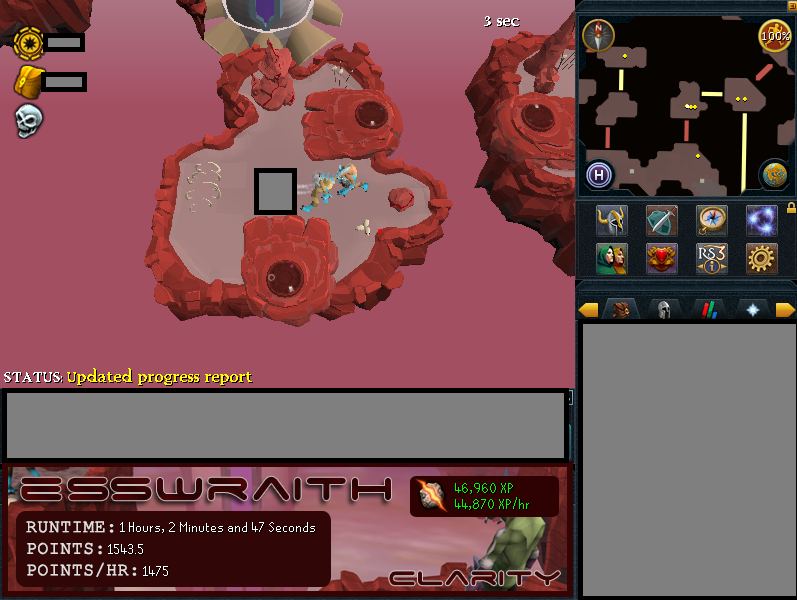 A brief progress log screenshot on a 90s Runecrafting account. Script can run endlessly if desired!
- DirectX Support for better reliability (if you don't have the plugin, get it here: http://villavu.com/forum/showthread.php?t=107256)
- Automatic installation of script assets to your computer (feel free to check the code to see what is being downloaded).
- Script will automatically check for a new version and update itself if a newer version exists, so you only need to download the attachment here once.
- Siphons runes from either Death, Blood, or Soul Esswraiths (Souls extensively tested to be flawless, bloods and deaths not tested as much)
- Paints progress on the SMART client, including total XP, XP per hour, total Runespan points, and Runespan points per hour.
- Island detection: only targets esswraiths on your current island.
- Choose between two methods of esswraith targeting: a timed waiting method, or a wait-until-death method. Timed waiting requires a larger stash of essence in the inventory beforehand.
- Antiban implemented.
- Numerous failsafes and randomization, some double failsafes.
Planned Future Updates:- Wizard finding.
- Node support, after which the script will be renamed ClarityRunespan and XP rates will be 100K+ XP/HR. I figured I would release esswraiths and then take some time to add in nodes afterwards.
- Color detection can always be improved. Currently Souls have very good detection, other esswraiths are not as accurate.
- Start script anywhere in RS.
Method Comparison1. resetEsswraith := false - this method will detect when your player has stopped siphoning, and then begin to look for a new esswraith to siphon. This is perhaps a more humanlike approach, but slower as there is a small delay time between esswraiths. Expect 45k XP/HR at level 99 Soul Esswraiths with this method.
2. resetEsswraith := true - this method will look for a new esswraith after the wait time specified as "resetWaitTime" plus or minus a gauss range random amount. This has faster, more guaranteed XP but may appear more botlike. Additionally, you need a reserve of rune essence to use this method. The wait time will need to be adjusted based on your RC level, as you will want a time that expires just before esswraith death but not after. XP rates can indeed be lowered by other players fully draining the esswraiths, so use the former method if you are in a crowded world. Expect 55k XP/HR at level 99 Soul Esswraiths with this method.
Instructions:- Download the script attached to this post.
- Fill in all the information and make sure you have admin rights or the installation procedure may not work.
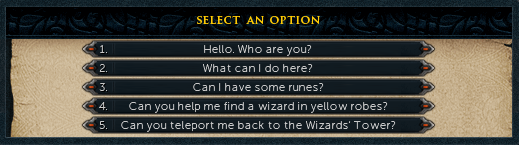
- Wear a cape. Enter the Runespan via the High Level Portal, and get runes from Wizard Finix (Choose option 3 below when speaking to him).
 The progress report is based on the default slots of all the runes, so do not move them. Keep your wicked hood in the first slot.
Your inventory should look like this:
The progress report is based on the default slots of all the runes, so do not move them. Keep your wicked hood in the first slot.
Your inventory should look like this:
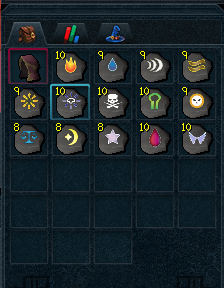 When rune essence is collected, it should be stored in the next free slot. Do not move this.
- Head to your desired location. Here is an interactive map of the RuneSpan.
Head to the highest level which contains the Soul, Blood, and Death esswraiths. The best location for Soul Esswraiths is this island in the center of the high level floor.
 I have tested the script and have run it quite smoothly for extended periods on this island. While other islands may work fine, this island offers the best rates by far!
- Make sure you have essence in your inventory before starting the script! Enjoy free Runecrafting experience!
SCRIPT DOWNLOAD: [ATTACH]22854[/ATTACH]Best of luck in your botting endeavors,
~Clarity
Stayon
2014-02-03 13:41:34
mmmm, been looking for one of these, will use soon. good job!
Clarity
2014-02-03 22:40:17
From: Stayon
mmmm, been looking for one of these, will use soon. good job!
Thanks, feel free to let me know if there are any issues. :)
[Update 1.14] - Improved island detection on the minimap and some other minor fixes.
Spartan 117
2014-02-03 22:54:42
Congratz on release and on SRL Members! You always have some sexy paint!
Clarity
2014-02-04 08:22:52
From: Spartan 117
Congratz on release and on SRL Members! You always have some sexy paint!
Heh thank you :p
[Update 1.15] Fixed standards and added preliminary code for a wizard finding function! Coming soon.
Additionally, feel free to post any better working colors for the esswraiths. The soul colors are across 10+ different logins so I think those are pretty much all set, but the blood and death colors were only across 2-3 logins.
Itankbots
2014-02-04 12:26:34
Awesome! I needed a rcer to train a few accounts :D
edit: just saw this only supports upper teirs of esswraths. Which is great but i need to get some fresh accounts to 75 rcing.. Ever plan to add lower level ones? If so let me know, ill bug test for you
Double edit: Don't really need to add esslings since they are only level 1-14…you can manually do them, but esshounds would be super nice for 20-65 :D
Clarity
2014-02-04 12:36:15
From: Itankbots
Awesome! I needed a rcer to train a few accounts :D
edit: just saw this only supports upper teirs of esswraths. Which is great but i need to get some fresh accounts to 75 rcing.. Ever plan to add lower level ones? If so let me know, ill bug test for you
Double edit: Don't really need to add esslings since they are only level 1-14…you can manually do them, but esshounds would be super nice for 20-65 :D
Yeah, I do plan to eventually turn it into an entire runespan script as opposed to just esswraiths (nodes included) but that will take a bit of time since esswraiths are significantly easier to detect than esshounds and nodes. I'll keep ya posted :)
Itankbots
2014-02-04 12:38:26
From: Clarity
Yeah, I do plan to eventually turn it into an entire runespan script as opposed to just esswraiths (nodes included) but that will take a bit of time since esswraiths are significantly easier to detect than esshounds and nodes. I'll keep ya posted :)
Alright, Thanks :) If i end up making it my self before you do (unlikely considering im busy and sick atm) Ill Pm you the code, feel free to add it to the script to speed up the process(if you wish). Runespan is a big task :P
Clarity
2014-02-04 19:57:21
From: Itankbots
Alright, Thanks :) If i end up making it my self before you do (unlikely considering im busy and sick atm) Ill Pm you the code, feel free to add it to the script to speed up the process(if you wish). Runespan is a big task :P
Atm I'm optimizing siphoning to make sure it can get the best experience per hour. Right now it occasionally maxes out but that would ideally be all the time. Next I'm finishing up the find wizard function which will boost XP rates a ton past 55k/hr. Then I'll get to nodes and esshounds. Esshounds will take a very unique color search since they are all the same color except for tiny differences, so that may be a little bit.
Thanatos
2014-02-04 20:14:19
From: Clarity
Atm I'm optimizing siphoning to make sure it can get the best experience per hour. Right now it occasionally maxes out but that would ideally be all the time. Next I'm finishing up the find wizard function which will boost XP rates a ton past 55k/hr. Then I'll get to nodes and esshounds. Esshounds will take a very unique color search since they are all the same color except for tiny differences, so that may be a little bit.
You've probably already done this but…Have you looked at Ashaman and Kyles runespan script? It worked extremely well for me when I used it to get 99 runecrafting and while the script is outdated it may be able to provide some good tips. Then again, with your barrows script I think you're all set.
solidus
2014-02-05 11:53:09
Having an issue with the script getting to step 10, then just sitting there, logged in on world. It's not showing the paint either and doesn't show any problems in debug. Running the direct X plugin
Clarity
2014-02-05 12:50:08
From: Thanatos
You've probably already done this but…Have you looked at Ashaman and Kyles runespan script? It worked extremely well for me when I used it to get 99 runecrafting and while the script is outdated it may be able to provide some good tips. Then again, with your barrows script I think you're all set.
I actually had not looked at them closely, thanks for the reminder, I'll definitely check them out! :)
From: solidus
Having an issue with the script getting to step 10, then just sitting there, logged in on world. It's not showing the paint either and doesn't show any problems in debug. Running the direct X plugin
Are your RS graphics still in OpenGL by accident while trying to run the DirectX plugin? SMART won't detect anything if it's looking for DirectX but your game settings are still OpenGL, and so the script won't do anything.
solidus
2014-02-07 08:54:03
I've got it set to Direct X in the game settings and switched it on in the script. I installed the plugin in the plugin folder too. It logs into the world so I think it must be running ok. It just loads up the information on the Blood Esswraith then just doesn't load the paint or move the mouse.
Clarity
2014-02-08 16:26:18
From: solidus
I've got it set to Direct X in the game settings and switched it on in the script. I installed the plugin in the plugin folder too. It logs into the world so I think it must be running ok. It just loads up the information on the Blood Esswraith then just doesn't load the paint or move the mouse.
Could you please take a screenshot of this/your game screen? Feel free to block out username.
NineteenNinetyNine
2014-02-08 20:31:18
Nvm I'm stupid didn't set up correctly. :duh:
Great script, going smooth so far :D
Clarity
2014-02-09 05:35:59
From: NineteenNinetyNine
Nvm I'm stupid didn't set up correctly. :duh:
Great script, going smooth so far :D
Glad to hear that! :) Let me know if there are any hiccups.
Clarity
2014-02-09 18:28:36
[Update 1.16] Improved island detection to include more colors.
The Mayor
2014-02-09 18:57:34
Will this work if I have 1 runecrafting, as in the first room you enter?
Clarity
2014-02-09 23:37:38
From: The Mayor
Will this work if I have 1 runecrafting, as in the first room you enter?
Atm it supports esswraiths only so 65+ but eventually I will add support for everything/a more full feature script. I wanted to get this simple version out there to those who are going for 99.
solidus
2014-02-10 14:59:58
As requested
[ATTACH=CONFIG]22902[/ATTACH]
[ATTACH=CONFIG]22903[/ATTACH]
It just sits there like in the first picture.
Clarity
2014-02-11 14:44:58
From: solidus
As requested
[ATTACH=CONFIG]22902[/ATTACH]
[ATTACH=CONFIG]22903[/ATTACH]
It just sits there like in the first picture.
Thanks for the screenshots. This may not be a scriptside issue and may be related to your SRL installation. Make sure that's all updated. If that doesn't change anything, it may be scriptside:
1. Mainscreen is very small in height. Resize your chatbox so it is as small in height as possible. Put the ability bar on top.
2. You're on a big island, is it set to big island? Small islands usually work better in general so you may want to try a smaller island with a blood esswraith on it.
3. Using the latest version of the script?
4. Is nothing happening in the debug or are messages appearing?
RlagkRud
2014-02-14 22:38:57
May I suggest using XP to detect siphoning instead of pixel shift?
I have a runespan script I'm using and I've found that checking to see if XP is changing is much more consistent than pixel shift.
lolrofllmaox
2014-02-15 00:01:13
I also get a bug where my character will stand still and do nothing. It usually happens after the Death Esswraith is killed twice, after which the program will display "Unable to successfully click on an esswraith." I use OpenGL and specify that on the program.
[ATTACH=CONFIG]22936[/ATTACH]
Stayon
2014-02-16 21:49:56
I've been using this to siphon souls and it's been working perfectly. I can't post a proggy though because it's not calculating the XP correctly.
Thief
2014-02-17 04:04:42
Working pretty well on the Soul Esswraiths.
The only problem I encountered was it running out of essences a few times and just standing there.
It's probably a good idea to collect around 400ish before starting the script.
Thanks :)
Clarity
2014-02-17 11:23:27
From: RlagkRud
May I suggest using XP to detect siphoning instead of pixel shift?
I have a runespan script I'm using and I've found that checking to see if XP is changing is much more consistent than pixel shift.
The script originally checked for XP gain and I found this dramatically reduced XP/hr in comparison to the current two methods. Unless you are using a different kind of XP check than I did.
From: lolrofllmaox
I also get a bug where my character will stand still and do nothing. It usually happens after the Death Esswraith is killed twice, after which the program will display "Unable to successfully click on an esswraith." I use OpenGL and specify that on the program.
[ATTACH=CONFIG]22936[/ATTACH]
The color search is probably not as perfected for Death esswraiths as it is for souls. Try grabbing your own colors with ACA, if that doesn't work I'll get to adding a better color range soon.
From: Stayon
I've been using this to siphon souls and it's been working perfectly. I can't post a proggy though because it's not calculating the XP correctly.
Thanks! Make sure your inventory looks like the picture in the first post, i.e. soul runes are in the slot as shown in the picture. Or edit the slot number to check in the script. Actually in the next update I'll either add DTMs for each rune, or the ability to specify what slot your runes are in.
From: Thief
Working pretty well on the Soul Esswraiths.
The only problem I encountered was it running out of essences a few times and just standing there.
It's probably a good idea to collect around 400ish before starting the script.
Thanks :)
Shouldn't happen with the wait-until-esswraith dies method, since that gives you +50 essence every time. What I usually do is wait-until-esswraith dies until I have 1-2k essence and then I switch it over to the timed method for better XP/hr.
I've started to work a bit on nodes. They're tricky but I should be able to roll them out soon.
Stayon
2014-02-17 14:47:59
Sorry, I should have read better! I'll try that again, not sure if update broke colors yet.
pepijnvd
2014-02-17 15:32:14
Sorry for asking, but the death esswraith isn't detected like 25-30% of the time, maybe you could get some more logs on them? :) Works perfectly fine on the others though
And on another note, The death esswraith has the same color as the earth essling, this is what messes up alot of times
Edit: Nvm, just saw what you told another guy, that you have to add in your own color script thingies, would you bother explaining me how i'd do this
Clarity
2014-02-18 16:19:46
From: pepijnvd
Sorry for asking, but the death esswraith isn't detected like 25-30% of the time, maybe you could get some more logs on them? :) Works perfectly fine on the others though
And on another note, The death esswraith has the same color as the earth essling, this is what messes up alot of times
Edit: Nvm, just saw what you told another guy, that you have to add in your own color script thingies, would you bother explaining me how i'd do this
@bonsai wrote a very helpful mini tutorial on using the ACA tool to create your own color information. But I will be updating the script with better colors soon, accounting for conflicts with other creatures such as esslings.
http://villavu.com/forum/showthread.php?t=106661&p=1271523#post1271523Until then, apologies for the issue. I designed the script exclusively for souls at first, the color search there is flawless as far as I know.
Very nice script! Like the other users said it's having a few problems detecting the death esswraith after die. I will try find the correct ACA colors even though I only have 1 account to test it on.
Clarity
2014-02-24 21:37:53
From: Roko
Very nice script! Like the other users said it's having a few problems detecting the death esswraith after die. I will try find the correct ACA colors even though I only have 1 account to test it on.
I am currently in the process of updating my Barrows script, and once that is done I will direct my attention to improving the death and blood esswraith detection, promise! :)
In the meantime you may want to try adding your own colors information.
From: Clarity
I am currently in the process of updating my Barrows script, and once that is done I will direct my attention to improving the death and blood esswraith detection, promise! :)
In the meantime you may want to try adding your own colors information.
Hehe yes, thanks alot man! I've got it to work perfectly after spending an hour learning ACA and having lots of different entries. Works perfectly now great script :)!
Clarity
2014-02-27 05:09:34
From: Roko
Hehe yes, thanks alot man! I've got it to work perfectly after spending an hour learning ACA and having lots of different entries. Works perfectly now great script :)!
Glad to hear that, best of luck with your levelling! :)
Clarity
2014-02-28 18:35:33
Noticed a pixelshift issue. If using the wait-until-dead method, make sure you wear a cape when running this script!
Finally hit 99 RC using my script. Post any progress reports if you got em!
Thief
2014-03-02 10:02:38
When I try to do method 1 (slower method) it just clicks once randomly on the screen and spits out this continually in the debug (without actually siphoning):
10 | == ClarityDebug == | Using Esswraith Tolerance: 17
11 | == ClarityDebug == | 369
12 | == ClarityDebug == | We are siphoning.
13 | == ClarityDebug == | 388
14 | == ClarityDebug == | We are siphoning.
15 | == ClarityDebug == | Failsafe timer expired.
16 | == ClarityDebug == | 951
17 | == ClarityDebug == | We are siphoning.
18 | == ClarityDebug == | 298
19 | == ClarityDebug == | We are siphoning.
20 | == ClarityDebug == | 363
21 | == ClarityDebug == | We are siphoning.
22 | == ClarityDebug == | 401
23 | == ClarityDebug == | We are siphoning.
24 | == ClarityDebug == | 411
25 | == ClarityDebug == | We are siphoning.
26 | == ClarityDebug == | 299
27 | == ClarityDebug == | We are siphoning.
28 | == ClarityDebug == | 319
29 | == ClarityDebug == | We are siphoning.
But method 2 detects and clicks perfectly. I just always seem to run out of essence on method 2, cause the esswraiths like live forever lol.
Clarity
2014-03-02 14:26:32
From: Thief
When I try to do method 1 (slower method) it just clicks once randomly on the screen and spits out this continually in the debug (without actually siphoning):
But method 2 detects and clicks perfectly. I just always seem to run out of essence on method 2, cause the esswraiths like live forever lol.
The pixelshift threshold seems to be very different for you then. Try experimenting with raising or lowering the threshold, it may be different based on what you are wearing?
That's intentional with Method 2, you're supposed to use that when you have a massive stock of essence.
Thief
2014-03-04 03:07:36
Thanks for the reply. I tried messing with the pixel shift but had no luck.
Is there a way to make the faster method click on the esswraith less frequently? (since this method works perfectly for me)
I had a skim through the script, but couldn't see where to change it.
Clarity
2014-03-04 03:20:40
From: Thief
Thanks for the reply. I tried messing with the pixel shift but had no luck.
Is there a way to make the faster method click on the esswraith less frequently? (since this method works perfectly for me)
I had a skim through the script, but couldn't see where to change it.
The wait time is user specified in declarePlayers :p
resetWaitTime := 25000; //wait time before choosing another esswraith.
25000 means it will click on an esswraith again after 20-30 seconds (random).
I will look into fixing up the other method.
Thief
2014-03-05 03:11:07
Oh haha, thanks for that I'll try it out :)
imscaredtolosemymain
2014-03-11 17:33:30
OK I have this working - To I think Solidus on page 1 - I had the same issue initially and SMART had decoupled, so closing samba and restarting it fixed that for me.
Has anyone got the paint working in DirectX mode? It doesn't work for me with this script, nor the divination one, one either of my two PCs set up.
Cheers
Clarity
2014-03-11 17:54:32
From: imscaredtolosemymain
OK I have this working - To I think Solidus on page 1 - I had the same issue initially and SMART had decoupled, so closing samba and restarting it fixed that for me.
Has anyone got the paint working in DirectX mode? It doesn't work for me with this script, nor the divination one, one either of my two PCs set up.
Cheers
The DX plugin is in beta and sometimes the paint doesn't work, do you see the paint occasionally with fade in/fade out, or not at all?
Thief
2014-03-12 03:43:08
From: imscaredtolosemymain
Has anyone got the paint working in DirectX mode? It doesn't work for me with this script, nor the divination one, one either of my two PCs set up.
Same as me, very very rarely the paint will show up - but it disappears again if I stop and start the script (any script using directX).
imscaredtolosemymain
2014-03-12 07:08:32
My paint almost never shows - most likely as I usually start the script, let SMART start, then switch it off to log on manually (paranoid much?).
Once out of maybe 100 attempts, the Div script showed up some blank boxes, but usually nothing. I used to be able to do my own progress reports in the plain text box in simba, but haven't looked at that again, yet.
don't worry about it - I was just curious if it was me only - did I not read somewhere that there are two different versions of the beta includes?
Thief
2014-03-13 09:24:56
My paint almost never shows - most likely as I usually start the script, let SMART start, then switch it off to log on manually (paranoid much?).
Haha, I used to do that when I first joined this site. I don't think that's the cause of it though.
You should definitely try making your own progress report :) I made a nubby one in a few minutes so I could keep track of xp.
Checkout one of Ashaman's scripts if you have trouble making it.
|——————————————————————-|
| Time running: 1 Hours, 33 Minutes and 52 Seconds |
| Exp Earned: 64,682 Exp/Hour: 41,340 |
|__________________________________________|
imscaredtolosemymain
2014-03-13 09:33:21
yeah I have added that this morning in 5 mins using writeln.
Not sure I prefer the way it works out XP from what is in the inventory - can we not get exp from the exp counters anymore?
Clarity
2014-03-13 09:35:30
Calcing via inventory is more accurate than looking at the XP counters, why do you prefer counters?
I will add a non-paint progress report to the script :)
imscaredtolosemymain
2014-03-13 10:33:42
Thanks Clarity!
I think I prefer counters as I seems to suit they way I use the script better - I have it running behind everything on my works pc and I flick back and fore, enabling/disabling smart to perform my own little manual randoms, or talking etc. if I take from a pool while doing this, it messes up the counter somehow.
maybe its just what I am used to from early last year (I had a simba holiday) - I'm not saying your way is worse, more that I didn't know you could do it that way! :duh:
luxrath
2014-03-18 15:48:33
Death essraiths dont work at all :/ is there a guide for editing the colors at all?
gawain
2014-03-25 14:45:36
i have problems with the six hour fix :/
it just won't kill the process.
only if i stop the script and play it again, then it detects that the session has ended and starts a new one :/
Clarity
2014-03-28 12:03:47
From: luxrath
Death essraiths dont work at all :/ is there a guide for editing the colors at all?
Haven't touched this script in ages so I'd expect the colors may have changed at some point. Do you have the ACA tool?
From: gawain
i have problems with the six hour fix :/
it just won't kill the process.
only if i stop the script and play it again, then it detects that the session has ended and starts a new one :/
Hmm, I haven't experienced that, perhaps someone with a better tech background has an explanation? :\
iP3RF3CT SA1NTS
2014-04-07 09:57:00
Hi there,
I got few problems with the ess script. It still on 1.12 instead of 1.16.
The script keep staying on this:
ClarityEsswraith v1.12
Initializing script…
Exception in Script: Runtime error: "The bitmap[0] does not exist" at line 79, column 13
The following bitmaps were not freed: [SMART Debug Image]
File[C:\Simba\Includes\SRL-6/logs/SRL log (07-04-14 at 09.52.07 AM).txt] has not been freed in the script, freeing it now.
And what are the graphics settings? I still have all setted up for ashamanconstruction, is that good?
*I'm still a novice with simba, I started using it 3 days ago*
Thank you!
Moneymake
2014-04-22 05:33:19
Great Script man works like a dream I just think the death esswraith needs some touching up, and im fine with that know ur busy and it still works right =D. Well done
kingob
2014-05-10 09:16:56
Just to say I am using this at the moment for soul esswraiths for points and it is still working very well.
victordono
2014-07-19 21:02:25
the script starts up and logs in and is ingame but my char just stands still and does nothing
– TPlayer.login()
—— TRSLobby.findPlayButton(): result = True
—- WARNING: Unknown login string: ""
—- HINT: Please report this issue in the SRL bugs section of the forum
—— Saving screenshot: unknown_login_count.png
—- Login response: One minute as passed…
—— All players inactive…
– TPlayer.login(): False
– Succesfully freed SMART[45672]
– Freeing gametabs bitmaps…
Successfully executed.
Zaros
2014-07-20 15:41:11
Had the same issue as XPSGiants…
If you want the newest version, the pastebin url is in the script, but it seems I had to go manually :)
http://pastebin.com/raw.php?i=UP6FB4WJ
hihow1488
2014-07-25 07:25:07
From: XPGSaints
Hi there,
I got few problems with the ess script. It still on 1.12 instead of 1.16.
The script keep staying on this:
ClarityEsswraith v1.12
Initializing script…
Exception in Script: Runtime error: "The bitmap[0] does not exist" at line 79, column 13
The following bitmaps were not freed: [SMART Debug Image]
File[C:\Simba\Includes\SRL-6/logs/SRL log (07-04-14 at 09.52.07 AM).txt] has not been freed in the script, freeing it now.
And what are the graphics settings? I still have all setted up for ashamanconstruction, is that good?
*I'm still a novice with simba, I started using it 3 days ago*
Thank you!
Pls fix that its really annoying every time you restart the script you have to find out how you can fix this and sometimes it works after new donwload ands somethimes after simba restart.
Thx
P.s Same error happend on 1.16
Fly TO
2014-07-27 00:12:54
not bad might look into trying
lorenzo1970
2014-07-30 14:27:51
i try out
Poezen
2014-08-26 08:36:39
I get this error :
Exception in Script: File "SRL-6/SRL.simba" not found at line 3, column 5
when trying to run it.
Also, this is how my simba interface looks :
I can't find to add players etc..[ATTACH=CONFIG]23901[/ATTACH]
already tried re-installing
EDIT: now everything works, except smart… How do I install it properly? I already tried a guide to add it via a CMD window, but that dind't work..
fatkidsgowii84
2014-09-06 18:52:31
Still working?
Cyanempire
2014-09-07 19:27:39
From: fatkidsgowii84
Still working?
try it?.
Clarity
2014-09-15 13:27:23
I haven't really touched this script in awhile, it's very very basic. I will take a look if I have some free time but I believe @Ashaman88 was working on a more official/thorough runespan script.
You can add in support for your own NPCs/nodes if you like until then by getting colors via the ACA tool!
Clarity
2014-09-21 03:50:28
Live stat tracking added! :)Script will now automatically commit usage statistics to
http://srlclarity.com/tracking
cbrems
2014-09-21 19:00:32
When I set resetEsswraith := false; I get the following:
10 | == ClarityDebug == | Using Esswraith Tolerance: 17
11 | == ClarityDebug == | 369
12 | == ClarityDebug == | We are siphoning.
13 | == ClarityDebug == | 388
14 | == ClarityDebug == | We are siphoning.
15 | == ClarityDebug == | Failsafe timer expired.
16 | == ClarityDebug == | 951
17 | == ClarityDebug == | We are siphoning.
18 | == ClarityDebug == | 298
19 | == ClarityDebug == | We are siphoning.
20 | == ClarityDebug == | 363
21 | == ClarityDebug == | We are siphoning.
22 | == ClarityDebug == | 401
23 | == ClarityDebug == | We are siphoning.
24 | == ClarityDebug == | 411
25 | == ClarityDebug == | We are siphoning.
26 | == ClarityDebug == | 299
27 | == ClarityDebug == | We are siphoning.
28 | == ClarityDebug == | 319
29 | == ClarityDebug == | We are siphoning.
However, when I have the settings as resetEsswraith := true;
Then the script works great! I'd really prefer to use method 1 but I simply am not able to.
Great script other than this!
Clarity
2014-09-21 20:34:29
From: cbrems
When I set resetEsswraith := false; I get the following:
10 | == ClarityDebug == | Using Esswraith Tolerance: 17
11 | == ClarityDebug == | 369
12 | == ClarityDebug == | We are siphoning.
13 | == ClarityDebug == | 388
14 | == ClarityDebug == | We are siphoning.
15 | == ClarityDebug == | Failsafe timer expired.
16 | == ClarityDebug == | 951
17 | == ClarityDebug == | We are siphoning.
18 | == ClarityDebug == | 298
19 | == ClarityDebug == | We are siphoning.
20 | == ClarityDebug == | 363
21 | == ClarityDebug == | We are siphoning.
22 | == ClarityDebug == | 401
23 | == ClarityDebug == | We are siphoning.
24 | == ClarityDebug == | 411
25 | == ClarityDebug == | We are siphoning.
26 | == ClarityDebug == | 299
27 | == ClarityDebug == | We are siphoning.
28 | == ClarityDebug == | 319
29 | == ClarityDebug == | We are siphoning.
However, when I have the settings as resetEsswraith := true;
Then the script works great! I'd really prefer to use method 1 but I simply am not able to.
Great script other than this!
What items are you wearing? That method is based on the pixel changing movement around your character during siphoning. So for some reason it thinks there is enough movement to constitute siphoning when you really aren't doing anything.
Sadly I don't have an account with the level to test this script at the moment. I'm working on adding all creatures and nodes in general, however, so hopefully with that update this issue will be fixed! :)
cbrems
2014-09-22 00:09:18
Hidden as requested by Clarity.
Clarity
2014-09-22 00:10:29
From: cbrems
…
Ah that was very specific. Might want to hide that post and move this to PM.
xSorrels
2014-09-25 18:45:40
How accurate is this with Death Wraiths?
Willing to use for 65-90.
Thanks in advance!
xSorrels
2014-09-27 16:04:07
From: XPGSaints
Hi there,
I got few problems with the ess script. It still on 1.12 instead of 1.16.
The script keep staying on this:
ClarityEsswraith v1.12
Initializing script…
Exception in Script: Runtime error: "The bitmap[0] does not exist" at line 79, column 13
The following bitmaps were not freed: [SMART Debug Image]
File[C:\Simba\Includes\SRL-6/logs/SRL log (07-04-14 at 09.52.07 AM).txt] has not been freed in the script, freeing it now.
Having this issue as well.
Get anything resolved?
EDIT:Restarted Simba and works.
Finding my way to 3rd floor, and going to test.
Thanks!
EDIT:Works well.
Had to adjust color with ADA, but other than that, great!
Question:Gathered and assigned colors for Skulls, Jumper, Shifter and a few others, and was curious how hard it would be to add
multiple targets, with maybe higher priorities.
Thanks in advance. <3
(Tried searching but no luck.)
cbrems
2014-09-29 01:46:34
I think adding new ones in is pretty easy, he posted code template for it somewhere on this thread.
cbrems
2014-10-03 15:04:41
How do we turn off the logs? I filled 60Gb of hard drive space with this o.0 Eventually I found the culprit but it's annoying having to delete them, although very easy
xSorrels
2014-10-04 23:19:44
[ATTACH=CONFIG]24149[/ATTACH]
Just wanted to say thanks to Clarity and all his helpers to make this script.
Although not 99, I still achieved my temp. goal using ClarityEsswraith.
Sorry I dont have a proggy!
cbrems
2014-10-05 14:40:06
I'm getting the following error when trying to turn the script on. I have not messed with any settings.
Error: Plugin(libtesseract2_32) has not been found
Compiling failed.
Clarity
2014-10-05 15:27:02
From: cbrems
I'm getting the following error when trying to turn the script on. I have not messed with any settings.
Error: Plugin(libtesseract2_32) has not been found
Compiling failed.
Plugins updated? That's not due to anything with the script :p
From: xSorrels
[ATTACH=CONFIG]24149[/ATTACH]
Just wanted to say thanks to Clarity and all his helpers to make this script.
Although not 99, I still achieved my temp. goal using ClarityEsswraith.
Sorry I dont have a proggy!
Congratulations! This script was heavily optimized for soul esswraiths (I made it at 90 RC) so 90-99 should be a breeze :)
everve
2014-10-05 19:52:32
I keep getting this error and can't seem to find the plugin to download it.
Error: Plugin(libtesseract2_32) has not been found
Compiling failed.
Can you tell me where i can find it?
Clarity
2014-10-05 21:11:51
From: everve
I keep getting this error and can't seem to find the plugin to download it.
Error: Plugin(libtesseract2_32) has not been found
Compiling failed.
Can you tell me where i can find it?
You should update your plugins :)
Or you can get them manually here:
https://github.com/SRL/SRL-Plugins/tree/master/plugins
xSorrels
2014-10-09 20:06:53
From: everve
I keep getting this error and can't seem to find the plugin to download it.
Error: Plugin(libtesseract2_32) has not been found
Compiling failed.
Can you tell me where i can find it?
The same thing happened to me.
All I did was restart Simba and it seemed to work.
Sometimes files load unsuccessfully while Setting up SRL.
_____________
However, Claritys direction would be your best bet.
everve
2014-10-15 07:04:17
It actually ended up happening to me on 2 different computers that have previously worked fine. Tried updating everything and nothing worked until I just reinstalled simba completely.
Clarity
2014-10-15 07:17:01
From: everve
It actually ended up happening to me on 2 different computers that have previously worked fine. Tried updating everything and nothing worked until I just reinstalled simba completely.
Glad to hear you solved the problem :)
liam1997
2014-10-17 11:53:52
when is ashaman expected to release his script? I used a script from here a while ago and it worked amazingly!
liam1997
2014-10-18 21:00:45
Bump, when is ashaman releasing his script :) ?
nero_dante
2014-10-19 23:04:44
Clarity, any news on whether your gunna be adding in node support?
iP3RF3CT SA1NTS
2014-10-22 16:16:44
I passed over 1h to try to make it work.
The script never find death ess.
"
8 | == ClarityDebug == | Using Esswraith OverText: eath" Where's the "D"?
I wrote death. It looks like this:
//Script-Specific Info
    strings[3]        := 'Death'; //replace with "Soul", "Blood", or "Death" for desired esswraith
    showScriptDebug   := true;    //do you want to see my script's debug messages?
    showScriptPaint   := true;    //do you want to see my script's paint?

    useRightClick     := false;   //do you want to left or right click esswraiths?
    resetEsswraith    := false;    //a more guaranteed method that yields slightly faster XP, also configure wait time below.
    resetWaitTime     := 25000;   //wait time before choosing another esswraith.
    islandSize        := 'Small'; //what size island are you on? Write 'Small' or 'Big' - Small is highly recommended!
Obquility
2014-11-10 16:24:41
My script doesnt work at all! Can someone clearly explain how to set this script up? This is all I get (SMART is already open):
ClarityEsswraith v1.12
Initializing script…
SRL: Logfile = C:\Simba\Includes\SRL-6/logs/SRL log (11-11-14 at 08.22.23 AM).txt
EDIT: Now I get this:
ClarityEsswraith v1.12
Initializing script…
SRL: Logfile = C:\Simba\Includes\SRL-6/logs/SRL log (11-11-14 at 08.32.25 AM).txt
Error: The bitmap[0] does not exist at line 79
Execution failed.
The following bitmaps were not freed: [SMART Debug Image]
File[C:\Simba\Includes\SRL-6/logs/SRL log (11-11-14 at 08.32.25 AM).txt] has not been freed in the script, freeing it now.
–If someone can help me with setting up the script it would be great!–
onilika
2014-11-11 20:35:55
From: jonesy259
My script doesnt work at all! Can someone clearly explain how to set this script up? This is all I get (SMART is already open):
ClarityEsswraith v1.12
Initializing script…
SRL: Logfile = C:\Simba\Includes\SRL-6/logs/SRL log (11-11-14 at 08.22.23 AM).txt
EDIT: Now I get this:
ClarityEsswraith v1.12
Initializing script…
SRL: Logfile = C:\Simba\Includes\SRL-6/logs/SRL log (11-11-14 at 08.32.25 AM).txt
Error: The bitmap[0] does not exist at line 79
Execution failed.
The following bitmaps were not freed: [SMART Debug Image]
File[C:\Simba\Includes\SRL-6/logs/SRL log (11-11-14 at 08.32.25 AM).txt] has not been freed in the script, freeing it now.
–If someone can help me with setting up the script it would be great!–
A new script (updated script) is downloaded to the transfers folder of yours (the one where every transfer is saved). Windows+E and search for.
Clarity
2014-11-11 23:23:08
From: XPGSaints
I passed over 1h to try to make it work.
The script never find death ess.
"8 | == ClarityDebug == | Using Esswraith OverText: eath" Where's the "D"?
There is not supposed to be a "D", adding in a D would actually increase script failure.
Seems as if colors have been updated. I have not looked at this script in awhile, when I get to the Runespan I'll re-ACA everything. Looking at the live stats, it seems that a lot of people are using the script with no issues, but I will still re-check everything. Please make sure you are following all the instructions with correct graphics settings. If esswraith detection is still bad, then the colors were changed by Jagex at some point and require updating.
From: jonesy259
My script doesnt work at all! Can someone clearly explain how to set this script up? This is all I get (SMART is already open):
ClarityEsswraith v1.12
Initializing script…
SRL: Logfile = C:\Simba\Includes\SRL-6/logs/SRL log (11-11-14 at 08.22.23 AM).txt
EDIT: Now I get this:
ClarityEsswraith v1.12
Initializing script…
SRL: Logfile = C:\Simba\Includes\SRL-6/logs/SRL log (11-11-14 at 08.32.25 AM).txt
Error: The bitmap[0] does not exist at line 79
Execution failed.
The following bitmaps were not freed: [SMART Debug Image]
File[C:\Simba\Includes\SRL-6/logs/SRL log (11-11-14 at 08.32.25 AM).txt] has not been freed in the script, freeing it now.
–If someone can help me with setting up the script it would be great!–
As mentioned above, you need to make sure you're using the latest version of the script. Run Simba with administrator privileges if the automatic script download isn't working, which it looks like it isn't.
Obquility
2014-11-12 03:33:44
From: Clarity
There is not supposed to be a "D", adding in a D would actually increase script failure.
Seems as if colors have been updated. I have not looked at this script in awhile, when I get to the Runespan I'll re-ACA everything. Looking at the live stats, it seems that a lot of people are using the script with no issues, but I will still re-check everything. Please make sure you are following all the instructions with correct graphics settings. If esswraith detection is still bad, then the colors were changed by Jagex at some point and require updating.
As mentioned above, you need to make sure you're using the latest version of the script. Run Simba with administrator privileges if the automatic script download isn't working, which it looks like it isn't.
Thanks Clarity, got it working. Simba installed to C drive but still requires right-click admin privileges. Also, how do I access that ClarityArmydal script? Is it members only? (Cause it looks like a really sexy script) :D
Clarity
2014-11-12 03:36:05
From: jonesy259
Thanks Clarity, got it working. Simba installed to C drive but still requires right-click admin privileges. Also, how do I access that ClarityArmydal script? Is it members only? (Cause it looks like a really sexy script) :D
Glad you got things working! :)
Currently the armadyl runes script is for Junior Members+
You can attain that rank by being registered for over a month with 30 posts, although if you spam for post count we won't really appreciate that and they might be deleted.
iP3RF3CT SA1NTS
2014-11-15 20:20:29
From: Clarity
There is not supposed to be a "D", adding in a D would actually increase script failure.
Seems as if colors have been updated. I have not looked at this script in awhile, when I get to the Runespan I'll re-ACA everything. Looking at the live stats, it seems that a lot of people are using the script with no issues, but I will still re-check everything. Please make sure you are following all the instructions with correct graphics settings. If esswraith detection is still bad, then the colors were changed by Jagex at some point and require updating.
As mentioned above, you need to make sure you're using the latest version of the script. Run Simba with administrator privileges if the automatic script download isn't working, which it looks like it isn't.
Everything is 100% good. I made 99 in 4 skills here (thank by the way)
When I use this script, it run 1 hour max and fails to detect wraiths :/
liam1997
2014-11-16 18:16:54
when can we expect "clarityrunespan"
boscolamhk
2014-11-22 04:10:47
May I know if the script now supports low-lvl runespan? I don't have 65 rc yet and I cannot do the soul or death runes in runespan.
Dark_Flame
2014-11-22 14:14:14
From: boscolamhk
May I know if the script now supports low-lvl runespan? I don't have 65 rc yet and I cannot do the soul or death runes in runespan.
Nope, you need to train to lvl 65
boscolamhk
2014-11-23 06:42:00
From: Dark_Flame
Nope, you need to train to lvl 65
Oh…sorry to ask…I want to ask the ACA thing, do I need to download the ACA script to use it to detect color?
I want to try changing the script a bit to train low lvl rc
(I am a new user to Simba and sorry for asking silly questions)
stopkiller
2014-11-28 17:14:47
When I run the script for blood esswraiths, it only runs for about 20min or so, and then is unable to find the esswraith again. Stopping the script and running it again does not fix the issue. Could this be an issue with colors? Maybe the color of the esswraith changes every so often.
Obquility
2014-11-28 18:25:47
Lol I wish I was like you guys, my script doesn't update, even with admin privileges :(
I'll get it to work though…
Hopefully :P
Clarity
2014-11-30 06:09:13
Sorry everyone who's been trying to use the script unsuccessfully. I'm happy to help with Simba/SRL setup related problems, but updating the script itself is last on my list.
My vacation just got done, and now I have final exams to study for. After that, I will finish my priority SRL projects, which everyone will see are well worth the wait… :)
One can modify this script to suit their needs with some basic ACA editing. If anyone has any questions about that, post away! Will just be awhile before I sit down and fully revamp it.
johnjoseph09
2014-12-17 04:47:53
Hey there clarity, Iv used your altar script and it got me 95 prayer :) . I hope this script works awesome too ! it sure does look epic !
Also, are you still working to add nodes? Will try and post proggy
jrtsoget
2015-01-13 15:05:09
This is awesome. I hate training runecrafting more than mining!
Clarity
2015-01-14 17:29:58
@The Mayor recently announced an AIO Runespan in the works, so I won't be updating this script much beyond the current functionality.
Skyotic
2015-01-14 20:43:14
but this still works for now?
The Mayor
2015-01-16 15:53:53
From: Clarity
@The Mayor recently announced an AIO Runespan in the works, so I won't be updating this script much beyond the current functionality.
It actually might be a while before I release it. It's
basically done, but I need to pick 2 colours from each of the monsters, which will take me 10+ solid hours :(
tlance
2015-01-25 06:17:11
ooooohhhhhhhh looking forward to its completion! hehe ;)
jarofhearts
2015-02-07 15:10:26
I'm with tlance. Definitely looking forward to your release! ;)
Pompus
2015-03-02 00:51:35
I can't wait to hit lvl 65 to check this script out. Also looking forward to
The Mayor's script
The following bitmaps were not freed: [SMART Debug Image]
darkfire23
2015-04-15 20:15:16
Hey clarity,
Ive been having troubles with the script logging in. It logged in by itself probably 1 in 100 times. THe 1 time it did, it looked great.
Running v1.18 of the script didnt change anything and everything (SRL,SPS, plugins, etc) is up to date.
Any suggestions?
EDIT: It helped to switch the game to directx instead of opengl >.<
Script is running flawlessly for Soul esswraiths with variable resetEsswraith working great on true and false. Dialing in now time for my spot to make it even better. i have had some issues with the paint displaying the wrong xp per hour.
fike13
2015-04-16 18:40:55
From: Miningboy11
The following bitmaps were not freed: [SMART Debug Image]
I updated SRL and it worked after that.
iriep12345
2015-04-21 11:43:40
how havent i found this script before..Its working wonders and im getting a solid 40k xp an hr.

that 10 hour run <3, love the stability
asianfishy
2015-05-07 02:05:40
running death esswraith right now and it only runs for ~2-3 minutes before it gives the error "Unable to successfully click on an esswraith." I think it happens after it moves to a second esswraith
asianfishy
2015-05-07 02:28:19
From: asianfishy
running death esswraith right now and it only runs for ~2-3 minutes before it gives the error "Unable to successfully click on an esswraith." I think it happens after it moves to a second esswraith
I put resetEsswraith = true and rightclick = true and it seems to be making it more consistent. Haven't tested for very long but ill update on that (if anyone did care xD)
Triblouge
2015-06-05 01:51:49
Hey, I would love to be able to use this script, but for some reason, the console window that it spawns doesn't even last a second. Then it keeps spawning them over and over again. This is all i get in the debug box
ClarityEsswraith v1.18
Initializing script…
SRL: Logfile = C:\Simba\Includes\SRL-6/logs/SRL log (04-06-15 at 10.50.38 PM).txt
—- FATAL ERROR: smartSetupDrawing(): Unable to setup SMART drawing
Error: The bitmap[0] does not exist at line 81
Execution failed.
The following bitmaps were not freed: [SMART Debug Image]
File[C:\Simba\Includes\SRL-6/logs/SRL log (04-06-15 at 10.50.38 PM).txt] has
Know any fixes?
Akantor
2015-06-14 00:57:47
After tinkering around with the script, I finally got it to work, and I have to say, it is awesome. Ran it all day and got ~400k xp and 13k points. I didn't have the paint on, but I'll run it again tomorrow and get a nice prog for ya.
Edit: Couldn't figure out how to post the paint, but here's what I got
Runtime: 5 Hours, 59 Minutes and 0 Seconds
Points: 8008
Paints/Hour: 1338
243,670 XP
40,720 XP/Hour
And that was at 92 rc on the slow method. Couldn't be more pleased.
