Spartan 117
2014-01-12 17:11:31
One of the reasons I have not been active here on villavu is the fact that I have a macbook pro. I have tried using WINE only to realize I can only use scripts already written. Well I will teach you how to use Simba on a mac without WINE today!
Step 1
First you need a platform to run Simba on. What would be better than Windows itself? NOTHING! So there are a couple of ways to put Windows on a mac. The easiest, in my opinion is using virtualization software. I suggest using VMWare fusion 5. (That is what I use). There are a couple reasons I choose this software.
1. It is older, so it is cheaper if you want to buy it. (49.99) find it here: https://my.vmware.com/web/vmware/info/slug/desktop_end_user_computing/vmware_fusion/5_0
2. It is able to use virtualize advanced 3d graphics (such as OpenGL for SMART).
3. It is easy to use.
However you want to go about getting VMWare Fusion 5 is your business.
Link removed by Coh3n.
Step 2
Now you need Windows software. Any version of windows should work (I think?). I suggest using Windows 7. Any version of Windows 7 is fine. I use windows 7 ultimate.
Step 3
So you have what you need, and it's time to install windows. This is simple enough. Here is a 4 minute video to guide you through the process. (not my video)
http://www.youtube.com/watch?v=j72uNiorWN8
Step 4
In order to use advanced graphics you must install the correct graphics driver.
With Windows open and running select the drop down menu "Virtual Machine" from the bar at the top of your computer screen like so:
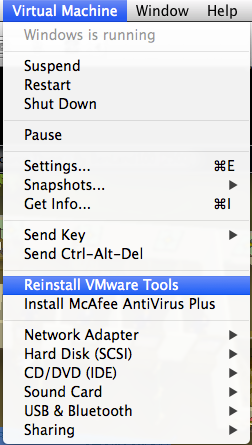
Now choose "install VMWare Tools" (Mine says reinstall VMWare Tools)
Step 5
Go to Java.com and download the latest version of Java.
Step 6
The rest of the steps can be found in the tutorial by Coh3n. Follow this link:
http://villavu.com/forum/showthread.php?t=47714
I hope this helps anyone having trouble on their mac! Now you have no reason to not write scripts!
Thank you for viewing!
If you have any trouble/suggestions comment or PM me.
Step 1
First you need a platform to run Simba on. What would be better than Windows itself? NOTHING! So there are a couple of ways to put Windows on a mac. The easiest, in my opinion is using virtualization software. I suggest using VMWare fusion 5. (That is what I use). There are a couple reasons I choose this software.
1. It is older, so it is cheaper if you want to buy it. (49.99) find it here: https://my.vmware.com/web/vmware/info/slug/desktop_end_user_computing/vmware_fusion/5_0
2. It is able to use virtualize advanced 3d graphics (such as OpenGL for SMART).
3. It is easy to use.
However you want to go about getting VMWare Fusion 5 is your business.
Link removed by Coh3n.
Step 2
Now you need Windows software. Any version of windows should work (I think?). I suggest using Windows 7. Any version of Windows 7 is fine. I use windows 7 ultimate.
Step 3
So you have what you need, and it's time to install windows. This is simple enough. Here is a 4 minute video to guide you through the process. (not my video)
http://www.youtube.com/watch?v=j72uNiorWN8
Step 4
In order to use advanced graphics you must install the correct graphics driver.
With Windows open and running select the drop down menu "Virtual Machine" from the bar at the top of your computer screen like so:

Now choose "install VMWare Tools" (Mine says reinstall VMWare Tools)
Step 5
Go to Java.com and download the latest version of Java.
Step 6
The rest of the steps can be found in the tutorial by Coh3n. Follow this link:
http://villavu.com/forum/showthread.php?t=47714
I hope this helps anyone having trouble on their mac! Now you have no reason to not write scripts!
Thank you for viewing!
If you have any trouble/suggestions comment or PM me.
