SRL Archive - RS3 Setup Tutorials

SRL Official RuneScape Botting Settings


footballjds

2013-12-30 11:32:29

SRL Official RuneScape Settings

The purpose of this guide is to provide a simple list of up-to-date settings for botting in RuneScape. This guide will be aided by pictures as well as bullet point text lists to ease searching. It is very important that all settings are correct. Erroneous game settings will result in failed or bugged scripts.

This setup guide is split into two parts. The first part overviews game settings while the second part outlines the correct interface setup.

Part 1 – Game settings
First we'll change the game settings and then we'll overview the correct interface settings. To access game settings simply click the settings “cog” button on the login screen


Set the screen size to “fixed” and then choose CUSTOM for the setup. Your custom setup MUST match these settings here:

Part 2 – Interface settings
Finally we need to select the correct interface and configure it. To change interfaces you must be logged in. This guide assumes you’re logged in already. SRL is setup to use the “Old School” interface layout so let’s ensure we’re using that by doing the following:
  1. Open the “Options Menu”
  2. Select a Preset
  3. Choose the “Old School” layout

Now that we have the correct interface layout lets configure the interface further. To further configure the interface simply select “Interface Settings”(1) from the “Options Menu”(2):

A new window will open and display your current interface settings. Simply make the settings outline in red match the below image and you're all set:

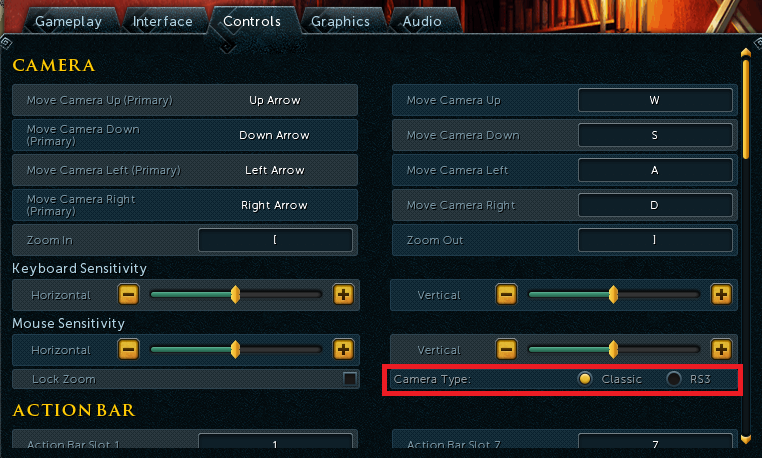
It is worth noting that your camera settings under control NEED to be set to classic(see below):

Final notes:
Some scripts will require specific Interface and Gameplay settings. When adjusting these simply follow the setup guide for the respective script. However, you must be sure not to change something that will affect SRL's functions.
SRL has an interface type. Each interface(minimap, chatbox, mainscreen, etc) have specific bounds. A function sets the bounds, so some things can change. For instance you can decrease the size of the chatbox to increase the size of the mainscreen.
footballjds

2013-12-30 11:41:10

If anyone finds a typo or fallacy in my post please let me know.

Sjoe

2013-12-30 14:11:40

nice layout :)

Don't forget to reduce the chatbox in height as much as possible. So you have a full overview of the mainscreen.

footballjds

2013-12-30 14:15:34

From: Sjoe
nice layout :)

Don't forget to reduce the chatbox in height as much as possible. So you have a full overview of the mainscreen.


That is certainly not required. Also, if there are any static coords in a script that would mess things up. I'm trying to only list required changes for using with SRL-6.
I can add that to the section a the bottom?

Sjoe

2013-12-30 15:17:29

From: footballjds
That is certainly not required. Also, if there are any static coords in a script that would mess things up. I'm trying to only list required changes for using with SRL-6.
I can add that to the section a the bottom?


Yeh not required but it covers up like 1/5th of the mainscreen?

footballjds

2014-01-14 18:57:17

I'm bumping this because i have users whose bugs are related to bad setup…

fallacysnow

2014-02-03 23:33:04

From: footballjds
If anyone finds a typo or fallacy in my post please let me know.


do i count as a fallacy :D

euphemism

2014-02-04 01:23:15

I can't recommend changing interface sizes at this time as SRL-6 is currently a mite static in nature and that would likely mess things up.

footballjds

2014-02-07 15:38:50

We need to have a standard camera type. I suggest using rs3 versus classic. rs3 has a higher angle of view.

If no one disagrees i'll add that to this guide.

Kevin

2014-02-07 15:44:37

From: footballjds
We need to have a standard camera type. I suggest using rs3 versus classic. rs3 has a higher angle of view.

If no one disagrees i'll add that to this guide.


I concur on the higher angle of view, although I wonder if it would break anything else?

footballjds

2014-02-07 15:48:58

From: Kevin
I concur on the higher angle of view, although I wonder if it would break anything else?


It shouldn't break anything unless scripters specifically switched to classic camera when writing their scripts(asha :p ) I'm positive rs3 camera is the default.

Ashaman88

2014-02-07 16:12:58

Is there any other difference besides rs3 having a higher max angle?

Most of my scripts don't rely on that, and I don't really care which one we use (unless one has a large advantage over the other), but I probs wouldn't update a few of the ones that do rely on it (LRC will be pain) for awhile. I'll just put it in the directions if rs3 mode is the way to go

noxehhh

2014-03-05 21:48:05

tyy :)

footballjds

2014-03-06 09:33:46

From: Ashaman88
Is there any other difference besides rs3 having a higher max angle?

Most of my scripts don't rely on that, and I don't really care which one we use (unless one has a large advantage over the other), but I probs wouldn't update a few of the ones that do rely on it (LRC will be pain) for awhile. I'll just put it in the directions if rs3 mode is the way to go


i guess people was classic camera not rs3?

Clarity

2014-03-06 10:16:44

From: footballjds
i guess people was classic camera not rs3?

Ash/Olly said the includes (MMtoMS, etc) were written in classic so I guess that means the decision is classic for now.

Brotein

2014-03-06 11:12:40

From: Ashaman88
Is there any other difference besides rs3 having a higher max angle?

Most of my scripts don't rely on that, and I don't really care which one we use (unless one has a large advantage over the other), but I probs wouldn't update a few of the ones that do rely on it (LRC will be pain) for awhile. I'll just put it in the directions if rs3 mode is the way to go


The difference between RS3 and Classic camera(besides the higher pitch) is the way that the camera follows the character. In classic, the camera is glued to the character so no matter what you are doing the camera will stay fixed on the center. With the RS3 camera, there is somewhat of a trail, so when you run the camera will take a half second to catch up once you stop. This is most noticeable on agility obstacles, where the camera will sort of transition with the player. It's a nicer effect but the timing of it is unpredictable and when I was writing my agility script I couldn't do it with anything other than Classic.

footballjds

2014-03-06 12:56:18

From: Clarity
Ash/Olly said the includes (MMtoMS, etc) were written in classic so I guess that means the decision is classic for now.


From: Brotein
The difference between RS3 and Classic camera(besides the higher pitch) is the way that the camera follows the character. In classic, the camera is glued to the character so no matter what you are doing the camera will stay fixed on the center. With the RS3 camera, there is somewhat of a trail, so when you run the camera will take a half second to catch up once you stop. This is most noticeable on agility obstacles, where the camera will sort of transition with the player. It's a nicer effect but the timing of it is unpredictable and when I was writing my agility script I couldn't do it with anything other than Classic.


Classic it is, and classic now sounds better, thanks for pitching in guys, I'll update any of my scripts some millenia… SO busy IRL atm.

Clarity

2014-03-06 13:43:22

Additional image for OP:


footballjds

2014-03-06 14:58:11

Thanks Clarity!! huge help, I've been off of skype too long… :P

Xgremreaper

2014-04-13 10:43:26

OMG i have gotten it to work it was the camera settings that was messed up it was not on classic thank you everyone who has helped me.

toxjq

2014-07-19 15:51:10

I cant find the toogle quick inventory option anywhere

footballjds

2014-07-21 08:52:35

From: toxjq
I cant find the toogle quick inventory option anywhere


dw about it

sahcazm

2014-09-24 08:54:49

Thanks a lot :)

ochovg

2014-09-25 14:17:20

Im using these settings but my bot still wont work..

giavanni6

2015-02-04 07:49:41

Thanks for this! I didn't know that you had to change the brightness, and I was wondering why most scripts didn't work. Haha.

Ioaks is now running near-flawlessly!

justal3ab98

2019-05-25 09:38:49

I can't click the gear icon (settings) before log in because the resolution is too small