SRL Archive - General

Auto-clicker Randomizer?


Gunner

2013-11-29 15:44:32

Hey all. I've been training Herblore in RS3, and I've come up with an idea. Probably not a new or original idea, but an idea nonetheless.

I've been getting by with Ghostmouse to train herb, but I'm sure it's only a matter of time before they drop the hammer on my obvious auto clicking. No matter how long of a session you record before clicking playback, each time the bot loops you're always going to be clicking that same series of pixels in the same exact order. I've been thinking wouldn't it be just grand if instead of telling the bot which pixel to click each instance, if I could give it a block of pixels to pick from each time it clicks. This would also negate the need for hour-long recording sessions to maximize the randomness.

As I said before, I'm sure this isn't a new idea, but I'm not exactly script savvy. I barely know the difference between a bitmap and a minimap. I'm willing to learn and do all the work myself but I don't know where to begin, and the sea of information here (as complete as it is) is just too overwhelming for me to try and find the pieces I need. Especially since I'm sure this particular script would consist of about 30 lines.

So if there's anyone willing to lend a helping hand to a noob, it would be greatly appreciated.

It goes without saying that once I get a few good test runs in, I would post the shell for you guys to use.

Thanks in advance!

inb4l2scriptunewb

tl;dr - i haz idea, too dumb make wurk.
Ian

2013-11-29 16:02:38

I think this task is more suited to Simba then Ghostmouse, even if you didn't want to use Simba's color capabilities.

For example, you can use

mouseBox(IntToBox(0, 0, 10, 10), MOUSE_LEFT, MOUSE_HUMAN);

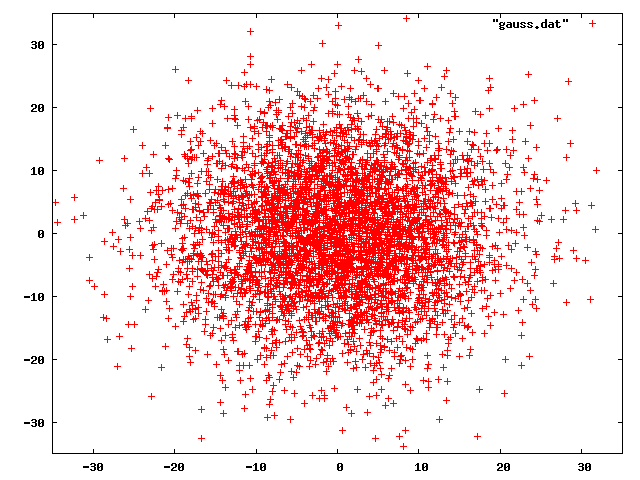
which will click in the box that you set with randomness weighted to the centre of the box.

Here's an example of the sort of gaussian distribution that gaussbox will have:

Gunner

2013-11-29 16:23:41

From: BMWxi
I think this task is more suited to Simba then Ghostmouse, even if you didn't want to use Simba's color capabilities.

For example, you can use

mouseBox(IntToBox(0, 0, 10, 10), MOUSE_LEFT, MOUSE_HUMAN);

which will click in the box that you set with randomness weighted to the centre of the box.

Here's an example of the sort of gaussian distribution that gaussbox will have:


I agree, Simba is better, but ghostmouse was a little more in my capability range as far as getting it to work lol. I've written a couple scripts using Simba before for non-RS related computer stuff, but only "click "here", wait X ms, scroll "here", click "here".

What you posted is exactly what I had in mind actually. Without asking you to write the whole script for me, what would just one instance in this script look like? I have no idea how to implement what you posted, and also mimic mouse movement. If I only used what you posted, wouldn't that just make it jump from location to location instantly?

Ian

2013-11-29 16:49:35

From: Gunner
I agree, Simba is better, but ghostmouse was a little more in my capability range as far as getting it to work lol. I've written a couple scripts using Simba before for non-RS related computer stuff, but only "click "here", wait X ms, scroll "here", click "here".

What you posted is exactly what I had in mind actually. Without asking you to write the whole script for me, what would just one instance in this script look like? I have no idea how to implement what you posted, and also mimic mouse movement. If I only used what you posted, wouldn't that just make it jump from location to location instantly?

MouseBox uses simba's mouse movement, so if you wanted it to humanlikely move to and left click in a box you would just use the mousebox function. :)

See the image here:

if you used the coordinates shown in the image with mousebox like this:

mouseBox(IntToBox(592, 334, 620, 335), MOUSE_LEFT, MOUSE_HUMAN);
then simba will move the mouse to somewhere in that highlighted green area and left click.

Gunner

2013-11-29 17:01:20

From: BMWxi
MouseBox uses simba's mouse movement, so if you wanted it to humanlikely move to and left click in a box you would just use the mousebox function. :)

See the image here:

if you used the coordinates shown in the image with mousebox like this:

mouseBox(IntToBox(592, 334, 620, 335), MOUSE_LEFT, MOUSE_HUMAN);
then simba will move the mouse to somewhere in that highlighted green area and left click.


Oh awesome. This will be a shorter script than I thought lol. I'm also going to try to add a "verify" protocol. Like when it opens the bank it first checks to see that "herb x" and "vial" are actually there, but that will be a secondary function.

I'm gonna get to work on setting this up. I may have another question or ten, but I think you pretty much answered everything I needed. If I get this ironed out to the point of actually posting the shell, I'll be sure to give you the credit. Thanks a lot for your help!

Ian

2013-11-29 18:13:33

From: Gunner
Oh awesome. This will be a shorter script than I thought lol. I'm also going to try to add a "verify" protocol. Like when it opens the bank it first checks to see that "herb x" and "vial" are actually there, but that will be a secondary function.

I'm gonna get to work on setting this up. I may have another question or ten, but I think you pretty much answered everything I needed. If I get this ironed out to the point of actually posting the shell, I'll be sure to give you the credit. Thanks a lot for your help!

No problem! If you want to check on the mouseover text of something before clicking on it you can use

mouseBox(IntToBox(592, 334, 620, 335), MOUSE_MOVE, MOUSE_HUMAN); //Moves the mouse to the designated area
if isMouseOverText(['vial'], 300) then //Checks for uptext
fastclick(MOUSE_LEFT); //Clicks using the left mouse button if the uptext is correct

Gunner

2013-11-29 18:47:11

From: BMWxi
No problem! If you want to check on the mouseover text of something before clicking on it you can use

mouseBox(IntToBox(592, 334, 620, 335), MOUSE_MOVE, MOUSE_HUMAN); //Moves the mouse to the designated area
if isMouseOverText(['vial'], 300) then //Checks for uptext
fastclick(MOUSE_LEFT); //Clicks using the left mouse button if the uptext is correct


Kickass man. That'll be a big help.

One problem though, When I click compile, it's compiling ok with no errors, but it's not actually taking control of my mouse and moving to the specified coordinates? What would be the procedure for the mousebox code you listed above?

Ian

2013-11-29 20:41:27

From: Gunner
Kickass man. That'll be a big help.

One problem though, When I click compile, it's compiling ok with no errors, but it's not actually taking control of my mouse and moving to the specified coordinates? What would be the procedure for the mousebox code you listed above?

I'd recommend using SMART, as that allows you to keep control of your mouse. Also I haven't tested anything not using SMART so I can't guarantee things to work otherwise.

To use SMART (and srl6), put this at the top of your script (right below where it says program)

{$DEFINE SMART}
{$i srl-6/srl.simba}


Also make sure you have SMART 8.3, but I think it comes with simba now.

Gunner

2013-11-29 21:02:12

From: BMWxi
I'd recommend using SMART, as that allows you to keep control of your mouse. Also I haven't tested anything not using SMART so I can't guarantee things to work otherwise.

To use SMART (and srl6), put this at the top of your script (right below where it says program)

{$DEFINE SMART}
{$i srl-6/srl.simba}


Also make sure you have SMART 8.3, but I think it comes with simba now.


I'm not to the point yet of writing a SMART script, for now I would just be happy if the script would take over control of my mouse and move it where I ask it too. Sadly though, I may have been putting a little too much faith in my ability to pick it back up, not to mention my patience, and I've lost all the old scripts I had written so I don't even have anything to go on as a template. I've been going at this for about 5hrs now and I haven't even managed to make the mouse move. I do have one less drinking glass to wash tomorrow. :duh:

Thanks for your help anyway.

Ian

2013-11-29 21:22:21

From: Gunner
I'm not to the point yet of writing a SMART script, for now I would just be happy if the script would take over control of my mouse and move it where I ask it too. Sadly though, I may have been putting a little too much faith in my ability to pick it back up, not to mention my patience, and I've lost all the old scripts I had written so I don't even have anything to go on as a template. I've been going at this for about 5hrs now and I haven't even managed to make the mouse move. I do have one less drinking glass to wash tomorrow. :duh:

Thanks for your help anyway.


putting the line I gave you is all you have to put in the script to use SMART, everything else is the same. :)

Gunner

2013-11-29 21:34:54

From: BMWxi
putting the line I gave you is all you have to put in the script to use SMART, everything else is the same. :)


Well son of a…I just assumed that using the DEFINE SMART would try to launch the client and I knew I didn't have enough coded to launch the client properly. Wow. Can't imagine how hard the lurkers must be laughing.

Sorry I made you hang around this silly thread for 5hrs, your single line of code in the very beginning gave me all I needed, if only I had been smart enough to implement it. Your If/Then code will prove a nice bonus as well.

I really appreciate your help.

Ian

2013-11-29 21:44:30

From: Gunner
Well son of a…I just assumed that using the DEFINE SMART would try to launch the client and I knew I didn't have enough coded to launch the client properly. Wow. Can't imagine how hard the lurkers must be laughing.

Sorry I made you hang around this silly thread for 5hrs, your single line of code in the very beginning gave me all I needed, if only I had been smart enough to implement it. Your If/Then code will prove a nice bonus as well.

I really appreciate your help.

Not a problem, I'd be on anyway so it's nothing extra really :)

Good luck on the script!

Gunner

2013-11-29 22:14:30

From: BMWxi
Not a problem, I'd be on anyway so it's nothing extra really :)

Good luck on the script!


Now that you mention it…lol. Is there a function to move the mouse down in the same way? With the same gaussian distribution as before? I can get it to right click on the banker, but I'm not sure how to move the mouse down to the Bank Banker option. I can't just use color, and I can't give it a coordinate because the coordinates of Bank Banker would be different in every instance. This will be needed for the Withdraw option as well.

Thanks in advance.

Ian

2013-11-30 03:24:56

From: Gunner
Now that you mention it…lol. Is there a function to move the mouse down in the same way? With the same gaussian distribution as before? I can get it to right click on the banker, but I'm not sure how to move the mouse down to the Bank Banker option. I can't just use color, and I can't give it a coordinate because the coordinates of Bank Banker would be different in every instance. This will be needed for the Withdraw option as well.

Thanks in advance.


chooseOption.select(['ank']);
should work :)

Gunner

2013-11-30 11:32:14

From: BMWxi

chooseOption.select(['ank']);
should work :)


Works great. I now have a simple script that will never stop unless the withdraw options are wrong. As time goes on I'll see about adding support where it actually waits for the bank to open instead of just wait(650); and looks for Done instead of wait(17000); but for now it's exactly what I wanted it to be in my first post.

Thanks for all your help.