SRL Archive - Unofficial Development

Quick Fix To load RS3 In Smart + Recommended In Game Settings!!


Itankbots

2013-07-22 16:10:18

This Is by No Means an Official Fix, But due to the fact that the official fix won't be till end of summer. I figured I would post this to help others out :)

Note: Im using Smart7.2, Settings should be the same for all smart versions, but you might need to take the -1 off In SmartParams

Setting up Smart to load rs3 correctly:

Step 1.

Go to Includes folder, SRL, Then Open SRL.Simba

Go To line 194 and replace the current Line with
SetTargetArray(SmartImageArray, 800, 600); 
(Old Code should look pretty much the same, just different params)


Step 2.

Go Includes folder, SRL, SRL, Misc Then Open SmartParams.Simba

Go To Line 292 or so and replace the old params with

  Result := SmartSpawnClient(ReplaceWrap(PluginPath, '\', '/', [rfReplaceAll]), Params[0], ',' + Params[1], 800, 600, 's', '', '');
{$ELSE}
Result := SmartSpawnClient(ReplaceWrap(PluginPath, '\', '/', [rfReplaceAll]), Params[0], ',' + Params[1], 800, 600, 's', '', '', -1);


Thats it for Smart! It should now load re-sized Perfect to fit the new rs3 :D


Setting Up the correct default Interface/Graphics For RS3 (best ones i have found so far)

Once you're logged in. Hit Esc and the Options Menu should Pop-up. Click the dropdown menu under "quick load layout" and Select "old school" Setting.

Also, click Interface Settings, And Slide Transparency all the way down to the LOWEST possible. This makes it so all your Interfaces(banking/inv) are NOT see-through. Which would make it ALOT harder to find objects.

Set "Hide Titlebar On Lock" and set "Use Thin Window layout". This Takes away ALOT of useless boarders -Credit to Brandon for noticing this :P

After that, just make sure you're in Safemode/fixed. And you should be good to go!

If you did it all correctly, it should look something like this below.
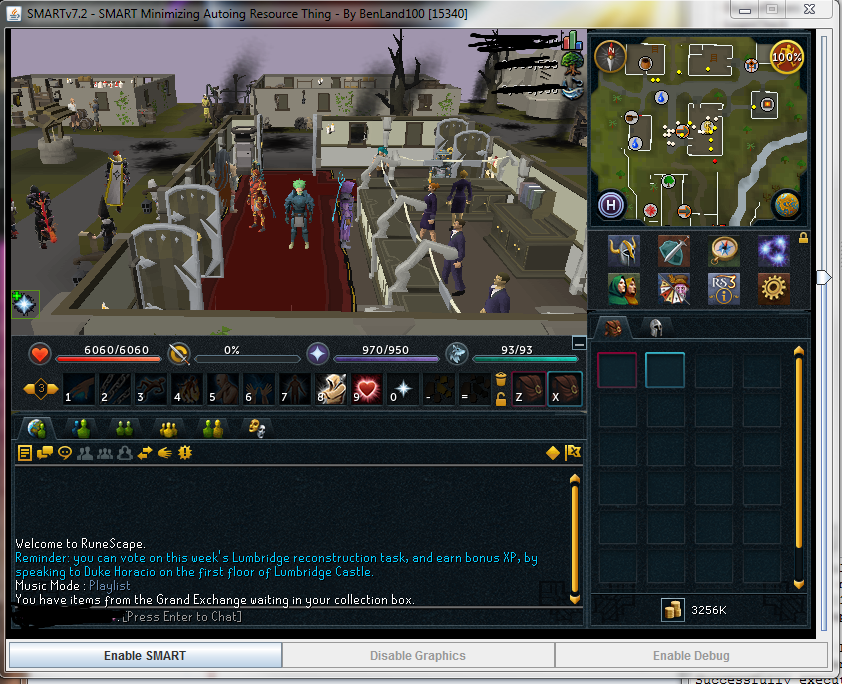

Feel free to post any other settings/suggestions that you find would work best as a good "default" base for everyone on SRL to use :D


Special thanks to @Kevin And @Sjoe for helping out with the Smart params :P

———————————————————————————————————————————————–

List Of Top Things that need Fixing:
1. Calling SetupSRL doesn't Work. Most likely due RSREADY being broken now. Fixed it!
2. Login Colours all different, most likely Mousebox positions too. Fixed! Login now works with my include set.
3. World Hopping and loggin out/lobbying needs Fixed. Im too tired to finish that today, will do tomorrow if no one else does!

List of things that work:
1.World switching and lobby handling still does surprisingly, just needed minor colour changes.
2. SPS Still works once you change the globals (vary person to person depending which layout you use)
- Credit to Ian for testing this for me
———————————————————————————————————————————————–

I added My Includes that currently work to log me in correctly. I HAVE NOT tested them very much, so they very well may be some bugs!
Only Use my Includes if you have the SAME or very similar interface layout as me. Also i only recommend jr mems+ Using these for now, Still VERY MUCH a work in progress.
If you have a different interface layout, you can still use my include set, just need to change some mousebox and Getcolour positions…But i added semi-detailed comments so it should be easy to do so!
But they should work for you guys to build apon them and start scripting :D Feel free to post any additions or edits you made yourself to make them better!

Ian

2013-07-22 16:13:49

Good job on this :)

Itankbots

2013-07-22 16:29:52

Added List of things that needs fix to then bottom of the post. (Only added top priority ones, like Login and stuff)

Im Off to bed though, too tired. Ill look at them tomrrow.

Feel free to take a look yourselves, If you fix them , Please post and ill add it to the list of fixed :D Im sure everyone will appreciate it :)

Sjoe

2013-07-22 16:48:56

now someone get sps walking working please lol

Brandon

2013-07-22 21:14:43

Those are definitely not recommended settings.. Look how small that screen space is..

Press Escape then go to Interface. Set "Hide Titlebar On Lock" and set "Use Thin Window layout".

Itankbots

2013-07-23 05:46:19

From: Brandon
Those are definitely not recommended settings.. Look how small that screen space is..

Press Escape then go to Interface. Set "Hide Titlebar On Lock" and set "Use Thin Window layout".


I only had like an hour messing with it, that why I said please post things to make it better :P. Ty for input I shall add that

Ian

2013-07-23 06:10:15

If anybody wants something for Mouseover text I made something: http://villavu.com/forum/showthread.php?t=104933

Itankbots

2013-07-23 15:00:37

Today I fixed Globals.simba/Players.simba To work with The setup show in my first post. Credit to BMWxi and others for helping me when i got stuck at certain spots :P

Along with Login.Simba (still need to Fix Logging out/ World hopping)

Once i Finish fixing The login include fully ill add it to the first post and release it for others to use. But remember, you need the EXACT Same setup as shown in my first post. Or the include wont work for you! And you will have to edit it on your own.

Hopefully ill finish it tonight, if not tomorrow at the latest and post an update. Cheers everyone :)

Rich

2013-07-23 15:25:05

Very nice work @Itankbots. I was going to get working on Players and Login.simba but it seems you've got it covered. Need anything done just let me know :)

Quick question though, am I being really stupid/blind/both? I can't see the button to logout anywhere with this layout!

Ian

2013-07-23 15:30:17

From: Rich
Very nice work @Itankbots. I was going to get working on Players and Login.simba but it seems you've got it covered. Need anything done just let me know :)

Quick question though, am I being really stupid/blind/both? I can't see the button to logout anywhere with this layout!


It's in the very top right corner for me, it's tiny too.


If you don't see it there clicking in that spot should have the same effect. You can get it back by setting the interfaces to not go into slim mode.

Itankbots

2013-07-23 15:34:13

From: Rich
Very nice work @Itankbots. I was going to get working on Players and Login.simba but it seems you've got it covered. Need anything done just let me know :)

Quick question though, am I being really stupid/blind/both? I can't see the button to logout anywhere with this layout!


Its really tiny in the upper right cornor, But jagex is changing the main way to get into all the Options menu by hitting 'esc' Now, that is easiest way to log out

Rich

2013-07-23 15:49:39

Cheers guys. Bit of a poor design if the button disappears in slim mode..?

Ian

2013-07-23 15:59:15

From: Rich
Cheers guys. Bit of a poor design if the button disappears in slim mode..?


Yeah, I think it's because the button picture was put onto the tab that gets minimized. I'm sure they'll fix it sometime though, this feels like a beta still.

Sjoe

2013-07-23 16:44:37

From: Itankbots

I added My Includes that currently work to log me in correctly. I HAVE NOT tested them very much, so they very well may be some bugs!
Only Use my Includes if you have the SAME or very similar interface layout as me. Also i only recommend jr mems+ Using these for now, Still VERY MUCH a work in progress.
If you have a different interface layout, you can still use my include set, just need to change some mousebox and Getcolour positions…But i added semi-detailed comments so it should be easy to do so!
But they should work for you guys to build apon them and start scripting :D Feel free to post any additions or edits you made yourself to make them better!


Keep up da good work!

Itankbots

2013-07-23 16:46:45

From: Sjoe
Keep up da good work!


Thanks :) Im off to bed for now… hopefully i come back and see someone else has posted some snippets too :D

dzpliu

2013-07-25 23:47:19

what does the global.simba fix?

Rich

2013-07-26 07:22:01

From: dzpliu
what does the global.simba fix?
I would assume things like the MSX1, MIX1 constants etc.

euphemism

2013-07-26 10:25:00

@Itankbots, as Coh3n mentioned in this thread, we are really wanting people to not start writing unofficial includes as it will create an ugly fragmentation problem like we had with the P07Include. The SRL-6 release is not months away. You can follow the progress on the SRL-6 Github. After the beta release, if you have any suggestions, they will be much appreciated. Otherwise, I would highly recommend not putting too much time into this and instead be patient a little while longer.

Wu-Tang Clan

2013-07-26 10:36:22

I added all of your include files and it still won't run anything… it targets correctly but nothing past that? Am I doing something wrong? It doesn't have any special features and doesn't use any interfaces in the entire script..

Ian

2013-07-26 11:30:28

From: Joseph D
I added all of your include files and it still won't run anything… it targets correctly but nothing past that? Am I doing something wrong? It doesn't have any special features and doesn't use any interfaces in the entire script..


You may need to fix RSReady yourself, his version is off for me by 20 pixels.

Wu-Tang Clan

2013-07-26 14:17:11

From: BMWxi
You may need to fix RSReady yourself, his version is off for me by 20 pixels.


even if I log in the character myself?

Ian

2013-07-26 15:44:26

From: Joseph D
even if I log in the character myself?


If you log the character in yourself you'll need to fix LoggedIn. It's fixed in almost the exact same way as RSReady. (Using GetColor to check if a certain point is a certain color)

Itankbots

2013-07-26 16:41:13

Sorry, i had a 9hr doctors app yesterday and today im really sick from the long day

@euphemism I can take this down if you wish, i really am only making it for personal use, and few friends, to keep 1-2 of my scripts going while the main include is getting a full re-write. I only plan to update things i use, inv/banking/login. Nothing else. And sorry, i got the impression that coh3n said i could make an unofficial thread with it. and end of summer here is September, so that is a few months for me. Just let me know and ill do whatever that makes everyone happy :) Don't wanna cause mass confusion.


@Everyone else, this was my first semi,working version. Will only work if you have smart loaded to 800x600 and I already have a better one with fail-safes/ Better cords. Just too sick to finish it and upload it. Ill wait for Euphemism's/Another admin/mods reply before i upload new one tho.

any questions or need newest version you can always find me in unofficial SRL Skype group. Anyways im off to rest. Peace

serajin

2013-07-26 17:13:26

There's an unnoficial SRL skype group? How does one get invited to that? Do you have to be a member/junior member?

Itankbots

2013-07-26 19:00:28

From: serajin
There's an unnoficial SRL skype group? How does one get invited to that? Do you have to be a member/junior member?


Most are mem+ , I'm not as you can see tho. You need an invite from @Justin

Feel free to add my Skype " Peter_knight2191". I'll help with what I can. ATM I'm busy with health issues tho, so expect slow response

Justin

2013-07-26 19:04:00

Guys please keep it on-topic.

OT: Nice work Itankbots :) Good to see that you have RS3 loading in SMART

euphemism

2013-07-26 21:06:45

Itankbots: You are free to do what you will. I was just pointing out that the wait for SRL-6 will not be as long as you make it out to be, and due to the massive restructuring of the include it might be prudent to look at the changes coming to see if it is worth your effort.

Ian

2013-07-26 22:37:08

From: Justin
Guys please keep it on-topic.

OT: Nice work Itankbots :) Good to see that you have RS3 loading in SMART


RS3 loaded in SMART since it's released, the first part was just getting RSReady and LoggedIn working so that we could call SetupSRL and not get stuck ;)

Wu-Tang Clan

2013-07-27 09:58:37

For me, the RSready wasn't working so I fixed it myself. If you too are not getting the "welcome to runescape message" try this

go to line 157 of your login include in C:/Simba/Includes/SRL/SRL/Core/Login.simba (or something like that)

Result := (GetColor(408,379) = 16645629) ; // Facebook Icon WHITE F colour

works for me

EDIT:

now that we got the color of the F in facebook, we need proper user/pass boxes
if my fix worked for you, then change lines 504-506 in your login include mentioned above to this:

Boxes:= [283, 175, 524, 192]
else
Boxes:= [285, 247, 524, 264];

Itankbots, thanks for all your help, I hope you get better.

digitalninja

2013-07-30 16:18:25

Whoa fantastic work itankbots! I was essentially looking for a decent "preset" layout to play around with! Great to know how to update the simba files as well.