SRL Archive - Technology

New PC build - God help me! :(


Aph0tix

2013-04-19 05:38:31

So finally all of components for my new desktop build arrived and I went to work installing them.


Now for some reason when I power up the PC it won't display an image on my monitor and I'm like completely panicking now because I've invested £400 in building this thing so far! I've double checked all the wires so I think it must be a compatability issue…can anyone see anything that I can't? =/


I used:

Gigabyte GZ-G2 Plus for the case.
Gigabyte GA-78LMT USB3+ for the Motherboard.
AMD FX-8350 Black Edition for the CPU.
16 GB (2x8GB) Corsair XMS3 RAM.
A poopy 160gb harddrive (IDE).
XFX HD-6450 for the graphics card. (2GB)
Some random 750w PSU.

Case: http://www.newegg.com/Product/Product.aspx?Item=N82E16811233103&Tpk=gigabyte%20gz-g2&IsVirtualParent=1
Motherboard: http://www.newegg.com/Product/Product.aspx?Item=N82E16813128565
CPU: http://www.newegg.com/Product/Product.aspx?Item=N82E16819113284
RAM: http://www.newegg.com/Product/Product.aspx?Item=N82E16820145357
Harddrive: http://www.newegg.com/Product/Product.aspx?Item=N82E16822178303
Graphics card: http://www.newegg.com/Product/Product.aspx?Item=N82E16814150658
PSU: http://www.ebay.co.uk/itm/140620234296?ssPageName=STRK:MEWNX:IT&_trksid=p3984.m1497.l2649
YoHoJo

2013-04-19 05:48:05

All of your URLs got messed up my VBulliten :/ you'll need to post them again.
When you power up, do the fans on your GFX card spin?
Have you tried multiple monitors?
Do your processor/motherboard have integrated graphics? If so, try removing your GFX card and using the integrated graphics card.

Aph0tix

2013-04-19 05:59:44

Hi, thanks for the reply!

I've updated the URLs on the original post now, thanks for spotting that. There are no fans on the GFX card as its passive, so god knows if its working…and yup I've tried a few monitors.

The integrated graphics on the motherboard aren't compatible with my processor apparently so I won't have any luck there…my new plan is to try the GFX card thats in this machine and see what happens, I shall report back! :duh:

serajin

2013-04-19 06:25:27

Does it make any beeps when it boots up?

Remove 1 of the sticks of ram, and place the other into Slot 1. Having bad ram will make a computer not boot. Make sure everything is seated correctly, mainly Ram and Processor.

J J

2013-04-19 06:28:39

650w psu off ebay for £18.75 isn't going to end well. It's never a good idea to save money on a PSU - after all, it's the heart of your computer. If it fails, nothing is going to work.

Judging from your build you spend nearly all of your budget on the CPU for 200$ and the ram for 110$ and then went bargain for the 25$ psu, 15$ hdd. But you did spend 70$ on a case. Not the most efficient build but yes.. everything together it should work..

So it does turn on and doesn't shut off randomly? It just doesn't give any signal to your display(s)?

The Mayor

2013-04-19 06:32:21

If it's not posting try resetting the CMOS.

Frement

2013-04-19 06:35:43

Connect your monitor to the motherboard. If you get a picture now, then the problem is with your GFX card, try removing it and installing it again.

masterBB

2013-04-19 08:37:54

From: serajin
Does it make any beeps when it boots up?


Also, do the other fans spin? CPU/case.

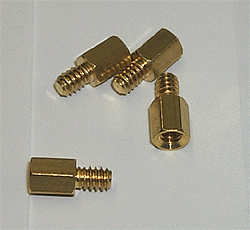
Are you sure you double checked that these spacers aren't touching the mobo, I had this with my previous pc build:

Aph0tix

2013-04-19 10:50:24

Hey guys, thanks for all of the responses.

I tried using my old GFX card and it didn't make any difference, it's still not sending visuals to the monitor.

From: serajin
Does it make any beeps when it boots up?

Remove 1 of the sticks of ram, and place the other into Slot 1. Having bad ram will make a computer not boot. Make sure everything is seated correctly, mainly Ram and Processor.


It doesn't beep unless the RAM is removed, could it be that the RAM is not compatible? I don't see why it wouldn't be…the motherboard supports 1600MHZ. I'll try your suggestion right now.

From: J J
650w psu off ebay for £18.75 isn't going to end well. It's never a good idea to save money on a PSU - after all, it's the heart of your computer. If it fails, nothing is going to work.

Judging from your build you spend nearly all of your budget on the CPU for 200$ and the ram for 110$ and then went bargain for the 25$ psu, 15$ hdd. But you did spend 70$ on a case. Not the most efficient build but yes.. everything together it should work..

So it does turn on and doesn't shut off randomly? It just doesn't give any signal to your display(s)?


I know it isn't the best build, its purely for botting and won't be used for personal use at all. Your correct, everything works it just doesn't output a display signal.

From: The Mayor
If it's not posting try resetting the CMOS.


I tried this, unfortunately it didn't change anything.

From: Frement
Connect your monitor to the motherboard. If you get a picture now, then the problem is with your GFX card, try removing it and installing it again.


Thanks but I don't think this would work as my CPU doesn't have integrated graphics.

From: masterBB
Also, do the other fans spin? CPU/case.

Are you sure you double checked that these spacers aren't touching the mobo, I had this with my previous pc build:


The fans spin and seem to work fine and they do make contact with the motherboard from underneath and then I screwed them in place…I did make sure that they were in the right holes though.

I know i'm not supposed to double post and will probably get banned now but i deserve it i'm a Removed#Justin moron i didn't plug the ATX 12v in only the 24 PIN ATX cable, could this be why? Fml!!!

"The 12V connector mainly supplies power to the CPU and if not connected the computer will NOT start" - Motherboard's manual. I'm a genius.

Edit: Me love you Admin, please no ban hammer me <3

The Killer

2013-04-19 11:08:02

^You will get infracted if you double post, in future, just use the edit button :)

Aph0tix

2013-04-19 11:09:56

I think I deserve more than an infraction, I probably deserve a good ass kicking after missing how obvious that fix was :(…

dzpliu

2013-04-19 11:10:48

glad that you found out what the problem was.

Aph0tix

2013-04-19 11:13:26

From: dzpliu
glad that you found out what the problem was.


Cheers mate, I've just ordered an adapter as low and behold my amazing $25 PSU doesn't have an 8 pin ATX cable only a 4 pin ATX cable, so when that arrives I'll update everyone and maybe share some pictures! :)

Rich

2013-04-19 16:55:45

If that PSU fails you, go to Maplins and pick up one from there. Not sure on the prices but they sell decent bits of kit.

Aph0tix

2013-04-19 20:44:56

Fingers crossed it works! I'll update all of you when I'm home and have tried the adaptor.

Justin

2013-04-19 21:01:14

From: Aph0tix
Fingers crossed it works! I'll update all of you when I'm home and have tried the adaptor.


Chances are that would of been the problem as the Graphics card wouldn't of been powering on :P

Aph0tix

2013-04-19 21:07:35

From: Justin
Chances are that would of been the problem as the Graphics card wouldn't of been powering on :P


I suck so much! I couldn't believe it when I saw it. I literally facepalmed!

grats

2013-04-19 21:09:17

overpriced memory

horrid power supply

graphics card is going to slow the system in most stuff you do, you'd be better off with the integrated graphics on the cpu

motherboard is a pretty bad choice for that cpu

lol @ the hard drive, hopefully it works for a while

your power supply doesn't even have an 8pin CPU connector, therefore it can't power the cpu

Aph0tix

2013-04-19 21:28:28

From: grats
overpriced memory

horrid power supply

graphics card is going to slow the system in most stuff you do, you'd be better off with the integrated graphics on the cpu

motherboard is a pretty bad choice for that cpu

lol @ the hard drive, hopefully it works for a while

your power supply doesn't even have an 8pin CPU connector, therefore it can't power the cpu


Did you read the thread? The build is only being used for botting (CPU and RAM intensive) there is no need for other components to be of a high specification, it achieves the goals I set out to and will be easy to replicate and build again when I wish to scale up and run more bots.

In addition a AMD 8350X doesn't have integrated graphics? :s

grats

2013-04-19 21:39:08

From: Aph0tix
Did you read the thread? The build is only being used for botting (CPU and RAM intensive) there is no need for other components to be of a high specification, it achieves the goals I set out to and will be easy to replicate and build again when I wish to scale up and run more bots.

In addition a AMD 8350X doesn't have integrated graphics? :s

it'll still process graphics

your psu dies, good chance it'll take all the other components with it
should just run a bunch of headless machines with 1 machine as the hard drive & iscsi to the other machines

I still wouldn't trust that psu, with any build… and it seriously only has 4 pin? with those 2 rails you're probably under powering the cpu.. I know I've seen GPU's triple in capabilities just by better power supplies

Lord Waffles

2013-04-21 18:50:48

From: Aph0tix
So finally all of components for my new desktop build arrived and I went to work installing them.


Now for some reason when I power up the PC it won't display an image on my monitor and I'm like completely panicking now because I've invested £400 in building this thing so far! I've double checked all the wires so I think it must be a compatability issue…can anyone see anything that I can't? =/


I used:

Gigabyte GZ-G2 Plus for the case.
Gigabyte GA-78LMT USB3+ for the Motherboard.
AMD FX-8350 Black Edition for the CPU.
16 GB (2x8GB) Corsair XMS3 RAM.
A poopy 160gb harddrive (IDE).
XFX HD-6450 for the graphics card. (2GB)
Some random 750w PSU.

Case: http://www.newegg.com/Product/Product.aspx?Item=N82E16811233103&Tpk=gigabyte%20gz-g2&IsVirtualParent=1
Motherboard: http://www.newegg.com/Product/Product.aspx?Item=N82E16813128565
CPU: http://www.newegg.com/Product/Product.aspx?Item=N82E16819113284
RAM: http://www.newegg.com/Product/Product.aspx?Item=N82E16820145357
Harddrive: http://www.newegg.com/Product/Product.aspx?Item=N82E16822178303
Graphics card: http://www.newegg.com/Product/Product.aspx?Item=N82E16814150658
PSU: http://www.ebay.co.uk/itm/140620234296?ssPageName=STRK:MEWNX:IT&_trksid=p3984.m1497.l2649


I didn't read the others comments, however last machine I built did the same thing. It would power up but the monitor would display nothing. It turns out one of the sticks of RAM I purchased new from newegg actually was bad. I pulled out all but one stick (i had four) and it still didn't work, however the one I left in was actually the bad one so be sure to pull them all out and try different sticks in.

bad RAM stick is 90% of the reason a machine will display nothing on the monitor when it boots up ;) good luck mate! PM me if you have any questions, i've been building rigs for awhile now.

EDIT: Seems like you fixed it? Still not sure, don't have time to read through the comments but it looks like you figgured out the issue (if the graphics card isn't the issue try the above solution)

Cheers
Waffles

Kasi

2013-04-22 12:53:07

From: Aph0tix

In addition a AMD 8350X doesn't have integrated graphics? :s


your motherboard had some sort of integrated graphics and trust grats when it comes to builds he is a god when it comes to builds.

Aph0tix

2013-04-26 17:24:08

Thanks everyone! I resolved the issue.